2014 NISSAN ROGUE AUX
[x] Cancel search: AUXPage 23 of 442
1. Vent (P. 4-25)
2. Headlight/fog light (if so equipped)/turnsignal switch (P. 2-35)
3. Meters, gauges, warning/indicator
lights and Vehicle Information Display
(P. 2-3, P.2-17) 4. Windshield wiper/washer switch and
rear window wiper/washer switch
(P. 2-32, P. 2-33)/Ignition switch
(if so equipped) (P. 5-10)
5. Push-button ignition switch
(if so equipped) (P. 5-13) 6. Vent (P. 4-25)
7. Hazard warning flasher switch (P. 6-2)
8. Radio (P. 4-37)/Navigation system*
(if so equipped)
9. Front passenger supplemental air bag
(P. 1-41)
10. Glove box (P. 2-47)
11. Heater and air conditioning controls
(P. 4-26)
12. Power outlet (P. 2-42)
13. Shift lever (P. 5-18)
14. Auxiliary jack (P. 4-64)/USB port
(P. 4-64)
15. Front passenger air bag status light
(P. 1-41)
16. Cruise control main/set switches
(P. 5-29/Bluetooth Hands-Free Phone
System (if so equipped) (P. 4-37)
17. Driver supplemental air bag/Horn
(P.1-41, P. 2-38)
18. Control panel and Vehicle Information
Display switches (P.2-17)
19. Hood release (P. 3-22)/Fuel door
release (P. 3-27)
LIC2626
INSTRUMENT PANEL
0-6Illustrated table of contents
Page 87 of 442
1. Vent (P. 4-25)
2. Headlight/fog light (if so equipped)/turnsignal switch (P. 2-35)
3. Meters, gauges, warning/indicator
lights and Vehicle Information Display
(P. 2-3, P.2-17) 4. Windshield wiper/washer switch and
rear window wiper/washer switch
(P. 2-32, P. 2-33)/Ignition switch
(if so equipped) (P. 5-10)
5. Push-button ignition switch
(if so equipped) (P. 5-13) 6. Vent (P. 4-25)
7. Hazard warning flasher switch (P. 6-2)
8. Radio (P. 4-37)/Navigation system*
(if so equipped)
9. Front passenger supplemental air bag
(P. 1-41)
10. Glove box (P. 2-47)
11. Heater and air conditioning controls
(P. 4-26)
12. Power outlet (P. 2-42)
13. Shift lever (P. 5-18)
14. Auxiliary jack (P. 4-64)/USB port
(P. 4-64)
15. Front passenger air bag status light
(P. 1-41)
16. Cruise control main/set switches
(P. 5-29/Bluetooth Hands-Free Phone
System (if so equipped) (P. 4-37)
17. Driver supplemental air bag/Horn
(P.1-41, P. 2-38)
18. Control panel and Vehicle Information
Display switches (P.2-17)
19. Hood release (P. 3-22)/Fuel door
release (P. 3-27)
LIC2626
INSTRUMENT PANEL
2-2Instruments and controls
Page 227 of 442
1.CD eject button
2. CD button
3. Display screen
4. CD insert slot
5.
SEEK button
6. SCAN button 7.
TRACK button
8.
BACK button
9. iPod MENU button
10. TUNE/FOLDER knob, ENTER/SETTING
button
11. Station select (1 - 6) buttons 12. RDM button
13. RPT button
14.
VOL (volume) knob /
button
15. DISP button
16. MEDIA button
17. FM•AM button
FM/AM RADIO WITH COMPACT
DISC (CD) PLAYER (Type A) (if so
equipped)
For all operation precautions, see “Audio opera-
tion precautions” in this section.
Audio main operation
VOL (volume) /(power) button:
Place the ignition switch in the ACC or ON position
and press the
(power) button while the sys-
tem is off to call up the mode (radio, CD, AUX,
Bluetooth® audio USB or iPod®) that was playing
immediately before the system was turned off.
To turn the system off, press the(power) button.
Turn the VOL (volume) control knob to adjust the
volume.
This vehicle may be equipped with Speed Sensi-
tive Volume. When this feature is active, the audio
volume changes as the driving speed changes.
LHA2847
4-46Monitor, climate, audio, phone and voice recognition systems
Page 228 of 442
SETTING button:
Press the SETTING button to show the Settings
screen on the display. Turn the TUNE/FOLDER
knob to navigate the options and then press the
ENTER button to make a selection.
AudioBass Adjusts the bass to the desired level.
Treble Adjusts the treble to the desired level.
Balance Adjusts the balance to the desired level. Balance adjusts the sound level between the left and right speakers.
Fade Adjusts the fade to the desired level. Fade adjusts the sound level between the front and rear speakers.
Speed Sens Vol. (Speed Sensitive Volume) Adjusts the speed sensitive volume function, which increases the volume of the audio system as the speed of
the vehicle increases. Set to “OFF” to disable the feature. The higher the setting, the more the volume in-
creases in relation to vehicle speed.
AUX Vol. Choose a setting from 0 to +3 to control the boost of incoming auxiliary device volume. A setting of 0 provides
no additional boost in volume. A setting of +3 provides the greatest boost in volume.
Brightness and Contrast Adjust the brightness or contrast to adjust the appearance of the display screen.
Clock adjust Press the ENTER/SETTING button to highlight the hours or minutes and then use the TUNE/FOLDER knob to
adjust the value. Press the ENTER/SETTING button again to set the value.
On-Screen Clock Toggles ON or OFF the clock display on the upper right corner of the display screen.
RDS Display Toggles ON or OFF the RDS information displayed on the screen while the radio is playing.
Language Select the desired language for the system from the available options.
Bass, treble, balance and fade can also be adjusted by pressing the ENTER/SETTING button and turning the TUNE/FOLDER knob to select the item to
adjust. When the desired item is shown on the display, turn the tuning to adjust and then press the ENTER/SETTING button until the display returns to the
main audio screen. If the button is not pressed for approximately 10 seconds, the radio or CD display will automatically reappear.
Monitor, climate, audio, phone and voice recognition systems4-47
Page 231 of 442
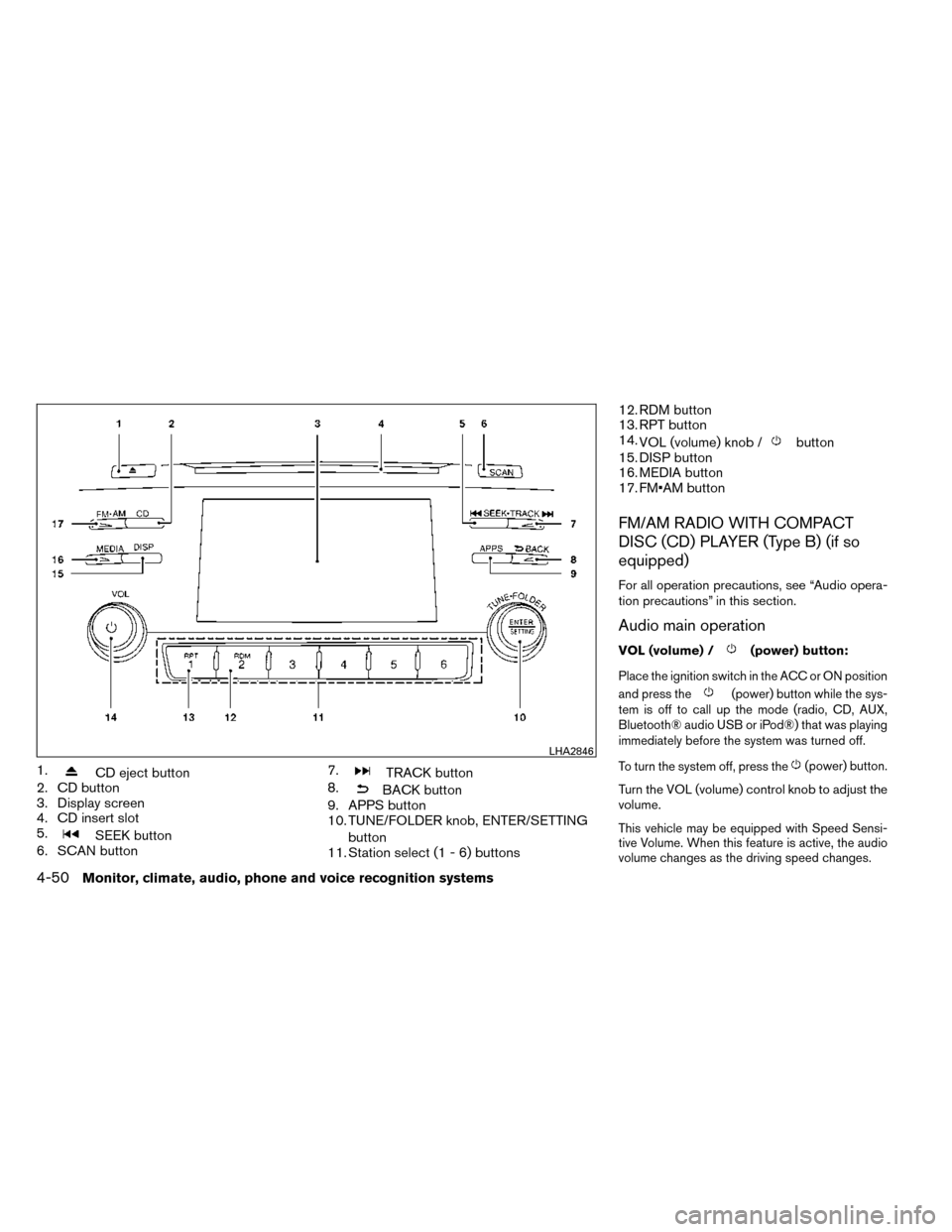
1.CD eject button
2. CD button
3. Display screen
4. CD insert slot
5.
SEEK button
6. SCAN button 7.
TRACK button
8.
BACK button
9. APPS button
10. TUNE/FOLDER knob, ENTER/SETTING
button
11. Station select (1 - 6) buttons 12. RDM button
13. RPT button
14.
VOL (volume) knob /
button
15. DISP button
16. MEDIA button
17. FM•AM button
FM/AM RADIO WITH COMPACT
DISC (CD) PLAYER (Type B) (if so
equipped)
For all operation precautions, see “Audio opera-
tion precautions” in this section.
Audio main operation
VOL (volume) /(power) button:
Place the ignition switch in the ACC or ON position
and press the
(power) button while the sys-
tem is off to call up the mode (radio, CD, AUX,
Bluetooth® audio USB or iPod®) that was playing
immediately before the system was turned off.
To turn the system off, press the
(power) button.
Turn the VOL (volume) control knob to adjust the
volume.
This vehicle may be equipped with Speed Sensi-
tive Volume. When this feature is active, the audio
volume changes as the driving speed changes.
LHA2846
4-50Monitor, climate, audio, phone and voice recognition systems
Page 232 of 442
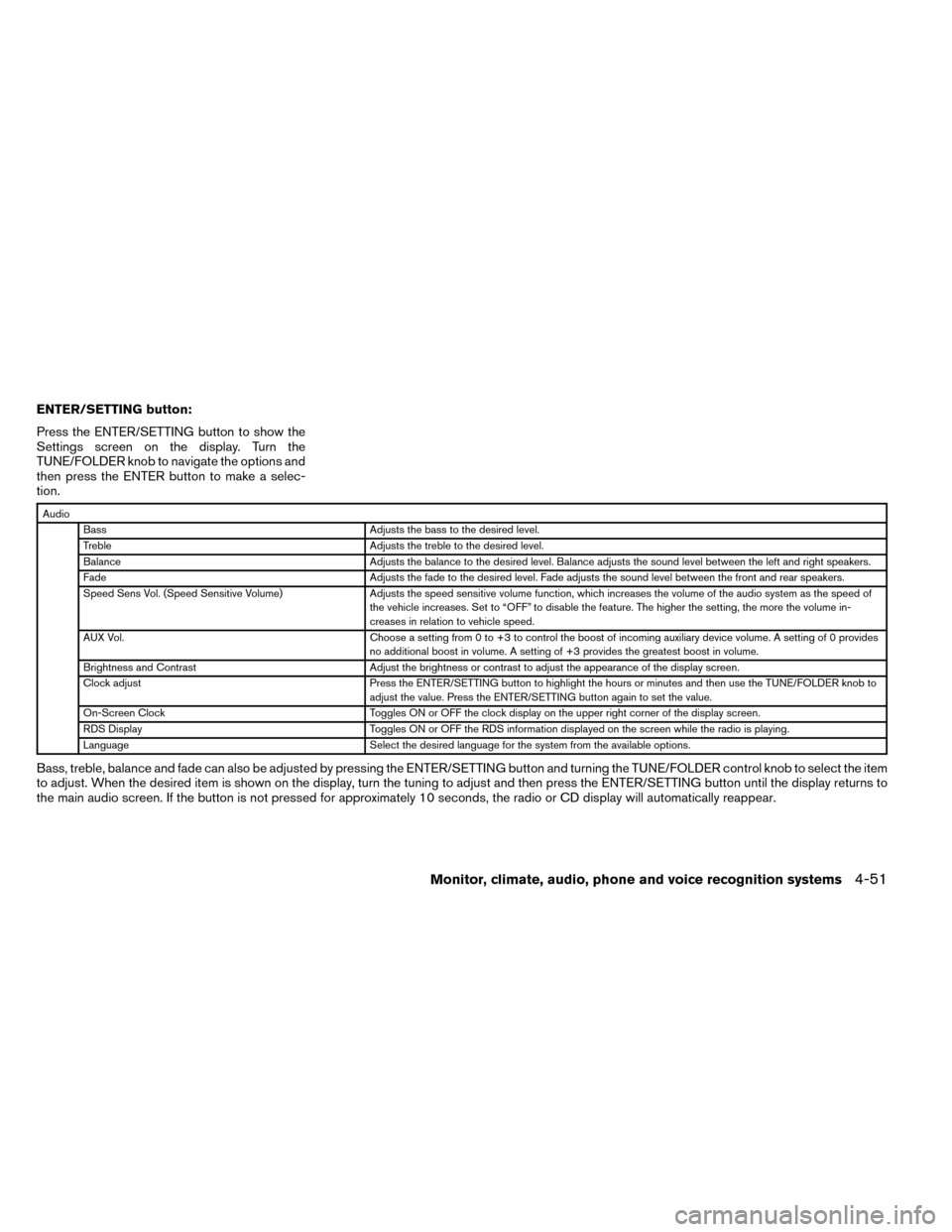
ENTER/SETTING button:
Press the ENTER/SETTING button to show the
Settings screen on the display. Turn the
TUNE/FOLDER knob to navigate the options and
then press the ENTER button to make a selec-
tion.
AudioBass Adjusts the bass to the desired level.
Treble Adjusts the treble to the desired level.
Balance Adjusts the balance to the desired level. Balance adjusts the sound level between the left and right speakers.
Fade Adjusts the fade to the desired level. Fade adjusts the sound level between the front and rear speakers.
Speed Sens Vol. (Speed Sensitive Volume) Adjusts the speed sensitive volume function, which increases the volume of the audio system as the speed of
the vehicle increases. Set to “OFF” to disable the feature. The higher the setting, the more the volume in-
creases in relation to vehicle speed.
AUX Vol. Choose a setting from 0 to +3 to control the boost of incoming auxiliary device volume. A setting of 0 provides
no additional boost in volume. A setting of +3 provides the greatest boost in volume.
Brightness and Contrast Adjust the brightness or contrast to adjust the appearance of the display screen.
Clock adjust Press the ENTER/SETTING button to highlight the hours or minutes and then use the TUNE/FOLDER knob to
adjust the value. Press the ENTER/SETTING button again to set the value.
On-Screen Clock Toggles ON or OFF the clock display on the upper right corner of the display screen.
RDS Display Toggles ON or OFF the RDS information displayed on the screen while the radio is playing.
Language Select the desired language for the system from the available options.
Bass, treble, balance and fade can also be adjusted by pressing the ENTER/SETTING button and turning the TUNE/FOLDER control knob to select the item
to adjust. When the desired item is shown on the display, turn the tuning to adjust and then press the ENTER/SETTING button until the display returns to
the main audio screen. If the button is not pressed for approximately 10 seconds, the radio or CD display will automatically reappear.
Monitor, climate, audio, phone and voice recognition systems4-51
Page 235 of 442
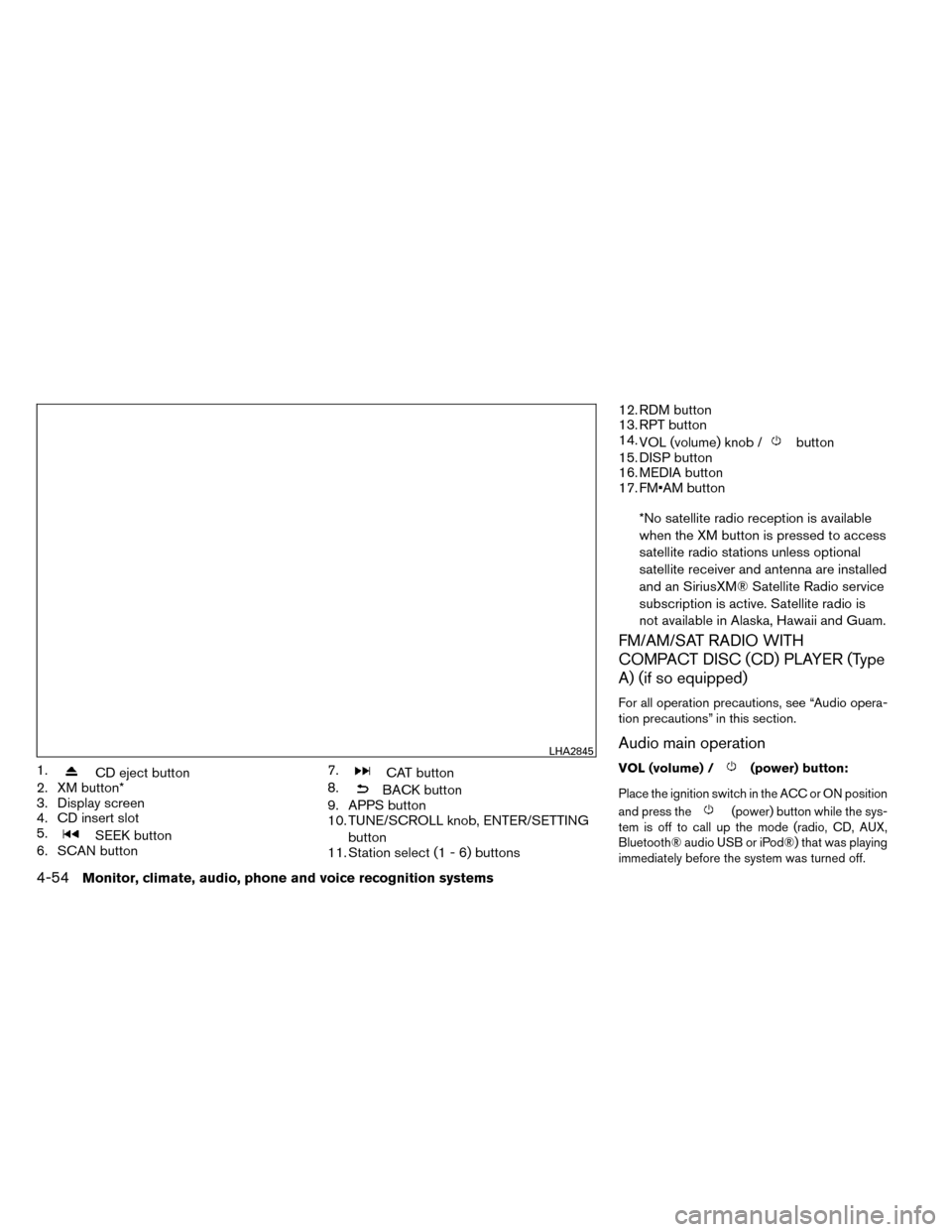
1.CD eject button
2. XM button*
3. Display screen
4. CD insert slot
5.
SEEK button
6. SCAN button 7.
CAT button
8.
BACK button
9. APPS button
10. TUNE/SCROLL knob, ENTER/SETTING
button
11. Station select (1 - 6) buttons 12. RDM button
13. RPT button
14.
VOL (volume) knob /
button
15. DISP button
16. MEDIA button
17. FM•AM button
*No satellite radio reception is available
when the XM button is pressed to access
satellite radio stations unless optional
satellite receiver and antenna are installed
and an SiriusXM® Satellite Radio service
subscription is active. Satellite radio is
not available in Alaska, Hawaii and Guam.
FM/AM/SAT RADIO WITH
COMPACT DISC (CD) PLAYER (Type
A) (if so equipped)
For all operation precautions, see “Audio opera-
tion precautions” in this section.
Audio main operation
VOL (volume) /(power) button:
Place the ignition switch in the ACC or ON position
and press the
(power) button while the sys-
tem is off to call up the mode (radio, CD, AUX,
Bluetooth® audio USB or iPod®) that was playing
immediately before the system was turned off.
LHA2845
4-54Monitor, climate, audio, phone and voice recognition systems
Page 236 of 442
To turn the system off, press the(power)
button.
Turn the VOL (volume) control knob to adjust the
volume.
This vehicle may be equipped with Speed Sen-
sitive Volume. When this feature is active, the
audio volume changes as the driving speed
changes. ENTER/SETTING button:
Press the ENTER/SETTING button to show the
Settings screen on the display. Turn the
TUNE/FOLDER knob to navigate the options and
then press the ENTER button to make a
selection.
Audio
Bass Adjusts the bass to the desired level.
Treble Adjusts the treble to the desired level.
Balance Adjusts the balance to the desired level. Balance adjusts the sound level between the left and right speakers.
Fade Adjusts the fade to the desired level. Fade adjusts the sound level between the front and rear speakers.
Speed Sens Vol. (Speed Sensitive Volume) Adjusts the speed sensitive volume function, which increases the volume of the audio system as the speed of
the vehicle increases. Set to “OFF” to disable the feature. The higher the setting, the more the volume in-
creases in relation to vehicle speed.
AUX Vol. Choose a setting from 0 to +3 to control the boost of incoming auxiliary device volume. A setting of 0 provides
no additional boost in volume. A setting of +3 provides the greatest boost in volume.
Brightness and Contrast Adjust the brightness or contrast to adjust the appearance of the display screen.
Clock adjust Press the ENTER/SETTING button to highlight the hours or minutes and then use the TUNE/FOLDER knob to
adjust the value. Press the ENTER/SETTING button again to set the value.
On-Screen Clock Toggles ON or OFF the clock display on the upper right corner of the display screen.
RDS Display Toggles ON or OFF the RDS information displayed on the screen while the radio is playing.
Language Select the desired language for the system from the available options.
Bass, treble, balance and fade can also be adjusted by pressing the ENTER/SETTING button and turning the TUNE/FOLDER control knob to select the item
to adjust. When the desired item is shown on the display, turn the tuning to adjust and then press the ENTER/SETTING button until the display returns to
the main audio screen. If the button is not pressed for approximately 10 seconds, the radio or CD display will automatically reappear.
Monitor, climate, audio, phone and voice recognition systems4-55