2014 NISSAN MAXIMA climate settings
[x] Cancel search: climate settingsPage 181 of 432
Menu ItemResult
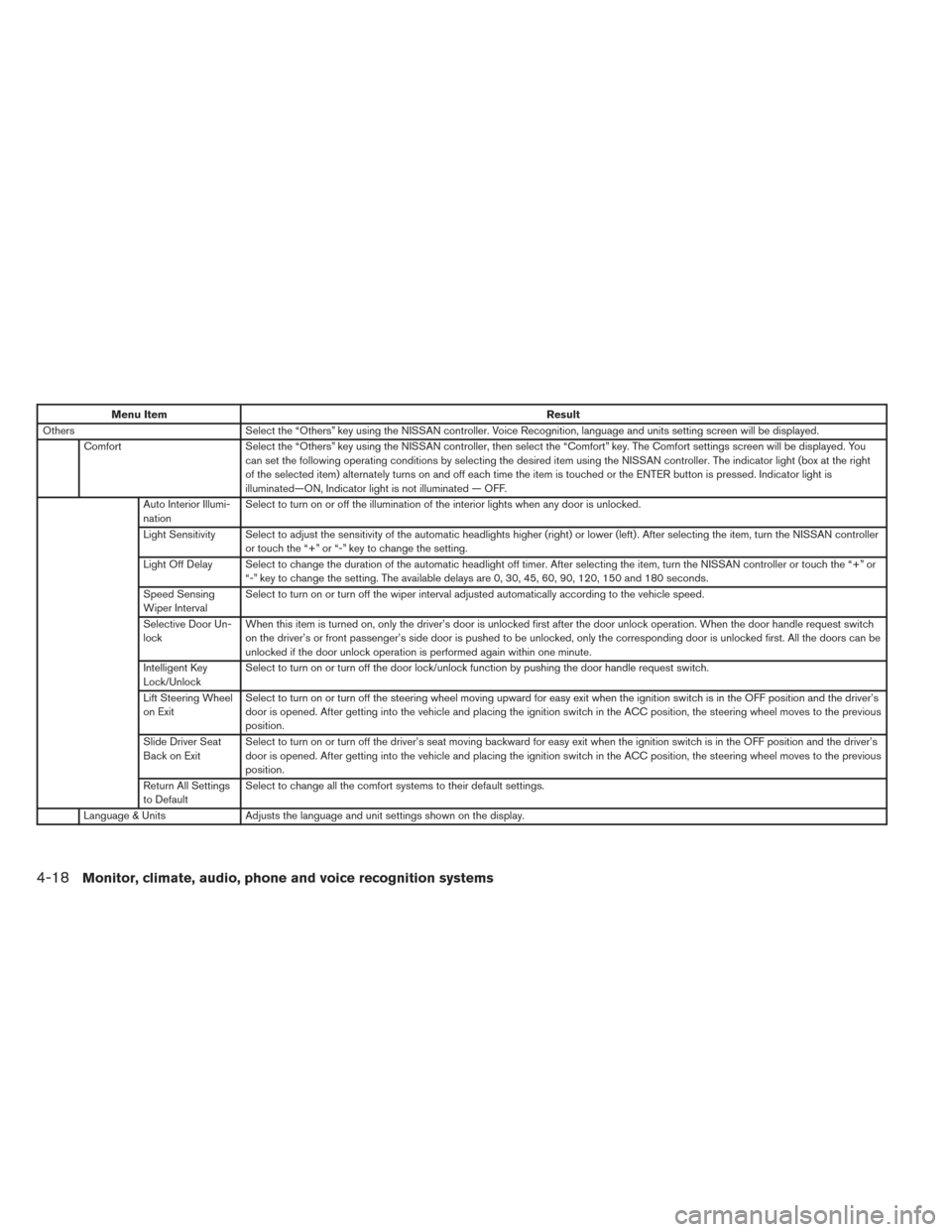
Others Select the “Others” key using the NISSAN controller. Voice Recognition, language and units setting screen will be displayed.
Comfort Select the “Others” key using the NISSAN controller, then select the “Comfort” key. The Comfort settings screen will be displayed. You
can set the following operating conditions by selecting the desired item using the NISSAN controller. The indicator light (box at the right
of the selected item) alternately turns on and off each time the item is touched or the ENTER button is pressed. Indicator light is
illuminated—ON, Indicator light is not illuminated — OFF.
Auto Interior Illumi-
nation Select to turn on or off the illumination of the interior lights when any door is unlocked.
Light Sensitivity Select to adjust the sensitivity of the automatic headlights higher (right) or lower (left) . After selecting the item, turn the NISSAN controller or touch the “+” or “-” key to change the setting.
Light Off Delay Select to change the duration of the automatic headlight off timer. After selecting the item, turn the NISSAN controller or touch the “+ ”or
“-” key to change the setting. The available delays are 0, 30, 45, 60, 90, 120, 150 and 180 seconds.
Speed Sensing
Wiper Interval Select to turn on or turn off the wiper interval adjusted automatically according to the vehicle speed.
Selective Door Un-
lock When this item is turned on, only the driver’s door is unlocked first after the door unlock operation. When the door handle request switch
on the driver’s or front passenger’s side door is pushed to be unlocked, only the corresponding door is unlocked first. All the doors can be
unlocked if the door unlock operation is performed again within one minute.
Intelligent Key
Lock/Unlock Select to turn on or turn off the door lock/unlock function by pushing the door handle request switch.
Lift Steering Wheel
on Exit Select to turn on or turn off the steering wheel moving upward for easy exit when the ignition switch is in the OFF position and the driver’s
door is opened. After getting into the vehicle and placing the ignition switch in the ACC position, the steering wheel moves to the previous
position.
Slide Driver Seat
Back on Exit Select to turn on or turn off the driver’s seat moving backward for easy exit when the ignition switch is in the OFF position and the driver’s
door is opened. After getting into the vehicle and placing the ignition switch in the ACC position, the steering wheel moves to the previous
position.
Return All Settings
to Default Select to change all the comfort systems to their default settings.
Language & Units Adjusts the language and unit settings shown on the display.
4-18Monitor, climate, audio, phone and voice recognition systems
Page 182 of 432
Menu ItemResult
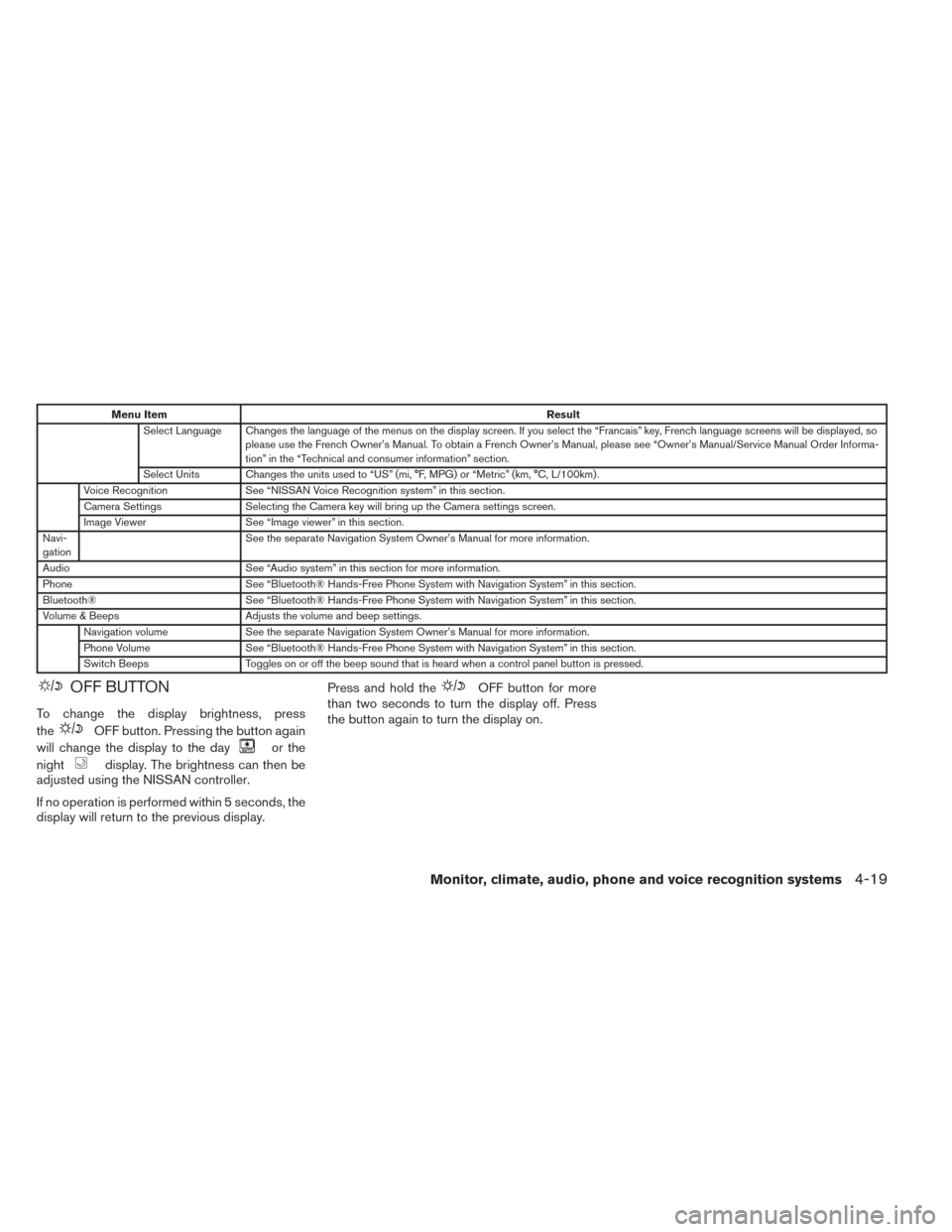
Select Language Changes the language of the menus on the display screen. If you select the “Francais” key, French language screens will be displayed, s o
please use the French Owner’s Manual. To obtain a French Owner’s Manual, please see “Owner’s Manual/Service Manual Order Informa-
tion” in the “Technical and consumer information” section.
Select Units Changes the units used to “US” (mi, °F, MPG) or “Metric” (km, °C, L/100km) .
Voice Recognition See “NISSAN Voice Recognition system” in this section.
Camera Settings Selecting the Camera key will bring up the Camera settings screen.
Image Viewer See “Image viewer” in this section.
Navi-
gation See the separate Navigation System Owner’s Manual for more information.
Audio See “Audio system” in this section for more information.
Phone See “Bluetooth® Hands-Free Phone System with Navigation System” in this section.
Bluetooth® See “Bluetooth® Hands-Free Phone System with Navigation System” in this section.
Volume & Beeps Adjusts the volume and beep settings.
Navigation volume See the separate Navigation System Owner’s Manual for more information.
Phone Volume See “Bluetooth® Hands-Free Phone System with Navigation System” in this section.
Switch Beeps Toggles on or off the beep sound that is heard when a control panel button is pressed.
OFF BUTTON
To change the display brightness, press
the
OFF button. Pressing the button again
will change the display to the day
or the
night
display. The brightness can then be
adjusted using the NISSAN controller.
If no operation is performed within 5 seconds, the
display will return to the previous display. Press and hold the
OFF button for more
than two seconds to turn the display off. Press
the button again to turn the display on.
Monitor, climate, audio, phone and voice recognition systems4-19
Page 184 of 432
Viewing images in a slideshow
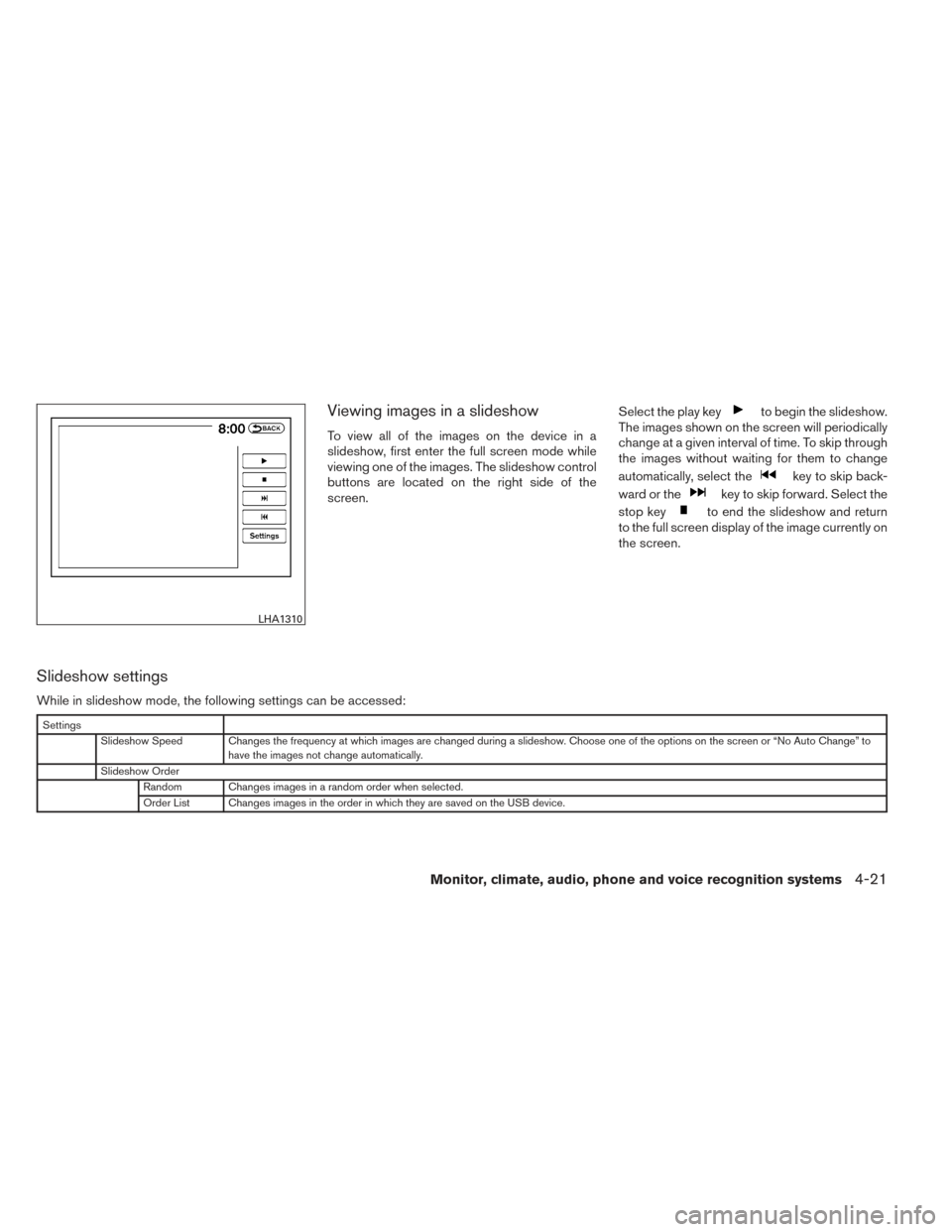
To view all of the images on the device in a
slideshow, first enter the full screen mode while
viewing one of the images. The slideshow control
buttons are located on the right side of the
screen.Select the play key
to begin the slideshow.
The images shown on the screen will periodically
change at a given interval of time. To skip through
the images without waiting for them to change
automatically, select the
key to skip back-
ward or the
key to skip forward. Select the
stop key
to end the slideshow and return
to the full screen display of the image currently on
the screen.
Slideshow settings
While in slideshow mode, the following settings can be accessed:
Settings
Slideshow Speed Changes the frequency at which images are changed during a slideshow. Choose one of the options on the screen or “No Auto Change” to have the images not change automatically.
Slideshow Order Random Changes images in a random order when selected.
Order List Changes images in the order in which they are saved on the USB device.
LHA1310
Monitor, climate, audio, phone and voice recognition systems4-21
Page 225 of 432
AUX settings
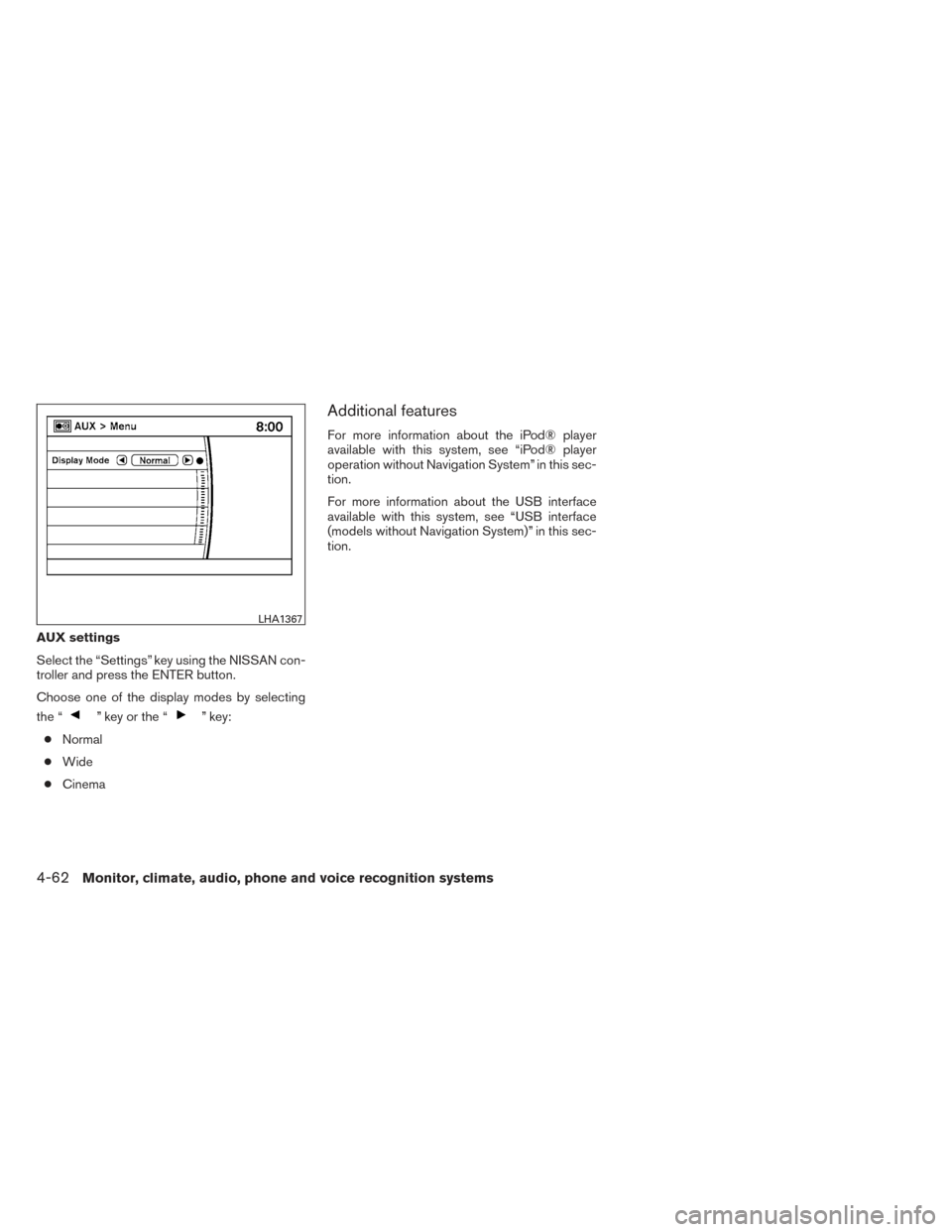
Select the “Settings” key using the NISSAN con-
troller and press the ENTER button.
Choose one of the display modes by selecting
the “
” key or the “” key:
● Normal
● Wide
● Cinema
Additional features
For more information about the iPod® player
available with this system, see “iPod® player
operation without Navigation System” in this sec-
tion.
For more information about the USB interface
available with this system, see “USB interface
(models without Navigation System)” in this sec-
tion.
LHA1367
4-62Monitor, climate, audio, phone and voice recognition systems
Page 227 of 432
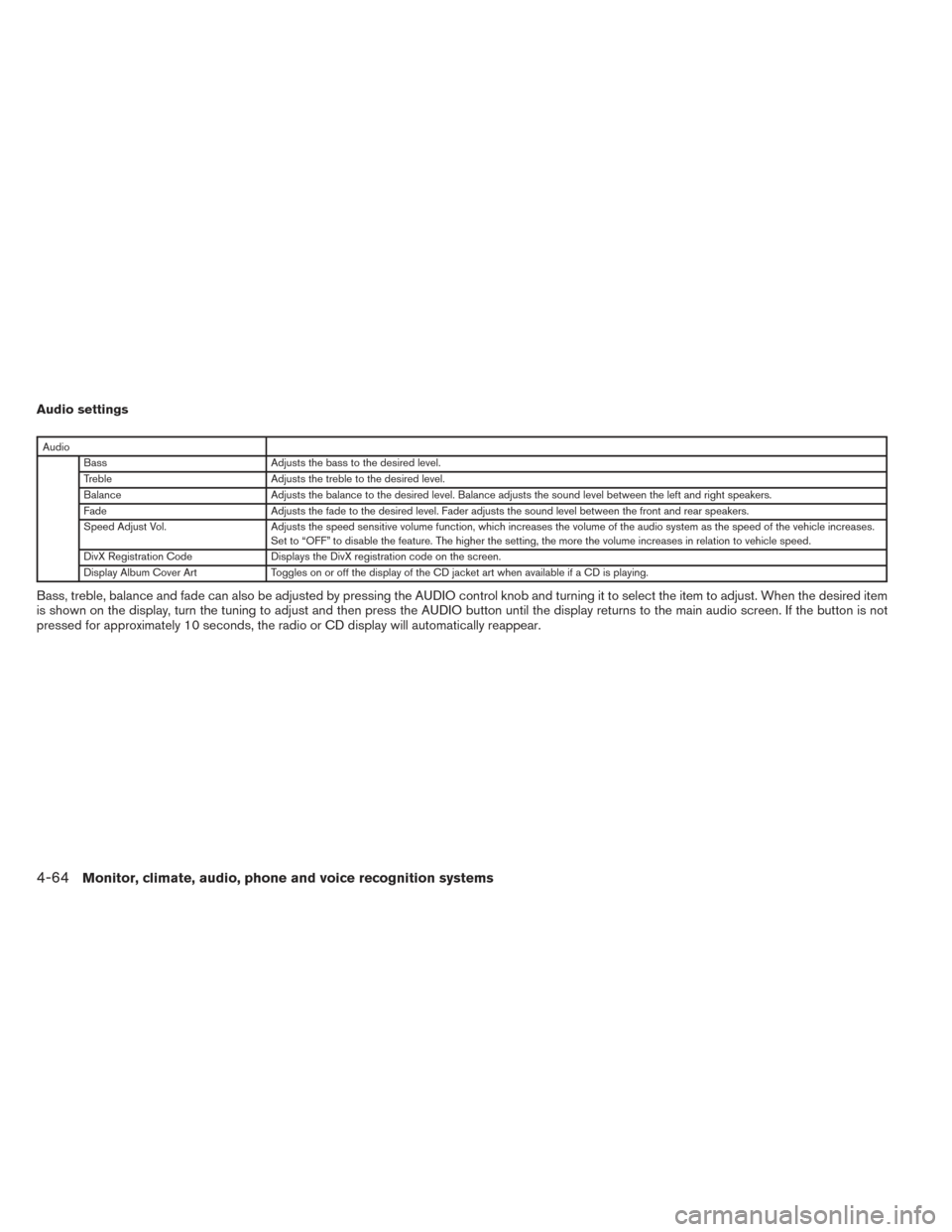
Audio settings
AudioBass Adjusts the bass to the desired level.
Treble Adjusts the treble to the desired level.
Balance Adjusts the balance to the desired level. Balance adjusts the sound level between the left and right speakers.
Fade Adjusts the fade to the desired level. Fader adjusts the sound level between the front and rear speakers.
Speed Adjust Vol. Adjusts the speed sensitive volume function, which increases the volume of the audio system as the speed of the vehicle increases.
Set to “OFF” to disable the feature. The higher the setting, the more the volume increases in relation to vehicle speed.
DivX Registration Code Displays the DivX registration code on the screen.
Display Album Cover Art Toggles on or off the display of the CD jacket art when available if a CD is playing.
Bass, treble, balance and fade can also be adjusted by pressing the AUDIO control knob and turning it to select the item to adjust. When the desired item
is shown on the display, turn the tuning to adjust and then press the AUDIO button until the display returns to the main audio screen. If the button is not
pressed for approximately 10 seconds, the radio or CD display will automatically reappear.
4-64Monitor, climate, audio, phone and voice recognition systems
Page 234 of 432
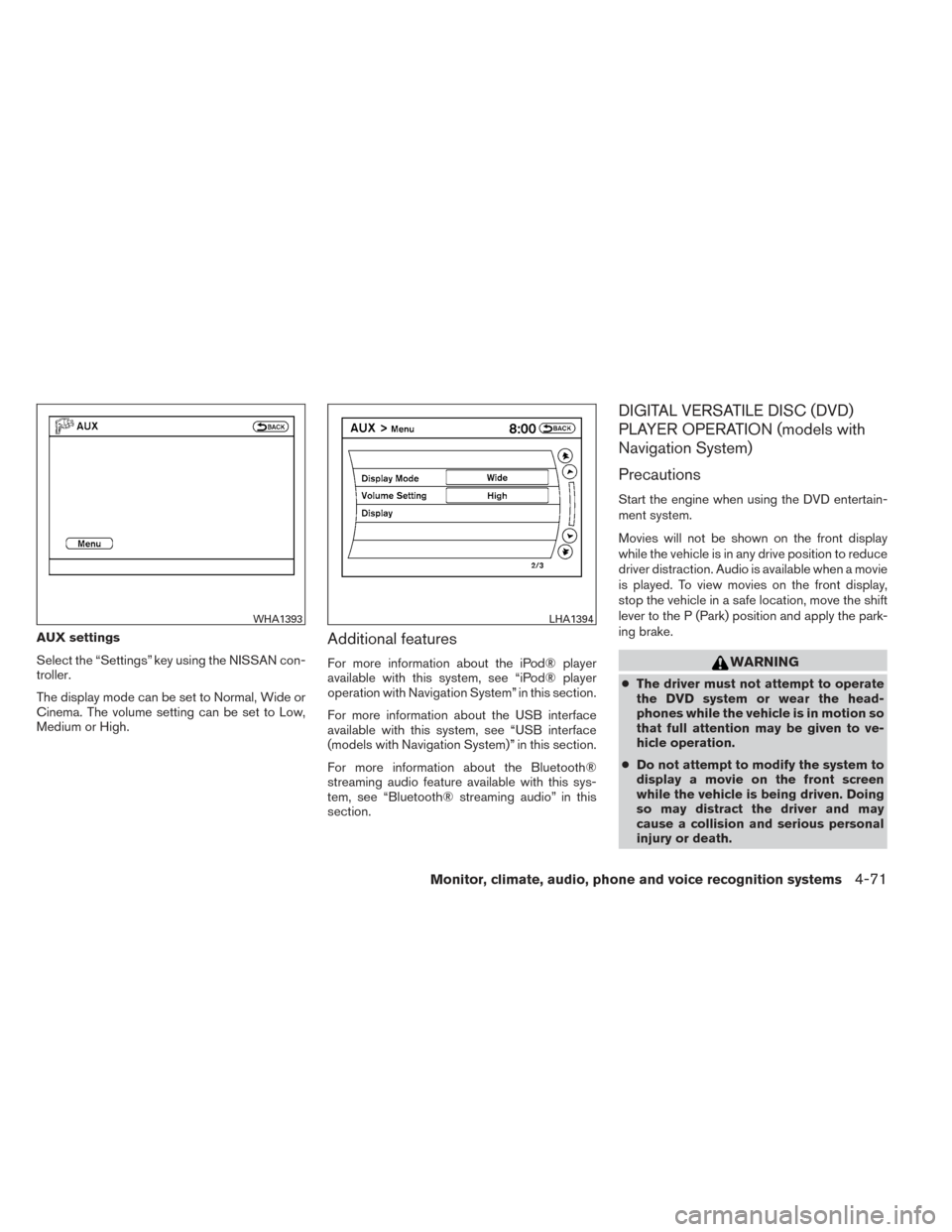
AUX settings
Select the “Settings” key using the NISSAN con-
troller.
The display mode can be set to Normal, Wide or
Cinema. The volume setting can be set to Low,
Medium or High.Additional features
For more information about the iPod® player
available with this system, see “iPod® player
operation with Navigation System” in this section.
For more information about the USB interface
available with this system, see “USB interface
(models with Navigation System)” in this section.
For more information about the Bluetooth®
streaming audio feature available with this sys-
tem, see “Bluetooth® streaming audio” in this
section.
DIGITAL VERSATILE DISC (DVD)
PLAYER OPERATION (models with
Navigation System)
Precautions
Start the engine when using the DVD entertain-
ment system.
Movies will not be shown on the front display
while the vehicle is in any drive position to reduce
driver distraction. Audio is available when a movie
is played. To view movies on the front display,
stop the vehicle in a safe location, move the shift
lever to the P (Park) position and apply the park-
ing brake.
WARNING
●The driver must not attempt to operate
the DVD system or wear the head-
phones while the vehicle is in motion so
that full attention may be given to ve-
hicle operation.
● Do not attempt to modify the system to
display a movie on the front screen
while the vehicle is being driven. Doing
so may distract the driver and may
cause a collision and serious personal
injury or death.
WHA1393LHA1394
Monitor, climate, audio, phone and voice recognition systems4-71
Page 236 of 432
NEXT/PREVIOUS
CHAPTER:
Select the
key to skip the chapter(s) of the
disc forward. Select the
key to skip the
chapter(s) of the disc backward. The chapters
will advance forward or backward the number of
times the respective key is touched or selected
with the NISSAN controller.
CM SKIP:
This function is only for DVD-VIDEO and DVD-
VR. Select the
orkey to fast forward
or rewind a set interval of time based on the CM
settings. For more information, see “DVD set-
tings” in this section.
Top Menu:
When the “Top Menu” key is selected while the
DVD is playing, the top menu specific to each
disc will be displayed. For details, see the instruc-
tions attached to the disc.
DVD settings
Select the “Settings” key to adjust the following
settings:
● Key (DVD-VIDEO)
Displays the operation keys for the specific
DVD menu. – Select the directional keys to move the
cursor on the DVD menu.
– Select the “Enter” key to fix the selected menu item.
– Select the “Move” key to move the loca- tion of the operation keys on the screen.
– Select the “Back” key to return to the previous menu screen.
– Select the “Hide” key to hide the opera- tion keys.
● Title Menu (DVD-VIDEO)
Some menus specific to each disc will be
shown. For details, see the instructions at-
tached to the disc.
● Title Search (DVD-VIDEO, DVD-VR)
The scene with the specified title will be
displayed the number of times the “+” or “-”
side is selected.
● Group Search (VIDEO CD)
The scene with the specified group will be
displayed the number of times the “+” or “-”
side is selected. ●
10 Key Search (DVD-VIDEO, VIDEO CD,
CD-DA, DVD-VR)
Select the “10 Key Search” key to open the
number entry screen. Input the number you
want to search for and select the “OK” key.
The specified Title/Chapter or Group/Track
will be played.
● Select No. (VIDEO CD)
Select the “Select No.” key to open the
number entry screen. Input the number you
want to search for and select the “OK” key.
The specified scene will be played.
● Angle (DVD-VIDEO)
If the DVD contains different angles (such as
moving images) , the current image angle
can be switched to another one. Select the
“Angle” key and use the “+” or “-” key to
change the angle.
● Angle Mark (DVD-VIDEO)
When this item is turned on, an angle mark
will be shown on the bottom of the screen if
the scene can be seen from a different angle.
● Menu Skip (DVD-VIDEO)
DVD menus are automatically configured
and the contents will be played directly
when the “Menu Skip” key is turned on. Note
that some discs may not be played directly
even if this item is turned on.
Monitor, climate, audio, phone and voice recognition systems4-73
Page 242 of 432
●Previous Chapter/Rewind:
Select the
key to skip the chapter(s)
of the disc backward. The chapters will go
back the number of times the key is selected.
Press and hold the key to rewind the chap-
ter.
List:
Select the “List” key on the movie file operation
screen to display the file list.
Settings:
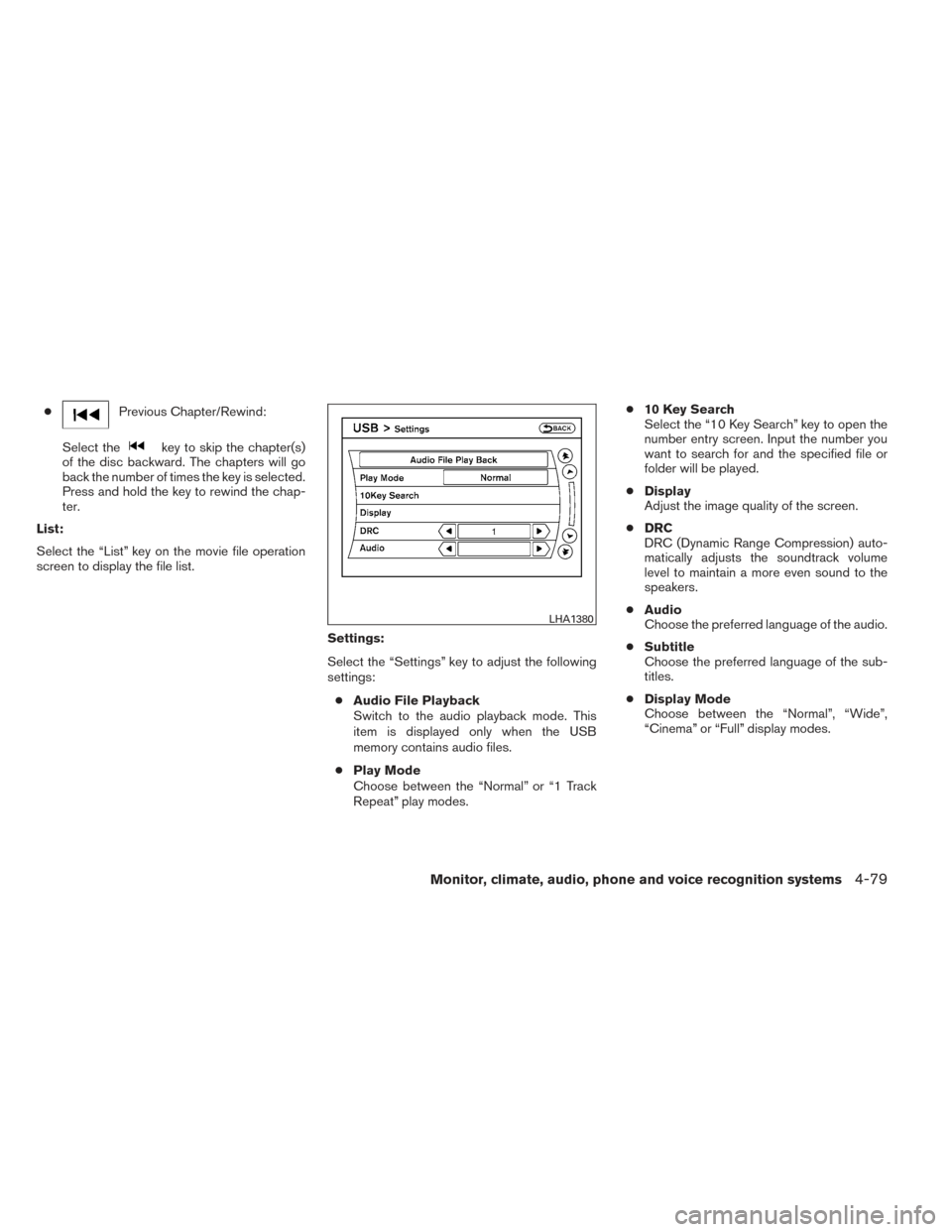
Select the “Settings” key to adjust the following
settings:● Audio File Playback
Switch to the audio playback mode. This
item is displayed only when the USB
memory contains audio files.
● Play Mode
Choose between the “Normal” or “1 Track
Repeat” play modes. ●
10 Key Search
Select the “10 Key Search” key to open the
number entry screen. Input the number you
want to search for and the specified file or
folder will be played.
● Display
Adjust the image quality of the screen.
● DRC
DRC (Dynamic Range Compression) auto-
matically adjusts the soundtrack volume
level to maintain a more even sound to the
speakers.
● Audio
Choose the preferred language of the audio.
● Subtitle
Choose the preferred language of the sub-
titles.
● Display Mode
Choose between the “Normal”, “Wide”,
“Cinema” or “Full” display modes.
LHA1380
Monitor, climate, audio, phone and voice recognition systems4-79