2014 NISSAN LEAF charging
[x] Cancel search: chargingPage 231 of 397
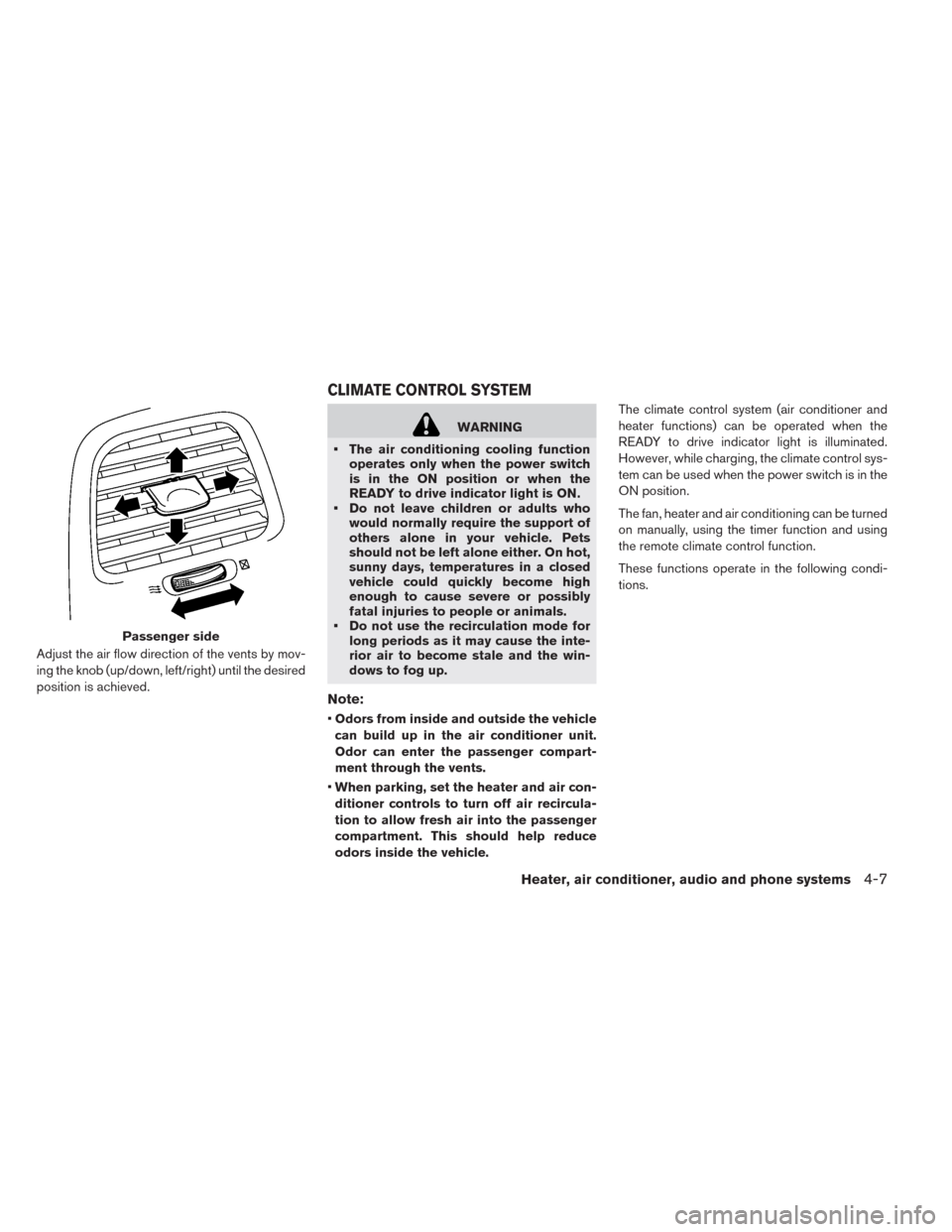
Adjust the air flow direction of the vents by mov-
ing the knob (up/down, left/right) until the desired
position is achieved.
WARNING
• The air conditioning cooling function
operates only when the power switch
is in the ON position or when the
READY to drive indicator light is ON.
• Do not leave children or adults who
would normally require the support of
others alone in your vehicle. Pets
should not be left alone either. On hot,
sunny days, temperatures in a closed
vehicle could quickly become high
enough to cause severe or possibly
fatal injuries to people or animals.
• Do not use the recirculation mode for
long periods as it may cause the inte-
rior air to become stale and the win-
dows to fog up.
Note:
•Odors from inside and outside the vehicle
can build up in the air conditioner unit.
Odor can enter the passenger compart-
ment through the vents.
•When parking, set the heater and air con-
ditioner controls to turn off air recircula-
tion to allow fresh air into the passenger
compartment. This should help reduce
odors inside the vehicle.The climate control system (air conditioner and
heater functions) can be operated when the
READY to drive indicator light is illuminated.
However, while charging, the climate control sys-
tem can be used when the power switch is in the
ON position.
The fan, heater and air conditioning can be turned
on manually, using the timer function and using
the remote climate control function.
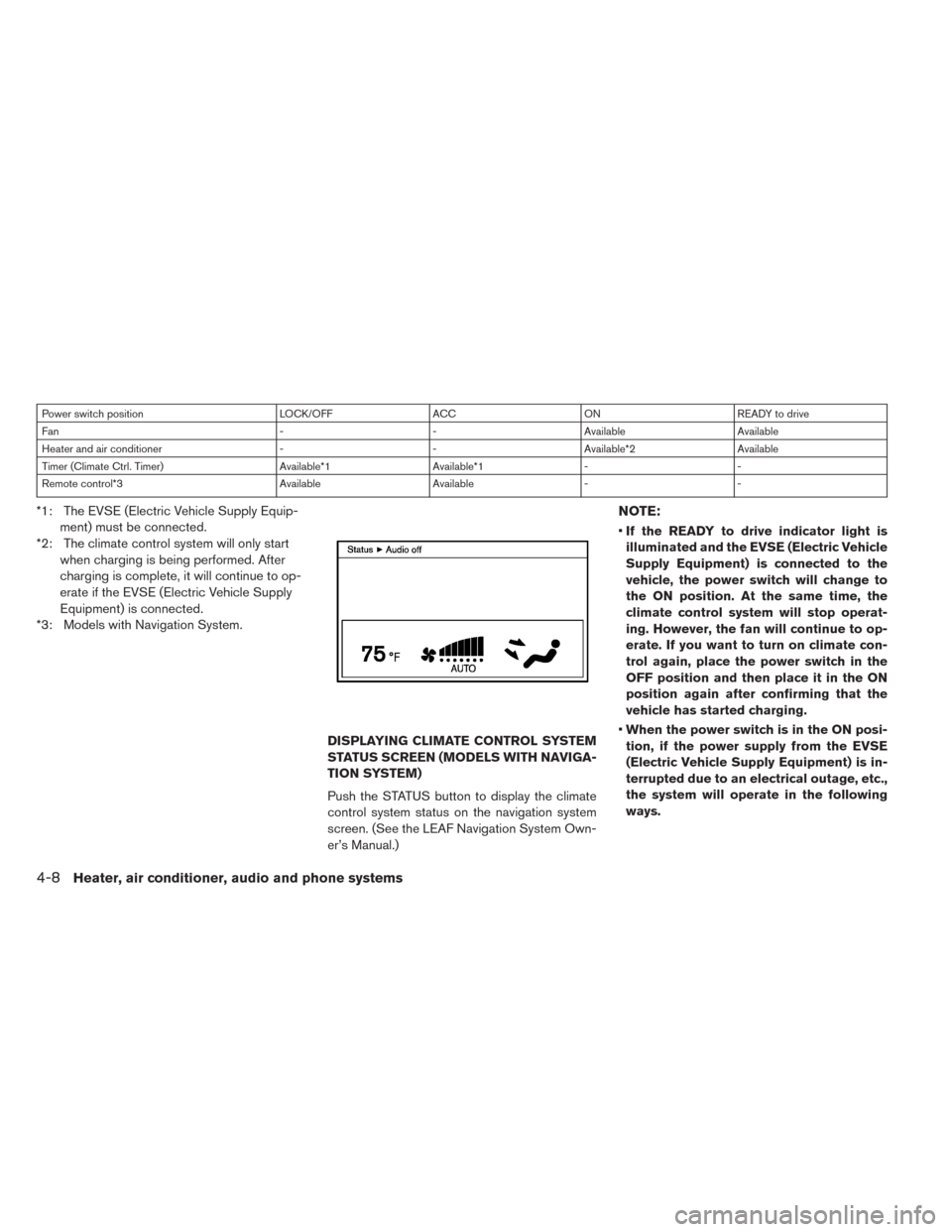
These functions operate in the following condi-
tions.
Passenger side
CLIMATE CONTROL SYSTEM
Heater, air conditioner, audio and phone systems4-7
Page 232 of 397
Power switch position LOCK/OFF ACC ON READY to drive
Fan - - Available Available
Heater and air conditioner - - Available*2 Available
Timer (Climate Ctrl. Timer) Available*1 Available*1 - -
Remote control*3 Available Available - -
*1: The EVSE (Electric Vehicle Supply Equip-
ment) must be connected.
*2: The climate control system will only start
when charging is being performed. After
charging is complete, it will continue to op-
erate if the EVSE (Electric Vehicle Supply
Equipment) is connected.
*3: Models with Navigation System.
DISPLAYING CLIMATE CONTROL SYSTEM
STATUS SCREEN (MODELS WITH NAVIGA-
TION SYSTEM)
Push the STATUS button to display the climate
control system status on the navigation system
screen. (See the LEAF Navigation System Own-
er’s Manual.)NOTE:
•If the READY to drive indicator light is
illuminated and the EVSE (Electric Vehicle
Supply Equipment) is connected to the
vehicle, the power switch will change to
the ON position. At the same time, the
climate control system will stop operat-
ing. However, the fan will continue to op-
erate. If you want to turn on climate con-
trol again, place the power switch in the
OFF position and then place it in the ON
position again after confirming that the
vehicle has started charging.
•When the power switch is in the ON posi-
tion, if the power supply from the EVSE
(Electric Vehicle Supply Equipment) is in-
terrupted due to an electrical outage, etc.,
the system will operate in the following
ways.
4-8Heater, air conditioner, audio and phone systems
Page 233 of 397
– If it occurs while charging is being per-
formed:
–The climate control system will stop
once. If the power supply is restored
within approximately 5 minutes, the
climate control system will restart.
However, if more than 5 minutes
have elapsed, the climate control
system will not restart.
– If it occurs after charging has finished:
–The climate control system will stop.
Heater, air conditioner, audio and phone systems4-9
Page 239 of 397
• When the outside air temperature is low, the air
flow from the foot outlets will be low or may not
operate for up to 150 seconds after turning on
the air conditioner. This is not a malfunction.
• Power consumption of the climate control varies
depending on the outside temperature and the
temperature set for the climate control. Power
consumption increases if the interior tempera-
ture is cooled down too much in summer or if it
is warmed up too much in winter. This reduces
vehicle range.
• When the vehicle is in the ECO position, the
climate control operates in the ECO mode
which reduces the power consumption.• If the charger is connected to the vehicle when
it is in the ready to drive mode and the air
conditioner or heater is on, the power switch
automatically changes to the ON position. The
climate control system automatically turns off
the heater or air conditioner and switches to the
air recirculation mode. Place the power switch
in the off position to begin charging. Turn on the
desired climate control function.
• If the air conditioner or heater is on while charg-
ing, the climate control system automatically
turns off the heater or air conditioning and
switches to the air recirculation mode when
charging is complete.
• The remote climate control or climate control
timer may fog up windows depending on the set
temperature or outside temperature.
• When turning on the seat heater switch prior to
operating the remote climate control or climate
control timer, the seat heater also will turn on.
The steering wheel heater will turn on automati-
cally when the outside temperature is low.
• When the vehicle is in ECO mode, the air con-
ditioner will accordingly stay in ECO mode for
lower power consumption.
In-cabin microfilter:
The climate control system is equipped with an
in-cabin microfilter which collects dirt, pollen,
dust, etc. To make sure the air conditioner, heats,
defogs, and ventilates efficiently, replace the filter
regularly. To replace the filter, contact a NISSAN
certified LEAF dealer.
The filter should be replaced if the air flow
decreases significantly or if windows fog
up easily when operating the climate con-
trol system.
Servicing climate control
The climate control system in your NISSAN is
charged with a refrigerant designed with the en-
vironment in mind. This refrigerant will not harm
the earth’s ozone layer. Special charging equip-
ment and lubricant are required when servicing
your NISSAN climate control. Using improper
refrigerants or lubricants will cause severe dam-
age to your climate control system. See “Capaci-
ties and recommended lubricants” in the “Tech-
nical and consumer information” section for
climate control system refrigerant and lubricant
recommendations.
Heater, air conditioner, audio and phone systems4-15
Page 245 of 397
Operation tips:
• The Climate Ctrl. Timer will only start when the
power switch is in the “OFF” position. Always
turn the power switch to the “OFF” position after
the Climate Ctrl. Timer is set.
• Touch “Timer 1” or “Timer 2” to turn off the
Climate Ctrl. Timer function. After this operation
has been performed, the indicator turns off and
the Climate Ctrl. Timer function will be turned
off. The start and stop time settings are not
deleted even if the Climate Ctrl. Timer function
is turned off.
• If OFF is selected for a day of the week, the
Climate Ctrl. timer will not operate on that day.
The system will wait until the next charging timer
set to perform charging.
• While the Climate Ctrl. Timer operates, the Cli-
mate Ctrl. Timer indicator and the charging sta-
tus indicator lights flash. If the Climate Ctrl.
Timer is set to activate, the Climate Ctrl. Timer
indicator illuminates.
• If the timer charge function and the Climate Ctrl.
Timer are in operation at the same time due to
an overlap of the timer settings, either function
can be set to be preferentially provided with
electric power. For the details of “Timer Priority”settings, refer to separate LEAF Navigation
System Owner’s Manual.
• The temperature in the passenger compartment
may not be comfortable if entering the vehicle
too soon before or too long after the scheduled
time of departure.
• Air conditioning is limited to the capacity of the
electric power when the charge connector is
connected. Therefore, the temperature may not
reach the factory default setting due to limita-
tions in air conditioning performance, if ambient
temperature is excessively high or low, or if the
charge connector is connected to a 120V out-
let.
• While the battery is being charged, the Climate
Ctrl. Timer cannot be operated until the Li-ion
battery available charge gauge reached the full
mark. When the battery is not being charged,
the Climate Ctrl. Timer can be operated, even if
the Li-ion battery available charge gauge has
not reached the full mark.
• When the climate control is set on first priority,
the Climate Ctrl. Timer works regardless of the
remaining battery energy.
• If the Climate Ctrl. Timer starts its operation
while the vehicle is being charged, the charging
time will be prolonged.• Operating the Climate Ctrl. Timer or remote
climate control in an environment with low tem-
perature may decrease the rate of battery
charge.
• The Climate Ctrl. Timer settings cannot be
modified while it is operating. If timer settings
are modified while the Climate Ctrl. Timer is
operating, these changes will be reflected the
next time the Climate Ctrl. Timer operates.
• When charging is set as the first priority, the
Climate Ctrl. Timer does not start until 10 seg-
ments of the Li-ion battery available charge
gauge are illuminated.
• When the climate control is set as the first
priority, the climate control system will be turned
on as scheduled by the Climate Ctrl. Timer
regardless of the remaining battery energy.
• Even when the climate control is set as the first
priority, the climate control system will be turned
off when the climate control spends more elec-
tric than the charging Li-ion battery.
• The Li-ion battery may not charge or may even
become discharged if the Climate Ctrl. Timer or
remote climate control is used in low ambient
temperatures.
Heater, air conditioner, audio and phone systems4-21
Page 246 of 397
Remote climate control
This vehicle incorporates a communication de-
vice that is called a TCU (Telematics Communi-
cation Unit) . The communication connection be-
tween this unit and NISSAN CARWINGS Data
Center allows for various remote function ser-
vices.
Even when away from the vehicle, climate control
can be started by accessing the NISSAN CAR-
WINGS Data Center website using a cellular
phone or a personal computer.
When operation is started, or at the set start time,
the NISSAN CARWINGS Data Center accesses
the vehicle. When the vehicle receives a com-
mand for remote operation, the climate control
immediately turns ON and operates for the speci-
fied period of time. Confirmation of the ON/OFF
of the climate control operation can be checked
by accessing the website or by e-mail.
Establishing the CARWINGS™ service is neces-
sary before using the service. See LEAF Naviga-
tion System Owner’s Manual.WARNING
• Radio waves could adversely affect
electric medical equipment. For more
information, contact your electric
medical equipment manufacturer for
the possible effect on pacemakers be-
fore using the remote climate control.
• Even if the remote climate control is
set, the temperature in the passenger
room may become high if the system
automatically stops. Do not leave chil-
dren or adults who would normally re-
quire the support of others alone in
your vehicle. Pets should not be left
alone either. On hot, sunny days, tem-
peratures in a closed vehicle could
quickly become high enough to cause
severe or possibly fatal injuries to
people or animals.
NOTE:
•To check the Li-ion battery charging status
using an internet enabled smart phone or
personal computer.
– The vehicle must be located in a cellu-
lar phone coverage area.
– The cellular phone must be located in
an area with cellular phone coverage.– The computer must be connected to
the internet.
•Some cellular phones are not compatible
with this system and cannot be used to
check the Li-ion battery charging status.
Confirm this beforehand.
Operating tips:
• When the charge connector is connected, the
climate control operates using electric power.
When the charge connector is disconnected
from the vehicle, the climate control operates
using vehicle battery electric power.
• The climate control can be operated for a maxi-
mum of 2 hours when the charge connector is
connected to the vehicle, or a maximum of 15
minutes when the charge connector is discon-
nected.
• The remote climate control will only start to
operate when the power switch is in the OFF
position. Be sure to check that the power switch
is in the OFF position.
• Remote climate control operation is not avail-
able when the vehicle is in an area of cellular
communication range.
• Communication becomes unavailable when the
vehicle is not used for two weeks or more.
When the power switch is placed in the ON
4-22Heater, air conditioner, audio and phone systems
Page 247 of 397
position, communication with the NISSAN
CARWINGS Data Center can be restored.
• Air conditioning is limited to the capacity of the
electric power when the charge connector is
connected to the vehicle. Therefore, the tem-
perature may not reach a comfortable level due
to performance of the air conditioning being
limited, if the outside temperature is excessively
high or low, or if the charge connector is con-
nected to a 120V outlet.
• If the power switch is in the ON position or the
charge connector is disconnected, while the
remote climate control is being operated, re-
mote climate control operation is automatically
stopped and an e-mail is sent.
• If remote climate control operation is started
while the vehicle is in normal charge mode, the
climate control operates in climate control pri-
ority mode and charging is continued.
• If remote climate control operation is started
and charging is stopped while the vehicle is in
quick charge mode, climate control operation is
also stopped.
• If the quick charge connector is connected and
charging is not performed, remote climate con-
trol operation starts using the battery electric
power of the vehicle.
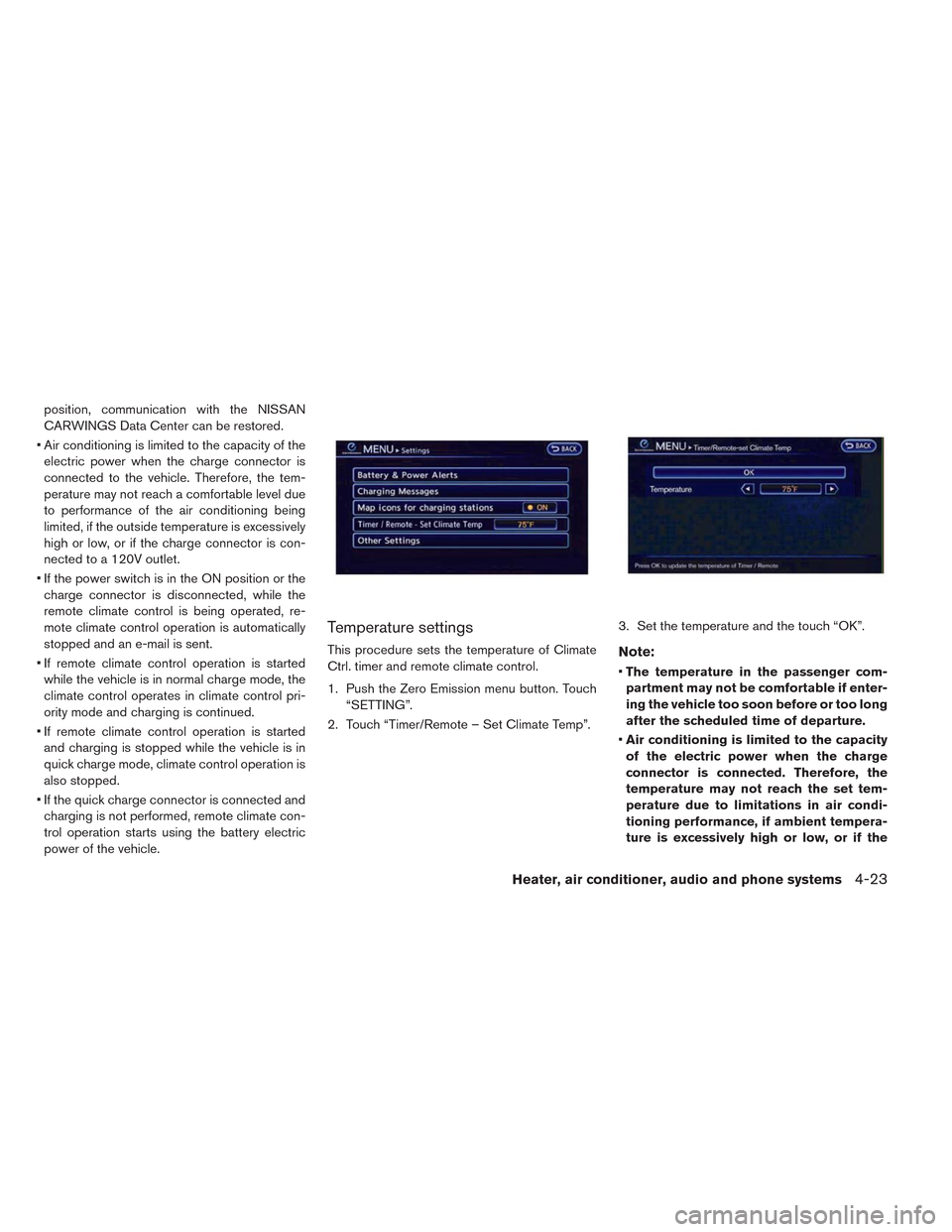
Temperature settings
This procedure sets the temperature of Climate
Ctrl. timer and remote climate control.
1. Push the Zero Emission menu button. Touch
“SETTING”.
2. Touch “Timer/Remote – Set Climate Temp”.3. Set the temperature and the touch “OK”.Note:
•The temperature in the passenger com-
partment may not be comfortable if enter-
ing the vehicle too soon before or too long
after the scheduled time of departure.
•Air conditioning is limited to the capacity
of the electric power when the charge
connector is connected. Therefore, the
temperature may not reach the set tem-
perature due to limitations in air condi-
tioning performance, if ambient tempera-
ture is excessively high or low, or if the
Heater, air conditioner, audio and phone systems4-23
Page 297 of 397
• If you move the shift lever to the N (Neutral)
position, the cruise control will be canceled.
To reset at a faster cruising speed,use one of
the following methods.
• Depress the accelerator pedal. When the ve-
hicle attains the preferred speed, push and re-
lease the COAST/SET switch.
• Push and hold the ACCEL/RES switch. When
the vehicle attains the preferred speed, release
the switch.
• Push, then quickly release the ACCEL/RES
switch. Each time you do this, the set speed will
increase by about 1 MPH (1.6 km/h) .
To reset at a slower cruising speed,use one
of the following methods.
• Lightly tap the brake pedal. When the vehicle
attains the preferred speed, push the COAST/
SET switch and release it.
• Push and hold the COAST/SET switch. Re-
lease the switch when the vehicle slows down
to the preferred speed.
• Push, then quickly release, the COAST/SET
switch. Each time you do this, the set speed will
decrease by about 1 MPH (1.6 km/h) .To resume the preset speed,push and re-
lease the ACCEL/RES switch. The vehicle will
resume the last set cruising speed when the
vehicle speed is over 25 MPH (40 km/h) .Vehicle range depends on a number of factors.
Actual vehicle range will vary depending upon:
• speed,
• vehicle load,
• electrical load from vehicle accessories,
• traffic and road conditions,
NISSAN recommends the following driving
habits to help maximize vehicle range:
Before driving:
• Follow recommended periodic maintenance.
• Keep tires inflated to correct pressure.
• Keep wheels in correct alignment.
• Pre-heat or pre-cool the interior cabin while the
vehicle is charging.
• Remove unnecessary cargo from the vehicle.
While driving:
• Drive in ECO mode
– In the ECO position more regenerative
brake is applied when the accelerator pedal
is released in comparison to the D (Drive)
position and more power is provided to the
Li-ion battery.
INCREASING POWER ECONOMY
Starting and driving5-17