2014 NISSAN JUKE battery
[x] Cancel search: batteryPage 209 of 402
4-54Heater, air conditioner, audio and phone systems
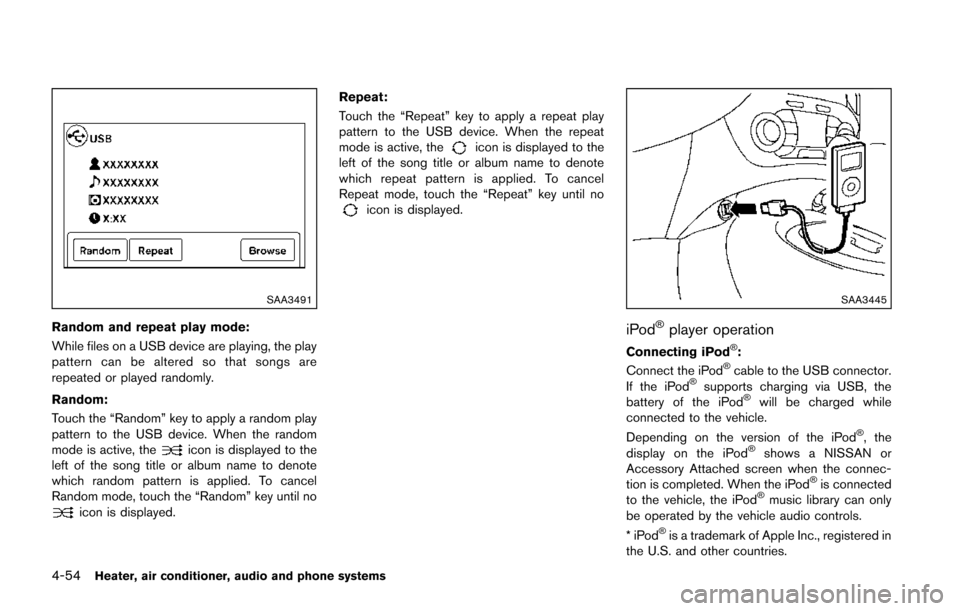
SAA3491
Random and repeat play mode:
While files on a USB device are playing, the play
pattern can be altered so that songs are
repeated or played randomly.
Random:
Touch the “Random” key to apply a random play
pattern to the USB device. When the random
mode is active, the
icon is displayed to the
left of the song title or album name to denote
which random pattern is applied. To cancel
Random mode, touch the “Random” key until no
icon is displayed. Repeat:
Touch the “Repeat” key to apply a repeat play
pattern to the USB device. When the repeat
mode is active, the
icon is displayed to the
left of the song title or album name to denote
which repeat pattern is applied. To cancel
Repeat mode, touch the “Repeat” key until no
icon is displayed.
SAA3445
iPod®player operation
Connecting iPod®:
Connect the iPod®cable to the USB connector.
If the iPod®supports charging via USB, the
battery of the iPod®will be charged while
connected to the vehicle.
Depending on the version of the iPod
®, the
display on the iPod®shows a NISSAN or
Accessory Attached screen when the connec-
tion is completed. When the iPod
®is connected
to the vehicle, the iPod®music library can only
be operated by the vehicle audio controls.
*iPod
®is a trademark of Apple Inc., registered in
the U.S. and other countries.
Page 215 of 402
4-60Heater, air conditioner, audio and phone systems
3. The channel indicator will then come on andthe sound will resume. Programming is now
complete.
4. Other keys can be set in the same manner.
If the battery cable is disconnected or if the fuse
opens, the radio memory will be canceled. In
that case, reset the desired stations.
Presets can also be selected by touching the
desired preset number on the screen.
Compact Disc (CD) player operation
If the radio is already operating, it automatically
turns off and the compact disc begins to play.
CD button:
When the CD button is pushed with the system
off and the compact disc loaded, the system will
turn on and the compact disc will start to play.
When the CD button is pushed with a compact
disc loaded and the radio playing, the radio will
automatically be turned off and the compact
disc will start to play. CD/MP3/WMA display mode:
Menu item
CD/MP3 display mode While listening to a CD or an MP3/WMA CD, certain text may be displayed (when a
CD encoded with text is being used) . Depending on how the CD or MP3/WMA CD
is encoded, the text is displayed listing the artist, album and song title. There are
other keys displayed on the screen when a CD is playing:
Random Touch the “Random” key to apply a random play pattern to the CD. If an MP3 CD is
playing, touching “Random” or alternates between Random Folder, and Random All.
This text will appear on the display. To cancel Random mode, touch the “Random”
key until the key is no longer highlighted.
Repeat Touch the “Repeat” key to apply a repeat play pattern to the CD. If an MP3 CD is
playing, touching “Repeat” alternates between repeating the current song and
repeating the current folder. This text will appear on the display. To cancel Repeat
mode, touch the “Repeat” key until the key is no longer highlighted.
Browse Touch the “Browse” key to display the titles on the CD in list format. Touch the title of
a song in the list to begin playing that song. If an MP3 CD is playing, touching the
“Browse” key will also list the folders on the disc. Follow the procedure for selecting a
song with the touch-screen to choose a folder.
Page 219 of 402
4-64Heater, air conditioner, audio and phone systems
CAUTION
.Do not force the USB device into the
USB port. Inserting the USB device
tilted or up-side-down into the port
may damage the port. Make sure
that the USB device is connected
correctly into the USB port.
. Do not grab the USB port cover (if
so equipped) when pulling the USB
device out of the port. This could
damage the port and the cover.
. Do not leave the USB cable in a
place where it can be pulled unin-
tentionally. Pulling the cable may
damage the port.
Refer to your device manufacturer’s owner
information regarding the proper use and care
of the device.
To connect an iPod
®to the vehicle so that the
iPod®can be controlled with the audio system
controls and display screen, use the USB port
located on the lower center of the instrument
panel. Connect the iPod
®-specific end of the
cable to the iPod®and the USB end of the cable
to the USB port on the vehicle. If your iPod®
supports charging via a USB connection, its battery will be charged while connected to the
vehicle with the ignition switch in the ACC or
ON position.
While connected to the vehicle, the iPod
®may
only be able to be operated by the vehicle audio
controls.
To disconnect the iPod
®from the vehicle,
remove the USB end of the cable from the
USB port on the vehicle, then remove the cable
from the iPod
®.
iPod®is a trademark of Apple Inc., registered in
the U.S. and other countries.
Compatibility:
The following models are compatible:
. iPod
®Classic 5th generation (firmware
version 1.3.0 or later)
. iPod
®Classic 6th generation (firmware
version 2.0.1 or later)
. iPod
®Classic 7th generation (firmware
version 2.0.4 or later)
. iPod
®Touch 2nd generation (firmware ver-
sion 4.2.1 or later)*
. iPod
®Touch 3rd generation (firmware ver-
sion 5.1 or later)
. iPod
®Touch 4th generation (firmware ver-
sion 5.1 or later) .
iPod
®nano - 1st generation (firmware
version 1.3.1 or later)
. iPod
®nano - 2nd generation (firmware
version 1.1.3 or later)
. iPod
®nano - 3rd generation (firmware
version 1.1.3 or later)
. iPod
®nano - 4th generation (firmware
version 1.0.4 or later)
. iPod
®nano - 5th generation (firmware
version 1.0.2 or later)
. iPod
®nano - 6th generation (firmware
version 1.1 or later)
. iPhone
®3G (firmware version 4.2.1 or later)
. iPhone®3GS (firmware version 5.1 or later)
. iPhone®4 (firmware version 5.1 or later)
. iPhone®4S (firmware version 5.1 or later)
* Some features of this iPod®may not be fully
functional.
Make sure that your iPod
®firmware is updated
to the version indicated above.
Page 227 of 402
4-72Heater, air conditioner, audio and phone systems
CAUTION
.Keep the antenna as far away as
possible from the electronic control
modules.
. Keep the antenna wire more than 8
in (20 cm) away from the electronic
control system harness. Do not
route the antenna wire next to any
harness.
. Adjust the antenna standing-wave
ratio as recommended by the man-
ufacturer.
. Connect the ground wire from the
CB radio chassis to the body.
. For details, consult a NISSAN deal-
er.
WARNING
.Use a phone after stopping your
vehicle in a safe location. If you
have to use a phone while driving,
exercise extreme caution at all
times so full attention may be given
to vehicle operation.
. If you find yourself unable to devote
full attention to vehicle operation
while talking on the phone, pull off
the road to a safe location and stop
your vehicle before doing so.
CAUTION
To avoid draining the vehicle battery,
use a phone after starting the engine.
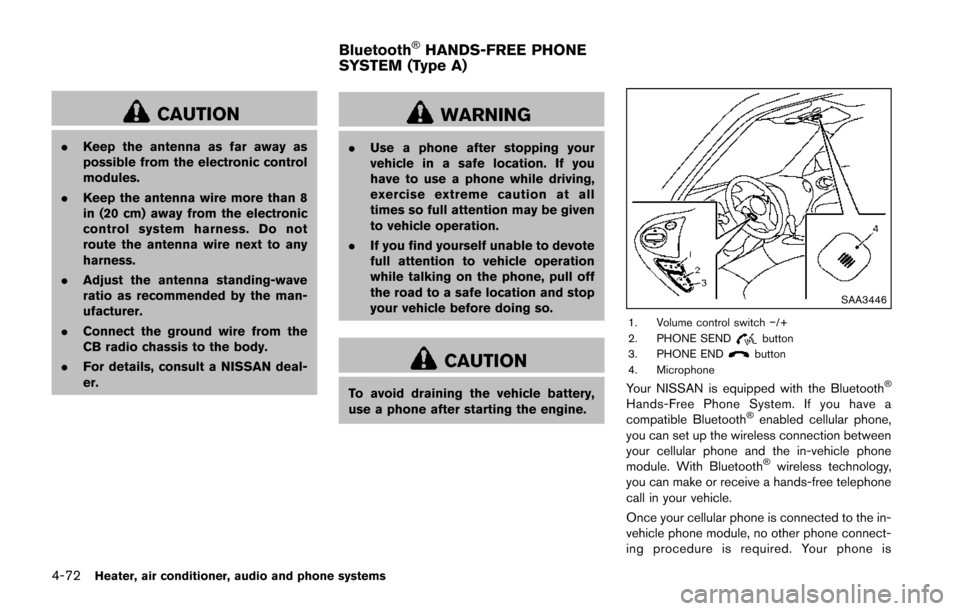
SAA3446
1. Volume control switch −/+
2. PHONE SENDbutton
3. PHONE ENDbutton
4. Microphone
Your NISSAN is equipped with the Bluetooth®
Hands-Free Phone System. If you have a
compatible Bluetooth®enabled cellular phone,
you can set up the wireless connection between
your cellular phone and the in-vehicle phone
module. With Bluetooth
®wireless technology,
you can make or receive a hands-free telephone
call in your vehicle.
Once your cellular phone is connected to the in-
vehicle phone module, no other phone connect-
ing procedure is required. Your phone is
Bluetooth®HANDS-FREE PHONE
SYSTEM (Type A)
Page 228 of 402
automatically connected with the in-vehicle
phone module when the ignition switch is
placed in the ON position with the connected
cellular phone turned on and carried in the
vehicle.
You can connect up to 5 different Bluetooth
®
cellular phones in the in-vehicle phone module.
However, you can talk on only one cellular phone
at a time.
Before using the Bluetooth
®Hands-Free Phone
System, refer to the following notes.
. Wireless LAN (Wi-Fi) and the Bluetooth
®
functions share the same frequency band
(2.4 GHz) . Using the Bluetooth®and the
wireless LAN functions at the same time may
slow down or disconnect the communica-
tion and cause undesired noise. It is
recommended that you turn off the wireless
LAN (Wi-Fi) when using the Bluetooth
®
functions.
. Set up the wireless connection between a
compatible cellular phone and the in-vehicle
phone module before using the Bluetooth
®
Hands-Free Phone System.
. Some Bluetooth®enabled cellular phones
may not be recognized by the in-vehicle
phone module. Please visit www.nissanusa.
com/bluetooth for a recommended phone
list and instructions for connecting your phone.
. You will not be able to use a hands-free
phone under the following conditions:
— Your vehicle is outside of the telephone
service area.
— Your vehicle is in an area where it is difficult to receive radio waves; such as in
a tunnel, in an underground parking
garage, near a tall building or in a
mountainous area.
— Your cellular phone is locked to prevent it from being dialed.
. When the radio wave condition is not ideal
or ambient sound is too loud, it may be
difficult to hear the other person’s voice
during a call.
. Immediately after the ignition switch is
placed in the ON position, it may be
impossible to receive a call for a short
period of time.
. Do not place the cellular phone in an area
surrounded by metal or far away from the in-
vehicle phone module to prevent tone quality
degradation and wireless connection dis-
ruption.
. While a cellular phone is connected through
the Bluetooth
®wireless connection, the
battery power of the cellular phone may
discharge quicker than usual. The Blue- tooth
®Hands-Free Phone System cannot
charge cellular phones.
. If the Bluetooth
®Hands-Free Phone System
seems to be malfunctioning, see “Trouble-
shooting guide” (P.4-84). You can also visit
www.nissanusa.com/bluetooth for trouble-
shooting help.
. Some cellular phones or other devices may
cause interference or a buzzing noise to
come from the audio system speakers.
Storing the device in a different location
may reduce or eliminate the noise.
. Refer to the cellular phone Owner’s Manual
regarding battery charging, cellular phone
antenna, etc.
This wireless hands-free car kit is based on
Bluetooth technology.
. Frequency: 2402 MHz - 2480 MHz
. Output power: 4.14 dBm E.I.R.P
. Modulation: FHSS GFSK 8DPSK, p/
4DQPSK
. Number of channels: 79
. This wireless equipment cannot be used for
any services related to life safety because
there is the possibility of radio interference.
Heater, air conditioner, audio and phone systems4-73
Page 241 of 402
4-86Heater, air conditioner, audio and phone systems
.You will not be able to use a hands-free
phone under the following conditions:
— Your vehicle is outside of the cellular
service area.
— Your vehicle is in an area where it is difficult to receive cellular signal; such as
in a tunnel, in an underground parking
garage, near a tall building or in a
mountainous area.
— Your cellular phone is locked to prevent it from being dialed.
. When the radio wave condition is not ideal
or ambient sound is too loud, it may be
difficult to hear the other person’s voice
during a call.
. Immediately after the ignition switch is
placed in the ON position, it may be
impossible to receive a call for a short
period of time.
. Do not place the cellular phone in an area
surrounded by metal or far away from the in-
vehicle phone module to prevent tone quality
degradation and wireless connection dis-
ruption.
. While a cellular phone is connected through
the Bluetooth
®wireless connection, the
battery power of the cellular phone may
discharge quicker than usual. The Blue-
tooth
®Hands-Free Phone System cannot charge cellular phones.
. If the hands-free phone system seems to be
malfunctioning, visit www.nissanusa.com/
bluetooth for troubleshooting help or con-
tact your NISSAN dealer.
. Some cellular phones or other devices may
cause interference or a buzzing noise to
come from the audio system speakers.
Storing the device in a different location
may reduce or eliminate the noise.
. Refer to the cellular phone owner’s manual
regarding the telephone charges, cellular
phone antenna and body, etc.
. The signal strength display on the monitor
will not coincide with the signal strength
display of some cellular phones.
REGULATORY INFORMATION
FCC Regulatory information
– CAUTION: To maintain compliance with
FCC’s RF exposure guidelines, use only the
supplied antenna. Unauthorized antenna, mod-
ification, or attachments could damage the
transmitter and may violate FCC regulations.
– Operation is subject to the following two
conditions:
1. This device may not cause interference and
2. This device may not cause interference and
IC Regulatory information
– Operation is subject to the following two
conditions: (1) this device may not cause
interference, and (2) this device must accept
any interference, including interference that may
cause undesired operation of the device.
– This Class B digital apparatus meets all
requirements of the Canadian Interference-
Causing Equipment Regulations.
Bluetooth®is a trademark
owned by Bluetooth SIG, Inc.
and licensed to Bosch.
VOICE COMMAND
You can use voice commands to operate various
Bluetooth®Hands-Free Phone System features
using the NISSAN Voice Recognition system.
For more details, see “NISSAN voice recogni-
tion system” (P.4-92) .
Voice Prompt Interrupt
While using the voice recognition system, the
system voice can be interrupted to allow the
user to speak commands. While the system is
speaking, push the
button on the steering
wheel. The system voice will stop and a tone will
be heard. After the tone, speak desired com-
mand (displayed on the touch-screen) .
Page 254 of 402
5 Starting and driving
Precautions when starting and driving ................................ 5-3Exhaust gas (carbon monoxide) ...................................... 5-3
Three-way catalyst .............................................................. 5-4
Tire Pressure Monitoring System (TPMS) .................... 5-4
Avoiding collision and rollover ......................................... 5-7
Off-road recovery ................................................................ 5-7
Rapid air pressure loss ...................................................... 5-7
Drinking alcohol/drugs and driving ................................. 5-8
Driving safety precautions ................................................. 5-8
Ignition switch (models without Intelligent
Key system) ........................................................................\
..... 5-10 Continuously Variable Transmission (CVT) ................ 5-11
Manual Transmission (MT) ............................................. 5-11
Key positions ..................................................................... 5-12
Push-button ignition switch (models with Intelligent
Key system) ........................................................................\
..... 5-12
Operating range for engine start function ................. 5-12
Push-button ignition switch operation ........................ 5-13
Push-button ignition switch positions ......................... 5-14
Emergency engine shut off ............................................ 5-14
Intelligent Key battery discharge .................................. 5-14
Before starting the engine ................................................... 5-15
Starting the engine ................................................................ 5-15
Models without Intelligent Key system ....................... 5-15
Models with Intelligent Key system ............................. 5-16 Driving the vehicle ................................................................. 5-17
Continuously Variable Transmission (CVT) ............. 5-17
Manual Transmission (MT) ........................................... 5-23
Integrated control system (if so equipped) .................... 5-25 Drive mode ...................................................................... 5-25
Parking brake ........................................................................\
.. 5-29
Cruise control ........................................................................\
. 5-30 Precautions on cruise control ..................................... 5-30
Cruise control operations ............................................ 5-30
Break-in schedule ................................................................. 5-31
Fuel Efficient Driving Tips ................................................... 5-32
Increasing fuel economy ...................................................... 5-33
All-Wheel Drive (AWD) (if so equipped) ........................ 5-33
All-Wheel Drive (AWD) mode
switch operations ........................................................... 5-33
AWD warning light ........................................................ 5-35
Parking/parking on hills ........................................................ 5-37
Electric power steering system ......................................... 5-38
Brake system ........................................................................\
.. 5-39 Braking precautions ...................................................... 5-39
Brake assist ........................................................................\
.... 5-40 Brake assist ..................................................................... 5-40
Anti-lock Braking System (ABS) ............................... 5-40
Vehicle Dynamic Control (VDC) system ......................... 5-41
Cold weather driving ............................................................ 5-43
Page 255 of 402

Freeing a frozen door lock ............................................. 5-43
Anti-freeze ........................................................................\
.. 5-43
Battery ........................................................................\
......... 5-43
Draining of coolant water ............................................... 5-43 Tire equipment ................................................................ 5-43
Special winter equipment ............................................ 5-43
Driving on snow or ice ................................................. 5-43
Engine block heater (if so equipped) ....................... 5-44