2014 NISSAN JUKE ad blue
[x] Cancel search: ad bluePage 246 of 402
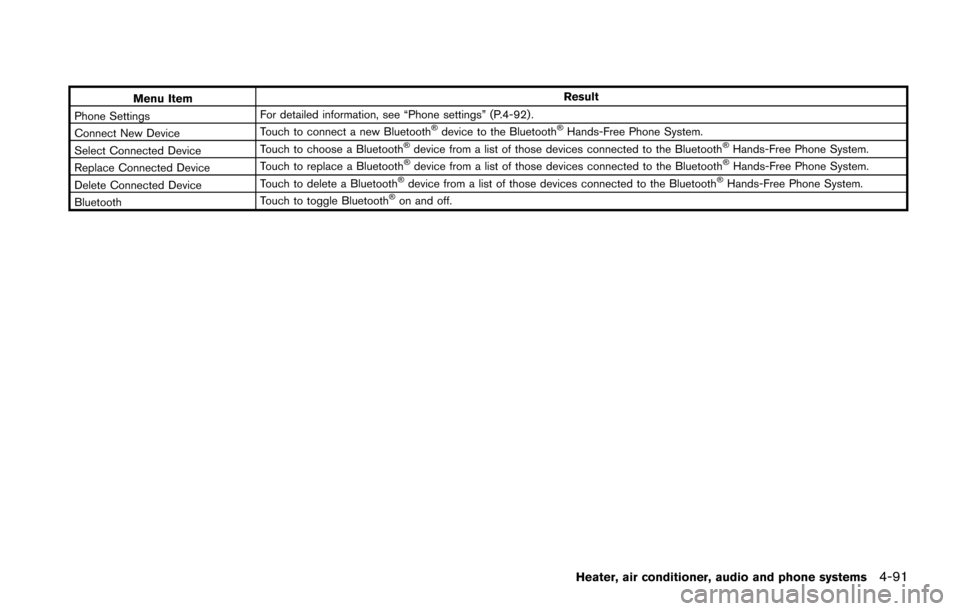
Menu ItemResult
Phone Settings For detailed information, see “Phone settings” (P.4-92) .
Connect New Device Touch to connect a new Bluetooth
®device to the Bluetooth®Hands-Free Phone System.
Select Connected Device Touch to choose a Bluetooth®device from a list of those devices connected to the Bluetooth®Hands-Free Phone System.
Replace Connected Device Touch to replace a Bluetooth®device from a list of those devices connected to the Bluetooth®Hands-Free Phone System.
Delete Connected Device Touch to delete a Bluetooth®device from a list of those devices connected to the Bluetooth®Hands-Free Phone System.
Bluetooth Touch to toggle Bluetooth®on and off.
Heater, air conditioner, audio and phone systems4-91
Page 247 of 402
4-92Heater, air conditioner, audio and phone systems
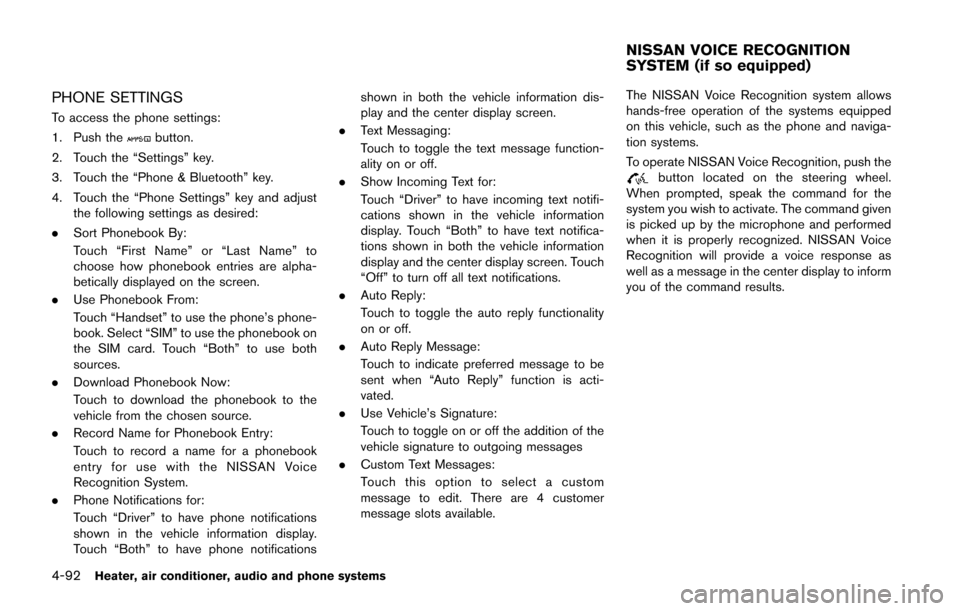
PHONE SETTINGS
To access the phone settings:
1. Push the
button.
2. Touch the “Settings” key.
3. Touch the “Phone & Bluetooth” key.
4. Touch the “Phone Settings” key and adjust the following settings as desired:
. Sort Phonebook By:
Touch “First Name” or “Last Name” to
choose how phonebook entries are alpha-
betically displayed on the screen.
. Use Phonebook From:
Touch “Handset” to use the phone’s phone-
book. Select “SIM” to use the phonebook on
the SIM card. Touch “Both” to use both
sources.
. Download Phonebook Now:
Touch to download the phonebook to the
vehicle from the chosen source.
. Record Name for Phonebook Entry:
Touch to record a name for a phonebook
entry for use with the NISSAN Voice
Recognition System.
. Phone Notifications for:
Touch “Driver” to have phone notifications
shown in the vehicle information display.
Touch “Both” to have phone notifications shown in both the vehicle information dis-
play and the center display screen.
. Text Messaging:
Touch to toggle the text message function-
ality on or off.
. Show Incoming Text for:
Touch “Driver” to have incoming text notifi-
cations shown in the vehicle information
display. Touch “Both” to have text notifica-
tions shown in both the vehicle information
display and the center display screen. Touch
“Off” to turn off all text notifications.
. Auto Reply:
Touch to toggle the auto reply functionality
on or off.
. Auto Reply Message:
Touch to indicate preferred message to be
sent when “Auto Reply” function is acti-
vated.
. Use Vehicle’s Signature:
Touch to toggle on or off the addition of the
vehicle signature to outgoing messages
. Custom Text Messages:
Touch this option to select a custom
message to edit. There are 4 customer
message slots available. The NISSAN Voice Recognition system allows
hands-free operation of the systems equipped
on this vehicle, such as the phone and naviga-
tion systems.
To operate NISSAN Voice Recognition, push the
button located on the steering wheel.
When prompted, speak the command for the
system you wish to activate. The command given
is picked up by the microphone and performed
when it is properly recognized. NISSAN Voice
Recognition will provide a voice response as
well as a message in the center display to inform
you of the command results.
NISSAN VOICE RECOGNITION
SYSTEM (if so equipped)
Page 249 of 402
4-94Heater, air conditioner, audio and phone systems
from recognizing the voice commands cor-
rectly.
. Wait until a tone sounds before speaking a
command. Otherwise, the command will not
be received properly.
. Start speaking a command within 3.5
seconds after the tone sounds.
. Speak in a natural voice without pausing
between words.
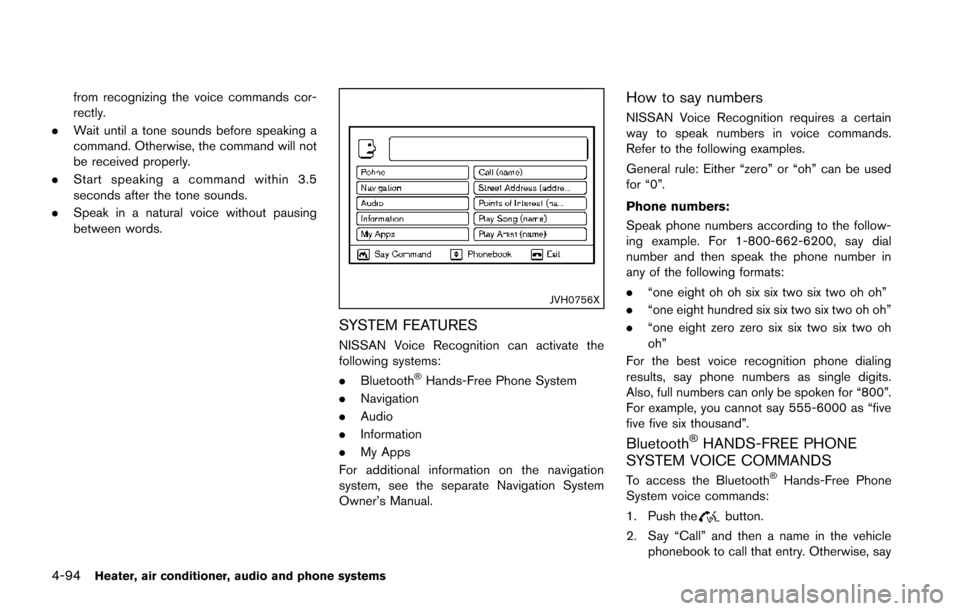
JVH0756X
SYSTEM FEATURES
NISSAN Voice Recognition can activate the
following systems:
.Bluetooth
®Hands-Free Phone System
. Navigation
. Audio
. Information
. My Apps
For additional information on the navigation
system, see the separate Navigation System
Owner’s Manual.
How to say numbers
NISSAN Voice Recognition requires a certain
way to speak numbers in voice commands.
Refer to the following examples.
General rule: Either “zero” or “oh” can be used
for “0”.
Phone numbers:
Speak phone numbers according to the follow-
ing example. For 1-800-662-6200, say dial
number and then speak the phone number in
any of the following formats:
. “one eight oh oh six six two six two oh oh”
. “one eight hundred six six two six two oh oh”
. “one eight zero zero six six two six two oh
oh”
For the best voice recognition phone dialing
results, say phone numbers as single digits.
Also, full numbers can only be spoken for “800”.
For example, you cannot say 555-6000 as “five
five five six thousand”.
Bluetooth®HANDS-FREE PHONE
SYSTEM VOICE COMMANDS
To access the Bluetooth®Hands-Free Phone
System voice commands:
1. Push the
button.
2. Say “Call” and then a name in the vehicle phonebook to call that entry. Otherwise, say
Page 250 of 402
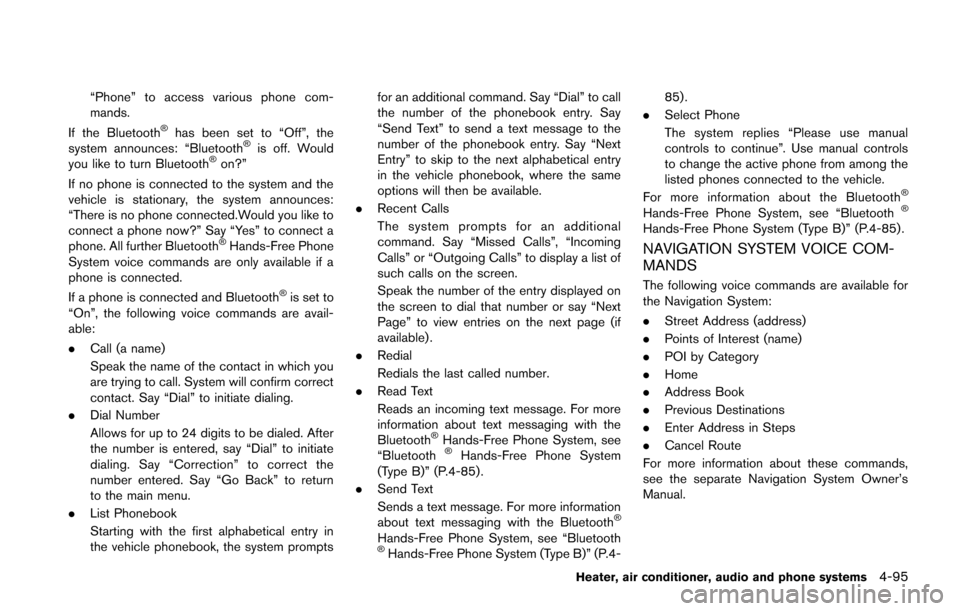
“Phone” to access various phone com-
mands.
If the Bluetooth
®has been set to “Off”, the
system announces: “Bluetooth®is off. Would
you like to turn Bluetooth®on?”
If no phone is connected to the system and the
vehicle is stationary, the system announces:
“There is no phone connected.Would you like to
connect a phone now?” Say “Yes” to connect a
phone. All further Bluetooth
®Hands-Free Phone
System voice commands are only available if a
phone is connected.
If a phone is connected and Bluetooth
®is set to
“On”, the following voice commands are avail-
able:
. Call (a name)
Speak the name of the contact in which you
are trying to call. System will confirm correct
contact. Say “Dial” to initiate dialing.
. Dial Number
Allows for up to 24 digits to be dialed. After
the number is entered, say “Dial” to initiate
dialing. Say “Correction” to correct the
number entered. Say “Go Back” to return
to the main menu.
. List Phonebook
Starting with the first alphabetical entry in
the vehicle phonebook, the system prompts for an additional command. Say “Dial” to call
the number of the phonebook entry. Say
“Send Text” to send a text message to the
number of the phonebook entry. Say “Next
Entry” to skip to the next alphabetical entry
in the vehicle phonebook, where the same
options will then be available.
. Recent Calls
The system prompts for an additional
command. Say “Missed Calls”, “Incoming
Calls” or “Outgoing Calls” to display a list of
such calls on the screen.
Speak the number of the entry displayed on
the screen to dial that number or say “Next
Page” to view entries on the next page (if
available) .
. Redial
Redials the last called number.
. Read Text
Reads an incoming text message. For more
information about text messaging with the
Bluetooth
®Hands-Free Phone System, see
“Bluetooth®Hands-Free Phone System
(Type B)” (P.4-85).
. Send Text
Sends a text message. For more information
about text messaging with the Bluetooth
®
Hands-Free Phone System, see “Bluetooth®Hands-Free Phone System (Type B)” (P.4- 85).
. Select Phone
The system replies “Please use manual
controls to continue”. Use manual controls
to change the active phone from among the
listed phones connected to the vehicle.
For more information about the Bluetooth
®
Hands-Free Phone System, see “Bluetooth®
Hands-Free Phone System (Type B)” (P.4-85) .
NAVIGATION SYSTEM VOICE COM-
MANDS
The following voice commands are available for
the Navigation System:
. Street Address (address)
. Points of Interest (name)
. POI by Category
. Home
. Address Book
. Previous Destinations
. Enter Address in Steps
. Cancel Route
For more information about these commands,
see the separate Navigation System Owner’s
Manual.
Heater, air conditioner, audio and phone systems4-95
Page 328 of 402
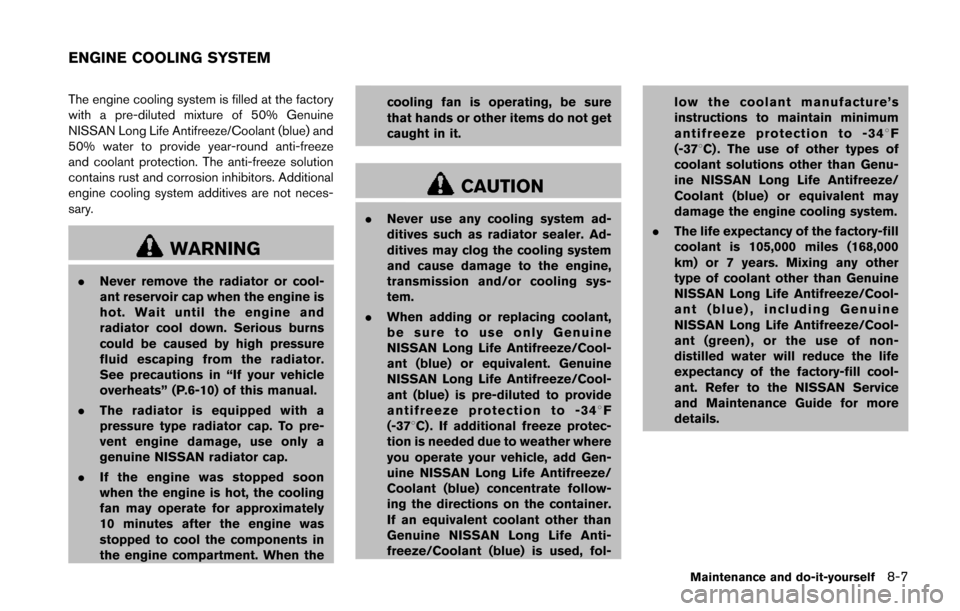
The engine cooling system is filled at the factory
with a pre-diluted mixture of 50% Genuine
NISSAN Long Life Antifreeze/Coolant (blue) and
50% water to provide year-round anti-freeze
and coolant protection. The anti-freeze solution
contains rust and corrosion inhibitors. Additional
engine cooling system additives are not neces-
sary.
WARNING
.Never remove the radiator or cool-
ant reservoir cap when the engine is
hot. Wait until the engine and
radiator cool down. Serious burns
could be caused by high pressure
fluid escaping from the radiator.
See precautions in “If your vehicle
overheats” (P.6-10) of this manual.
. The radiator is equipped with a
pressure type radiator cap. To pre-
vent engine damage, use only a
genuine NISSAN radiator cap.
. If the engine was stopped soon
when the engine is hot, the cooling
fan may operate for approximately
10 minutes after the engine was
stopped to cool the components in
the engine compartment. When the cooling fan is operating, be sure
that hands or other items do not get
caught in it.
CAUTION
.
Never use any cooling system ad-
ditives such as radiator sealer. Ad-
ditives may clog the cooling system
and cause damage to the engine,
transmission and/or cooling sys-
tem.
. When adding or replacing coolant,
be sure to use only Genuine
NISSAN Long Life Antifreeze/Cool-
ant (blue) or equivalent. Genuine
NISSAN Long Life Antifreeze/Cool-
ant (blue) is pre-diluted to provide
antifreeze protection to -348 F
(-378C) . If additional freeze protec-
tion is needed due to weather where
you operate your vehicle, add Gen-
uine NISSAN Long Life Antifreeze/
Coolant (blue) concentrate follow-
ing the directions on the container.
If an equivalent coolant other than
Genuine NISSAN Long Life Anti-
freeze/Coolant (blue) is used, fol- low the coolant manufacture’s
instructions to maintain minimum
antifreeze protection to -348
F
(-378C) . The use of other types of
coolant solutions other than Genu-
ine NISSAN Long Life Antifreeze/
Coolant (blue) or equivalent may
damage the engine cooling system.
. The life expectancy of the factory-fill
coolant is 105,000 miles (168,000
km) or 7 years. Mixing any other
type of coolant other than Genuine
NISSAN Long Life Antifreeze/Cool-
ant (blue) , including Genuine
NISSAN Long Life Antifreeze/Cool-
ant (green) , or the use of non-
distilled water will reduce the life
expectancy of the factory-fill cool-
ant. Refer to the NISSAN Service
and Maintenance Guide for more
details.
Maintenance and do-it-yourself8-7
ENGINE COOLING SYSTEM
Page 367 of 402
9-2Technical and consumer information
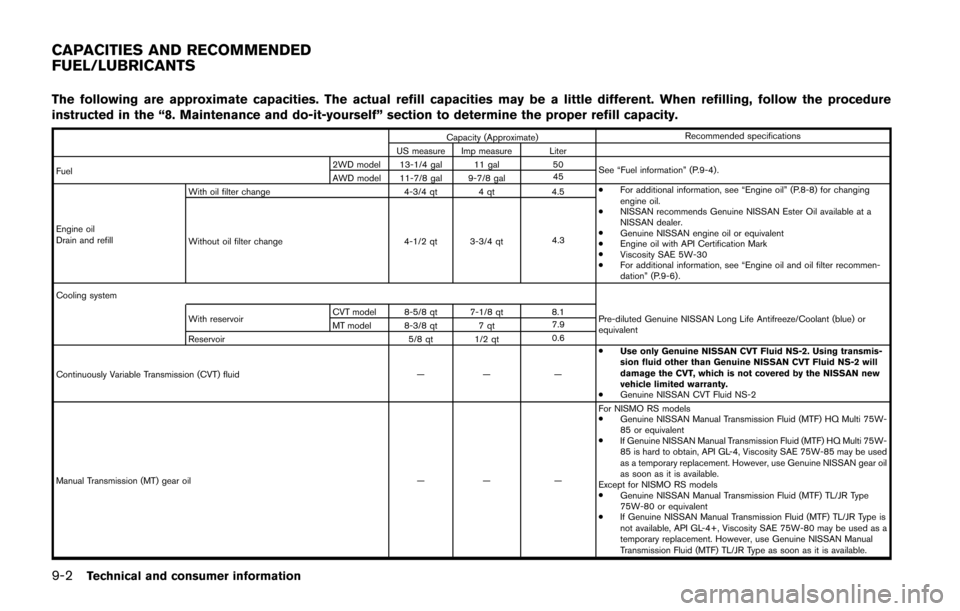
The following are approximate capacities. The actual refill capacities may be a little different. When refilling, follow the procedure
instructed in the “8. Maintenance and do-it-yourself” section to determine the proper refill capacity.
Capacity (Approximate)Recommended specifications
US measure Imp measure Liter
Fuel 2WD model 13-1/4 gal 11 gal
50
See “Fuel information” (P.9-4).
AWD model 11-7/8 gal 9-7/8 gal 45
Engine oil
Drain and refill With oil filter change
4-3/4 qt 4 qt4.5.
For additional information, see “Engine oil” (P.8-8) for changing
engine oil.
. NISSAN recommends Genuine NISSAN Ester Oil available at a
NISSAN dealer.
. Genuine NISSAN engine oil or equivalent
. Engine oil with API Certification Mark
. Viscosity SAE 5W-30
. For additional information, see “Engine oil and oil filter recommen-
dation” (P.9-6).
Without oil filter change
4-1/2 qt 3-3/4 qt4.3
Cooling system With reservoir CVT model 8-5/8 qt 7-1/8 qt
8.1
Pre-diluted Genuine NISSAN Long Life Antifreeze/Coolant (blue) or
equivalent
MT model 8-3/8 qt 7 qt
7.9
Reservoir 5/8 qt 1/2 qt0.6
Continuously Variable Transmission (CVT) fluid —— —.
Use only Genuine NISSAN CVT Fluid NS-2. Using transmis-
sion fluid other than Genuine NISSAN CVT Fluid NS-2 will
damage the CVT, which is not covered by the NISSAN new
vehicle limited warranty.
. Genuine NISSAN CVT Fluid NS-2
Manual Transmission (MT) gear oil —— —For NISMO RS models
.
Genuine NISSAN Manual Transmission Fluid (MTF) HQ Multi 75W-
85 or equivalent
. If Genuine NISSAN Manual Transmission Fluid (MTF) HQ Multi 75W-
85 is hard to obtain, API GL-4, Viscosity SAE 75W-85 may be used
as a temporary replacement. However, use Genuine NISSAN gear oil
as soon as it is available.
Except for NISMO RS models
. Genuine NISSAN Manual Transmission Fluid (MTF) TL/JR Type
75W-80 or equivalent
. If Genuine NISSAN Manual Transmission Fluid (MTF) TL/JR Type is
not available, API GL-4+, Viscosity SAE 75W-80 may be used as a
temporary replacement. However, use Genuine NISSAN Manual
Transmission Fluid (MTF) TL/JR Type as soon as it is available.
CAPACITIES AND RECOMMENDED
FUEL/LUBRICANTS
Page 388 of 402
10 Index
A
ABS (Anti-lock Braking System) ............................ 5-40
Adjusting the screen .................................................. 4-19
Advanced air bag system ......................................... 1-44
Air bag systemAdvanced air bag system .................................. 1-44
Front passenger air bag and status light....... 1-46
Front-seat mounted side-impact
supplemental air bag system ............................ 1-49
Roof-mounted curtain side-impact
supplemental air bag system ............................ 1-49
Air bag warning labels............................................... 1-52
Air bag warning light...................................... 1-52, 2-17
Air cleaner housing filter ........................................... 8-16
Air conditioner Air conditioner operation.................................... 4-20
Air conditioner service ........................................ 4-27
Air conditioner specification label.................... 9-12
Air conditioning system refrigerant and
lubricant recommendations....................... 4-27, 9-7
In-cabin microfilter ............................................... 4-27
Air conditioner operation........................................... 4-23
Alarm, How to stop alarm (see vehicle
security system)........................................................... 2-30
Alcohol, drugs and driving.......................................... 5-8
All-wheel drive (AWD)............................................... 5-33
Antenna.......................................................................... 4-70
Anti-lock Braking System (ABS) ............................ 5-40
Anti-lock braking system (ABS) warning light..... 2-13
Appearance care Exterior appearance care ...................................... 7-2
Interior appearance care ....................................... 7-5
Application download................................................. 4-71
Audible reminders....................................................... 2-19
Audio operation precautions.................................... 4-28 Audio setup .................................................................... 4-6
Audio system................................................................ 4-28
Steering wheel audio controls.......................... 4-69
Audio system voice commands............................... 4-96
Autolight system.......................................................... 2-36
Automatic Air conditioner....................................................... 4-24
Door locks................................................................. 3-6
AUX (Auxiliary) input....................................... 4-47, 4-52
Average fuel consumption ........................................ 2-11
Avoiding collision and rollover ................................... 5-7
B
Back door (See lift gate) .......................................... 3-20
Battery............................................................................ 8-13 Battery replacement, Intelligent Key................ 8-24
Battery replacement, Keyfob............................. 8-23
Battery saver system........................................... 2-37
Variable voltage control system........................ 8-14
Before starting the engine........................................ 5-15
Bluetooth
®Hands-Free Phone System
(Type B)......................................................................... 4-85
Bluetooth
®Hands-Free Phone System
(Type A) ......................................................................... 4-72
Bluetooth
®hands-free phone system
voice commands ......................................................... 4-94
Bluetooth
®settings..................................................... 4-90
Bluetooth®streaming audio ..................................... 4-67
Booster seats............................................................... 1-34
Brake Anti-lock Braking System (ABS) ..................... 5-40
Brake and clutch fluid......................................... 8-11
Brake system......................................................... 5-39
Parking brake operation ..................................... 5-29
Warning light......................................................... 2-13 Break-in schedule ....................................................... 5-31
Brightness control
Display ON/OFF button ........................................ 4-6
Instrument panel................................................... 2-38
Bulb check/instrument panel ................................... 2-13
Bulb replacement........................................................ 8-26
C
Cabin air filter............................................................... 4-27
Capacities and recommended fuel/lubricants ....... 9-2
Car phone or CB radio ............................................. 4-71
Cargo cover.................................................................. 2-44
Cargo floor box............................................................ 2-43
Catalytic converter, Three way catalyst................... 5-4
CD/USB memory care and cleaning ..................... 4-68
Check tire pressure warning...................................... 2-7
Child restraints............................................................. 1-18 Booster seats........................................................ 1-34
LATCH system...................................................... 1-20
Precautions on child restraints......................... 1-18
Child safety................................................................... 1-16
Child safety rear door lock ......................................... 3-6
Chimes, Audible reminders ...................................... 2-19
Circuit breaker, Fusible link...................................... 8-20
Cleaning exterior and interior............................ 7-2, 7-5
Clock.............................................................................. 2-41
Clock (models with navigation system)................... 4-8
Clutch fluid.................................................................... 8-11
Coat hook ..................................................................... 2-44
Cockpit ............................................................................ 2-3
Cold weather driving.................................................. 5-43
Compact Disc (CD) player (See
audio system)....................................... 4-44, 4-50, 4-60
Connect phone............................................................ 4-71
Connecting procedure............................................... 4-87
Page 390 of 402
Fuel-filler cap......................................................... 3-21
Fuel-filler door....................................................... 3-21
Gauge ........................................................................ 2-9
Fuel Efficient Driving Tips ......................................... 5-32
Fuses.............................................................................. 8-19
Fusible links.................................................................. 8-20
G
Gas cap......................................................................... 3-21
Gauge .............................................................................. 2-5 Engine coolant temperature gauge .................... 2-8
Fuel gauge................................................................ 2-9
Odometer.................................................................. 2-6
Speedometer............................................................ 2-6
Tachometer ............................................................... 2-8
Trip computer........................................................ 2-10
General maintenance ................................................... 8-2
Giving voice commands............................................ 4-93
Glove box...................................................................... 2-44
H
Hands-Free Phone System, Bluetooth®
(Type A) ......................................................................... 4-72
Hazard warning flasher switch................................... 6-2
Head restraints/headrests........................................... 1-5
Headlights Bulb replacement................................................. 8-27
Headlight switch................................................... 2-35
Heated seats................................................................ 2-40
Heater Engine block heater............................................. 5-44
Heater and air conditioner operation.............. 4-20
Help voice commands ............................................... 4-96
Hood release................................................................ 3-19
Horn................................................................................ 2-39 How to say numbers.................................................. 4-94
How to use brightness control button................... 4-15
How to use the APPS·i button................................ 4-12
How to use the back button........................... 4-6, 4-11
How to use the CAMERA button........................... 4-15
How to use the ON·OFF button/Volume
control knob.................................................................. 4-15
How to use the SETUP button ................................. 4-6
I
IC Regulatory information ......................................... 4-86
Ignition switch (with Intelligent Key system) ............................. 5-12
(without Intelligent Key system) ....................... 5-10
Key positions......................................................... 5-12
Immobilizer system...................................................... 2-31
In-cabin microfilter ...................................................... 4-27
Indicator lights.............................................................. 2-17
Information voice commands ................................... 4-96
Initialization.................................................................... 4-93
Inside mirror.................................................................. 3-25
Inspection/maintenance (I/M) test .......................... 9-20
Instrument brightness control .................................. 2-38
Instrument panel............................................................ 2-4
Integrated control system ............................. 2-21, 5-25
Intelligent Key system ................................................ 3-10 Intelligent Key system warning light................ 2-14
Key operating range ............................................ 3-12
Key operation ........................................................ 3-13
P position selecting warning light.................... 2-16
Remote keyless operation.................................. 3-16
Interior light replacement........................................... 8-28
Interior lights................................................................. 2-49
iPod
®connecting........................................................ 4-45
iPod®player operation................................... 4-54, 4-63
ISOFIX child restraint................................................. 1-20
J
Jump starting.................................................................. 6-8
K
Keyless entry (See remote keyless entry system) .................... 3-7
With Intelligent Key system (See Intelligent
Key system) ........................................................... 3-16
Keys.................................................................................. 3-2 For Intelligent Key system.................................. 3-10
L
LabelsAir bag warning labels........................................ 1-52
Air conditioner specification label.................... 9-12
Emission control information label................... 9-11
Engine serial number........................................... 9-10
F.M.V.S.S./C.M.V.S.S. certification label ........ 9-11
Tire and Loading information label ....... 8-31, 9-11
Vehicle identification number (VIN) ................. 9-10
LATCH system............................................................. 1-20
License plate, Installing front license plate .......... 9-13
Lift gate.......................................................................... 3-20
Light Air bag warning light........................................... 1-52
Bulb replacement................................................. 8-26
Fog light switch.................................................... 2-39
Headlight switch................................................... 2-35
Headlights bulb replacement............................ 8-27
Indicator lights....................................................... 2-17
Interior lights.......................................................... 2-49
Map lights .............................................................. 2-50
Replacement.......................................................... 8-26
10-3