2014 NISSAN JUKE navigation system
[x] Cancel search: navigation systemPage 249 of 402
4-94Heater, air conditioner, audio and phone systems
from recognizing the voice commands cor-
rectly.
. Wait until a tone sounds before speaking a
command. Otherwise, the command will not
be received properly.
. Start speaking a command within 3.5
seconds after the tone sounds.
. Speak in a natural voice without pausing
between words.
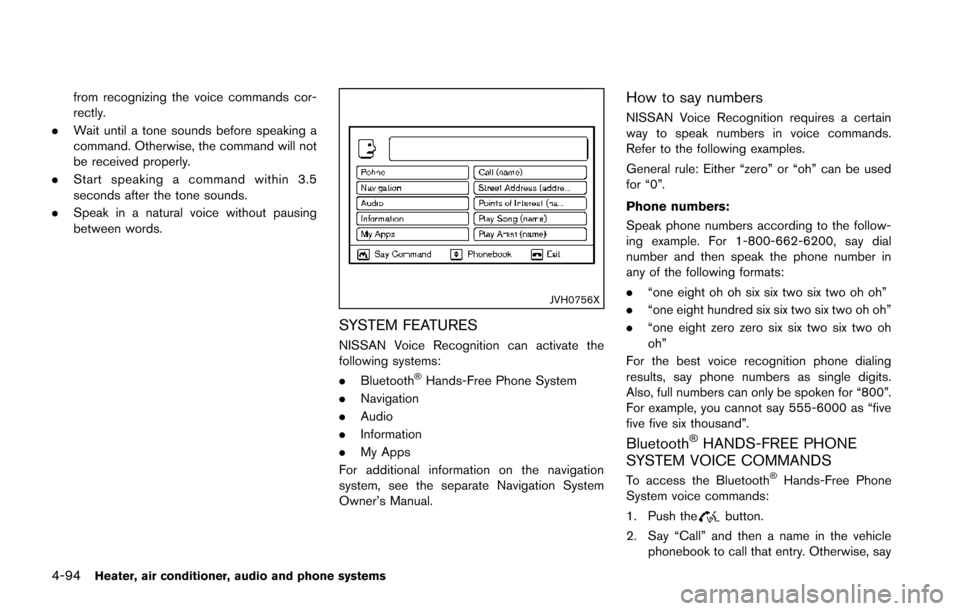
JVH0756X
SYSTEM FEATURES
NISSAN Voice Recognition can activate the
following systems:
.Bluetooth
®Hands-Free Phone System
. Navigation
. Audio
. Information
. My Apps
For additional information on the navigation
system, see the separate Navigation System
Owner’s Manual.
How to say numbers
NISSAN Voice Recognition requires a certain
way to speak numbers in voice commands.
Refer to the following examples.
General rule: Either “zero” or “oh” can be used
for “0”.
Phone numbers:
Speak phone numbers according to the follow-
ing example. For 1-800-662-6200, say dial
number and then speak the phone number in
any of the following formats:
. “one eight oh oh six six two six two oh oh”
. “one eight hundred six six two six two oh oh”
. “one eight zero zero six six two six two oh
oh”
For the best voice recognition phone dialing
results, say phone numbers as single digits.
Also, full numbers can only be spoken for “800”.
For example, you cannot say 555-6000 as “five
five five six thousand”.
Bluetooth®HANDS-FREE PHONE
SYSTEM VOICE COMMANDS
To access the Bluetooth®Hands-Free Phone
System voice commands:
1. Push the
button.
2. Say “Call” and then a name in the vehicle phonebook to call that entry. Otherwise, say
Page 250 of 402
“Phone” to access various phone com-
mands.
If the Bluetooth
®has been set to “Off”, the
system announces: “Bluetooth®is off. Would
you like to turn Bluetooth®on?”
If no phone is connected to the system and the
vehicle is stationary, the system announces:
“There is no phone connected.Would you like to
connect a phone now?” Say “Yes” to connect a
phone. All further Bluetooth
®Hands-Free Phone
System voice commands are only available if a
phone is connected.
If a phone is connected and Bluetooth
®is set to
“On”, the following voice commands are avail-
able:
. Call (a name)
Speak the name of the contact in which you
are trying to call. System will confirm correct
contact. Say “Dial” to initiate dialing.
. Dial Number
Allows for up to 24 digits to be dialed. After
the number is entered, say “Dial” to initiate
dialing. Say “Correction” to correct the
number entered. Say “Go Back” to return
to the main menu.
. List Phonebook
Starting with the first alphabetical entry in
the vehicle phonebook, the system prompts for an additional command. Say “Dial” to call
the number of the phonebook entry. Say
“Send Text” to send a text message to the
number of the phonebook entry. Say “Next
Entry” to skip to the next alphabetical entry
in the vehicle phonebook, where the same
options will then be available.
. Recent Calls
The system prompts for an additional
command. Say “Missed Calls”, “Incoming
Calls” or “Outgoing Calls” to display a list of
such calls on the screen.
Speak the number of the entry displayed on
the screen to dial that number or say “Next
Page” to view entries on the next page (if
available) .
. Redial
Redials the last called number.
. Read Text
Reads an incoming text message. For more
information about text messaging with the
Bluetooth
®Hands-Free Phone System, see
“Bluetooth®Hands-Free Phone System
(Type B)” (P.4-85).
. Send Text
Sends a text message. For more information
about text messaging with the Bluetooth
®
Hands-Free Phone System, see “Bluetooth®Hands-Free Phone System (Type B)” (P.4- 85).
. Select Phone
The system replies “Please use manual
controls to continue”. Use manual controls
to change the active phone from among the
listed phones connected to the vehicle.
For more information about the Bluetooth
®
Hands-Free Phone System, see “Bluetooth®
Hands-Free Phone System (Type B)” (P.4-85) .
NAVIGATION SYSTEM VOICE COM-
MANDS
The following voice commands are available for
the Navigation System:
. Street Address (address)
. Points of Interest (name)
. POI by Category
. Home
. Address Book
. Previous Destinations
. Enter Address in Steps
. Cancel Route
For more information about these commands,
see the separate Navigation System Owner’s
Manual.
Heater, air conditioner, audio and phone systems4-95
Page 251 of 402
4-96Heater, air conditioner, audio and phone systems
AUDIO SYSTEM VOICE COMMANDS
To access the audio system voice commands:
1. Push the
button.
2. Say “Audio”.
3. Speak a command from the following available commands:
. Play (AM, FM, etc.)
Allows user to select radio band
. Tune AM (number)
Allows user to tune directly to a desired AM
frequency
. Tune FM (number)
Allows user to tune directly to a desired FM
frequency
. SXM channel (number)
Allows user to tune directly to a desired
SXM station (if so equipped)
. CD Track (number)
Allows user to select track to be played
. Play Song (name)
Allows user to select song name to be
played
. Play Artist (name)
Allows user to select artist to be played
. Play Album (name)
Allows user to select album name to be
played For more information about the audio system,
see “FM-AM-SAT radio with Compact Disc (CD)
player (Type C)” (P.4-57) .INFORMATION VOICE COMMANDS
The following voice commands are available for
the information functions of the Navigation
System:
.
Traffic
. Fuel Prices
. Stocks
. Movie Listings
. Current Weather
. Weather Map
. 5 — day Forecast
. 6 — hour Forecast
For more information about these commands,
see the separate Navigation System Owner’s
Manual.
MY APPS VOICE COMMANDS
Many Apps can be accessed using this voice
command. See “NissanConnectTMApp smart-
phone integration” (P.4-71) .
HELP VOICE COMMANDS
The following voice commands can be spoken
to have the system provide instructions and tips
for using the NISSAN Voice Recognition sys-
tem.
. List Commands
. What Can I Say?
. General Help
. Quit
. Exit
Page 278 of 402
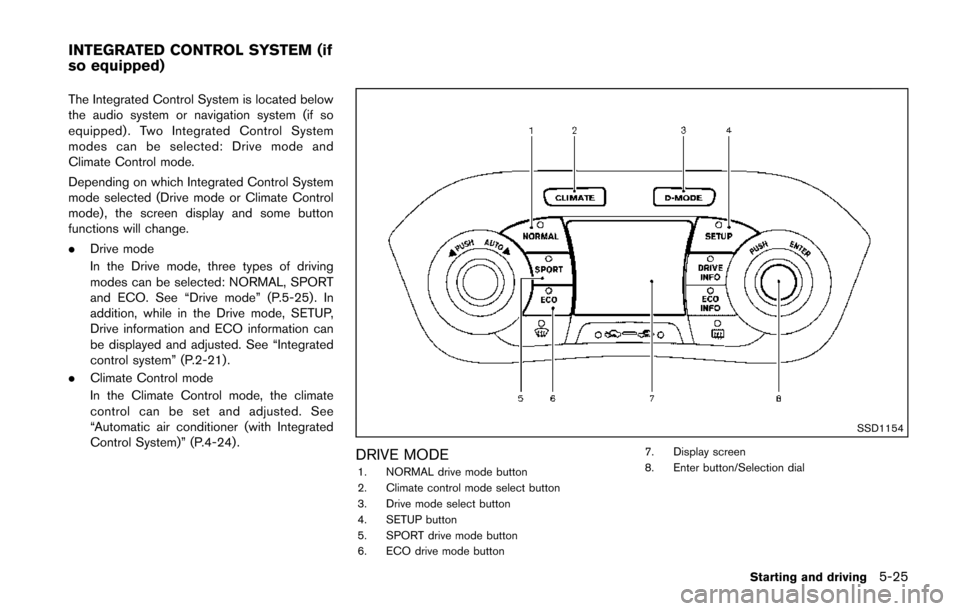
The Integrated Control System is located below
the audio system or navigation system (if so
equipped) . Two Integrated Control System
modes can be selected: Drive mode and
Climate Control mode.
Depending on which Integrated Control System
mode selected (Drive mode or Climate Control
mode) , the screen display and some button
functions will change.
.Drive mode
In the Drive mode, three types of driving
modes can be selected: NORMAL, SPORT
and ECO. See “Drive mode” (P.5-25). In
addition, while in the Drive mode, SETUP,
Drive information and ECO information can
be displayed and adjusted. See “Integrated
control system” (P.2-21).
. Climate Control mode
In the Climate Control mode, the climate
control can be set and adjusted. See
“Automatic air conditioner (with Integrated
Control System)” (P.4-24) .
SSD1154
DRIVE MODE1. NORMAL drive mode button
2. Climate control mode select button
3. Drive mode select button
4. SETUP button
5. SPORT drive mode button
6. ECO drive mode button 7. Display screen
8. Enter button/Selection dial
Starting and driving5-25
INTEGRATED CONTROL SYSTEM (if
so equipped)
Page 285 of 402
5-32Starting and driving
Follow these easy-to-use Fuel Efficient Driving
Tips to help you achieve the most fuel economy
from your vehicle.
1. Use smooth accelerator and brake pedalapplication.
.Avoid rapid starts and stops..Use smooth, gentle accelerator andbrake application whenever possible.
.Maintain constant speed while commut-
ing and coast whenever possible.
2. Maintain constant speed.
.Look ahead to try and anticipate and minimize stops.
.Synchronizing your speed with traffic
lights allows you to reduce your number
of stops.
.Maintaining a steady speed can minimize red light stops and improve fuel effi-
ciency.
3. Use air conditioning (A/C) at higher vehicle speeds.
.Below 40 MPH (64 km/h), it is moreefficient to open windows to cool the
vehicle due to reduced engine load.
.Above 40 MPH (64 km/h) , it is moreefficient to use A/C to cool the vehicle
due to increased aerodynamic drag.
.Recirculating the cool air in the cabinwhen the A/C is on reduces cooling load.
4. Drive at economical speeds and distances.
.Observing the speed limit and not ex- ceeding 60 MPH (97 km/h) (where
legally allowed) can improve fuel effi-
ciency due to reduced aerodynamic
drag.
.Maintaining a safe following distancebehind other vehicles reduces unneces-
sary braking.
.Safely monitoring traffic to anticipatechanges in speed permits reduced brak-
ing and smooth acceleration changes.
.Select a gear range suitable to road conditions.
5. Use cruise control.
.Using cruise control during highway driving helps maintain a steady speed.
.Cruise control is particularly effective in providing fuel savings when driving on
flat terrains.
6. Plan for the shortest route.
.Utilize a map or navigation system to determine the best route to save time.
7. Avoid idling.
.Shutting off your engine when safe for stops exceeding 30-60 seconds saves fuel and reduces emissions.
8. Buy an automated pass for toll roads.
.Automated passes permit drivers to use special lanes to maintain cruising speed
through the toll and avoid stopping and
starting.
9. Winter warm up.
.Limit idling time to minimize impact to fuel economy.
.Vehicles typically need no more than 30seconds of idling at start-up to effectively
circulate the engine oil before driving.
.Your vehicle will reach its ideal operatingtemperature more quickly while driving
versus idling.
10. Keeping your vehicle cool.
.Park your vehicle in a covered parking area or in the shade whenever possible.
.When entering a hot vehicle, opening thewindows will help to reduce the inside
temperature faster, resulting in reduced
demand on your A/C system.
FUEL EFFICIENT DRIVING TIPS
Page 388 of 402
10 Index
A
ABS (Anti-lock Braking System) ............................ 5-40
Adjusting the screen .................................................. 4-19
Advanced air bag system ......................................... 1-44
Air bag systemAdvanced air bag system .................................. 1-44
Front passenger air bag and status light....... 1-46
Front-seat mounted side-impact
supplemental air bag system ............................ 1-49
Roof-mounted curtain side-impact
supplemental air bag system ............................ 1-49
Air bag warning labels............................................... 1-52
Air bag warning light...................................... 1-52, 2-17
Air cleaner housing filter ........................................... 8-16
Air conditioner Air conditioner operation.................................... 4-20
Air conditioner service ........................................ 4-27
Air conditioner specification label.................... 9-12
Air conditioning system refrigerant and
lubricant recommendations....................... 4-27, 9-7
In-cabin microfilter ............................................... 4-27
Air conditioner operation........................................... 4-23
Alarm, How to stop alarm (see vehicle
security system)........................................................... 2-30
Alcohol, drugs and driving.......................................... 5-8
All-wheel drive (AWD)............................................... 5-33
Antenna.......................................................................... 4-70
Anti-lock Braking System (ABS) ............................ 5-40
Anti-lock braking system (ABS) warning light..... 2-13
Appearance care Exterior appearance care ...................................... 7-2
Interior appearance care ....................................... 7-5
Application download................................................. 4-71
Audible reminders....................................................... 2-19
Audio operation precautions.................................... 4-28 Audio setup .................................................................... 4-6
Audio system................................................................ 4-28
Steering wheel audio controls.......................... 4-69
Audio system voice commands............................... 4-96
Autolight system.......................................................... 2-36
Automatic Air conditioner....................................................... 4-24
Door locks................................................................. 3-6
AUX (Auxiliary) input....................................... 4-47, 4-52
Average fuel consumption ........................................ 2-11
Avoiding collision and rollover ................................... 5-7
B
Back door (See lift gate) .......................................... 3-20
Battery............................................................................ 8-13 Battery replacement, Intelligent Key................ 8-24
Battery replacement, Keyfob............................. 8-23
Battery saver system........................................... 2-37
Variable voltage control system........................ 8-14
Before starting the engine........................................ 5-15
Bluetooth
®Hands-Free Phone System
(Type B)......................................................................... 4-85
Bluetooth
®Hands-Free Phone System
(Type A) ......................................................................... 4-72
Bluetooth
®hands-free phone system
voice commands ......................................................... 4-94
Bluetooth
®settings..................................................... 4-90
Bluetooth®streaming audio ..................................... 4-67
Booster seats............................................................... 1-34
Brake Anti-lock Braking System (ABS) ..................... 5-40
Brake and clutch fluid......................................... 8-11
Brake system......................................................... 5-39
Parking brake operation ..................................... 5-29
Warning light......................................................... 2-13 Break-in schedule ....................................................... 5-31
Brightness control
Display ON/OFF button ........................................ 4-6
Instrument panel................................................... 2-38
Bulb check/instrument panel ................................... 2-13
Bulb replacement........................................................ 8-26
C
Cabin air filter............................................................... 4-27
Capacities and recommended fuel/lubricants ....... 9-2
Car phone or CB radio ............................................. 4-71
Cargo cover.................................................................. 2-44
Cargo floor box............................................................ 2-43
Catalytic converter, Three way catalyst................... 5-4
CD/USB memory care and cleaning ..................... 4-68
Check tire pressure warning...................................... 2-7
Child restraints............................................................. 1-18 Booster seats........................................................ 1-34
LATCH system...................................................... 1-20
Precautions on child restraints......................... 1-18
Child safety................................................................... 1-16
Child safety rear door lock ......................................... 3-6
Chimes, Audible reminders ...................................... 2-19
Circuit breaker, Fusible link...................................... 8-20
Cleaning exterior and interior............................ 7-2, 7-5
Clock.............................................................................. 2-41
Clock (models with navigation system)................... 4-8
Clutch fluid.................................................................... 8-11
Coat hook ..................................................................... 2-44
Cockpit ............................................................................ 2-3
Cold weather driving.................................................. 5-43
Compact Disc (CD) player (See
audio system)....................................... 4-44, 4-50, 4-60
Connect phone............................................................ 4-71
Connecting procedure............................................... 4-87
Page 391 of 402
10-4
Warning/indicator lights and
audible reminders................................................. 2-13
Lights, Exterior and interior light replacement ..... 8-28
Loading information (See vehicle
loading information) .................................................... 9-14
Lock Automatic door locks ............................................. 3-6
Door locks................................................................. 3-4
Lift gate lock.......................................................... 3-20
Power door lock...................................................... 3-4
Loose fuel cap warning.................................... 2-7, 3-23
Low fuel warning light................................................ 2-15
Low tire pressure warning light............................... 2-15
Low tire pressure warning system
(See tire pressure monitoring system (TPMS)) .... 5-4
M
Maintenance Battery..................................................................... 8-13
General maintenance ............................................. 8-2
Inside the vehicle .................................................... 8-3
Maintenance precautions...................................... 8-5
Maintenance requirements.................................... 8-2
Outside the vehicle................................................. 8-2
Seat belt maintenance........................................ 1-15
Making a call ................................................................ 4-87
Malfunction indicator light (MIL).............................. 2-18
Manual air conditioner................................................ 4-21
Manual front seat adjustment..................................... 1-3
Map lights ..................................................................... 2-50
Mechanical key (Intelligent Key system) ................. 3-4
Meter Trip computer........................................................ 2-10
Meters and gauges....................................................... 2-5 Instrument brightness control ........................... 2-38 Mirror
Inside mirror........................................................... 3-25
Outside mirrors..................................................... 3-25
Vanity mirror........................................................... 3-27
Monitor, RearView monitor ....................................... 4-15
Moonroof....................................................................... 2-48
My APPS voice commands...................................... 4-96
N
Navigation setup............................................................ 4-7
Navigation system voice commands...................... 4-95
New vehicle break-in.................................................. 5-31
NISSAN Vehicle Immobilizer System..................... 2-31
NISSAN voice recognition system ......................... 4-92
NissanConnect
TMApp
smartphone integration.............................................. 4-71
O
Odometer........................................................................ 2-6
Off-road recovery.......................................................... 5-7
Oil Capacities and
recommended fuel/lubricants............................... 9-2
Changing engine oil and filter.............................. 8-9
Checking engine oil level...................................... 8-8
Engine oil................................................................... 8-8
Engine oil viscosity.................................................. 9-7
One Shot Call.............................................................. 4-87
Operating tips.............................................................. 4-93
Outside air temperature display.............................. 2-10
Outside mirrors............................................................ 3-25
Overheat, If your vehicle overheats ........................ 6-10
Owner’s Manual/Service Manual
order information ......................................................... 9-21
P
Pandora®audio ........................................................... 4-66
Panic alarm.......................................................... 3-8, 3-17
Parking Brake break-in....................................................... 5-39
Parking brake operation ..................................... 5-29
Parking on hills ..................................................... 5-37
Phone Bluetooth
®Hands-Free Phone System
(Type A) .................................................................. 4-72
Car phone or CB radio ...................................... 4-71
Phone settings............................................................. 4-92
Power Electric power steering system ........................ 5-38
Moonroof................................................................ 2-48
Power door lock...................................................... 3-4
Power outlet .......................................................... 2-42
Power windows .................................................... 2-45
Precautions Audio operation .................................................... 4-28
Braking precautions............................................. 5-39
Child restraints...................................................... 1-18
Cruise control........................................................ 5-30
Driving safety............................................................ 5-8
Maintenance ............................................................. 8-5
Seat belt usage .................................................... 1-10
Supplemental restraint system.......................... 1-38
When starting and driving .................................... 5-3
Push starting ................................................................ 6-10
Push-button ignition switch.......................... 5-12, 5-13
R
Radio.............................................................................. 4-28 Car phone or CB radio ...................................... 4-71
Radio operation .................................................... 4-42