2014 NISSAN JUKE buttons
[x] Cancel search: buttonsPage 156 of 402
")
4 Heater, air conditioner, audio and phone sys-tems
Safety note ........................................................................\
.......... 4-3
Control panel buttons — color screen (Type A) ............... 4-3
How to use touch screen ................................................. 4-4
How to use the BACK button ......................................... 4-6
How to use brightness control and display
ON/OFF button ................................................................... 4-6
How to use the SETUP button ....................................... 4-6
Control panel buttons — color screen (Type B) ........... 4-10 How to use touch screen .............................................. 4-10
How to use the BACK button ...................................... 4-11
How to use the APPS·i button ..................................... 4-12
How to use brightness control button ........................ 4-15
How to use the ON·OFF button/Volume
control knob ....................................................................... 4-15
How to use the CAMERA button ................................ 4-15
RearView monitor (if so equipped) ................................... 4-15
How to read the displayed lines .................................. 4-16
Difference between predictive and
actual distances ................................................................ 4-17
Adjusting the screen (if so equipped) ........................ 4-19
Operating tips ................................................................... 4-19
Ventilators ........................................................................\
......... 4-19 Center ventilators ............................................................. 4-19
Side ventilators ................................................................. 4-20 Heater and air conditioner .................................................. 4-20
Manual air conditioner (if so equipped) ................... 4-21
Automatic air conditioner (with Integrated
Control System) ............................................................. 4-24
Operating tips (for automatic air conditioner) ........ 4-27
In-cabin microfilter ......................................................... 4-27
Servicing air conditioner .............................................. 4-27
Audio system ........................................................................\
.. 4-28 Audio operation precautions ....................................... 4-28
FM-AM-SAT radio with Compact Disc (CD) player
(Type A) ........................................................................\
.... 4-41
FM-AM-SAT radio with Compact Disc (CD) player
(Type B) ........................................................................\
.... 4-48
FM-AM-SAT radio with Compact Disc (CD) player
(Type C) ........................................................................\
... 4-57
CD/USB memory care and cleaning ........................ 4-68
Steering wheel switch for audio control .................. 4-69
Antenna ........................................................................\
.... 4-70
NissanConnect
TMApp smartphone integration (if
so equipped) ........................................................................\
.. 4-71
Registering with NissanConnect
TMApp .................. 4-71
Connect phone ............................................................... 4-71
Application download ................................................... 4-71
Car phone or CB radio ........................................................ 4-71
Page 157 of 402
Bluetooth®Hands-Free Phone System (Type A) .......... 4-72
Regulatory information .................................................... 4-74
Using the system .............................................................. 4-74
Control buttons ................................................................. 4-76
Getting started .................................................................. 4-76
List of voice commands .................................................. 4-78
Speaker Adaptation (SA) mode ................................... 4-82
Troubleshooting guide ..................................................... 4-84
Bluetooth
®Hands-Free Phone System (Type B) ........ 4-85
Regulatory information .................................................... 4-86
Voice command ................................................................ 4-86
Connecting procedure .................................................... 4-87
Vehicle phonebook .......................................................... 4-87
Making a call ..................................................................... 4-87
Receiving a call ................................................................. 4-88
During a call ...................................................................... 4-88 Ending a call ................................................................... 4-88
Text messaging ............................................................... 4-88
Bluetooth
®settings ....................................................... 4-90
Phone settings ................................................................ 4-92
NISSAN voice recognition system (if so equipped) ..... 4-92 Using the system ........................................................... 4-93
System features .............................................................. 4-94
Bluetooth
®hands-free phone system
voice commands ............................................................ 4-94
Navigation system voice commands ......................... 4-95
Audio system voice commands .................................. 4-96
Information voice commands ...................................... 4-96
My APPS voice commands ......................................... 4-96
Help voice commands .................................................. 4-96
Troubleshooting guide .................................................. 4-97
Page 158 of 402
WARNING
.Do not disassemble or modify this
system. If you do, it may result in
accidents, fire, or electric shock.
. Do not use this system if you notice
any abnormality, such as a frozen
screen or lack of sound. Continued
use of the system may result in
accident, fire or electric shock.
. In case you notice any foreign
object in the system hardware, spill
liquid on it, or notice smoke or smell
coming from it, stop using the
system immediately and contact
your nearest NISSAN dealer. Ignor-
ing such conditions may lead to
accidents, fire, or electric shock.
Do not attempt to operate the system in
extreme temperature conditions [below
− 48F( −208 C) and above 1588 F (708C)].
Operating this system under these condi-
tions may result in system malfunctions.
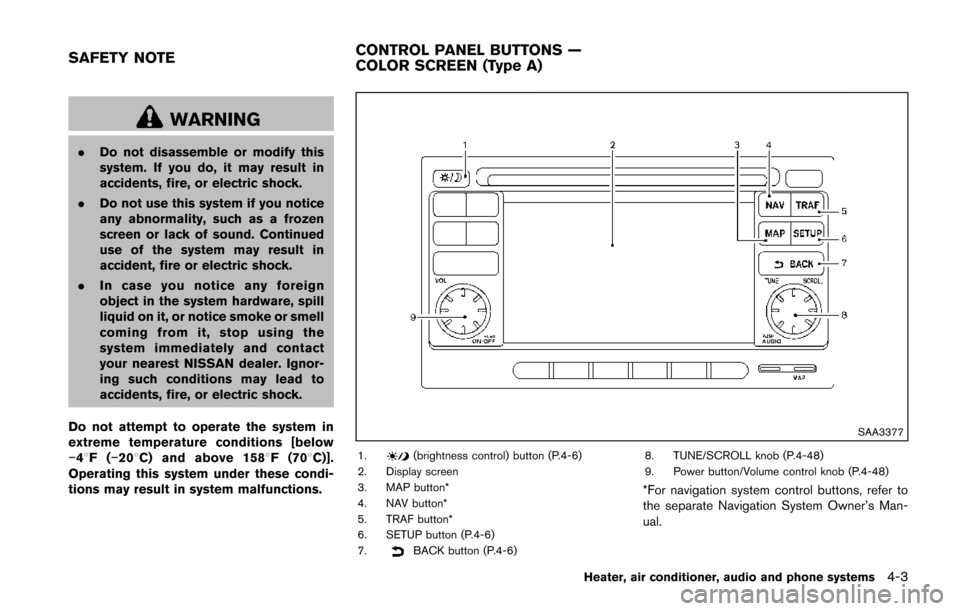
SAA3377
1.(brightness control) button (P.4-6)
2. Display screen
3. MAP button*
4. NAV button*
5. TRAF button*
6. SETUP button (P.4-6)
7.
BACK button (P.4-6) 8. TUNE/SCROLL knob (P.4-48)
9. Power button/Volume control knob (P.4-48)
*For navigation system control buttons, refer to
the separate Navigation System Owner’s Man-
ual.
Heater, air conditioner, audio and phone systems4-3
SAFETY NOTE
CONTROL PANEL BUTTONS —
COLOR SCREEN (Type A)
Page 165 of 402
4-10Heater, air conditioner, audio and phone systems
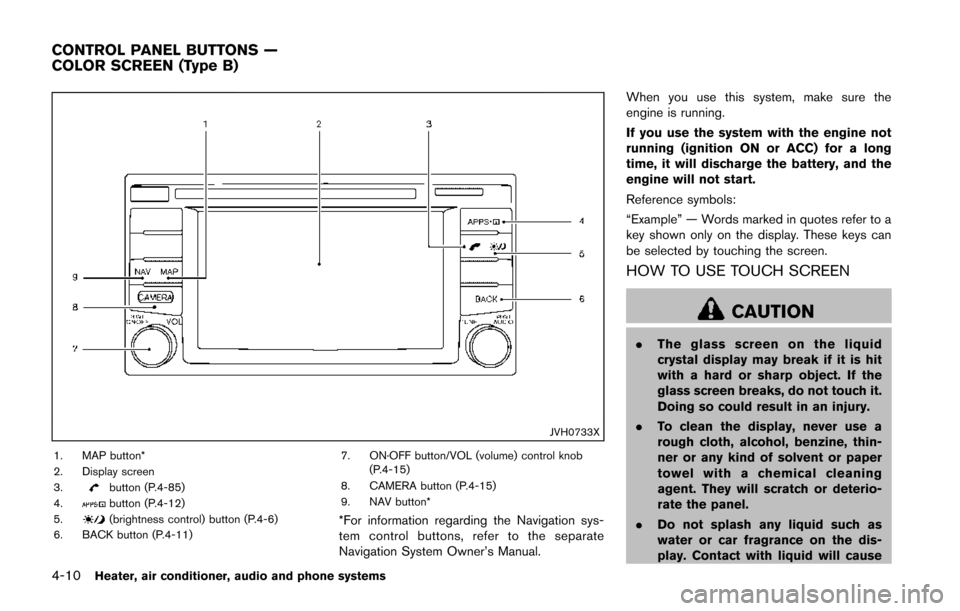
JVH0733X
1. MAP button*
2. Display screen
3.
button (P.4-85)
4.button (P.4-12)
5.(brightness control) button (P.4-6)
6. BACK button (P.4-11) 7. ON·OFF button/VOL (volume) control knob
(P.4-15)
8. CAMERA button (P.4-15)
9. NAV button**For information regarding the Navigation sys-
tem control buttons, refer to the separate
Navigation System Owner’s Manual. When you use this system, make sure the
engine is running.
If you use the system with the engine not
running (ignition ON or ACC) for a long
time, it will discharge the battery, and the
engine will not start.
Reference symbols:
“Example” — Words marked in quotes refer to a
key shown only on the display. These keys can
be selected by touching the screen.
HOW TO USE TOUCH SCREEN
CAUTION
.
The glass screen on the liquid
crystal display may break if it is hit
with a hard or sharp object. If the
glass screen breaks, do not touch it.
Doing so could result in an injury.
. To clean the display, never use a
rough cloth, alcohol, benzine, thin-
ner or any kind of solvent or paper
towel with a chemical cleaning
agent. They will scratch or deterio-
rate the panel.
. Do not splash any liquid such as
water or car fragrance on the dis-
play. Contact with liquid will cause
CONTROL PANEL BUTTONS —
COLOR SCREEN (Type B)
Page 179 of 402
4-24Heater, air conditioner, audio and phone systems
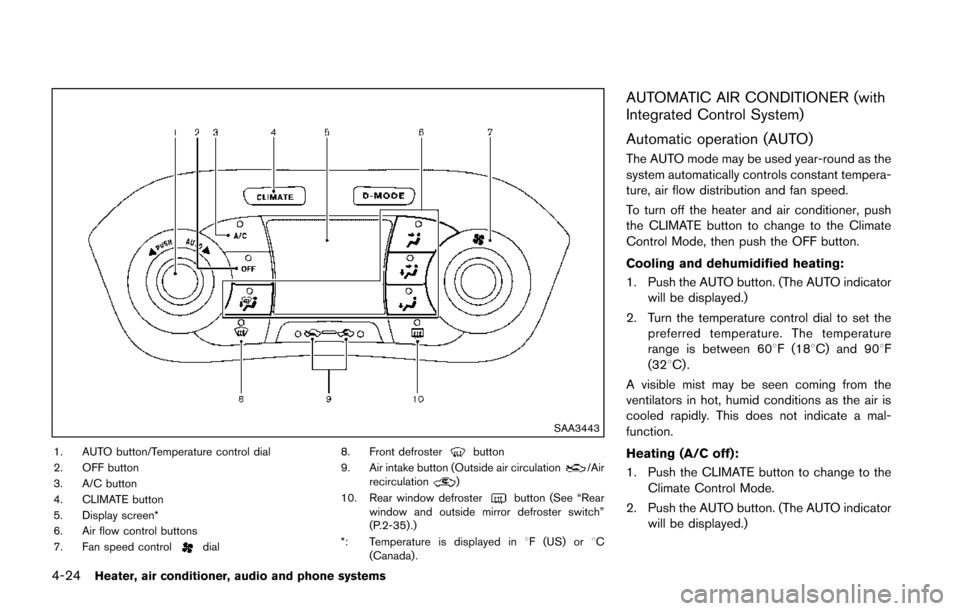
SAA3443
1. AUTO button/Temperature control dial
2. OFF button
3. A/C button
4. CLIMATE button
5. Display screen*
6. Air flow control buttons
7. Fan speed control
dial8. Front defroster
button
9. Air intake button (Outside air circulation/Air
recirculation)
10. Rear window defroster
button (See “Rear
window and outside mirror defroster switch”
(P.2-35) .)
*: Temperature is displayed in 8F (US) or 8C
(Canada) .
AUTOMATIC AIR CONDITIONER (with
Integrated Control System)
Automatic operation (AUTO)
The AUTO mode may be used year-round as the
system automatically controls constant tempera-
ture, air flow distribution and fan speed.
To turn off the heater and air conditioner, push
the CLIMATE button to change to the Climate
Control Mode, then push the OFF button.
Cooling and dehumidified heating:
1. Push the AUTO button. (The AUTO indicator will be displayed.)
2. Turn the temperature control dial to set the preferred temperature. The temperature
range is between 608F (188C) and 908F
(328C) .
A visible mist may be seen coming from the
ventilators in hot, humid conditions as the air is
cooled rapidly. This does not indicate a mal-
function.
Heating (A/C off):
1. Push the CLIMATE button to change to the Climate Control Mode.
2. Push the AUTO button. (The AUTO indicator will be displayed.)
Page 180 of 402
3. If the A/C indicator light illuminates, push theA/C button. (The A/C indicator light will turn
off.)
4. Turn the temperature control dial to set the preferred temperature. The temperature
range is between 608F (188C) and 908F
(328C) .
.Do not set the temperature lower than the
outside air temperature. Doing so may
cause the temperature to not be con-
trolled properly.
.If the windows fog up, use dehumidifiedheating by pushing the A/C button (the
A/C indicator light will illuminate) .
Dehumidified defrosting/defogging:
1. Push the front defroster
button. (The
indicator light will illuminate.)
2. Turn the temperature control dial to set the preferred temperature.
.To remove moisture or fog on the frontwindow quickly, set the temperature to
the high temperature and the fan speed
to their maximum level.
.After the windshield is cleared, push thefront defrosterbutton again. (The
indicator light will turn off.)
.When the front defrosterbutton is
pushed, the air conditioner will automa- tically turn on to defog the windshield.
The outside air circulation mode will be
selected to improve the defogging per-
formance.
.When theposition is selected, the
air recirculation mode cannot be turned
on to prevent the windows from being
fogged up.
Manual operation
The manual mode can be used to control the
heater and air conditioner to your desired
settings.
To turn off the heater and air conditioner, push
the OFF button.
If the Drive Mode is indicated on the screen,
push the CLIMATE button to change to the
Climate Control Mode, then push the OFF
button.
Fan speed control:
Turn the fan speed control
dial to adjust the
fan speed.
Air flow control:
Push the air flow control buttons to change the
air flow mode:
— Air flows from the center and side ventilators.
— Air flows from the center and sideventilators and foot outlets.
— Air flows mainly from the foot outlets.
— Air flows from the defroster outlets andfoot outlets.
Temperature control:
Turn the temperature control dial to set the
preferred temperature.
The temperature range is between 608F (188C)
and 908F (328C) .
Air recirculation:
Push the air intake button to change the air
circulation mode. When the indicator light
illuminates, the flowing air is recirculated inside
the vehicle.
. When the
orposition is selected,
the air recirculation mode cannot be turned
on to prevent the windows from being
fogged up.
Outside air circulation:
Push the air intake button to change the air
circulation mode. When the indicator light
illuminates, the flowing air is drawn from outside
the vehicle.
Heater, air conditioner, audio and phone systems4-25
Page 195 of 402
4-40Heater, air conditioner, audio and phone systems
SAA2782
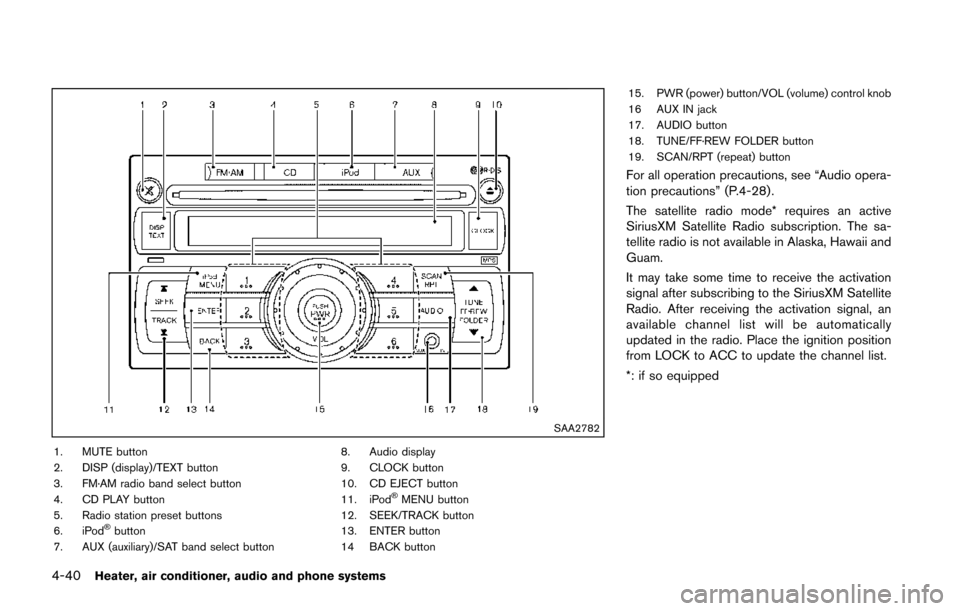
1. MUTE button
2. DISP (display)/TEXT button
3. FM·AM radio band select button
4. CD PLAY button
5. Radio station preset buttons
6. iPod
®button
7. AUX (auxiliary)/SAT band select button 8. Audio display
9. CLOCK button
10. CD EJECT button
11. iPod
®MENU button
12. SEEK/TRACK button
13. ENTER button
14 BACK button 15. PWR (power) button/VOL (volume) control knob
16 AUX IN jack
17. AUDIO button
18. TUNE/FF·REW FOLDER button
19. SCAN/RPT (repeat) button
For all operation precautions, see “Audio opera-
tion precautions” (P.4-28) .
The satellite radio mode* requires an active
SiriusXM Satellite Radio subscription. The sa-
tellite radio is not available in Alaska, Hawaii and
Guam.
It may take some time to receive the activation
signal after subscribing to the SiriusXM Satellite
Radio. After receiving the activation signal, an
available channel list will be automatically
updated in the radio. Place the ignition position
from LOCK to ACC to update the channel list.
*: if so equipped
Page 196 of 402
FM-AM-SAT* RADIO WITH COMPACT
DISC (CD) PLAYER (Type A)
Audio main operation
Head unit:
The auto loudness circuit enhances the low and
high frequency ranges automatically in both
radio reception and CD playback.
ON·OFF/Volume control:
Place the ignition switch in the ACC or ON
position, and then push the PWR button while
the system is off to call up the normal mode
(radio, CD, AUX and iPod
®) which was playing
immediately before the system was turned off.
While the system is on, pushing the PWR button
turns the system off.
Turn the VOL control knob to adjust the volume.
MUTE button:
Push the
button to mute the audio sound.
Push the
button again to release the mute
setting.
AUDIO button:
Push the AUDIO button to change the selecting
mode as follows.
Push the TUNE (,) or SEEK (,)
button to adjust Bass and Treble to the desired
level. Use the TUNE or SEEK button also to
adjust Fade or Balance modes. Fade adjusts the
sound level between the front and rear speakers
and Balance adjusts the sound between the
right and left speakers.
To turn the beep sound off or on, push the TUNE
or SEEK button until the desired mode is
displayed. This turns on or off the beep sound
when audio buttons are pushed.
To change the Speed Sensitive Volume (Spd
Sen Vol) mode to OFF, LOW, MID or HIGH,
push the TUNE or SEEK button until the desired
mode is displayed.
Once you have adjusted the sound quality to the
desired level, push the AUDIO button repeatedly
until the normal mode display reappears. Other-
wise, the normal mode display will automatically
reappear after approximately 5 seconds.
CLOCK button:
Push the CLOCK button to turn on or off the
CLOCK display.
See “Clock” (P.2-41) for the detailed clock
adjustment operation.
Heater, air conditioner, audio and phone systems4-41