2014 NISSAN JUKE light
[x] Cancel search: lightPage 160 of 402
SAA3387
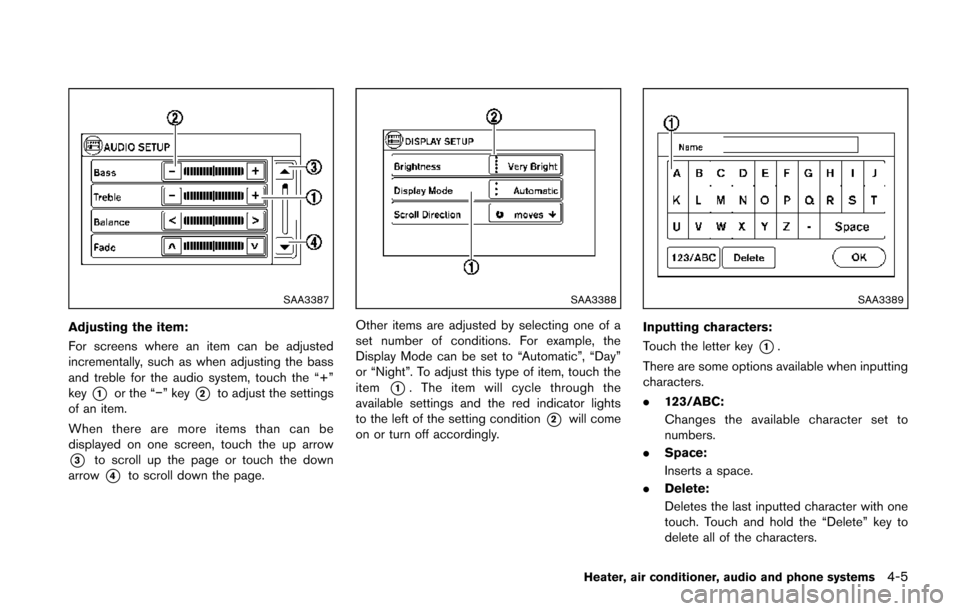
Adjusting the item:
For screens where an item can be adjusted
incrementally, such as when adjusting the bass
and treble for the audio system, touch the “+”
key
*1or the “−” key*2to adjust the settings
of an item.
When there are more items than can be
displayed on one screen, touch the up arrow
*3to scroll up the page or touch the down
arrow
*4to scroll down the page.
SAA3388
Other items are adjusted by selecting one of a
set number of conditions. For example, the
Display Mode can be set to “Automatic”, “Day”
or “Night”. To adjust this type of item, touch the
item
*1. The item will cycle through the
available settings and the red indicator lights
to the left of the setting condition
*2will come
on or turn off accordingly.
SAA3389
Inputting characters:
Touch the letter key
*1.
There are some options available when inputting
characters.
. 123/ABC:
Changes the available character set to
numbers.
. Space:
Inserts a space.
. Delete:
Deletes the last inputted character with one
touch. Touch and hold the “Delete” key to
delete all of the characters.
Heater, air conditioner, audio and phone systems4-5
Page 162 of 402
to disable the feature entirely.
AUX Level:
Controls the volume level of incoming sound
when an auxiliary device is connected to the
system. Available options are Quiet, Medium
and Loud.
Navigation setup
Refer to the separate Navigation System Own-
er’s Manual for information regarding this item.
XM setup
For SiriusXM Satellite Radio setup, refer to “FM-
AM-SAT radio with Compact Disc (CD) player
(Type B)” (P.4-48).SAA3391
System setup
Select the “System” key to select and/or adjust
various functions of the system. A screen with
additional options will appear.
SAA3392
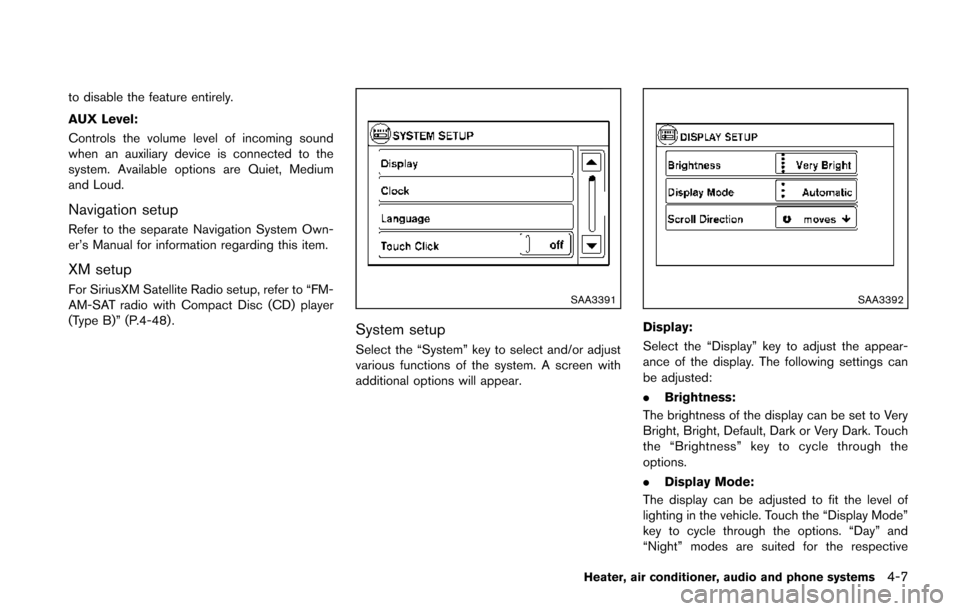
Display:
Select the “Display” key to adjust the appear-
ance of the display. The following settings can
be adjusted:
.Brightness:
The brightness of the display can be set to Very
Bright, Bright, Default, Dark or Very Dark. Touch
the “Brightness” key to cycle through the
options.
. Display Mode:
The display can be adjusted to fit the level of
lighting in the vehicle. Touch the “Display Mode”
key to cycle through the options. “Day” and
“Night” modes are suited for the respective
Heater, air conditioner, audio and phone systems4-7
Page 163 of 402
4-8Heater, air conditioner, audio and phone systems
times of day, while “Automatic” controls the
display automatically.
.Scroll Direction:
The direction that menus scroll can be adjusted.
Choose either “up” or “down”.
SAA3393
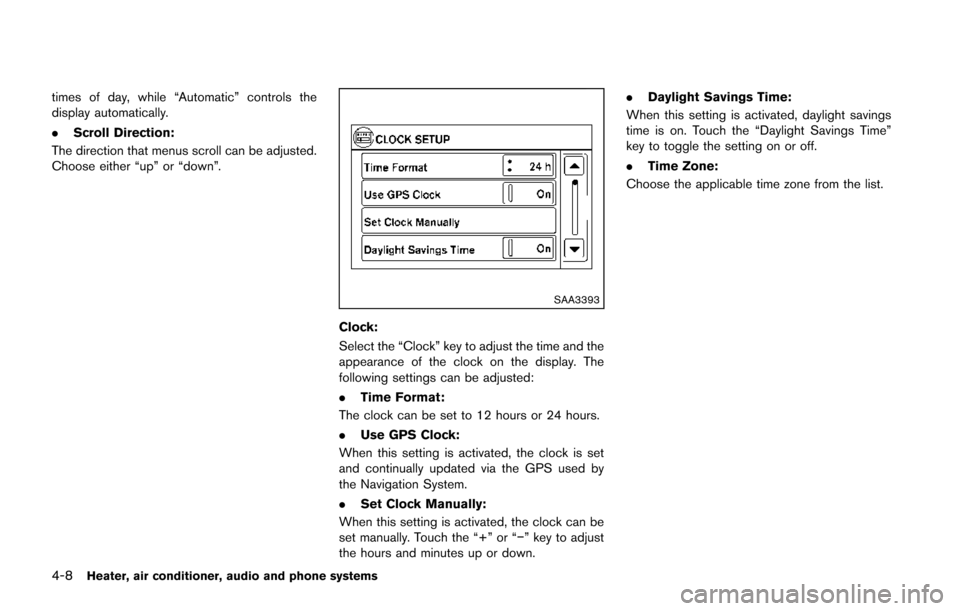
Clock:
Select the “Clock” key to adjust the time and the
appearance of the clock on the display. The
following settings can be adjusted:
. Time Format:
The clock can be set to 12 hours or 24 hours.
. Use GPS Clock:
When this setting is activated, the clock is set
and continually updated via the GPS used by
the Navigation System.
. Set Clock Manually:
When this setting is activated, the clock can be
set manually. Touch the “+” or “−” key to adjust
the hours and minutes up or down. .
Daylight Savings Time:
When this setting is activated, daylight savings
time is on. Touch the “Daylight Savings Time”
key to toggle the setting on or off.
. Time Zone:
Choose the applicable time zone from the list.
Page 168 of 402
Menu ItemResult
Audio For more details, see “FM-AM-SAT radio with Compact Disc (CD) player (Type C)” (P.4-57) .
Navigation See the separate Navigation System Owner’s Manual for more information.
Phone & Bluetooth For more details, see “Bluetooth
®Hands-Free Phone System (Type B)” (P.4-85) .
System Touch this key to select and/or adjust various functions of this system. A screen with additional options will
appear.
Display Touch this key to adjust the appearance of the display.
Brightness Adjusts the brightness of the display.
Display Mode Adjusts to fit the level of lighting in the vehicle. Touch key to cycle through options. “Day” and “Night” modes are
suited for the respective times of day while “Auto” controls the display automatically.
Scroll Direction Adjusts the direction of the menu scroll. Choose to either move up or down.
Clock Touch this key to adjust the time.
Time Format The clock can be set to 12 hours or 24 hours.
Date Format Select from five possible formats of displaying the day, month, and year.
Clock Mode Adjust the mode for the clock. “Auto” uses the system’s GPS to automatically maintain the time. “Manual” allows
you to set the clock using the “Set Clock Manually” key.
Set Clock Manually Adjust the clock manually, Touch the “+” or “-” keys to adjust the hours, minutes, day, month and year up or down.
“Clock Mode” must be set to manual for this option to be available.
Daylight Savings Time Adjusts the daylight savings time on or off.
Time Zone Choose the applicable time zone from the list.
Language Touch this key to change the language on the display.
Camera Touch this key to change the camera settings.
Display Mode Touch this key to select the touch-screen display mode (day, night, or automatic) .
Brightness Adjust touch-screen brightness.
Contrast Adjust touch-screen contrast.
Heater, air conditioner, audio and phone systems4-13
Page 174 of 402
course.
ADJUSTING THE SCREEN (if so
equipped)
For detailed information, see “How to use the
APPS·i button” (P.4-12) .
OPERATING TIPS
.When the shift lever is shifted to the R
(Reverse) position, the monitor screen auto-
matically changes to the RearView Monitor
mode. However, the radio can be heard.
. When the view is switched, the display
images on the screen may be displayed with
some delay.
. When the temperature is extremely high or
low, the screen may not clearly display
objects. This is not a malfunction.
. When strong light is directly coming on the
camera, objects may not be displayed
clearly. This is not a malfunction.
. Vertical lines may be seen in objects on the
screen. This is due to strong reflected light
from the bumper. This is not a malfunction.
. The screen may flicker under fluorescent
light. This is not a malfunction.
. The colors of objects on the RearView
Monitor may differ somewhat from the actual
color of objects. This is not a malfunction. .
Objects on the monitor may not be clear in a
dark environment. This is not a malfunction.
. If dirt, rain or snow accumulates on the
camera, the RearView Monitor may not
display objects clearly. Clean the camera.
. Do not use alcohol, benzine or thinner to
clean the camera. This will cause discolora-
tion. To clean the camera, wipe with a cloth
dampened with diluted mild cleaning agent
and then wipe with a dry cloth.
. Do not damage the camera as the monitor
screen may be adversely affected.
. Do not use wax on the camera window.
Wipe off any wax with a clean cloth
dampened with mild detergent diluted with
water.
SAA3338
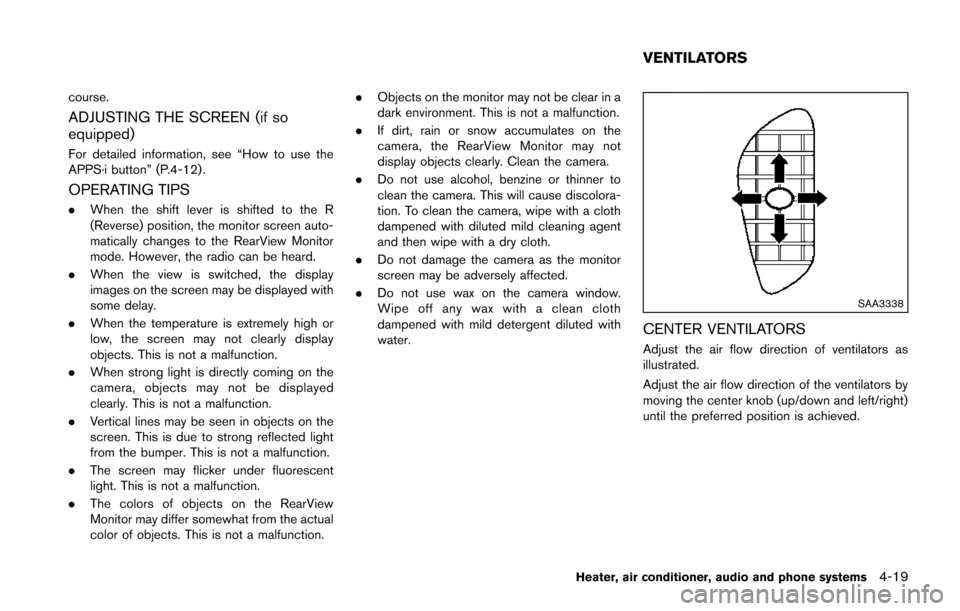
CENTER VENTILATORS
Adjust the air flow direction of ventilators as
illustrated.
Adjust the air flow direction of the ventilators by
moving the center knob (up/down and left/right)
until the preferred position is achieved.
Heater, air conditioner, audio and phone systems4-19
VENTILATORS
Page 177 of 402
4-22Heater, air conditioner, audio and phone systems
Fan speed control:
Turn the fan speed control
dial clockwise to
increase the fan speed.
Turn the fan speed control
dial counter-
clockwise to decrease the fan speed.
A/C (Air Conditioner) operation:
Push the A/C button to turn on or off the air
conditioner. When the air conditioner is on, the
A/C indicator light on the button illuminates.
Temperature control:
Turn the temperature control dial to set the
desired temperature. Turn the dial between the
middle and the right position to select the hot
temperature. Turn the dial between the middle
and the left position to select the cool tempera-
ture.
Heater operation
Heating:
This mode is used to direct heated air to the foot
outlets.
1. Move the air intake lever to the
position.
2. Turn the air flow control dial to the
position.
3. Turn the fan speed control
dial to the
desired position. 4. Turn the temperature control dial to the
desired position between the middle and the
hot (right) position.
Ventilation:
This mode directs outside air to the side and
center ventilators.
1. Move the air intake lever to the
position.
2. Turn the air flow control dial to the
position.
3. Turn the fan speed control
dial to the
desired position.
Defrosting or defogging:
This mode directs the air to the defroster outlets
to defrost/defog the windows.
1. Move the air intake lever to the
position.
2. Turn the air flow control dial to the
position.
3. Turn the fan speed control
dial to the
desired position.
4. Turn the temperature control dial to the desired position between the middle and the
hot (right) position.
. To remove frost from the outside surface of
the windshield quickly, turn the temperature
control dial to the maximum hot position and
the fan speed control
dial to the
maximum position. .
When the
position is selected, the air
conditioner will automatically turn on. This
will dehumidify the air and help to defog the
windows.
Bi-level heating:
This mode directs cool air from the side and
center vents and warm air from the foot outlets.
When the temperature control dial is turned to
the maximum hot or cool position, the air
between the ventilators and the foot outlets is
the same temperature.
1. Move the air intake lever to the
position.
2. Turn the air flow control dial to the
position.
3. Turn the fan speed control
dial to the
desired position.
4. Turn the temperature control dial to the desired position.
Heating and defogging:
This mode heats the interior and defogs the
windows.
1. Move the air intake lever to the
position.
2. Turn the air flow control dial to the
position.
3. Turn the fan speed control
dial to the
desired position.
Page 178 of 402
4. Turn the temperature control dial to thedesired position.
When the
position is selected, the air
conditioner will automatically turn on. This will
dehumidify the air and help to defog the
windows.
Air conditioner operation
The air conditioner system should be operated
for approximately 10 minutes at least once a
month. This helps prevent damage to the air
conditioner system due to the lack of lubrication.
Cooling:
This mode is used to cool and dehumidify the air.
1. Move the air intake lever to the
position.
2. Turn the air flow control dial to the
position.
3. Turn the fan speed control
dial to the
desired position.
4. Push the A/C button on. (The A/C indicator light will illuminate.)
5. Turn the temperature control dial to the desired position between the middle and the
cool (left) position.
. For quick cooling when the outside tem-
perature is high, move the air intake lever to
the
position. Be sure to move the air
intake lever to theposition for normal cooling.
. A visible mist may be seen coming from the
ventilators in hot, humid conditions as the air
is cooled rapidly. This does not indicate a
malfunction.
Dehumidified heating:
This mode is used to heat and dehumidify the
air.
1. Move the air intake lever to the
position.
2. Turn the air flow control dial to the
position.
3. Turn the fan speed control
dial to the
desired position.
4. Push the A/C button on. (The A/C indicator light will illuminate.)
5. Turn the temperature control dial to the desired position between the middle and the
hot (right) position.
Dehumidified defogging:
This mode is used to defog the windows and
dehumidify the air.
1. Move the air intake lever to the
position.
2. Turn the air flow control dial to the
position.
3. Turn the fan speed control
dial to the
desired position. 4. Turn the temperature control dial to the
desired position.
When the
position is selected, the air
conditioner will automatically turn on. This will
dehumidify the air and help to defog the
windows.
Heater, air conditioner, audio and phone systems4-23
Page 180 of 402
3. If the A/C indicator light illuminates, push theA/C button. (The A/C indicator light will turn
off.)
4. Turn the temperature control dial to set the preferred temperature. The temperature
range is between 608F (188C) and 908F
(328C) .
.Do not set the temperature lower than the
outside air temperature. Doing so may
cause the temperature to not be con-
trolled properly.
.If the windows fog up, use dehumidifiedheating by pushing the A/C button (the
A/C indicator light will illuminate) .
Dehumidified defrosting/defogging:
1. Push the front defroster
button. (The
indicator light will illuminate.)
2. Turn the temperature control dial to set the preferred temperature.
.To remove moisture or fog on the frontwindow quickly, set the temperature to
the high temperature and the fan speed
to their maximum level.
.After the windshield is cleared, push thefront defrosterbutton again. (The
indicator light will turn off.)
.When the front defrosterbutton is
pushed, the air conditioner will automa- tically turn on to defog the windshield.
The outside air circulation mode will be
selected to improve the defogging per-
formance.
.When theposition is selected, the
air recirculation mode cannot be turned
on to prevent the windows from being
fogged up.
Manual operation
The manual mode can be used to control the
heater and air conditioner to your desired
settings.
To turn off the heater and air conditioner, push
the OFF button.
If the Drive Mode is indicated on the screen,
push the CLIMATE button to change to the
Climate Control Mode, then push the OFF
button.
Fan speed control:
Turn the fan speed control
dial to adjust the
fan speed.
Air flow control:
Push the air flow control buttons to change the
air flow mode:
— Air flows from the center and side ventilators.
— Air flows from the center and sideventilators and foot outlets.
— Air flows mainly from the foot outlets.
— Air flows from the defroster outlets andfoot outlets.
Temperature control:
Turn the temperature control dial to set the
preferred temperature.
The temperature range is between 608F (188C)
and 908F (328C) .
Air recirculation:
Push the air intake button to change the air
circulation mode. When the indicator light
illuminates, the flowing air is recirculated inside
the vehicle.
. When the
orposition is selected,
the air recirculation mode cannot be turned
on to prevent the windows from being
fogged up.
Outside air circulation:
Push the air intake button to change the air
circulation mode. When the indicator light
illuminates, the flowing air is drawn from outside
the vehicle.
Heater, air conditioner, audio and phone systems4-25