2014 MITSUBISHI OUTLANDER PHEV steering
[x] Cancel search: steeringPage 248 of 442

CAUTION•When a road surface is surging, and there
is unevenness.
• When being driven in a tunnel.
• When your vehicle changed lanes, and
your vehicle approached immediately be- hind the vehicle in front.
• During a certain time after your vehicle
turns left or right.
• When you are carrying extremely heavy
loads in the rear seats or luggage area.
• After the Plug-in Hybrid EV System has
been running for an extended period of time.
• Under adverse weather conditions (rain,
snow, sand storms, etc.)*
• When the cover part in front of the sensor
and the sensor become dirty or have snow and ice* adhering to it.
• When water, snow or sand on the road are
extorted by the vehicle in front or an on- coming vehicle*.
*: When judging the state that detection per-
formance deterioration and the FCM can’t operate temporarily by these situations auto-
matically,“FCM TEMPORARILY NOT AVAILABLE” message is indicated, and a
“FCM OFF” indicator lights up.
Additionally, it may be indicated in the fol-
lowing situations.
• When the brake is overheating.
• When you are driving in light traffic with
few vehicles and obstacles in front.CAUTIONWhen the FCM will be in the state which can operate, indication is released automati-
cally. When the indication keeps going out,
there is an abnormality in the system. Please contact a MITSUBISHI MOTORS Author-
ized Service Point.
l Factors such as the positional relationship
between your vehicle and a vehicle in front,
driver’s own technique of steering the vehi-
cle and irregularly moving traffic due to ac-
cidents or vehicle trouble may deter the
FCM control and alarm from functioning.
l When the system recognizes the driver’s
steering or accelerating actions as evasive actions to avoid collision, FCM control and
alarm functions may be cancelled.
l The FCM control and alarm functions may
be triggered in the following situations.
CAUTION• When there is a structure (B) beside the
entrance of a curve and intersection.
• When running on a narrow iron bridge.
• When passing through a gate with small
head or side clearances.
• When there are metallic objects, steps or
projections on the road surface.
• When quickly approaching a vehicle in
front to overtake it.
• When passing an electronic toll collection
gate.
• When running under an overpass, a pe-
destrian overpass or a small tunnel.
• When running in Multi-storey car park.
• When the road gradiently and suddenly
changes while running.
• When stopping very close to a wall or a
vehicle in front.
Forward Collision Mitigation System (FCM)*
7-58OGGE14E5Starting and driving7
Page 253 of 442

NOTElThe warning message can be cleared tempo-
rarily by setting the LDW switch to “OFF.”
LDW deactivation due to fault
The alarm shown below is displayed if LDW
becomes to a non-initialized state due to a
fault.
If this happens, please contact a
MITSUBISHI MOTORS Authorized Service
Point for inspection of the system.
CAUTIONl LDW has its performance limitations. Do
not over-rely on the system.
l LDW is not designed to lessen risks associ-
ated with not looking ahead carefully (atten-
tion drawn to something on the side, absent-
mindedness, etc.) or poor visibility caused
by bad weather etc. Keep steering your vehi-
cle correctly and drive safely.
l The system may not be able to detect the
lane correctly in the following conditions. If required, set the LDW switch to “OFF.”
• When driving on a road whose lane mark-
ings (white or yellow) are worn out or
smeared with dirt to an extent not recog- nizable by the system.
• When lane markings are vague, typically
during a drive in the rain, snow or fog, or when running against the sun.
• When the vehicle is moving in a place
where lane markings are interrupted, such
as a toll booth entrance and motorway junction.
• When running on a road portion with in-
completely removed old lane markings,
shadows, lingering snow, truck-like pud- dles mistakable for lane markings (espe-cially after the rain when road surface is
reflecting light) or similar confusing fac- tors.
• When running in a lane other than the
cruising lane and passing lane.
• When running beside a closed lane sec-
tion or in a provisional lane in a traffic
work zone.CAUTION• When running in an extremely narrow
lane.
• When the following distance between
your vehicle and a vehicle in front be-
comes extremely reduced (especially when a marking is hidden by a vehicle in
front this is running too close to the mark- ing).
• When entering a junction or other point of
road where lanes are laid out complicated-ly.
• When passing a road section where the
number of lanes increases/decreases or
multiple lanes are crossing each other.
• When the lane is marked by double or
otherwise special lines.
• When driving on a winding or rough road.
• When driving on a slippery road covered
by rain water, snow, ice, etc.
• When passing through a place where the
brightness suddenly changes, like the inlet or outlet of a tunnel.
• When turning steep curves.
• When the road surface is reflecting the
light shining from the direction opposite
to the running direction.
• Vehicle largely lurches when it is running
over steps or other irregularities of the
road surface.
• When the headlamp illumination is inade-
quate because of contaminated or deterio-
rated lenses or improperly aimed head- lamps.
Lane Departure Warning (LDW)*
7-63OGGE14E5Starting and driving7
Page 256 of 442

Under-inflation also reduces fuel efficiencyand tyre tread life, and may affect the vehi-
cle’s handling and stopping ability.
Please note that the tyre pressure monitoring system (TPMS) is not a substitute for proper
tyre maintenance, and it is the driver’s re- sponsibility to maintain correct tyre pressure,even if under-inflation has not reached thelevel to trigger illumination of the tyre pres-
sure monitoring system (TPMS) low tyre
pressure telltale.
Your vehicle has also been equipped with a warning lamp to indicate when the system is
not operating properly.
The warning lamp is combined with the low
tyre pressure telltale.
When the system detects a malfunction, the
telltale will flash for approximately one mi- nute and then remain continuously illumina- ted. This sequence will continue upon subse-
quent vehicle start-ups as long as the mal-
function exists.
When the warning lamp is illuminated, the system may not be able to detect or signal
low tyre pressure as intended.The tyre pressure monitoring system (TPMS)
malfunctions may occur for a variety of rea-
sons, including the installation of replace- ment or alternate tyres or wheels on the vehi-cle that prevent the tyre pressure monitoring
system (TPMS) from functioning properly. Always check the tyre pressure monitoringsystem (TPMS) malfunction telltale after re-
placing one or more tyres or wheels on your vehicle to ensure that the replacement or al- ternate tyres and wheels allow the tyre pres-
sure monitoring system (TPMS) to continue to function properly.If the warning lamp/display il-
luminates while driving
E00637300079
1. If the warning lamp illuminates, avoid
hard braking, sharp steering manoeuvres
and high speeds. You should stop and adjust the tyres to the proper inflationpressure as soon as possible. Adjust the spare tyre at the same time. Refer to
“Tyres” on page 11-10.
NOTEl In addition, the warning display will be dis-
played on the information screen in the mul-
ti-information display.
l When inspecting or adjusting the tyre pres-
sure, do not apply excessive force to the
valve stem to avoid breakage.NOTEl After inspecting or adjusting the tyre pres-
sure, always reinstall the valve cap on the
valve stem.
Without the valve cap, dirt or moisture could
get into the valve, resulting in damage to the tyre inflation pressure sensor.
l Do not use metal valve caps, which may
cause a metal reaction, resulting in corrosion and damage of the tyre inflation pressure
sensors.
l Once adjustments have been made, the
warning lamp will go off after a few minutesof driving.
2. If the warning lamp remains illuminated
after you have been driving for about 10
minutes after you adjust the tyre infla- tion pressure, one or more of the tyresmay have a puncture. Inspect the tyreand if it has a puncture, have it repaired
by a MITSUBISHI MOTORS Author-
ized Service Point as soon as possible.
WARNINGl If the warning lamp/display illuminates
while you are driving, avoid hard brak- ing, sharp steering manoeuvres and high speeds.
Driving with an under-inflated tyre ad-
versely affects vehicle performance and
can result in an accident.
Tyre pressure monitoring system (TPMS)
7-66OGGE14E5Starting and driving7
Page 265 of 442

NOTE•When there is an upward slope at the
back.
A- Actual objects
B- Objects shown on the screen
l The reference lines for distance and vehicle
width are intended to indicate the distance to
a flat object such as a level, flat road surface. This may make the distance to a projectingobject shown on the screen differ from the
actual distance to the projecting object. Do not use them as a guide for distances to solid
objects.
Example: On the screen the point B appears
the nearest, then the point C and A in order
of distance. The points A and B actually are the same distances from the vehicle, and the
NOTEpoint C is farther off than the points A and
B.Cargo loads
E00609901497
Cargo loads precautions
CAUTIONlDo not load cargo or luggage higher than the
top of the seatback. Be sure that your cargo
or luggage cannot move once your vehicle is moving. Having the driver’s vision blocked,
and your cargo being thrown inside the cab- in if you suddenly have to brake can cause a
serious accident or injury.CAUTIONl Load heavy cargo or luggage in the front of
the vehicle. If the load in the back of the ve-
hicle is too heavy, steering may become un- stable.
Loading a roof carrier
CAUTIONl Use a roof carrier that properly fits your ve-
hicle. Do not load luggage directly onto the
roof.
For installation, refer to the instruction man-
ual accompanying the roof carrier.NOTEl We recommend you to use a
MITSUBISHI
MOTORS GENUINE roof carrier, since the
brackets to be used have a special shape. For details, we recommend you to consult aMITSUBISHI MOTORS Authorized Serv-
ice Point.
Cargo loads
7-75OGGE14E5Starting and driving7 Check surroundings for safety.
Page 292 of 442

2. Press the PWR/VOL key.Turn the power OFF.NOTEl Hold down the steering MODE key to also
turn the audio function ON/OFF.Adjust Volume
E00737300025
1. Turn the PWR/VOL key to adjust the
volume.
Turn the PWR/VOL key clockwise toincrease, and counter- clockwise to de-
crease the volume.
NOTEl The maximum value for volume is 45, and
the minimum is 0.NOTEl The initial setting for volume is “17”.Insert/Eject Discs
E00737400026
1.
Insert the disc into the disc slot with the
label surface up.
Push the disc in a certain amount, and
the product will pull the disc in, and playback will start.
2. Press the
key.
This will eject the disc from the product,
so remove the disc.
CAUTIONl When replacing discs, first ensure that the
vehicle is stopped in an area in which stop-ping is permitted.
l Do not insert your hand, fingers, or foreign
objects into the disc slot. This may lead to injury, smoking, or fire.
l 8 cm CDs are not supported.
Operation Keys
8-24OGGE14E5For pleasant driving8 Disc *Label sideDisc slot
Page 294 of 442

16- MENU keySwitch to Menu mode.17-/SEL key
Adjust audio quality and select items.
For radio, manually select stations.*:Requires a separately-purchased Bluetooth-capable audio device in equipment by type.
Steering wheel audio remote
control switches
E00737601142
1- Vol + key, - key Adjust audio functions and the mobile
phone function volume.
2- CH
key, key
Select CD and other audio source tracks
and radio stations.
Hold down to skip up and down through tracks.
3- MODE Key
Hold down to turn the audio functionON/OFF. Additionally, each time this is
pressed, this switches the audio source.
The order of switching is as shown be- low.
If devices are not connected, then these are to be skipped, and the next source se-lected.CD or MP3MWLWDAB1, 2, 3 *3FM1, 2, 3Bluetooth Audio *2iPod*1
or USB device*1
:An iPod cable (available separately) is
required.* 2
:Requires a separately-purchased Blue-
tooth-capable audio device.* 3
:Requires DAB tuner connection.Listen to Radio
E00737700032
This explains how to listen to FM, MW, and
LW radio broadcasts.
To Listen to the Radio
Press the RADIO key to switch the band.
Switch between FM1, FM2, FM3, MW, and LW bands.
The selected band is indicated on the display.
NOTEl This switches in the order FM1, FM2, FM3,
DAB1*, DAB2*, DAB3*, MW, and LW. *:When a DAB tuner is connected.
Manual/Seek Station Selection
Turn the /SEL key to the frequency to lis-
ten to.
Listen to Radio
8-26OGGE14E5For pleasant driving8
Page 316 of 442
WARNINGlAlthough the Bluetooth ®
2.0 interface al-
lows you to make hands-free calls, if you
choose to use the cellular phone while
driving, you must not allow yourself to be
distracted from the safe operation of your vehicle. Anything, including cellularphone usage, that distracts you from the safe operation of your vehicle increasesyour risk of an accident.
l Refer to and comply with all state and lo-
cal laws in your area regarding cellular
phone usage while driving.NOTEl If the operation mode is left in ACC, the ac-
cessory power will automatically turn off af-ter a certain period of time and you will no
longer be able to use the Bluetooth ®
2.0 in-
terface. The accessory power comes on again if the power switch is operated.
Refer to “ACC power auto-cutout function”
on page 7-10.
l The Bluetooth ®
2.0 interface cannot be used
if the Bluetooth ®
device has a flat battery or
the device power is turned off.
l Hands-free calls will not be possible if your
phone does not have service available.
l If you place the Bluetooth ®
device in the
luggage compartment, you may not be able
to use the Bluetooth ®
2.0 interface.NOTEl Some Bluetooth ®
devices are not compatible
with the Bluetooth ®
2.0 interface.
l You can confirm the Link System software
version by pressing the HANG-UP button 3
times (press and hold 2 times and then press briefly) within 10 seconds.
l For details on the Bluetooth ®
2.0 interface,
you can see them by accessing the MITSUBISHI MOTORS website.
Please read and agree on the “Warning about
Links to the Web Sites of Other Companies”
because it connects to other than MITSUBISHI MOTORS website.
http://www.mitsubishi-motors.com/en/prod-
ucts/index.html
l Software updates by cellular phone/digital
audio device manufacturers may change/ alter device connectivity.
Steering control switch and microphone
® p. 8-48
Voice recognition function ® p. 8-49
Useful voice commands ® p. 8-50
Speaker enrollment function ® p. 8-52
Connecting the Bluetooth® 2.0 interface and Bluetooth® device ® p. 8-53
Operating a music player connected via Blue-
tooth® ® p. 8-57
How to make or receive hands-free calls ® p. 8-57
Phone book function ® p. 8-59
Steering control switch and mi-
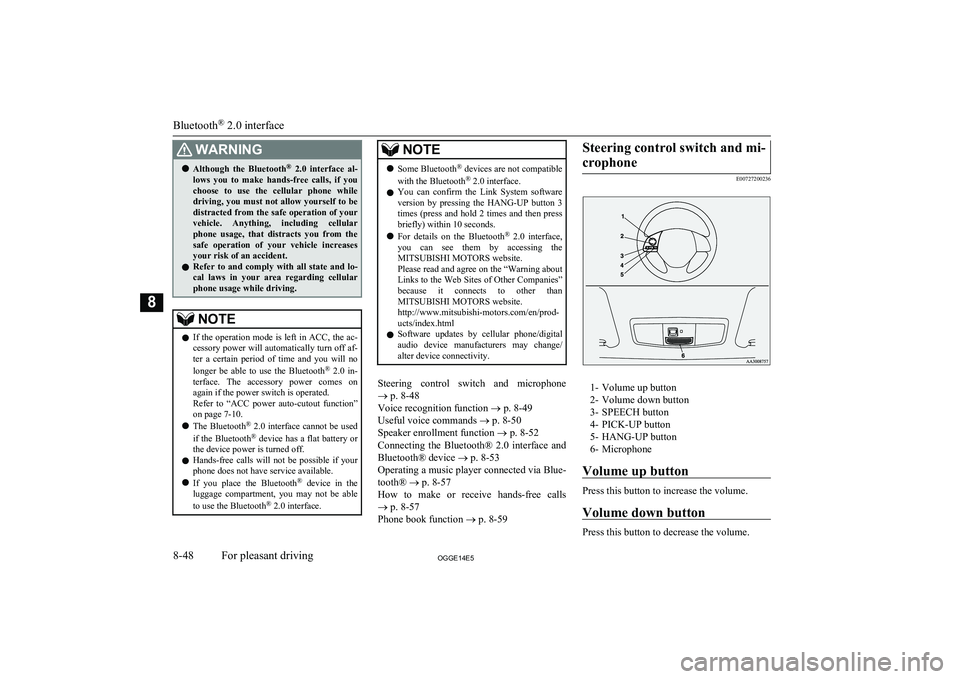
crophone
E00727200236
1- Volume up button
2- Volume down button
3- SPEECH button
4- PICK-UP button
5- HANG-UP button
6- Microphone
Volume up button
Press this button to increase the volume.
Volume down button
Press this button to decrease the volume.
Bluetooth ®
2.0 interface
8-48OGGE14E5For pleasant driving8
Page 327 of 442

If the CD player or radio was playing when
the incoming call was received, the audio system will mute the sound from the CD
player or radio and output only the incoming call.
To receive the call, press the PICK-UP but- ton on the steering wheel control switch.
When the call is over, the audio system will return to its previous state.MUTE function
E00760300041
At any time during a call, you can mute the vehicle microphone.
Pressing the SPEECH button and then saying
“Mute” during a call will turn ON the MUTE
function and mute the microphone.
Saying “Mute off” in the same way will turn off the MUTE function and cancel the muteon the microphone.
Switching between hands-free
mode and private mode
E00761400036
The Bluetooth ®
2.0 interface can switch be-
tween Hands-free mode (Hands-free calls) and private mode (calls using cellular phone).If you press the SPEECH button and say “Transfer call” during a Hands-free call, you
can stop the Hands-free mode and talk in pri-
vate mode.
To return to Hands-free mode, press the
SPEECH button again and say “Transfer
call”.Phone book function
E00763700017
The Bluetooth ®
2.0 interface has 2 types of
unique phone books that are different from
the phone book stored in the cellular phone. They are the vehicle phone book and the mo-
bile phone book.
These phone books are used to register tele- phone numbers and to make calls to desired
numbers via the voice recognition function.
NOTEl Disconnecting the battery cable will not de-
lete information registered in the phone
book.Vehicle phone book
E00763801262
This phone book is used when making calls
with the voice recognition function.
Up to 32 names can be registered in the vehi-
cle phone book per language.
Also, each entry has 4 locations associated with: home, work, mobile and other. You can
register one telephone number for each loca- tion.
You can register a desired name as a name
for any phone book entry registered in the ve- hicle phone book.
Names and telephone numbers can be
changed later on.
The vehicle phone book can be used with all paired cellular phones.
To register a telephone number in the ve- hicle phone book
You can register a telephone number in thevehicle phone book in the following 2 ways:
Reading out a telephone number, and select- ing and transferring 1 phone book entry fromthe phone book of the cellular phone.
To register by reading out a telephone
number
1. Press the SPEECH button.
2. Say “Phone book.”
3. The voice guide will say “Select one of
the following: new entry, edit number,
edit name, list names, delete, erase all, or
import contact.” Say “New entry.”
4. The voice guide will say “Name please.”
Say your preferred name to register it.
Bluetooth ®
2.0 interface
8-59OGGE14E5For pleasant driving8