2014 MITSUBISHI OUTLANDER PHEV air condition
[x] Cancel search: air conditionPage 234 of 442

WARNINGlNever rely solely on the ACC. The ACC is
the system to reduce load on the driver.
The ACC is not a collision avoidance sys-
tem or an automatic driving system. The system is not intended to compensate for
driver’s loss of attention to the front dur-
ing driving due to distraction or careless-
ness or supplement a drop in visibility due
to the rain and fog.
It is never a substitute for your safe and careful driving. Always be ready to applythe brakes manually.
l This system may not correctly detect the
actual situation depending on the type of vehicle in front and its conditions, theweather conditions, and the road condi-
tions.
Additionally, the system may be unable to
decelerate sufficiently if the vehicle in front applies the brakes suddenly or an- other vehicle cuts into your path, so yourvehicle approaches the front vehicle.Improper usage of this system or loss of
attention to the front by the over-rely on the ACC, may result in a serious accident.CAUTIONl In the following situations, the system may
become transiently unable to detect a vehicle in front or triggers its control and alarm
functions by detecting something other than a vehicle in front.CAUTION• When driving in curved sections of road
including their entrance/outlet or running beside a closed lane in a traffic work or
similar zone.
• When your vehicle position in a lane is in-
stable, is frequently steered to right and left, or running unstably due to a trafficaccident, trouble with some vehicles, etc.
• When driving on the road that the vehicle
in front runs in offset position from your
vehicle.
l Never use the ACC in any of the following
situations. Failure to follow this instructioncould lead to an accident.
• On roads with heavy traffic or roads in-
cluding many windings or steep curves.
CAUTION• On roads with slippery surfaces, such as
frozen, snow-covered, and dirt roads.
• Under adverse weather conditions (rain,
snow, sand storms, etc.).
• On steep downslopes.
• On roads including steep up and down
slopes or many changes in inclination.
• In traffic requiring frequent acceleration
and deceleration.
• When the proximity alarm sounds fre-
quently.
• When your vehicle is towed or your vehi-
cle tows another vehicle.
• When your vehicle is on a chassis dyna-
mometer or free rollers.
• When the air pressure in the tyres is not
correct.
• When installing the spare tyre for emer-
gency.
• When snow traction device (tyre chains)
are attached.
l Be sure to take the following precautions to
keep the system in good operating condi-
tions.
Improper handling of the system compo-
nents may result in degraded sensor per- formance.
• Avoid application of strong shock loads to
the sensor and never tamper with or re-
move the sensor mounting screws.
• The cover in front of the sensor and the
sensor should be kept clean.
Adaptive Cruise Control System (ACC)*
7-44OGGE14E5Starting and driving7
Page 267 of 442

1698 mm269 mm3369 mm4105 mm5815 mm6441 mm
(at kerb weight condition)7489 mm
(at kerb weight condition) 408 mm
(at laden condition)8527 mm
(at kerb weight condition)9537 mm
(at kerb weight condition)10473 mm11528 mm12583 mm
Operating hints
l Be sure that the driving speed does not
exceed 100 km/h (62 mph) for trailer op-
eration. It is also recommended that you obey the local regulations in case driving speed with a trailer is limited to less than
100 km/h (62 mph).
l To prevent shocks from the overrun
brake, depress the brake pedal lightly at first and then more strongly.
Overheating
This will normally occur as a result of some
mechanical failure. If your vehicle should overheat, stop and check for a loose or bro-ken water pump/alternator drive belt, a
blocked radiator air intake or a low coolant level. If these items are satisfactory the over-
heating could be caused by a number of me-
chanical causes that would have to be
checked at a competent service centre.
CAUTIONl If the engine overheats, reference should be
made to “Engine overheating” section of
“For emergencies” prior to taking any cor- rective action.Parking
It is not recommended to park on a steep
slope while towing trailer.
If parking on a steep slope cannot be avoided,
the road grade should be less than 12% and
the following procedure performed. 1. Apply the parking brake firmly on the
vehicle and the trailer (if fitted).
2. Put the select position in “P”.
3. Place chocks or blocks at the tyres on
both vehicle and trailer.
4. Turn the front wheels into the shoulder
of the road to prevent the vehicle from moving.
Driving on long up hills while towing trailer
When the remaining quantity of the drive bat-tery is low, or high-speed driving on long up
hills at high temperature, the drive battery
output is restricted and the vehicle speed may be decreased.
The vehicle speed may be recovered if the
drive battery quantity is recovered.
Trailer towing
7-77OGGE14E5Starting and driving7
Page 269 of 442

Ventilators........................................................................................... 8-02
Automatic climate control air conditioner.......................................... 8-04
Important operation tips for the air conditioner.................................. 8-13
Air purifier.......................................................................................... 8-13 Remote Climate Control..................................................................... 8-13
Heating................................................................................................ 8-14 LW/MW/FM radio/CD player*.......................................................... 8-14
Handling of Discs................................................................................8-18 Audio Files (MP3/WMA/AAC)..........................................................8-19
Important Points on Safety for the Customer......................................8-23
Operation Keys................................................................................... 8-23
Listen to Radio.................................................................................... 8-26 Listen to DAB*................................................................................... 8-27
Listen to Traffic Messages.................................................................. 8-29
Listen to CDs...................................................................................... 8-29
Listen to MP3s.................................................................................... 8-30
Listen to an iPod................................................................................. 8-31 Listen to Audio Files on a USB Device.............................................. 8-33Listen to Bluetooth Audio................................................................... 8-35
Display Indicator................................................................................. 8-38 Audio Quality and Volume Balance Adjustment............................... 8-39
System Settings................................................................................... 8-40
Troubleshooting.................................................................................. 8-44 Antenna............................................................................................... 8-47Link System*...................................................................................... 8-47
Bluetooth ®
2.0 interface......................................................................8-47
USB input terminal............................................................................. 8-66
Sun visors............................................................................................ 8-69
Ashtray*.............................................................................................. 8-70Cigarette lighter*.................................................................................8-70
Accessory socket................................................................................. 8-71
Interior lamps...................................................................................... 8-72
Storage spaces..................................................................................... 8-73 Cup holder........................................................................................... 8-75
Bottle holder........................................................................................8-76 Cargo area cover................................................................................. 8-76
Assist grips.......................................................................................... 8-78
Coat hook............................................................................................ 8-78
Luggage hooks.................................................................................... 8-78For pleasant driving
OGGE14E58
Page 270 of 442
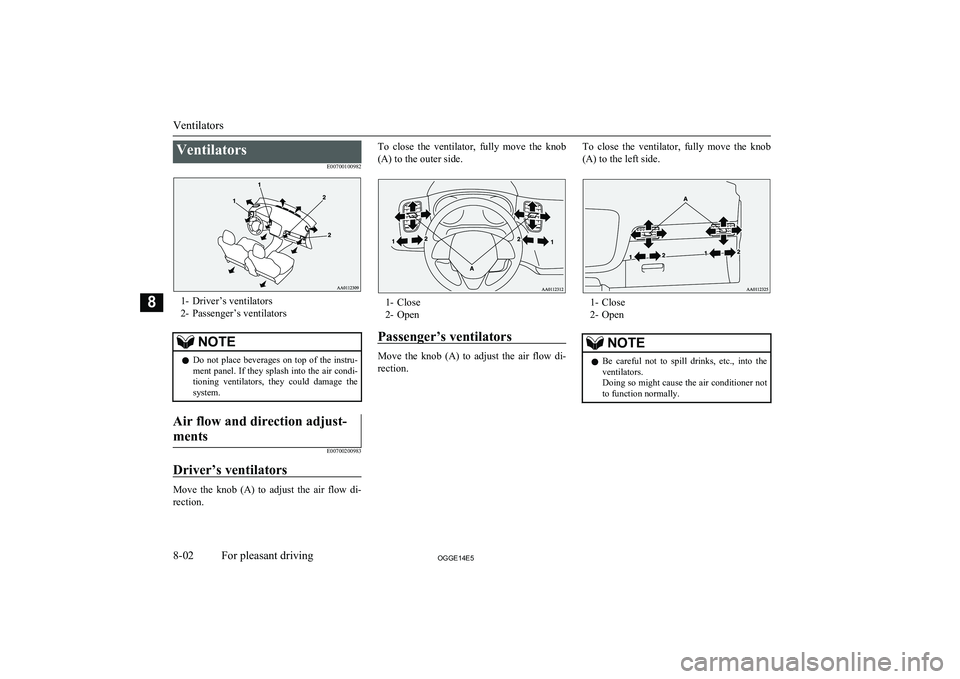
VentilatorsE00700100982
1- Driver’s ventilators2- Passenger’s ventilators
NOTEl Do not place beverages on top of the instru-
ment panel. If they splash into the air condi-
tioning ventilators, they could damage the
system.Air flow and direction adjust-
ments
E00700200983
Driver’s ventilators
Move the knob (A) to adjust the air flow di- rection.
To close the ventilator, fully move the knob
(A) to the outer side.
1- Close
2- Open
Passenger’s ventilators
Move the knob (A) to adjust the air flow di- rection.
To close the ventilator, fully move the knob
(A) to the left side.
1- Close
2- Open
NOTEl Be careful not to spill drinks, etc., into the
ventilators.
Doing so might cause the air conditioner not to function normally.
Ventilators
8-02OGGE14E5For pleasant driving8
Page 272 of 442

Automatic climate control air conditionerE00702401436
Cooling or heating can only be performed when ready indicator is illuminating. When the operation mode is ON, only the blower is available.NOTEl If the drive battery level display indicates 0, the cooling performance cannot be obtained even the air conditioner is turned on.
Refer to “Drive battery level display screen” on page 6-10.
l If the engine cannot be started due to fuel shortage, etc., the heating performance cannot be obtained even the air conditioner is turned on.
Control panel
E00702502623
Automatic climate control air conditioner
8-04OGGE14E5For pleasant driving8 Dual-zone automatic climate control air conditioner
Page 273 of 442

1- Driver’s side temperature control switch(LHD vehicles)
Passenger’s side temperature control
switch (RHD vehicles)
2- Air conditioning switch
3- Blower speed selection switch
4- MODE switch
5- Passenger’s side temperature control switch (LHD vehicles)
Driver’s side temperature control switch
(RHD vehicles)6- Air selection switch
7- Demister switch
8- AUTO switch
9- Rear window demister switch ® p. 6-50
10- OFF switch
11- Driver’s side temperature display (LHD vehicles) ® p. 8-07
Passenger’s side temperature display
(RHD vehicles) ® p. 8-07
12- DUAL indicator13- Mode selection display
14- Passenger’s side temperature display (LHD vehicles) ® p. 8-07
Driver’s side temperature display (RHD
vehicles) ® p. 8-07
15- Air conditioning indicator
16- Blower speed display
Automatic climate control air conditioner
8-05OGGE14E5For pleasant driving8
Page 274 of 442

NOTElThere is an interior air temperature sensor (A) in the illustrated position.
Never place anything on top of the sensor, since doing so will prevent it from functioning properly.
l Since the air conditioning operation is controlled while the ECO mode is operating, you may feel that effectiveness of the air conditioner is weak.
Also, on vehicles without electric heater, the heating performance cannot be obtained while the ECO mode is operating since engine starting is controlled. In such case, cancel ECO mode.
→ “ECO mode switch” on page 6-51
l Even if the ECO mode is operating, you can select normal operation of the air conditioner.
On vehicles equipped with MITSUBISHI Multi-Communication System (MMCS), screen operations can be used to change the setting. Refer to the separate
owner’s manual for details.
l In extreme cold, the air conditioning control panel screen may operate sluggishly. This does not indicate a problem.
It will disappear when the vehicle interior temperature rises to a normal temperature.
l A sound will be made every time you push all the switches.
Blower speed selection switch
E00702801371
Press of the blower speed selection
switch to increase the blower speed.
Press
of the blower speed selection
switch to decrease the blower speed.
Automatic climate control air conditioner
8-06OGGE14E5For pleasant driving8
Page 275 of 442
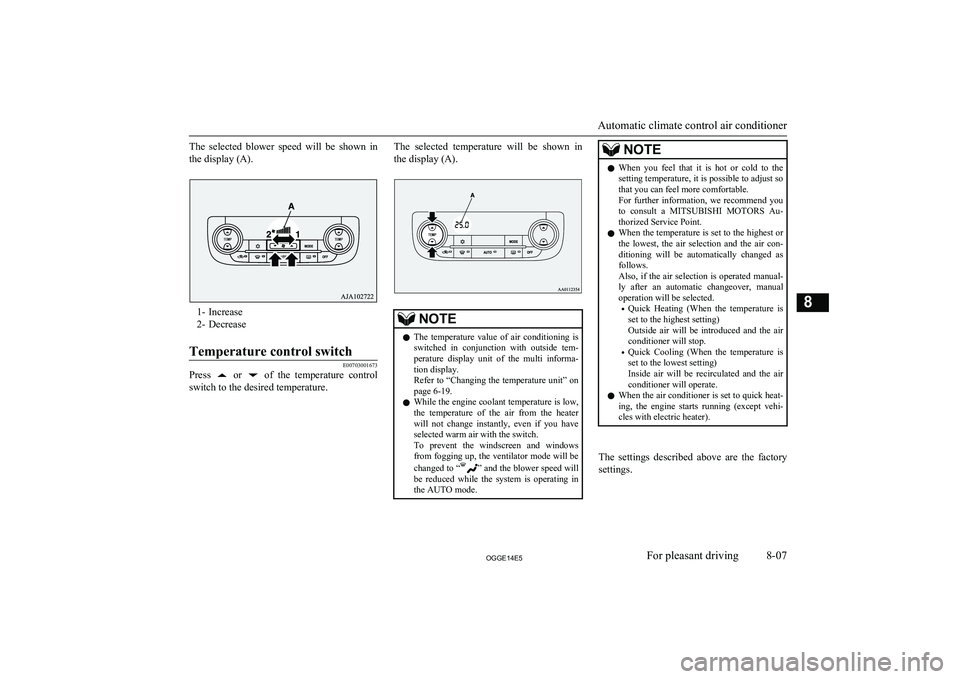
The selected blower speed will be shown inthe display (A).
1- Increase
2- Decrease
Temperature control switch
E00703001673
Press or of the temperature control
switch to the desired temperature.
The selected temperature will be shown in
the display (A).NOTEl The temperature value of air conditioning is
switched in conjunction with outside tem- perature display unit of the multi informa- tion display.
Refer to “Changing the temperature unit” on
page 6-19.
l While the engine coolant temperature is low,
the temperature of the air from the heaterwill not change instantly, even if you have selected warm air with the switch.
To prevent the windscreen and windows from fogging up, the ventilator mode will be
changed to “
” and the blower speed will
be reduced while the system is operating in the AUTO mode.
NOTEl When you feel that it is hot or cold to the
setting temperature, it is possible to adjust sothat you can feel more comfortable.
For further information, we recommend you
to consult a MITSUBISHI MOTORS Au-
thorized Service Point.
l When the temperature is set to the highest or
the lowest, the air selection and the air con- ditioning will be automatically changed as
follows.
Also, if the air selection is operated manual- ly after an automatic changeover, manualoperation will be selected.
• Quick Heating (When the temperature is
set to the highest setting)
Outside air will be introduced and the air conditioner will stop.
• Quick Cooling (When the temperature is
set to the lowest setting)
Inside air will be recirculated and the air
conditioner will operate.
l When the air conditioner is set to quick heat-
ing, the engine starts running (except vehi-
cles with electric heater).
The settings described above are the factory settings.
Automatic climate control air conditioner
8-07OGGE14E5For pleasant driving8