2014 MITSUBISHI OUTLANDER key
[x] Cancel search: keyPage 137 of 451

Starting the engine
Features and controls 5-59
5
“Free-hand Advanced
Security Transmitter
(F.A.S.T.-key): Starting” on page5-12. [Except for vehicles equipped with the Free-hand Advanced Security Transmit- ter (F.A.S.T.-key).] Do not operate the starter motor continu- ously for longer than 15 seconds as this could run the battery
down or damage the
starter motor. If the engine does not start, turn the ignition switch back to the “OFF” or “LOCK” position,
wait a few seconds,
and then try again. Trying repeatedly with the engine or starter motor still turning will damage the starter mechanism. If the engine will not
start because the bat-
tery is weak or discharged, refer to “Jump-starting the engine” (on page 8-2)for instructions. A longer warm up period will only con- sume extra fuel. The engine is warmed upenough for driving when the bar graph of engine coolant temper
ature display starts
to move or the low coolant temperatureindicator goes out. Refer to “Engine cool- ant temperature display” on page 5-128 or “Low coolant temper
ature indicator” on
page 5-166.
This model is equipped with an electronically controlled fuel injection system. This is a sys-tem that automatically controls fuel injection. There is usually no need to depress the accel- erator pedal when starting the engine.The starter should not be run for more than 15 seconds at a time. To prevent battery drain, wait a few secondsbetween attempts to restart the engine. 1. Make sure all occupants are properly seated with seat belts fastened.
2. Insert the ignition key. 3. Press and hold the brake pedal down withyour right foot. 4. Make sure the selector
lever is in the “P”
(PARK) position.5. Turn the ignition switch to the “ON” posi- tion and make certain that all warning lights are functioning properly beforestarting the engine. 6. Turn the ignition switch to the “START” position without pressi
ng the accelerator
pedal. Release the ignition switch when the engine starts.
After several attempts, you may experience that the engine still does not start. 1. Make sure that all electric devices, such as lights, air conditio
ning blower and rear
window defogger, are turned off.
Tips for starting
WA R N I N G Never run the engine in
a closed or poorly
ventilated area any longer than is neededto move your vehicle
out of the area. Car-
bon monoxide gas, wh
ich is odorless and
extremely poisonous, could build up and cause serious injury or death.CAUTION Do not push-start the vehicle.Do not run the engine at high rpms or drive at high speeds until
the engine has had a
chance to warm up. Release the ignition sw
itch as soon as the
engine starts. Otherwis
e, the starter motor
will be damaged
Starting the engine
NOTE
Minor noises may be heard on engine start- up. These will disappear as the engine warmsup.
When the engine is hard to start
BK0200500US.book 59 ページ 2013年2月12日 火曜日 午前9時46分
Page 138 of 451
Automatic transaxle (if so equipped) 5-60 Features and controls
5
2. While depressing the brake pedal, press the accelerator peda
l halfway and hold it
there, then crank th
e engine. Release the
accelerator pedal, immediately after the engine starts.3. If the engine still will
not start, the engine
could be flooded with too much gasoline. While depressing the brake pedal, pushthe accelerator pedal all the way down and hold it there, then crank the engine for 5 to 6 seconds. Return the ignition switch to the “OFF” or “LOCK” position and release the accelerator pedal. Wait a fewseconds, and then crank the engine again for 5 to 6 seconds while depressing the brake pedal, but do no
t push the accelera-
tor pedal. Release the ignition key if the engine starts. If the engine fails to start, repeat these procedures
. If the engine still
will not start, cont
act your local Mitsubi-
shi Motors dealer or a repair facility of your choice for assistance.
When the ambient temperature is -22 °F (-30 °C) or lower, it may not be possible to start
from a standstill even wi
th the selector lever
in the “D” (DRIVE) position.This occurs because the transaxle has not warmed up sufficiently
; it does not indicate a
problem. If this occurs, place the selectorlever in the “P” (PAR
K) position and let the
engine idle for at least 10 minutes. The transaxle will wa
rm up, and you will be
able to start normally. Do not leave the vehicle during warm-up operation. The MIVEC engine automatically switches its intake-valve control between a low-speed mode and a high-speed mode in accordance with driving conditions for maximum engineperformance.
N00513200216
Automatic transaxle will automaticallychange its gear depe
nding on road and driv-
ing conditions. This
helps achieve smooth
driving and excellent fuel efficiency. Also you can manually shift up and shiftdown the transaxle. Refer to “Sports mode” on page 5-65. The transaxle prevents
unnecessary upshifts
even when the accelerator pedal is releasedand ensures smooth driving. According to the conditions, the transaxle will automatically shift to a lower gear to achieve stronger engine braking. This may help reduce your need to use the servicebrake.
Startability of automatic transaxle vehicle and CVT vehicle with ambient temperature of -22 °F (-30 °C) or lower
Using the MIVEC engine
NOTE
To protect the engine
, the high-speed mode
may not be selected wh
ile the engine coolant
temperature is low. In such a case, the engine revolutions do not rise to over 5,000 rpmeven if the accelerato
r pedal is depressed.
Automatic transaxle
(if so
equipped)DRIVING UPHILL
DRIVING DOWNHILL
BK0200500US.book 60 ページ 2013年2月12日 火曜日 午前9時46分
Page 146 of 451
Continuously variable transmission (CVT) (if so equipped) 5-68 Features and controls
5
N00560200034
The CVT will automati
cally and continuously
change its gear ratio depending on road anddriving conditions. This helps achieve smooth driving and excellent fuel efficiency. Also you can manually shift up and shiftdown the transmission. Refer to “Sports mode” on page 5-72. The transmission prevents unnecessary upshifts even when the accelerator pedal is released and ensures smooth driving.
According to the condi
tions, the transmission
will automatically shift to a lower gear ratio to achieve stronger engi
ne braking. This may
help reduce your need to use the service brake.
N00560301061
As an additional safe
ty precaution, models
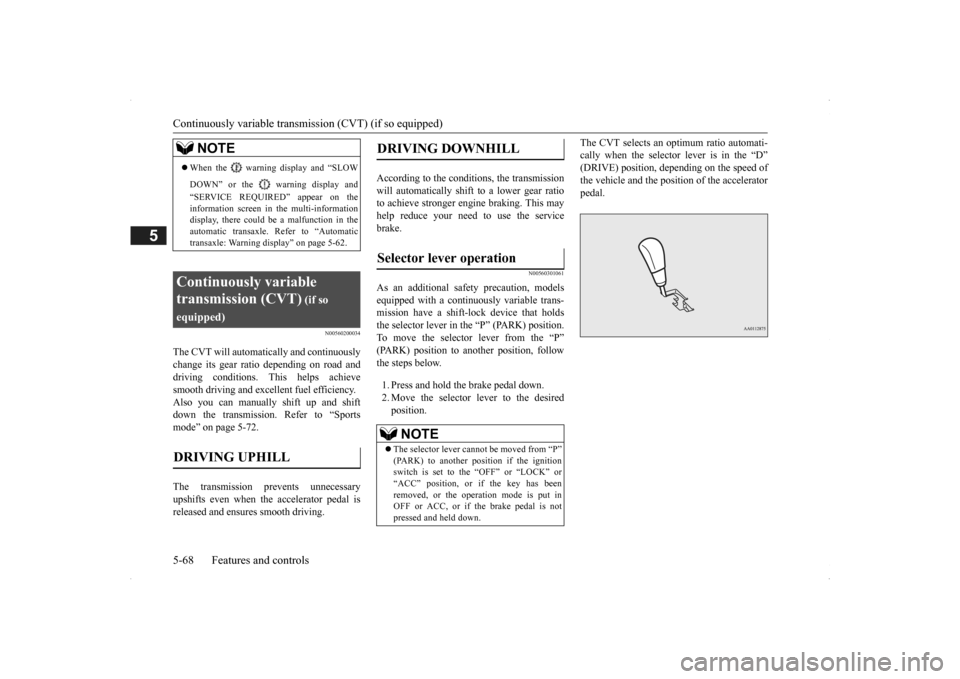
equipped with a continuously variable trans-mission have a shift-lock device that holds the selector lever in the “P” (PARK) position. To move the selector lever from the “P”(PARK) position to another position, follow the steps below. 1. Press and hold the brake pedal down. 2. Move the selector lever to the desiredposition.
The CVT selects an optimum ratio automati- cally when the selector lever is in the “D”(DRIVE) position, depending on the speed of the vehicle and the posit
ion of the accelerator
pedal.
NOTE
When the warning display and “SLOW DOWN” or the wa
rning display and
“SERVICE REQUIRED” appear on the information screen in the multi-informationdisplay, there could be
a malfunction in the
automatic transaxle. Refer to “Automatic transaxle: Warning di
splay” on page 5-62.
Continuously variable transmission (CVT)
(if so
equipped)DRIVING UPHILL
DRIVING DOWNHILL
Selector lever operation
NOTE
The selector lever cannot
be moved from “P”
(PARK) to another po
sition if the ignition
switch is set to the “OFF” or “LOCK” or“ACC” position, or if the key has been removed, or the opera
tion mode is put in
OFF or ACC, or if the brake pedal is notpressed and held down.
BK0200500US.book 68 ページ 2013年2月12日 火曜日 午前9時46分
Page 213 of 451

Multi Information display - Type 1
Features and controls 5-135
5
Refer to “Changing
the time until “REST
REMINDER” is displayed” on page 5-139.Refer to “Changing the turn signal sound” on page 5-139. Refer to “Changing the momentary fuelconsumption displa
y” on page 5-139.
Refer to “Returning to the factory set- tings” on page 5-140.
N00557001240
You can change the mode condition for theaverage fuel consumption and average speed display to “Auto reset” or “Manual reset.” 1. Press and hold the mu
lti information dis-
play switch (for about 2 seconds or more)to switch from the setting mode screen to the menu screen. Refer to “Changing th
e function settings”
on page 5-134.
2. Lightly press the multi information dis- play switch to select “AVG” (average fuelconsumption and aver
age speed setting).
3. Press and hold the multi information dis- play switch (for about 2 seconds or more)to switch in sequence from A or 1 (Auto reset)
M, 2 or P (Manual reset)
A or
1 (Auto reset).The setting is changed to the selected reset condition. If you press and hold the multi informa- tion meter switch when the average fuelconsumption and average speed are dis- played, these calculati
ons will be reset to
zero.
When the following operation is per- formed, the mode setting changes auto-matically from manual to auto. [Except for vehicles equipped with the F. A . S . T. - k e y ] Turn the ignition switch to the “ON” posi-tion from the “ACC”, “LOCK” or “OFF” position. [For vehicles equipped with the F.A.S.T.- key] Change the operation mode to ON from ACC or OFF. When the average fuel consumption and average speed are being displayed, if you hold down the multi information display switch, these calculations will be reset tozero.
NOTE
If the battery is disc
onnected, these function
settings are reset from memory and is auto- matically to the
factory settings.
Changing the reset mode for aver- age fuel consumption and average speed
Manual reset mode
Auto reset mode
BK0200500US.book 135 ページ 2013年2月12日 火曜日 午前9時46分
Page 214 of 451

Multi Information display - Type 1 5-136 Features and controls
5
When the engine switch or the operation mode is in the following conditions, theaverage fuel consumption display and the average speed display will automatically reset. [Except for vehicles
equipped with the
F. A . S . T. - k e y ] The ignition switch has been set to the “ACC”, “LOCK” or
“OFF” position for
about 4 hours or more. [For vehicles equipped
with the F.A.S.T.-
key]The operation mode has been in ACC or OFF for about 4 hours or more.
N00557101166
The fuel consumption display unit can be changed. The distance, speed, and amount units are also changed to match the selected fuel consumption unit. 1. Press and hold the mu
lti information dis-
play switch (for about 2 seconds or more) to change from the setting mode screen to the menu screen. Refer to “Changing th
e function settings”
on page 5-134.2. Lightly press the multi information dis- play switch to select “AVG UNIT” (fuel consumption disp
lay unit setting).
3. Press and hold the mu
lti information dis-
play switch (for about 2 seconds or more) to display “AVG UNIT” (fuel consump- tion display unit setting).
4. Lightly press the multi information dis- play switch to switch to select the units.5. Press and hold the multi information dis- play switch (for about 2 seconds or more) to change the setting to the selected unit.
The distance and speed
units are also changed
in the following combinations to match theselected fuel consumption unit.
NOTE
The average fuel consumption display and average speed display ca
n be reset separately
in both auto reset m
ode and manual reset
mode. Disconnecting the batt
ery cable will erase
from memory the manual reset mode or auto reset mode setting for the average speed dis-play and average fuel consumption display. The initial (default) setting is “Auto reset mode”.
Changing the fuel consumption display unit
NOTE
The display units for the driving range, the average fuel consumption, the average speed and the momentary fuel consumption are changed, but the units
for the indicating nee-
dle (speedometer), the odometer and the trip odometer will remain unchanged. If the battery is disconnected, the memory of the unit setting is erased and is automatically set to {mpg (US) or L/100 km}.Fuel economy
Distance (driving range)
Speed (average speed)
mpg (US) mile (s) mph mpg (UK) mile (s) mph km /L km km /h L /100 km km km /h
BK0200500US.book 136 ページ 2013年2月12日 火曜日 午前9時46分
Page 228 of 451
Indicator light, warning light, and information screen display list (multi information display - Type 1) 5-150 Features and controls
5
N00558001234
Warning display list
Screen
Cause
Do this (Reference)
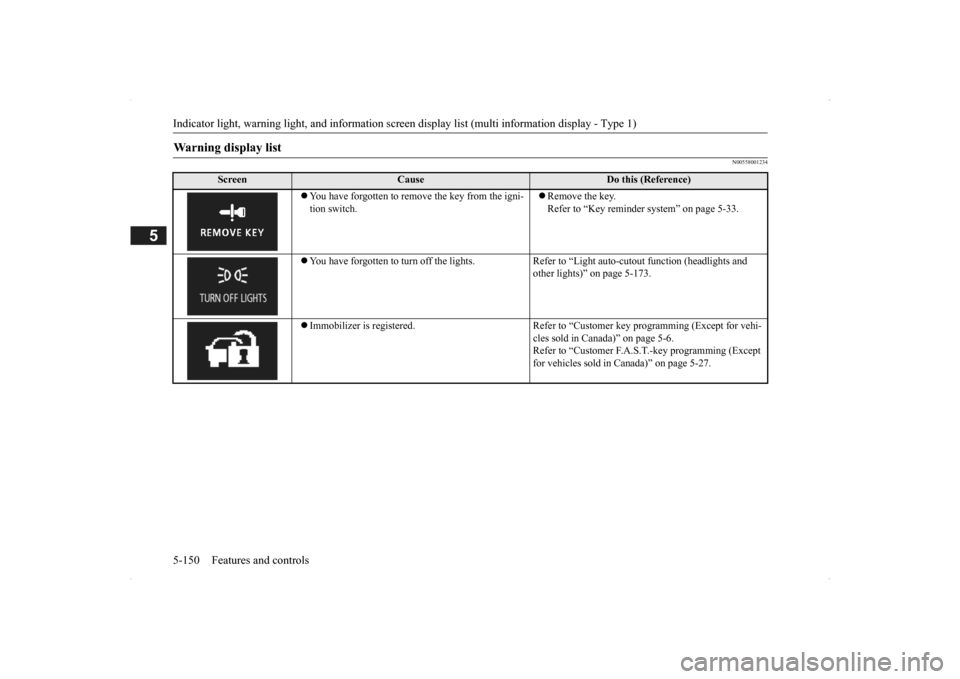
You have forgotten to remove the key from the igni- tion switch.
Remove the key. Refer to “Key reminder
system” on page 5-33.
You have forgotten to turn off the lights. Refer
to “Light auto-cutout function (headlights and
other lights)” on page 5-173.
Immobilizer is registered. Refer to “C
ustomer key programming (Except for vehi-
cles sold in Canada)” on page 5-6.Refer to “Customer F.A.S.
T.-key programming (Except
for vehicles sold in Canada)” on page 5-27.
BK0200500US.book 150 ページ 2013年2月12日 火曜日 午前9時46分
Page 229 of 451
Indicator light, warning light, and information screen display list (multi information display - Type 1)
Features and controls 5-151
5
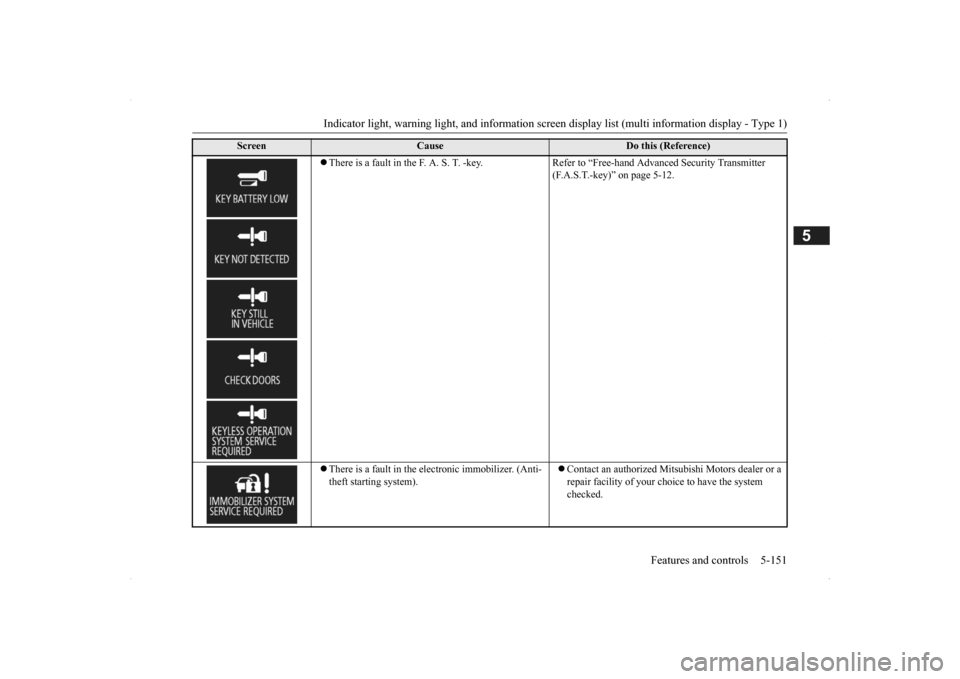
There is a fault in the F. A. S. T. -key. Refer to “Free-hand Advanced Security Transmitter
(F.A.S.T.-key)” on page 5-12.
There is a fault in the electronic immobilizer. (Anti- theft starting system).
Contact an authorized Mitsubishi Motors dealer or a repair facility of your choi
ce to have the system
checked.
Screen
Cause
Do this (Reference)
BK0200500US.book 151 ページ 2013年2月12日 火曜日 午前9時46分
Page 230 of 451
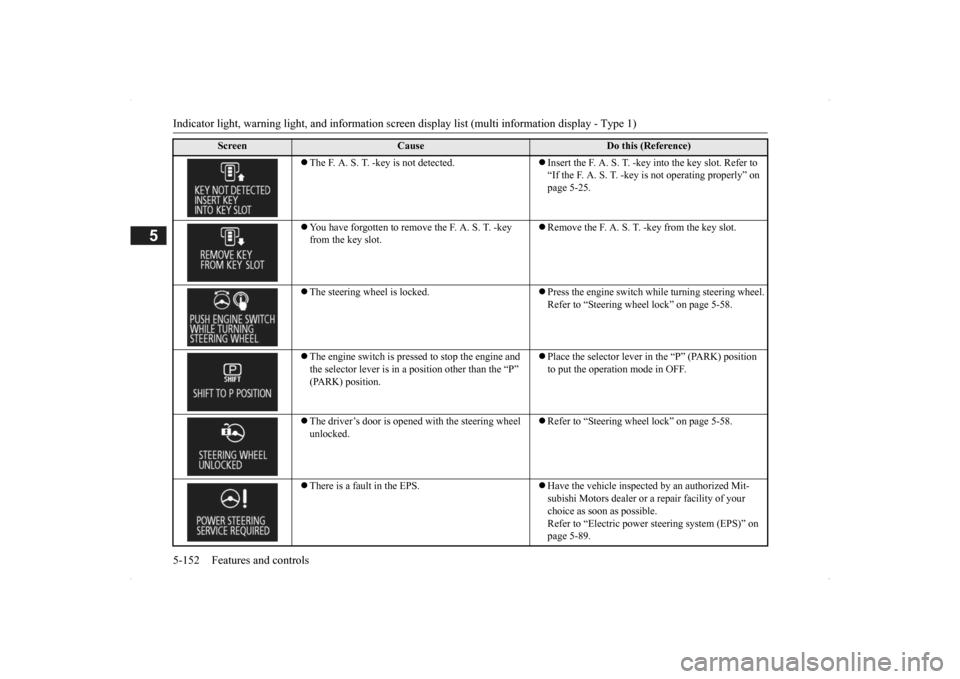
Indicator light, warning light, and information screen display list (multi information display - Type 1) 5-152 Features and controls
5
The F. A. S. T. -key is not detected.
Insert the F. A. S. T. -key
into the key slot. Refer to
“If the F. A. S. T. -key is not operating properly” on page 5-25.
You have forgotten to remove the F. A. S. T. -key from the key slot.
Remove the F. A. S. T. -key from the key slot.
The steering wheel is locked.
Press the engine switch while turning steering wheel. Refer to “Steering wheel lock” on page 5-58.
The engine switch is presse
d to stop the engine and
the selector lever is in a
position other than the “P”
(PARK) position.
Place the selector lever in the “P” (PARK) position to put the operation mode in OFF.
The driver’s door is opened with the steering wheel unlocked.
Refer to “Steering wheel lock” on page 5-58.
There is a fault in the EPS.
Have the vehicle inspected by an authorized Mit- subishi Motors dealer or
a repair facility of your
choice as soon as possible. Refer to “Electric power steering system (EPS)” on page 5-89.
Screen
Cause
Do this (Reference)
BK0200500US.book 152 ページ 2013年2月12日 火曜日 午前9時46分