2014 MITSUBISHI OUTLANDER key
[x] Cancel search: keyPage 251 of 451

Combination headlights and dimmer switch
Features and controls 5-173
5
N00532601580
If the following operation is performed with the combination headlights and dim- mer switch in the “ ” or “ ” position, the lights automatically turn off. [Except for vehicles equipped with the F. A . S . T. - k e y ] The ignition switch is turned to the “OFF” or “ACC” position or
the key is removed
from the ignition switch and the driver’s door is opened. [For vehicles equipped with the F.A.S.T.- key]The operation mode is changed to OFF or ACC and the driver’s door is opened.
NOTE
The sensitivity of the automatic on/off con- trol can be adjusted.For further informati
on, please contact your
authorized Mitsubishi Motors dealer or a repair facility of your choice. On vehicles equipped
with Mitsubishi Multi-
Communication System,
screen operations
can be used to make the adjustment. Refer to the separate owner’s manual fordetails. Do not place anything
on the automatic light
sensor (A), and do not
clean with a glass
cleaner.NOTE
Do not cover the sensor (A) for the automatic on/off control by affixing a sticker or label to the windshield.
NOTE
If the lights do not turn on or off with the switch in the “AUTO”
position, manually
operate the switch. Have the system checked by an authorized Mitsubishi Motors dealer or a repair facility of your choice.
Light auto-cutout function (headlights and other lights)
BK0200500US.book 173 ページ 2013年2月12日 火曜日 午前9時46分
Page 252 of 451
Combination headlights and dimmer switch 5-174 Features and controls
5
If the following operation is performed with the combination headlights and dim- mer switch in the “ ” or “ ” position, the lights automatically turn off afterabout 3 minutes. [Except for vehicles
equipped with the
F. A . S . T. - k e y ] The ignition switch is turned to the “OFF”or “ACC” position or the key is removed from the ignition switch and the driver’s door is not opened. [For vehicles equipped
with the F.A.S.T.-
key] The operation mode is changed to OFF or ACC and the driver’s door is not opened.
If the combination
headlights and dimmer
switch is turned to the “ ” or “ ” posi- tion again after the engine is turned off, theabout 3-minute auto
-cutout function
described above will not
work. The lights (the
parking lights, tail lig
hts and license plate
lights) will stay on and will not turn off auto- matically.
N00549801236
[When using a key to start the engine]If the driver’s door is opened with the key in the “OFF” or “LOCK” or “ACC” position orremoved from the ignition switch while the lights are on, the tone will sound to remind you to turn off the lights. [When using the F.A.S.T.-key to start the engine] If the driver’s door is opened with the opera- tion mode is put in OFF or ACC, or if theoperation mode is changed to OFF while the lights are on, the tone will sound to remind you to turn off the lights. In either case, the lights will turn off automat- ically and so will the tone. Or you can turn
the light switch to the “OFF” position to stop the tone.
N00549901178
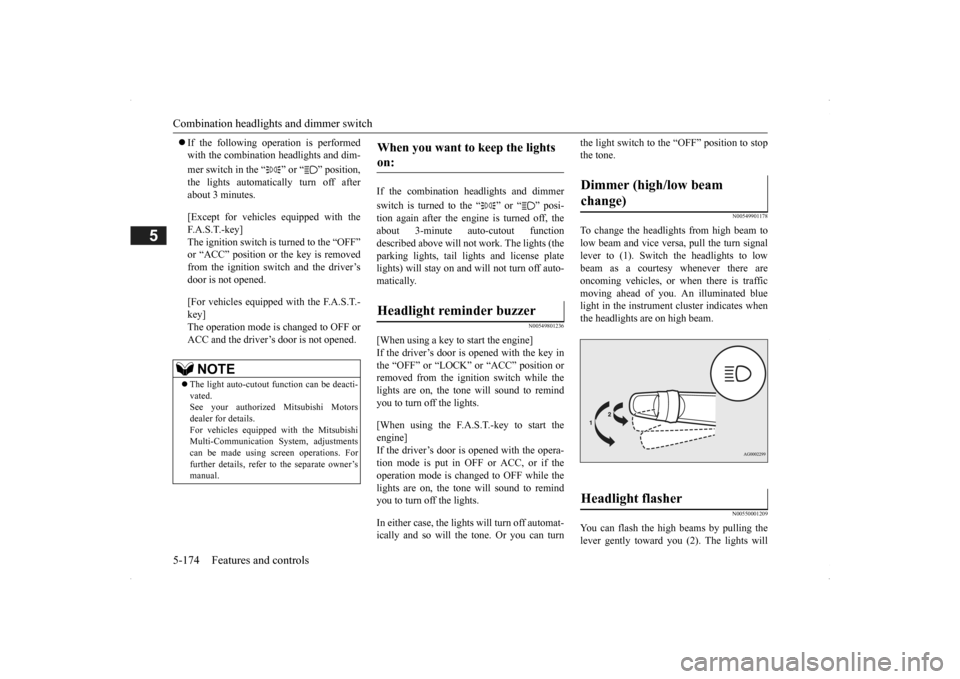
To change the headlights from high beam tolow beam and vice vers
a, pull the turn signal
lever to (1). Switch the headlights to low beam as a courtesy whenever there are oncoming vehicles, or when there is traffic moving ahead of you. An illuminated bluelight in the instrument
cluster indicates when
the headlights are on high beam.
N00550001209
You can flash the high beams by pulling the lever gently toward you (2). The lights will
NOTE
The light auto-cutout
function can be deacti-
vated. See your authorized Mitsubishi Motorsdealer for details. For vehicles equipped
with the Mitsubishi
Multi-Communication System, adjustmentscan be made using sc
reen operations. For
further details, refer to the separate owner’s manual.
When you want to keep the lights on: Headlight reminder buzzer
Dimmer (high/low beam change) Headlight flasher
BK0200500US.book 174 ページ 2013年2月12日 火曜日 午前9時46分
Page 253 of 451
Combination headlights and dimmer switch
Features and controls 5-175
5
go back to normal when you let go. While the high beam is on, you will see a blue light onthe instrument panel.
N00563201117
This function turns on
the front side-marker
and parking lights for
about 30 seconds after
the UNLOCK button on the remote controltransmitter is pressed when the combination headlights and dimmer switch is in the “OFF” or “AUTO” position (f
or vehicles equipped
with the automatic light control). On vehicles equipped with the automatic light control (except for vehicles e
quipped with LDW), the
welcome light functi
on will operate only
when it is dark outside the vehicle.
N00547301110
This function turns on the headlights in thelow beam setting for a
bout 30 seconds after
the ignition switch is turned to the “OFF” or“LOCK” position or the operation mode is put in OFF.
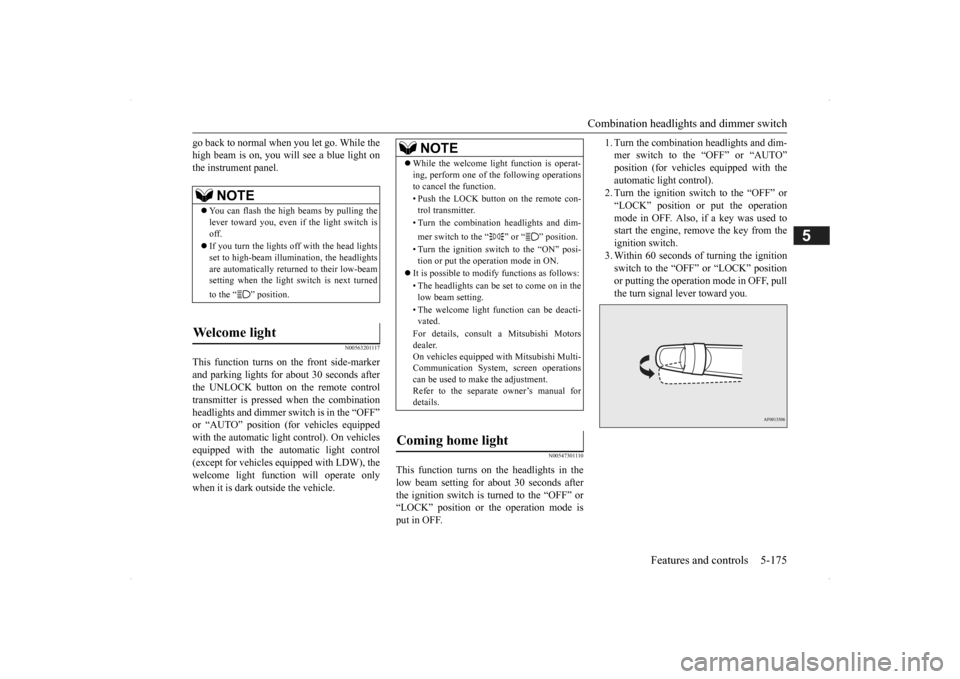
1. Turn the combination headlights and dim- mer switch to the “OFF” or “AUTO”position (for vehicles
equipped with the
automatic light control). 2. Turn the ignition switch to the “OFF” or“LOCK” position or put the operation mode in OFF. Also, if a key was used to start the engine, rem
ove the key from the
ignition switch. 3. Within 60 seconds of turning the ignition switch to the “OFF” or “LOCK” position or putting the operation mode in OFF, pull the turn signal lever toward you.
NOTE
You can flash the high beams by pulling the lever toward you, even if the light switch isoff. If you turn the lights off with the head lights set to high-beam illumi
nation, the headlights
are automatically returned to their low-beam setting when the light
switch is next turned
to the “ ” position.
Welcome light
NOTE
While the welcome light function is operat- ing, perform one of
the following operations
to cancel the function. • Push the LOCK button on the remote con- trol transmitter. • Turn the combination headlights and dim- mer switch to the “ ” or “ ” position. • Turn the ignition switch to the “ON” posi- tion or put the operation mode in ON.
It is possible to modify functions as follows: • The headlights can be set to come on in the low beam setting. • The welcome light f
unction can be deacti-
vated. For details, consult a Mitsubishi Motors dealer. On vehicles equipped
with Mitsubishi Multi-
Communication System, screen operationscan be used to ma
ke the adjustment.
Refer to the separate
owner’s manual for
details.
Coming home light
BK0200500US.book 175 ページ 2013年2月12日 火曜日 午前9時46分
Page 271 of 451

Bluetooth® 2.0 interface (if so equipped)
Features and controls 5-193
5
5. The voice guide will
say “Select one of
the following: pair, edit, delete, or list.”Say “Pair.” 6. The voice guide will
say “Please say a 4-
digit pairing code.” Say a 4-digit number.When the confirmation function is on, the system will confirm
whether the number
said is acceptable. Answer “Yes.”Answer “No” to return to pairing code selection.
7. The voice guide will say “Start pairing procedure on the device. See the device manual for instructions.” Enter in the Bluetooth
® device the 4-digit number you
have registered in Step 6.
8. The voice guide will say “Please say the name of the device after the beep.” Youcan assign a desired name for the Blue- tooth
® device and register it as a device
tag. Say the name you want to registerafter the beep. 9. The voice guide will say “Pairing com- plete,” after which a
beep will be played
and the pairing process will end.
N00565101080
If multiple paired Bluetooth
® devices are
available in the vehicl
e, the cellular phone or
music player most recent
ly connected is auto-
NOTE
If 7 devices have alre
ady been paired, the
voice guide will sa
y “Maximum devices
paired” and then the system will end the pairing process. To re
gister a ne
w device,
delete one device and th
en repeat the pairing
process. (Refer to “Selecting a device: Deleting adevice” on page 5-195.)NOTE
Some Bluetooth
® devices requi
re a specific
pairing code. Please re
fer to the device man-
ual for pairing code requirements.
The pairing code entered here is only used for the Bluetooth
® connection ce
rtification.
It is any 4-digit numbe
r the user would like
to select.Remember the pairing c
ode as it needs to be
keyed into the Bluetooth
® device later in the
pairing process. Depending on the connecti
on settings of the
Bluetooth
® device, this code may have to be
entered each time you connect the Blue- tooth
® device to the Bluetooth
® 2.0 inter-
face. For the default
connection settings,
refer to the instructions for the device.NOTE
Depending on the Bluetooth
® device, it may
take a few minutes to pair it with the Blue- tooth
® 2.0 interface.
If the Bluetooth
® 2.0 interface
cannot recog-
nize the Bluetooth
® device, the voice guide
will say “Pairi
ng has timed out” and the pair-
ing process will
be cancelled.
Confirm that the devi
ce you are pairing sup-
ports Bluetooth
®, and try pairing it again.
NOTE
If you enter the wrong number, the voice guide will say “Pairing
failed” and the pair-
ing process will be cancelled.Confirm the number is right, and try pairing it again.NOTE
When the confirmation f
unction is on, after
repeating the device
tag you have said, the
voice guide will ask
“Is this correct?”
Answer “Yes.” To change the device
tag, answer “No” and
then say the device tag again.
Selecting a device
NOTE
BK0200500US.book 193 ページ 2013年2月12日 火曜日 午前9時46分
Page 291 of 451
Interior lights
Features and controls 5-213
5
2- (OFF) The dome light stays off regardless of any door or the liftgate being opened or closed.
N00537601165
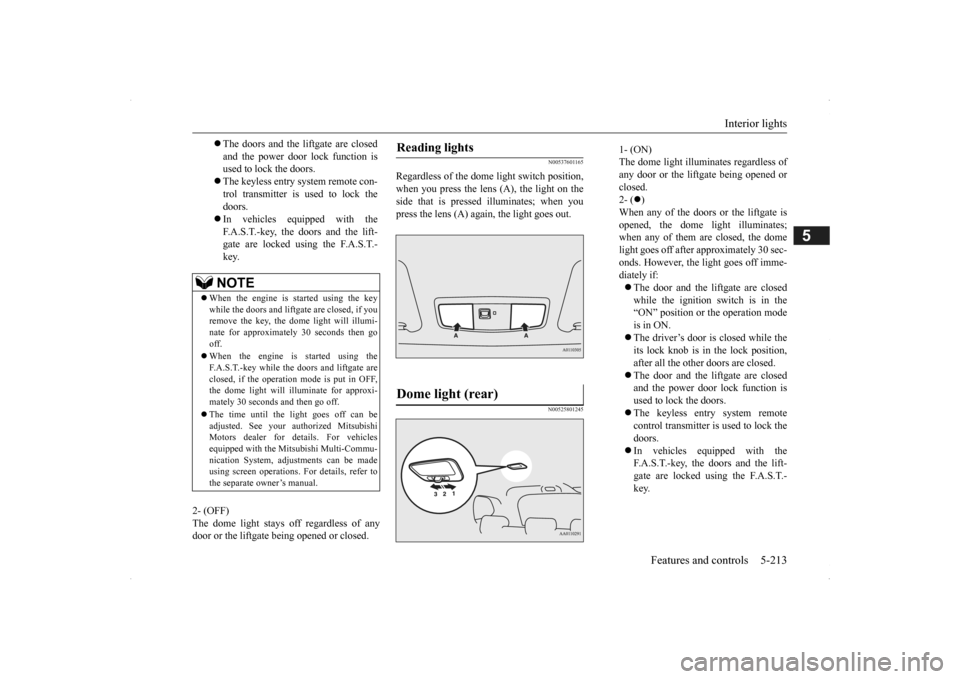
Regardless of the dome light switch position, when you press the lens (A), the light on the side that is pressed illuminates; when youpress the lens (A) agai
n, the light goes out.
N00525801245
The doors and the liftgate are closed and the power door lock function is used to lock the doors. The keyless entry system remote con- trol transmitter is used to lock the doors. In vehicles equipped with the F.A.S.T.-key, the doors and the lift- gate are locked using the F.A.S.T.-key.NOTE
When the engine is
started using the key
while the doors and liftgate are closed, if youremove the key, the dom
e light will illumi-
nate for approximately 30 seconds then go off. When the engine is started using the F.A.S.T.-key while the doors and liftgate areclosed, if the operation
mode is put in OFF,
the dome light will illuminate for approxi- mately 30 seconds and then go off. The time until the light goes off can be adjusted. See your authorized MitsubishiMotors dealer for details. For vehicles equipped with the Mitsubishi Multi-Commu- nication System, adjustments can be madeusing screen operations.
For details, refer to
the separate owner’s manual.
Reading lights Dome light (rear)
1- (ON) The dome light illumin
ates regardless of
any door or the liftgate being opened or closed. 2- (
)
When any of the doors or the liftgate is opened, the dome li
ght illuminates;
when any of them are closed, the domelight goes off after approximately 30 sec- onds. However, the li
ght goes off imme-
diately if: The door and the liftgate are closed while the ignition switch is in the“ON” position or the operation mode is in ON. The driver’s door is closed while the its lock knob is in the lock position, after all the other doors are closed. The door and the liftgate are closed and the power door lock function is used to lock the doors. The keyless entry system remote control transmitter is used to lock the doors. In vehicles equipped with the F.A.S.T.-key, the doors and the lift- gate are locked using the F.A.S.T.- key.
BK0200500US.book 213 ページ 2013年2月12日 火曜日 午前9時46分
Page 292 of 451
Interior lights 5-214 Features and controls
5
3- (OFF) The dome light stays off regardless of anydoor or the liftgate being opened or closed.
N00526101186
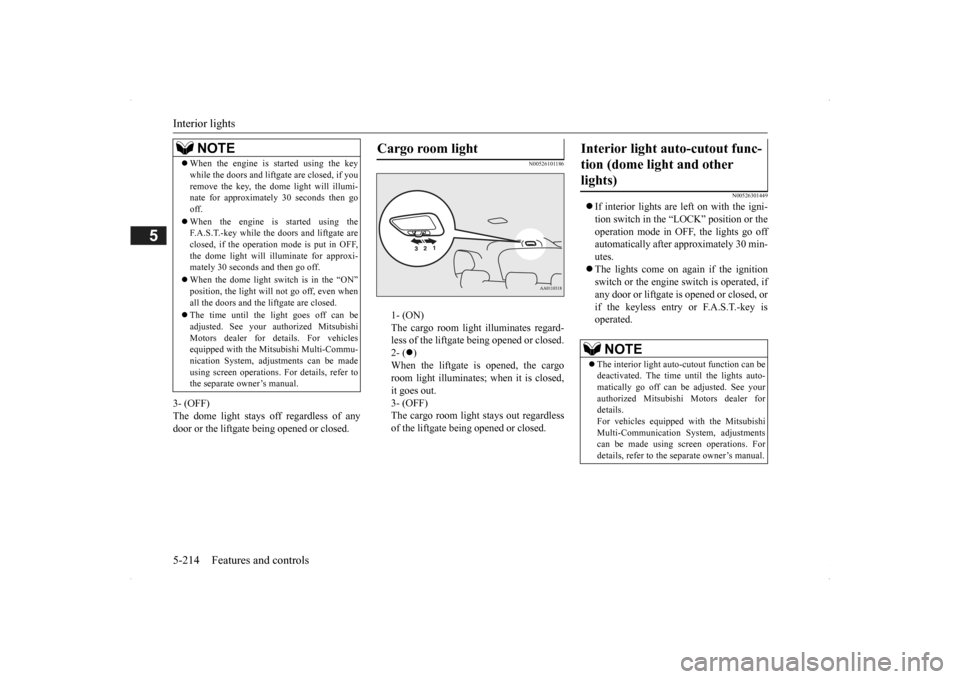
1- (ON) The cargo room light illuminates regard- less of the liftgate being opened or closed.2- (
)
When the liftgate is opened, the cargo room light illuminates;
when it is closed,
it goes out. 3- (OFF) The cargo room light
stays out regardless
of the liftgate bei
ng opened or closed.
N00526301449
If interior lights are left on with the igni- tion switch in the “LOCK” position or the operation mode in OFF, the lights go off automatically after approximately 30 min-utes. The lights come on again if the ignition switch or the engine
switch is operated, if
any door or liftgate is opened or closed, or if the keyless entry or F.A.S.T.-key isoperated.
NOTE
When the engine is started using the key while the doors and liftga
te are closed, if you
remove the key, the do
me light will illumi-
nate for approximately 30 seconds then go off. When the engine is started using the F.A.S.T.-key while the doors and liftgate are closed, if the operation mode is put in OFF,the dome light will il
luminate for approxi-
mately 30 seconds and then go off. When the dome light switch is in the “ON” position, the light will not go off, even when all the doors and the liftgate are closed. The time until the light goes off can be adjusted. See your authorized MitsubishiMotors dealer for details. For vehicles equipped with the Mitsubishi Multi-Commu- nication System, adju
stments can be made
using screen operations. For details, refer to the separate owner’s manual.
Cargo room light
Interior light auto-cutout func- tion (dome light and other lights)
NOTE
The interior light auto
-cutout function can be
deactivated. The time until the lights auto- matically go off can be
adjusted. See your
authorized Mitsubishi Motors dealer fordetails. For vehicles equipped
with the Mitsubishi
Multi-Communication System, adjustmentscan be made using sc
reen operations. For
details, refer to the
separate owner’s manual.
BK0200500US.book 214 ページ 2013年2月12日 火曜日 午前9時46分
Page 306 of 451
Parking 6-6 Driving safety
6
N00629601330
When parking on a hill, set the parking brake, and turn the front wheels toward the curb on a downhill, or away from
the curb on an uphill.
If necessary, apply chocks to the wheels. Be sure that the parki
ng brake is firmly set
when parked and that the selector lever is in the “P” (PARK) position. When parking on a hill, it
is important to set
the parking brake before moving the selector lever to the “P” (PARK) position. This pre- vents loading the parking brake against thetransaxle. When this ha
ppens, it is difficult to
move the selector lever out of the “P” (PARK) position. Never leave the engine running while you take a short nap or rest. Also, never leave the engine running in a closed or poorly venti- lated place.
Your front bumper can be damaged if you scrape it over curbs or parking stop blocks.Be careful when traveling up or down steep slopes where your bumper can scrape the road. Always remove the key from the ignition switch and lock all doors and the liftgate when leaving the
vehicle unattended.
Always try to park your vehicle in a well lit area.
Move effort could be required to turn the steering wheel.Refer to “Electric power steering system (EPS)” on page 5-89.
N00629900352
It is very important to know how much weight your vehicle can carry. This weight iscalled the vehicle ca
pacity weight and
includes the weight of
all occupants, cargo
(including the roof load), non-factory-installed options, and the tongue weight of the trailer, if any, being towed. The tire and loading information placard located on thedriver’s door sill of
your vehicle will show
how much weight it may properly carry. It is important to familiarize yourself with the following terms before
loading your vehicle:
Parking Parking on a hill Parking with the engine run- ning
WA R N I N G Leaving the engine ru
nning risks injury or
death from accidentally moving the selec-tor lever or the accumulation of toxicexhaust fumes in the passenger compart- ment.
Where you park
WA R N I N G Do not park your vehicle in areas where combustible materials
such as dry grass or
leaves can come in contact with a hotexhaust, since a fire could occur.
When leaving the vehicle
Do not keep the steering wheel fully turned for a long time Loading information
WA R N I N G Never overload your ve
hicle. Overloading
can damage your vehicle, adversely affectvehicle performance, including handling and braking, cause tire failure, and result in an accident.
BK0200500US.book 6 ページ 2013年2月12日 火曜日 午前9時46分
Page 317 of 451

7
Comfort controlsVents .................................................................................................7-2 Automatic climate control air conditioner .
..............
...........
.........
.....7-5
Important air conditioning operating tips ...
...........
...........
.........
.....7-14
Air purifier ......................................................................................7-14 AM/FM radio/CD player (if so equipped) .....................................7-15 Handling of Discs ..........................................................................7-18Audio Files (MP3/WMA/AAC) ....................................................7-20 Important Points on Safety for the Customer ................................7-24 Operation Keys ..............................................................................7-25Listen to Radio ...............................................................................7-28 Listen to Satellite Radio (if so equipped) .......................................7-29 Listen to CDs .................................................................................7-31Listen to MP3s ...............................................................................7-32 Listen to an iPod ............................................................................7-33 Listen to Audio Files on a USB Device .........................................7-35Listen to Bluetooth Audio (if so equipped) ....................................7-38 Display Indicator ...........................................................................7-40 Audio Quality and Volume Balance Adjustment ...........................7-41System Settings ..............................................................................7-42 Troubleshooting ...........
...........
...........
...........
...........
.........
.........
.....7-45
Antenna ...........................................................................................7-47General information about your radio ......
...........
...........
...........
.....7-48
BK0200500US.book 1 ページ 2013年2月12日 火曜日 午前9時46分