2014 MITSUBISHI OUTLANDER display
[x] Cancel search: displayPage 170 of 451

Cruise control 5-92 Features and controls
5
N00546601129
If an abnormal condition occurs in the sys- tem, the following display/indicator will turn on. Warning display
N00546301070
N00518301596
Cruise control is an automatic speed control system that keeps a set speed. It can be acti- vated at speeds from about 25 mph(40 km/h). Cruise cont
rol does not work at
speeds below about 25 mph (40 km/h).
NOTE
The indicator may come on when you start the engine. This means that the battery voltage momentarily dropped when theengine was started. It
does not indicate a
malfunction, provided th
at the display goes
out immediately. When a spare tire has been put on your vehi- cle, the gripping ability of the tire will be lower, making it more
likely that the dis-
play/indicator will blink.
ASC warning display
-
ASC indicator
-
ASC OFF indicator
CAUTION The system may be malfunctioning. Park your vehicle in a
safe place and stop the
engine. Restart the engi
ne and check whether
the display/indicator goes out. If they go out, there is no abnormal condition. If they do not go out or if they turn on frequently, it is notnecessary to stop the
vehicle immediately,
but you should have your
vehicle inspected
by an authorized Mitsubishi Motors dealer ora repair facility of
your choice as soon as
possible.
To w i n g
CAUTION If the 2WD vehicle is
towed with the ignition
switch in the “ON” pos
ition or the operation
mode in ON and only the front wheels or only the rear wheels raised off the ground, the ASC may operate, resulting in an acci-dent. When towing the 2WD vehicle with the front wheels raised, ke
ep the ignition switch
in the “OFF”, “LOCK”
or “ACC” position or
the operation mode in ACC or OFF. Whentowing the vehicle with the rear wheels raised, keep the ignition switch in the “ACC” position or the operation mode in ACC.Refer to “Towing” on page 8-14.
Cruise control
CAUTION When you do not wish to drive at a set speed, turn off the cruise control for safety. Do not use cruise control when driving con- ditions will not allow
you to stay at the same
speed, such as in heavy traffic or on roadsthat are winding, icy, snow-covered, wet, slippery, on a steep downhill slope.NOTE
Cruise control may not
be able to keep your
speed on uphills or downhills. Your speed may decr
ease on a steep uphill.
You may use the accelerator pedal if youwant to stay at your set speed. Your speed may increase to more than the set speed on a steep downhill. You have to usethe brake to control your speed. As a result, the set speed driving is deactivated.
BK0200500US.book 92 ページ 2013年2月12日 火曜日 午前9時46分
Page 171 of 451
Cruise control
Features and controls 5-93
5
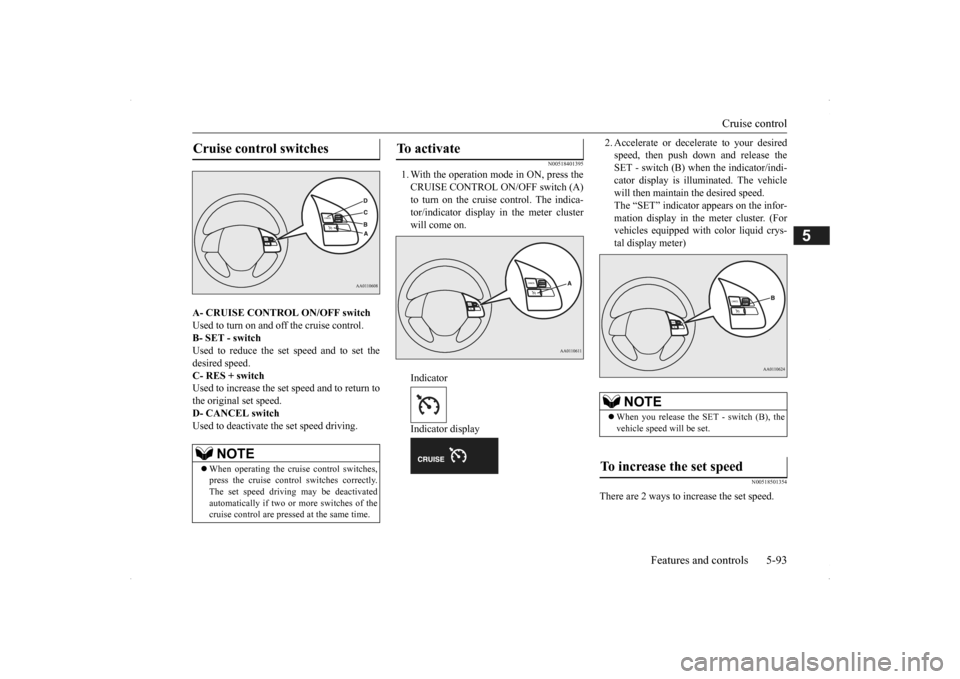
A- CRUISE CONTROL ON/OFF switch Used to turn on and off the cruise control. B- SET - switch Used to reduce the set speed and to set thedesired speed. C- RES + switch Used to increase the set speed and to return tothe original set speed. D- CANCEL switch Used to deactivate the set speed driving.
N00518401395
1. With the operation mode in ON, press the CRUISE CONTROL ON/OFF switch (A) to turn on the cruise control. The indica-tor/indicator display in the meter cluster will come on. Indicator Indicator display
2. Accelerate or decele
rate to your desired
speed, then push down and release theSET - switch (B) when the indicator/indi- cator display is illum
inated. The vehicle
will then maintain the desired speed.The “SET” indicator appears on the infor- mation display in the meter cluster. (For vehicles equipped with
color liquid crys-
tal display meter)
N00518501354
There are 2 ways to increase the set speed.
Cruise control switches
NOTE
When operating the crui
se control switches,
press the cruise control switches correctly. The set speed driving may be deactivatedautomatically if two or
more switches of the
cruise control are pre
ssed at the same time.
To activate
NOTE
When you release the SET - switch (B), the vehicle speed
will be set.
To increase the set speed
BK0200500US.book 93 ページ 2013年2月12日 火曜日 午前9時46分
Page 174 of 451
Adaptive Cruise Control System (ACC) (if so equipped) 5-96 Features and controls
5
The set speed driving is deactivated automati- cally in any of th
e following ways.
When your speed slows to about 10 mph (15 km/h) or more below the set speed because of a hill, etc. When your speed slows to about 25 mph (40 km/h) or less. When the active stability control (ASC) starts operating. (if so equipped)Refer to “Active stab
ility control (ASC)”
on page 5-90.
Also, the set speed driving may be deacti- vated as follow: When the engine speed rises and approaches the tachometer’s red zone (the red-coloured part of the tachometer dial).
N00518901316
If the set speed driving is deactivated by thecondition described in “To deactivate” on page 5-95, you can resu
me the previously set
speed by pressing the “ACC RES” switch (C) while driving at a speed of about 25 mph (40 km/h) or higher.The “SET” indicator appears on the informa- tion display in the meter
cluster. (For vehicles
equipped with the color liquid crystal displaymeter)
Under either of the following conditions, however, using the switch does not allow youto resume the previously set speed. In these situations, repeat the speed setting procedure: The CRUISE CONTROL ON/OFF switch is pressed. The operation mode is put in OFF. Indicator go off.
N00576800022
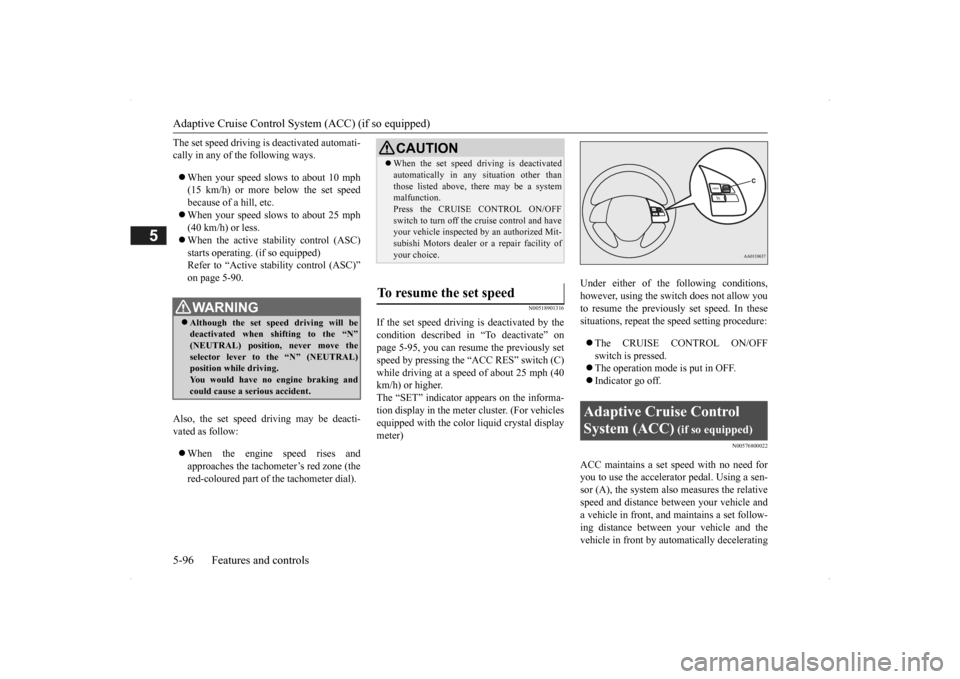
ACC maintains a set speed with no need for you to use the accelerator pedal. Using a sen-sor (A), the system also measures the relative speed and distance between your vehicle and a vehicle in front, and maintains a set follow-ing distance between your vehicle and the vehicle in front by auto
matically decelerating
WA R N I N GAlthough the set sp
eed driving will be
deactivated when shifting to the “N” (NEUTRAL) position
, never move the
selector lever to
the “N” (NEUTRAL)
position while driving. You would have no engine braking andcould cause a serious accident.
CAUTION When the set speed driving is deactivated automatically in any
situation other than
those listed above, th
ere may be a system
malfunction. Press the CRUISE CONTROL ON/OFF switch to turn off the
cruise control and have
your vehicle inspected
by an authorized Mit-
subishi Motors dealer or
a repair facility of
your choice.
To resume the set speed
Adaptive Cruise Control System (ACC)
(if so equipped)
BK0200500US.book 96 ページ 2013年2月12日 火曜日 午前9時46分
Page 175 of 451
Adaptive Cruise Control System (ACC) (if so equipped)
Features and controls 5-97
5
your vehicle if it becomes too close to the vehicle in front.The cruising set speed can be set from 25 mph (40 km/h) to 110 mph (180 km/h). The distance can be select
ed from three levels.
If the vehicle in front decelerates, the ACC will automatically apply limited braking to maintain the distance, a
nd if the front vehicle
then accelerates, the ACC will automatically accelerate your vehicle up to the set speed. If your vehicle is approa
ching too close to the
front vehicle, a buzzer will sound and a warn- ing is shown in the multi information display.When the ACC detects no vehicle ahead, the set speed will be maintained. Conventional cruise cont
rol mode without the
distance control can
also be selected.
N00577000021
N00577100035
While the ACC is turned on, indicators for the ACC are shown in the multi information display.
WA R N I N G Before using the ACC, read this entire sec- tion to understand th
e limitations of this
system. Failure to follow instructionscould result in an accident. Never rely solely on the ACC. The ACC is not a collision avoidance system or an automatic driving system. It is designed to use only limited brak
ing and is never a
substitute for your safe and careful driv- ing. Always be ready to apply the brakes manually.
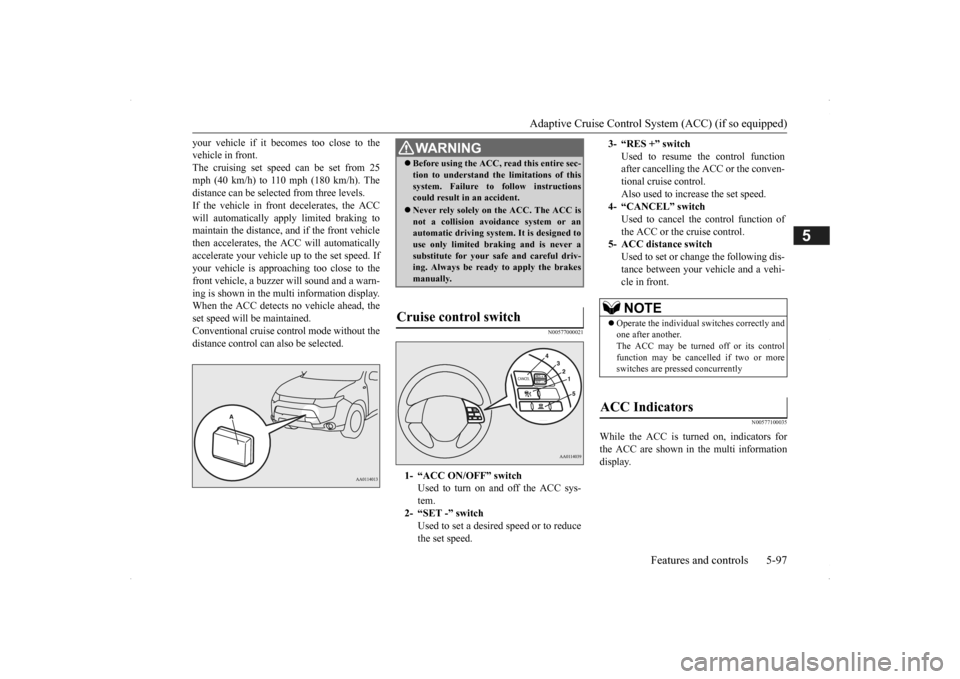
Cruise control switch
1- “ACC ON/OFF” switch
Used to turn on and off the ACC sys-tem.
2- “SET -” switch
Used to set a desired speed or to reducethe set speed.
3- “RES +” switch
Used to resume the control function after cancelling the ACC or the conven-tional cruise control. Also used to increase the set speed.
4- “CANCEL” switch
Used to cancel the control function of the ACC or the cruise control.
5- ACC distance switch
Used to set or change the following dis- tance between your
vehicle and a vehi-
cle in front.NOTE
Operate the individual
switches correctly and
one after another. The ACC may be turned off or its control function may be canc
elled if two or more
switches are pressed concurrently
ACC Indicators
BK0200500US.book 97 ページ 2013年2月12日 火曜日 午前9時46分
Page 176 of 451
Adaptive Cruise Control System (ACC) (if so equipped) 5-98 Features and controls
5
N00577200023
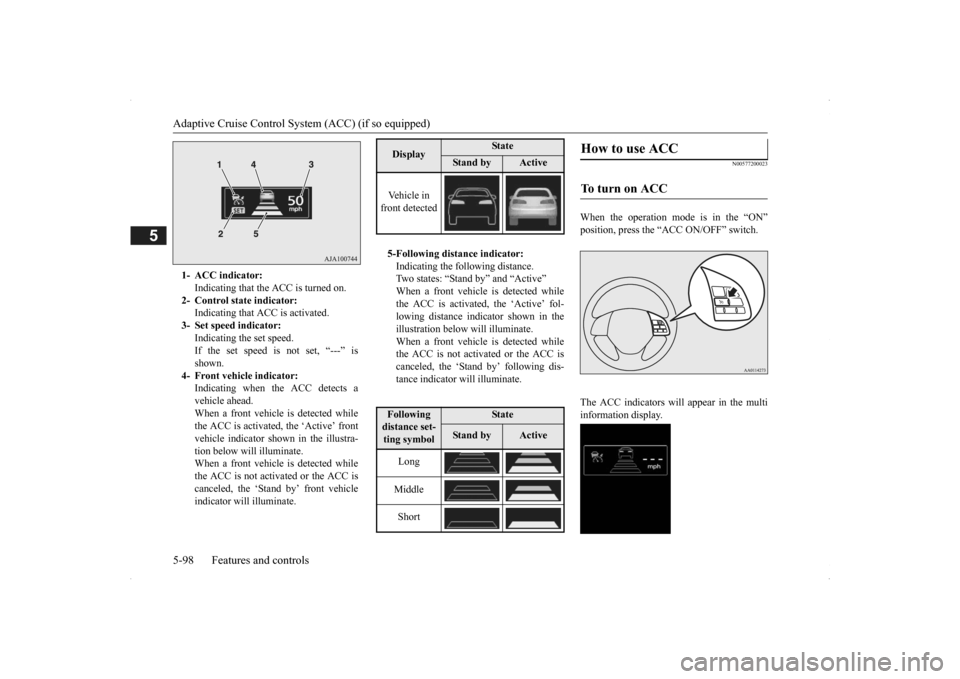
When the operation mode is in the “ON” position, press the “ACC ON/OFF” switch. The ACC indicators will appear in the multi information display.
1- ACC indicator:
Indicating that the ACC is turned on.
2- Control state indicator:
Indicating that A
CC is activated.
3- Set speed indicator:
Indicating the set speed. If the set speed is not set, “---” isshown.
4- Front vehicle indicator:
Indicating when the ACC detects avehicle ahead. When a front vehicle is detected while the ACC is activated, the ‘Active’ frontvehicle indicator shown in the illustra- tion below will illuminate. When a front vehicle is detected whilethe ACC is not activated or the ACC is canceled, the ‘Stand by’ front vehicle indicator will illuminate.
Display
State
Stan d b y
Active
Vehicle in front detected 5-Following distance indicator: Indicating the following distance.Two states: “Stand
by” and “Active”
When a front vehicle is detected while the ACC is activated, the ‘Active’ fol-lowing distance indicator shown in the illustration below will illuminate. When a front vehicle is detected whilethe ACC is not activated or the ACC is canceled, the ‘Stand by’ following dis- tance indicator will illuminate.Following distance set- ting symbol
State
Stan d b y
Active
Long Middle Short
How to use ACC
To turn on ACC
BK0200500US.book 98 ページ 2013年2月12日 火曜日 午前9時46分
Page 177 of 451
Adaptive Cruise Control System (ACC) (if so equipped)
Features and controls 5-99
5
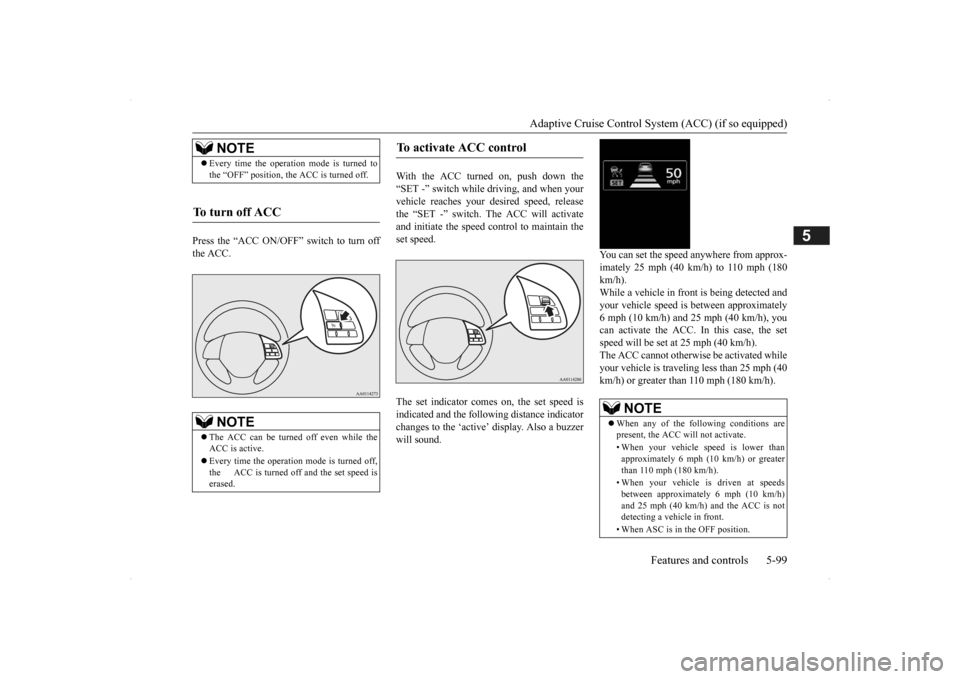
Press the “ACC ON/OFF” switch to turn off the ACC.
With the ACC turned on, push down the “SET -” switch while
driving, and when your
vehicle reaches your de
sired speed, release
the “SET -” switch. The ACC will activate and initiate the speed control to maintain the set speed. The set indicator comes on, the set speed is indicated and the follow
ing distance indicator
changes to the ‘active’
display. Also a buzzer
will sound.
You can set the speed anywhere from approx- imately 25 mph (40 km/h) to 110 mph (180 km/h). While a vehicle in front
is being detected and
your vehicle speed is
between a
pproximately
6 mph (10 km/h) and 25 mph (40 km/h), youcan activate the ACC. In this case, the set speed will be set at 25 mph (40 km/h). The ACC cannot otherwis
e be activated while
your vehicle is traveling less than 25 mph (40 km/h) or greater than 110 mph (180 km/h).
NOTE
Every time the operation mode is turned to the “OFF” position, the ACC is turned off.
To turn off ACC
NOTE
The ACC can be turned off even while the ACC is active. Every time the operation mode is turned off, the ACC is turned off and the set speed is erased.
To activate ACC control
NOTE
When any of the following conditions are present, the ACC will not activate. • When your vehicle speed is lower than approximately 6 mph (10 km/h) or greaterthan 110 mph (180 km/h). • When your vehicle is driven at speeds between approximately 6 mph (10 km/h) and 25 mph (40 km/h) and the ACC is not detecting a vehi
cle in front.
• When ASC is in the OFF position.
BK0200500US.book 99 ページ 2013年2月12日 火曜日 午前9時46分
Page 178 of 451
Adaptive Cruise Control System (ACC) (if so equipped) 5-100 Features and controls
5
N00581300025
The speed of your vehicle will be maintained at the speed you have set. The speed can be set between approximately 25 mph (40 km/h) and 110 mph (180 km/h).
N00581400026
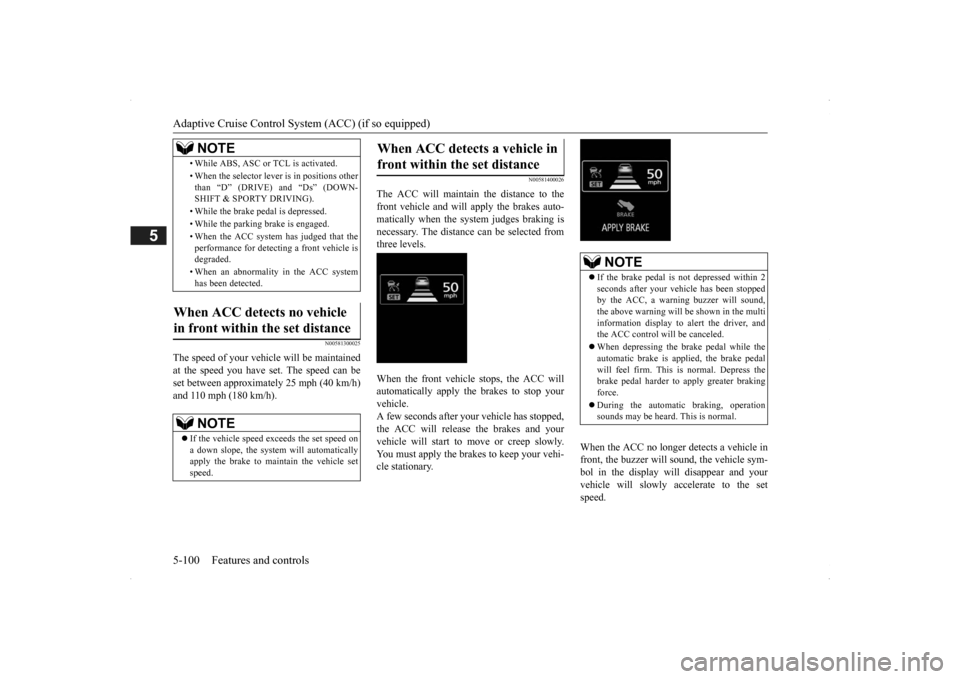
The ACC will maintain the distance to thefront vehicle and will apply the brakes auto-matically when the system judges braking is necessary. The distance
can be selected from
three levels. When the front vehicle stops, the ACC will automatically apply the brakes to stop yourvehicle. A few seconds after your vehicle has stopped, the ACC will release the brakes and yourvehicle will start to move or creep slowly. You must apply the brakes to keep your vehi- cle stationary.
When the ACC no longer detects a vehicle in front, the buzzer will sound, the vehicle sym-bol in the display will disappear and your vehicle will slowly accelerate to the set speed.
• While ABS, ASC or TCL is activated. • When the selector leve
r is in positions other
than “D” (DRIVE) and “Ds” (DOWN- SHIFT & SPORTY DRIVING). • While the brake pedal is depressed. • While the parking brake is engaged.• When the ACC system has judged that the performance for detect
ing a front vehicle is
degraded. • When an abnormality
in the ACC system
has been detected.
When ACC detects no vehicle in front within the set distance
NOTE
If the vehicle speed exceeds the set speed on a down slope, the system will automatically apply the brake to main
tain the vehicle set
speed.NOTE
When ACC detects a vehicle in front within the set distance
NOTE
If the brake pedal is not depressed within 2 seconds after your vehi
cle has been stopped
by the ACC, a warni
ng buzzer will sound,
the above warning will be shown in the multi information display to alert the driver, and the ACC control will be canceled. When depressing the brake pedal while the automatic brake is applied, the brake pedalwill feel firm. This is normal. Depress the brake pedal harder to apply greater braking force. During the automatic
braking, operation
sounds may be heard. This is normal.
BK0200500US.book 100 ページ 2013年2月12日 火曜日 午前9時46分
Page 179 of 451

Adaptive Cruise Control System (ACC) (if so equipped)
Features and controls 5-101
5
N00576900023
While the ACC is activa
ted, if your vehicle is
approaching too closely to the vehicle in front, the ACC gives a warning by sounding abuzzer and displaying a message. Apply the brakes to maintain the appropriate distance to the vehicle in front.
WA R N I N G When your vehicle no longer follows the front vehicle, e.g.
at a freeway exit or
when your vehicle or the front vehiclechanges its lane, your
vehicle may acceler-
ate up to the set speed. Apply the brake, if necessary, to slow down.
Approach alarm
WA R N I N G When the ACC is not being used, turn off the system to avoid
unexpected
ACC acti-
vation. The ACC will not decelerate your vehicle and/or give the appr
oach alarm in the fol-
lowing cases.• When an object other than a vehicle,such as a pedestri
an, is in front.
• When a malfunction is detected in the system.
The ACC will not decelerate your vehicle in the following cases,
but will give the
approach alarm.• When the front vehicle is stationary ormoving at an extremely slow speed.• When your brake system has a problem,such as overheating.
The ACC may not be ab
le to maintain the
set speed or the dist
ance to a vehicle in
front and may not alert the driver, if thesystem cannot detect the front vehicle properly. Typical situations include:
• When a vehicle cuts
into your path at a
close distance.• When a vehicle in front is not completely in your path.• When a vehicle in front is towing atrailer.• When a motorcycle or a bicycle is infront.• When a vehicle in fr
ont is a truck loaded
with freight that protrudes rearward from the cargo bed.• When the height of a vehicle in front isextremely low or the road clearance ofthe vehicle is extremely high.• When driving on a r
oad with alternating
up and down surfaces.• When driving on a curve.• When driving on a bumpy or rough road.• When driving in a tunnel.• When driving in construction zones.• When the rear of your vehicle is weigheddown with the weight of passengers andluggage• For up to two minute
s after starting driv-
ing.• When the surface of th
e sensor is covered
with dirt, snow, ice, etc.• When a front vehicl
e or an oncoming
vehicle is splashing wa
ter, snow or dirt.
Never use the ACC in the following situa- tions:• In heavy traffic.WA R N I N G
SC00000500-3.fm 101 ページ 2013年2月13日 水曜日 午前9時48分