Page 198 of 451

Instrument cluster 5-120 Features and controls
5
N00519001402
N00519101272
The speedometer shows
the vehicle speed in
miles per hour (mph) or kilometers per hour(km/h).
NOTE
Mirror image is displayed on the screen. Monitor brightness is adjusted automatically by sensors. It is possible to change the display language of the screen. For details, please refer to the separatedowner’s manual for “Mitsubishi Multi-Com- munication System”. Under certain circumst
ances, it may become
difficult to see an image on the screen, even when the system is functioning correctly. • In a dark area, such as at night. • When water drops or condensation are on the lens. • When sun light or he
adlights shine directly
into the lens.
Instrument cluster 1- Tachometer
P.5-121
Type 1 Type 2
2- Multi Information display (Type
1:Color liquid crystal display type) P.5-121 Information screen display list (Type 1) P.5-149 Multi Information display (Type2:Mono-color liquid crystal display type)
P.5-140
3- Speedometer
P.5-120
4- Rheostat illumination button (Type 1)
P.5-121
5- Multi information display switch (Type
2) P.5-141
Speedometer Type A
BK0200500US.book 120 ページ 2013年2月12日 火曜日 午前9時46分
Page 199 of 451

Multi Information display - Type 1
Features and controls 5-121
5
N00519201303
The tachometer shows en
gine revolutions per
minute. This allows the driver to determine the most efficient sel
ector position and engine
speed combinations.This gauge also assists in evaluating engine performance.
N00554901206
Each time you press this button, there is asound and the brightness of the instruments changes.
N00555001288
The multi information display displays warn-ings, the odometer, tr
ip odometer, service
reminder, engine cool
ant temperature, fuel
remaining, outside temperature, selector lever position, average and momentary fuel con-sumption, driving range
, average speed, etc.
Tachometer Type B
CAUTIONThe red zone indicate
s an engine speed
beyond the range of safe operation. Select the correct selector position to control the engine speed so that
the tachometer indi-
cator does not ente
r the red zone.
Meter illumination control (Vehicle equipped with the multi information display - Type 1) 1- Brightness level 2- Rheostat illumination button
NOTE
You can adjust to 8 different levels for when the front side-marker
and parking lights are
illuminated and when they are not. If the vehicle is equi
pped with the automatic
light control, the light switch is in a positionother than the “OFF” pos
ition and it is suffi-
ciently dark outside th
e vehicle, the meter
illumination switches automatically to theadjusted brightness. The brightness level of the instruments is stored when the ignition switch is turned to the “OFF” or “LOCK”
position or the opera-
tion mode is put in OFF. If you press and hold the button for longer than about 2 second when the front side-marker and parking li
ghts are illuminated,
the brightness level ch
anges to the maximum
level. Pressing and
holding the button for
longer than about 2 second again returns the brightness level to the previous level.
Multi Information display - Type 1
BK0200500US.book 121 ページ 2013年2月12日 火曜日 午前9時46分
Page 200 of 451
Multi Information display - Type 1 5-122 Features and controls
5
It is also possible to change elements such as the language and units used on the multiinformation display. [With ignition switch or operation mode in OFF] 1-
Warning display screen
P.5-128
2- Information screen
P.5-124
Interrupt display screen
P.5-127
3- Door ajar warning display screen
P.5-128
4- Odometer
P.5-129
BK0200500US.book 122 ページ 2013年2月12日 火曜日 午前9時46分
Page 201 of 451
![MITSUBISHI OUTLANDER 2014 3.G Owners Manual Multi Information display - Type 1
Features and controls 5-123
5
[With ignition switch or operation mode in ON]
N00555101188
Each time the multi information display switch is operated, th
e buzzer s](/manual-img/19/7531/w960_7531-200.png "MITSUBISHI OUTLANDER 2014 3.G Owners Manual Multi Information display - Type 1
Features and controls 5-123
5
[With ignition switch or operation mode in ON]
N00555101188
Each time the multi information display switch is operated, th
e buzzer s")
Multi Information display - Type 1
Features and controls 5-123
5
[With ignition switch or operation mode in ON]
N00555101188
Each time the multi information display switch is operated, th
e buzzer sounds and the
multi information disp
lay changes between
information such as warnings, trip odometer,
1- Drive mode indicator display screen (if
so equipped)
P. 5 - 7 6
2- S-AWC control mode display screen (if
so equipped)
P. 5 - 7 8
3-
Warning display screen
P.5-128
4- Forward Collision Mitigation System
(FCM) OFF displa
y screen (if so
equipped)
P.5-107
5- Lane Departure Warning (LDW) dis-
play screen (if so equipped)
P. 5 - 1 1 1
6- ECO mode indicator display screen
P.5-178
7- Information screen
P.5-124
8- Selector lever
position display
P.5-70
9- Engine coolant te
mperature display
P.5-128
10- Odometer
P.5-129
11- Cruise control display screen (if so
equipped)
P.5-92
12- Adaptive Cruise Control System (ACC)
display screen (if so equipped) P.5-96
13- ECO indicator (if so equipped)
P.5-133
14- Fuel remaining display screen
P.5-129
15- Outside temperature display screen
P.5-129
NOTE
The fuel units, outside
temperature units,
display language, and
other settings can be
changed. Refer to “Changing the function settings” onpage 5-134.
Multi information display switch
BK0200500US.book 123 ページ 2013年2月12日 火曜日 午前9時46分
Page 202 of 451
Multi Information display - Type 1 5-124 Features and controls
5
average and momentary fuel consumption, distance range, etc.It is also possible to change elements such as the language and units used on the multi information display by operating the multiinformation display switch.
N00555301177
Each time you lightly press th
e multi information display switch, the displa
y screen switches in the following order.
Information screen (With the igniti
on switch in “OFF” or “LOCK” po
sition or the operation mode in
OFF) *: When there is a warning display
BK0200500US.book 124 ページ 2013年2月12日 火曜日 午前9時46分
Page 203 of 451
Multi Information display - Type 1
Features and controls 5-125
5
N00555801202
When the ignition switch is turned to the
“ON” position or the operation m
ode is put in ON, the disp
lay screen switches in the
following order.
1-
Trip odometer
P.5-129
2-
Trip odometer
P.5-129
3- ECO score display
P.5-133
4- Service reminder
P.5-130
5- Redisplay of a warning display screen
P.5-128
Information screen (With the igniti
on switch is turned from the “O
FF” or “LOCK” position to the
“ON” position or the operation mo
de is changed from OFF to ON)
*: When the inspection time has arrived 1- Screen when the ignition switch
or the operation mode is OFF
2- System check screen
P.5-131
3- Screen when the ignition switch
or the operation mode is ON
4- Service reminder
P.5-130
BK0200500US.book 125 ページ 2013年2月12日 火曜日 午前9時46分
Page 204 of 451
Multi Information display - Type 1 5-126 Features and controls
5
N00556201232
Each time you lightly press th
e multi information display switch, the displa
y screen switches in the following order.
Information screen (With the ignition
switch or the operation mode in ON)
*: When there is a warning display 1-
Trip odometer
P.5-129
2-
Trip odometer
P.5-129
3- Driving range display
P.5-132
ECO drive assist display
P.5-133
4- Average fuel consumption display
P.5-132 ECO drive assist display
P.5-133
5- Average speed display
P.5-132
Momentary fuel consumption display
P.5-133
6- ECO score display
P.5-133
7- S-AWC operation display (if so equipped)
P.5-80
8- Service reminder
P.5-130
BK0200500US.book 126 ページ 2013年2月12日 火曜日 午前9時46分
Page 205 of 451
Multi Information display - Type 1
Features and controls 5-127
5
N00556301217
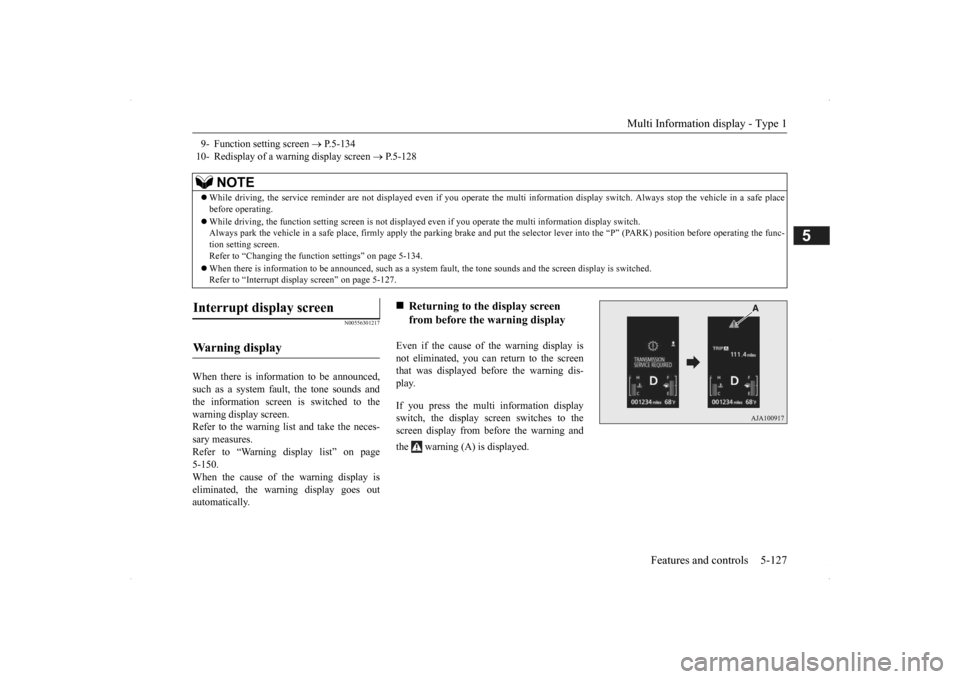
When there is information to be announced, such as a system fault, the tone sounds and the information screen is switched to the warning display screen.Refer to the warning list and take the neces- sary measures. Refer to “Warning display list” on page5-150. When the cause of the warning display is eliminated, the warning display goes outautomatically.
Even if the cause of the warning display is not eliminated, you can return to the screenthat was displayed be
fore the warning dis-
play. If you press the multi information display switch, the display screen switches to thescreen display from before the warning and the warning (A) is displayed.
9- Function setting screen
P.5-134
10- Redisplay of a warning display screen
P.5-128
NOTE
While driving, the service reminder are not
displayed even if you operate the multi in
formation display swit
ch. Always stop the
vehicle in a safe place
before operating. While driving, the function sett
ing screen is not displayed even if you ope
rate the multi information display switch.
Always park the vehicle in a sa
fe place, firmly apply the park
ing brake and put the selector le
ver into the “P” (PARK) position
before operating the func-
tion setting screen.Refer to “Changing the func
tion settings” on page 5-134.
When there is information to be announced, such as a system
fault, the tone sounds and the
screen display is switched.
Refer to “Interrupt disp
lay screen” on page 5-127.
Interrupt display screen Wa r n i n g d is p la y
Returning to the display screen from before the warning display
BK0200500US.book 127 ページ 2013年2月12日 火曜日 午前9時46分


