2014 MITSUBISHI OUTLANDER CD player
[x] Cancel search: CD playerPage 277 of 451

Bluetooth® 2.0 interface (if so equipped)
Features and controls 5-199
5
“
a call you need to sim-
ulate the pressing of a phone button as a response to an automated system, press theSPEECH button and speak “1 2 3 4 pound send” and the 1234# will be sent via your cel- lular phone.
N00565801045
If an incoming phone call is received whilethe ignition switch or
the operation mode is in
ON or ACC, the audio sy
stem will be auto-
matically turned on and switched to theincoming call, even when the audio system was originally off. The voice guide announcement for theincoming call will be output from the front passenger’s seat speaker. If the CD player or radio was playing whenthe incoming call was received, the audio sys- tem will mute the sound from the CD player or radio and output only the incoming call. To receive the call, press the PICK-UP button on the steering wheel control switch. When the call is over, the audio system willreturn to its previous state.
N00565900010
At any time during a ca
ll, you can mute the
vehicle microphone. Pressing the SPEECH button and then saying“Mute” during a call will turn ON the mute function and mute the microphone. Saying “Mute off” in the same way will turnoff the mute function and cancel the mute on the microphone.
N00566600014
The Bluetooth
® 2.0 interface
can switch
between hands-free mode
(hands-free calls)
and private mode (calls
using cellular phone).
If you press the SPEECH button and say “Transfer call” during a hands-free call, you can stop the hands-free mode and talk in pri-vate mode. To return to hands-free mode, press the SPEECH button again and say “Transfercall.”
N00566000018
The Bluetooth
® 2.0 interface
has 2 types of
unique phonebooks that are different from the phonebook stored in the cellular phone. They
are the vehicle phonebook and the mobile phonebook.These phonebooks are used to register tele- phone numbers and make
calls to desired
numbers via voice recognition function.
N00566101120
This phonebook is used when making callswith the voice re
cognition function.
Up to 32 names can be registered in the vehi- cle phonebook per language. Also, each entry has 4 locations associatedwith: home, work, mobile
and other. You can
register one telephone number for each loca- tion. You can register a desire
d name as a name for
any phonebook entry register
ed in the vehicle
phonebook. Names and telephone numbers can bechanged later on. The vehicle phonebook ca
n be used with all
paired cellular phones.
Receiving calls
Mute function
Switching between hands-free mode and private mode
Phonebook function
NOTE
Disconnecting the batt
ery cable will not
delete information regi
stered in the phone-
book.
Vehicle phonebook
BK0200500US.book 199 ページ 2013年2月12日 火曜日 午前9時46分
Page 287 of 451

USB input terminal (if so equipped)
Features and controls 5-209
5
* : “iPod,” “iPod classic,” “iPod nano,” “iPod touch,” and “iPhone”
are registered trade-
marks of Apple Inc. in the United States and other countries.
N00567201030
You can play music files of the followingspecifications that are saved in a USB mem- ory device or other
device supporting mass
storage class. When
you connect your iPod,
playable file specif
ications depend on the
connected iPod.
iPod nano*
first gener- ation
F/W Ver.1.3.1 or later
second generation
F/W Ver.1.1.3 or later
third gen- eration
F/W Ver.1.1.3 or later
fourth gen- eration
F/W Ver.1.0.4 or later
fifth gener- ation
F/W Ver.1.0.2 or later
sixth gen- eration
F/W Ver.1.0 or later
iPod touch*
first gener- ation
F/W Ver.3.1.3 or later
second generation
F/W Ver.4.2.1 or later
third gen- eration
F/W Ver.4.3.1 or later
fourth gen- eration
F/W Ver.4.3.1 or later
Model name
Condition
iPhone*
iPhone
F/W Ver.3.1.3 or later
iPhone 3G
F/W Ver.4.2.1 or later
iPhone 3GS
F/W Ver.4.3.1 or later
iPhone 4
F/W Ver.4.3.1 or later
iPhone 4S
F/W Ver.5.0.1 or later
Models other than USB memory devices and iPods
Digital audio player support-ing mass stor- age class
NOTE
Depending on the type of the USB memory device or other devi
ce connected, the con-
nected device may not
function properly or
the available functi
ons may be limited.
It is recommended to use an iPod with firm- ware updated to th
e latest version.
Model name
Condition
You can charge your iP
od by connecting it to
the USB input terminal
when the ignition
switch or the operation mode is in ON orACC. Do not keep your USB memory device or iPod in your vehicle. It is recommended that you back up the files in case of data damage. Do not connect to the USB input terminal any device (hard disk
, card reader, memory
reader, etc.) other
than the connectable
devices specified in the previous section.The device and/or data
may be damaged. If
any of these devices
was connected by mis-
take, remove it after turning the ignitionswitch to the “LOCK” position or putting the operation mode in OFF.
File specifications
Item
Condition
File format MP3, WMA, AAC
NOTE
BK0200500US.book 209 ページ 2013年2月12日 火曜日 午前9時46分
Page 317 of 451

7
Comfort controlsVents .................................................................................................7-2 Automatic climate control air conditioner .
..............
...........
.........
.....7-5
Important air conditioning operating tips ...
...........
...........
.........
.....7-14
Air purifier ......................................................................................7-14 AM/FM radio/CD player (if so equipped) .....................................7-15 Handling of Discs ..........................................................................7-18Audio Files (MP3/WMA/AAC) ....................................................7-20 Important Points on Safety for the Customer ................................7-24 Operation Keys ..............................................................................7-25Listen to Radio ...............................................................................7-28 Listen to Satellite Radio (if so equipped) .......................................7-29 Listen to CDs .................................................................................7-31Listen to MP3s ...............................................................................7-32 Listen to an iPod ............................................................................7-33 Listen to Audio Files on a USB Device .........................................7-35Listen to Bluetooth Audio (if so equipped) ....................................7-38 Display Indicator ...........................................................................7-40 Audio Quality and Volume Balance Adjustment ...........................7-41System Settings ..............................................................................7-42 Troubleshooting ...........
...........
...........
...........
...........
.........
.........
.....7-45
Antenna ...........................................................................................7-47General information about your radio ......
...........
...........
...........
.....7-48
BK0200500US.book 1 ページ 2013年2月12日 火曜日 午前9時46分
Page 331 of 451

AM/FM radio/CD player (if so equipped)
Comfort controls 7-15
7
N00734302102
The audio system can only be used when the ignition switch or the
operation mode is in
ON or ACC.
N00715000021
This product supports audio playback from iPod/iPhone devices, however dif- fering versions mean
that playback cannot
be guaranteed. Please be aware that depending on the iPod/iPhone model or
version, operation
may differ.
N00715200023
If the product becomes dirty, wipe with a soft cloth. If very dirty, use a soft cloth dipped in neutral detergent diluted in water, and then wrung out. Do not use benzene, thin- ners, or other chemic
al wipes. This may
harm the surface.
N00715300024
Product names and other proper names are the trademarks or registered trade- marks of their respective owners.
AM/FM radio/CD player
(if
so equipped)
NOTE
To listen to the audio system while the engine is not running, turn the ignitionswitch to the “ACC” position or put the oper- ation mode in ACC. If the ignition switch
or the operation mode
is left in ACC, the accessory power will automatically turn off after a certain period of time and you will no longer be able to usethe audio system. The accessory power comes on again if the ignition switch or the engine switch is operated with it in the“ACC” position. Refer
to “ACC power auto-
cutout function” on page 5-18 and 5-57. If a cellular phone is
used inside the vehicle,
it may create noise in the audio equipment. This does not mean that anything is wrongwith your audio equipment. In such a case, use the cellular phone at
a place as far away
as possible from the audio equipment.
If foreign objects or water get into the audio equipment, or if smoke or a strange odorcomes from it, immediately turn off theaudio system and have it checked at an authorized Mitsubishi
Motors dealer or a
repair facility of your
choice. Never try to
repair it yourself. Avoid using the audio sys- tem until it is insp
ected by a qualified per-
son. If the audio system is damaged by foreign objects, water, or fi
re, have the system
checked by a qualified Mitsubishi Motors technician.
Important Points on Usage
iPod/iPhone Playback Function
(if
so equipped)
NOTE
How to Clean
Trademarks
BK0200500US.book 15 ページ 2013年2月12日 火曜日 午前9時46分
Page 332 of 451

AM/FM radio/CD player (if so equipped) 7-16 Comfort controls
7
Furthermore, even if there is no specific denotation of trademarks or registeredtrademarks, these are to be observed in their entirety. “Made for iPod”, “Made for iPhone” mean that an electronic accessory hasbeen designed to connect specifically to iPod or iPhone, respec
tively, and has been
certified by the devel
oper to meet Apple
performance standards. iPhone, iPod, iPod clas
sic, iPod nano, and
iPod touch are trademarks of Apple Inc.,registered in the U.S. and other countries. Apple is not responsib
le for the operation
of this device or its compliance withsafety and regulatory standards.NOTE
iPod and iTunes licensi
ng allows individual
users to privately re
produce and play back
non- copyrighted
material as we
ll as material
that may be legally
copied and reproduced.
Infringement of copyright is prohibited. Please refer to your
vehicle’s user manual
regarding the iPod/iPho
ne that can be used
with vehicles equippe
d with a Bluetooth
®
2.0 interface.
BK0200500US.book 16 ページ 2013年2月12日 火曜日 午前9時46分
Page 333 of 451
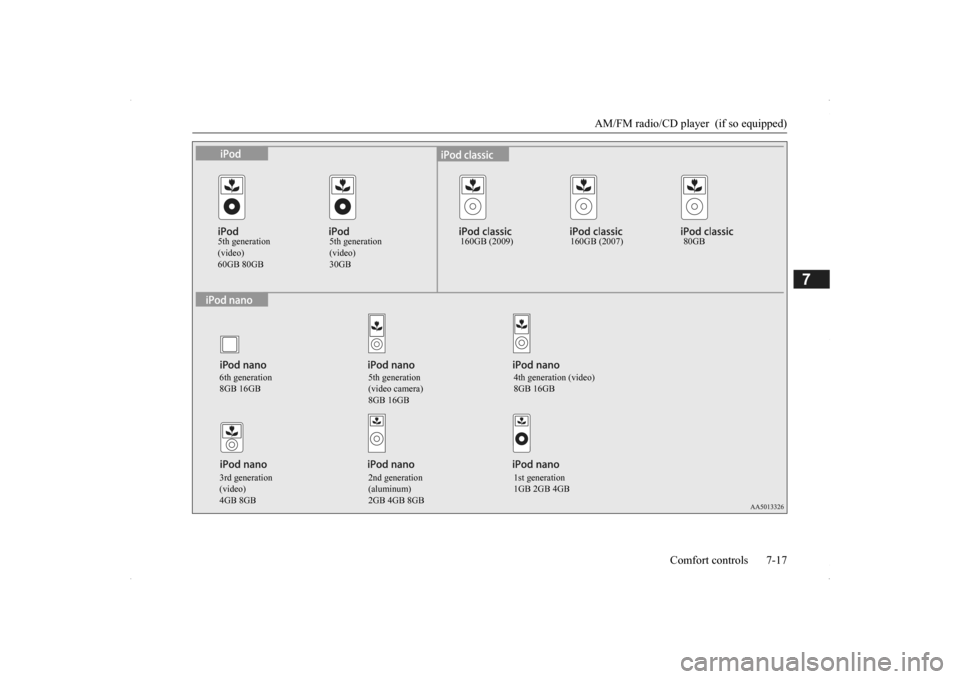
AM/FM radio/CD player (if so equipped)
Comfort controls 7-17
7
5th generation (video)60GB 80GB
5th generation (video)30GB
160GB (2009) 160GB (2007) 80GB
6th generation 8GB 16GB
5th generation (video camera) 8GB 16GB
4th generation (video) 8GB 16GB
3rd generation (video)4GB 8GB
2nd generation (aluminum)2GB 4GB 8GB
1st generation 1GB 2GB 4GB
BK0200500US.book 17 ページ 2013年2月12日 火曜日 午前9時46分
Page 443 of 451

Alphabetical index
12-1
12
Numerics
12 V power outlets
............................
5-211
4-wheel drive operation
.......................
5-81
A
Accessory (installation)
.........................
3-6
Active stability control (ASC)
..............
5-90
Adaptive Cruise Cont
rol System (ACC) 5-96
Air bag
..............................................
4-33
Air cleaner filter
...................................
9-9
Air conditioner
Automatic climate control air conditioner
.
7-5Important air condi
tioning operating tips
..
7-14
Air purifier
.........................................
7-14
All-wheel drive operation
....................
5-81
Aluminum wheels
...............................
9-43
AM/FM radio
.....................................
7-15
Antenna
Roof antenna
..................................
7-47
Anti-lock braking system
.....................
5-87
Arm rest
...............................................
4-9
Assist grip
........................................
5-221
Audio
AM/FM radio
.................................
7-15
CD player
......................................
7-15
Troubleshooting
.............................
7-45
Automatic climate cont
rol air conditioner 7-5
Automatic transaxle
............................
5-60
Fluid
.....................................
9-10
, 11-7
Selector le
ver operation
..................
5-61
Selector lever positions
...................
5-64
Sports mode
...................................
5-65
B
Back-up light
Bulb capacity
.................................
9-30
Replacement
..................................
9-38
Ball joint, steering linka
ge seals, drive shaft
boots
...............................................
9-23
Battery
..............................................
9-13
Charging system warning light
.......
5-168
Checking battery
electrolyte level
....
9-13
Disconnection and connection
.........
9-13
During cold weather
.......................
9-13
Specification
..................................
11-6
Bluetooth® 2.0 interface
....................
5-185
Bottle holders
....................................
5-219
Brake
Fluid
.....................................
9-12
, 11-7
Brake assist
........................................
5-86
Braking
Anti-lock braking system
................
5-87
Braking
...........................................
6-5
Hose
..............................................
9-23
Pad wear alarm
...............................
5-85
Parking brake
.................................
5-52
Pedal
.............................................
5-84
Pedal free play
................................
9-21
Power brakes
..................................
5-85
Service brake
..................................
5-84
Warning lights and buzzer
.............
5-167
Break-in recommendations
....................
5-3
Bulb capacity
......................................
9-30
C
California Perchl
orate Materials
Requirements
.....................................
3-7
Capacities
..........................................
11-7
Card holder
............................
5-211
, 5-216
Cargo area cover
...............................
5-219
Cargo loads
........................................
6-10
Cargo room light
...............................
5-214
Bulb capacity
.................................
9-32
Catalytic converter
................................
9-2
Cautions on the handling of all-wheel drive vehicles
............................................
5-83
CD player
...........................................
7-15
Certification label
...............................
11-3
Charging system warning light
...........
5-168
Child restraint systems
........................
4-25
Child safety locks for rear door
............
5-35
BK0200500US.book 1 ページ 2013年2月12日 火曜日 午前9時46分