2014 MITSUBISHI OUTLANDER Screen
[x] Cancel search: ScreenPage 320 of 451
Vents 7-4 Comfort controls
7
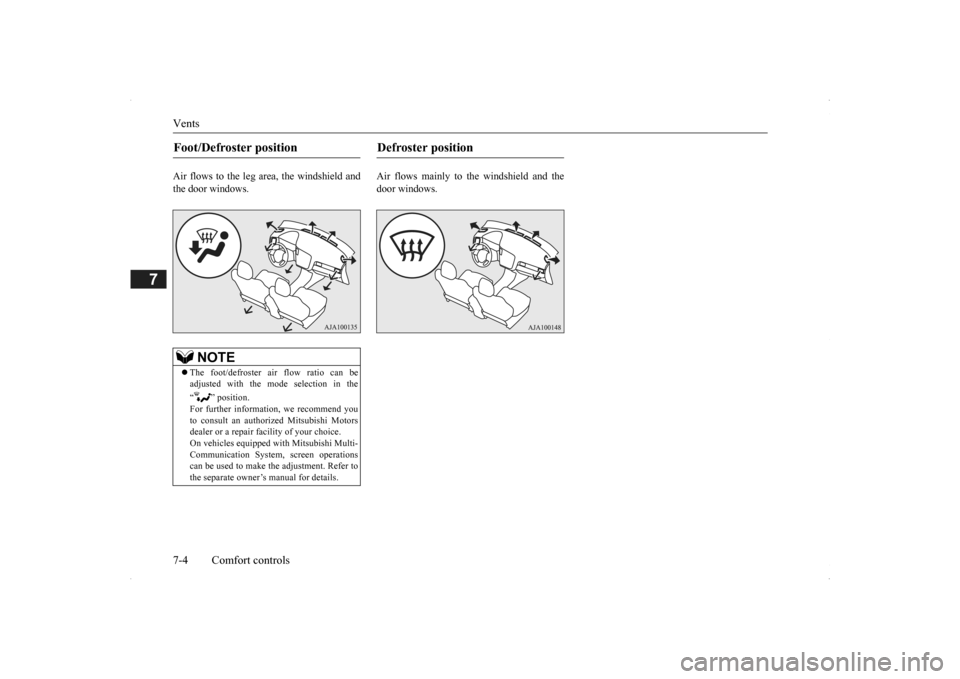
Air flows to the leg area, the windshield and the door windows.
Air flows mainly to the windshield and the door windows.
Foot/Defroster position
NOTE
The foot/defroster air flow ratio can be adjusted with the mode selection in the “ ” position. For further information, we recommend youto consult an authorized Mitsubishi Motors dealer or a repair fa
cility of your choice.
On vehicles e
quipped with Mitsubishi Multi-
Communication System, screen operations can be used to make the adjustment. Refer to the separate owner’s manual for details.
Defroster position
BK0200500US.book 4 ページ 2013年2月12日 火曜日 午前9時46分
Page 323 of 451
Automatic climate cont
rol air conditioner
Comfort controls 7-7
7
N00736901189
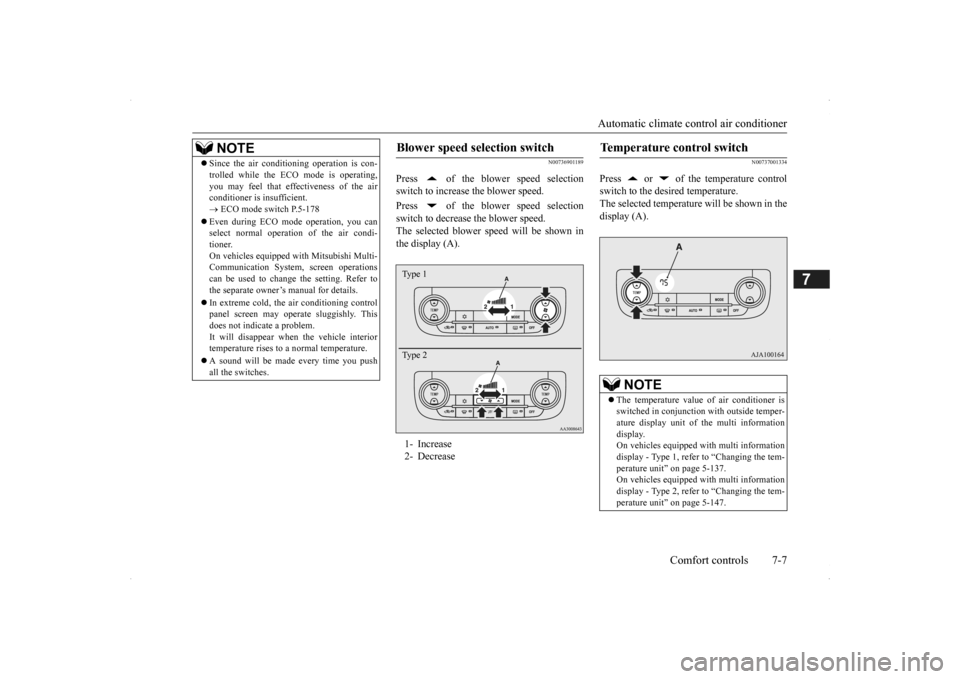
Press of the blower speed selection switch to increase the blower speed. Press of the blower speed selection switch to decrease the blower speed. The selected blower sp
eed will be shown in
the display (A).
N00737001334
Press or of the temperature controlswitch to the desired temperature. The selected temperature will be shown in the display (A).
NOTE
Since the air conditi
oning operation is con-
trolled while the ECO mode is operating,you may feel that effectiveness of the airconditioner is insufficient. ECO mode switch P.5-178
Even during ECO mode operation, you can select normal operati
on of the air condi-
tioner.On vehicles equipped
with Mitsubishi Multi-
Communication System,
screen operations
can be used to change the setting. Refer tothe separate owner’
s manual for details.
In extreme cold, the air conditioning control panel screen may operate sluggishly. This does not indicate a problem. It will disappear when
the vehicle interior
temperature rises to a normal temperature. A sound will be made every time you push all the switches.
Blower speed selection switch 1- Increase 2- DecreaseType 1 Type 2
Temperature control switch
NOTE
The temperature value of air conditioner is switched in conjunction
with outside temper-
ature display unit of the multi informationdisplay. On vehicles equipped with multi information display - Type 1, refer to “Changing the tem-perature unit” on page 5-137. On vehicles equipped with multi information display - Type 2, refer to “Changing the tem-perature unit” on page 5-147.
BK0200500US.book 7 ページ 2013年2月12日 火曜日 午前9時46分
Page 326 of 451
Automatic climate cont
rol air conditioner
7-10 Comfort controls
7
automatically goes back
to the outside posi-
tion.If high cooling performanc
e is desired, or if
the outside air is dusty
or contaminated in
some way, use the
recirculat
ion position.
Switch to the outside position every now and then to keep the windows from fogging up.
N00712300023
You can change the following functions to match your preference.
Enable automatic air control: When the AUTO switch is pressed, the airselection switch will also be automatically controlled. Disable automatic air control: Even when the AUTO switch is pressed,the air selection switch will not be auto- matically controlled. Changing the settings Press the air selection switch for approxi- mately 10 seconds or longer. When the setting has changed, the systemwill beep and the indi
cator light will flash.
• When the setting has changed from enabled to disabled,
the system will beep
three times and the indicator light will flash three times. • When the setting has changed from dis-abled to enabled, the system will beep two times and the indicator light will flash three times.On vehicles equippe
d with Mitsubishi
Multi-Communication System, screen operations can also be
used to change the
setting. Refer to the separate owner’s manual for details.
N00737301353
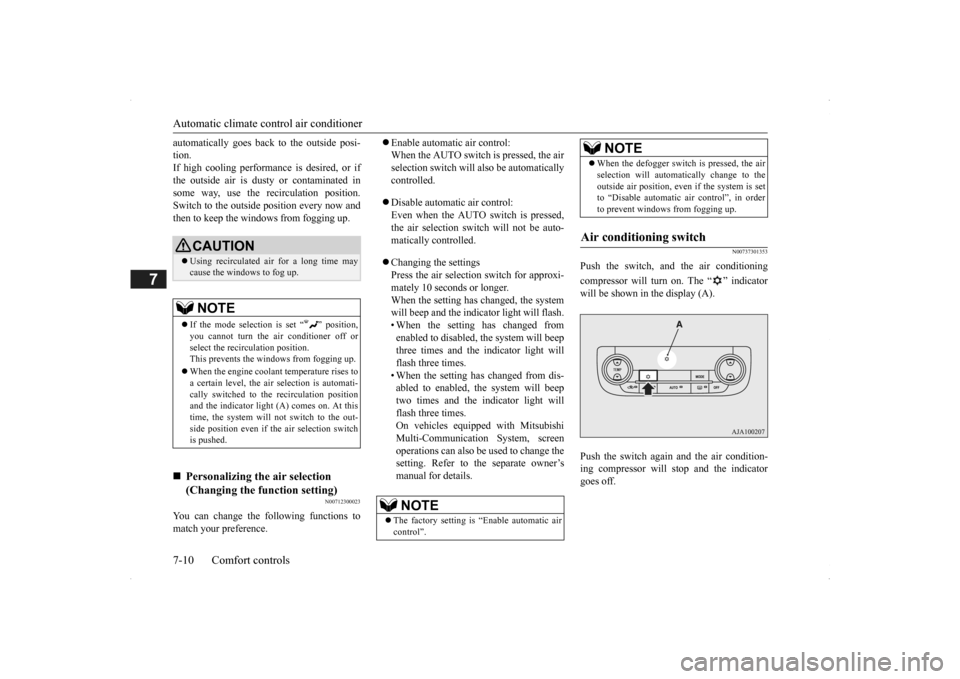
Push the switch, and the air conditioning compressor will turn on. The “ ” indicator will be shown in the display (A). Push the switch again and the air condition- ing compressor will stop and the indicatorgoes off.
CAUTION Using recirculated air for a long time may cause the windows to fog up.NOTE
If the mode selection
is set “ ” position,
you cannot turn the ai
r conditioner off or
select the recirc
ulation position.
This prevents the windows from fogging up. When the engine coolan
t temperature rises to
a certain level, the air selection is automati-cally switched to the
recirculation position
and the indicator light
(A) comes on. At this
time, the system will not switch to the out-side position even if
the air selection switch
is pushed.
Personalizing the air selection (Changing the function setting)
NOTE
The factory setting is
“Enable automatic air
control”.
When the defogger switch is pressed, the air selection will automati
cally change to the
outside air position, even if the system is setto “Disable automatic air control”, in order to prevent windows from fogging up.
Air conditioning switch
NOTE
BK0200500US.book 10 ページ 2013年2月12日 火曜日 午前9時46分
Page 327 of 451

Automatic climate cont
rol air conditioner
Comfort controls 7-11
7
N00712200022
You can change the following functions to match your preference.
Enable automatic air conditioning control: When the AUTO switch is pressed, orwhen the temperature control switch has been set to the minimum temperature, the air conditioning switch is automaticallycontrolled. Disable automatic air conditioning con- trol: The air conditioning switch is not auto-matically controlled,
unless the air condi-
tioning switch is used. Changing the settings Press the air conditioning switch for about 10 seconds or longer. When the setting has changed, the systemwill beep and the indi
cator light will flash.
• When the setting has changed from enabled to disabled, the system will beepthree times and the indicator light will flash three times. • When the setting has changed from dis-abled to enabled, the system will beep two times and the i
ndicator light will
flash three times.On vehicles equippe
d with Mitsubishi
Multi-Communication System, screen operations can also be used to change thesetting. Refer to th
e separate owner’s
manual for details.
N00703501026
When the AUTO switch is pressed, the indi- cator light (A) comes on and the mode selec- tion (except for “ ”), blower speed adjustment, recirculated/outside air selection,temperature adjustment
, and air conditioner
ON/OFF status are all controlled automati- cally.
CAUTION Using the air conditioni
ng slightly increases
the engine idle speed. Therefore, make sureyour foot is firmly on the brake pedal whenshifting the transaxle into drive.NOTE
If a problem is detect
ed in the air condition-
ing compressor, the “ ” indicator blinks. Press the air conditioning
switch once to turn
it off, then once more to turn it back on. If the“ ” indicator does not blink, there is no problem. If it does blink,
have it checked at
an authorized Mitsubish
i Motors dealer or a
repair facility of your choice. For example, sometimes after using a high- pressure car wash, the
condenser can get wet,
and the “ ” indicator blinks temporarily. Wait for a while, pres
s the air conditioning
switch once to turn the system off, then once more to turn it back on. Once the water evap- orates, the blinking will stop.
Personalizing the
air conditioning
switch (Changing the function set-ting)
NOTE
The factory setting is
“Enable automatic air
conditioning control”. When the defogger switch
is pressed, the air
conditioner will run au
tomatically, even if
the system is set to “Disable automatic airconditioning control”, in order to prevent windows from fogging up.
AUTO switch
BK0200500US.book 11 ページ 2013年2月12日 火曜日 午前9時46分
Page 360 of 451
System Settings 7-44 Comfort controls
7
Set the time manually. 1. Select “YES” at the “Adjust time” screen, and press the /SEL key. The hour can be adjusted. Press the
/SEL key again to adjust the minutes.
2. Turn the /SEL key to adjust the time.3. Press the /SEL key. This completes the adjustment.
Change the mobile phone voice cut- in set- tings and the Bluetooth
® 2.0 interface lan-
guage.
Depending on the vehi
cle, PHONE settings
may not be possible.
Supported profiles A hands-free kit (available separately) is required. (“Set value” bold typefa
ce indicates factory
default settings.)
*2:Once the CODE (passcode) of your
choice is entered, each time th
e /SET key is pressed, this swit
ches in the order Settings chan
nel select,
Change LOCK settings, a
nd Complete settings.
To return to “each channel LOCK setting”, press the
6 key. Input the CODE from the 1 RPT key to the 6 key.
Time Setting
NOTE
In order to finish ad
justing the time, hold
down the /SEL key unt
il the seconds are
reset to “00”.
PHONE Settings
NOTE
Cancel functions such as the mobile phone “dial lock”, and connect while on thestandby screen. While connected, mobile phone (receiving calls, etc.) operations
may not function cor-
rectly. Depending on the distance between the prod- uct and the mobile
phone, the conditions
within the vehicle, and types of screening,connection may not be
possible. In these
cases, situate the mobile phone as close as possible to the product. Even though a Bluet
ooth-capable mobile
phone, characteristics a
nd specifications may
mean that correct ope
ration may not be pos-
sible. For safety’s sake, do
not operate the mobile
phone while driving.
When operating the
mobile phone, first stop the vehicle in a safelocation. Even though a Bluet
ooth-capable mobile
phone, phone specifications
and settings may
result in differences in display, or prevent correct operation.
Some models may not
be confirmed as con-
nected, or may not connect.Hands-free
HFP(v1.5)
Phonebook transfer
OPP(v1.1), PBAP(v1.0)
Vehicles without a Bluetooth
® 2.0 Inter-
faceSettings value
Settings content
PHONE OFF
Do not use mobile phone voice cut-in.
PHONE MUTE
During mobile phone voice cut- in, mute the audio.
PHONE AT T
During mobile phone voice cut- in, output audio from all speak- ers.
NOTE
BK0200500US.book 44 ページ 2013年2月12日 火曜日 午前9時46分
Page 370 of 451

Engine overheating 8-4 For emergencies
8
If you drive your vehicl
e with a low battery
charge after the engine has been started byusing jumper cables, th
e engine may misfire.
This can cause the anti-lock braking system warning light to blink on
and off. This is only
due to the low battery voltage. It is not a problem with the brake system. If this hap- pens, fully charge the battery and ensure the charging system is operating properly.
N00836501375
When the engine is overheating, the warningwill be displayed in th
e instrument cluster as
follows. The information screen in the multi infor- mation display will be interrupted and the engine coolant temp
erature warning dis-
play will appear. Also “ ” will blink. (Color liquid crystal display type) The high coolant temperature warning lamp will illuminate.
(Mono-color liquid
crystal display type)
If these warnings are displayed:
1. Stop the vehicle in a safe place. Turn on the hazard warning flashers.2. With the engine st
ill running, carefully
raise the engine hood to vent the engine compartment.3. Check that the cooling fan is running. If the fan is not turn
ing, stop the engine
immediately and cont
act an authorized
Mitsubishi Motors dealer or a repair facil- ity of your choice for assistance. 4. If you see steam or spray coming from under the hood, turn off the engine.
Charging the battery by using an external battery charger
WA R N I N G Always remove the
battery from your
vehicle when the battery is charged by an external battery charger. Keep sparks, cigarette
s, and flames away
from the battery because the battery couldexplode. Keep your work area well vented when charging or using
the battery in an
enclosed space. Remove all the caps before charging the battery. Electrolyte (battery acid) is made of corro- sive diluted sulfuric acid. If electrolyte comes in contact with your hands, eyes,clothes, or the pain
ted surface of your
vehicle, thoroughly
flush with water. If
electrolyte gets in your eyes, flush themimmediately and thor
oughly with water,
and get prompt medical attention. Always wear protective clothing and gog- gles when working near the battery. Keep the battery out of the reach of chil- dren.
As your vehicle has anti-lock brakes Engine overheating
WA R N I N G To avoid personal injury, keep hands, hair, jewelry and clothes aw
ay from the cooling
fan. The cooling fan ca
n start at any time.
BK0200500US.book 4 ページ 2013年2月12日 火曜日 午前9時46分
Page 388 of 451

Engine hood 9-4 Vehicle care and maintenance
9
Release the lever and
lift the engine hood.
Support the engine hood with the hood prop. Insert the hood prop securely in the opening under the hood marked with an arrow.
Unlatch the prop from the engine hood and put it back in its retainer. Slowly lower the engine hood about 8 inches (20 cm), then let it drop from its own weight.
NOTE
To prevent damage to the engine hood and wipers, make sure the
wipers are at resting
position when you open the engine hood.
CAUTION Always insert the support prop into the hole specially made for it. Propping the enginehood at any other place
could cause the prop
to slip out and lead
to an accident.
The hood prop can fall out if the hood is lifted by a strong wind.
To close
CAUTION Be careful not to trap your hands or fingers when closing the engine hood.
Make sure the engine hood is firmly closed before driving.If you drive without the engine hood com-pletely closed, it c
ould open up while driv-
ing.NOTE
If this does not clos
e the engine hood prop-
erly, drop it again from a slightly higher position. Do not push down strongly on the engine hood. Depending on how strongly or whereyou push down, you could create a dent in the vehicle body. If you drive with the e
ngine hood left open, a
warning display is displayed on the informa- tion screen in the multi-information display.CAUTION
BK0200500US.book 4 ページ 2013年2月12日 火曜日 午前9時46分
Page 445 of 451

Alphabetical index
12-3
12
Replacement
..................................
9-34
Front turn signal light
Bulb capacity
.................................
9-30
Replacement
..................................
9-36
Fuel
Filling the fuel tank
...........................
3-3
Fuel economy
...................................
6-2
Fuel hoses
......................................
9-22
Fuel selection
...................................
3-2
Tank capacity
.................................
11-7
Fuses
.................................................
9-25
Fusible links
.......................................
9-25
G
General maintenance
...........................
9-23
General vehicle data
............................
11-4
Genuine parts
.......................................
3-6
Glove compartment
...........................
5-215
Glove compartment light
Bulb capacity
.................................
9-32
H
Hazard warning
flasher switch
...........
5-177
Hazard warning lights
.......................
5-166
Head restraints
....................................
4-10
Headlight leveling switch
..................
5-176
Headlights
Bulb capacity
.................................
9-30
Dimmer
........................................
5-174
Headlight flasher
...........................
5-174
Replacement
..........................
9-33
, 9-34
Switch
..........................................
5-171
High beam indicator
..........................
5-166
High-mounted stop light
Bulb capacity
.................................
9-30
Hill start assist
...................................
5-85
Hood lock release me
chanism and safety
catch
...............................................
9-24
Horn switch
......................................
5-184
I
If the vehicle breaks down
.....................
8-2
Ignition switch
...................................
5-56
Important facts to know in
case of an accident
10-4 Indicators
....................
5-148
, 5-165
, 5-166
Information screen display
.................
5-149
Inside rearview mirror
.........................
5-54
Inspection and maintena
nce following rough
road operation
..................................
5-83
Instrument cluster
..............................
5-120
Interior lights
....................................
5-212
J
Jack
.....................................................
8-5
Storage
............................................
8-5
Jump-starting the engine
........................
8-2
K
Keyless entry system
....................
5-7
, 5-28
Keys
....................................................
5-3
L
Labeling
.............................................
11-2
Lane Departure Warning System (LDW)
.....
5-111 License plate light
Bulb capacity
.................................
9-30
Replacement
...................................
9-38
Liftgate
..............................................
5-35
Link System
.....................................
5-185
Loading information
..............................
6-6
Lubricants
..........................................
11-7
Luggage floor box
.............................
5-216
Luggage hooks
.................................
5-222
M
MIVEC engine
..........................
5-24
, 5-60
Modification of your vehicle
..................
3-5
BK0200500US.book 3 ページ 2013年2月12日 火曜日 午前9時46分