Page 322 of 460
5-50 Comfort controls
5
To search by genre
N00763700032
1. Say “Play” on the main menu.NOTE�The Bluetooth
® 2.0 interface starts recognizing the con-
nected device.
If the connected device cannot be recognized or a connec-
tion error occurs, the Bluetooth
® 2.0 interface starts an
appropriate voice guide. Follow the voice guide.
2. After the voice guide says “Would you like to play by Art-
ist, Album, Playlist or Genre?,” say “Genre”.
NOTE�If you say “Genre ,” you can skip step 3.
3. After the voice guide says “What Genre would you like to
play?,” say the music type.
4. If there is only one match, the system proceeds to step 6.
5. If there are two or more matches, the voice guide will say
“More than one match was found, would you like to play
?” If you say “Yes,” the system proceeds to
step 6.
If you say “No,” the next matching genre is uttered by the
system.NOTE�If you say “No” to three or all genres uttered by the sys-
tem, the voice guide will say “Genre not found, please try
again” and the system returns to step 2.6. After the voice guide says “Playing ,” the system
creates an index for the genre.
NOTE�If the confirmation function is active, the voice guide con-
firms if the genre is correct. If the genre is correct, say
“Yes”. If not, say “No”. After the voice guide says “Genre
not found, please try again,” the system returns to step 2.
Refer to “Confirmation function setting” on page 3-132.
7. The system exits the voice recognition mode and starts
playback.
BK0162600US.book 50 ページ 2013年3月22日 金曜日 午後2時41分
Page 325 of 460

Comfort controls
5-53
5
To fast-forward/reverse the track
N00764200034
To fast-forward/reverse the current track, press the button
or button.
Fast-forward
To fast-forward the current track, press the button. While
the button is kept pressed, the track will be fast-forwarded.
Fast-reverse
To fast-reverse the current track, press the button. While
the button is kept pressed, the track will be fast-reversed.To s e l e c t a f i l e
N00764300035
Tr a c k u p
Press the button repeatedly until the desired file number
appears on the display.
Tr a c k d o w n
Press the button repeatedly until the desired file number
appears on the display.NOTE�Pressing the button once during the song will cause
the audio system to restart playback from the beginning of
the file.
To find a file
N00703100012
Operate the SEL switch to select desired file.
When this mode is activated by pressing the SEL switch, the
SEL indicator will be displayed in the display.NOTE�To cancel the selection, press the button to return to the
previous step.
�If no operation is performed for 10 seconds or more or
other button is operated after the SEL switch has been
turned, searching of the desired file is canceled.
�If no operation is performed for 5 seconds or more after
the file is displayed, playback starts.
�When the SEL indicator is not shown on the display and
the SEL switch is operated, the volume adjustment is acti-
vated.Press the SEL switch : To start this mode or to select the folder
or file.
Turn the SEL switch : To show the folder or file.
BK0162600US.book 53 ページ 2013年3月22日 金曜日 午後2時41分
Page 328 of 460

5-56 Comfort controls
5To play tracks from a Bluetooth
® device
(vehicles with Bluetooth
® 2.0 interface)
N00765300104
You can wirelessly connect a digital audio player or cellular
phone supporting Bluetooth
® to listen to the tracks on the con-
nected device.
Refer to “Bluetooth
® 2.0 interface” for the connecting method,
etc. on page 3-128.
The following explains the basic playback method.
NOTE�Depending on the connected device, operation of the con-
nected device is limited to its available functions.
�Depending on the connected device, the device may not
operate correctly.
�A file protected by copyright might not be able to play-
back.
�It is recommended to adjust the equaliser of the connected
device to 0 db or neutral.
�The voice operation is not available to access music files
on the connected Bluetooth
® device.
Bluetooth
® device control panel and display
N00765400062
1- CD (Mode changeover) button
2- PWR (On-Off) switch
3-
BT (Bluetooth
®) indicator
4- TRACK indicator
5- Display
6- PAGE (Title scroll) button
7-
(Fast-reverse/Track down) button
8-
(Fast-forward/Track up) button
9- DISP (Title display) button
10- Play/Pause button
11- Stop button
12- RPT (Repeat) button
13- RDM (Random) button
BK0162600US.book 56 ページ 2013年3月22日 金曜日 午後2時41分
Page 354 of 460
6-14 For emergencies
6
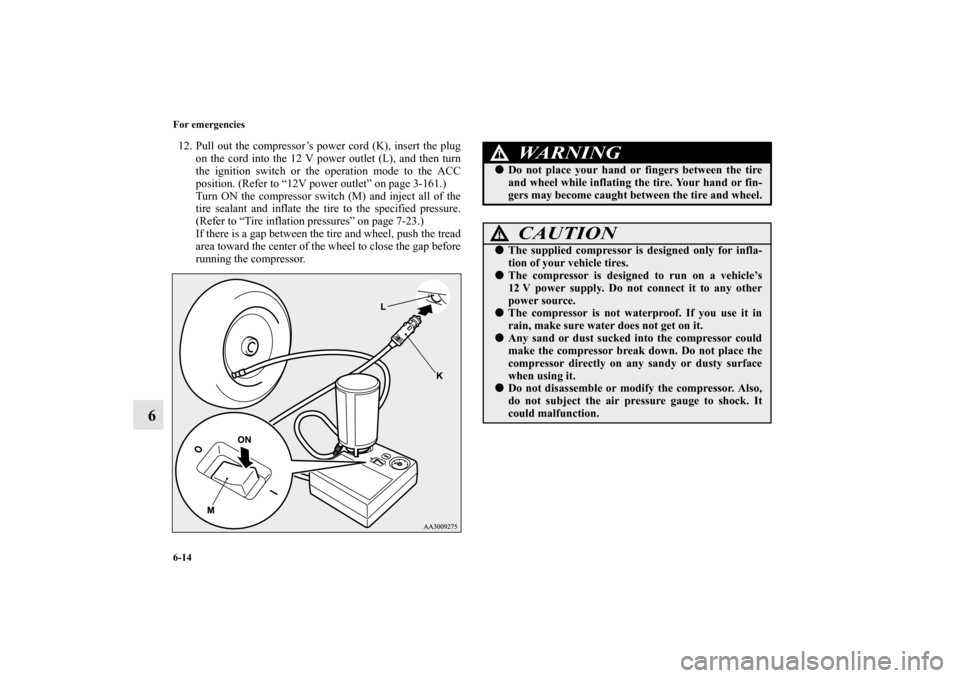
12. Pull out the compressor’s power cord (K), insert the plug
on the cord into the 12 V power outlet (L), and then turn
the ignition switch or the operation mode to the ACC
position. (Refer to “12V power outlet” on page 3-161.)
Turn ON the compressor switch (M) and inject all of the
tire sealant and inflate the tire to the specified pressure.
(Refer to “Tire inflation pressures” on page 7-23.)
If there is a gap between the tire and wheel, push the tread
area toward the center of the wheel to close the gap before
running the compressor.
WA R N I N G
!�Do not place your hand or fingers between the tire
and wheel while inflating the tire. Your hand or fin-
gers may become caught between the tire and wheel.
CAUTION
!�The supplied compressor is designed only for infla-
tion of your vehicle tires.�The compressor is designed to run on a vehicle’s
12 V power supply. Do not connect it to any other
power source.�The compressor is not waterproof. If you use it in
rain, make sure water does not get on it.�Any sand or dust sucked into the compressor could
make the compressor break down. Do not place the
compressor directly on any sandy or dusty surface
when using it.�Do not disassemble or modify the compressor. Also,
do not subject the air pressure gauge to shock. It
could malfunction.
BK0162600US.book 14 ページ 2013年3月22日 金曜日 午後2時41分
Page 394 of 460
7-20 Vehicle care and maintenance
7
�Intended outboard sidewall:
• The sidewall that contains a whitewall, bears white let-
tering or bears manufacturer, brand, and/or model name
molding that is higher or deeper than the same molding
on the other sidewall of the tire, or
• The outward facing sidewall of an asymmetrical tire that
has a particular side that must always face outward
when mounted on a vehicle.
�Passenger car tire: a tire intended for use on passenger
cars, multipurpose passenger vehicles, and trucks that
have a gross vehicle weight rating (GVWR) of 10,000
pounds or less.
�Light truck (LT) tire: a tire designated by its manufacturer
as primarily intended for use on lightweight trucks or mul-
tipurpose passenger vehicles.
�Tread: portion of a tire that comes into contact with the
road.
�Tread rib: a tread section running circumferentially
around a tire.
�Tread separation: pulling away of the tread from the tire
carcass.
�Carcass: the tire structure, except tread and sidewall rub-
ber which, when inflated, bears the load.
�Sidewall: portion of a tire between the tread and bead.
�Section width: the linear distance between the exteriors of
the sidewalls of an inflated tire, excluding elevations due
to labeling, decoration, or protective bands.
�Bead: the part of the tire that is made of steel wires,
wrapped or reinforced by ply cords and that is shaped to
fit the rim.
�Ply: a layer of rubber-coated parallel cords.
�Cord: the strands forming the plies in the tire.�Rim: a metal support for a tire or a tire and tube assembly
upon which the tire beads are seated.
�Rim diameter: nominal diameter of the bead seat.
�Groove: the space between two adjacent tread ribs.
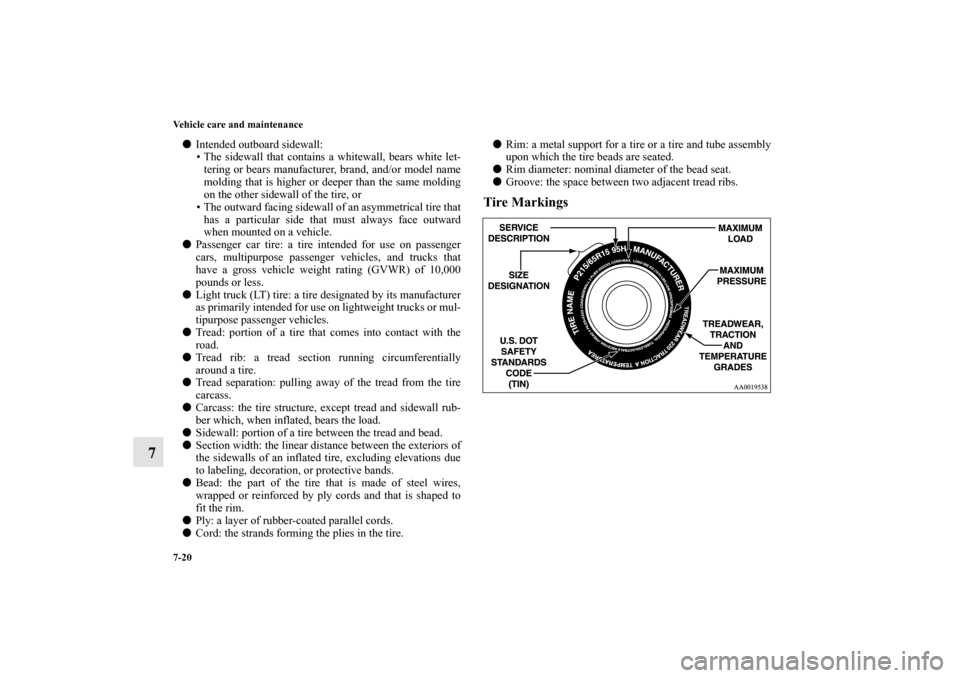
Tire Markings
BK0162600US.book 20 ページ 2013年3月22日 金曜日 午後2時41分