2014 MITSUBISHI LANCER SPORTBACK fuel
[x] Cancel search: fuelPage 129 of 422
Continuously variable transm
ission (CVT) (if so equipped)
5-62 Features and controls
5
driving conditions. This helps achieve smooth driving and excellent fuel efficiency. Also you can manually shift up and shift down the transmission. Refer to “Sportsmode” on page 5-66. The transmission prevents unnecessary upshifts even when the accelerator pedal isreleased and ensures smooth driving. According to the condi
tions, the transmission
will automatically shift to a lower gear ratio to achieve stronger engine braking. This may help reduce your need to use the servicebrake.
N00513800397
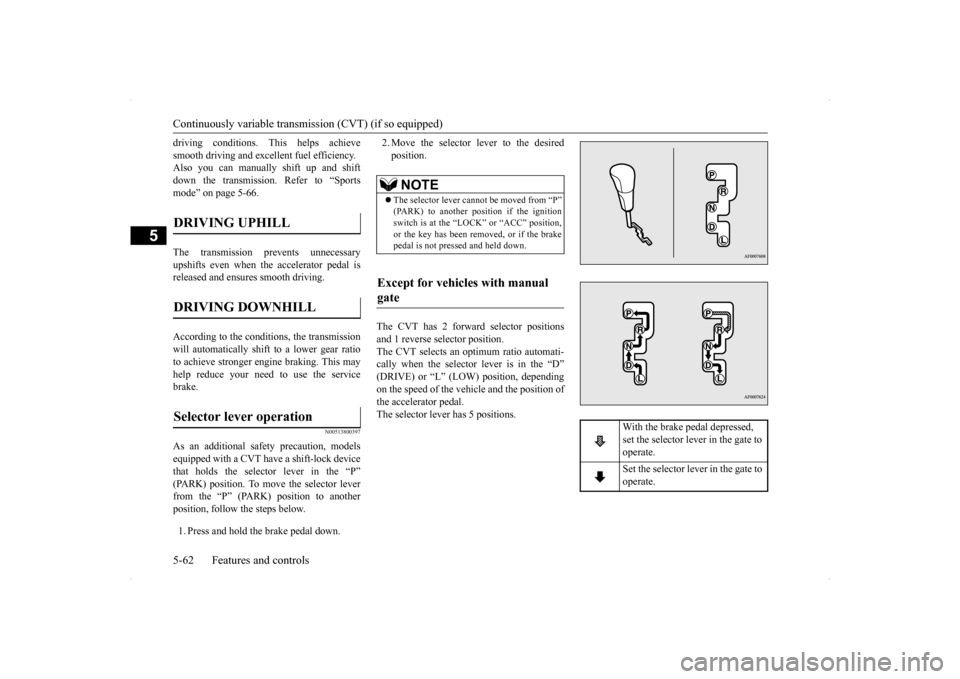
As an additional safety precaution, modelsequipped with a CVT have a shift-lock device that holds the selector lever in the “P” (PARK) position. To move the selector leverfrom the “P” (PARK) position to another position, follow the steps below. 1. Press and hold the brake pedal down.
2. Move the selector lever to the desired position.
The CVT has 2 forward selector positions and 1 reverse selector position. The CVT selects an optimum ratio automati- cally when the selector lever is in the “D”(DRIVE) or “L” (LOW) position, depending on the speed of the vehicle and the position of the accelerator pedal.The selector lever has 5 positions.
DRIVING UPHILL
DRIVING DOWNHILL
Selector lever operation
NOTE
The selector lever cannot be moved from “P” (PARK) to another position if the ignition switch is at the “LOCK” or “ACC” position,or the key has been removed, or if the brake pedal is not pressed and held down.
Except for vehicles with manual gate
With the brake pedal depressed, set the selector lever in the gate to operate. Set the selector lever in the gate to operate.
BK0200700US.bo
ok 62 ページ 2013年2月15日 金曜日 午後12時17分
Page 137 of 422
Twin Clutch SST (Sportronic Shif
t Transmission) (if so equipped)
5-70 Features and controls
5
N00515300208
If the CVT does not shift while driving, or your vehicle does not pick up enough speed when starting on an uphill slope, there may be something unusual happening in the transmis-sion, causing a safety device to activate. Have your vehicle checked at an authorized Mit- subishi Motors dealer or a repair facility ofyour choice as soon as possible. 1. If your vehicle has difficulty moving uphill, shift the selector lever into “L” (LOW) position (except for vehicles withsport mode) or 2nd shift range of the sports mode. This method might not work dependingon the type of transmission malfunction.
2. Once the vehicle is moving on a level road, move the selector lever back to “D” (DRIVE) position.
N00539700046
The Twin Clutch SST is a transmission that,through integrated control of the engine and transmission, is able to achieve both thesmooth shifting of an automatic transaxle and the acceleration and fuel economy close to a manual transaxle. In addition, the controlmode can be selected from two types to suit the driving conditions. Together with manual shifting, the transmis-sion is capable of responding to a variety of driving circumstances. Twin Clutch SST control mode
P.5-75
Manual shift
P.5-76
N00539800047
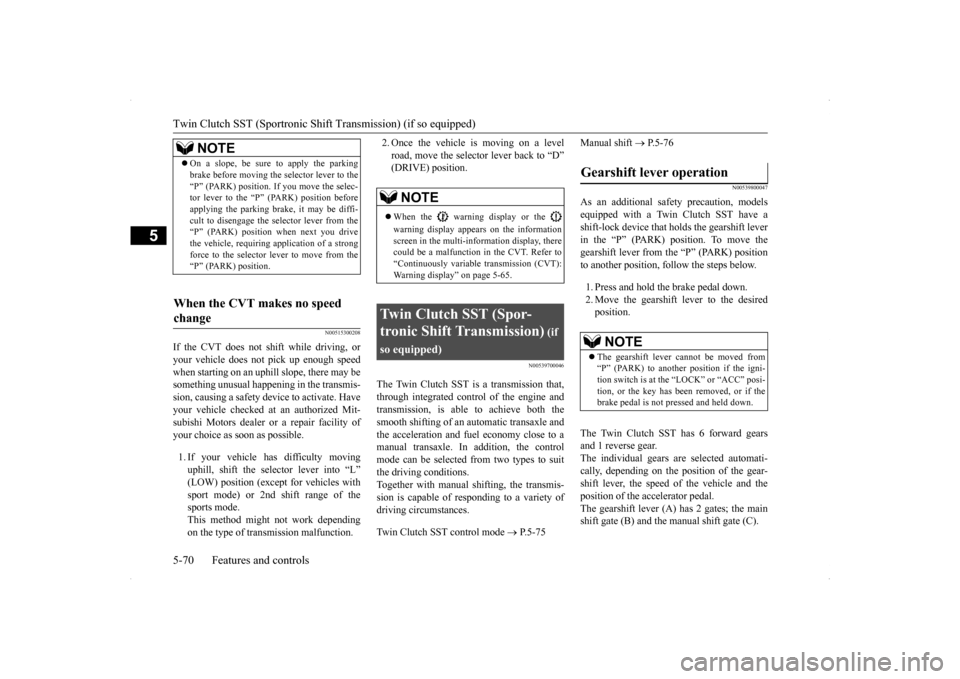
As an additional safety precaution, models equipped with a Twin Clutch SST have ashift-lock device that holds the gearshift lever in the “P” (PARK) position. To move the gearshift lever from the “P” (PARK) positionto another position, follow the steps below. 1. Press and hold the brake pedal down. 2. Move the gearshift lever to the desired position.
The Twin Clutch SST has 6 forward gears and 1 reverse gear. The individual gears are selected automati-cally, depending on the position of the gear- shift lever, the speed of the vehicle and the position of the accelerator pedal.The gearshift lever (A) has 2 gates; the main shift gate (B) and the manual shift gate (C).
NOTE
On a slope, be sure to apply the parking brake before moving the selector lever to the “P” (PARK) position. If you move the selec- tor lever to the “P” (PARK) position before applying the parking brake, it may be diffi-cult to disengage the selector lever from the “P” (PARK) position when next you drive the vehicle, requiring application of a strongforce to the selector lever to move from the “P” (PARK) position.
When the CVT makes no speed change
NOTE
When the warning display or the warning display appears on the information screen in the multi-information display, therecould be a malfunction in the CVT. Refer to “Continuously variable transmission (CVT): Warning display” on page 5-65.
Twin Clutch SST (Spor- tronic Shift Transmission)
(if
so equipped)
Gearshift lever operation
NOTE
The gearshift lever cannot be moved from “P” (PARK) to another position if the igni-tion switch is at the “LOCK” or “ACC” posi- tion, or the key has been removed, or if the brake pedal is not pressed and held down.
BK0200700US.bo
ok 70 ページ 2013年2月15日 金曜日 午後12時17分
Page 169 of 422

Tire pressure monitoring system 5-102 Features and controls
5
Ty p e 1 Ty p e 2 Each tire, including the spare (if provided), should be checked monthly when cold and inflated to the inflation pressure recom- mended by the vehicle manufacturer on thevehicle placard or tire inflation pressure label. (If your vehicle has tires of a different size than the size indicated on the vehicle placardor tire inflation pressure label, you shoulddetermine the proper tire inflation pressure for those tires.) As an added safety feature, your vehicle hasbeen equipped with a tire pressure monitoring system (TPMS) that illuminates a low tire pressure telltale when one or more of yourtires is significantly under-inflated. Accordingly, when the low tire pressure tell- tale illuminates, you should stop and checkyour tires as soon as possible, and inflate them to the proper pressure. Driving on a sig-
nificantly under-inflated tire causes the tire to overheat and can lead to tire failure. Under-inflation also reduces fuel efficiency and tire tread life, and may affect the vehi-cle’s handling and stopping ability. Please note that the TPMS is not a substitute for proper tire maintenance, and it is the driver’sresponsibility to maintain correct tire pres- sure, even if under-inflation has not reached the level to trigger illumination of the TPMSlow tire pressure telltale.Your vehicle has also been equipped with a TPMS malfunction indicator to indicate when the system is not operating properly. TheTPMS malfunction indicator is combined with the low tire pressure telltale. When the system detects a malfunction, thetelltale will flash for approximately one min- ute and then remain continuously illuminated. This sequence will continue upon subsequentvehicle start-ups as long as the malfunction exists. When the malfunction indicator is illumi-nated, the system may not be able to detect or signal low tire pressure as intended. TPMS malfunctions may occur for a varietyof reasons, including the installation of replacement or alternate tires or wheels on the vehicle that prevent the TPMS from function-ing properly. Always check the TPMS mal- function telltale after replacing one or more tires or wheels on your vehicle to ensure that
the replacement or alternate tires and wheels allow the TPMS to continue to function prop- erly.
N00532800439
1. If the tire pressure monitoring system warning light illuminates, avoid hardbraking, sharp steering maneuvers andhigh speeds. You should stop and adjust the tires to the proper inflation pressure as soon as possible. Adjust the spare tire atthe same time. Refer to “Tires” on page 9-17.
If the warning light/display illu- minates while driving
NOTE
In addition, the warning display is displayed on the information screen in the multi-infor- mation display. When inspecting or adjusting the tire pres- sure, do not apply excessive force to the valve stem to avoid breakage. After inspecting or adjusting the tire pres- sure, always reinstall the valve cap on the valve stem. Without the valve cap, dirt or moisture couldget into the valve, resulting in damage to the tire inflation pressure sensor. Do not use metal valve caps, which may cause a metal reaction, resulting in corrosion and damage of the tire inflation pressure sen-sors.
BK0200700US.book
102 ページ 2013年2月15日 金曜日 午後12時17分
Page 175 of 422

Multi-information display 5-108 Features and controls
5
N00555000249
The multi-information display displays warn
ings, the odometer, trip odometer, service re
minder, engine coolant temperature, fue
l remaining, out-
side temperature, Twin Clutch SST control mode, ACD control
mode, gearshift lever position, selector lever position, average an
d momentary
fuel consumption, driving range, average speed, instrument brightness, etc. It is also possible to change elements such as th
e language and units used on the multi-information display.
Multi-information display
W i t h i g n i t i o n s w i t c h i s “ O N ” p o s i t i o n { C o nt i n u o us l y
v a r i a b l e t r a n s m i s s i o n ( C V T ) , Tw
i n C l u t c h S ST }
With ignition switch is “OFF” position
With ignition switch is “ON” position (Manual transaxle)
Type 1 Type 2 Type 1 Type 2 Type 1 Type 2
1-
Warning display screen (With igni- tion switch in the “OFF” position) P.5-109
2- Information screen (With ignition
switch in the “OFF” position) P.5-110 Interrupt display screen (With ignition switch in the “OFF” position) P.5-111
3- Door ajar warning display screen (With
ignition switch in the “OFF” position) P.5-112
4-
Warning display screen (With igni- tion switch in the “ON” position) P.5-114
5- Active stability control (ASC) OFF dis-
play screen (if so equipped)
P.5-114
6- Information screen (With ignition
switch in the “ON” position)
P. 5 - 1 1 4
Interrupt display screen (With ignition switch in the “ON” position)
P. 5 - 1 1 7
7- Outside temperature display screen
P.5-118
8- Fuel remaining display screen
P.5-119
BK0200700US.book
108 ページ 2013年2月15日 金曜日 午後12時17分
Page 176 of 422
Multi-information display
Features and controls 5-109
5
N00555100178
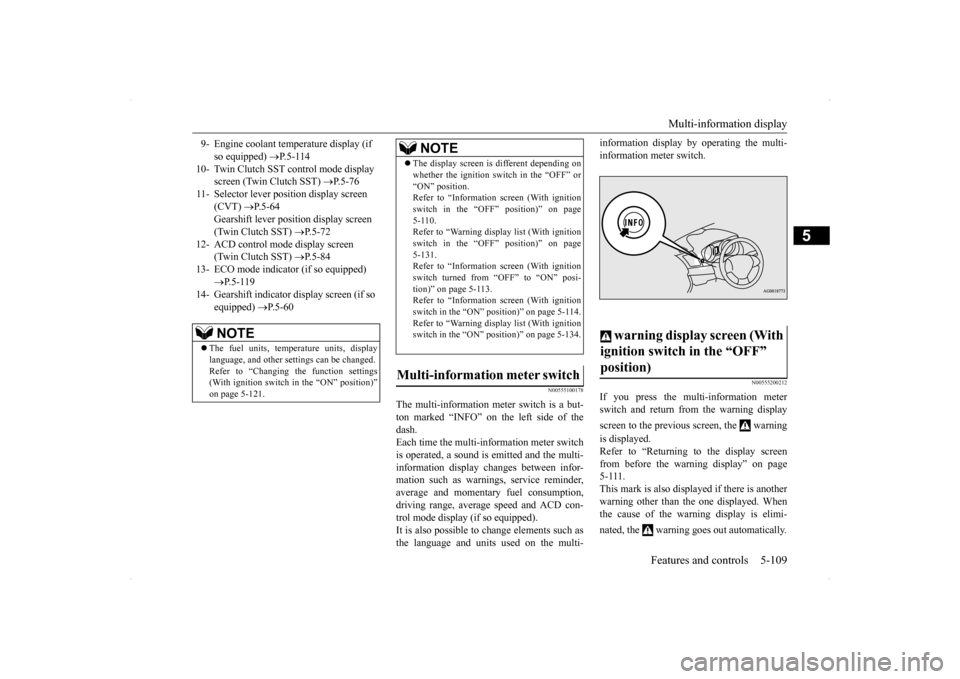
The multi-information meter switch is a but- ton marked “INFO” on the left side of thedash. Each time the multi-information meter switch is operated, a sound is emitted and the multi-information display changes between infor- mation such as warnings, service reminder, average and momentary fuel consumption,driving range, average speed and ACD con- trol mode display (if so equipped). It is also possible to change elements such asthe language and units used on the multi-
information display by operating the multi- information meter switch.
N00555200212
If you press the multi-information meter switch and return from the warning display screen to the previous screen, the warning is displayed. Refer to “Returning to the display screen from before the warning display” on page5-111. This mark is also displayed if there is another warning other than the one displayed. Whenthe cause of the warning display is elimi- nated, the warning goes out automatically.
9- Engine coolant temperature display (if
so equipped)
P.5-114
10- Twin Clutch SST control mode display
screen (Twin Clutch SST)
P. 5 - 7 6
11- Selector lever position display screen
(CVT)
P.5-64
Gearshift lever position display screen (Twin Clutch SST)
P. 5 - 7 2
12- ACD control mode display screen
(Twin Clutch SST)
P. 5 - 8 4
13- ECO mode indicator (if so equipped)
P. 5 - 1 1 9
14- Gearshift indicator display screen (if so
equipped)
P. 5 - 6 0
NOTE
The fuel units, temperature units, display language, and other settings can be changed.Refer to “Changing the function settings (With ignition switch in the “ON” position)” on page 5-121.
The display screen is different depending on whether the ignition switch in the “OFF” or “ON” position. Refer to “Information screen (With ignition switch in the “OFF” position)” on page5-110. Refer to “Warning displa
y list (With ignition
switch in the “OFF” position)” on page5-131. Refer to “Information screen (With ignition switch turned from “OFF” to “ON” posi-tion)” on page 5-113. Refer to “Information screen (With ignition switch in the “ON” position)” on page 5-114.Refer to “Warning displa
y list (With ignition
switch in the “ON” position)” on page 5-134.
Multi-information meter switch
NOTE
warning display screen (With ignition switch in the “OFF” position)
BK0200700US.book
109 ページ 2013年2月15日 金曜日 午後12時17分
Page 181 of 422
Multi-information display 5-114 Features and controls
5
N00555200124
This is displayed when you press the multi- information meter switch and switch the warning display screen.This mark is also displayed if there is another warning other than the one displayed. When the cause of the warning display is eliminated, the warning goes out automat- ically.
N00556100058
This is displayed when the Active stability control (ASC) is turned off with the “ASCOFF” switch.
If there is a fault in the ASC, the “ASC OFF” display illuminates. Refer to “ASC OFF switch” on page 5-92.
N00556200219
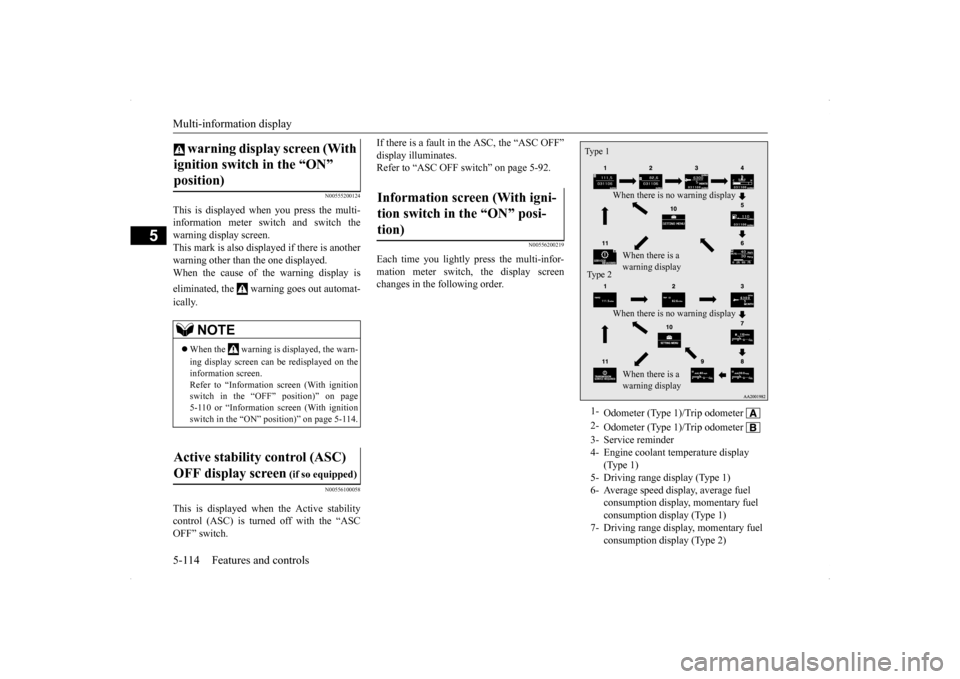
Each time you lightly press the multi-infor- mation meter switch, the display screenchanges in the following order.
warning display screen (With ignition switch in the “ON” position)
NOTE
When the warning is displayed, the warn- ing display screen can be redisplayed on the information screen. Refer to “Information screen (With ignition switch in the “OFF” position)” on page5-110 or “Information screen (With ignition switch in the “ON” position)” on page 5-114.
Active stability control (ASC) OFF display screen
(if so equipped)
Information screen (With igni-tion switch in the “ON” posi-tion)
1-
Odometer (Type 1)/Trip odometer
2-
Odometer (Type 1)/Trip odometer
3- Service reminder4- Engine coolant temperature display
(Type 1)
5- Driving range display (Type 1)6- Average speed display, average fuel
consumption display, momentary fuel consumption display (Type 1)
7- Driving range display, momentary fuel
consumption display (Type 2)
Type 1
When there is no warning display When there is a warning display
Type 2
When there is no warning display When there is a warning display
BK0200700US.book
114 ページ 2013年2月15日 金曜日 午後12時17分
Page 182 of 422
Multi-information display
Features and controls 5-115
5
The operation method is the same as when the ignition switch is in the “OFF” position.For further details, refer to “Odometer/Trip odometer” on page 5-110.
Shows the distance and number of months until the next periodic inspection.Refer to “Service reminder” on page 5-119. Shows the engine coolant temperature. If the coolant becomes hot, “ ” will blink. Pay careful attention to the engine coolant temperature display while you are driving. Shows the approximate driving range (how many more miles or kilometers you can drive) with the current fuel level. When thisdriving range falls below 30 miles (50 km), “- --” is displayed. Refuel as soon as possible.
This displays the average speed from the last reset to the present.There are 2 types of mode settings as follows. For details on how to change the average speed display setting, refer to “Changing thefunction settings (With ignition switch in the “ON” position)” on page 5-121.
8- Average fuel consumption display,
momentary fuel consumption display (Type 2)
9- Average speed display, momentary fuel
consumption display (Type 2)
10- Function setting screen 11- Redisplay of a warning display screen
NOTE
While driving, the function setting screen is not displayed even if you operate the multi- information meter switch. Always park the vehicle in a safe place before operating.Refer to “Changing the function settings (With ignition switch in the “ON” position)” on page 5-121. When there is information to be announced, such as a system fault, the tone sounds andthe screen display is changed. Refer to “Interrupt display screen (With igni- tion switch in the “ON” position)” on page5-117.
Odometer/Trip odometer
Service reminder Engine coolant temperature dis- play
CAUTION If the engine is overheating, “ ” will blink. In this case, the bar graph is on the red zone. Immediately park the vehicle in a safe placeand take the required measures. Refer to “Engine overheating” on page 8-4.
Driving range display
NOTE
The driving range is determined based on the fuel consumption data. This may vary depending on the driving conditions and hab- its. Treat the distance displayed as just a rough guideline. When you refuel, the driving range display is automatically updated.However, if you only add a small amount of fuel, the correct value will not be displayed. Fill to a full tank whenever possible. When your vehicle is stopped on an extremely steep hill, the driving range valuemay change. This is due to the movement of fuel in the tank and does not indicate any problem. The display setting can be changed to the preferred units (miles or km).Refer to “Changing the function settings (With ignition switch in the “ON” position)” on page 5-121.
Average speed display
BK0200700US.book
115 ページ 2013年2月15日 金曜日 午後12時17分
Page 183 of 422

Multi-information display 5-116 Features and controls
5
When the average speed is being dis- played, if you hold down the multi-infor- mation meter switch, the average speed displayed at that time is reset. When the ignition switch is turned to the “ON” position from the “ACC” or “LOCK” position, the mode settingchanges automatically from manual to auto. Switching to auto occurs automatically. Ifswitching to manual mode is done, how-ever, the data from the last reset is dis- played. When the average speed is being dis- played, if you hold down the multi-infor-mation meter switch, these calculations will be reset to zero. When the ignition switch has been set to the “ACC” or “LOCK” position for about 4 hours or more, the average speed dis- play will automatically reset.
This displays the average fuel consumption from the last reset to the present. There are 2 types of mode settings as follows.For details on how to change the average fuel consumption display setting, refer to “Chang- ing the function settings (With ignition switchin the “ON” position)” on page 5-121. The “ ” mark in the momentary fuel gauge shows the average fuel consumption. (Type 2)
When the average fuel consumption is being displayed, if you hold down the multi-information meter switch, the aver- age fuel consumption displayed at thattime is reset. When the ignition switch is turned to the “ON” position from the “ACC” or“LOCK” position, the mode setting changes automatically from manual to auto. Switching to auto occurs automatically. Ifswitching to manual mode is done, how- ever, the data from the last reset is dis- played. When the average fuel consumption is being displayed, if you hold down the multi-information meter switch, these cal- culations will be reset to zero. When the ignition switch has been set to the “ACC” or “LOCK” position for about 4 hours or more, the average speed dis-play will automatically reset.
Manual reset mode Auto reset mode
NOTE
The average speed display and the average fuel consumption display can be reset sepa-rately in both auto reset mode and manual reset mode.
“---” is displayed when the average speed cannot be measured. The initial (default) setting is “Auto reset mode”. The display setting can be changed to the preferred units (mph or km/h).Refer to “Changing the function settings (With ignition switch in the “ON” position)” on page 5-121. The average speed display memories for auto reset mode and manual reset mode are erasedif the battery is disconnected.
Average fuel consumption display
NOTE
Manual reset mode Auto reset mode
BK0200700US.book
116 ページ 2013年2月15日 金曜日 午後12時17分