2014 MITSUBISHI LANCER EVOLUTION door lock
[x] Cancel search: door lockPage 103 of 338

Power windows 5-42 Features and controls
5
Use the following procedure to test the sys- tem: 1. Lower the driver’s window.
2. Arm the system as explained in “Armed stage”. 3. Make sure that the theft-alarm indicator comes on and flashes for approximately20 seconds. 4. Wait a few seconds and then unlock the driver’s side door by using the inside doorlock knob and open the door. 5. Check to be sure that the horn sounds intermittently and the headlights blink onand off when the door is opened.6. Disarm the system by unlocking all doors by the keyless entry system or the F.A.S.T.-key operation.
N00510800266
N00548700114
The main switch located on the driver’s door can be used to operate all door windows. A window can be opened or closed by operat- ing the corresponding switch.Press the switch down to open the window, and pull up the switch to close it. If the driver’s door window switch is fullypressed down/pulled up, the driver’s door window automatically opens/closes com- pletely.
NOTE
If the UNLOCK button is pressed when all doors are closed and no door is opened within approximately 30 seconds, re-armingwill automatically occur. The amount of time after unlocking until the vehicle relocks automatically can be adjusted. See an authorized Mitsubishi Motors dealer for details. Once the system has been disarmed, it can- not be rearmed except by repeating the arm-ing procedure.
Testing the theft-alarm system Disarm...by the keyless entry system or F.A.S.T.-key operation
Power windows 1- Open (down) 2- Close (up)
NOTE
Never try to operate the main switch and sub switch in different directions at the same time. This will freeze the window in posi- tion. Operating the power windows repeatedly with the engine stopped will run down the battery. Use the window switches only whilethe engine is running. WA R N I N G Before operating the power windows, make sure that nothing can be trapped(head, hands, fingers, etc.) in the window. Never leave the vehicle with the key in the ignition switch. Never leave a child alone in the vehicle.
Main switch
BK0200800US.bo
ok 42 ページ 2013年2月14日 木曜日 午後2時28分
Page 104 of 338
Power windows
Features and controls 5-43
5
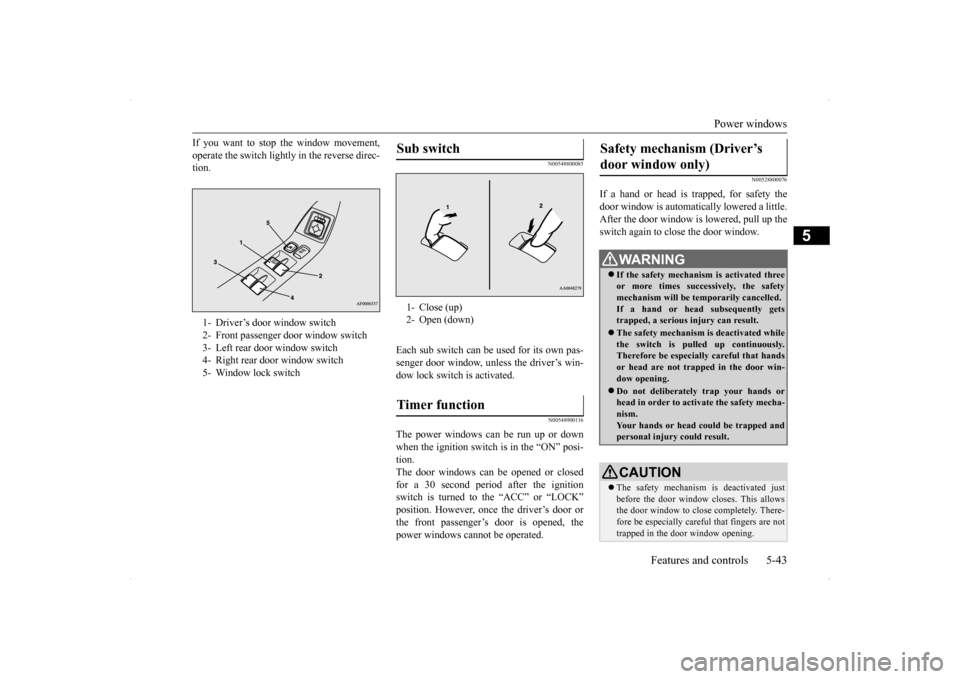
If you want to stop the window movement, operate the switch lightly in the reverse direc- tion.
N00548800085
Each sub switch can be used for its own pas-senger door window, unless the driver’s win- dow lock switch is activated.
N00548900116
The power windows can be run up or down when the ignition switch is in the “ON” posi- tion.The door windows can be opened or closed for a 30 second period after the ignition switch is turned to the “ACC” or “LOCK”position. However, once the driver’s door or the front passenger’s door is opened, the power windows cannot be operated.
N00528800076
If a hand or head is trapped, for safety thedoor window is automatically lowered a little. After the door window is lowered, pull up the switch again to close the door window.
1- Driver’s door window switch 2- Front passenger door window switch3- Left rear door window switch 4- Right rear door window switch 5- Window lock switch
Sub switch 1- Close (up) 2- Open (down)Timer function
Safety mechanism (Driver’s door window only)
WA R N I N G If the safety mechanism is activated three or more times successively, the safetymechanism will be temporarily cancelled. If a hand or head subsequently gets trapped, a serious injury can result. The safety mechanism is deactivated while the switch is pulled up continuously.Therefore be especially careful that hands or head are not trapped in the door win- dow opening. Do not deliberately trap your hands or head in order to activate the safety mecha-nism. Your hands or head could be trapped and personal injury could result.CAUTION The safety mechanism is deactivated just before the door window closes. This allowsthe door window to close completely. There- fore be especially careful that fingers are not trapped in the door window opening.
BK0200800US.bo
ok 43 ページ 2013年2月14日 木曜日 午後2時28分
Page 105 of 338
Sunroof (if so equipped) 5-44 Features and controls
5
N00549000068
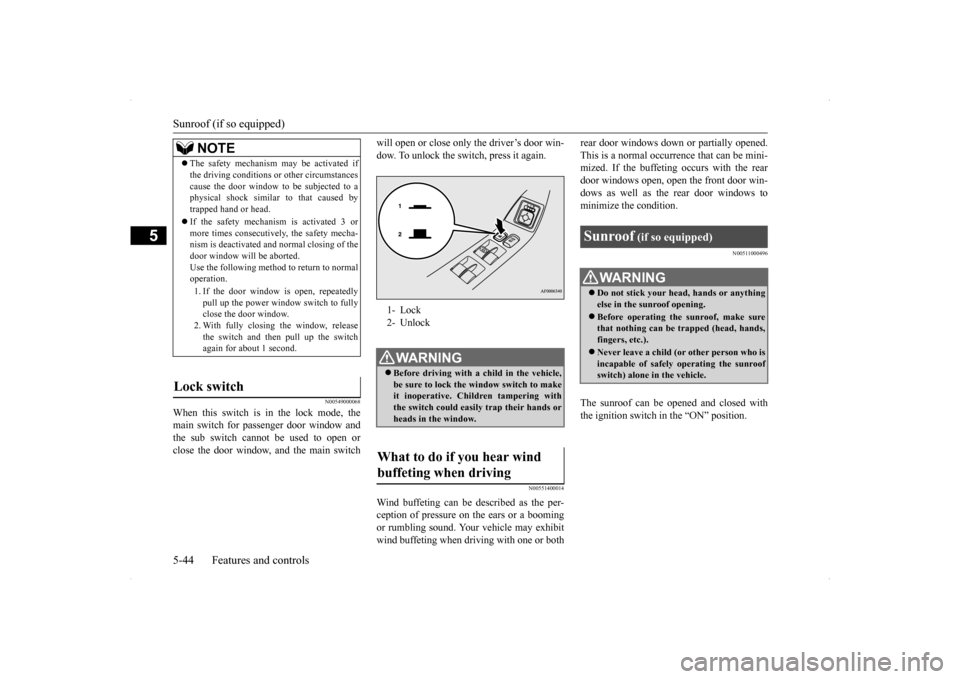
When this switch is in the lock mode, the main switch for passenger door window and the sub switch cannot be used to open orclose the door window, and the main switch
will open or close only the driver’s door win- dow. To unlock the switch, press it again.
N00551400014
Wind buffeting can be described as the per- ception of pressure on the ears or a booming or rumbling sound. Your vehicle may exhibitwind buffeting when driving with one or both
rear door windows down or partially opened. This is a normal occurrence that can be mini- mized. If the buffeting occurs with the rear door windows open, open the front door win-dows as well as the rear door windows to minimize the condition.
N00511000496
The sunroof can be opened and closed with the ignition switch in the “ON” position.
NOTE
The safety mechanism may be activated if the driving conditions or other circumstances cause the door window to be subjected to a physical shock similar to that caused by trapped hand or head. If the safety mechanism is activated 3 or more times consecutively, the safety mecha-nism is deactivated and normal closing of the door window will be aborted. Use the following method to return to normaloperation. 1. If the door window is open, repeatedly pull up the power window switch to fully close the door window. 2. With fully closing the window, releasethe switch and then pull up the switch again for about 1 second.
Lock switch
1- Lock 2- UnlockWA R N I N G Before driving with a child in the vehicle, be sure to lock the window switch to makeit inoperative. Children tampering with the switch could easily trap their hands or heads in the window.
What to do if you hear wind buffeting when driving
Sunroof
(if so equipped)
WA R N I N G Do not stick your head, hands or anything else in the sunroof opening. Before operating the sunroof, make sure that nothing can be trapped (head, hands, fingers, etc.). Never leave a child (or other person who is incapable of safely operating the sunroof switch) alone in the vehicle.
BK0200800US.bo
ok 44 ページ 2013年2月14日 木曜日 午後2時28分
Page 106 of 338
Sunroof (if so equipped)
Features and controls 5-45
5
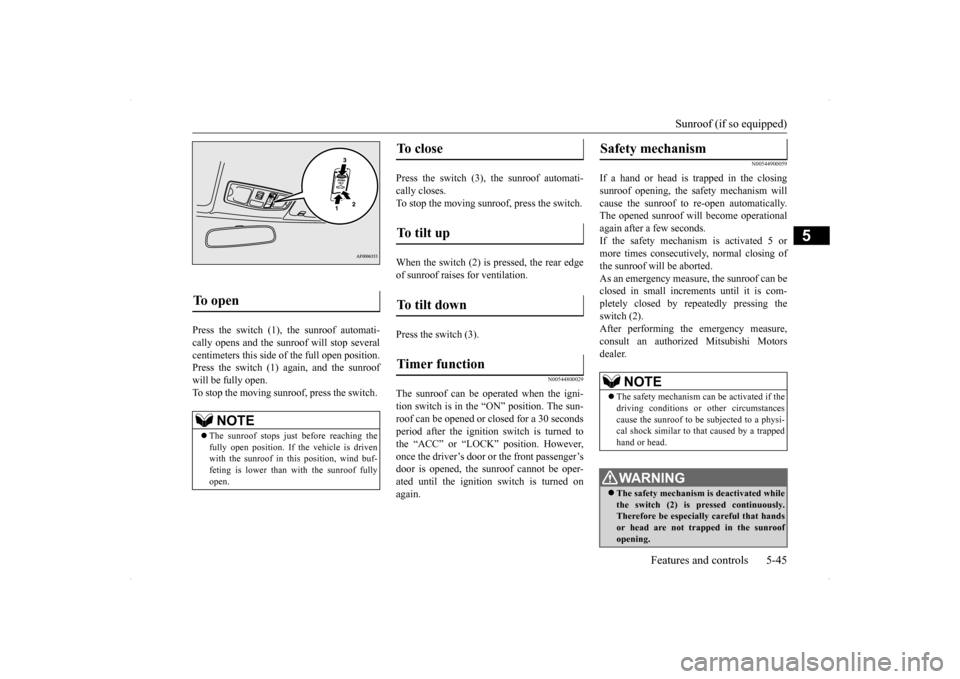
Press the switch (1), the sunroof automati- cally opens and the sunroof will stop several centimeters this side of the full open position. Press the switch (1) again, and the sunroofwill be fully open.To stop the moving sunroo
f, press the switch.
Press the switch (3), the sunroof automati- cally closes.To stop the moving sunroof, press the switch. When the switch (2) is pressed, the rear edge of sunroof raises for ventilation. Press the switch (3).
N00544800029
The sunroof can be oper
ated when the igni-
tion switch is in the “ON” position. The sun- roof can be opened or closed for a 30 secondsperiod after the ignition
switch is turned to
the “ACC” or “LOCK” position. However, once the driver’s door or the front passenger’sdoor is opened, the sunroof cannot be oper- ated until the ignition switch is turned on again.
N00544900059
If a hand or head is trapped in the closingsunroof opening, the safety mechanism willcause the sunroof to re-open automatically. The opened sunroof will become operational again after a few seconds.If the safety mechanism is activated 5 or more times consecutively, normal closing of the sunroof will be aborted.As an emergency measure, the sunroof can beclosed in small increments until it is com- pletely closed by repeatedly pressing the switch (2).After performing the emergency measure, consult an authorized Mitsubishi Motors dealer.
To open
NOTE
The sunroof stops just before reaching the fully open position. If the vehicle is driven with the sunroof in this position, wind buf- feting is lower than with the sunroof fullyopen.
To close
To tilt up
To tilt down
Timer function
Safety mechanism
NOTE
The safety mechanism can be activated if the driving conditions or other circumstances cause the sunroof to be subjected to a physi-cal shock similar to that caused by a trapped hand or head.WA R N I N G The safety mechanism is deactivated while the switch (2) is pressed continuously. Therefore be especially careful that handsor head are not trapped in the sunroof opening.
BK0200800US.bo
ok 45 ページ 2013年2月14日 木曜日 午後2時28分
Page 174 of 338

Indicator light, warning light, an
d information screen display list Features and controls 5-113
5
You have forgotten to turn off the lights. Refer to “Light auto-cutout function (head-
lights and other lights)” on page 5-127.
The theft-alarm system is operating. Refer
to “Theft-alarm system” on page 5-40.
Immobilizer is registered. Refer to “Customer key programming (Except
for vehicles sold in Canada)” on page 5-6.Refer to “Customer F.A.S.T.-key program- ming (Except for vehicles sold in Canada)” on page 5-27.
After turning off the engine, an attempt was made to open the driver’s door with the ignition switch in any position other than “LOCK” (PUSH OFF).
Turn the ignition switch to the “LOCK” (PUSH OFF) position. Refer to “Ignition switch return reminder system” on page 5-35.
An attempt was made to lock all the doors and the trunk lid with the ignition switch in any position other than “LOCK” (PUSH OFF).
Turn the ignition switch to the “LOCK” (PUSH OFF) position. Refer to “Ignition switch turn-off reminder system” on page 5-18.
Screen
Cause
Do this (Reference)
BK0200800US.book
113 ページ 2013年2月14日 木曜日 午後2時28分
Page 188 of 338
![MITSUBISHI LANCER EVOLUTION 2014 10.G Owners Manual Combination headlights and dimmer switch
Features and controls 5-127
5
[When the engine is not running, or when the engine is running but the parking brake is not released] The engine starts when the](/manual-img/19/7475/w960_7475-187.png "MITSUBISHI LANCER EVOLUTION 2014 10.G Owners Manual Combination headlights and dimmer switch
Features and controls 5-127
5
[When the engine is not running, or when the engine is running but the parking brake is not released] The engine starts when the")
Combination headlights and dimmer switch
Features and controls 5-127
5
[When the engine is not running, or when the engine is running but the parking brake is not released] The engine starts when the lights are off.
N00532601610
With the combination headlights and dim- mer switch in the “ ” or “ ” position, if the key is turned to the “LOCK” or“ACC” position or removed from the ignition switch and the driver’s door is opened, the lights automatically turn off. [When using a key to start the engine]
• If the driver’s door is opened after the key is removed from the ignition switch, a high-pitched constant tone will sound to remind you to turn off the lights.• If the driver’s door is opened with the key in the ignition switch, a low-pitched beep will sound to remind you to removethe key. [When using the F.A.S.T.-key to start the engine] • If the ignition switch is turned to the “LOCK” position and the driver’s door is opened, a high-pitched constantbuzzer will sound to remind you to turn off the lights. • If the ignition switch is turned to anyposition other than “LOCK” and the driver’s door is opened, a low-pitched constant buzzer will sound to remindyou to return the ignition switch.
With the combination headlights and dim- mer switch in the “ ” or “ ” position, if the key is turned to the “LOCK” or “ACC” position or removed from theignition switch and the driver’s door is not opened, the lights automatically turn off after about 3 minutes.
NOTE
Once the daytime running light come on, they do not go out until the ignition switch is turned to the “LOCK” or “ACC” position.OFF All lights off AUTO
Headlights and other lights turn on and off automatically in accor- dance with outside light level. Parking, tail, front and rear side- marker lights, license plate and instrument panel lights on Headlights and other lights on
NOTE
The sensitivity of the automatic on/off con- trol can be adjusted. For further information, please contact your authorized Mitsubishi Motors dealer or arepair facility of your choice.
Do not cover the sensor (A) for the automatic on/off control by affixing a sticker or label to the windshield. If the lights do not turn on or off with the switch in the “AUTO” position, manually operate the switch. Have the system checked by an authorized Mitsubishi Motors dealer ora repair facility of your choice.
Light auto-cutout function (headlights and other lights)
NOTE
BK0200800US.book
127 ページ 2013年2月14日 木曜日 午後2時28分
Page 189 of 338

Combination headlights and dimmer switch 5-128 Features and controls
5
If the combination headlights and dimmer switch is turned to the “ ” or “ ” posi- tion again after the engine is turned off, the about 3-minute auto-cutout functiondescribed above will not work. The lights (theparking lights, tail lights and license plate lights) will stay on and will not turn off auto- matically.
N00549800183
[When using a key to start the engine] If the driver’s door is opened with the key in the “LOCK” or “ACC” position or removedfrom the ignition switch while the lights are on, the tone will sound to remind you to turn off the lights. [When using the F.A.S.T.-key to start the engine] If the driver’s door is opened with the ignition switch in the “LOCK” or “ACC” position, orif the ignition switch is moved to the “LOCK” position while the lights are on, the tone will sound to remind you to turn off thelights.
In either case, the lights will turn off automat- ically and so will the tone. Or you can turn the light switch to the “OFF” position to stop the tone.
N00549900142
To change the headlights from high beam tolow beam and vice versa, pull the turn signallever to (1). Switch the headlights to low beam as a courtesy whenever there are oncoming vehicles, or when there is trafficmoving ahead of you. An illuminated blue light in the instrument cluster indicates when the headlights are on high beam.
NOTE
The light auto-cutout function can be deacti- vated. See your authorized Mitsubishi Motors dealer for details.
When you want to keep the lights on:
NOTE
When the engine is started using the key, if the driver’s door is opened and the key is removed, the headlight reminder buzzerintermittently emits a high-pitched sound. If the key is still in the ignition switch the key reminder buzzer intermittently emits a low-pitched sound. The buzzer stops when the driver’s door is closed. (A warning is also displayed in themulti-information display.)
When the engine is started using the F.A.S.T.-key, if the driver’s door is opened and the ignition switch is in the “LOCK” position, the headlight reminder buzzer inter- mittently emits a high-pitched sound. If theignition switch is in any position other than “LOCK”, the ignition switch on reminder buzzer intermittently emits a low-pitchedsound. The buzzer stops when the driver’s door is closed. (A warning is also displayed in themulti-information display.)
Headlight reminder buzzer
NOTE
Dimmer (high/low beam change)
BK0200800US.book
128 ページ 2013年2月14日 木曜日 午後2時28分
Page 220 of 338

USB input terminal
Features and controls 5-159
5
Refer to the following sections for details on how to play music files: Refer to the separate owner’s manual for a DISPLAY AUDIO.
N00566800074
1. Park your vehicle in a safe place and turn the ignition switch to the “LOCK” posi- tion.2. Open the USB input terminal cover (A) in the glove compartment.
3. Connect a commercially available USB connector cable (C)
to the USB memory
device (B). 4. Connect the USB connector cable (C) to the USB input terminal (D).
5. To remove the USB connector cable, turn the ignition switch to the “LOCK” posi- tion first and perform the installation steps in reverse.
N00566900046
1. Park your vehicle in a safe place and turnthe ignition switch to the “LOCK” posi- tion.
* : “iPod” is a registered trademark of Apple Inc. in the United States and other coun-tries.
How to connect a USB memory device
WA R N I N G An open glove compartment door can cause a serious injury or death to the front passenger in an accident, even if the pas- senger is wearing his/her seat belt. Always keep the glove compartment door closedwhen driving.NOTE
Do not connect the USB memory device to the USB input terminal directly.The USB memory device may be damaged. When closing the glove compartment, be careful not to trap the USB connector cable.
How to connect an iPod
BK0200800US.book
159 ページ 2013年2月14日 木曜日 午後2時28分