2014 MITSUBISHI ASX ignition
[x] Cancel search: ignitionPage 284 of 418

Confirmation function setting
E00760400013
The Bluetooth ®
2.0 interface is equipped
with a confirmation function.
With the confirmation function activated, you are given more opportunities than normal to
confirm a command when making various
settings to Bluetooth ®
2.0 interface. This al-
lows you to decrease the possibility that a
setting is accidentally changed.
The confirmation function can be turned on
or off by following the steps below. 1. Press the SPEECH button.
2. Say “Setup”.
3. Say “Confirmation prompts”.
4. The voice guide will say “Confirmation
prompts are
Answer “Yes” to change the setting or
answer “No” to keep the current setting.
5. The voice guide will say “Confirmation
prompts are
Security function
E00760500043
It is possible to use a password as a security function by setting a password of your choice
for the Bluetooth ®
2.0 interface.
When the security function is turned on, it is
necessary to make a voice input of a 4-digit password in order to use all functions of the
Bluetooth ®
2.0 interface, except for recep-
tion.
Setting the password
Use the following procedure to turn on the security function by setting a password. 1. Press the SPEECH button.
2. Say “Setup”.
3. Say “Password.”
4. The voice guide will say “Password is
disabled. Would you like to enable it?”
Answer “Yes.”
Answer “No” to cancel the setting of the
password and return to the main menu.
5. The voice guide will say “Please say a 4-
digit password. Remember this pass-
word. It will be required to use this sys- tem”.
Say a 4-digit number which you want to
set as a password.
6. For confirmation purposes, the voice
guide will say “Password <4-digit pass-
word>. Is this correct?” Answer “Yes.”
Answer “No” to return to the password input in Step 5.
7. When the registration of the password is
completed, the voice guide will say
“Password is enabled” and the system will return to the main menu.
NOTEl Password will be required to access the sys-
tem after the next ignition cycle.
l It is required for a little time after engine
stop that the entered password is actually re-corded in the system.
If the ignition switch or the operation mode
is made to ACC or ON or the engine is star- ted immediately after engine stop, there is a case when the entered password is not recor-ded in the system. At this time, please try to
enter the password again.
Entering the password
If a password has been set and the security
function is enabled, the voice guide will say “Hands-free system is locked. State the pass-word to continue” when the SPEECH button
is pressed to enter voice recognition mode.
Say the 4-digit password number to enter the
password.
If the entered password is wrong, the voice
guide will say “<4- digit password>, Incor-
rect password. Please try again”. Enter the correct password.
NOTEl You can re-enter the password as many
times as you want.
Bluetooth ®
2.0 interface*
7-50 OGAE14E1For pleasant driving7
Page 292 of 418

NOTElIf the name you selected has matching data
in the vehicle phone book but no telephone
number is registered under the selected loca- tion, the voice guide will say “{home/work/
mobile/other} not found for
Say “Add location” and you can register an
additional telephone number under the selec-
ted location.
l If the name you selected has matching data
in the mobile phone book but no telephone
number is registered under the selected loca- tion, the voice guide will say “{home/work/
mobile/other} not found for
Answer “Yes,” and the system will return to Step 3.
Answer “No,” and the call will be cancelled. Start over again from Step 1.
6. The voice guide will say “Calling
tem will dial the telephone number.
NOTEl When the confirmation function is on, the
system will ask if the name and location of the receiver are correct.
If the name is correct, answer “Yes.”
If you want to change the name or location
to call, answer “No.” The system will return to Step 3.
Redialing
You can redial the last number called, based
on the history of dialed calls in the paired cel-
lular phone.
Use the following procedure to redial. 1. Press the SPEECH button.
2. Say “Redial.”
SEND function
E00761300035
During a call, press the SPEECH button to
enter voice recognition mode, then say “
For example, if during a call you need to sim- ulate the press of a phone button as a re-
sponse to an automated system, press the SPEECH button and speak “1 2 3 4 pound SEND” and the 1234# will be sent on your
cellular phone.
Receiving calls
E00761600025
If an incoming phone call is received while
the ignition switch or the operation mode isin ON or ACC, the audio system will be au-
tomatically turned on and switched to the in-
coming call, even when the audio system was originally off.
The voice guide announcement for the in-
coming call will be output from the front pas- senger’s seat speaker.
If the CD player or radio was playing when
the incoming call was received, the audio system will mute the sound from the CD
player or radio and output only the incoming call.
To receive the call, press the PICK-UP but- ton on the steering wheel control switch.
When the call is over, the audio system will return to its previous state.
MUTE function
E00760300054
At any time during a call, you can mute the
vehicle microphone.
Pressing the SPEECH button and then saying
“Mute” during a call will turn ON the MUTE
function and mute the microphone.
Saying “Mute off” in the same way will turn off the MUTE function and cancel the muteon the microphone.
Bluetooth ®
2.0 interface*
7-58 OGAE14E1For pleasant driving7
Page 300 of 418

Enrollment commands
E00732400193
PhraseEnglishFrenchSpanishItalianGermanDutchPortugueseRussian11234567891234567891234567891234567891234567891234567891234567891234567892888 555 1212888 555 1212888 555 1212888 555 1212888 555 1212888 555 1212888 555 1212888 555 12123CallAppelerLlamarChiamaAnrufenBellenLigarВызов4DialComposerMarcarComponiWählenNummer keuzeMarcarНабор5SetupConfigurerConfiguraciónConfiguraEinrichtungSetupConfigurarНастройка6CancelAnnulerCancelarAnnullaAbbrechenAnnulerenCancelarОтмена7ContinueContinuerContinuarContinuaWeiterDoorgaanContinuarПродолжить8HelpAideAyudaAiutoHilfeHelpAjudaСправка
USB input terminal*E00761900099
You can connect your USB memory device or iPod* to play music files stored in the USB memory device or iPod.
The following explains how to connect and
remove a USB memory device or iPod.
Refer to the following sections for details on
how to play music files:
Refer to “Listen to Audio Files on a USB De-
vice” on page 7-32.
*: “iPod” is a registered trademark of Apple
Inc. in the United States and other countries.How to connect a USB memory
device
E00762000390
1. Park your vehicle in a safe place and
turn the ignition switch to the “LOCK”
position or put the operation mode in
OFF.
2. Open the USB input terminal cover (A)
in the floor console box.
USB input terminal*
7-66 OGAE14E1For pleasant driving7
Page 301 of 418

3.Connect a commercially available USB
connector cable (C) to the USB memory
device (B).
4. Connect the USB connector cable (C) to
the USB input terminal (D).
CAUTIONl Keep the lid of the floor console box closed
while driving the vehicle. A lid or the con- tents of the glove box could otherwise cause
injuries.NOTEl Do not connect the USB memory device to
the USB input terminal directly.
The USB memory device may be damaged.
l When closing the floor console box, be care-
ful not to trap the USB connector cable.
5. To remove the USB connector cable,
turn the ignition switch to the “LOCK”
position or put the operation mode in
OFF first and perform the installation steps in reverse.
How to connect an iPod
E00762100043
1. Park your vehicle in a safe place and
turn the ignition switch to the “LOCK”
position or put the operation mode in
OFF.
2. Open the USB input terminal cover (A)
in the floor console box.
3. Connect the Dock connector (C) to the
iPod (B).
NOTEl Use a genuine Dock connector from Apple
Inc.
USB input terminal*
7-67
OGAE14E1For pleasant driving7
Page 302 of 418

4.Connect the Dock connector (C) to the
USB input terminal (D).CAUTIONl Keep the lid of the floor console box closed
while driving the vehicle. A lid or the con- tents of the floor console box could other-
wise cause injuries.NOTEl When closing the floor console box, be care-
ful not to trap the connector cable.
5. To remove the Dock connector, turn the
ignition switch to the “LOCK” position
or put the operation mode in OFF first and perform the installation steps in re-verse.
Types of connectable devices
and supported file specifica-tions
E00762200015
Device types
E00762300348
Devices of the following types can be con- nected.
Model nameConditionUSB memory deviceStorage capacity of
256 Mbytes or moreiPod touch*F/W Ver.1.1.1 or lat-
eriPod classic*F/W Ver.1.0 or lateriPod (fifth genera- tion)*F/W Ver.1.2.2 or lat-
eriPod nano (fifth gen-
eration)*F/W Ver.1.2 or lateriPod nano (second generation)*F/W Ver.1.1.2 or lat-
erModels other than
USB memory devi-
ces and iPodsDigital audio player
supporting mass stor- age class
*: “iPod touch,” “iPod classic,” “iPod” and
“iPod nano” are registered trademarks of Ap- ple Inc. in the United States and other coun-
tries.
NOTEl Depending on the type of the USB memory
device or other device connected, the con-
nected device may not function properly or the available functions may be limited.
l It is recommended to use an iPod with firm-
ware updated to the latest version.
l You can charge your iPod by connecting it
to the USB input terminal when the ignition switch or the operation mode is in ON orACC.
l Do not keep your USB memory device or
iPod in your vehicle.
l It is recommended that you back up files in
case of data damage.
l Do not connect to the USB input terminal
any device (hard disk, card reader, memory reader, etc.) other than the connectable devi- ces specified in the previous section.
The device and/or data may be damaged. If
any of these devices was connected by mis-
take, remove it after turning the ignition switch to the “LOCK” position or putting the operation mode in OFF.File specifications
E00762400017
You can play music files of the following
specifications that are saved in a USB memo-ry device or other device supporting mass
storage class.
USB input terminal*
7-68 OGAE14E1For pleasant driving7
Page 305 of 418

NOTElDo not leave the cigarette lighter removed
from its socket, because the socket might be- come clogged by foreign material and be
short-circuited.CAUTIONl Do not touch the heating element or the cig-
arette lighter housing, hold the knob only to prevent burns.
l Do not allow children to operate or play with
the cigarette lighter as burns may occur.
l Something is wrong with the cigarette light-
er if it does not pop back out within approxi-
mately 30 seconds of being pushed in.
Pull it out and have the problem corrected at MITSUBISHI MOTORS Authorized Serv-
ice Point.
l Do not use any electric appliance that is not
approved by MITSUBISHI MOTORS . Do-
ing so could damage the socket. If you used
the cigarette lighter after damaging the sock- et, the cigarette lighter might pop out or fail
to come out after being pushed in.
l When the cigarette lighter socket is used as a
power source for an electric appliance, be sure that the electric appliance operates at
12 V and has an electric capacity of 120 W or less. In addition, long use of the electricappliance without running the engine may
run down the battery.Accessory socket
E00711601346CAUTIONlBe sure to use a “plug-in” type accessory op-
erating at 12 V and at 120 W or less.
When using more than one socket at the same time, make sure that the electrical ac-
cessories are 12 V accessories and that the total power consumption does not exceed
120 W.
l Long use of the electric appliance without
running the engine may run down the bat-
tery.
l When the accessory socket is not in use, be
sure to close the lid or install the cap, be-
cause the socket might become clogged by foreign material and be short-circuited.
To use a plug-in type accessory, open the lid
or remove the cap, and insert the plug in the accessory socket.
NOTEl Accessory sockets in 2 locations can be used
at the same time.The accessory socket can be used while the
ignition switch or the operation mode is in
ON or ACC.Floor console*Floor console box
Accessory socket
7-71
OGAE14E1For pleasant driving7
Page 306 of 418

Interior lampsE00712001174
1- Luggage room lamp
2- Room lamp (rear)*
3- Map & room lamps (front) Sunshade illumination dimming control
switch*
NOTEl If you leave the lamps on without running
the engine, you will run down the battery.
Before you leave the vehicle, make sure that
the lamps are turned off.Map & room lamps (front)
E00717300638
Room lamp
1- (DOOR) The lamp illuminates when a door or thetailgate is opened. It goes off about 15
seconds after the door or tailgate is
closed.
However, the lamp goes off immediately in the following cases: •When the ignition switch is turned
to the “ON” position or the opera-
tion mode is put in ON.
• When the central door lock function
is used to lock the vehicle.
• When the remote control switch of
the keyless entry system or the key-
less operation system is used to lock the vehicle.
• If the vehicle is equipped with the
keyless operation system, when the keyless operation function is used to
lock the vehicle.NOTEl When the key was used to start the engine, if
the key is removed while the doors and tail- gate are closed, the lamp is illuminated and after about 15 seconds it goes off.
l When the keyless operation function was
used to start the engine, if the operation mode is put in OFF while the doors and tail-
gate are closed, the lamp illuminates and af- ter about 15 seconds it goes off.
l The time until the lamp goes off can be ad-
justed. For details, please consult a
MITSUBISHI MOTORS Authorized Serv-
ice Point.
2-
The lamp stays off regardless of whether
the doors and tailgate are open or closed.
Interior lamps
7-72 OGAE14E1For pleasant driving7
Page 307 of 418
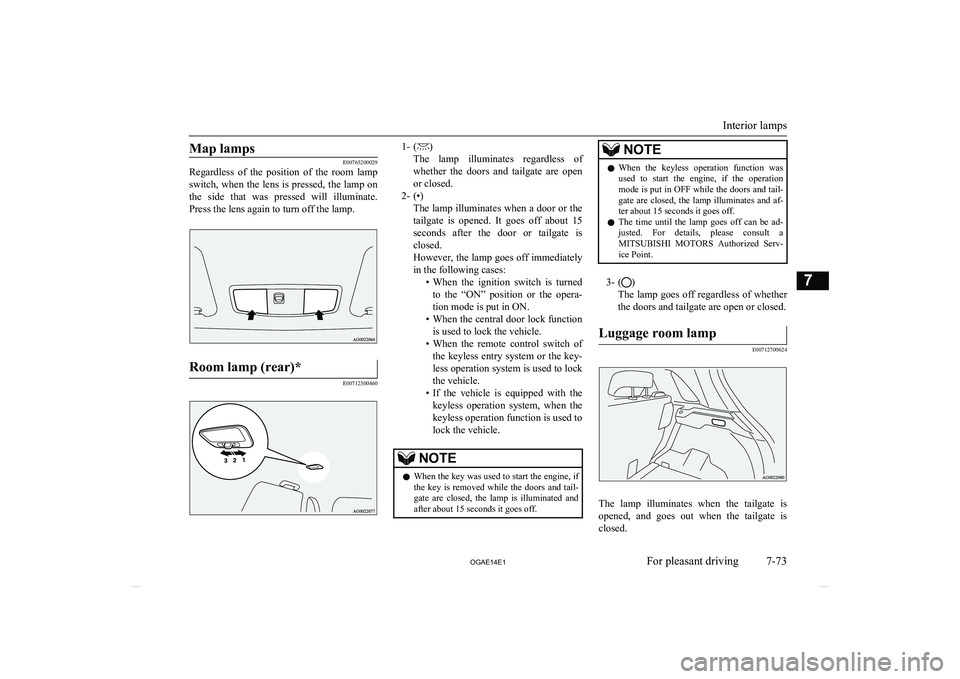
Map lamps
E00765200029
Regardless of the position of the room lamp
switch, when the lens is pressed, the lamp on
the side that was pressed will illuminate. Press the lens again to turn off the lamp.
Room lamp (rear)*
E00712300460
1- ()
The lamp illuminates regardless of whether the doors and tailgate are open
or closed.
2- (•) The lamp illuminates when a door or thetailgate is opened. It goes off about 15
seconds after the door or tailgate is
closed.
However, the lamp goes off immediately in the following cases: •When the ignition switch is turned
to the “ON” position or the opera-
tion mode is put in ON.
• When the central door lock function
is used to lock the vehicle.
• When the remote control switch of
the keyless entry system or the key- less operation system is used to lock
the vehicle.
• If the vehicle is equipped with the
keyless operation system, when the
keyless operation function is used to
lock the vehicle.NOTEl When the key was used to start the engine, if
the key is removed while the doors and tail- gate are closed, the lamp is illuminated and after about 15 seconds it goes off.NOTEl When the keyless operation function was
used to start the engine, if the operation
mode is put in OFF while the doors and tail- gate are closed, the lamp illuminates and af-ter about 15 seconds it goes off.
l The time until the lamp goes off can be ad-
justed. For details, please consult a MITSUBISHI MOTORS Authorized Serv-
ice Point.
3- ()
The lamp goes off regardless of whether
the doors and tailgate are open or closed.
Luggage room lamp
E00712700624
The lamp illuminates when the tailgate is opened, and goes out when the tailgate is
closed.
Interior lamps
7-73
OGAE14E1For pleasant driving7