2014 MERCEDES-BENZ SLS AMG ROADSTER transmission
[x] Cancel search: transmissionPage 142 of 292
Making adjustments in 1 mph
increments
X
Briefly press the cruise control lever to the
pressure point, up :for a higher speed or
down ;for a lower speed.
The last speed stored is increased or
reduced.
Making adjustments in 10 mph
increments X
Briefly press the cruise control lever
beyond the pressure point, up :for a
higher speed or down ;for a lower speed.
The last speed stored is increased or
reduced.
Deactivating cruise control There are several ways to deactivate cruise
control:
X Briefly press the cruise control lever
forwards =.
or
X Brake.
Cruise control is automatically deactivated if:
R you press the electric parking brake
handle.
R you are driving below 20 mph (30 km/h).
R ESP ®
intervenes or you deactivate ESP ®
R you shift the transmission to Nwhile the
vehicle is in motion.
If cruise control is deactivated, you will hear
a warning tone. The "Cruise Control Off Cruise Control Off"
message is displayed in the multifunction
display for approximately five seconds.
i The last speed stored is cleared when you
switch off the engine. AMG adaptive sport suspension
system
General notes The electronically controlled damping system
works continuously. This improves driving
safety and ride comfort.
The damping is tuned individually to each
wheel and depends on:
R your driving style, e.g. sporty
R the road surface condition, e.g. bumps
R your individual selection of Sport, Sport +
or Comfort
If you select Comfort or Sport + mode and
restart the engine, the mode reverts to Sport.
i GT model: you can only choose between
Sport and Sport + modes. If you select
Sport + mode and restart the engine, the
mode reverts to Sport. Sport mode
The firmer suspension tuning in Sport mode
ensures even better contact with the road.
Select this mode when employing a sporty
driving style, e.g. on winding country roads.
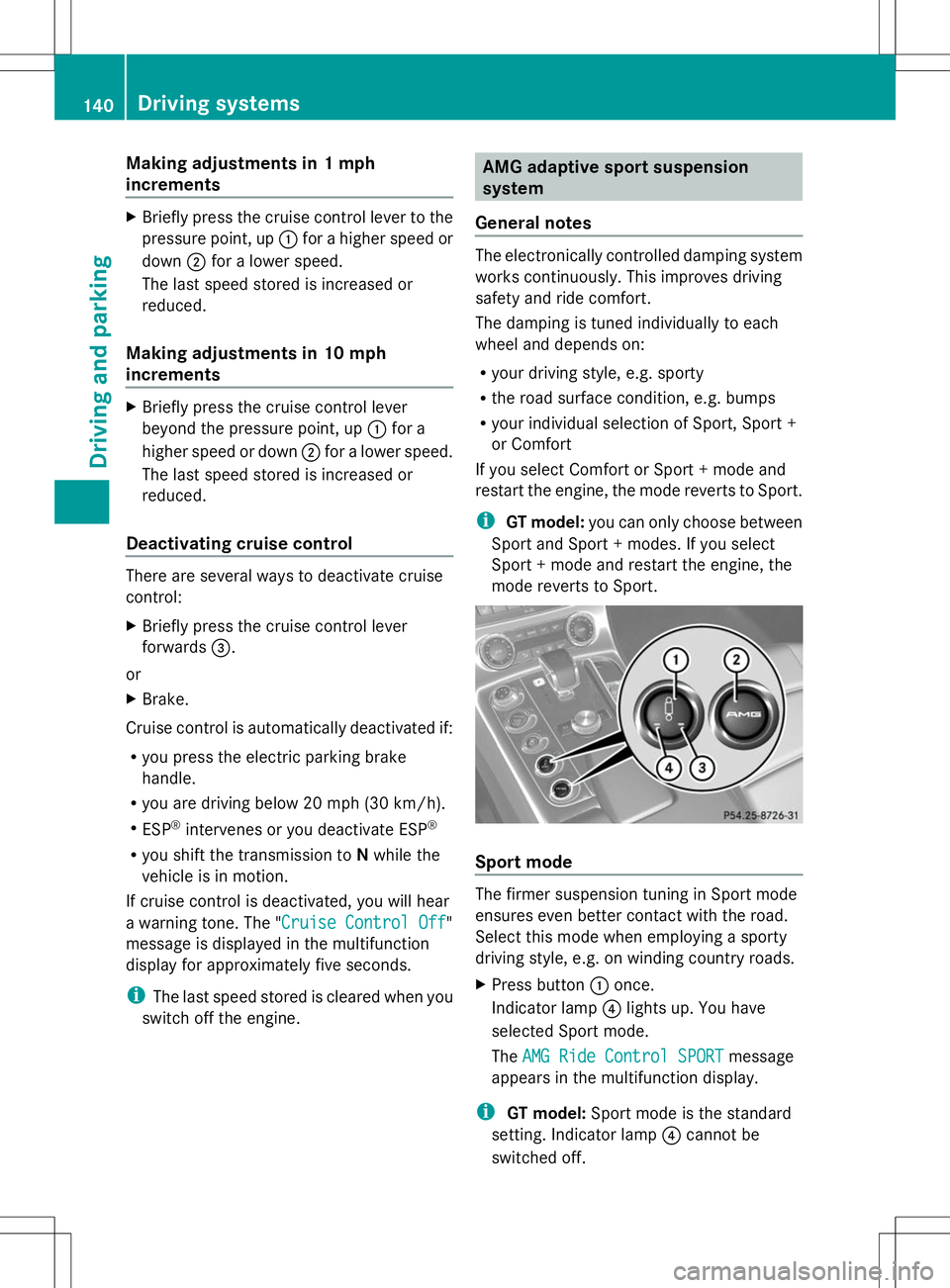
X
Press button :once.
Indicator lamp ?lights up. You have
selected Sport mode.
The AMG Ride Control SPORT AMG Ride Control SPORT message
appears in the multifunction display.
i GT model: Sport mode is the standard
setting. Indicator lamp ?cannot be
switched off. 140
Driving systemsDriving and parking
Page 145 of 292
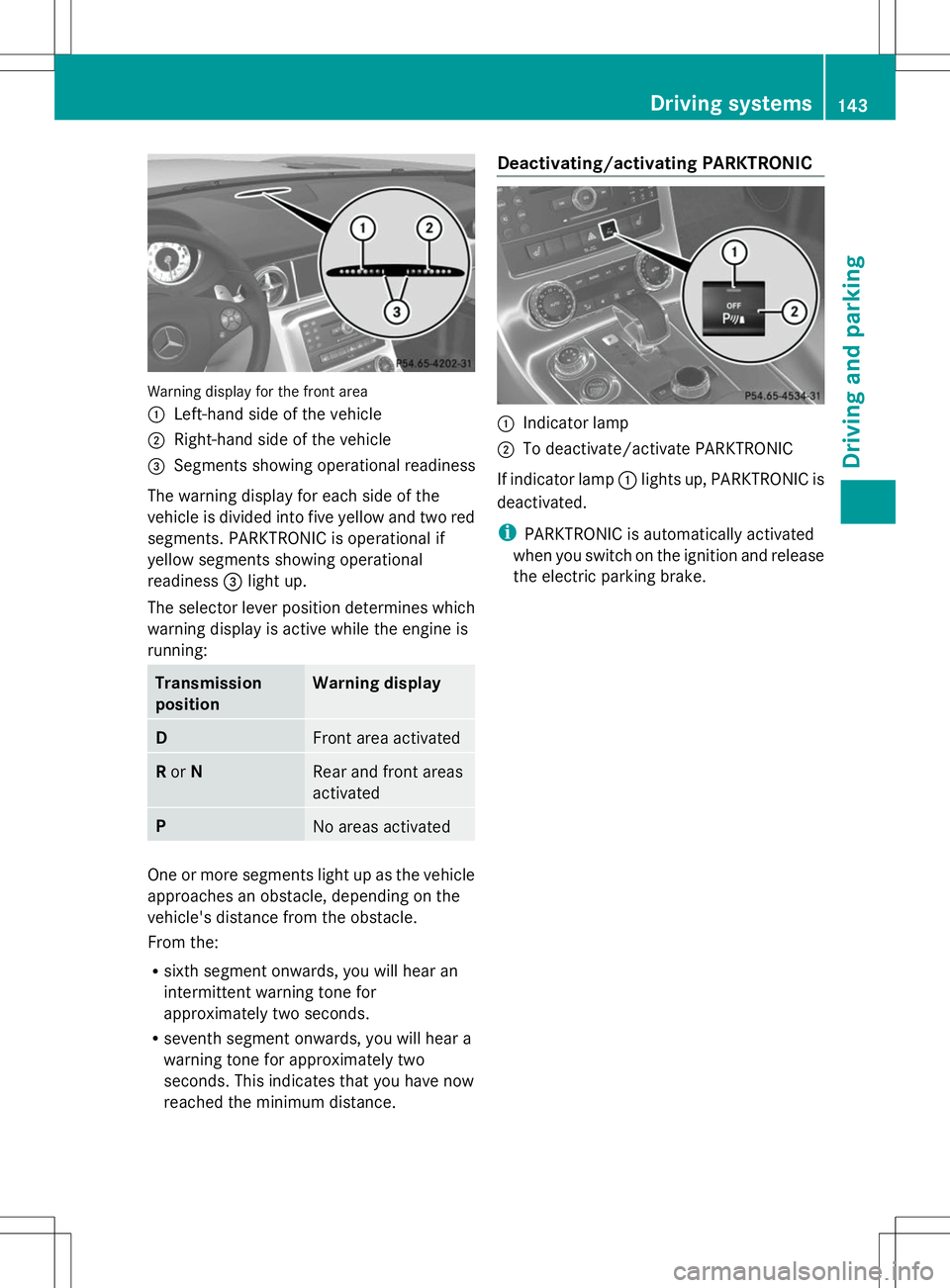
Warning display for the front area
:
Left-hand side of the vehicle
; Right-hand side of the vehicle
= Segments showing operational readiness
The warning display for each side of the
vehicle is divided into five yellow and two red
segments. PARKTRONIC is operational if
yellow segments showing operational
readiness =light up.
The selector lever position determines which
warning display is active while the engine is
running: Transmission
position Warning display
D
Front area activated
R
or N Rear and front areas
activated
P
No areas activated
One or more segments light up as the vehicle
approaches an obstacle, depending on the
vehicle's distance from the obstacle.
From the:
R sixth segment onwards, you will hear an
intermittent warning tone for
approximately two seconds.
R seventh segment onwards, you will hear a
warning tone for approximately two
seconds. This indicates that you have now
reached the minimum distance. Deactivating/activating PARKTRONIC
:
Indicator lamp
; To deactivate/activate PARKTRONIC
If indicator lamp :lights up, PARKTRONIC is
deactivated.
i PARKTRONIC is automatically activated
when you switch on the ignition and release
the electric parking brake. Driving systems
143Driving and parking Z
Page 152 of 292
Useful information
i This Operator's Manual describes all
models and all standard and optional
equipment of your vehicle available at the
time of publication of the Operator's
Manual. Country-specific differences are
possible. Please note that your vehicle may
not be equipped with all features
described. This also applies to safety-
related systems and functions.
i Please read the information on qualified
specialist workshops (Y page 22).Important safety notes
You will find an illustration of the instrument
cluster in the "At a glance" section
(Y page 27). G
WARNING
If you operate information systems and
communication equipment integrated in the
vehicle while driving, you will be distracted
from traffic conditions. You could also lose
control of the vehicle. There is a risk of an
accident.
Only operate the equipment when the traffic
situation permits. If you are not sure that this
is possible, park the vehicle paying attention
to traffic conditions and operate the
equipment when the vehicle is stationary. G
WARNING
If the instrument cluster has failed or
malfunctioned, you may not recognize
function restrictions in systems relevant to
safety. The operating safety of your vehicle
may be impaired. There is a risk of an
accident.
Drive on carefully. Have the vehicle checked
at a qualified specialist workshop
immediately. You must observe the legal requirements for
the country in which you are currently driving
when operating the on-board computer.
The on-board computer only shows messages
or warnings from certain systems in the
multifunction display. You should therefore
make sure your vehicle is operating safely at
all times. Otherwise, a vehicle that is not
operating safely may cause an accident.
Displays and operation
Engine oil temperature display
The engine oil temperature gauge is in the
instrument cluster on the right-hand side.
Under normal operating conditions, the
temperature may rise to 140 †.
The transmission fluid temperature and the
coolant temperature are displayed in the
AMG menu (Y page 161). Tachometer
The red band in the tachometer indicates the
engine's overrevving range.
! Do not drive in the overrevving range, as
this could damage the engine.
The fuel supply is interrupted to protect the
engine when the red band is reached. Outside temperature display
You should pay special attention to road
conditions when temperatures are around
freezing point.
The outside temperature display is in the
multifunction display (Y page 152).
Changes in the outside temperature are
displayed after a short delay. 150
Displays and operationOn-board computer and displays
Page 163 of 292
AMG menu
AMG displays X
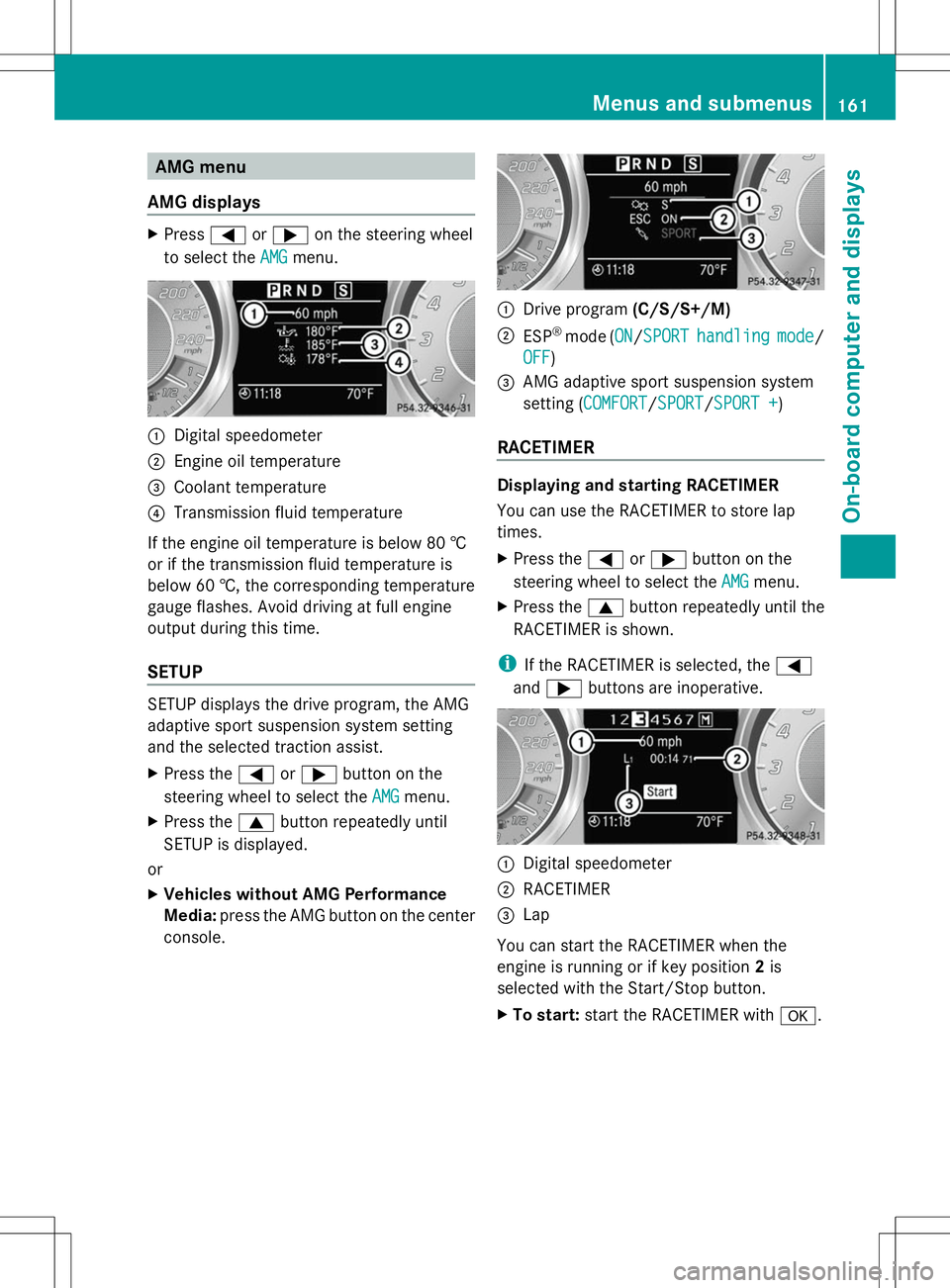
Press =or; on the steering wheel
to select the AMG
AMGmenu. :
Digital speedometer
; Engine oil temperature
= Coolant temperature
? Transmission fluid temperature
If the engine oil temperature is below 80 †
or if the transmission fluid temperature is
below 60 †, the corresponding temperature
gauge flashes. Avoid driving at full engine
output during this time.
SETUP SETUP displays the drive program, the AMG
adaptive sport suspension system setting
and the selected traction assist.
X Press the =or; button on the
steering wheel to select the AMG
AMG menu.
X Press the 9button repeatedly until
SETUP is displayed.
or
X Vehicles without AMG Performance
Media: press the AMG button on the center
console. :
Drive program (C/S/S+/M)
; ESP ®
mode (ON ON/SPORTSPORT handling handling mode
mode/
OFF
OFF )
= AMG adaptive sport suspension system
setting (COMFORT COMFORT/SPORT SPORT/SPORT +SPORT +)
RACETIMER Displaying and starting RACETIMER
You can use the RACETIMER to store lap
times.
X
Press the =or; button on the
steering wheel to select the AMG AMGmenu.
X Press the 9button repeatedly until the
RACETIMER is shown.
i If the RACETIMER is selected, the =
and ; buttons are inoperative. :
Digital speedometer
; RACETIMER
= Lap
You can start the RACETIMER when the
engine is running or if key position 2is
selected with the Start/Stop button.
X To start: start the RACETIMER with a. Menus and sub
menus
161On-board computer and displays Z
Page 168 of 292
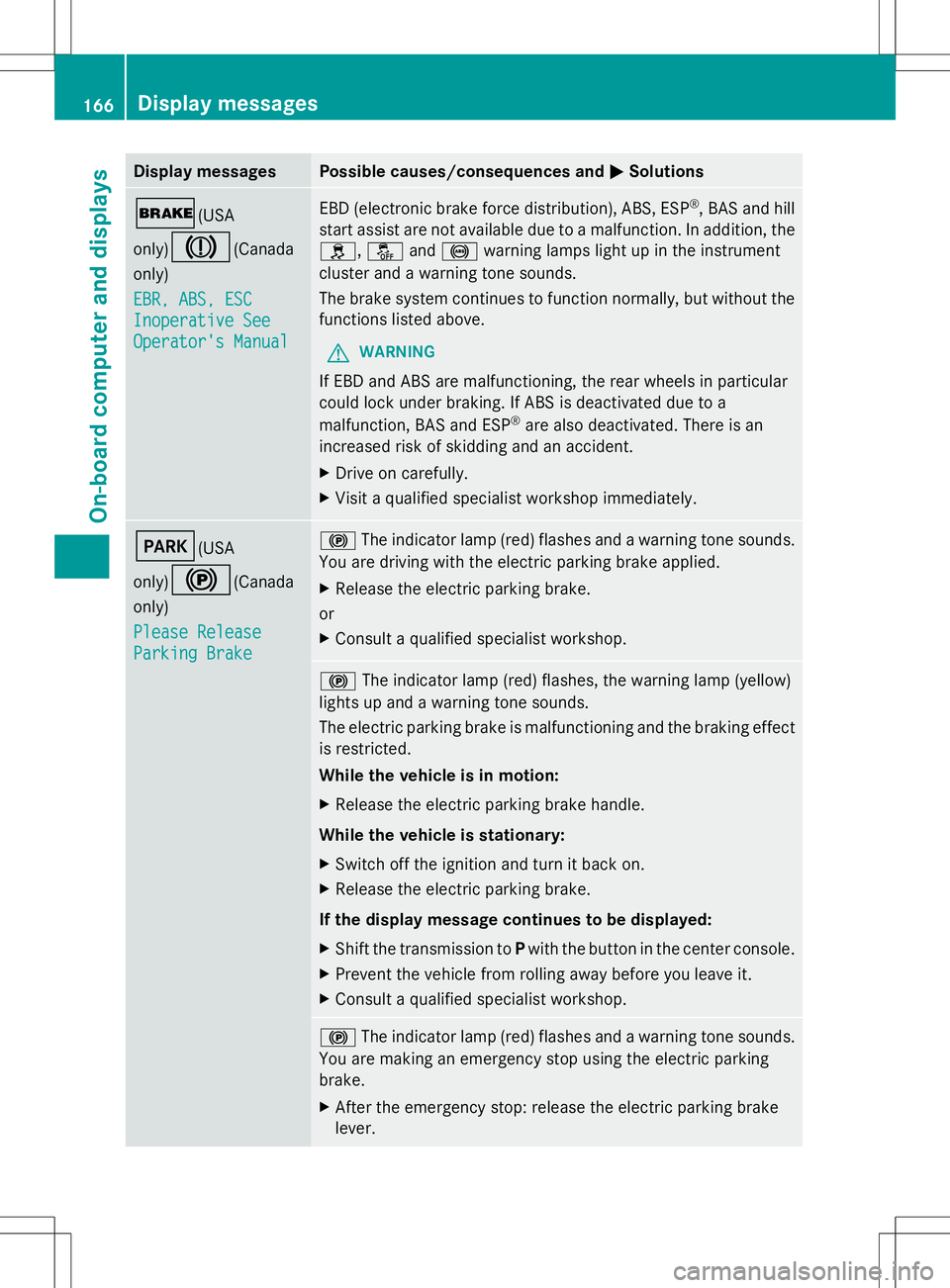
Display messages Possible causes/consequences and
M
MSolutions $(USA
only)
J(Canada
only)
EBR, ABS, ESC EBR, ABS, ESC
Inoperative See Inoperative See
Operator's Manual Operator's Manual EBD (electronic brake force distribution), ABS, ESP
®
, BAS and hill
start assist are not available due to a malfunction. In addition, the
h, åand! warning lamps light up in the instrument
cluster and a warning tone sounds.
The brake system continues to function normally, but without the
functions listed above.
G WARNING
If EBD and ABS are malfunctioning, the rear wheels in particular
could lock under braking. If ABS is deactivated due to a
malfunction, BAS and ESP ®
are also deactivated. There is an
increased risk of skidding and an accident.
X Drive on carefully.
X Visit a qualified specialist workshop immediately. F(USA
only)
!(Canada
only)
Please Release Please Release
Parking Brake Parking Brake !
The indicator lamp (red) flashes and a warning tone sounds.
You are driving with the electric parking brake applied.
X Release the electric parking brake.
or
X Consult a qualified specialist workshop. !
The indicator lamp (red) flashes, the warning lamp (yellow)
lights up and a warning tone sounds.
The electric parking brake is malfunctioning and the braking effect
is restricted.
While the vehicle is in motion:
X Release the electric parking brake handle.
While the vehicle is stationary:
X Switch off the ignition and turn it back on.
X Release the electric parking brake.
If the display message continues to be displayed:
X Shift the transmission to Pwith the button in the center console.
X Prevent the vehicle from rolling away before you leave it.
X Consult a qualified specialist workshop. !
The indicator lamp (red) flashes and a warning tone sounds.
You are making an emergency stop using the electric parking
brake.
X After the emergency stop: release the electric parking brake
lever. 166
Display
messagesOn-board computer and displays
Page 169 of 292
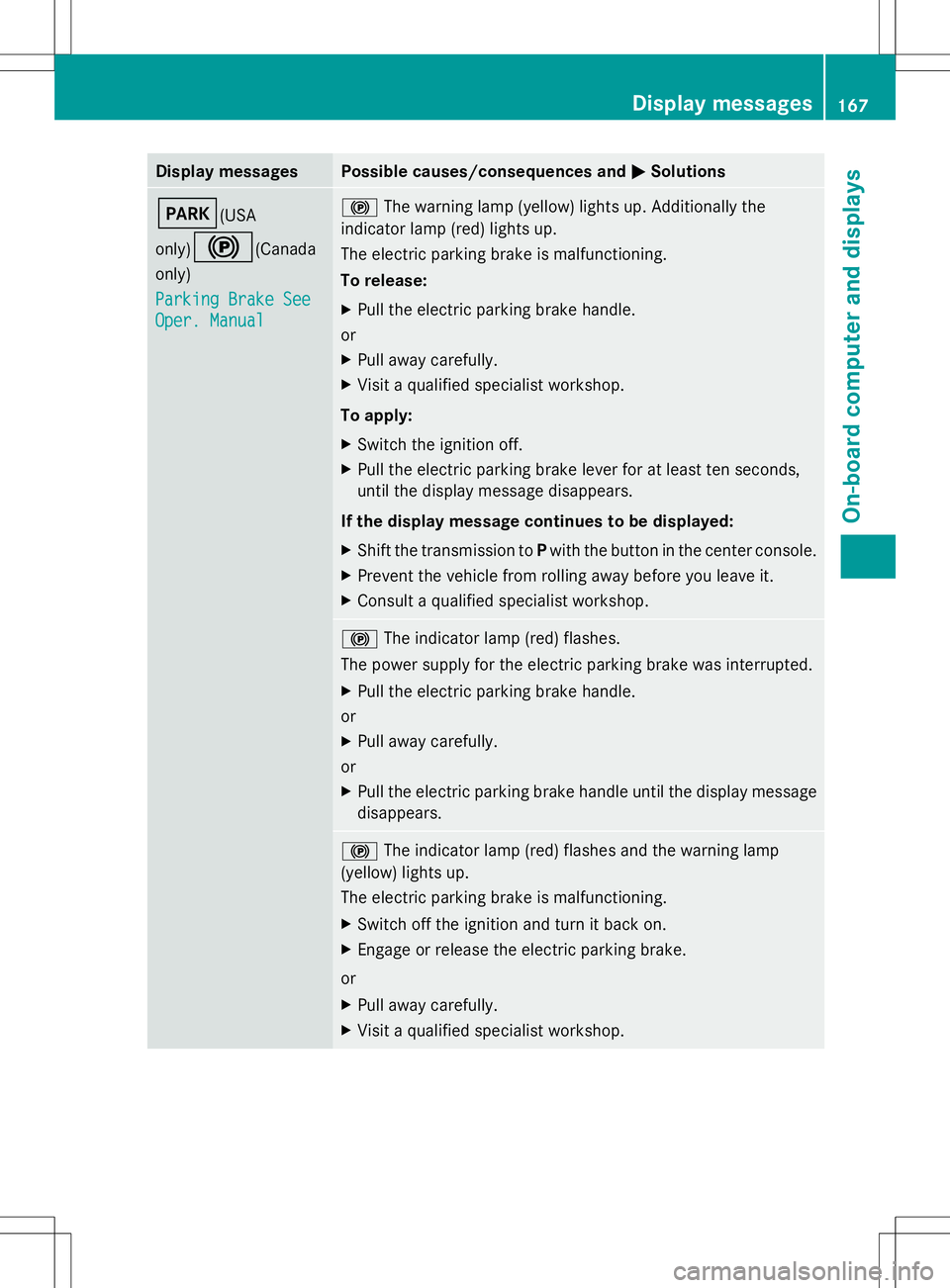
Display messages Possible causes/consequences and
M
MSolutions F(USA
only)
!(Canada
only)
Parking Brake See Parking Brake See
Oper. Manual Oper. Manual !
The warning lamp (yellow) lights up. Additionally the
indicator lamp (red) lights up.
The electric parking brake is malfunctioning.
To release:
X Pull the electric parking brake handle.
or
X Pull away carefully.
X Visit a qualified specialist workshop.
To apply:
X Switch the ignition off.
X Pull the electric parking brake lever for at least ten seconds,
until the display message disappears.
If the display message continues to be displayed:
X Shift the transmission to Pwith the button in the center console.
X Prevent the vehicle from rolling away before you leave it.
X Consult a qualified specialist workshop. !
The indicator lamp (red) flashes.
The power supply for the electric parking brake was interrupted.
X Pull the electric parking brake handle.
or
X Pull away carefully.
or
X Pull the electric parking brake handle until the display message
disappears. !
The indicator lamp (red) flashes and the warning lamp
(yellow) lights up.
The electric parking brake is malfunctioning.
X Switch off the ignition and turn it back on.
X Engage or release the electric parking brake.
or
X Pull away carefully.
X Visit a qualified specialist workshop. Display
messages
167On-board computer and displays Z
Page 170 of 292
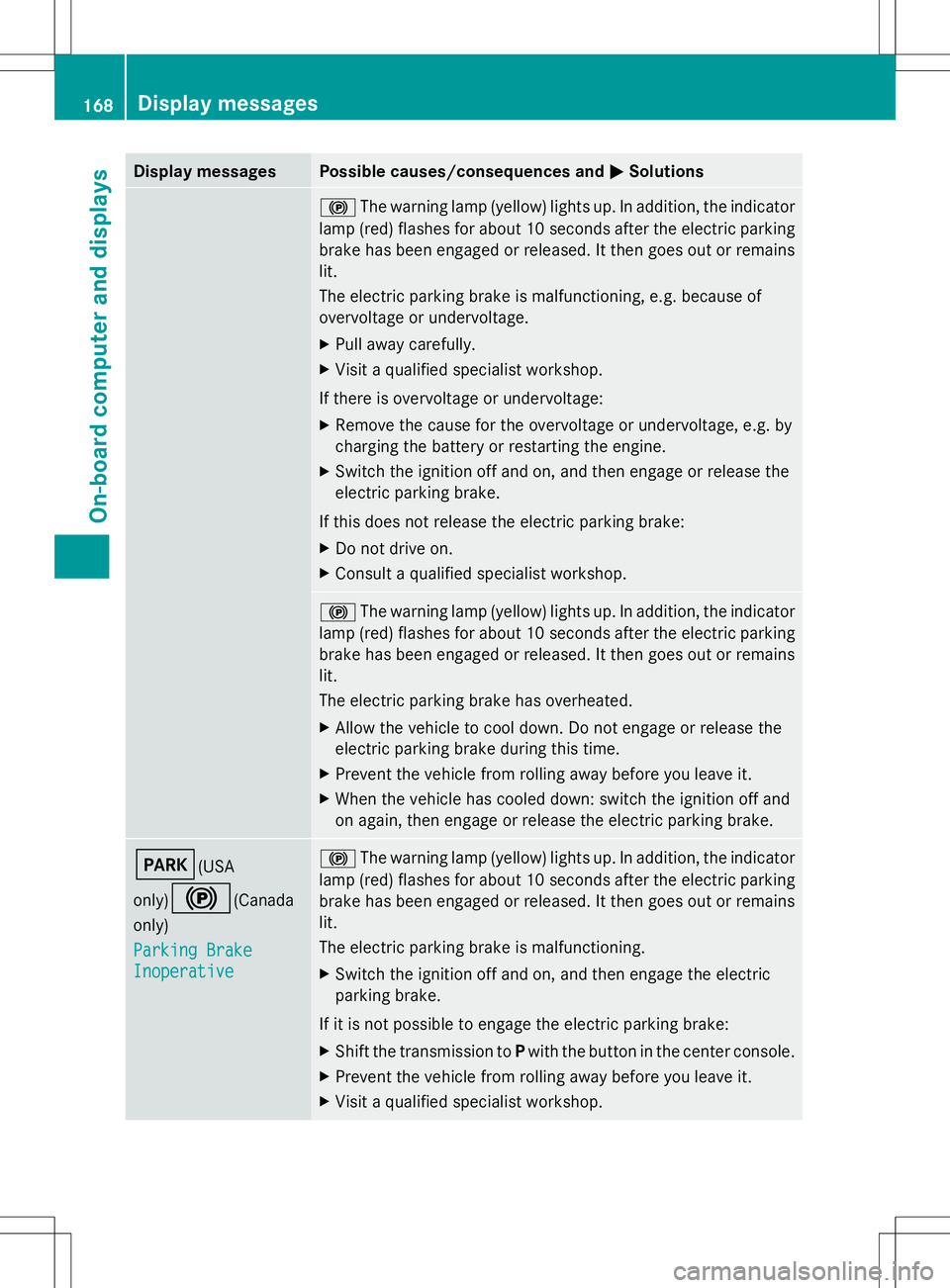
Display messages Possible causes/consequences and
M
MSolutions !
The warning lamp (yellow) lights up. In addition, the indicator
lamp (red) flashes for about 10 seconds after the electric parking
brake has been engaged or released. It then goes out or remains
lit.
The electric parking brake is malfunctioning, e.g. because of
overvoltage or undervoltage.
X Pull away carefully.
X Visit a qualified specialist workshop.
If there is overvoltage or undervoltage:
X Remove the cause for the overvoltage or undervoltage, e.g. by
charging the battery or restarting the engine.
X Switch the ignition off and on, and then engage or release the
electric parking brake.
If this does not release the electric parking brake:
X Do not drive on.
X Consult a qualified specialist workshop. !
The warning lamp (yellow) lights up. In addition, the indicator
lamp (red) flashes for about 10 seconds after the electric parking
brake has been engaged or released. It then goes out or remains
lit.
The electric parking brake has overheated.
X Allow the vehicle to cool down. Do not engage or release the
electric parking brake during this time.
X Prevent the vehicle from rolling away before you leave it.
X When the vehicle has cooled down: switch the ignition off and
on again, then engage or release the electric parking brake. F(USA
only)
!(Canada
only)
Parking Brake Parking Brake
Inoperative Inoperative !
The warning lamp (yellow) lights up. In addition, the indicator
lamp (red) flashes for about 10 seconds after the electric parking
brake has been engaged or released. It then goes out or remains
lit.
The electric parking brake is malfunctioning.
X Switch the ignition off and on, and then engage the electric
parking brake.
If it is not possible to engage the electric parking brake:
X Shift the transmission to Pwith the button in the center console.
X Prevent the vehicle from rolling away before you leave it.
X Visit a qualified specialist workshop. 168
Display
messagesOn-board computer and displays
Page 188 of 292
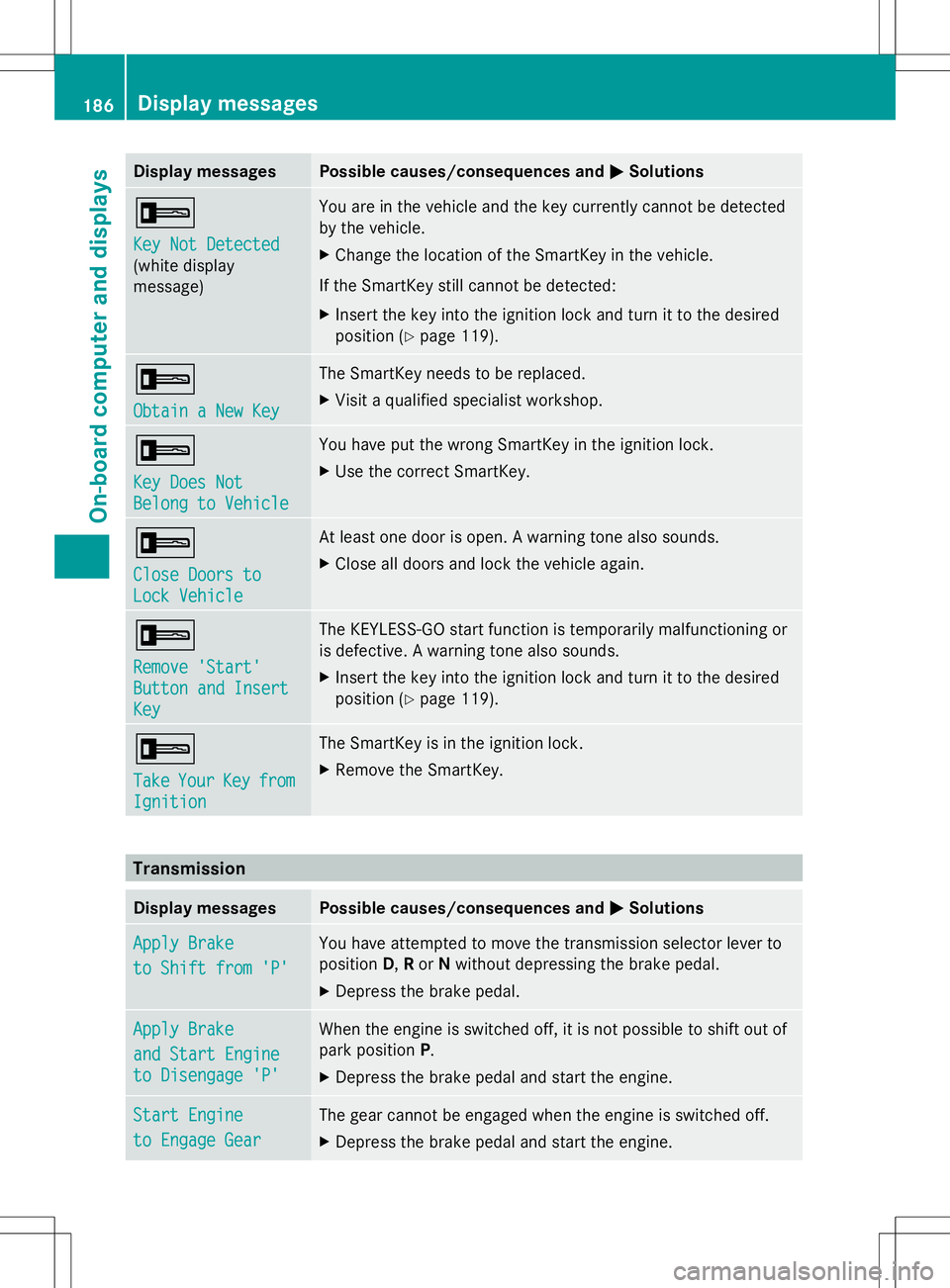
Display messages Possible causes/consequences and
M
MSolutions +
Key Not Detected Key Not Detected
(white display
message) You are in the vehicle and the key currently cannot be detected
by the vehicle.
X
Change the location of the SmartKey in the vehicle.
If the SmartKey still cannot be detected:
X Insert the key into the ignition lock and turn it to the desired
position (Y page 119). +
Obtain a New Key Obtain a New Key The SmartKey needs to be replaced.
X
Visit a qualified specialist workshop. +
Key Does Not Key Does Not
Belong to Vehicle Belong to Vehicle You have put the wrong SmartKey in the ignition lock.
X
Use the correct SmartKey. +
Close Doors to Close Doors to
Lock Vehicle Lock Vehicle At least one door is open. A warning tone also sounds.
X
Close all doors and lock the vehicle again. +
Remove 'Start' Remove 'Start'
Button and Insert Button and Insert
Key Key The KEYLESS-GO start function is temporarily malfunctioning or
is defective. A warning tone also sounds.
X
Insert the key into the ignition lock and turn it to the desired
position (Y page 119). +
Take Take
Your
YourKey
Keyfrom
from
Ignition
Ignition The SmartKey is in the ignition lock.
X
Remove the SmartKey. Transmission
Display messages Possible causes/consequences and
M MSolutions Apply Brake
Apply Brake
to Shift from 'P' to Shift from 'P' You have attempted to move the transmission selector lever to
position
D,Ror Nwithout depressing the brake pedal.
X Depress the brake pedal. Apply Brake Apply Brake
and Start Engine and Start Engine
to Disengage 'P' to Disengage 'P' When the engine is switched off, it is not possible to shift out of
park position
P.
X Depress the brake pedal and start the engine. Start Engine Start Engine
to Engage Gear to Engage Gear The gear cannot be engaged when the engine is switched off.
X
Depress the brake pedal and start the engine. 186
Display
messagesOn-board computer and displays