2014 MERCEDES-BENZ SLK-Class media interface
[x] Cancel search: media interfacePage 219 of 270
Depending on the device connected, the fol-
lowing categories may be available, for exam-
ple:
R Current Tracklist
Current Tracklist
R Select By Cover Select By Cover
R Keyword Search
Keyword Search
R Playlists
Playlists (e.g.All
All)
R Artists
Artists
R Albums
Albums
R Tracks
Tracks
R Podcasts
Podcasts
R Genres
Genres
R Composers
Composers
R Audiobooks
Audiobooks
R Videos
Videos (except for Hong Kong)
i Some playback categories contain the
entry All
All . If this entry has been selected,
the entire content of the category selected
will be played.
The Videos Videos category is available for
iPods ®
and iPhones ®
(except for Hong
Kong).
i The functions are available as soon as the
entire media content has been read and
analyzed. For certain functions, such as
keyword search and selection by cover, this
can take several minutes, depending on the
scope of media and the connected device.
If the same device is reconnected with
unchanged media content, these functions
are available much more quickly.
However, if you change the media content,
it has to be read and analyzed again. Calling up a category list
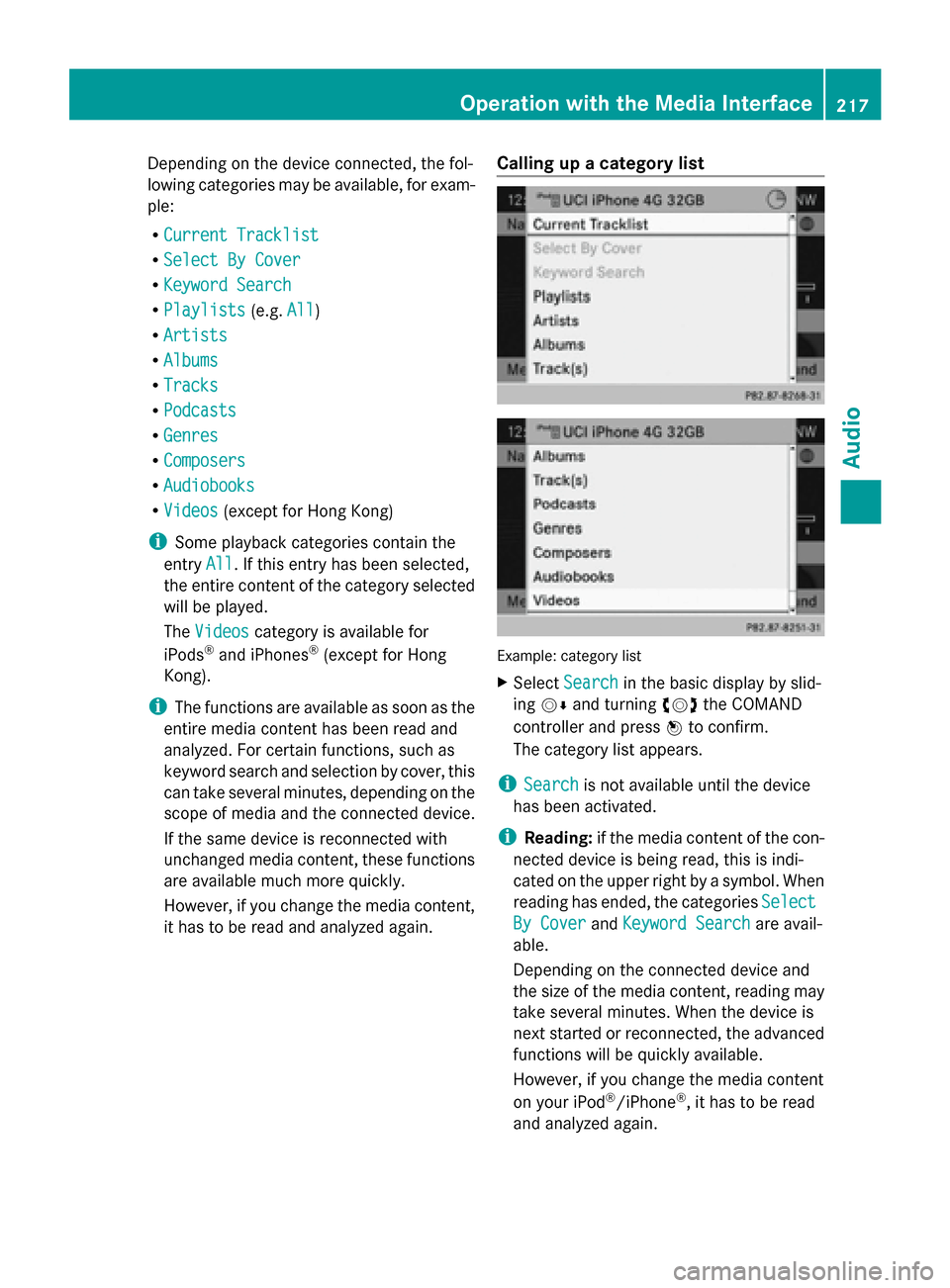
Example: category list
X
Select Search Search in the basic display by slid-
ing 00520064 and turning 00790052007Athe COMAND
controller and press 0098to confirm.
The category list appears.
i Search
Search is not available until the device
has been activated.
i Reading: if the media content of the con-
nected device is being read, this is indi-
cated on the upper right by a symbol. When
reading has ended, the categories Select Select
By Cover
By Cover andKeyword Search
Keyword Search are avail-
able.
Depending on the connected device and
the size of the media content, reading may
take several minutes. When the device is
next started or reconnected, the advanced
functions will be quickly available.
However, if you change the media content
on your iPod ®
/iPhone ®
, it has to be read
and analyzed again. Operation
withthe Media Interface
217Audio Z
Page 220 of 270
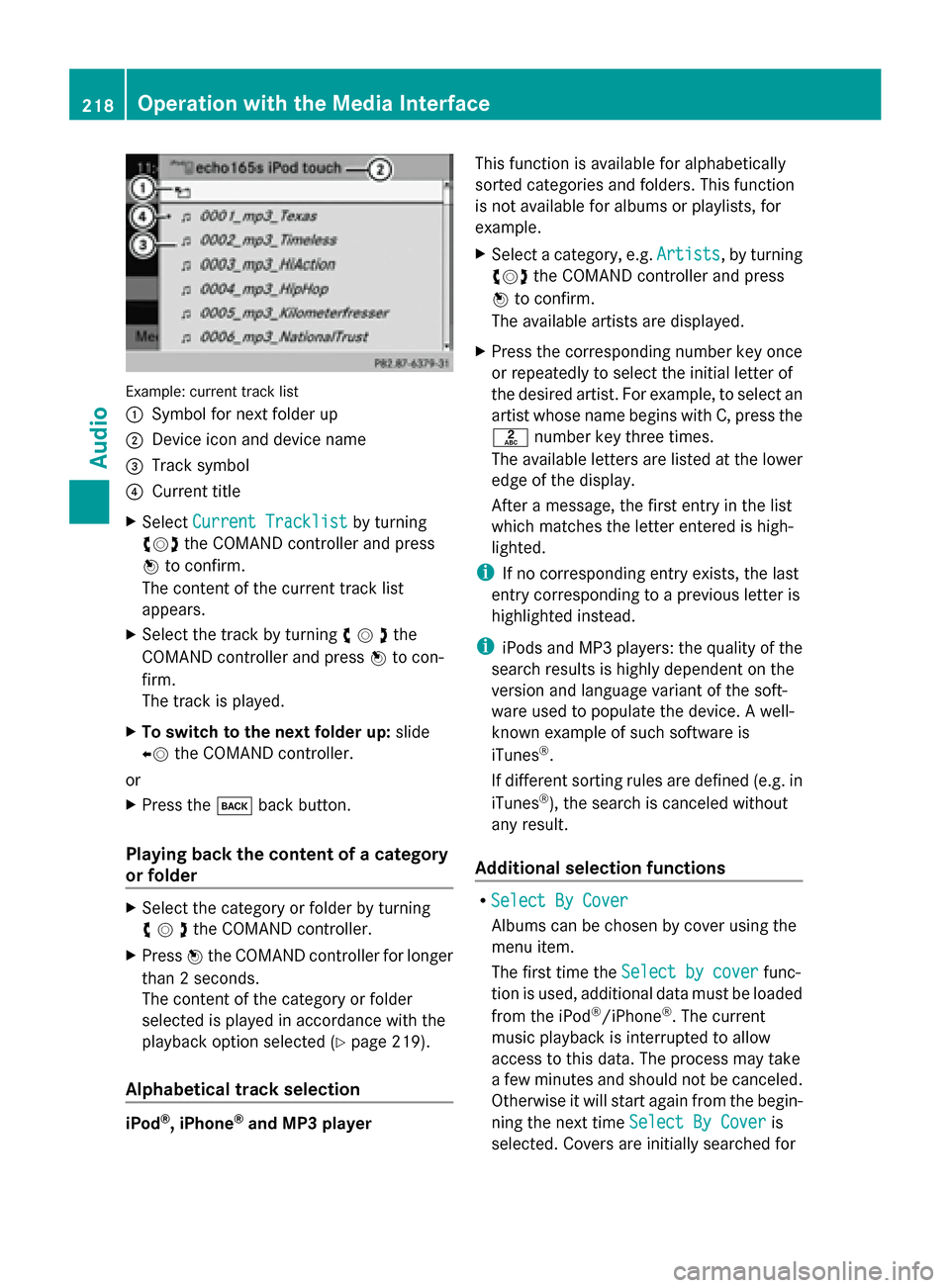
Example: current track list
0043
Symbol for next folder up
0044 Device icon and device name
0087 Track symbol
0085 Current title
X Select Current Tracklist Current Tracklist by turning
00790052007A the COMAND controller and press
0098 to confirm.
The content of the current track list
appears.
X Select the track by turning 00790052007Athe
COMAND controller and press 0098to con-
firm.
The track is played.
X To switch to the next folder up: slide
00950052 the COMAND controller.
or
X Press the 003Dback button.
Playing back the content of a category
or folder X
Select the category or folder by turning
00790052007Athe COMAND controller.
X Press 0098the COMAND controller for longer
than 2 seconds.
The content of the category or folder
selected is played in accordance with the
playback option selected (Y page 219).
Alphabetical track selection iPod
®
, iPhone ®
and MP3 player This function is available for alphabetically
sorted categories and folders. This function
is not available for albums or playlists, for
example.
X
Select a category, e.g. Artists
Artists, by turning
00790052007A the COMAND controller and press
0098 to confirm.
The available artists are displayed.
X Press the corresponding number key once
or repeatedly to select the initial letter of
the desired artist. For example, to select an
artist whose name begins with C, press the
0082 number key three times.
The available letters are listed at the lower
edge of the display.
After a message, the first entry in the list
which matches the letter entered is high-
lighted.
i If no corresponding entry exists, the last
entry corresponding to a previous letter is
highlighted instead.
i iPods and MP3 players: the quality of the
search results is highly dependent on the
version and language variant of the soft-
ware used to populate the device. A well-
known example of such software is
iTunes ®
.
If different sorting rules are defined (e.g. in
iTunes ®
), the search is canceled without
any result.
Additional selection functions R
Select By Cover Select By Cover
Albums can be chosen by cover using the
menu item.
The first time the Select by cover Select by cover func-
tion is used, additional data must be loaded
from the iPod ®
/iPhone ®
. The current
music playback is interrupted to allow
access to this data. The process may take
a few minutes and should not be canceled.
Otherwise it will start again from the begin-
ning the next time Select By Cover Select By Cover is
selected. Covers are initially searched for 218
Operation
withthe Media InterfaceAudio
Page 221 of 270
in the Gracenote Media Database and are
then added to during playback from the
connected device (Y page 196). The avail-
ability depends on the use and the tracks
already selected.
R Keyword Search
Keyword Search
Selecting keyword search allows you to
search through all categories on the con-
nected device for keywords.
i More information on Select By Cover
Select By Cover
and Keyword Search Keyword Search can be found under
"Music search, selecting category"
(Y page 216).
i For an iPod ®
/iPhone ®
, the available cov-
ers are added most efficiently if the entire
media content is in the current playlist. This
is the case if you have selected the play-
back option Tracks
Tracks orRandom Medium Random Medium
(Y page 219).
Special feature in iPod ®
/iPhone ®
mode i
If the connected iPod ®
/iPhone ®
is not
functioning or paused, you can search for
tracks but cannot select them. After con-
firming a new track, the Function Function
Unavailable
Unavailable message appears. Playback options
X To select a playback option: select
Media Interface
Media Interface in the basic display by
sliding 00520064and turning 00790052007Athe
COMAND controller and press 0098to con-
firm.
The options list appears. The 003Bdot indi-
cates the option selected.
X Select an option and press 0098to confirm.
The following options are available:
R Normal Track Sequence
Normal Track Sequence
Normal track sequence: you hear the
tracks in their normal order (e.g. numerical
or alphabetical).
R Random Medium
Random Medium All the tracks on the medium are played in
random order.
R Random Track List Random Track List
The tracks in the currently active category
or folder, including any subfolders, are
played in random order.
i If the connected iPod ®
/iPhone ®
is not
functioning or paused, the playback
options are inactive. The display of options
is grayed out. MP3 player instructions
General information Up to 30,000 tracks per medium are sup-
ported.
You can speed up some functions and
improve the search results by:
R
making sure the names of tracks, albums
and artists, for example, are written the
same way
R labeling albums featuring various artists as
"compilations"
i Multiple entries of tracks in playlists are
filtered out for some players.
Data formats MP3 and WMA are supported as data formats
with fixed and variable bit rates (up to
320 kbits/s).
Special considerations when using MP3
players
Up to eight directory levels with up to 1,000
tracks per directory are supported.
Do not use USB extension leads or adapters.
They can impair functionality.
i
DRM (Digital Rights Management) pro-
tected files are not supported by the Media
Interface. Operation
withthe Media Interface
219Audio Z
Page 222 of 270
Audio AUX mode
Notes on audio AUX mode
External audio sources may have different
volumes, which can mean that system mes-
sages such as traffic announcements and
navigation system announcements are much
louder. If necessary, deactivate the system
messages or adjust their volume manually.
You can connect an external audio source
(AUX) to COMAND.
Depending on the vehicle model series the
connection is made via a jack in the storage
compartment in the center console or via the
USB port (Y page 191).
If COMAND is equipped with the Media Inter-
face, external audio sources are connected
using the cable set provided. An AUX socket
is not provided. The connections for the
Media Interface are located in the stowage
compartment in the center console.
i You will find further information online at
http://www.mbusa-mobile.com. Or call
the Mercedes-Benz Customer Assistance
Center at 1-800-FOR-MERCedes
(1-800-367-6372 )(for the USA) or Cus-
tomer Relations at 1-800-387-010 0(for
Canada). Switching to audio AUX mode
Switching modes using the function
button The external device is connected to the audio
AUX in.
X Press the 003Afunction button one or more
times.
By pressing the function button repeatedly,
you can change the operating mode in the
following order:
R CD/audio DVD/MP3 (disc)
R Memory card mode
R MUSIC REGISTER
R USB storage device R
Media Interface or audio AUX mode
R Bluetooth ®
audio mode
Switching modes via the audio menu When you connect an external audio source,
audio AUX is not selected automatically.
X
Select Audio
Audio in the main function bar by
sliding 00970052and turning 00790052007Athe COMAND
controller and press 0098to confirm.
If AUX mode was the last mode selected, it
will now be active.
If another audio source is switched on, you
can now switch to audio AUX mode in the
audio menu.
X Select Audio Audiousing00970052and press 0098to
confirm.
The audio menu appears.
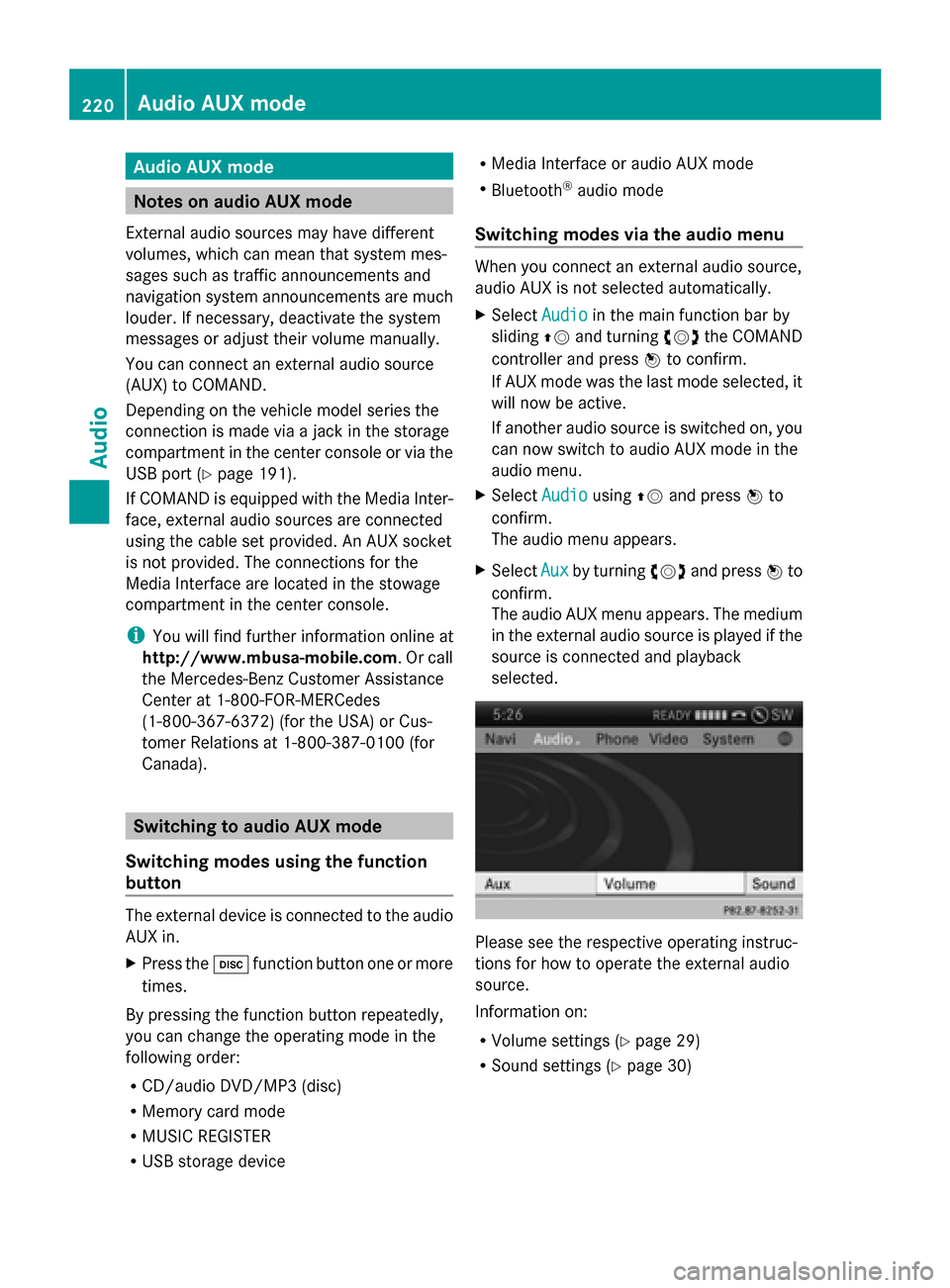
X Select Aux Auxby turning 00790052007Aand press 0098to
confirm.
The audio AUX menu appears. The medium
in the external audio source is played if the
source is connected and playback
selected. Please see the respective operating instruc-
tions for how to operate the external audio
source.
Information on:
R
Volume settings (Y page 29)
R Sound settings (Y page 30)220
Audio AUX modeAudio
Page 228 of 270
Switching modes using the function
button
X
Press the 003Afunction button.
COMAND switches to the previous disc
operating mode.
By pressing the function button repeatedly,
you can change the operating mode in the
following order:
R Video DVD/CD/audio DVD/MP3 in the
DVD changer or DVD single drive (disc
mode)
R Memory card mode
R MUSIC REGISTER
R USB storage device
R Media Interface or audio AUX mode
R Bluetooth ®
audio mode
X DVD changer: selectMedia
Media by sliding
00520064 and turning 00790052007Athe COMAND con-
troller and press 0098to confirm.
Single DVD drive: selectMedia Media by sliding
00520064 and turning 00790052007Athe COMAND con-
troller and press 0098to confirm.
X Select a ývideo DVD from the media list
(Y page 228).
Switching on with the video menu X
Select Video
Videoin the main function bar by
sliding 00970052and turning 00790052007Athe COMAND
controller and press 0098to confirm.
Video DVD mode is switched on. Showing/hiding the control menu
X To show: in DVD video mode, slide 009700520064
the COMAND controller.
X To hide: slide009700520064 the COMAND control-
ler.
or
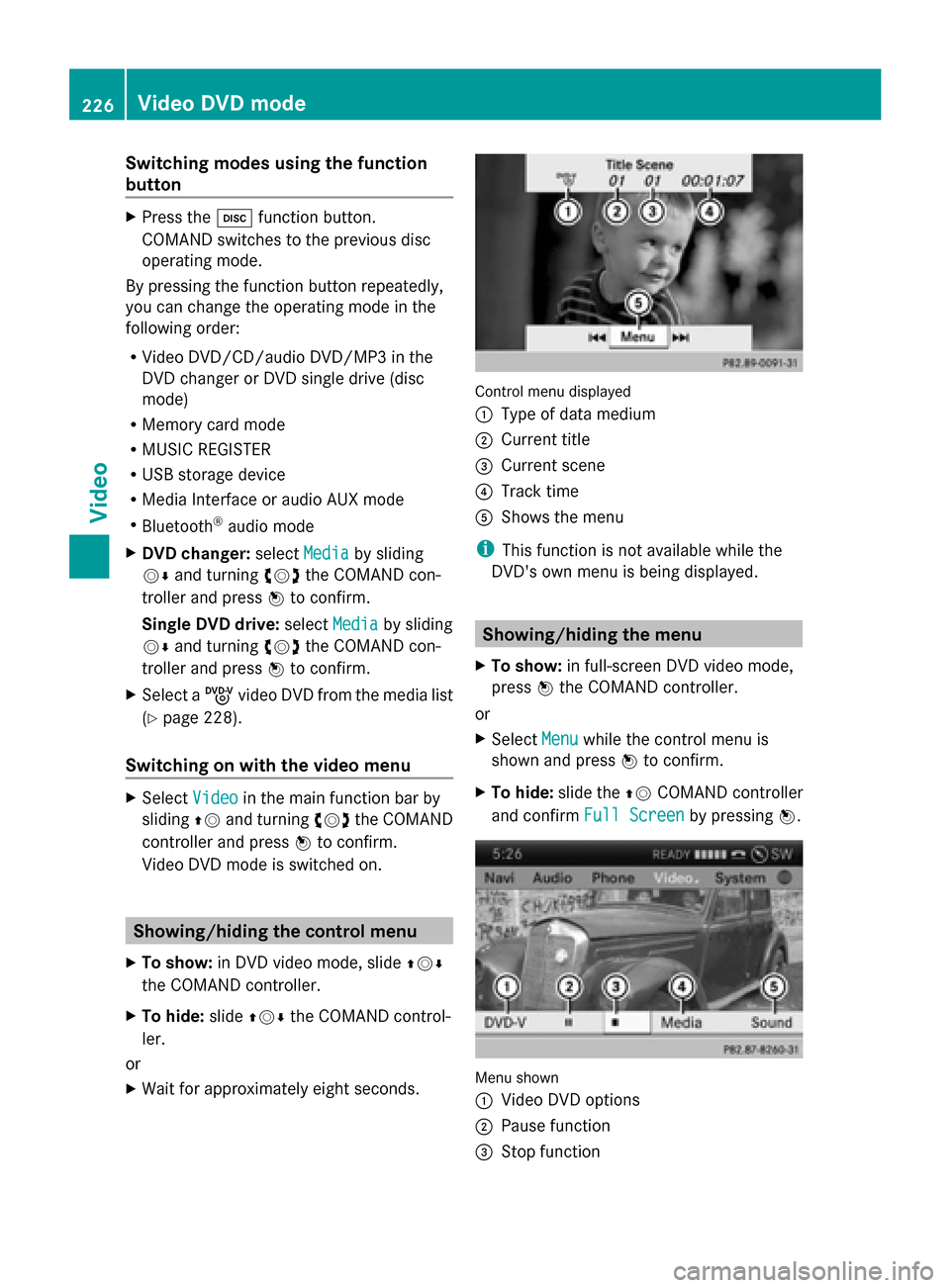
X Wait for approximately eight seconds. Control menu displayed
0043
Type of data medium
0044 Current title
0087 Current scene
0085 Track time
0083 Shows the menu
i This function is not available while the
DVD's own menu is being displayed. Showing/hiding the menu
X To show: in full-screen DVD video mode,
press 0098the COMAND controller.
or
X Select Menu Menuwhile the control menu is
shown and press 0098to confirm.
X To hide: slide the 00970052COMAND controller
and confirm Full Screen
Full Screen by pressing0098. Menu shown
0043
Video DVD options
0044 Pause function
0087 Stop function 226
Video DVD modeVideo
Page 232 of 270
you may be able to influence events by select-
ing and triggering actions. The type and num-
ber of actions depend on the DVD.
X Select an action by sliding 009700520064or009500520096 the
COMAND controller and press 0098to exe-
cute it.
A menu appears and the first entry,
Select
Select , is highlighted.
X Press 0098the COMAND controller. AUX video mode
Connecting external video sources
External video sources may have different
volumes, which can mean that system mes-
sages such as traffic announcements and
navigation system announcements are much
louder. If necessary, deactivate the system
messages or adjust their volume manually.
If your vehicle is equipped with Media Inter-
face, you can connect an external video
source (AUX video) ( Ypage 213).
The 1/8 inch audio/video jacks are in the
center console stowage compartment.
i In vehicles with a rear view camera, the
AUX video jack cannot be used for external
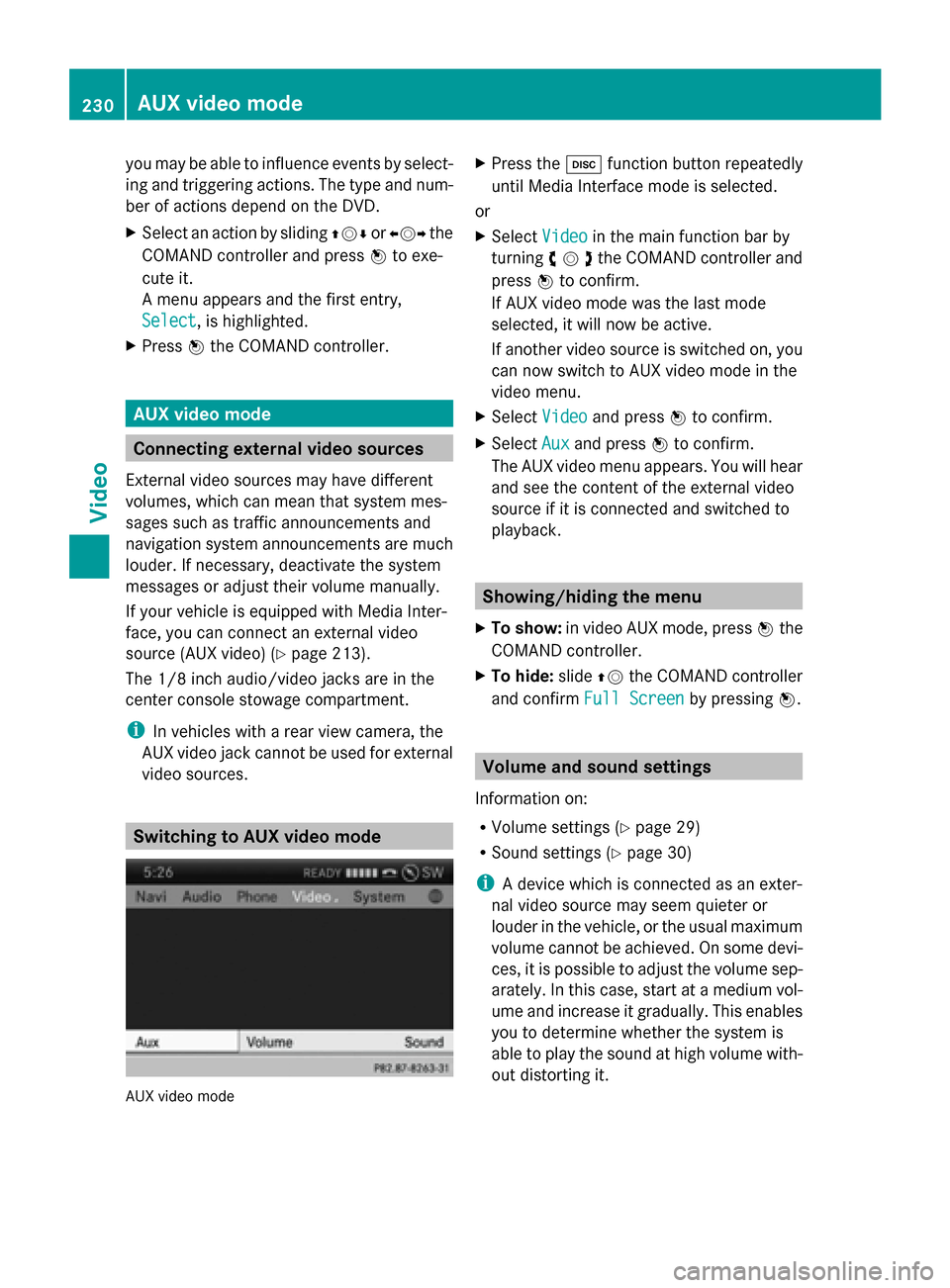
video sources. Switching to AUX video mode
AUX video mode X
Press the 003Afunction button repeatedly
until Media Interface mode is selected.
or
X Select Video
Video in the main function bar by
turning 00790052007Athe COMAND controller and
press 0098to confirm.
If AUX video mode was the last mode
selected, it will now be active.
If another video source is switched on, you
can now switch to AUX video mode in the
video menu.
X Select Video Videoand press 0098to confirm.
X Select Aux
Auxand press 0098to confirm.
The AUX video menu appears. You will hear
and see the content of the external video
source if it is connected and switched to
playback. Showing/hiding the menu
X To show: in video AUX mode, press 0098the
COMAND controller.
X To hide: slide00970052the COMAND controller
and confirm Full Screen Full Screen by pressing0098. Volume and sound settings
Information on:
R Volume settings (Y page 29)
R Sound settings ( Ypage 30)
i A device which is connected as an exter-
nal video source may seem quieter or
louder in the vehicle, or the usual maximum
volume cannot be achieved. On some devi-
ces, it is possible to adjust the volume sep-
arately. In this case, start at a medium vol-
ume and increase it gradually. This enables
you to determine whether the system is
able to play the sound at high volume with-
out distorting it. 230
AUX video modeVideo