2014 MERCEDES-BENZ S-Class radio
[x] Cancel search: radioPage 2 of 434
Publication details
Internet
Further information about Mercedes-Benz
vehicles and about Daimler AG can be found
on the following websites:
http://www.mbusa.com (USA only)
http://www.mercedes-benz.ca (Canada
only) Editorial office
© Daimler AG: Not to be reprinted, translated
or otherwise reproduced, in whole or in part,
without written permission from Daimler AG. Vehicle manufacturer
Daimler AG
Mercedesstraße 137
70327 Stuttgart
Germany
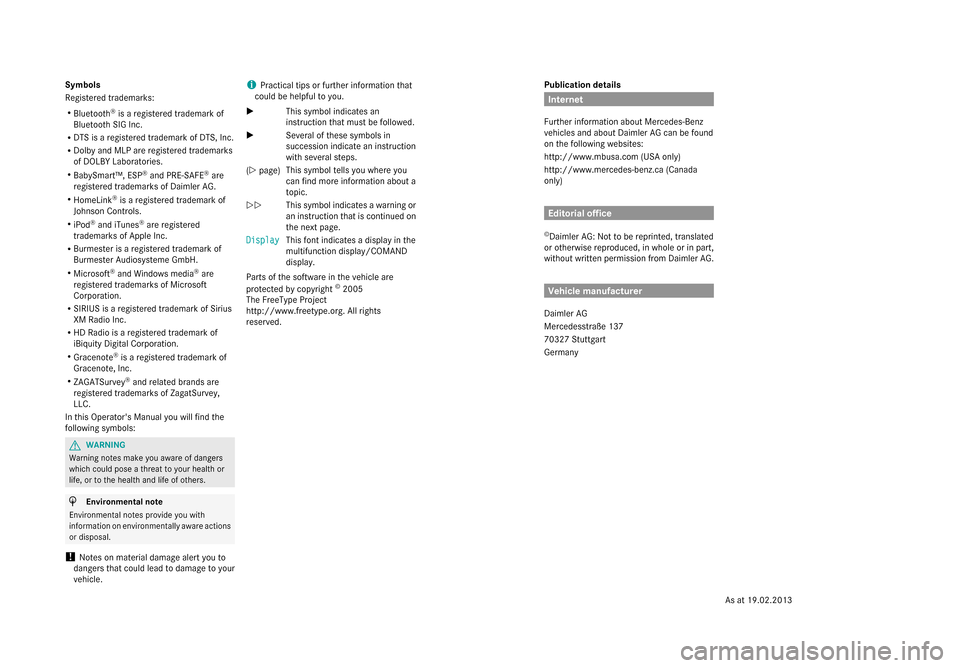
Symbols
Registered trademarks:
R
Bluetooth ®
is a registered trademark of
Bluetooth SIG Inc.
R DTS is a registered trademark of DTS, Inc.
R Dolby and MLP are registered trademarks
of DOLBY Laboratories.
R BabySmart™, ESP ®
and PRE-SAFE ®
are
registered trademarks of Daimler AG.
R HomeLink ®
is a registered trademark of
Johnson Controls.
R iPod ®
and iTunes ®
are registered
trademarks of Apple Inc.
R Burmester is a registered trademark of
Burmester Audiosysteme GmbH.
R Microsoft ®
and Windows media ®
are
registered trademarks of Microsoft
Corporation.
R SIRIUS is a registered trademark of Sirius
XM Radio Inc.
R HD Radio is a registered trademark of
iBiquity Digital Corporation.
R Gracenote ®
is a registered trademark of
Gracenote, Inc.
R ZAGATSurvey ®
and related brands are
registered trademarks of ZagatSurvey,
LLC.
In this Operator's Manual you will find the
following symbols: G
WARNING
Warning notes make you aware of dangers
which could pose a threat to your health or
life, or to the health and life of others. H
Environmental note
Environmental notes provide you with
information on environmentally aware actions
or disposal.
! Notes on material damage alert you to
dangers that could lead to damage to your
vehicle. i
Practical tips or further information that
could be helpful to you.
X This symbol indicates an
instruction that must be followed.
X Several of these symbols in
succession indicate an instruction
with several steps.
(Y page) This symbol tells you where you
can find more information about a
topic.
YY This symbol indicates a warning or
an instruction that is continued on
the next page.
Display
Display This font indicates a display in the
multifunction display/COMAND
display.
Parts of the software in the vehicle are
protected by copyright ©
2005
The FreeType Project
http://www.freetype.org. All rights
reserved.
As at 19.02.2013
Page 16 of 434

Problem (malfunction)
...................240
Switching automatic activation
on/off ............................................ 260
Notes on breaking-in a new vehicle 170O
Occupant Classification System
(OCS) Faults ............................................... 55
Operation ........................................ .51
System self-test ............................... 54
Occupant safety
Air bags ........................................... 46
Automatic measures after an
accident ........................................... 57
Children in the vehicle .....................63
Important safety notes ....................44
PRE-SAFE ®
(anticipatory
occupant protection) .......................56
Seat belt .......................................... 57
SRS (Supplemental Restraint
System) ........................................... 45
OCS
Faults ............................................... 55
Operation ........................................ .51
System self-test ............................... 54
Odometer ........................................... 250
Oil see Engine oil
On-board computer
AMG menu ..................................... 264
Assistance graphic menu ...............258
Assistance menu ........................... 259
Displaying a service message ........352
Display messages ..........................265
DISTRONIC PLUS ........................... 207
Factory settings ............................. 263
Important safety notes ..................248
Instrument cluster menu ...............262
Lights menu ................................... 262
Media menu ................................... 255
Menu overview .............................. 250
Message memory .......................... 265
Navigation menu ............................ 252
Operation ....................................... 249
Radio menu ................................... 254
Service menu ................................. 259Settings menu
............................... 259
Standard displa y............................ 250
Telephone menu ............................ 257
Trip menu ...................................... 250
Video DVD operation .....................256
Operating safety
Declaration of conformity ................26
Important safety notes ....................25
Operating system
see On-board computer
Operator's Manual
Overview .......................................... 23
Vehicle equipment ...........................23
Outside temperature display ...........248
Overhead control panel ......................39
Override feature Rear side windows ...........................70 P
Paint code number ............................422
Paintwork (cleaning instructions) ...356
Panic alarm .......................................... 44
Panorama roof with power tilt/
sliding panel
Opening/closing ............................ 103
Problem (malfunction) ...................107
Resetting ....................................... 106
Panorama sliding sunroof
Important safety notes ..................102
Parcel net hooks ............................... 320
Parking ............................................... 190
Important safety notes ..................190
Parking brake ................................ 192
Position of exterior mirror, front-
passenger side ............................... 132
Rear view camera .......................... 226
see PARKTRONIC
Parking aid
Active Parking Assist .....................221
see Exterior mirrors
see PARKTRONIC
Parking assistance
see PARKTRONIC
Parking brake
Display message ............................ 269
Electric parking brake ....................192
Warning lamp ................................. 307 14
Index
Page 17 of 434

Parking lamps
Switching on/off ........................... 139
PARKTRONIC
Deactivating/activating .................220
Driving system ............................... 218
Function/notes ............................. 218
Important safety notes ..................218
Problem (malfunction) ...................221
Range of the sensors .....................219
Warning displa y............................. 220
PASSENGER AIR BAG OFF
Problem (malfunction) .....................55
Problems (malfunction) .................. 279
PASSENGER AIR BAG OFF indicator
lamp ...................................................... 51
Perfume atomizer Operating ...................................... .164
Perfume via l................................... 164
Problem (malfunction) ...................166
Plastic trim (cleaning instructions) .360
Power locks ......................................... 92
Power washers .................................. 355
Power windows see Side windows
PRE-SAFE ®
(anticipatory occupant
protection) Display message ............................ 272
Operation ........................................ .56
PRE-SAFE ®
Brake
Activating/deactivating .................260
Display message ............................ 273
Function/notes ................................ 78
Important safety notes ....................78
Warning lamp ................................. 311
PRE-SAFE ®
PLUS (anticipatory
occupant protection PLUS) Operation ........................................ .56
Program selector button ..................182
Protection of the environment General notes .................................. 22
Pulling away
Automatic transmission .................174
Hill start assist ............................... 175Q
Qualified specialist workshop ...........27 R
Radio Selecting a station .........................254
Radio-wave reception/
transmission in the vehicle
Declaration of conformity ................26
Reading lamp ..................................... 144
Rear compartment Activating/deactivating climate
control ........................................... 155
Setting the air distribution .............160
Setting the airflow .........................160
Setting the air vents ......................167
Setting the temperature ................159
Stowage compartment ..................318
Rear lamps
see Lights
Rear seats
Adjusting ....................................... 113
Adjusting a rear reclining seat .......113
Overview .......................................... 41
Setting the reclined position ..........113
Rear view camera
Cleaning instructions .....................358
Function/notes ............................. 226
Switching on/off ........................... 227
Rear-view mirror
Anti-glare (manual) ........................130
Dipping (automatic) .......................132
Rear window blind ............................325
Rear window defroster Problem (malfunction) ...................163
Switching on/off ........................... 162
Refrigerant (air-conditioning
system)
Important safety notes ..................428
Refueling
Fuel gauge ....................................... 33
Important safety notes ..................187
Notes for AMG vehicles .................425
Refueling proces s.......................... 188
see Fuel
Remote control
Garage door opene r....................... 341
Programming (garage door opener) 342
Replacing bulbs
General notes ................................ 146 Index
15
Page 22 of 434

Opening/closing (automatically
from outside)
................................... 94
Opening/closing (from outside,
HANDS-FREE ACCESS) ....................95
Opening/closing (manually from
outside) ............................................ 94
Power closing .................................. 92
Trunk lid
Display message ............................ 298
Obstacle recognition ........................93
Opening/closing .............................. 93
Opening dimensions ......................429
Trunk load (maximum) ......................429
Turn signals Display message ............................ 280
Switching on/off ........................... 140
Two-way radio
Windshield (infrared reflective) ......345
Type identification plate
see Vehicle identification plate U
Unlocking Emergency unlocking .......................92
From inside the vehicle (central
unlocking button) ............................. 91V
Vanity mirror (in the sun visor) ........324
Vehicle Correct use ...................................... 27
Data acquisition ............................... 28
Display message ............................ 297
Equipment ....................................... 23
Individual settings ..........................259
Limited Warranty ............................. 28
Loading .......................................... 395
Locking (in an emergency) ...............93
Locking (SmartKey) .......................... 85
Lowering ........................................ 412
Maintenance .................................... 24
Operating safety .............................. 25
Parking for a long period ................ 193
Pulling away ................................... 174
Raising ........................................... 409
Reporting problems .........................27Securing from rolling away
............408
Towing away .................................. 376
Transporting .................................. 378
Unlocking (in an emergency) ...........92
Unlocking (SmartKey) ......................85
Vehicle data ................................... 429
Vehicle data
Roof load (maximum )..................... 429
Trunk load (maximum )................... 429
Vehicle dimensions ...........................429
Vehicle emergency locking ................93
Vehicle identification number see VIN
Vehicle identification plate ..............422
Vehicle level Active Body Control (ABC) .............214
Display message .................... 287, 288
Vehicle maintenance
see ASSYST PLUS
Vehicle tool kit .................................. 364
Video Operating the DVD ......................... 256
VIN ...................................................... 422 W
Warning and indicator lamps ABS ................................................ 304
Brakes ........................................... 303
Check Engine ................................. 308
Coolant .......................................... 309
Distance warning ........................... 311
ESP ®
.............................................. 305
ESP ®
OFF ....................................... 306
Fuel tank ........................................ 308
Overview .......................................... 34
Parking brake ................................ 307
PASSENGER AIRBAG OFF ................51
Reserve fuel ................................... 308
Seat belt ........................................ 302
SRS ................................................ 307
Steering ......................................... 313
Tire pressure monitor ....................312
Warranty .............................................. 23
Washer fluid Display message ............................ 300
Wheel and tire combination
see Tires 20
Index
Page 28 of 434

Never tamper with the wiring as well as
electronic components or their software. You
should have all work to electrical and
electronic equipment carried out at a qualified
specialist workshop.
If you make any changes to the vehicle
electronics, the general operating permit is
rendered invalid.
! There is a risk of damage to the vehicle if:
R the vehicle becomes stuck, e.g. on a high
curb or an unpaved road
R you drive too fast over an obstacle, e.g.
a curb or a hole in the road
R a heavy object strikes the undercarriage
or parts of the chassis
In situations like this, the body, the
undercarriage, chassis parts, wheels or
tires could be damaged without the
damage being visible. Components
damaged in this way can unexpectedly fail
or, in the case of an accident, no longer
withstand the strain they are designed to.
In such situations, have the vehicle
checked and repaired immediately at a
qualified specialist workshop. If on
continuing your journey you notice that
driving safety is impaired, pull over and
stop the vehicle immediately, paying
attention to road and traffic conditions. In
such cases, visit a qualified specialist
workshop. Declarations of conformity
Vehicle components which receive
and/or transmit radio waves USA:
"The wireless devices of this vehicle
comply with Part 15 of the FCC Rules.
Operation is subject to the following two
conditions: 1) These devices may not cause
harmful interference, and 2) These devices
must accept any interference received,
including interference that may cause
undesired operation. Changes or modifications not expressly approved by the
party responsible for compliance could void
the user’s authority to operate the
equipment."
Canada:
"The wireless devices of this vehicle
comply with Industry Canada license-exempt
RSS standard(s). Operation is subject to the
following two conditions: (1) These devices
may not cause interference, and (2) These
devices must accept any interference,
including interference that may cause
undesired operation of the device." Diagnostics connection
The diagnostics connection is only intended
for the connection of diagnostic equipment at
a qualified specialist workshop. G
WARNING
If you connect equipment to the diagnostics
connection in the vehicle, it may affect the
operation of the vehicle systems. As a result,
the operating safety of the vehicle could be
affected. There is a risk of an accident.
Do not connect any equipment to a
diagnostics connection in the vehicle. G
WARNING
Objects in the driver's footwell can restrict the
pedal travel or obstruct a depressed pedal.
The operating and road safety of the vehicle
is jeopardized. There is a risk of an accident.
Make sure that all objects in the vehicle are
stowed correctly, and that they cannot enter
the driver's footwell. Install the floormats
securely and as specified in order to ensure
sufficient clearance for the pedals. Do not use
loose floormats and do not place floormats on
top of one another.
! If the engine is switched off and
equipment on the diagnostics connection
is used, the starter battery may discharge.
Connecting equipment to the diagnostics
connection can lead to emissions monitoring
information being reset, for example. This 26
Introduction
Page 39 of 434

Center console
Function Page
0043
Switches COMAND on/off
(see the separate operating
instructions)
0044
Adjusts the volume/mute
(see the separate operating
instructions)
0087
00A7
ECO start/stop
function 177
0085
Telephone keypad (see the
separate operating
instructions) 0083
00CC
Sets the vehicle level 214,
216 0084
Adjusts the suspension
settings 214,
216 006B
00C9
Selects the drive
program/program selector
button 182
00CD
Selects the drive
program/program selector
button (AMG vehicles) 182 Function Page
006C
Back button (see the
separate operating
instructions)
006D
Seat adjustment button
(see the separate operating
instructions)
006E
Navigation button (see the
separate operating
instructions)
006F
Radio button (see the
separate operating
instructions)
0070
002F
Hazard warning
lamps 140
0071
Media button (see the
separate operating
instructions)
0072
Telephone, address book
and Internet button (see
separate operating
instructions) Center console
37At a glance
Page 86 of 434

Useful information
i This Operator's Manual describes all
models and all standard and optional
equipment of your vehicle available at the
time of publication of the Operator's
Manual. Country-specific differences are
possible. Please note that your vehicle may
not be equipped with all features
described. This also applies to safety-
related systems and functions.
i Read the information on qualified
specialist workshops: (Y page 27).SmartKey
Important safety notes
G
WARNING
If children are left unsupervised in the vehicle,
they could:
R open the doors, thus endangering other
people or road users.
R get out and disrupt traffic.
R operate the vehicle's equipment.
Additionally, children could set the vehicle in
motion if, for example, they:
R release the parking brake.
R shifting the automatic transmission out of
park position P
R Start the engine.
There is a risk of an accident and injury.
When leaving the vehicle, always take the
SmartKey with you and lock the vehicle. Never
leave children or animals unattended in the
vehicle. Always keep the SmartKey out of
reach of children. G
WARNING
If persons, particularly children are subjected
to prolonged exposure to extreme heat or
cold, there is a risk of injury, possibly even
fatal. Never leave children unattended in the
vehicle. G
WARNING
If you attach heavy or large objects to the
SmartKey, the SmartKey could be
unintentionally turned in the ignition lock. This
could cause the engine to be switched off.
There is a risk of an accident.
Do not attach any heavy or large objects to
the SmartKey. Remove any bulky key rings
before inserting the SmartKey into the
ignition lock.
! Keep the SmartKey away from strong
magnetic fields. Otherwise, the remote
control function could be affected.
Strong magnetic fields can occur in the
vicinity of powerful electrical installations.
Do not keep the SmartKey:
R with electronic devices, e.g. a mobile
phone or another SmartKey
R with metallic objects, e.g. coins or metal
foil
R inside metallic objects, e.g. a metal case
This can affect the functionality of the
SmartKey.
Do not keep the SmartKey in the
temperature-controlled cup holder
(Y page 323). On vehicles without KEYLESS-
GO, do not keep it on the parcel shelf or in the
trunk. Otherwise, the SmartKey may not be
detected, e.g. when starting the engine using
the Start/Stop button.
A check which periodically establishes a radio
connection between the vehicle and the
SmartKey determines whether a valid
SmartKey is in the vehicle. This occurs, for
example:
R when starting the engine
R whilst driving
R when the external door handles are
touched
R during convenience closing 84
SmartKeyOpening and closing
Page 87 of 434

SmartKey functions
0043
0037 To lock the vehicle
0044 0054 To open/close the trunk lid
0087 0036 To unlock the vehicle
X To unlock centrally: press button0087.
If you do not open the vehicle within
approximately 40 seconds of unlocking:
R the vehicle is locked again.
R the anti-theft alarm system is armed
again.
X To lock centrally: press button0043.
The SmartKey centrally locks/unlocks:
R the doors
R the trunk lid
R the fuel filler flap
The turn signals flash once when unlocking
and three times when locking.
i You can also set an audible signal to
confirm that the vehicle has been locked.
The audible signal can be activated and
deactivated using COMAND (see the
separate operating instructions).
i When the surround lighting is activated in
COMAND, it comes on when it is dark after
the vehicle is unlocked using the remote
control. Information on activating and
deactivating the surround lighting can be
found in the separate operating
instructions. X
To open the trunk lid automatically
from outside the vehicle: press and hold
button 0044until the trunk lid opens. KEYLESS-GO
General notes Bear in mind that the engine can be started
by any of the vehicle occupants if there is a
SmartKey in the vehicle.
Locking/unlocking centrally
You can start, lock or unlock the vehicle using
KEYLESS-GO. To do this, you only need carry
the SmartKey with you. You can combine the
functions of KEYLESS-GO with those of a
conventional SmartKey. Unlock the vehicle
by using KEYLESS-GO, for instance, and lock
it using the
0037button on the SmartKey.
When locking or unlocking with KEYLESS-GO,
the distance between the SmartKey and the
corresponding door handle must not be
greater than 3 ft (1 m).
A check which periodically establishes a radio
connection between the vehicle and the
SmartKey determines whether a valid
SmartKey is in the vehicle. This occurs, for
example:
R when starting the engine
R whilst driving
R when the external door handles are
touched
R during convenience closing SmartKey
85Opening and closing Z