2014 MERCEDES-BENZ S-Class mirror
[x] Cancel search: mirrorPage 231 of 434
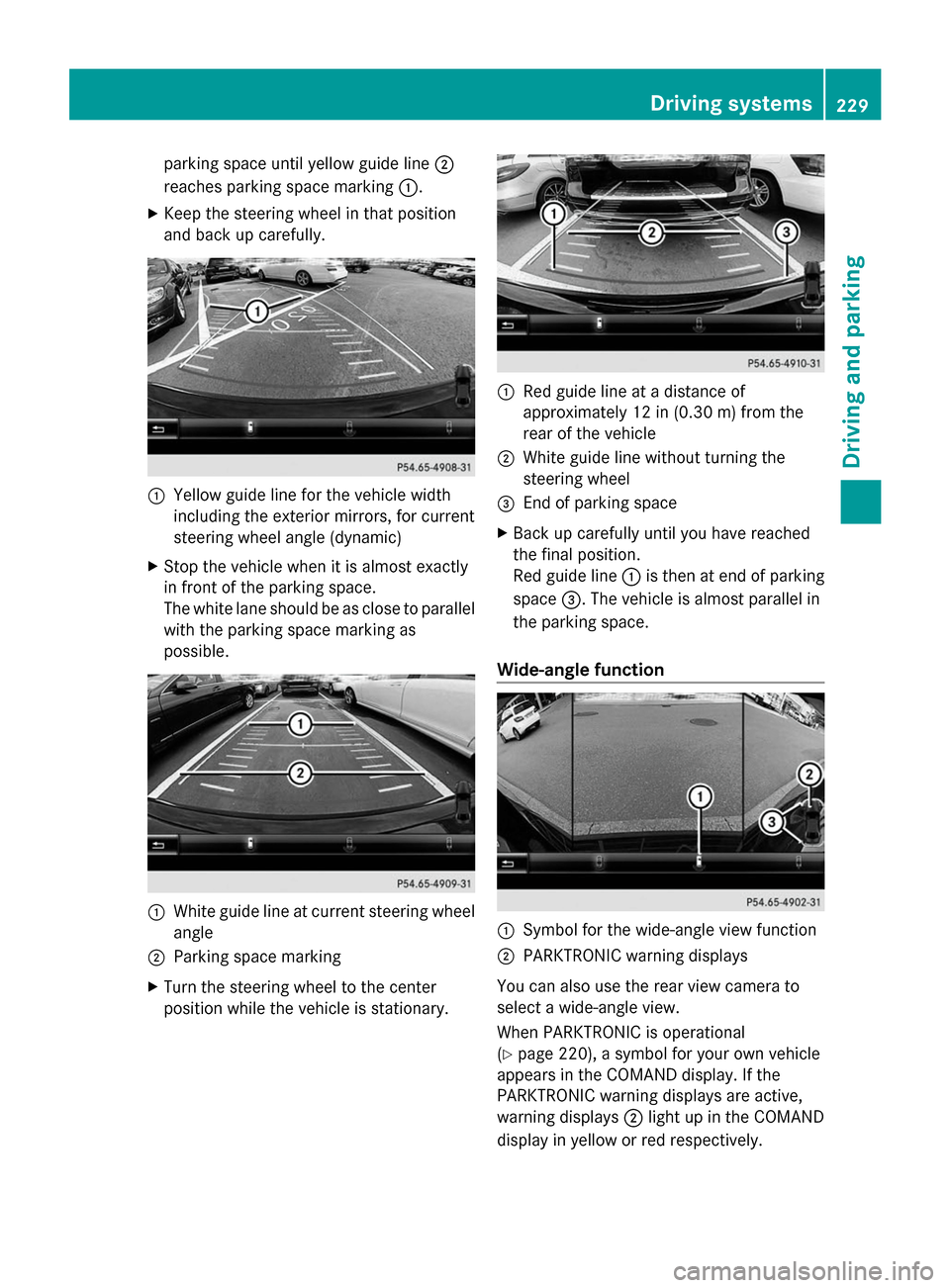
parking space until yellow guide line
0044
reaches parking space marking 0043.
X Keep the steering wheel in that position
and back up carefully. 0043
Yellow guide line for the vehicle width
including the exterior mirrors, for current
steering wheel angle (dynamic)
X Stop the vehicle when it is almost exactly
in front of the parking space.
The white lane should be as close to parallel
with the parking space marking as
possible. 0043
White guide line at current steering wheel
angle
0044 Parking space marking
X Turn the steering wheel to the center
position while the vehicle is stationary. 0043
Red guide line at a distance of
approximately 12 in (0.30 m) from the
rear of the vehicle
0044 White guide line without turning the
steering wheel
0087 End of parking space
X Back up carefully until you have reached
the final position.
Red guide line 0043is then at end of parking
space 0087. The vehicle is almost parallel in
the parking space.
Wide-angle function 0043
Symbol for the wide-angle view function
0044 PARKTRONIC warning displays
You can also use the rear view camera to
select a wide-angle view.
When PARKTRONIC is operational
(Y page 220), a symbol for your own vehicle
appears in the COMAND display. If the
PARKTRONIC warning displays are active,
warning displays 0044light up in the COMAND
display in yellow or red respectively. Driving systems
229Driving and parking Z
Page 232 of 434
Object detection
The rear view camera can detect moving and
stationary objects. If, for example, a
pedestrian or another vehicle is detected,
these objects are marked with bars. The
system is only able to detect and mark
stationary objects when your vehicle is
moving. By contrast, stationary objects will
always be detected and marked.
To ensure that you can use the function, it
must be switched on in COMAND (see the
separate operating instructions). 360° camera (surround view)
General notes The 360° camera is a system consisting of
four cameras.
The system analyzes images from the
following cameras:
R Rear view camera
R Front camera
R Two cameras in the exterior rear view
mirrors
The cameras capture the immediate
surroundings of the vehicle. The system
supports you, e.g. when parking or if vision is
restricted at an exit.
The 360° camera images can be shown in full
screen mode or in seven different split-screen
views on the COMAND display. A split-screen
view also includes a top view of the vehicle.
This view is calculated from the data supplied
by the installed cameras (virtual camera).
The six split-screen views are:
R top view and picture from the rear view
camera (130° viewing angle)
R top view and image from the front camera
(130° viewing angle without displaying the
maximum steering wheel angle)
R top view and enlarged rear view
R top view and enlarged front view R
top view and pictures from the rearward
facing mirror cameras (rear wheel view)
R top view and pictures from the forward
facing mirror cameras (front wheel view)
When the function is active and you shift the
transmission from position Dor Rto N, you
see the view which was active before the
360° view in the COMAND display. The
dynamic guidelines are hidden.
When you change between transmission
positions Dand R, you see the previously
selected front or rear view.
Important safety notes The 360°camera is only an aid and may show
a distorted view of obstacles, show them
incorrectly or not at all. The 360°camera is
not a substitute for attentive driving.
You are always responsible for safe
maneuvering and parking. When
maneuvering or parking, make sure that there
are no persons, animals or objects in the area
in which you are maneuvering.
You are always responsible for safety, and
must always pay attention to your
surroundings when parking and
maneuvering. This applies to the areas
behind, in front of and beside the vehicle. You
could otherwise endanger yourself and
others.
The 360° camera will not function or will
function in a limited manner:
R
if the doors are open
R if the exterior mirrors are folded in
R if the trunk lid is open
R in heavy rain, snow or fog
R at night or in very dark places
R if the cameras are exposed to very bright
light
R if the area is lit by fluorescent light or LED
lighting (the display may flicker)
R if the camera lenses fog up, e.g. when
driving into a heated garage in winter,
causing a rapid change in temperature 230
Driving systemsDriving and parking
Page 234 of 434
X
Make sure that the SmartKey is in position
2 in the ignition lock.
X Make sure that the Activation by R
Activation by R
gear
gear function is selected in COMAND (see
the separate operating instructions).
X To show the 360° camera image: engage
reverse gear.
The area behind the vehicle is shown in the
COMAND display in split-screen mode. You
see the top view of the vehicle and the
image from the rear view camera.
Selecting the split-screen and full
screen displays Switching between split screen views:
X
To switch to the line with the vehicle icons:
slide the controller 00970052.
X To select a vehicle icon: turn the controller.
Switching to full screen mode:
X Turn and press the controller to select
Fullscreen
Fullscreen.
i The full screen option is only available in
the following views:
R Top view with picture from the rear view
camera
R Top view with picture from the front
camera
Displays in the COMAND display Important safety notes
The camera system may show a distorted
view of obstacles, show them incorrectly or
not at all. Obstacles are not shown by the
system in the following locations:
R under the front and rear bumpers
R very close to the front and rear bumpers
R in close range above the handle on the
trunk lid
R very close to the exterior mirrors
R in the transitional areas between the
various cameras in the virtual top view !
Objects not at ground level may appear to
be further away than they actually are, e.g.:
R the bumper of a parked vehicle
R the drawbar of a trailer
R the ball coupling of a trailer tow hitch
R the rear section of an HGV
R a slanted post
Use the guidelines only for orientation.
Approach objects no further than the
bottom-most guideline.
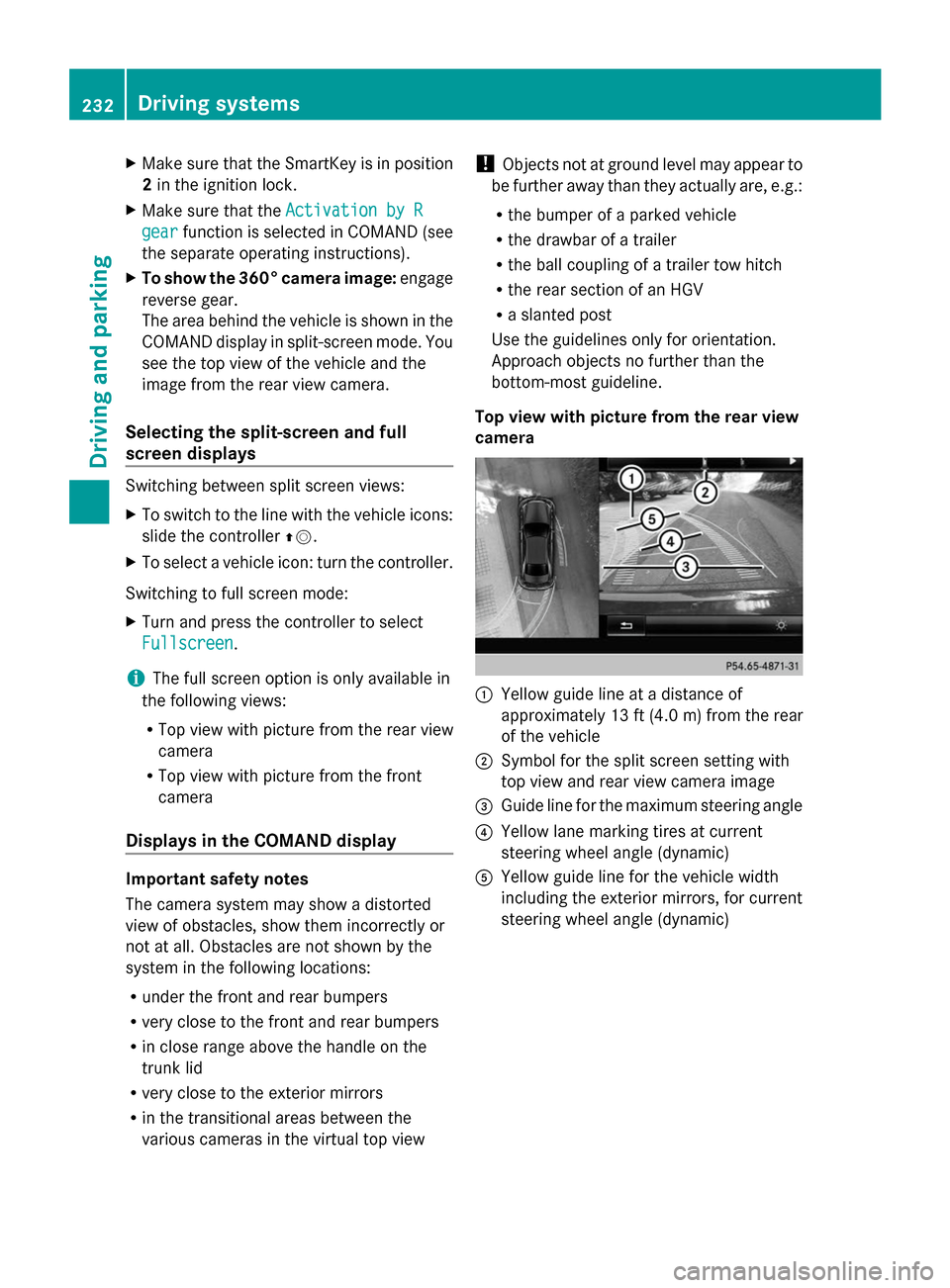
Top view with picture from the rear view
camera 0043
Yellow guide line at a distance of
approximately 13 ft (4.0 m) from the rear
of the vehicle
0044 Symbol for the split screen setting with
top view and rear view camera image
0087 Guide line for the maximum steering angle
0085 Yellow lane marking tires at current
steering wheel angle (dynamic)
0083 Yellow guide line for the vehicle width
including the exterior mirrors, for current
steering wheel angle (dynamic) 232
Driving systemsDriving and parking
Page 235 of 434
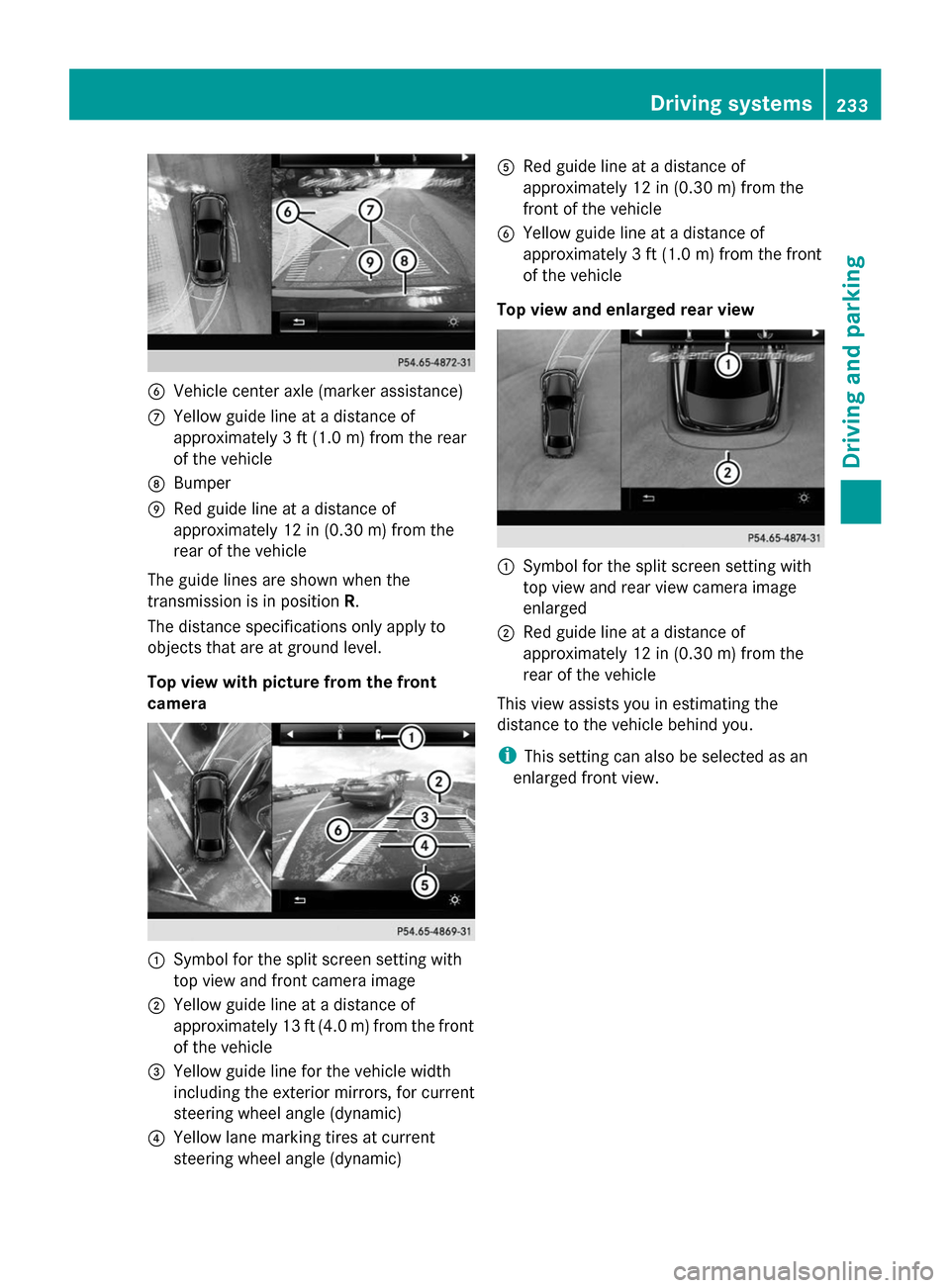
0084
Vehicle center axle (marker assistance)
006B Yellow guide line at a distance of
approximately 3 ft (1.0 m) from the rear
of the vehicle
006C Bumper
006D Red guide line at a distance of
approximately 12 in (0.30 m) from the
rear of the vehicle
The guide lines are shown when the
transmission is in position R.
The distance specifications only apply to
objects that are at ground level.
Top view with picture from the front
camera 0043
Symbol for the split screen setting with
top view and front camera image
0044 Yellow guide line at a distance of
approximately 13 ft (4.0 m) from the front
of the vehicle
0087 Yellow guide line for the vehicle width
including the exterior mirrors, for current
steering wheel angle (dynamic)
0085 Yellow lane marking tires at current
steering wheel angle (dynamic) 0083
Red guide line at a distance of
approximately 12 in (0.30 m) from the
front of the vehicle
0084 Yellow guide line at a distance of
approximately 3 ft (1.0 m) from the front
of the vehicle
Top view and enlarged rear view 0043
Symbol for the split screen setting with
top view and rear view camera image
enlarged
0044 Red guide line at a distance of
approximately 12 in (0.30 m) from the
rear of the vehicle
This view assists you in estimating the
distance to the vehicle behind you.
i This setting can also be selected as an
enlarged front view. Driving systems
233Driving and parking Z
Page 236 of 434
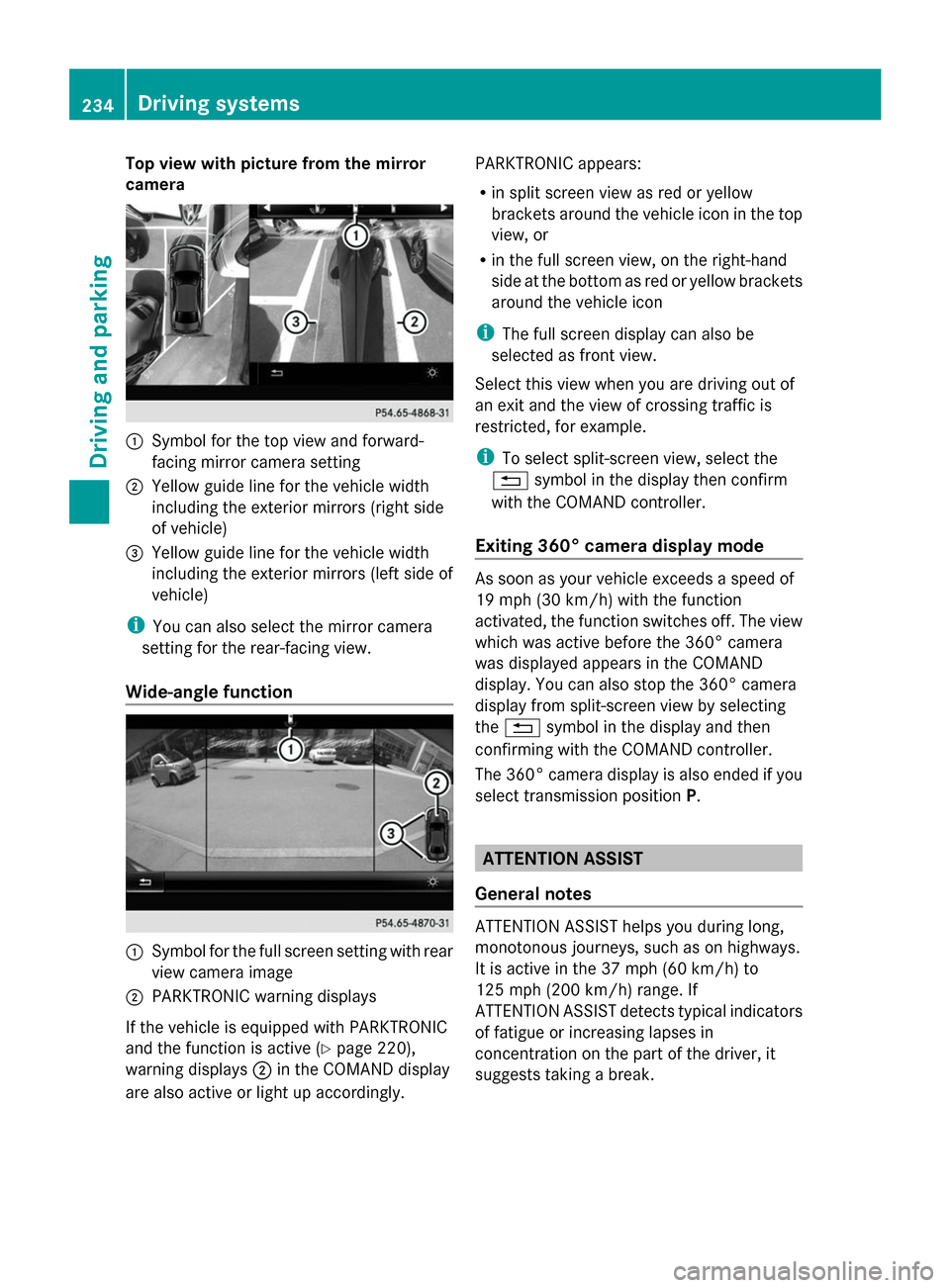
Top view with picture from the mirror
camera 0043
Symbol for the top view and forward-
facing mirror camera setting
0044 Yellow guide line for the vehicle width
including the exterior mirrors (right side
of vehicle)
0087 Yellow guide line for the vehicle width
including the exterior mirrors (left side of
vehicle)
i You can also select the mirror camera
setting for the rear-facing view.
Wide-angle function 0043
Symbol for the full screen setting with rear
view camera image
0044 PARKTRONIC warning displays
If the vehicle is equipped with PARKTRONIC
and the function is active ( Ypage 220),
warning displays 0044in the COMAND display
are also active or light up accordingly. PARKTRONIC appears:
R
in split screen view as red or yellow
brackets around the vehicle icon in the top
view, or
R in the full screen view, on the right-hand
side at the bottom as red or yellow brackets
around the vehicle icon
i The full screen display can also be
selected as front view.
Select this view when you are driving out of
an exit and the view of crossing traffic is
restricted, for example.
i To select split-screen view, select the
0038 symbol in the display then confirm
with the COMAND controller.
Exiting 360° camera display mode As soon as your vehicle exceeds a speed of
19 mph (30 km/h) with the function
activated, the function switches off. The view
which was active before the 360° camera
was displayed appears in the COMAND
display. You can also stop the 360° camera
display from split-screen view by selecting
the 0038 symbol in the display and then
confirming with the COMAND controller.
The 360° camera display is also ended if you
select transmission position P. ATTENTION ASSIST
General notes ATTENTION ASSIST helps you during long,
monotonous journeys, such as on highways.
It is active in the 37 mph (60 km/h) to
125 mph (200 km/h) range. If
ATTENTION ASSIST detects typical indicators
of fatigue or increasing lapses in
concentration on the part of the driver, it
suggests taking a break.234
Driving systemsDriving an
d parking
Page 242 of 434

Problems with Night View Assist
Problem Possible causes/consequences and
0050
0050Solutions The picture quality of
Night View Assist Plus
has deteriorated. The windshield is fogged up on the inside.
X Fold down camera cover (Y page 359).
X Defrost the windshield (Y page 162). The windshield is iced up.
X
De-ice the windshield (Y page 161). The windshield wipers are smearing the windshield.
X
Replace the wiper blades (Y page 147). The windshield is smeared after the vehicle has been cleaned in a
car wash.
X
Clean the windshield (Y page 357). There is windshield chip damage in the camera's field of vision.
X Replace the windshield. The pedestrian and
animal recognition is
not available. The infrared camera in the radiator grill is dirty.
X
Use a soft cloth and water to clean the infrared camera. Driving Assistance PLUS package
General notes The Active Driving Assistance PLUS package
consists of DISTRONIC PLUS (Y page 201),
Active Blind Spot Assist (Y page 240) and
Active Lane Keeping Assist (Y page 243).
Active Blind Spot Assist General notes
Active Blind Spot Assist uses a radar sensor
system, pointed toward the rear of the
vehicle, to monitor the area to the sides of the
vehicle which the driver is unable to see. A
warning display in the exterior mirrors draws
your attention to vehicles detected in the
monitored area. If you then switch on the
corresponding turn signal to change lane, you
will also receive an optical and audible
warning. If a risk of lateral collision is detected, corrective braking may help you
avoid a collision. Active Blind Spot Assist
evaluates the free space in the direction of
travel and to the side before making a course-
correcting brake application. For this, Active
Blind Spot Assist uses radar sensors which
are pointed in the direction of travel.
Active Blind Spot Assist supports you from a
speed of approximately 20 mph (30 km/h).
Important safety notes
Active Blind Spot Assist is only an aid and is
not a substitute for attentive driving.
G
WARNING
Active Blind Spot Assist does not react to:
R vehicles overtaken too closely on the side,
placing them in the blind spot area
R vehicles which approach with a large speed
differential and overtake your vehicle 240
Driving systemsDriving and parking
Page 245 of 434

If a course-correcting brake application
occurs, red warning lamp 0043flashes in the
exterior mirror and a dual warning tone
sounds. In addition, display 0044underlining
the danger of a side collision appears in the
multifunction display.
In very rare cases, the system may make an
inappropriate brake application. A course-
correcting brake application may be
interrupted at any time if you steer slightly in
the opposite direction or accelerate.
The course-correcting brake application is
available in the speed range between
20 mph (30 km/h) and 120 mph (200 km/h).
Either no braking application, or a course-
correcting brake application adapted to the
driving situation occurs if:
R there are vehicles or obstacles, e.g. crash
barriers, located on both sides of your
vehicle.
R a vehicle approaches you too closely at the
side.
R you have adopted a sporty driving style with
high cornering speeds.
R you clearly brake or accelerate.
R a driving safety system intervenes, e.g.
ESP ®
or PRE-SAFE ®
Brake.
R ESP ®
is switched off.
R a loss of tire pressure or a defective tire is
detected.
Switching on Active Blind Spot Assist
X Make sure that Active Blind Spot Assist is
activated in the on-board computer
(Y page 261).
X Turn the SmartKey to position 2in the
ignition lock.
Warning lamps 0043in the exterior mirrors
light up red for approximately
1.5 seconds. Gray radar waves propagating
backwards appear next to the vehicle in the
assistance display in the multifunction
display. Active Lane Keeping Assist General notes
Active Lane Keeping Assist monitors the area
in front of your vehicle by means of camera
system
0043at the top of the windshield.
Various different areas to the front, rear and
side of your vehicle are also monitored with
the aid of the radar sensor system. Active
Lane Keeping Assist detects lane markings on
the road and can warn you before you leave
your lane unintentionally. If you do not react
to the warning, a lane-correcting application
of the brakes can bring the vehicle back into
the original lane.
If you select km kmin the Display Unit
Display Unit
Speed-/Odometer:
Speed-/Odometer: function on the on-board
computer (Y page 262), Active Lane Keeping
Assist is activated starting at a speed of
60 km/h. If the miles milesdisplay unit is selected,
the assistance range begins at 40 mph.
Important safety notes
If you fail to adapt your driving style, Active
Lane Keeping Assist can neither reduce the
risk of accident nor override the laws of
physics. Active Lane Keeping Assist cannot
take account of road and weather conditions.
It may not recognize traffic situations. Active
Lane Keeping Assist is only an aid. You are
responsible for the distance to the vehicle in
front, for vehicle speed, for braking in good
time and for staying in your lane.
Active Lane Keeping Assist cannot
continuously keep your vehicle in its lane. Driving systems
243Driving and parking Z
Page 283 of 434
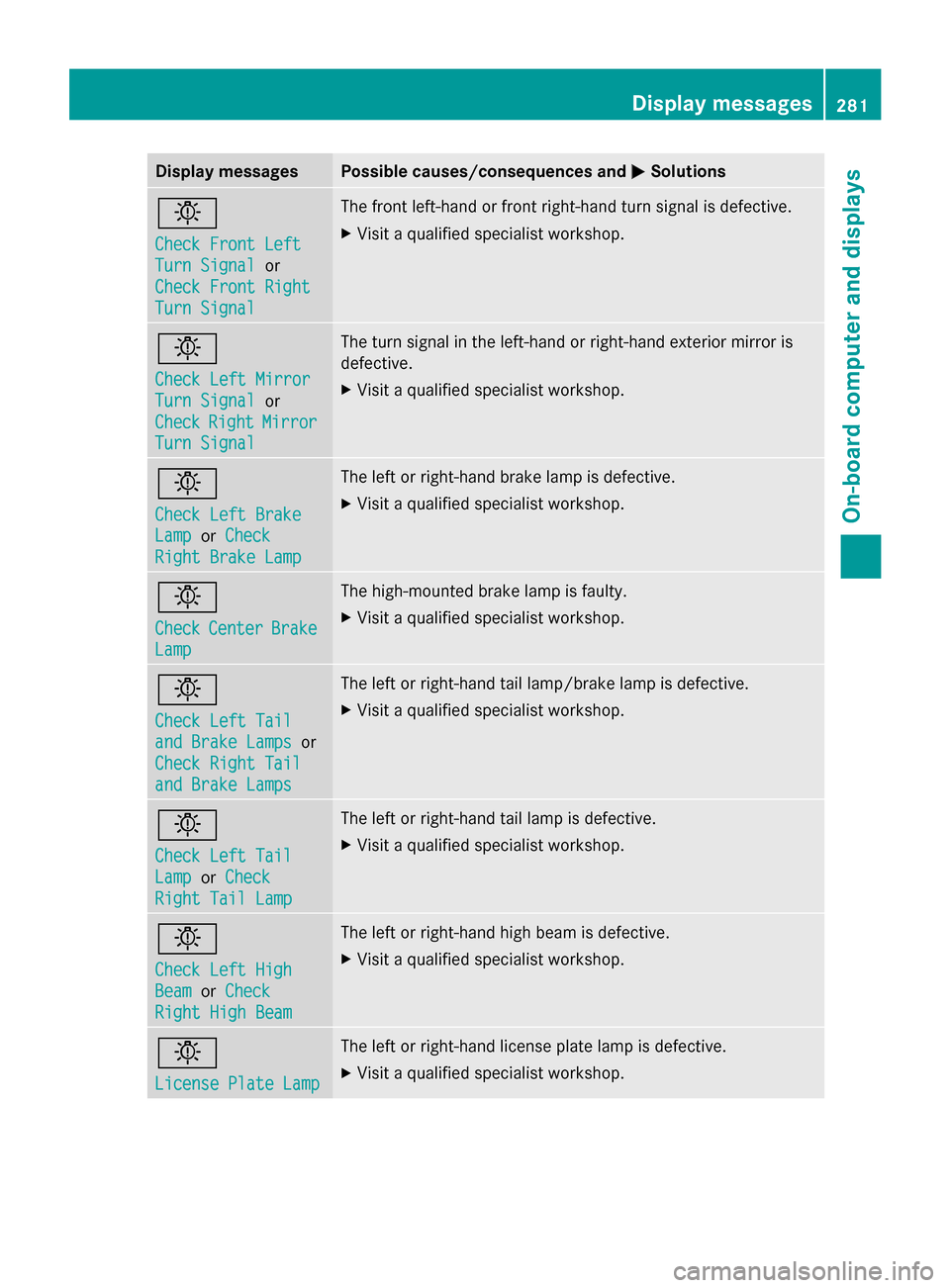
Display messages Possible causes/consequences and
0050
0050Solutions 0049
Check Front Left Check Front Left
Turn Signal Turn Signal
or
Check Front Right
Check Front Right
Turn Signal Turn Signal The front left-hand or front right-hand turn signal is defective.
X
Visit a qualified specialist workshop. 0049
Check Left Mirror Check Left Mirror
Turn Signal Turn Signal
or
Check
Check Right
Right Mirror
Mirror
Turn Signal
Turn Signal The turn signal in the left-hand or right-hand exterior mirror is
defective.
X
Visit a qualified specialist workshop. 0049
Check Left Brake Check Left Brake
Lamp Lamp
orCheck
Check
Right Brake Lamp
Right Brake Lamp The left or right-hand brake lamp is defective.
X
Visit a qualified specialist workshop. 0049
Check Check
Center
Center Brake
Brake
Lamp
Lamp The high-mounted brake lamp is faulty.
X
Visit a qualified specialist workshop. 0049
Check Left Tail Check Left Tail
and Brake Lamps and Brake Lamps
or
Check Right Tail
Check Right Tail
and Brake Lamps and Brake Lamps The left or right-hand tail lamp/brake lamp is defective.
X
Visit a qualified specialist workshop. 0049
Check Left Tail Check Left Tail
Lamp Lamp
orCheck
Check
Right Tail Lamp
Right Tail Lamp The left or right-hand tail lamp is defective.
X
Visit a qualified specialist workshop. 0049
Check Left High Check Left High
Beam Beam
orCheck
Check
Right High Beam
Right High Beam The left or right-hand high beam is defective.
X
Visit a qualified specialist workshop. 0049
License Plate Lamp License Plate Lamp The left or right-hand license plate lamp is defective.
X
Visit a qualified specialist workshop. Display
messages
281On-board computer and displays Z