2014 MERCEDES-BENZ GL-Class Service b
[x] Cancel search: Service bPage 274 of 462

Useful information
i This Operator's Manual describes all
models and all standard and optional
equipment of your vehicle available at the
time of publication of the Operator's
Manual. Country-specific differences are
possible. Please note that your vehicle may
not be equipped with all features
described. This also applies to safety-
related systems and functions.
i Read the information on qualified
specialist workshops: (Y page 28).Important safety notes
G
WARNING
If you operate information systems and
communication equipment integrated in the
vehicle while driving, you will be distracted
from traffic conditions. You could also lose
control of the vehicle. There is a risk of an
accident.
Only operate the equipment when the traffic
situation permits. If you are not sure that this
is possible, park the vehicle paying attention
to traffic conditions and operate the
equipment when the vehicle is stationary. G
WARNING
If the instrument cluster has failed or
malfunctioned, you may not recognize
function restrictions in systems relevant to
safety. The operating safety of your vehicle
may be impaired. There is a risk of an
accident.
Drive on carefully. Have the vehicle checked
at a qualified specialist workshop
immediately.
You must observe the legal requirements for
the country in which you are currently driving
when operating the on-board computer.
The on-board computer only shows messages
or warnings from certain systems in the multifunction display. You should therefore
make sure your vehicle is operating safely at
all times. Otherwise, a vehicle that is not
operating safely may cause an accident.
For an overview, see the instrument panel
illustration (Y
page 33). Displays and operation
Instrument cluster lighting
The lighting in the instrument cluster, in the
displays and the controls in the vehicle
interior can be adjusted using the brightness
control knob.
The brightness control knob is located on the
bottom left of the instrument cluster
(Y page 33).
X Turn the brightness control knob clockwise
or counter-clockwise.
If the light switch is set to Ã,Tor
L, the brightness is dependent upon
the brightness of the ambient light.
i The light sensor in the instrument cluster
automatically controls the brightness of
the multifunction display.
In daylight, the displays in the instrument
cluster are not illuminated. Coolant temperature display
G
WARNING
Opening the hood when the engine is
overheated or when there is a fire in the
engine compartment could expose you to hot
gases or other service products. There is a
risk of injury.
Let an overheated engine cool down before
opening the hood. If there is a fire in the
engine compartment, keep the hood closed
and contact the fire department.
! A display message is shown if the coolant
temperature is too high. 272
Displays and operationOn-board computer and displays
Page 281 of 462

If track information is stored on the audio
device or medium, the multifunction display
will show the number and title of the track.
The current track does not appear in audio
AUX mode (Auxiliary audio mode: external
audio source connected).
Video DVD operation Example: CD/DVD changer display
X
Switch on COMAND and select video DVD;
see the separate operating instructions.
X Press the =or; button on the
steering wheel to select the Audio Audiomenu.
X To select the next/previous scene:
briefly press the 9or: button.
X To select a scene from the scene list
(rapid scrolling): press and hold the
9 or: button until desired
scene :has been reached. Telephone menu
Introduction G
WARNING
If you operate information systems and
communication equipment integrated in the
vehicle while driving, you will be distracted
from traffic conditions. You could also lose
control of the vehicle. There is a risk of an
accident.
Only operate the equipment when the traffic
situation permits. If you are not sure that this
is possible, park the vehicle paying attention
to traffic conditions and operate the
equipment when the vehicle is stationary. When telephoning, you must observe the
legal requirements for the country in which
you are currently driving.
X Switch on the mobile phone (see the
separate operating instructions).
X Switch on COMAND (see the separate
operating instructions).
X Establish a Bluetooth ®
connection to
COMAND; see the separate operating
instructions.
X Press the =or; button on the
steering wheel to select the Tel
Tel menu.
You will see one of the following display
messages in the multifunction display:
R Phone READY Phone READY or the name of the network
provider: the mobile phone has found a
network and is ready to receive.
R Phone No Service Phone No Service: there is no network
available or the mobile phone is searching
for a network.
Accepting a call Example: incoming call
If someone calls you when you are in the
Tel Tel
menu, a display message appears in the
multifunction display.
X Press the 6button on the steering
wheel to accept an incoming call.
You can accept a call even if you are not in
the Tel
Tel menu.
Rejecting or ending a call X
Press the ~button on the steering
wheel.
You can end or reject a call even if you are not
in the Tel Telmenu. Menus and submenus
279On-board computer and displays Z
Page 284 of 462

Activating/deactivating Lane Keeping
Assist X
Press =or; on the steering wheel
to select the DriveAssist
DriveAssist menu.
X Press 9or: to select Lane
Lane
Keeping Assist
Keeping Assist .
X Press the abutton.
The current selection is displayed.
X Press ato confirm.
X Press the :or9 button to set Off
Off ,
Standard
Standard orAdaptive
Adaptive.
When Lane Keeping Assist or Active Lane
Keeping Assist is activated, the
multifunction display shows the lane
markings as bright lines in the assistance
graphic.
X Press the abutton to save the setting.
For further information about Lane Keeping
Assist, see (Y page 245).
For further information about Active Lane
Keeping Assist, see (Y page 251).Maintenance menu
In the
Serv Servmenu, you have the following
options:
R Calling up display messages in message
memory (Y page 290)
R Restarting the tire pressure loss warning
system (Y page 412)
R Checking the tire pressure electronically
(Y page 412)
R Calling up the service due date
(Y page 375) Settings menu
Introduction In the
Sett. Sett. menu, you have the following
options:
R Changing the instrument cluster settings
(Y page 282)
R Changing the light settings (Y page 283)
R Changing the vehicle settings
(Y page 284)
R Changing the convenience settings
(Y page 285)
R Restoring the factory settings
(Y page 286)
Instrument cluster submenu Selecting the unit of measurement for
distance
The
Display Unit Speed-/Odometer: Display Unit Speed-/Odometer:
function allows you to choose whether
certain displays appear in kilometers or miles
in the multifunction display.
You can determine whether the multifunction
display shows some messages in miles or
kilometers.
X Press the =or; button on the
steering wheel to select the Sett. Sett.menu.
X Press the :or9 button to select the
Instrument Cluster
Instrument Cluster submenu.
X Press ato confirm.
X Press the :or9 button to select the
Display Unit Speed-/Odometer:
Display Unit Speed-/Odometer:
function.
You will see the selected setting: km kmor
miles
miles.
X Press the abutton to save the setting. 282
Menus and sub
menusOn-board computer and displays
Page 285 of 462

The selected unit of measurement for
distance applies to:
R Digital speedometer in the Trip
Trip menu
R Odometer and the trip odometer
R Trip computer
R Current consumption and the range
R Navigation instructions in the Navi
Navi menu
R Cruise control
R DISTRONIC PLUS
R ASSYST PLUS service interval display
Selecting the permanent display function
You can determine whether the multifunction
display permanently shows your speed or the
outside temperature.
X Press the =or; button on the
steering wheel to select the Sett Settmenu.
X Press the :or9 button to select the
Instrument Cluster
Instrument Cluster submenu.
X Press ato confirm.
X Press the :or9 button to select the
Permanent Display:
Permanent Display: function.
You will see the selected setting Outside
Outside
Temperature
Temperature orAdditional
Additional
Speedometer [km/h]
Speedometer [km/h] (USA)/
Additional Speedometer [mph]
Additional Speedometer [mph]
(Canada).
X Press the abutton to save the setting.
i The speed is shown in km/h (USA)/mph
(Canada).
Light submenu Setting the daytime running lamps
i This function is not available in Canada.
X Press the =or; button on the
steering wheel to select the Sett. Sett.menu.
X Press the :or9 button to select the
Light
Light submenu.
X Press ato confirm. X
Press :or9 to select the Daytime
Daytime
Running Lights
Running Lights function.
If the Daytime Running Lights
Daytime Running Lights function
has been switched on, the cone of light and
the W symbol in the multifunction
display are shown in orange.
X Press the abutton to save the setting.
Further information on daytime running
lamps (Y page 128).
Setting the brightness of the ambient
lighting
X Press the =or; button on the
steering wheel to select the Sett
Sett menu.
X Press the :or9 button to select the
Light Light submenu.
X Press ato confirm.
X Press the :or9 button to select the
Amb. Light +/-.
Amb. Light +/-. function.
You will see the selected setting.
X Press ato confirm.
X Press the :or9 button to adjust the
brightness to any level from Off
Off toLevel
Level
5
5 (bright).
X Press the aor% button to save the
setting.
Setting the ambient lighting color
X Press the =or; button on the
steering wheel to select the Sett.
Sett. menu.
X Press the :or9 button to select the
Lights Lights submenu.
X Press ato confirm.
X Press the :or9 button to select the
Ambient Light Color
Ambient Light Color function.
X Press ato confirm.
X Press the :or9 button to set the
color to SOLAR
SOLAR, NEUTRAL
NEUTRAL orPOLAR
POLAR.
X Press the aor% button to save the
setting. Menus and submenus
283On-board computer and displays Z
Page 301 of 462

Display messages Possible causes/consequences and
M
MSolutions PRE-SAFE
PRE-SAFE
Functions Functions
Currently Limited Currently Limited
See Operator's See Operator's
Manual Manual Vehicles with the Active Driving Assistance package:
PRE-SAFE
®
Brake is temporarily inoperative. Possible causes are:
R function is impaired due to heavy rain or snow.
R the sensors in the radiator grill and the bumper are dirty.
R the radar sensor system is temporarily inoperative, e.g. due to
electromagnetic radiation emitted by nearby TV or radio
stations or other sources of electromagnetic radiation.
R AMG vehicles: ESP ®
is deactivated.
R the system is outside the operating temperature range.
R the on-board voltage is too low.
When the causes stated above no longer apply, the display
message disappears.
PRE-SAFE ®
Brake is operational again.
If the display message does not disappear:
X Pull over and stop the vehicle safely as soon as possible, paying
attention to road and traffic conditions.
X Secure the vehicle against rolling away ( Ypage 188).
X Clean the sensors in the radiator grill and the bumper
(Y page 380).
X Restart the engine.
X AMG vehicles: reactivate ESP ®
(Y page 73). PRE-SAFE PRE-SAFE
Functions Functions
Currently Limited Currently Limited
See Operator's See Operator's
Manual Manual Vehicles without the Active Driving Assistance package: Adaptive
Brake Assist is faulty. The distance warning function may also have
failed.
Vehicles with the Active Driving Assistance package:
PRE-SAFE
®
Brake is faulty. BAS PLUS or the distance warning
function may also have failed.
X Visit a qualified specialist workshop. 6
SRS Malfunction SRS Malfunction
Service Required Service Required There is a malfunction in the SRS (Supplemental Restraint
System).
The
6 warning lamp also lights up in the instrument cluster.
G WARNING
The air bags or Emergency Tensioning Devices may either be
triggered unintentionally or, in the event of an accident, may not
be triggered.
There is an increased risk of injury.
X Visit a qualified specialist workshop.
Further information on occupant safety (Y page 43). Display
messages
299On-board computer and displays Z
Page 302 of 462

Display messages Possible causes/consequences and
M
MSolutions 6
Front Left Front Left
Malfunction Malfunction
Service Required Service Required
or
Front Right Front Right
Malfunction
Malfunction
Service Required Service Required SRS has malfunctioned at the front on the left or right. The
6
warning lamp also lights up in the instrument cluster.
G WARNING
The air bags or Emergency Tensioning Devices may either be
triggered unintentionally or, in the event of an accident, may not
be triggered.
There is an increased risk of injury.
X Visit a qualified specialist workshop. 6
Rear Left Rear Left
Malfunction Malfunction
Service Required Service Required
or
Rear Right Rear Right
Malfunction
Malfunction
Service Required Service Required SRS has malfunctioned at the rear on the left or right. The
6
warning lamp also lights up in the instrument cluster.
G WARNING
The air bags or Emergency Tensioning Devices may either be
triggered unintentionally or, in the event of an accident, may not
be triggered.
There is an increased risk of injury.
X Visit a qualified specialist workshop. 6
Rear Center Rear Center
Malfunction Malfunction
Service Required Service Required SRS has malfunctioned at the rear center. The
6warning lamp
also lights up in the instrument cluster.
G WARNING
The air bags or Emergency Tensioning Devices may either be
triggered unintentionally or, in the event of an accident, may not
be triggered.
There is an increased risk of injury.
X Visit a qualified specialist workshop. 6
Left Side Curtain Left Side Curtain
Airbag Airbag
Malfunction
Malfunction
Service Required
Service Required
or Right Side Right Side
Curtain Airbag
Curtain Airbag
Malfunction Malfunction
Service Required Service Required There is a malfunction in the left-hand or right-hand window
curtain air bag. The
6warning lamp also lights up in the
instrument cluster.
G WARNING
The left or right window curtain air bag may either be triggered
unintentionally or, in the event of an accident, may not be
triggered.
There is an increased risk of injury.
X Visit a qualified specialist workshop. 300
Display
messagesOn-board computer and displays
Page 323 of 462

Display messages Possible causes/consequences and
M
MSolutions Transmission Not
Transmission Not
in P Risk of in P Risk of
Vehicle Rolling Vehicle Rolling
Away Away The driver's door is open and the transmission is in position
R,N
or D.
A warning tone also sounds.
X Shift the transmission to position P.
X Secure the vehicle against rolling away ( Ypage 188). Service Required Service Required
Do Do
Not
Not Shift
Shift Gears
Gears
Visit Dealer
Visit Dealer You cannot change the transmission position due to a malfunction.
A warning tone also sounds.
If transmission position
Dis selected:
X Drive to a qualified specialist workshop without shifting the
transmission from position D.
If transmission position R,Nor Pis selected:
X Notify a qualified specialist workshop or breakdown service. Only Shift to 'P' Only Shift to 'P'
when Vehicle is when Vehicle is
Stationary Stationary The vehicle is moving.
X
Stop the vehicle safely as soon as possible, paying attention to
road and traffic conditions.
X Shift the transmission to position P.A The tailgate is open.
G WARNING
When the engine is running, exhaust gases can enter the vehicle
interior if the tailgate is open.
There is a risk of poisoning.
X Close the tailgate. ? The hood is open.
G WARNING
The open hood may block your view when the vehicle is in motion.
There is a risk of an accident.
X Pull over and stop the vehicle safely as soon as possible, paying
attention to road and traffic conditions.
X Secure the vehicle against rolling away ( Ypage 188).
X Close the hood. C At least one door is open.
A warning tone also sounds.
X
Close all the doors. Display
messages
321On-board computer and displays Z
Page 324 of 462
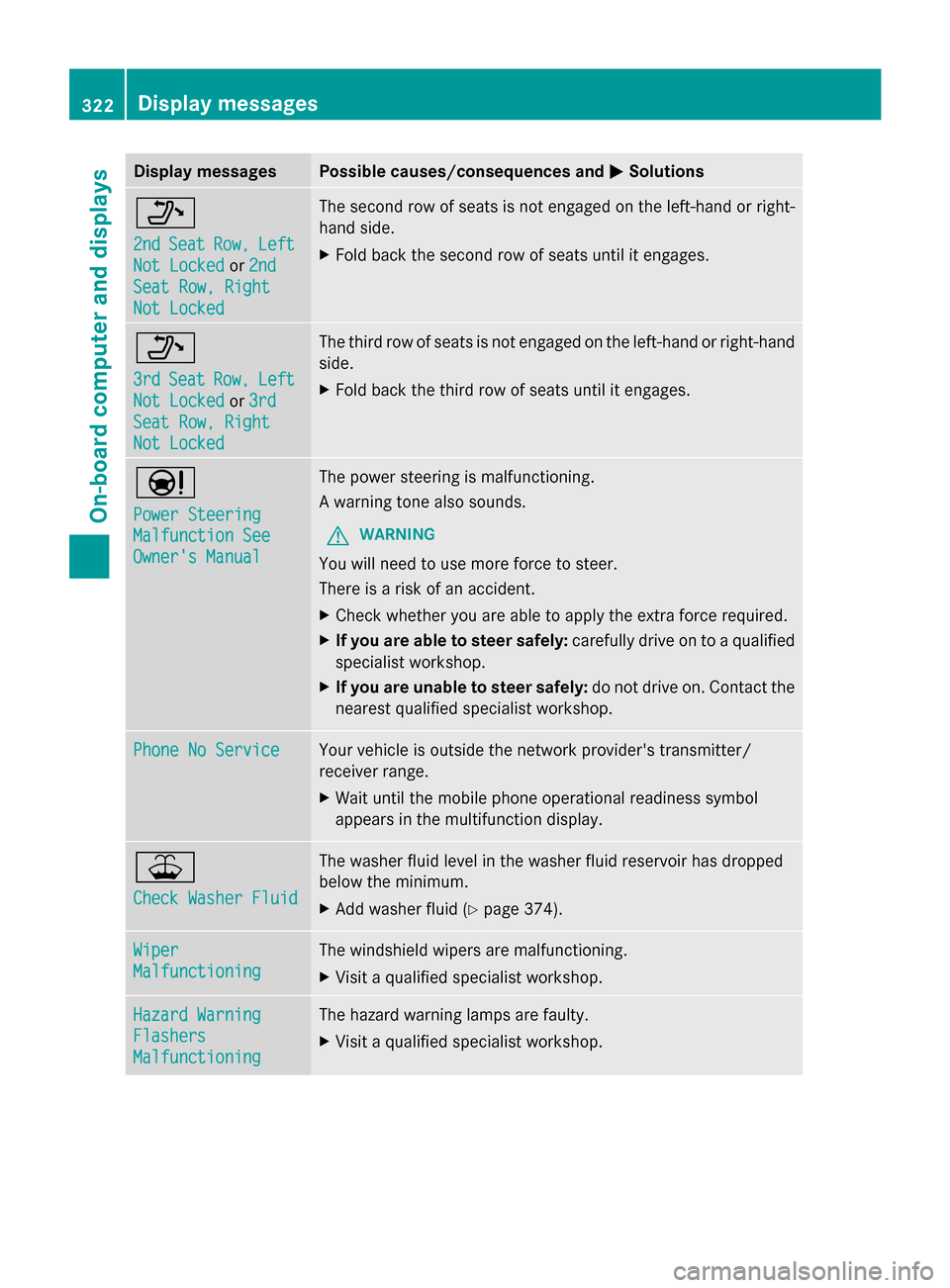
Display messages Possible causes/consequences and
M
MSolutions _
2nd 2nd
Seat
Seat Row,
Row,Left
Left
Not Locked
Not Locked or2nd
2nd
Seat Row, Right
Seat Row, Right
Not Locked Not Locked The second row of seats is not engaged on the left-hand or right-
hand side.
X
Fold back the second row of seats until it engages. _
3rd 3rd
Seat
Seat Row,
Row,Left
Left
Not Locked
Not Locked or3rd
3rd
Seat Row, Right
Seat Row, Right
Not Locked Not Locked The third row of seats is not engaged on the left-hand or right-hand
side.
X
Fold back the third row of seats until it engages. Ð
Power Steering Power Steering
Malfunction See Malfunction See
Owner's Manual Owner's Manual The power steering is malfunctioning.
A warning tone also sounds.
G WARNING
You will need to use more force to steer.
There is a risk of an accident.
X Check whether you are able to apply the extra force required.
X If you are able to steer safely: carefully drive on to a qualified
specialist workshop.
X If you are unable to steer safely: do not drive on. Contact the
nearest qualified specialist workshop. Phone No Service Phone No Service Your vehicle is outside the network provider's transmitter/
receiver range.
X
Wait until the mobile phone operational readiness symbol
appears in the multifunction display. ¥
Check Washer Fluid Check Washer Fluid The washer fluid level in the washer fluid reservoir has dropped
below the minimum.
X
Add washer fluid ( Ypage 374). Wiper Wiper
Malfunctioning Malfunctioning The windshield wipers are malfunctioning.
X
Visit a qualified specialist workshop. Hazard Warning Hazard Warning
Flashers Flashers
Malfunctioning Malfunctioning The hazard warning lamps are faulty.
X
Visit a qualified specialist workshop. 322
Display
messagesOn-board computer and displays