2014 MERCEDES-BENZ E-Class COUPE head light
[x] Cancel search: head lightPage 144 of 394
The interior lighting automatically switches
on if you:
R unlock the vehicle
R open a door
R remove the SmartKey from the ignition
lock.
The interior light is activated for a short while
when the SmartKey is removed from the
ignition lock. You can activate this delayed
switch-off using the on-board computer
(Y page 245).
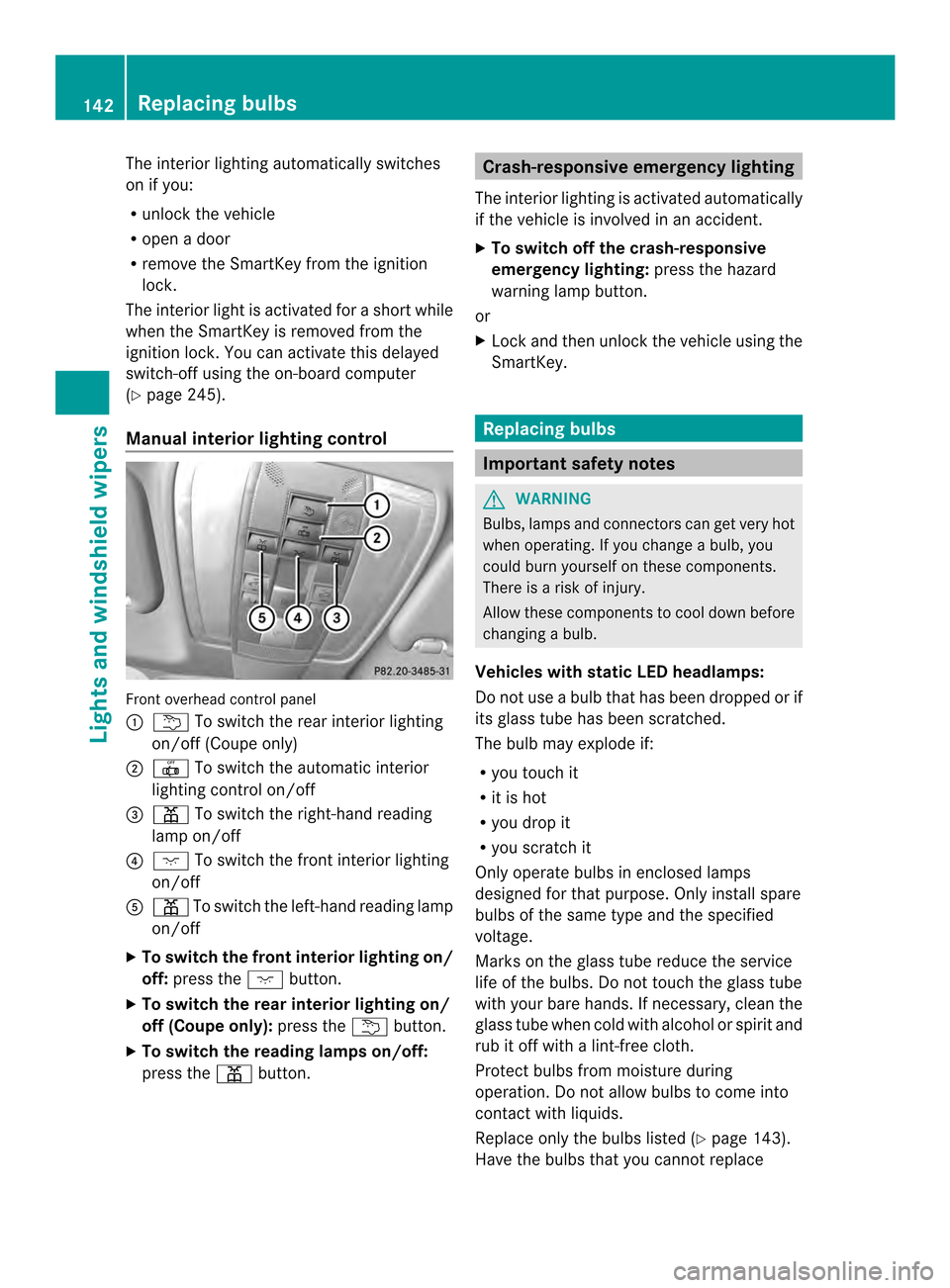
Manual interior lighting control Front overhead control panel
0002
0001 To switch the rear interior lighting
on/of f(Coupe only)
0003 001B To switch the automatic interior
lighting control on/off
0023 0012 To switch the right-hand reading
lamp on/off
0022 0004 To switch the front interior lighting
on/off
0020 0012 To switch the left-hand reading lamp
on/off
X To switch the front interior lighting on/
off: press the 0004button.
X To switch the rea rinterior lighting on/
off (Coupe only): press the0001button.
X To switch the reading lamps on/off:
press the 0012button. Crash-responsive emergency lighting
The interior lighting is activated automatically
if the vehicle is involved in an accident.
X To switch off the crash-responsive
emergency lighting: press the hazard
warning lamp button.
or
X Lock and then unlock the vehicle using the
SmartKey. Replacing bulbs
Important safety notes
G
WARNING
Bulbs, lamps and connectors can get very hot
when operating. If you change a bulb, you
could burn yourself on these components.
There is a risk of injury.
Allow these components to cool down before
changing a bulb.
Vehicles with static LED headlamps:
Do not use a bulb that has been dropped or if
its glass tube has been scratched.
The bulb may explode if:
R you touch it
R it is hot
R you drop it
R you scratch it
Only operate bulbs in enclosed lamps
designed for that purpose. Only install spare
bulbs of the same type and the specified
voltage.
Marks on the glass tube reduce the service
life of the bulbs. Do not touch the glass tube
with your bare hands. If necessary, clean the
glass tube when cold with alcohol or spirit and
rub it off with a lint-free cloth.
Protec tbulbs from moisture during
operation .Do not allow bulbs to come into
contact with liquids.
Replace only the bulbs listed (Y page 143).
Have the bulbs that you cannot replace 142
Replacing bulbsLights and windshiel
dwipers
Page 145 of 394

yourself changed at a qualified specialist
workshop.
If you require assistance changing bulbs,
consult a qualified specialist workshop.
If the new bulb still does no
tlight up, consult
a qualified specialist workshop.
Bulbs and lamps are an importan taspect of
vehicle safety. You must therefore make sure
that these function correctly at all times.
Have the headlamp setting checked regularly.
Vehicles with static LED headlamps
The front and rear light clusters of your
vehicle are equipped with LED light bulbs. Do
not replace the bulbs yourself. Contact a
qualified specialist workshop which has the
necessary specialist knowledge and tools to
carry out the work required.
Lamps are an important aspect of vehicle
safety. You must therefore make sure that
these function correctly at all times. Have the
headlamp setting checked regularly. Overview:c
hanging bulbs/bulb types
You can change the following bulbs. The bulb
type can be found in the legend. Static LED headlamps
0002
High-beam headlamp: H7 55 W Changing the front bulbs
High-beam headlamps (static LED
headlamps) X
Switch off the lights.
X Open the hood.
X Turn housing cover 0002counter-clockwise
and pull it out.
X Turn bulb holder 0003counter-clockwise and
pull it out.
X Take the bulb out of bulb holder 0003.
X Insert the new bulb into bulb holder 0003.
X Insert bulb holder 0003into the lamp and turn
it clockwise.
X Align housing cover 0002and turn it
clockwise until it engages. Windshield wipers
Switching the windshield wipers on/
off
! Do not operate the windshield wipers
whe nthe windshield is dry, as this could
damage the wiper blades. Moreover, dust
that has collected on the windshield can
scratch the glass if wiping takes place when
the windshield is dry.
If it is necessary to switch on the windshield
wipers in dry weather conditions, always
use washer fluid when operating the
windshield wipers.
! If the windshield wipers leave smears on
the windshield after the vehicle has been Windshield wipers
143Lights and windshield wipers Z
Page 189 of 394

!
Depressing the brake pedal constantly
results in excessive and premature wear to
the brake pads.
If the brakes have been subjected to a heavy
load, do not stop the vehicle immediately, but
drive on for a short while.T his allows the
airflow to cool the brakes more quickly.
Wet roads If you have driven for a long time in heavy rain
without braking, there may be a delayed
reaction from the brakes when braking for the
first time. This may also occur after the
vehicle has been washed or driven through
deep water.
You have to depress the brake pedal more
firmly. Maintain a greater distance from the
vehicle in front.
After driving on a wet road or having the
vehicle washed, brake firmly while paying
attention to the traffic conditions. This will
warm up the brake discs, thereby drying them
more quickly and protecting them against
corrosion.
Limited braking performance on salt-
treated roads If you drive on salted roads, a layer of salt
residue may form on the brake discs and
brake pads. This can result in a significantly
longer braking distance.
R Brake occasionally to remove any possible
salt residue. Make sure that you do not
endanger other road users when doing so.
R Carefully depress the brake pedal and the
beginning and end of a journey.
R Maintain a greater distance to the vehicle
ahead.
Servicing the brakes !
If the red brake warning lamp lights up in
the instrumentc luster and you hear a
warning tone while the engine is running,
the brake fluid level may be too low. Observe additional warning messages in
the multifunction display.
The brake fluid level may be too low due to
brake pad wear or leaking brake lines.
Have the brake system checked
immediately. This work should be carried
out at a qualified specialist workshop.
! Vehicles with 4MATIC: function or
performance tests may only be carried out
on a 2-axle dynamometer. If you are
planning to have the vehicle tested on such
a dynamometer, contact an authorized
Mercedes-Benz Center to obtain further
information first. Otherwise, you could
damage the drive train or the brake system.
! Vehicles with 4MATIC: as the ESP®
system operates automatically, the engine
and the ignition must be switched off
(SmartKey in position 0or 1in the ignition
lock or Start/Stop button in position 0or
1) while the parking brake is being tested
on a brake dynamometer.
Braking maneuvers triggere dautomatically
by ESP ®
may seriously damage the brake
system.
! Vehicles with 4MATIC: as the ESP®
system operates automatically, the engine
and the ignition system must be switched
off (SmartKey in position 0or 1in the
ignition lock or Start/Stop button in
position 0or 1) when:
R testing the parking brake on a brake
dynamometer.
R you intend to have the vehicle towed with
the fron taxle raised.
Braking maneuvers triggered automatically
by ESP ®
may seriously damage the brake
system.
All checks and maintenance work on the
brake system must be carried ou tata
qualified specialist workshop. Consult a
qualified specialist workshop to arrange this.
Have brake pads installed and brake fluid
replaced at a qualified specialist workshop. Driving tips
187Driving and parking Z
Page 207 of 394

Example: side view
Example: top view
Front sensors
Center Approx. 40 in (approx.
100 cm)
Corners Approx. 24 in (approx.
60 cm)
Rea
rsensors Center Approx. 48 in (approx.
120 cm)
Corners Approx. 32 in (approx.
80 cm)
Minimum distance
Center Approx
.8in (approx.
20 cm) Corners Approx
.6in (approx.
15 cm) If
there is an obstacle withi nthis range, the
relevant warning displays light up and a warning tone sounds. If the distance falls
below the minimum, the distance may no
longer be shown.
Warning displays
Warning display for the front area
0002
Segments on the left-hand side of the
vehicle
0003 Segments on the right-hand side of the
vehicle
0023 Segments showing operational readiness
The warning displays show the distance
between the sensors and the obstacle. The
warning display for the front area is located
on the dashboard above the center air vents.
The warning display for the rear area in the
Coupe is located on the headliner in the rear
compartment; in the Cabriolet, it is between
the rear seats.
The warning display for each side of the
vehicle is divided into five yellow and two red
segments. PARKTRONIC is operational if
yellow segments showing operational
readiness 0023light up.
The selected transmission position and the
direction in which the vehicle is rolling
determine which warning display is active
when the engine is running. Driving systems
205Driving and parking Z
Page 213 of 394

X
To exit aparking space using Active
Parking Assist: press the000Bbutton on
the multifunctio nsteering wheel.
The Park Assist Active Accelerate and Brake Observe Surroundings
message appears in the multifunction
display.
X Let go of the multifunctio nsteering wheel.
X Pull away, being ready to brake at all times.
Do not exceed a maximum speed of
approximately 6mph (10 km/h) when
exiting a parking space. Otherwise Active
Parking Assist will be canceled.
X Shift the transmission to position Dor Ras
required while the vehicle is stationary.
Active Parking Assist immediately steers in
the other direction. The Park AssistActive Accelerate and Brake
Observe Surroundings message appears
in the multifunction display.
i You will achieve the best results by
waiting for the steering procedure to
complete before pulling away.
If you back up after activation, the steering
wheel is moved to the straight-ahead
position.
X Drive forwards and back up as instructed
by the PARKTRONIC warning displays.
Once you have exited the parking space
completely, the steering wheel is moved to
the straight-ahead position .You hear a tone
and the Park Assist Finished message
appears in the multifunction display .You will
then have to steer and merge into traffic on
your own. PARKTRONIC is still available. You
can take over the steering, before the vehicle
has exited the parking space completely. This
is useful, for example when you recognize
that it is already possible to pull out of the
parking space.
Canceling Active Parking Assist You can cancel Active Parking Assist at any
time. X
Stop the movement of the multifunction
steering wheel or steer yourself.
Active Parking Assist will be canceled at
once. The Park Assist Canceled message appears in the multifunction
display.
or
X Press the PARKTRONIC button on the
center console (Y page 206).
PARKTRONIC is switched off and Active
Parking Assist is immediately canceled.
The Park Assist Canceled message
appears in the multifunction display.
Active Parking Assist is canceled
automatically if:
R the transmission is shifted too early
R transmission position Pis selected
R parking using Active Parking Assist is no
longer possible
R you are driving faster than 6 mph
(10 km/h)
R a wheel spins, ESP ®
intervenes or fails. In
such cases the 000Cwarning lamp lights
up in the instrument cluster.
Aw arning tone sounds. The parking symbol
disappears and the multifunction display
shows the Park Assist Canceled message.
When Active Parking Assist is canceled, you
must steer and brake again yourself.
Vehicles with automatic transmission:
if a
system malfunctio noccurs, the vehicle is
braked to a standstill. To drive on, depress the
accelerato ragain. Driving systems
211Driving and parking Z
Page 247 of 394

X
Press 000Bto confirm.
X Press the 0004or0003 button to set the
color to SOLAR ,
NEUTRAL or
POLAR .
X Press the 000Bor0007 button to save the
setting.
Activating/deactivating surround
lighting and exterior lighting delayed
switch-off
X Press the 0002or0005 button on the
steering wheel to select the Sett. menu.
X Press the 0004or0003 button to select the
Lights submenu.
X Press 000Bto confirm.
X Press 0004or0003 to select the
Surround Lighting function.
If the Surround Lighting function is
activated, the light cone and the area
around the vehicle are displayed in orange
in the multifunction display.
X Press the 000Bbutton to save the setting.
Deactivating delayed switch-off of the
exterior lighting temporarily:
X Before leaving the vehicle, turn the
SmartKey to position 0in the ignition lock.
X Turn the SmartKey to position 2in the
ignition lock.
The exterior lighting delayed switch-off is
deactivated.
Delayed switch-off of the exterior lighting is
reactivated the next time you start the
engine.
If you have activated the SurroundLighting function and the light switch is set
to 0004, the following functions are activated
when it is dark:
R surround lighting: the exterior lighting
remains lit for 40 seconds after unlocking
with the SmartKey. If you start the engine,
the surround lighting is switched off and
automatic headlamp mode is activated
(Y page 135).
R exterior lighting delayed switch-off: the
exterior lighting remains lit for 60 seconds after the engine is switched off.
If you close all the doors and the trunkl
id,
the exterior lighting goes off after
5s econds.
i Depending on your vehicle's equipment,
when the surround lighting and delayed
switch-off exterior lighting are on, the
following light up:
R Parking lamps
R Low-beam headlamps
R Daytime running lamps
R Side marker lamps
R Surround lighting in the exterior mirrors
Activating/deactivating the interior
lighting delayed switch-off
If you activate the Light. Delay function,
the interior lighting remains on for
20 seconds after you remove the key from the
ignition lock.
X Press the 0002or0005 button on the
steering wheel to select the Sett. menu.
X Press the 0004or0003 button to select the
Lights submenu.
X Press 000Bto confirm.
X Press the 0004or0003 button to select the
Light. Delay function.
If the Light. Delay function has been
switched on, the vehicle interior is
displayed in orange in the multifunction
display.
X Press the 000Bbutton to save the setting.
Vehicle Activating/deactivating the automatic
door locking mechanism
X
Press the 0002or0005 button on the
steering wheel to select the Sett. menu.
X Press 0004or0003 to select the Vehicle submenu.
X Press 000Bto confirm. Menus and submenus
245On-board computer and displays Z
Page 256 of 394

Display messages Possible causes/consequences and
0001 Solutions
001D
Front Left
Malfunction
Service
Required or
Front Right Malfunction
Service Required SRS has malfunctioned at the front on the left or right. The
001D
warning lamp also lights up in the instrumen tcluster.
G WARNING
The air bags or Emergency Tensioning Devices may either be
triggered unintentionally or, in the event of an accident, may not
be triggered.
There is an increased risk of injury.
X Visit a qualified specialist workshop. 001D
Rear Left
Malfunction
Service Required
or
Rear Right Malfunction
Service Required G
WARNING
The air bags or Emergency Tensioning Devices may either be
triggered unintentionally or, in the event of an accident, may not
be triggered.
There is an increased risk of injury.
SRS has malfunctione dat the rear on the left or right. The 001D
warning lamp also lights up in the instrument cluster.
X Visi taqualified specialist workshop. 001D
Left Side Curtain
Airbag Malfunction
Service
Required or
Right Side Curtain
Airbag Malfunction
Service Required There is a malfunction in the left-hand or right-hand window
curtain air bag (Coupe) or head bag (Cabriolet).
The
001D warning lamp also lights up in the instrument cluster.
G WARNING
The left or right window curtain air bag (Coupe) or head bag
(Cabriolet) may either be triggered unintentionally or, in the event
of an accident, may not be triggered.
There is an increased risk of injury.
X Visit a qualified specialist workshop. 254
Display messagesOn-board computer and displays
Page 259 of 394

Display messages Possible causes/consequences and
0001 Solutions
X
Wait fo raperiod of at least 60 seconds until the necessary
system checks have been completed.
X Make sure that the display messages do not appear in the
multifunction display.
If these conditions are fulfilled, the front-passenger seat can be
occupied again. Whether the PASSENGER AIR BAG OFF indicator
lamp remains lit or goes out depends on how OCS classifies the
occupant.
If the conditions are not fulfilled, the system is not operating
correctly.
X Visit a qualified specialist workshop immediately.
For further information about the Occupant Classification System,
see (Y page 50). Lights
i Display messages about LEDs:
This display message will only appear if all LEDs have failed. Display messages Possible causes/consequences and
0001 Solutions
0002
Check Left
Cornering Light or
Check Right Cornering Light The left or right-hand cornering light is defective.
X
Visit a qualified specialist workshop. 0002
Check Left Low
Beam or
Check Right Low Beam The left or right-hand low-beam headlamp is defective.
X
Visit a qualified specialist workshop. 0002
Check Rear Left
Turn Signal or
Check Rear Right Turn Signal The rear left-hand or rear right-hand turn signal is defective.
X
Visit a qualified specialist workshop. Display messages
257On-board computer and displays Z