2014 MERCEDES-BENZ E-Class Mp3
[x] Cancel search: Mp3Page 223 of 270
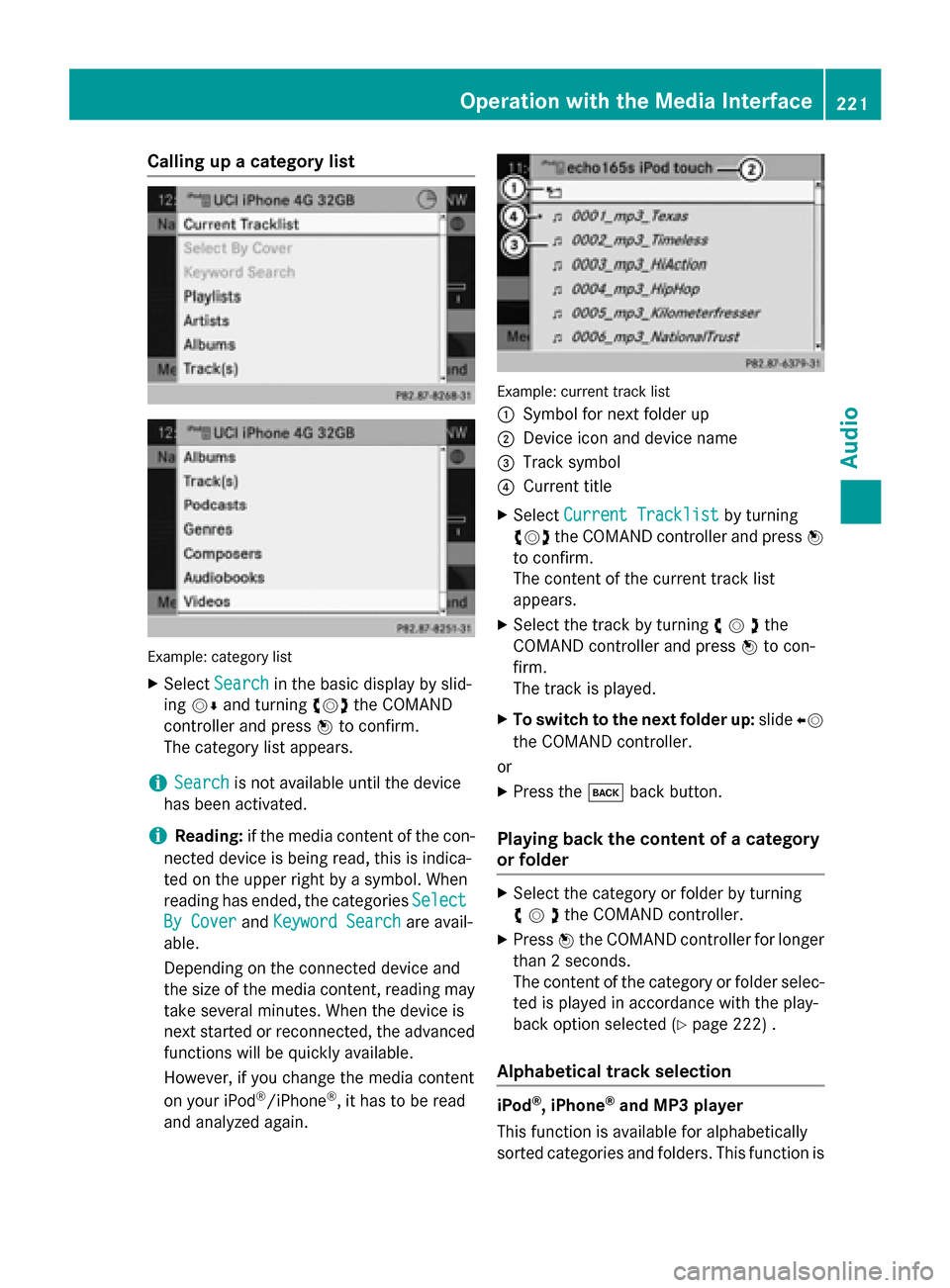
Calling up a category list
Example: category list
X Select Search
Search in the basic display by slid-
ing 00520064 and turning 00790052007Athe COMAND
controller and press 0098to confirm.
The category list appears.
i Search
Search is not available until the device
has been activated.
i Reading:
if the media content of the con-
nected device is being read, this is indica-
ted on the upper right by a symbol. When
reading has ended, the categories Select
Select
By Cover
By Cover andKeyword Search Keyword Search are avail-
able.
Depending on the connected device and
the size of the media content, reading may
take several minutes. When the device is
next started or reconnected, the advanced
functions will be quickly available.
However, if you change the media content
on your iPod ®
/iPhone ®
, it has to be read
and analyzed again. Example: current track list
0043
Symbol for next folder up
0044 Device icon and device name
0087 Track symbol
0085 Current title
X Select Current Tracklist
Current Tracklist by turning
00790052007A the COMAND controller and press 0098
to confirm.
The content of the current track list
appears.
X Select the track by turning 00790052007Athe
COMAND controller and press 0098to con-
firm.
The track is played.
X To switch to the next folder up: slide00950052
the COMAND controller.
or
X Press the 003Dback button.
Playing back the content of a category
or folder X
Select the category or folder by turning
00790052007Athe COMAND controller.
X Press 0098the COMAND controller for longer
than 2 seconds.
The content of the category or folder selec-
ted is played in accordance with the play-
back option selected (Y page 222) .
Alphabetical track selection iPod
®
, iPhone ®
and MP3 player
This function is available for alphabetically
sorted categories and folders. This function is Operation
withthe Media Interface
221Audio Z
Page 224 of 270
not available for albums or playlists, for exam-
ple.
X Select a category, e.g. Artists
Artists, by turning
00790052007A the COMAND controller and press 0098
to confirm.
The available artists are displayed.
X Press the corresponding number key once
or repeatedly to select the initial letter of
the desired artist. For example, to select an
artist whose name begins with C, press the 0082 number key three times.
The available letters are listed at the lower
edge of the display.
After a message, the first entry in the list
which matches the letter entered is high-
lighted.
i If no corresponding entry exists, the last
entry corresponding to a previous letter is
highlighted instead.
i iPods and MP3 players: the quality of the
search results is highly dependent on the
version and language variant of the soft-
ware used to populate the device. A well-
known example of such software is
iTunes ®
.
If different sorting rules are defined (e.g. in iTunes ®
), the search is canceled without
any result.
Additional selection functions R
Select By Cover Select By Cover
Albums can be chosen by cover using the
menu item.
The first time the Select By Cover Select By Cover func-
tion is used, additional data must be loaded
from the iPod ®
/iPhone ®
. The current
music playback is interrupted to allow
access to this data. The process may take a
few minutes and should not be canceled.
Otherwise it will start again from the begin-
ning the next time Select By Cover
Select By Cover is
selected. Covers are initially searched for in the Gracenote Media Database and are
then added to during playback from the
connected device (Y page 200). The avail- ability depends on the use and the tracks
already selected.
R Keyword Search
Keyword Search
Selecting keyword search allows you to
search through all categories on the con-
nected device for keywords.
i More information on
Select By Cover Select By Cover
and Keyword Search
Keyword Search can be found under
"Music search, selecting category"
(Y page 220).
i For an iPod ®
/iPhone ®
, the available cov-
ers are added most efficiently if the entire
media content is in the current playlist. This is the case if you have selected the play-
back option Tracks TracksorRandom Medium
Random Medium
(Y page 222).
Special feature in iPod ®
/iPhone ®
mode i
If the connected iPod ®
/iPhone ®
is not
functioning or paused, you can search for
tracks but cannot select them. After con-
firming a new track, the Function Function
Unavailable
Unavailable message appears. Playback options
X To select a playback option: select
Media Interface
Media Interface in the basic display by
sliding 00520064and turning 00790052007Athe COMAND
controller and press 0098to confirm.
The options list appears. The 003Bdot indi-
cates the option selected.
X Select an option and press 0098to confirm.
The following options are available: R Normal Track Sequence
Normal Track Sequence
Normal track sequence: you hear the
tracks in their normal order (e.g. numerical
or alphabetical).
R Random Medium Random Medium
All the tracks on the medium are played in
random order.
R Random Track List Random Track List 222
Operation with the Media InterfaceAudio
Page 225 of 270
The tracks in the currently active category
or folder, including any subfolders, are
played in random order.
i If the connected iPod ®
/iPhone ®
is not
functioning or paused, the playback
options are inactive. The display of options is grayed out. MP3 player instructions
General information Up to 30,000 tracks per medium are suppor-
ted.
You can speed up some functions and
improve the search results by:
R making sure the names of tracks, albums
and artists, for example, are written the
same way
R labeling albums featuring various artists as
"compilations"
i Multiple entries of tracks in playlists are
filtered out for some players.
Data formats MP3 and WMA are supported as data formats
with fixed and variable bit rates (up to
320 kbits/s).
Special considerations when using MP3
players Up to eight directory levels with up to 1,000
tracks per directory are supported.
Do not use USB extension leads or adapters. They can impair functionality.
i DRM (Digital Rights Management) protec-
ted files are not supported by the Media
Interface. Audio AUX mode
Notes on audio AUX mode
External audio sources may have different
volumes, which can mean that system mes-
sages such as traffic announcements and
navigation system announcements are much louder. If necessary, deactivate the system
messages or adjust their volume manually.
You can connect an external audio source
(AUX) to COMAND.
Depending on the vehicle model series, the
connection is made using a jack in the stow-
age compartment in the center console or a
USB port (Y page 197).
If COMAND is equipped with the Media Inter-
face, external audio sources are connected
using the cable set provided. An AUX socket
is not provided. The connections for the
Media Interface are located in the stowage
compartment in the center console.
i You will find further information online at
http://www.mbusa-mobile.com. Or call
the Mercedes-Benz Customer Assistance
Center at 1-800-FOR-MERCedes
(1-800-367-6372) (for the USA) or Cus-
tomer Relations at 1-800-387-010 0(for
Canada). Switching to audio AUX mode
Switching on using the DISC button The external device is connected to the audio
AUX input.
X Press the 003Abutton one or more times.
By pressing the function button repeatedly,
you can change the operating mode in the
following order:
R CD/MP3 (disc)
R Memory card mode
R MUSIC REGISTER
R USB storage device Audio AUX mode
223Audio Z
Page 229 of 270

Notes on discs
! Do not affix stickers or labels to the discs.
They could peel off and damage COMAND.
Stickers can cause the disc to bend, which can result in read errors and disc recogni-
tion problems.
! COMAND is designed to play discs that
comply with the EN 60908 standard. There-
fore, you can only use discs with a maxi-
mum thickness of 1.3 mm.
If you insert thicker discs, e.g. those that
contain data on both sides (DVD on one
side and audio data on the other), they can- not be ejected and can damage the device.
Only use round discs with a diameter of
12 cm. Do not use discs with a diameter of 8 cm, even with an adapter.
Playback problems may occur when playing
copied discs. There are a large variety of
discs, DVD authoring software, writing soft-
ware and writers available. This variety means that there is no guarantee that the system will
be able to play discs that you have copied
yourself. DVD playback conditions
If video DVDs do not conform to the NTSC or PAL TV standards, they may create picture,
sound or other problems during playback.
COMAND is capable of playing back video
DVDs produced according to the following
standards:
R Region code 1 or region code 0 (no region
code)
R PAL or NTSC standard
You will generally find the relevant details
either on the DVD itself or on the DVD case.
i If you insert a video DVD with a different
region code, you will see a message to this
effect.
i COMAND is set to region code 1 at the
factory. This setting can be changed at an authorized Mercedes-Benz Center. This will
allow you to play video DVDs with a differ-
ent region code, provided that they are pro- duced in accordance with the PAL or NTSC
standard. The region code can be changed up to five times. Function restrictions
Depending on the DVD, it is possible that cer- tain functions or actions will be temporarily
blocked or may not function at all. As soon as
you try to activate these functions or actions, you will see the 0047symbol in the display. Inserting and removing DVDs
X Proceed as described in the "Inserting and
ejecting CDs and DVDs" section
(Y page 196). Switching to video DVD mode
Switching on automatically X
Insert a video DVD.
COMAND loads the medium inserted and
starts to play it.
Switching on using the DISC button X
Press the 003Abutton.
COMAND switches to the previous disc
operating mode.
By pressing the 003Abutton repeatedly, you
can switch modes in the following order:
R video DVD/CD/MP3 in the single DVD
drive (disc mode)
R memory card mode
R MUSIC REGISTER
R USB storage device
R Media Interface or audio AUX mode
R Bluetooth ®
audio mode Video
DVDmode
227Video Z
Page 232 of 270

Selecting a video DVD from the media
list
X Show the menu (Y page 228).
X Select Media
Mediaby sliding 00520064and turning
00790052007A the COMAND controller and press 0098
to confirm.
The media list appears. The 003Bdot indicates
the current medium being played. Video
DVDs are indicated by the ýicon.
X Press 0098the COMAND controller.
COMAND loads the video DVD and begins
playing it.
i If you select a CD or an MP3 medium, you
switch to the respective audio mode.
Further information on the media list
(Y page 198). DVD menu
Calling up the DVD menu The DVD menu is the menu stored on the DVD
itself. It is structured in various ways accord- ing to the individual DVD and permits certain
actions and settings.
In the case of multi-language DVDs, for exam-
ple, you can change the DVD language in the DVD menu.
X Show the menu (Y page 228).
X Select DVD-Video
DVD-Video in the menu by turning
00790052007A the COMAND controller and press 0098
to confirm.
X Select DVD Functions DVD Functions and press0098to
confirm.
X Select Menu
Menu and press 0098to confirm.
The DVD menu appears. Selecting menu items in the DVD menu X
Show the DVD menu (Y page 230).
X Select a menu item by sliding 009700520064the
COMAND controller and press 0098to con-
firm.
or X Select a menu item by sliding 009500520096the
COMAND controller and press 0098to con-
firm.
The menu appears.
X To reconfirm your selection: confirm
Select Select by pressing 0098.
COMAND carries out the action.
Make a selection from the further options,
if necessary.
COMAND then switches back to the DVD
menu.
i Menu items which cannot be selected are
shown in gray.
i Depending on the DVD, the menu items:
Back (to movie) Back (to movie), Play
Play,Stop
Stop,004E,
004F orGo
Go Up
Upmay either not function at all
or may not function at certain points in the DVD menu. To indicate this, the 0047symbol
appears in the display.
Moving up one level in the DVD menu X
Show the DVD menu (Y page 230).
X Select the corresponding menu item in the
DVD menu and press 0098the COMAND con-
troller to confirm.
or 230
Video DVD modeVideo
Page 237 of 270

Your COMAND equipment
................236
Overview ............................................ 236
Basic functions ................................. 241
System settings ................................ 243
CD/audio DVD and MP3 mode ........244
Video DVD mode ............................... 247
Operation with an active COMAND source ................................................ 252
AUX mode .......................................... 254 235Rea
r Seat Entertainment System
Page 244 of 270
i
The headphones' volume setting does not
affect the main loudspeakers. Selecting sound settings
You can select the sound settings in the CD/
MP3, video DVD and AUX modes.
X Switch on an operating mode (e.g. audio
CD mode) (Y page 244).
X Select Treble
Treble orBass
Bass using
the 006400590065 buttons on the remote
control and press the 008Bbutton to confirm.
An adjustment scale appears.
X Select a setting using the 00630064but-
tons and press the 008Bbutton to confirm. Multiple users
Simultaneous use of the rear-compart-
ment disc drive The two rear-compartment screens can be
operated almost entirely independently from
one another. However, there can be a conflict
in some menus if the two screens are used
simultaneously.
If the rear-compartment disc drive is being
used for both screens simultaneously, select- ing certain menus or settings on one of the
screens also affects the other screen.
The following functions affect both screens:
R changing playback options
R selecting a track (from a track list or folder)
R using the play, pause and stop functions
R fast forwarding/rewinding or scrolling
R calling up the DVD menu and navigating
within it
R setting the language, subtitles and camera
angle
R calling up interactive DVD content The following functions affect only one
screen:
R audio and video functions as well as picture
settings
R switching between full screen and the
menu
Switching between operating modes When you exit an operating mode (e.g. audio
CD mode), the current setting is saved. If youcall up this operating mode again later, there
are two possibilities:
R the operating mode has been changed on
the other screen.
R the operating mode has not been changed.
In the first case, the operating mode appears as it is on the other screen.
In the second case, the setting appears on the
screen as it was when you last exited the
operating mode. Picture settings
Overview You can select picture settings in video DVD
and AUX mode (Y
page 254).
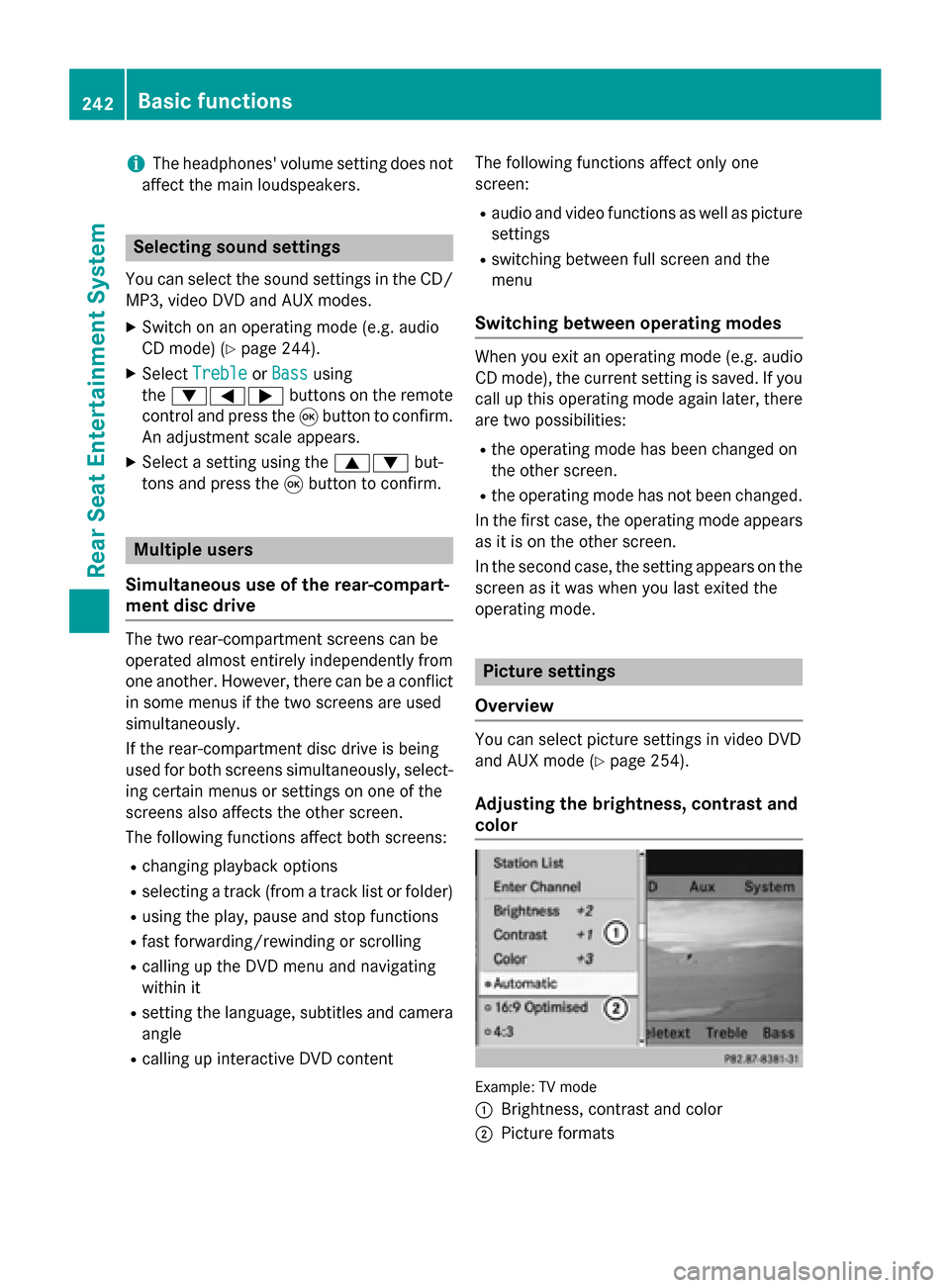
Adjusting the brightness, contrast and
color Example: TV mode
0043
Brightness, contrast and color
0044 Picture formats 242
Basic functionsRear Seat Entertainment System
Page 246 of 270
Setting the brightness
X Select Settings
Settings using the0064button
and press 008Bto confirm.
X Select Brightness
Brightness using the00630064
buttons and press the 008Bbutton to confirm.
A scale appears.
X Adjust the brightness using the 00630064
buttons and press the 008Bbutton to confirm.
The brightness bar moves up or down. The picture becomes lighter or darker in
accordance with the scale. Showing/hiding the picture
X To hide the picture: selectDisplay Off Display Off
in the system menu using the 00640065
buttons on the remote control and press
the 008Bbutton to confirm.
The picture is hidden.
X To display the picture: press the008Bbut-
ton. CD/audio DVD and MP3 mode
Important safety notes
G
WARNING
The CD/DVD drive is a class 1 laser product. If you open the housing of the CD/DVD drive,
there is a risk of exposure to invisible laser
radiation. This laser radiation could damage
your retina. There is a risk of injury.
Never open the housing. Always have main-
tenance and repair work carried out at a quali- fied specialist workshop. General notes
You will find information on the following top- ics in the Audio section:
R notes on CDs/DVDs (Y page 204)
R notes on MP3 mode (Y page 202)
R notes on copyright (Y page 204) Inserting a CD/DVD
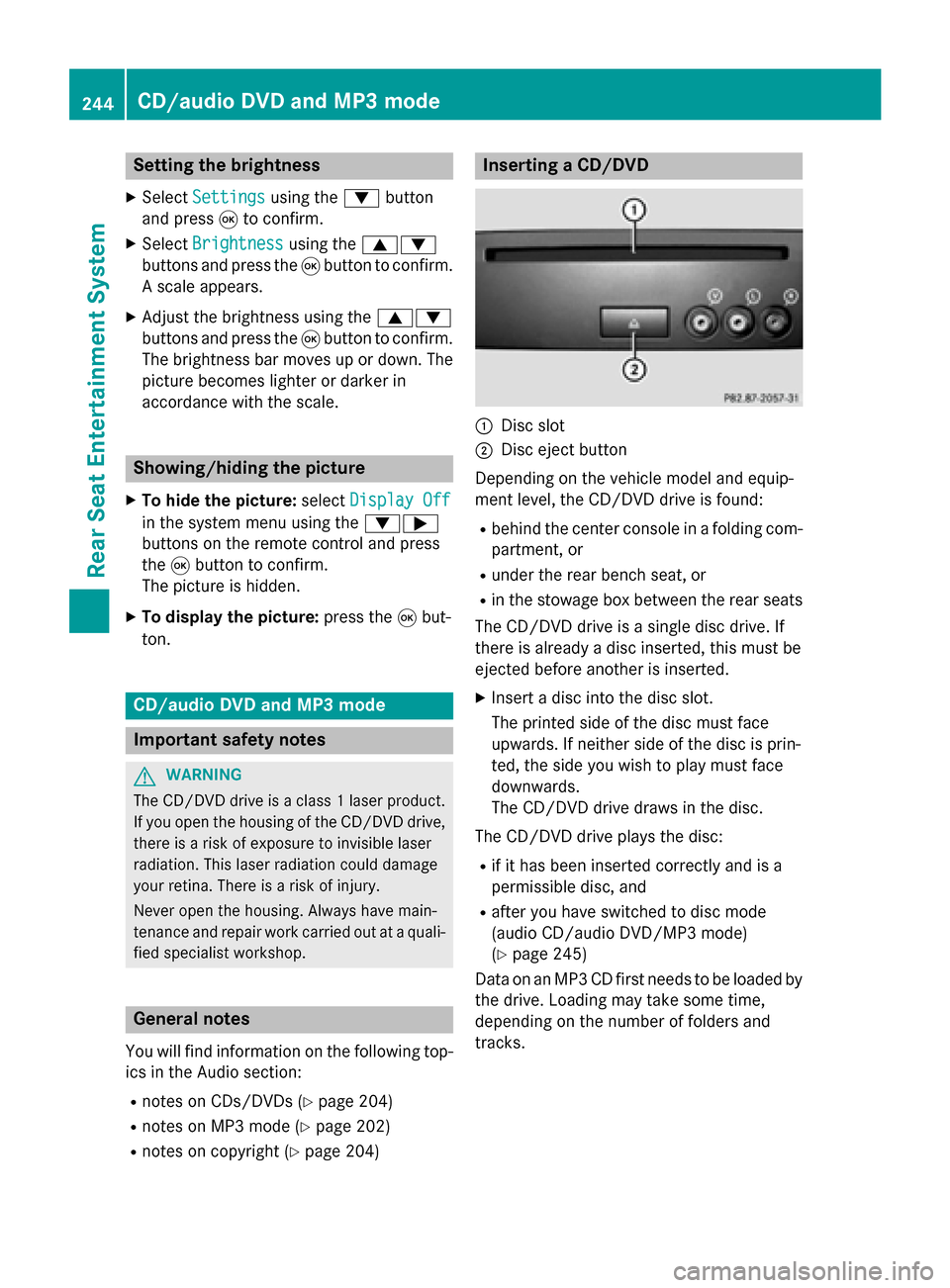
0043
Disc slot
0044 Disc eject button
Depending on the vehicle model and equip-
ment level, the CD/DVD drive is found:
R behind the center console in a folding com-
partment, or
R under the rear bench seat, or
R in the stowage box between the rear seats
The CD/DVD drive is a single disc drive. If
there is already a disc inserted, this must be
ejected before another is inserted.
X Insert a disc into the disc slot.
The printed side of the disc must face
upwards. If neither side of the disc is prin-
ted, the side you wish to play must face
downwards.
The CD/DVD drive draws in the disc.
The CD/DVD drive plays the disc:
R if it has been inserted correctly and is a
permissible disc, and
R after you have switched to disc mode
(audio CD/audio DVD/MP3 mode)
(Y page 245)
Data on an MP3 CD first needs to be loaded by the drive. Loading may take some time,
depending on the number of folders and
tracks. 244
CD/audio DVD and MP3 modeRear Seat Entertainment System