2014 MERCEDES-BENZ C-CLASS ESTATE radiator
[x] Cancel search: radiatorPage 16 of 489
Headlamp
Cleaning system (notes) ............... .477
Headlamp flasher .............................. 137
Headlamps
Misting up ...................................... 140
see Automatic headlamp mode
Heating
see Climate control
High-pressure cleaners .................... 402
High-voltage battery
Charge leve l................................... 276
Charging ........................................ 420
Charging (on-board computer) ....... 277
General notes .................................. 43
Vehicle fire ....................................... 43
Hill start assist .................................. 189
HOLD function
Activating ....................................... 237
Deactivating ................................... 237
Display message ............................ 342
Function/note s............................. 236
Horn ...................................................... 32
Hybrid drive
Displaying the total range .............. 279
Generated electrical energy ........... 279
Hybrid operation
AGILITY SELECT switch .................. 280
Automatic engine start (ECO
Start/Stop function) ...................... 283
Automatic engine switch-off (ECO
start/stop function) ....................... 283
Driving tips .................................... 281
ECO start/stop function ................ 282
Energy flow display ........................ 276
Extended overrun mod e................. 283
Fuel consumption .......................... 279
General notes ................................ 272
Important safety notes .................. 273
Manual gearshifting ....................... 281
Noiseless start ............................... 280
Operating (on-board computer) ..... 276
Overrun mode ................................ 283
Overview (instrument cluster) ........ 275
Power display (electric motor) ....... 275
Problems ....................................... 285
Pulling away ................................... 280
RBS (Recuperative Brake Sys-
tem) ............................................... 273 Resetting values (Audio 20) ........... 279
Resetting values (COMAND
Online) ........................................... 279
Starting the engine ........................ 279
Hybrid system
Automatic deactivation .................... 42
Danger of electric shock .................. 42
Display message ............................ 338
High-voltage battery ........................ 43
Important safety notes .................... 42
Manual deactivation ......................... 43
Opening the bonnet ......................... 44
Overview ........................................ 274
Problems (malfunctions) ................ 285
READY indicator ............................. 279
Warning lamp ................................. 364
Hybrid vehicle
Climate control (THERMATIC) ........ 157
Climate control
(THERMOTRONIC) .......................... 160
Hybrid vehicles
Important safety notes .................... 42 I
Ignition lock see Key positions
Immobiliser .......................................... 86
Indicator and warning lamp
Restraint system ............................ 361
Indicator and warning lamps
COLLISION PREVENTION ASSIST
PLUS .............................................. 365
Coolant .......................................... 362
Engine diagnostics ......................... 362
Indicator lamps
Display message ............................ 332
see Warning and indicator lamps
Indicators
see Turn signals
Insect protection on the radiator .... 396
Instrument cluster
Overview .......................................... 34
Power display ................................ 275
Warning and indicator lamps ........... 35
Instrument cluster lighting .............. 294
Intelligent Light System
Activating/deactivating ................. 313 Index
13
Page 20 of 489
Position of exterior mirror, front-
passenger side ...............................1
29
Reversing camera .......................... 248
see PARKTRONIC
Parking aid
Active Parking Assist ..................... 243
see Exterior mirrors
see PARKTRONIC
Parking assistance
see PARKTRONIC
Parking brake
Display message ............................ 320
Electric parking brake .................... 213
Warning lamp ................................. 361
Parking lamps
Display message ............................ 333
Switching on/off ........................... 136
PARKTRONIC
Deactivating/activating ................. 242
Driving system ............................... 240
Function/notes ............................ .240
Important safety notes .................. 240
Problem (fault) ............................... 243
Sensor range ................................. 240
Trailer towing ................................. 240
Warning displa y............................. 241
PASSENGER AIR BAG
Indicator lamps ................................ 46
PASSENGER AIR BAG indicator
lamp
Problem (malfunction) ................... 330
Perfume atomizer
Operating ....................................... 170
Perfume vial ................................... 170
Problem (malfunction) ................... 172
Petrol .................................................. 472
Pets in the vehicle ............................... 75
Plastic trim (cleaning instruc-
tions) .................................................. 407
Power windows
see Side windows
Pre-entry climate control (via key)
Problems (malfunctions) ................ 174
PRE-SAFE® (anticipatory occupant
protection)
Operation ......................................... 62 PRE-SAFE® (preventive occupant
safety system)
Display message ............................ 325
PRE-SAFE® Brake
Activating/deactivating ................. 311
Display message ............................ 325
Function/note s................................ 84
Important safety notes .................... 84
Warning lamp ................................. 365
PRE-SAFE® PLUS (anticipatory
occupant protection PLUS)
Operation ......................................... 62
Protection against theft
ATA (Anti-Theft Alarm system )......... 87
Immobiliser ...................................... 86
Interior motion sensor ..................... 88
Tow-away protection ........................ 87
Protection of the environment
General notes .................................. 24
Pulling away
Automatic transmission ................. 189
Hill start assist ............................... 189
Hybrid operation ............................ 280
Manual transmission ...................... 188
Trailer ............................................ 189 Q
Qualified specialist workshop ........... 27 R
Radiator cover ................................... 396
Radio
Selecting a station ......................... 304
Radio-based vehicle components
Declaration of conformity ................ 27
Rain closing feature
Panorama sliding sunroof .............. 113
Sliding sunroof ............................... 112
RBS (Recuperative Brake System)
Driving safety systems ..................... 44
Important safety notes .................... 44
Warning lamp ................................. 364
Reading lamp ..................................... 140
READY indicator ................................ 279
Rear compartment
Setting the air vents ...................... 182 Index
17
Page 26 of 489
Hybrid system ................................ 364
LIM (cruise control) ........................ 220
LIM (DISTRONIC PLUS) .................. 227
LIM (variable SPEEDTRONIC) ......... 223
Overview .......................................... 35
Parking brake ................................ 361
PASSENGER AIR BAG ...................... 46
RBS (Recuperative Brake Sys-
tem) ............................................... 364
Reserve fuel ................................... 362
Seat belt ........................................ 353
SRS ................................................ 285
Steering ......................................... 367
Tyre pressure monitor ................... 366
Warning triangle ................................ 410
Warnings
Stickers ........................................... 42
Washer fluid
Display messag e............................ 351
Wheel and tyre combinations
see Tyres
Wheel bolt tightening torque ........... 447
Wheel chock ...................................... 443
Wheels
Changing a whee l.......................... 441
Changing/replacing ....................... 442
Checking ........................................ 433
Cleaning ......................................... 403
Emergency spare wheel ................. 463
Fitting a new wheel ........................ 446
Fitting a wheel ............................... 442
Important safety notes .................. 432
Removing a whee l.......................... 446
Storing ........................................... 442
Tightening torque ........................... 447
Wheel size/tyre size ...................... 448
Windowbag
Display message ............................ 328
Operation ......................................... 53
Windows
Cleaning ......................................... 403
see Side windows
Windscreen
Demisting ...................................... 166
Windscreen washer fluid
see Windscreen washer system
Windscreen washer system
Notes ............................................. 477 Topping up ..................................... 398
Windscreen wipers
Problem (malfunction) ................... 150
Rear window wipe r........................ 147
Replacing the wiper blades ............ 147
Switching on/of f........................... 146
Winter operation
Important safety notes .................. 434
Radiator cover ............................... 396
Slippery road surfaces ................... 219
Snow chains .................................. 435
Summer tyres ................................ 434
Winter tyres
Limiting the speed (on-board com-
puter) ............................................. 315
M+S tyres ...................................... 434
Wiper blades
Cleaning ......................................... 404
Important safety notes .................. 147
Replacing ....................................... 147
Replacing (on the rear window )..... 149
Replacing (windscreen) .................. 147
Wooden trim (cleaning instruc-
tions) .................................................. 407
Workshop
see Qualified specialist workshop Index
23
Page 188 of 489
boosting effect. You will require considerably
more effort to steer and brake. There is a riskof an accident.
Do not switch off the ignition while driving. G
WARNING
If the parking brake has not been fully
released when driving, the parking brake can:
R overheat and cause a fire
R lose its hold function.
There is a risk of fire and an accident. Release
the parking brake fully before driving off.
! Do not warm up the engine when the vehi-
cle is stationary. Drive off immediately.
Avoid high engine speeds and driving at full throttle until the engine has reached its
operating temperature.
Only shift the automatic transmission to
the desired drive position when the vehicle is stationary.
Where possible, avoid spinning the drive
wheels when pulling away on slippery
roads. You could otherwise damage the
drive train.
Hybrid vehicles: observe the important
safety notes for hybrid vehicles
(Y page 273). Key positions
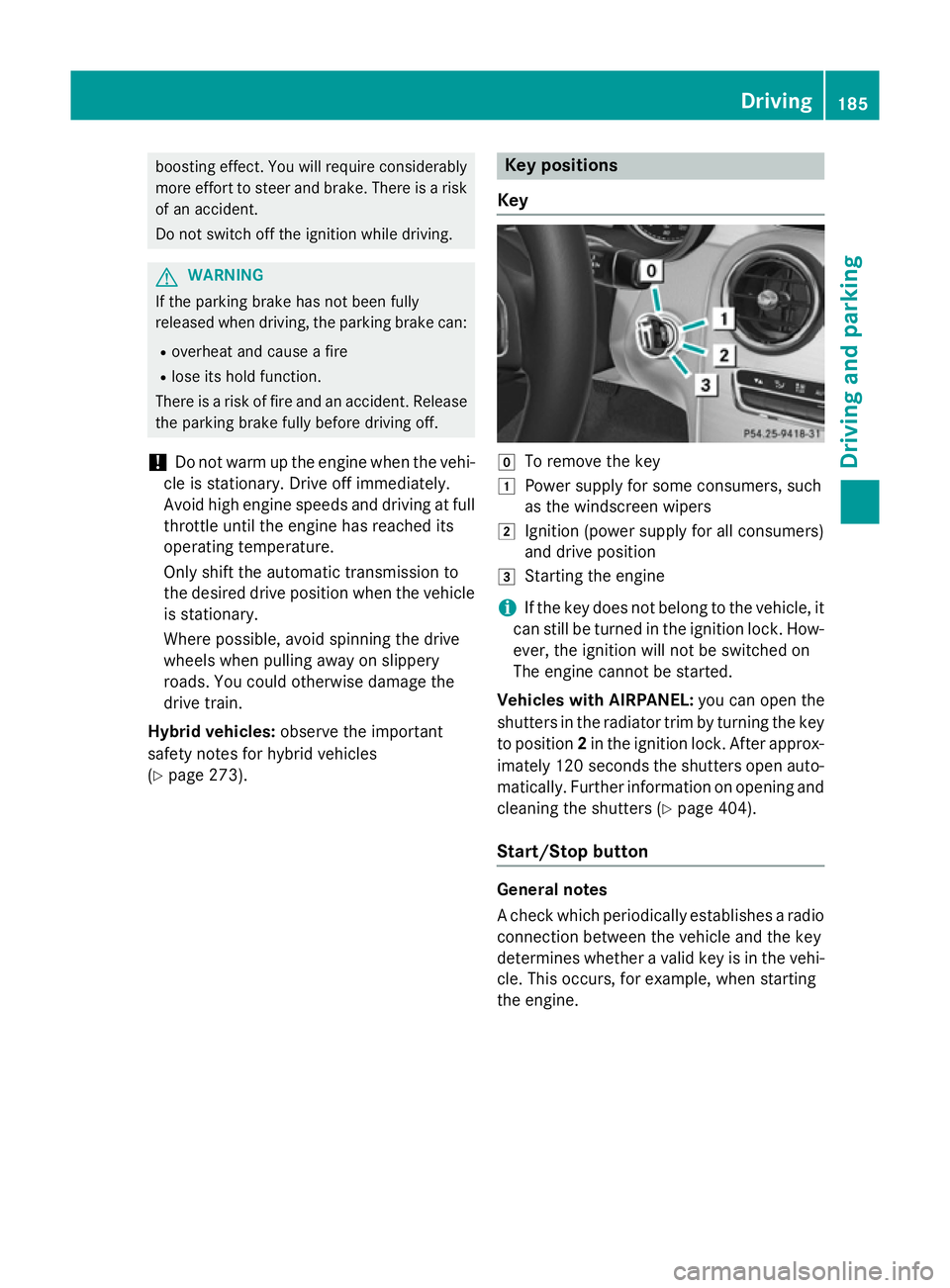
Key g
To remove the key
1 Power supply for some consumers, such
as the windscreen wipers
2 Ignition (power supply for all consumers)
and drive position
3 Starting the engine
i If the key does not belong to the vehicle, it
can still be turned in the ignition lock. How-
ever, the ignition will not be switched on
The engine cannot be started.
Vehicles with AIRPANEL: you can open the
shutters in the radiator trim by turning the key to position 2in the ignition lock. After approx-
imately 120 seconds the shutters open auto-
matically. Further information on opening and cleaning the shutters (Y page 404).
Start/Stop button General notes
A check which periodically establishes a radio
connection between the vehicle and the key
determines whether a valid key is in the vehi-
cle. This occurs, for example, when starting
the engine. Driving
185Driving and parking Z
Page 197 of 489
Problem
Possible causes/consequences and
M
MSolutions Vehicles with a petrol
engine:
The engine is not run-
ning smoothly and is
misfiring. There is a malfunction in the engine electronics or in a mechanical
component of the engine management system.
X Only depress the accelerator pedal slightly.
Otherwise, non-combusted fuel may get into the catalytic con-
verter and damage it.
X Have the cause rectified immediately at a qualified specialist
workshop. The coolant tempera-
ture display is showing
more than 120 †. A
display message may
also appear in the mul-
tifunction display and a warning tone may
sound. The coolant level is too low. The coolant is too hot and the engine
is no longer being cooled sufficiently.
X Stop as soon as possible and allow the engine and the coolant to
cool down.
X Check the coolant level (Y page 397). Observe the warning
notes as you do so and top up the coolant if necessary. If the coolant level is correct, the engine radiator fan may be faulty.
The coolant is too hot and the engine is no longer being cooled
sufficiently.
X If the coolant temperature is below 120 †, you can continue
driving to the nearest qualified specialist workshop.
X Avoid heavy loads on the engine as you do so, e.g. driving in
mountainous terrain and stop-start traffic. Manual transmission
Gear lever
! Only engage gear when the clutch pedal is
depressed.
! When shifting between
5thand 6thgear,
you should always push the gear lever all
the way to the right. Otherwise, you could
shift unintentionally into 3rdor4th gear
and damage the transmission.
If you shift down at too high a speed (trans-
mission braking), this can cause the engine to overrev, leading to engine damage.
Do not use the clutch bite point to keep the
vehicle stationary on uphill gradients.
There is otherwise a risk of damaging the
clutch.
! On long and steep downhill gradients,
especially if the vehicle is laden or towing a trailer, you must shift into gear
1, 2or3in
good time. This uses the engine's braking
effect. This relieves the load on the brake
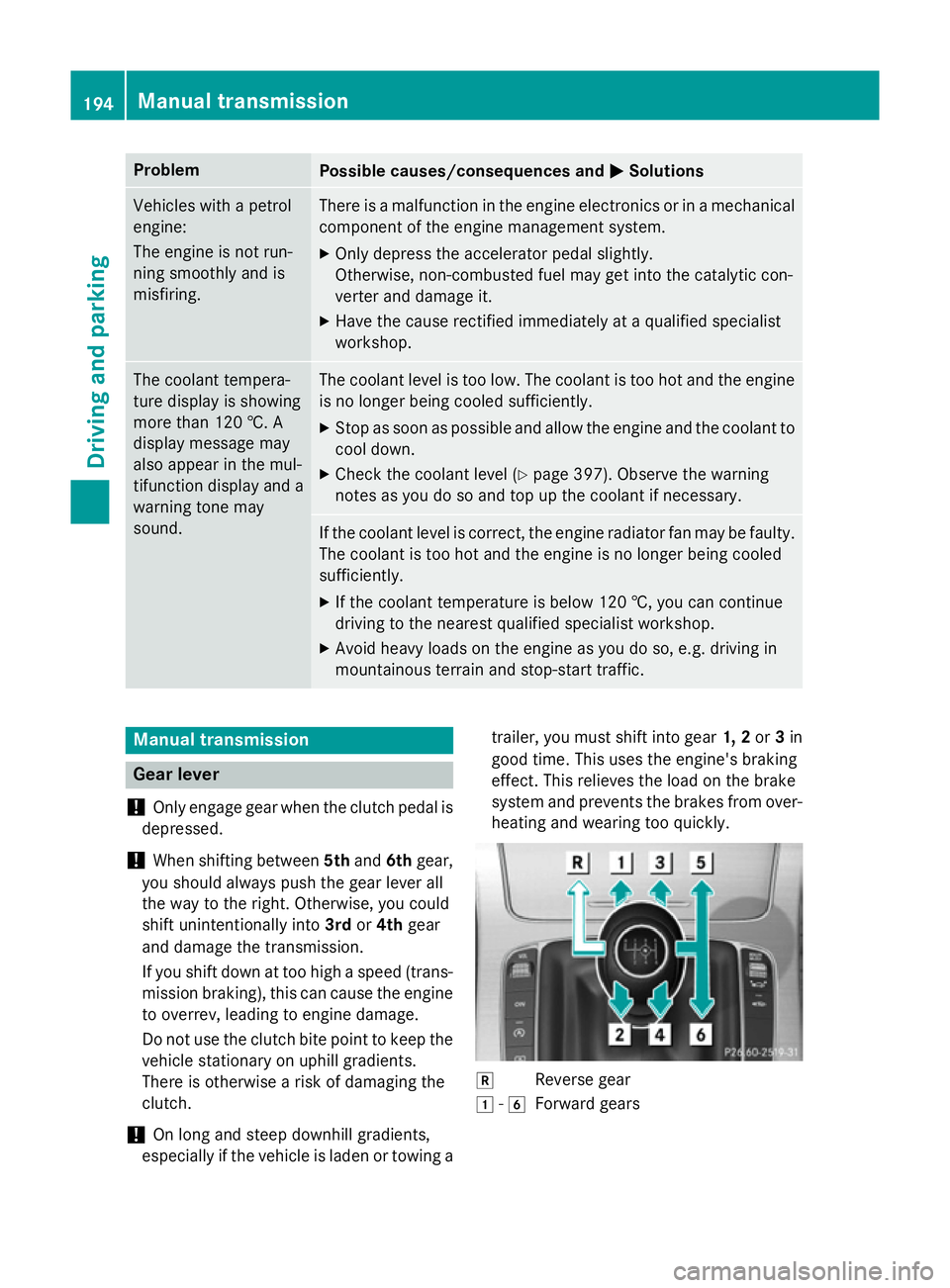
system and prevents the brakes from over- heating and wearing too quickly. k
Reverse gear
1 -6
Forward gears 194
Manual transmissionDriving and parking
Page 270 of 489
detected in the monitored area. If you then
switch on the corresponding turn signal to
change lanes, you will also receive a visual
and audible collision warning. If a risk of side impact is detected, corrective braking may
help you avoid a collision. Active Blind Spot
Assist evaluates the free space in the direc-
tion of travel and to the side before making a course-correcting brake application. For this,Active Blind Spot Assist uses the forward-
facing radar sensors.
Active Blind Spot Assist supports you from a
speed of approximately 30 km/h.
Important safety notes
Active Blind Spot Assist is only an aid and is
not a substitute for attentive driving. G
WARNING
Active Blind Spot Assist does not react to
vehicles:
R overtaking too closely on the side, placing
them in the blind spot area
R if the difference in the speed of approach
and overtaking is too great
As a result, Active Blind Spot Assist may nei-
ther give warnings nor intervene in such sit-
uations. There is a risk of an accident.
Always pay careful attention to the traffic sit-
uation and maintain a safe distance at the side of the vehicle.
Radar sensors
The Active Blind Spot Assist radar sensors are
integrated into the front and rear bumpers
and behind a cover in the radiator trim. Make sure that the bumpers and the cover in the
radiator trim are free of dirt, ice or slush. The rear sensors must not be covered, e.g. by
bicycle racks or overhanging loads. Following
a severe impact or in the event of damage to the bumpers, have the function of the radar
sensors checked at a qualified specialist
workshop. Active Blind Spot Assist may oth-
erwise no longer function properly. Monitoring range G
WARNING
Active Blind Spot Assist does not detect all
traffic situations and road users. There is a
risk of an accident.
Always make sure that there is sufficient dis-
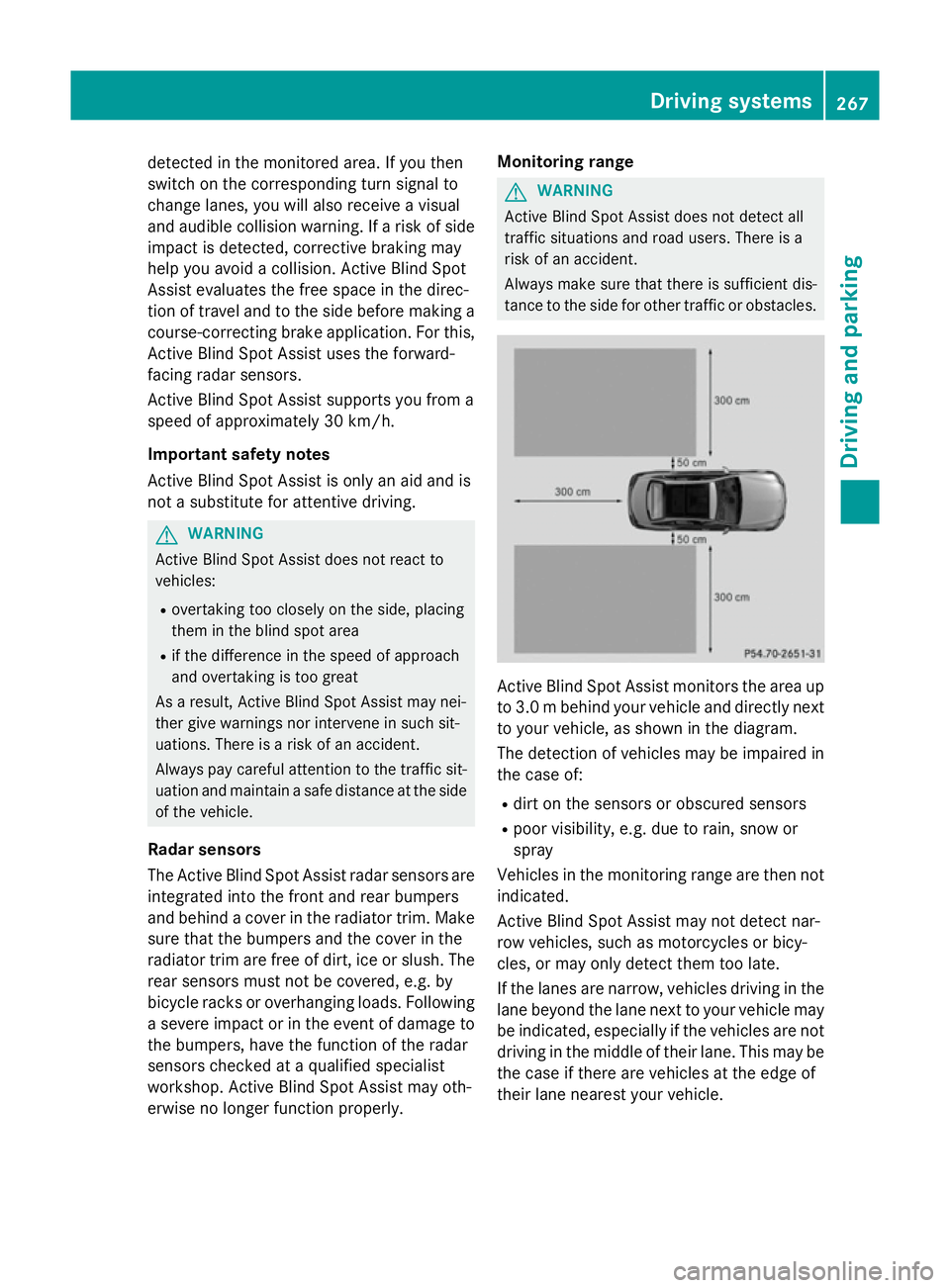
tance to the side for other traffic or obstacles. Active Blind Spot Assist monitors the area up
to 3.0 mbehind your vehicle and directly next
to your vehicle, as shown in the diagram.
The detection of vehicles may be impaired in the case of:
R dirt on the sensors or obscured sensors
R poor visibility, e.g. due to rain, snow or
spray
Vehicles in the monitoring range are then not
indicated.
Active Blind Spot Assist may not detect nar-
row vehicles, such as motorcycles or bicy-
cles, or may only detect them too late.
If the lanes are narrow, vehicles driving in the
lane beyond the lane next to your vehicle may
be indicated, especially if the vehicles are not driving in the middle of their lane. This may be
the case if there are vehicles at the edge of
their lane nearest your vehicle. Driving systems
267Driving and parking Z
Page 273 of 489
warning, a lane-correcting application of the
brakes can bring the vehicle back into the
original lane.
If you select km
km in the Display unit Display unit
Speed-/odometer
Speed-/odometer function on the on-board
computer (Y page 314), Active Lane Keeping
Assist is activated starting at a speed of
60 km/h. If the miles
miles display unit is selected,
the assistance range begins at 40 mph.
Important safety notes
If you fail to adapt your driving style, Active
Lane Keeping Assist can neither reduce the
risk of an accident nor override the laws of
physics. Active Lane Keeping Assist cannot
take account of road and weather conditions. It may not detect traffic situations. Active
Lane Keeping Assist is only an aid. You are
responsible for the distance to the vehicle in
front, for vehicle speed, for braking in good
time, and for staying in lane.
Active Lane Keeping Assist cannot continu-
ously keep your vehicle in its lane. G
WARNING
Active Lane Keeping Assist cannot always
clearly detect lane markings.
In such cases, Active Lane Keeping Assist
can:
R give an unnecessary warning and then
make a course-correcting brake application
to the vehicle
R neither give a warning nor intervene
There is a risk of an accident.
Always pay particular attention to the traffic
situation and keep within the lane, especially
if Active Lane Keeping Assist alerts you. Ter-
minate the intervention in a non-critical driv-
ing situation. The system may be impaired or may not func-
tion if:
R there is poor visibility, e.g. due to insuffi-
cient illumination of the road, or due to
snow, rain, fog or spray
R there is glare, e.g. from oncoming traffic,
the sun or reflection from other vehicles
(e.g. if the road surface is wet)
R the windscreen is dirty, misted up, dam-
aged or covered, for instance by a sticker,
in the vicinity of the camera
R the radar sensors in the front or rear bump-
ers or the radiator trim are dirty, e.g.
obscured by snow
R no or several, unclear lane markings are
present for one lane, e.g. in a construction
area
R the lane markings are worn away, dark or
covered up, e.g. by dirt or snow
R the distance to the vehicle in front is too
small and the lane markings thus cannot be
detected
R the lane markings change quickly, e.g.
lanes branch off, cross one another or
merge
R the road is narrow and winding
R there are highly variable shade conditions
on the road
If no vehicle is detected in the adjacent lane
and broken lane markings are detected, no
lane-correcting brake application is made.
Warning vibration through the steering
wheel
A warning may be given if a front wheel
passes over a lane marking. It will warn you by means of intermittent vibration in the steer-
ing wheel for up to 1.5 seconds.
Lane-correcting brake application
If you leave your lane under certain circum-
stances, the vehicle will brake briefly on one
side. This is intended to help you return the
vehicle to the original lane. 270
Driving systemsDriving and parking
Page 329 of 489
Display messages
Possible causes/consequences and
M
MSolutions Radar sensors
Radar sensors
dirty See Owner's dirty See Owner's
Manual Manual At least one of the following driving systems or driving safety sys-
tems is temporarily restricted or inoperative:
R PRE-SAFE ®
PLUS
R PRE-SAFE ®
Brake
R COLLISION PREVENTION ASSIST PLUS
R Active Lane Keeping Assist
R Active Blind Spot Assist
R DISTRONIC PLUS
Possible causes:
R the sensors in the radiator trim and/or in the bumpers are dirty
R the function of the driving system and/or driving safety system
is impaired due to heavy rain or snow
A warning tone also sounds.
Once the causes listed above no longer apply, the display message
goes out. All driving systems/driving safety systems are operative again.
If the display message does not disappear:
X Pull over and stop the vehicle safely as soon as possible, paying
attention to road and traffic conditions.
X Safeguard the vehicle against rolling away (Y page 211).
X Switch off the engine.
X Clean the sensors (Y page 405) in the following locations:
R in the radiator trim
R in the front bumper
R in the rear bumper, particularly in the middle of the rear
bumper
X Restart the engine.
The display message disappears. ü ü If this symbol appears in the multifunction display, a seat belt
tongue has been inserted into a rear seat belt buckle.
Further information on the status indicator for the rear seat belts
(Y page 50). 326
Display
messagesOn-board computer and displays