2014 MERCEDES-BENZ B-CLASS HATCHBACK reset
[x] Cancel search: resetPage 188 of 405
Fuel consumption also increases when driv-
ing in cold weather, in stop-start traffic, on
short journeys and in hilly terrain. ECO display
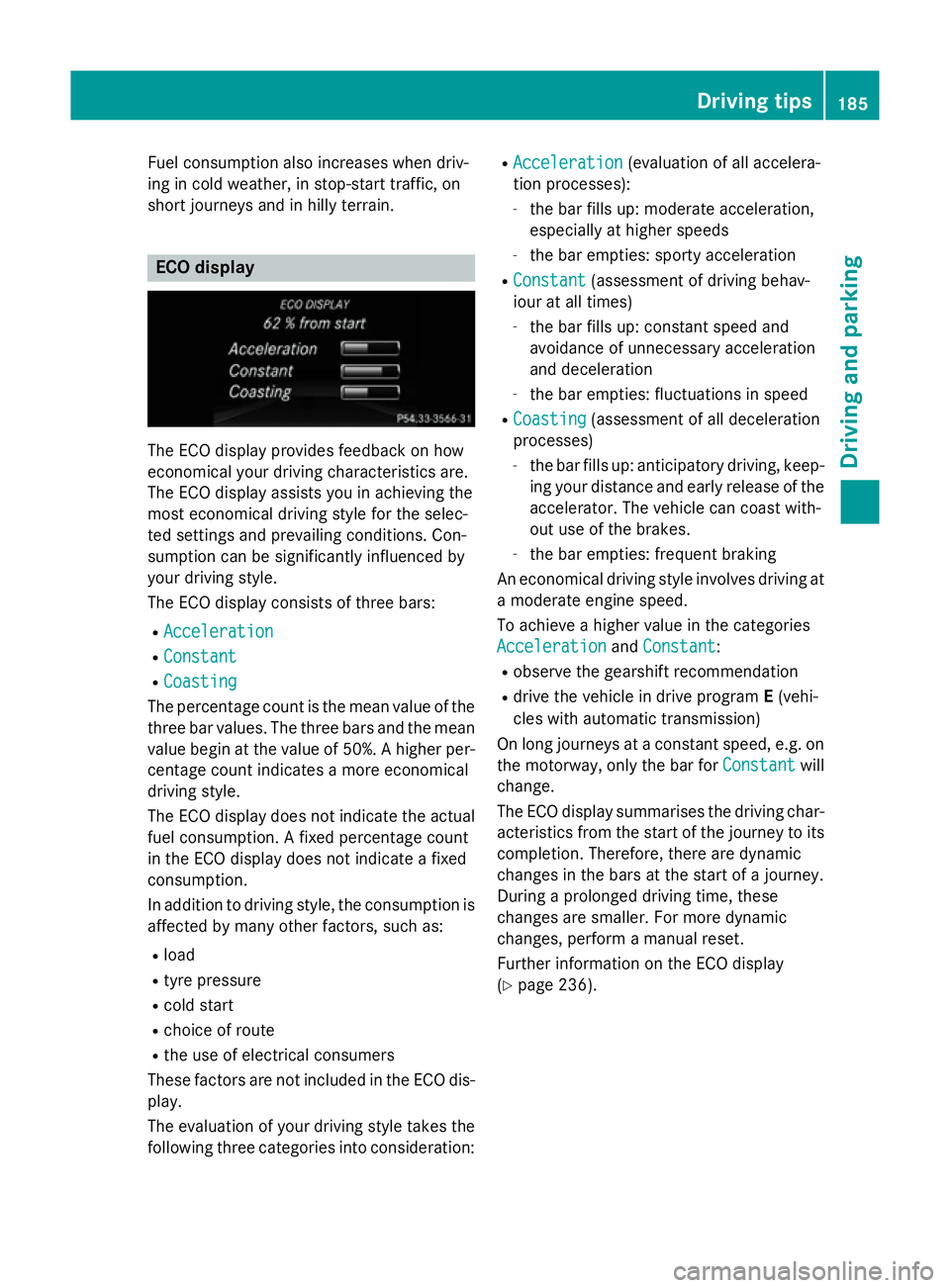
The ECO display provides feedback on how
economical your driving characteristics are.
The ECO display assists you in achieving the
most economical driving style for the selec-
ted settings and prevailing conditions. Con-
sumption can be significantly influenced by
your driving style.
The ECO display consists of three bars:
R Acceleration
Acceleration
R Constant Constant
R Coasting
Coasting
The percentage count is the mean value of the three bar values. The three bars and the mean
value begin at the value of 50%. A higher per- centage count indicates a more economical
driving style.
The ECO display does not indicate the actual
fuel consumption. A fixed percentage count
in the ECO display does not indicate a fixed
consumption.
In addition to driving style, the consumption is
affected by many other factors, such as:
R load
R tyre pressure
R cold start
R choice of route
R the use of electrical consumers
These factors are not included in the ECO dis-
play.
The evaluation of your driving style takes the following three categories into consideration: R
Acceleration
Acceleration (evaluation of all accelera-
tion processes):
- the bar fills up: moderate acceleration,
especially at higher speeds
- the bar empties: sporty acceleration
R Constant Constant (assessment of driving behav-
iour at all times)
- the bar fills up: constant speed and
avoidance of unnecessary acceleration
and deceleration
- the bar empties: fluctuations in speed
R Coasting Coasting (assessment of all deceleration
processes)
- the bar fills up: anticipatory driving, keep-
ing your distance and early release of the
accelerator. The vehicle can coast with-
out use of the brakes.
- the bar empties: frequent braking
An economical driving style involves driving at a moderate engine speed.
To achieve a higher value in the categories
Acceleration Acceleration andConstant
Constant :
R observe the gearshift recommendation
R drive the vehicle in drive program E(vehi-
cles with automatic transmission)
On long journeys at a constant speed, e.g. on the motorway, only the bar for Constant
Constantwill
change.
The ECO display summarises the driving char-
acteristics from the start of the journey to its completion. Therefore, there are dynamic
changes in the bars at the start of a journey.
During a prolonged driving time, these
changes are smaller. For more dynamic
changes, perform a manual reset.
Further information on the ECO display
(Y page 236). Driving tips
185Driving and parking Z
Page 219 of 405

Wide-angle function
:
Symbol for the wide-angle view function
; Own vehicle
= PARKTRONIC warning displays
You can also use the reversing camera to
select a wide-angle view.
When PARKTRONIC is operational
(Y page 204), a symbol for your own vehicle
appears in the Audio 20/COMAND Online
display. If the PARKTRONIC warning displays
are active, warning displays =light up in the
Audio 20/COMAND Online display in yellow
or red respectively. ATTENTION ASSIST
General notes ATTENTION ASSIST helps you during long,
monotonous journeys such as on motorways
and trunk roads. It is active in the 60 km/h to
200 km/h speed range. If ATTENTION ASSIST
detects typical indicators of fatigue or
increasing lapses in concentration on the part of the driver, it suggests taking a break.
Important safety notes ATTENTION ASSIST is only an aid. It may not
always detect fatigue or lapses in concentra-
tion until too late, or may not detect them at
all. The system is not a substitute for a well-
rested and attentive driver. The functionality of ATTENTION ASSIST is
restricted, and warnings may be delayed or
not occur at all:
R if the length of the journey is less than
approximately 30 minutes
R if the road condition is poor, e.g. if the sur-
face is uneven or if there are potholes
R if there is a strong side wind
R if you have adopted a sporty driving style
with high cornering speeds or high rates of
acceleration
R if you are predominantly driving at a speed
below 60 km/h or above 200 km/h
R if the time has been set incorrectly
R in active driving situations, such as when
you change lanes or change your speed
ATTENTION ASSIST is reset and starts
assessing your tiredness again when you con- tinue your journey if:
R you switch off the engine
R you take off your seat belt and open the
driver's door, e.g. for a change of drivers or
to take a break
Displaying Attention Level with black
and white multifunction display X
Select the status overview using the on-
board computer (Y page 242).
X Press :to display the ATTEN-
TION ASSIST assessment. 216
Driving systemsDriving and parking
Page 237 of 405

Left control panel
=
; R
Calls up the menu and menu bar 9
: Press briefly:
R Scrolls through lists
R Selects a submenu or function
R Vehicles with Audio 20: in the
Audio Audio menu, selects the previ-
ous/next stored station, when
the preset list or station list is
active, or an audio track
R Vehicles with COMAND Online:
in the Audio
Audio menu, selects the
previous/next station, when the
preset list or station list is active,
or an audio track or video scene
R In the Tel Tel(telephone) menu:
switches to the phone book and
selects a name or telephone
number 9
: Press and hold:
R Vehicles with Audio 20: in the
Audio Audio menu, selects the previ-
ous/next station, when the pre-
set list or station list is active, or
selects an audio track using
rapid scrolling
R Vehicles with COMAND Online:
in the Audio Audio menu, selects a pre-
set list or station list in the
desired waveband or an audio
track or video scene using rapid
scrolling
R In the Tel Tel(Telephone) menu:
starts rapid scrolling if the phone book is open a R
Confirms selection/display mes-
sage
R In the Tel
Tel(Telephone) menu:
switches to the telephone book
and starts dialling the selected
number % Press briefly:
R Back
R Switches off LINGUATRONIC
(see the separate operating
instructions)
R Hides display messages/calls
up the last Trip
Trip menu function
used
R Exits the telephone book/redial
memory % Press and hold:
R Calls up the standard display in
the Trip Trip menu Right control panel
ó R
Switches on LINGUATRONIC
(see the separate operating
instructions) 8 R
Mute W
X R
Adjusts the volume ~ R
Rejects or ends a call
R Exits telephone book/redial
memory 6 R
Makes or accepts a call
R Switches to the redial memory 234
Displays and operationOn-board computer and displays
Page 239 of 405

Menus and submenus
Menu overview
Press the =or; button on the steer-
ing wheel to call up the menu bar and select a
menu.
Operating the on-board computer
(Y page 233).
Depending on the equipment fitted in the
vehicle, you can call up the following menus:
R Trip Trip menu (Y page 236)
R Navi
Navi menu (navigation instructions)
(Y page 237)
R Audio
Audio menu (Y page 239)
R Tel
Tel menu (telephone) (Y page 240)
R Assist.
Assist. menu (assistance) (Y page 242)
R Serv.
Serv. menu (Y page 245)
R Settings
Settings menu (settings) (Y page 245)
The Audio
Audio, Navi
NaviandTel
Tel menus differ slightly
in vehicles with Audio 20 and in vehicles with COMAND Online. The examples given in this
Owner's Manual apply to vehicles equipped
with COMAND Online. Trip menu
Standard display X
Press and hold the %button on the
steering wheel until the Trip
Trip menu with
trip meter :and total distance
recorder ;is shown. Trip computer "From start" or "From
reset" :
Distance
; Driving time
= Average speed
? Average fuel consumption
X Press the =or; button on the steer-
ing wheel to select the Trip Tripmenu.
X Press the 9or: button to select
From start
From start orFrom reset
From reset.
The values in the From start
From start submenu are
calculated from the start of a journey whilst
the values in the From reset From resetsubmenu are
calculated from the last time the submenu
was reset (Y page 237).
The From start From start trip computer is automati-
cally reset when:
R the ignition has been switched off for more
than four hours.
R 999 hours have been exceeded.
R 9,999 kilometres have been exceeded.
The From reset
From reset trip computer is automati-
cally reset if the value exceeds 9,999 hours or 99,999 kilometres.
ECO display X
Press the =or; button on the steer-
ing wheel to select the Trip
Tripmenu.
X Press the 9or: button to select
ECO DISPLAY
ECO DISPLAY .236
Menus and submenusOn-board computer and displays
Page 240 of 405

If the ignition remains switched off for longer
than four hours, the ECO display will be auto-
matically reset.
Further information on the ECO display
(Y page 185).
Displaying the range and current fuel
consumption X
Press the =or; button on the steer-
ing wheel to select the Trip Tripmenu.
X Press the 9or: button to select
approximate range :and current fuel con-
sumption ;.
Approximate range :that can be covered is
calculated according to your current driving
style and the amount of fuel in the tank. If
there is only a small amount of fuel left in the
fuel tank, the display shows a vehicle being
refuelled Cinstead of approximate
range :.
Recuperation display =shows you if energy
has been recuperated from the kinetic energy
in overrun mode and saved in the battery.
Recuperation display =depends on the
engine installed and is therefore not available in all vehicles.
Digital speedometer X
Press the =or; button on the steer-
ing wheel to select the Trip Tripmenu.
X Press the 9or: button to select
digital speedometer ;.
A gearshift recommendation :Zcan also
be displayed.
Observe the information on gearshift rec-
ommendation :for manual transmission
(Y page 169) or for automatic transmission
(shifting manually) (Y page 175).
Resets values X
Press the =or; button on the steer-
ing wheel to select the Trip Tripmenu.
X Press the 9or: button to select the
function that you wish to reset.
X Press the abutton.
X Select :YesYesand press ato confirm.
You can reset the values of the following func-
tions:
R Trip meter
R "From start" trip computer
R "From reset" trip computer
R ECO display
If you reset the values in the "ECO display",
the values in the "From start" trip computer
are also reset. If you reset the values in the
"From start" trip computer, the values in the
"ECO display" are also reset. Navigation menu
Displaying navigation instructions In the
Navi Navimenu, the multifunction display
shows navigation instructions. Menus and submenus
237On-board computer and displays Z
Page 242 of 405

Lane not recommended
=: you will not be
able to complete the next change of direction
if you stay in this lane.
Recommended lane and new lane during a
change of direction ?: in this lane you will be
able to complete the next two changes of
direction without changing lane.
Other status indicators of the naviga-
tion system The navigation system displays additional
information and the vehicle status.
Possible displays
R New
New route...
route... orCalculating Calculating route...
route...
A new route is calculated.
R Road not mapped
Road not mapped
The vehicle position is inside the area of the
digital map but the road is not recognised,
e.g. new roads, car parks or private land.
R No route No route
No route could be calculated to the selec-
ted destination.
R O
You have reached the destination or an
intermediate destination. Audio menu
Selecting a radio station :
Active station list
; Station frequency with memory position
Station ;is displayed with the station fre-
quency or station name. The memory position is only displayed along with station ;if this
has been stored.
X Switch on Audio 20 or COMAND Online and
select Radio (see the separate operating
instructions).
X Press the =or; button on the steer-
ing wheel to select the Audio Audiomenu.
Vehicles with Audio 20
X To select a station from the preset list:
briefly press the 9or: button.
X To select a station from the station list:
press and briefly hold the 9or:
button.
Vehicles with COMAND Online
X To select a preset list or station list:
press and hold the 9or: button
until the preset list or station list is shown in
the desired frequency range.
X To select a station: briefly press9
or :.
i DAB radio mode (Digital
AudioBroadcast-
ing) is an optimised digital transmission
standard designed for the mobile reception
of radio transmissions. Menus and submenus
239On-board computer and displays Z
Page 252 of 405

X
Press the :or9 button to select A
A,B
B
or Change C
Change C.
X Press ato confirm.
You can now change the departure time.
X Press the =or; button to select the
display to be changed: hours, minutes.
X Press the :or9 button to set the
selected display.
X Press the abutton to store the entry.
The yellow indicator lamp on the auxiliary
heating button lights up.
Comfort Switching belt adjustment on/off
X Press the =or; button on the steer-
ing wheel to select the Settings Settingsmenu.
X Press the :or9 button to select the
Convenience
Convenience submenu.
X Press ato confirm.
X Press the :or9 button to select the
Belt adjustment
Belt adjustment function.
Vehicles with a black and white multifunc-
tion display: you see the selected setting on
on
or off
off.
Vehicles with a colour multifunction dis-
play: when the Belt adjustment
Belt adjustment function
is activated, the vehicle seat belt is dis-
played in orange in the multifunction dis-
play.
X Press the abutton to save the setting.
For further information on belt adjustment,
see (Y page 45).
Switching the fold-in mirrors when lock-
ing function on/off
This function is only available when the vehi-
cle is equipped with the electrical fold-in func-
tion.
If you switch on the Fold
Fold mirrors mirrors in
inwhen
when
locking
locking function (vehicles with black and
white multifunction display) or the Auto.
Auto.
fold-in mirrors
fold-in mirrors function (vehicles with
colour multifunction display), the exterior mir- rors fold in when you lock the vehicle. If you unlock the vehicle and then open the driver's
or front-passenger door, the exterior mirrors
fold out again.
If you activate the Fold mirrors in when Fold mirrors in when
locking
locking function (vehicles with a black and
white multifunction display) or Auto. fold-
Auto. fold-
in mirrors
in mirrors function (vehicles with a colour
multifunction display) and fold in the exterior
mirrors using the button on the door
(Y page 116), they will not fold out automat-
ically. The exterior mirrors can then only be
folded out using the button on the door.
X Press the =or; button on the steer-
ing wheel to select the Settings Settingsmenu.
X Press the :or9 button to select the
Convenience
Convenience submenu.
X Press ato confirm.
X Press :or9 to select the Fold
Fold
mirrors
mirrors in
inwhen
when locking
locking function (vehi-
cles with a black and white multifunction
display) or the Auto. fold-in mirrors Auto. fold-in mirrors
function (vehicles with a colour multifunc-
tion display).
Vehicles with a black and white multifunc-
tion display: you see the selected setting on
on
or off off.
Vehicles with a colour multifunction dis-
play: if the Auto. Auto.fold-in
fold-in mirrors
mirrorsfunc-
tion is activated, the vehicle's exterior mir- ror is displayed in orange in the multifunc-
tion display.
X Press the abutton to save the setting.
Resetting to factory settings X
Press the =or; button on the steer-
ing wheel to select the Settings Settingsmenu.
X Press the :or9 button to select the
Factory setting
Factory setting submenu.
X Press ato confirm.
The Reset all settings?
Reset all settings? message
appears. Menus and submenus
249On-board computer and displays Z
Page 253 of 405

X
Press the :or9 button to select No
No
or Yes
Yes.
X Press the abutton to confirm the selec-
tion.
If you have selected Yes
Yes, the multifunction
display shows a confirmation message.
For safety reasons, not all functions are reset: the Limit speed (winter tyres):
Limit speed (winter tyres): func-
tion in permanent SPEEDTRONIC can only be
set in the Vehicle Vehiclesubmenu. 250
Menus and submenusOn-board computer and displays