2014 LINCOLN MKZ warning
[x] Cancel search: warningPage 399 of 468

SYNC Services Voice Commands
E142599
When a route has been
downloaded (non-navigationsystems), press the voice button on
the steering wheel controls. When
prompted, say any of the following
commands:
"SERVICES"
"Cancel route"
"Navigation voice off" "Navigation voice on" "Next turn"
"Route status"
"Route summary" "Services"
"Update route" "Help"
Sirius T ravel Link (If Equipped)
WARNING
Driving while distracted can
result in loss of vehicle control,
crash and injury. We strongly
recommend that you use extreme
caution when using any device that
may take your focus off the road. Your
primary responsibility is the safe
operation of your vehicle. We
recommend against the use of any
handheld device while driving and
encourage the use of voice-operated
systems when possible. Make sure you
are aware of all applicable local laws
that may affect the use of electronic
devices while driving.
Note: In order to use Sirius Travel Link,
your vehicle must be equipped with
navigation and your navigation SD card
must be in the SD card slot.
Note: A paid subscription is required
to access and use these features. Go
to www.siriusxm.com/travellink for
more information.
Note: Visit www.siriusxm.com/traffic#
and click on Coverage map and details
for a complete listing of all traffic areas
covered by Sirius Travel Link.
Note: Neither Sirius nor Ford is
responsible for any errors or
inaccuracies in the Sirius Travel Link
services or its use in vehicles.
396
MyLincoln Touch™
Page 403 of 468

Alerts
E142608
If your vehicle is equipped
with Navigation, touch the i
(Information) button to
access these features. If your vehicle
is not equipped with Navigation, touch
the corner of the touchscreen with the
green tab.
Press Alerts, and then choose from
any of the following services:
• View the complete message
• Delete the message
• Delete All messages
This screen displays any system
messages (such as an SD card fault).
Note: The system alerts you to any
messages by turning the information
icon yellow. After you read or delete
the messages, the icon returns to white.
Calendar
E142608
If your vehicle is equipped
with Navigation, touch the i
(Information) button to
access these features. If your vehicle
is not equipped with Navigation, touch
the corner of the touchscreen with the
green tab.
Press Calendar. You can view the
current calendar by day, week or
month.
911 Assist (If Equipped)
WARNINGS
Unless the 911 Assist setting is
set on before a crash, the system
will not dial for help, which could
delay response time, potentially
increasing the risk of serious injury or
death after a crash.
Do not wait for 911 Assist to
make an emergency call if you
can do it yourself. Dial emergency
services immediately to avoid delayed
response time, which could increase
the risk of serious injury or death after
a crash. If you do not hear 911 Assist
within five seconds of the crash, the
system or phone may be damaged or
non-functional.
Always place your phone in a
secure location in your vehicle so
it does not become a projectile or
damaged in a crash. Failure to do so
may cause serious injury to someone
or damage the phone, which could
prevent 911 Assist from working
properly.
Note: The SYNC 911 Assist feature
must be set on prior to the incident.
Note: Before setting this feature on,
make sure that you read the 911 Assist
Privacy Notice later in this section for
important information.
400
MyLincoln Touch™
Page 406 of 468

Vehicle Health Report (If Equipped)
WARNING
Always follow scheduled
maintenance instructions,
regularly inspect your vehicle, and
seek repair for any damage or problem
you suspect. Vehicle Health Report
supplements, but cannot replace,
normal maintenance and vehicle
inspection. Vehicle Health Report only
monitors certain systems
electronically monitored by your
vehicle and will not monitor or report
the status of any other system, (such
as brake lining wear). Failure to
perform scheduled maintenance and
regularly inspect your vehicle may
result in vehicle damage and serious
injury.
Note: This feature is only available in
the United States.
Note: Your Vehicle Health Report
feature requires activation prior to use.
Visit www.SYNCMyRide.com to
register. There is no fee or subscription
associated with Vehicle Health Report,
but you must register to use this
feature.
Note: This feature may not function
properly if you have enabled caller ID
blocking on your cellular phone. Before
running a report, review the Vehicle
Health Report Privacy Notice.
Note: In order to allow a break-in
period for your vehicle, you may not be
able to create a Vehicle Health Report
until your vehicle odometer has
reached 200 miles. Note:
Cellular phone and SMS charges
may apply when making a report.
Register for Vehicle Health Report and
set your report preferences at
www.SYNCMyRide.com. After
registering, you can request a Vehicle
Health Report (inside your vehicle).
Return to your account at
www.SYNCMyRide.com to view your
report. You can also choose for SYNC
to remind you automatically to run
reports at specific mileage intervals.
Cellular phone airtime usage may
apply when reporting.
The system allows you to check your
vehicle’s overall health in the form of
a diagnostic report card. The Vehicle
Health Report contains valuable
information, such as:
• Vehicle diagnostic information
• Scheduled maintenance
• Open recalls and Field Service Actions
• Items noted during vehicle inspections by your authorized
dealer that still need servicing.
Making a Report
E142608
If you want to run a report by
using the touchscreen, touch
Apps > Vehicle Health
Report.
E142599
To run a report by voice
command, press the voice
button on the steering wheel
and, when prompted, say "Vehicle
health report".
403
MyLincoln Touch™
Page 427 of 468

Keep User's Guide in vehicle: When
kept in the vehicle, the User's Guide
will be a ready reference for you and
other users unfamiliar with the
Windows Automotive-based system.
Please make certain that before using
the system for the first time, all
persons have access to the User's
Guide and read its instructions and
safety information carefully.
WARNING
Operating certain parts of this
system while driving can distract
your attention away from the road,
and possibly cause an accident or
other serious consequences. Do not
change system settings or enter data
non-verbally (using your hands) while
driving. Stop the vehicle in a safe and
legal manner before attempting these
operations. This is important since
while setting up or changing some
functions you might be required to
distract your attention away from the
road and remove your hands from the
wheel.
General Operation
Voice Command Control: Functions
within the Windows
Automotive-based system may be
accomplished using only voice
commands. Using voice commands
while driving allows you to operate
the system without removing your
hands from the wheel. Prolonged Views of Screen: Do not
access any function requiring a
prolonged view of the screen while
you are driving. Pull over in a safe and
legal manner before attempting to
access a function of the system
requiring prolonged attention. Even
occasional short scans to the screen
may be hazardous if your attention
has been diverted away from your
driving task at a critical time.
Volume Setting: Do not raise the
volume excessively. Keep the volume
at a level where you can still hear
outside traffic and emergency signals
while driving. Driving while unable to
hear these sounds could cause an
accident.
Use of Speech Recognition
Functions: Speech recognition
software is inherently a statistical
process which is subject to errors. It is
your responsibility to monitor any
speech recognition functions included
in the system and address any errors.
Navigation Features: Any navigation
features included in the system are
intended to provide turn by turn
instructions to get you to a desired
destination. Please make certain all
persons using this system carefully
read and follow instructions and
safety information fully.
424
Appendices
Page 434 of 468

otherwise reproduce, copy, modify,
decompile, disassemble or reverse
engineer any portion of this Data, and
may not transfer or distribute it in any
form, for any purpose, except to the
extent permitted by mandatory laws.
License Limitations on Transfer:
Your limited license does not allow
transfer or resale of the Data, except
on the condition that you may transfer
the Data and all accompanying
materials on a permanent basis if: (a)
you retain no copies of the Data; (b)
the recipient agrees to the terms of
this End User License Agreement; and
(c) you transfer the Data in the exact
same form as you purchased it by
physically transferring the original
media (e.g., the CD-ROM or DVD you
purchased), all original packaging, all
Manuals and other documentation.
Specifically, Multi-disc sets may only
be transferred or sold as a complete
set as provided to you and not as a
subset thereof.
Additional License Limitations:
Except where you have been
specifically licensed to do so by NT in
a separate written agreement, and
without limiting the preceding
paragraph, your license is conditioned
on use of the Data as prescribed in
this agreement, and you may not (a)
use this Data with any products,
systems, or applications installed or
otherwise connected to or in
communication with vehicles capable
of vehicle navigation, positioning,
dispatch, real time route guidance,
fleet management or similarapplications; or (b) with, or in
communication with, including
without limitation, cellular phones,
palmtop and handheld computers,
pagers, and personal digital assistants
or PDAs.
WARNING
This Data may contain
inaccurate or incomplete
information due to the passage of
time, changing circumstances,
sources used and the nature of
collecting comprehensive geographic
Data, any of which may lead to
incorrect results.
No Warranty: This Data is provided
to you "as is" , and you agree to use it
at your own risk. NT and its licensors
(and their licensors and suppliers)
make no guarantees, representations
or warranties of any kind, express or
implied, arising by law or otherwise,
including but not limited to, content,
quality, accuracy, completeness,
effectiveness, reliability, fitness for a
particular purpose, usefulness, use or
results to be obtained from this Data,
or that the Data or server will be
uninterrupted or error free.
Disclaimer of Warranty: NT AND
ITS LICENSORS (INCLUDING THEIR
LICENSORS AND SUPPLIERS)
DISCLAIM ANY WARRANTIES,
EXPRESS OR IMPLIED, OF QUALITY,
PERFORMANCE, MERCHANTABILITY,
FITNESS FOR A PARTICULAR
431
Appendices
Page 438 of 468

THE GRACENOTE SOFTWARE, EACH
ITEM OF GRACENOTE DATA AND
THE GRACENOTE CONTENT ARE
LICENSED TO YOU "AS IS". NEITHER
GRACENOTE MAKES ANY
REPRESENTATIONS OR
WARRANTIES, EXPRESS OR IMPLIED,
REGARDING THE ACCURACY OF ANY
GRACENOTE DATA FROM THE
GRACENOTE SERVERS OR
GRACENOTE CONTENT.
GRACENOTE COLLECTIVELY AND
SEPARATELY RESERVE THE RIGHT
TO DELETE DATA AND/OR CONTENT
FROM THE COMPANIES'
RESPECTIVE SERVERS OR, IN THE
CASE OF GRACENOTE, CHANGE
DATA CATEGORIES FOR ANY CAUSE
THAT GRACENOTE DEEMS
SUFFICIENT. NO WARRANTY IS
MADE THAT EITHER GRACENOTE
CONTENT OR THE GRACENOTE
SOFTWARE OR GRACENOTE
SERVERS ARE ERROR-FREE OR
THAT THE FUNCTIONING OF THE
GRACENOTE SOFTWARE OR
GRACENOTE SERVERS WILL BE
UNINTERRUPTED. GRACENOTE IS
NOT OBLIGATED TO PROVIDE YOU
WITH ANY ENHANCED OR
ADDITIONAL DATA TYPES THAT
GRACENOTE MAY CHOOSE TO
PROVIDE IN THE FUTURE AND IS
FREE TO DISCONTINUE ITS ONLINE
SERVICES AT ANY TIME.
GRACENOTE DISCLAIM ALL
WARRANTIES EXPRESS OR IMPLIED,
INCLUDING, BUT NOT LIMITED TO,
IMPLIED WARRANTIES OF
MERCHANTABILITY, FITNESS FOR A
PARTICULAR PURPOSE, TITLE, AND
NON-INFRINGEMENT. NEITHERGRACENOTE WARRANTS THE
RESULTS THAT WILL BE OBTAINED
BY YOUR USE OF THE GRACENOTE
SOFTWARE OR ANY GRACENOTE
SERVER. IN NO CASE WILL
GRACENOTE BE LIABLE FOR ANY
CONSEQUENTIAL OR INCIDENTAL
DAMAGES OR FOR ANY LOST
PROFITS OR LOST REVENUES FOR
ANY REASON WHATSOEVER.
© Gracenote 2007.
FCC ID: KMHSYNCG2
IC: 1422A-SYNCG2
This device complies with Part 15 of
the FCC Rules and with RSS-210 of
Industry Canada. Operation is subject
to the following two conditions: (1)
This device may not cause harmful
interference, and (2) this device must
accept any interference received,
including interference that may cause
undesired operation.
WARNING
Changes or modifications not
expressively approved by the
party responsible for compliance
could void the user's authority to
operate the equipment. The term "IC"
before the radio certification number
only signifies that Industry Canada
technical specifications were met.
The antenna used for this transmitter
must not be co-located or operating
in conjunction with any other antenna
or transmitter.
435
Appendices
Page 442 of 468
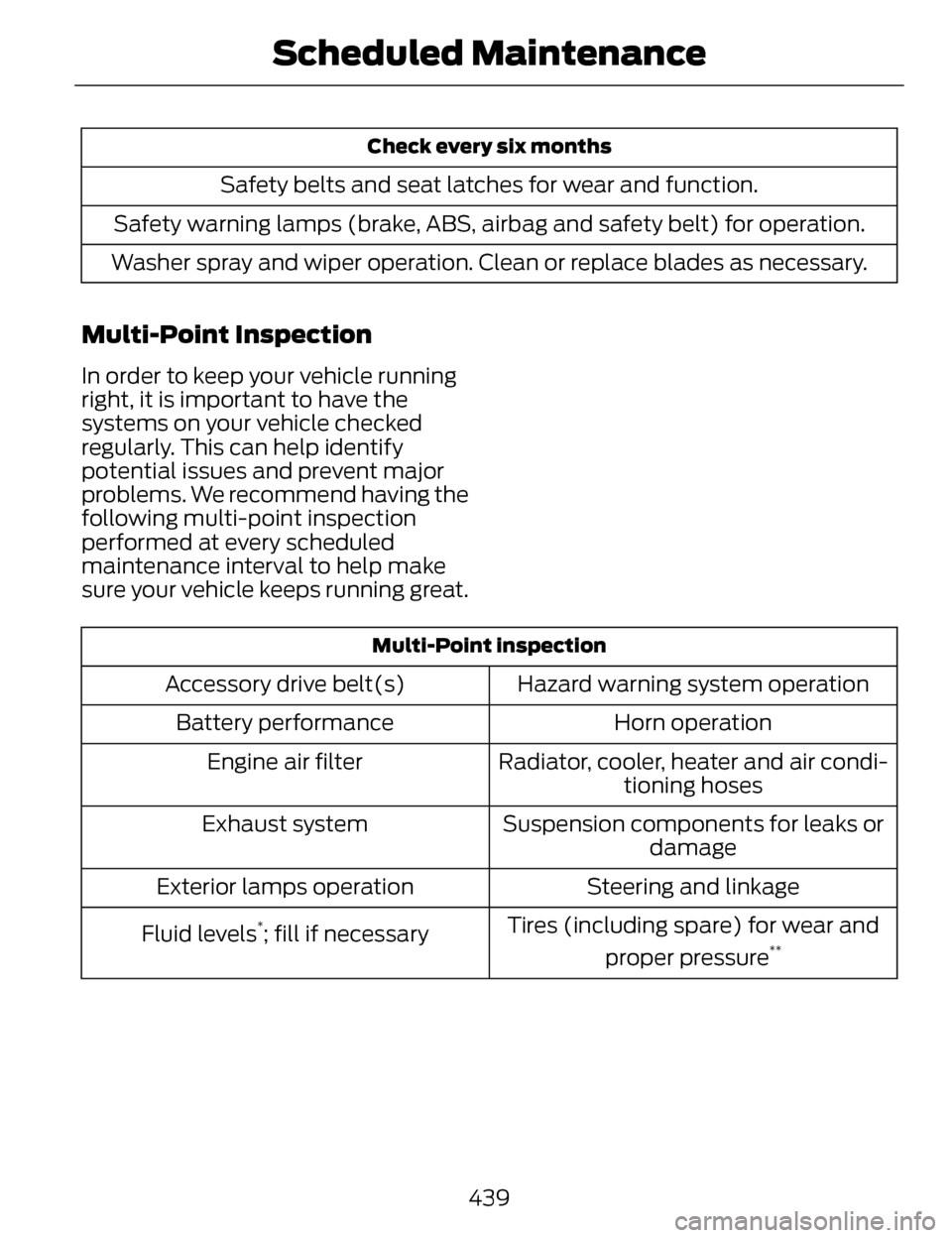
Check every six months
Safety belts and seat latches for wear and function.
Safety warning lamps (brake, ABS, airbag and safety belt) for operation.
Washer spray and wiper operation. Clean or replace blades as necessary.
Multi-Point Inspection
In order to keep your vehicle running
right, it is important to have the
systems on your vehicle checked
regularly. This can help identify
potential issues and prevent major
problems. We recommend having the
following multi-point inspection
performed at every scheduled
maintenance interval to help make
sure your vehicle keeps running great.
Multi-Point inspection
Hazard warning system operation
Accessory drive belt(s)
Horn operation
Battery performance
Radiator, cooler, heater and air condi-tioning hoses
Engine air filter
Suspension components for leaks ordamage
Exhaust system
Steering and linkage
Exterior lamps operation
Tires (including spare) for wear andproper pressure
**Fluid levels*; fill if necessary
439
Scheduled Maintenance
Page 456 of 468

A
A/CSee: Climate Control...............................128
About This Manual..................................7Protecting the Environment......................7
ABSSee: Brakes..................................................179
ABS driving hintsSee: Hints on Driving With Anti-LockBrakes......................................................180
Accessories ...........................................337Exterior style...............................................337
Interior style................................................337
Lifestyle........................................................337
Peace of mind...........................................337
AccessoriesSee: Replacement Parts
Recommendation...................................12
ACCSee: Using Adaptive Cruise Control...199
Active Park Assist...............................189Automatic Steering into ParkingSpace.........................................................191
Deactivating the Park Assist Feature.....................................................192
Troubleshooting the System................192
Using Active Park Assist........................190
Adaptive Headlamps..........................86
Adjusting the Headlamps...............285
Horizontal Aim Adjustment.................286
Vertical Aim Adjustment......................285
Adjusting the Steering Wheel...........75Power Tilt and Telescope Steering Column.......................................................75
AFSSee: Adaptive Headlamps.....................86
Airbag Disposal.......................................51
Air Conditioning
See: Climate Control...............................128
AlarmSee: Anti-Theft Alarm...............................73
All-Wheel Drive....................................173
Anti-Theft Alarm...................................73
Arming the Alarm.......................................74
Disarming the Alarm.................................74
Appendices...........................................418
Audible Warnings andIndicators............................................100
Headlamps On Warning Chime.........100
Key in Ignition Warning Chime............100
Keyless Warning Alert............................100
Parking Brake On Warning
Chime....................................................... 100
Audio Control..........................................76Seek, Next or Previous..............................76
Audio System........................................124General Information................................124
Audio unit - Vehicles With: Premium
AM/FM/CD..........................................125
Autolamps...............................................82
Automatic Climate Control.............128
Automatic High Beam Control........84
Activating the System..............................85
Manually Overriding the System..........85
Automatic Transmission...................167Automatic Transmission Adaptive
Learning.....................................................171
Brake-Shift Interlock Override.............170
If Your Vehicle Gets Stuck In Mud or Snow..........................................................172
Push Button Shift Transmission.........167
SelectShift Automatic™ Transmission.........................................169
Automatic Transmission FluidCheck....................................................276
6F35/HF35 transmission......................276
6F50/6F55 Transmission.....................276
Autowipers..............................................79
Auxiliary Power Points......................148
110 Volt AC Power Point.........................148
12 Volt DC Power Point...........................148
Locations.....................................................148
453
Index