Page 80 of 498

The system will turn off the lights if:
•you switch the ignition on
•you press the lock button on the remote control
•you lock the vehicle using the keyless entry keypad
•they have been on for 25 seconds.
The lights will not turn off if:
•you have turned them on with the dimmer control
•any door is open.
Illuminated Exit
The interior dome lamps, parking lamps and puddle lamps (if equipped)
illuminate when all doors are closed and the ignition is turned off.
The lights turn off if all the doors remain closed and:
•25 seconds elapse
•you press theSTART/STOPbutton.
Battery Saver
If you leave the courtesy lamps, dome lamps or headlamps on, the
battery saver shuts them off 10 minutes after you switch the ignition off.
Accessory Mode Battery Saver for Intelligent Access Keys
If you leave your vehicle in the run ignition state, it will shut off once it
detects a certain amount of battery drain or after 45 minutes.
LIFTGATE
WARNING:It is extremely dangerous to ride in a cargo area,
inside or outside of a vehicle. In a crash, people riding in these
areas are more likely to be seriously injured or killed. Do not allow
people to ride in any area of your vehicle that is not equipped with
seats and safety belts. Be sure everyone in your vehicle is in a seat and
using a safety belt properly.
Power Liftgate
WARNING:Make sure all persons are clear of the power liftgate
area before using the power liftgate control.
Locks79
2014 MKT(mkt)
Owners Guide gf, 1st Printing, April 2013
USA(fus)
Page 90 of 498

ADJUSTING THE STEERING WHEEL
WARNING:Do not adjust the steering wheel when your vehicle
is moving.
Note:Make sure that you are sitting in the correct position. Refer to
Sitting in the Correct Positionin theSeatschapter.
Use the control on the side of the
steering column to adjust the
position.
To adjust:
•tilt: press the top or bottom of the
control
•telescope: press the front or rear
of the control.
Easy Entry and Exit Feature
When you switch the ignition off, the steering column will move to the
full up and forward position to allow extra room to exit your vehicle. The
column will return to the previous setting when you switch the ignition
on. You can enable or disable this feature in the information display.
SeeGeneral Informationin theInformation Displayschapter.
Memory Feature
The steering column position saves when you do a memory set function.
You can recall it with the memory feature. Refer to theSeatschapter.
Pressing the adjustment control during memory recall will cancel the
operation. The column will respond to the adjustment control.
The steering column sets a stopping position just short of the end of the
column position to prevent damage to the steering column. A new
stopping position will be set if the steering column encounters an object
while tilting or telescoping.
Steering Wheel89
2014 MKT(mkt)
Owners Guide gf, 1st Printing, April 2013
USA(fus)
Page 94 of 498
ADJUSTABLE PEDALS (IF EQUIPPED)
WARNING:Never adjust the accelerator and brake pedal with
feet on the pedals while the vehicle is moving.
The control is located on the left side of the steering column. Press and
hold the appropriate control to move the pedals.
A. Farther
B. Closer
The pedal positions are saved and recalled with the memory feature
(if equipped). Refer to theSeatschapter.
The pedals should only be adjusted when the vehicle is parked.
AB
Pedals93
2014 MKT(mkt)
Owners Guide gf, 1st Printing, April 2013
USA(fus)
Page 104 of 498
Second row map lamps
Your vehicle has second row lamps
located within the grab handles.
Press the lens to turn on the lamps.
Second row vanity mirror dome lamps (Livery only)
The vanity mirror dome lamps are
located in the headliner behind the
front seats. The lamps light when:
•Any door is opened.
•The instrument panel dimmer
button is pressed until the
courtesy lamp comes on.
•The remote entry controls are
pressed and the ignition is off.
Press the lens on either lamp to manually turn the dome lamps on and off.
Lighting103
2014 MKT(mkt)
Owners Guide gf, 1st Printing, April 2013
USA(fus)
Page 108 of 498

EXTERIOR MIRRORS
Power Exterior Mirrors
WARNING:Do not adjust the mirror while your vehicle is in
motion.
A. Left mirror
B. Adjustment control
C. Right mirror
To adjust your mirrors:
1. Press the button to select the mirror you want to adjust. An indicator
light on the button will illuminate.
2. Use the adjustment control to adjust the position of the mirror.
3. Press the mirror button again to deselect the mirror. The indicator
light will turn off.
Fold-Away Exterior Mirrors
Push the mirror toward the door window glass. Make sure that you fully
engage the mirror in its support when returning it to its original position.
Heated Exterior Mirror
Note:Do not remove ice from the mirrors with a scraper or attempt to
readjust the mirror glass that has frozen in place. These actions could
cause damage to the glass and mirrors.
Note:Do not clean the housing or glass of any mirror with harsh
abrasives, fuel or other petroleum-based cleaning products.
Both mirrors heat to remove ice, mist and fog when you turn the rear
window defroster on.
Memory Mirrors
You can save and recall the mirror positions through the memory
function. SeeMemory functionin theSeatschapter.
Windows and Mirrors107
2014 MKT(mkt)
Owners Guide gf, 1st Printing, April 2013
USA(fus)
Page 124 of 498
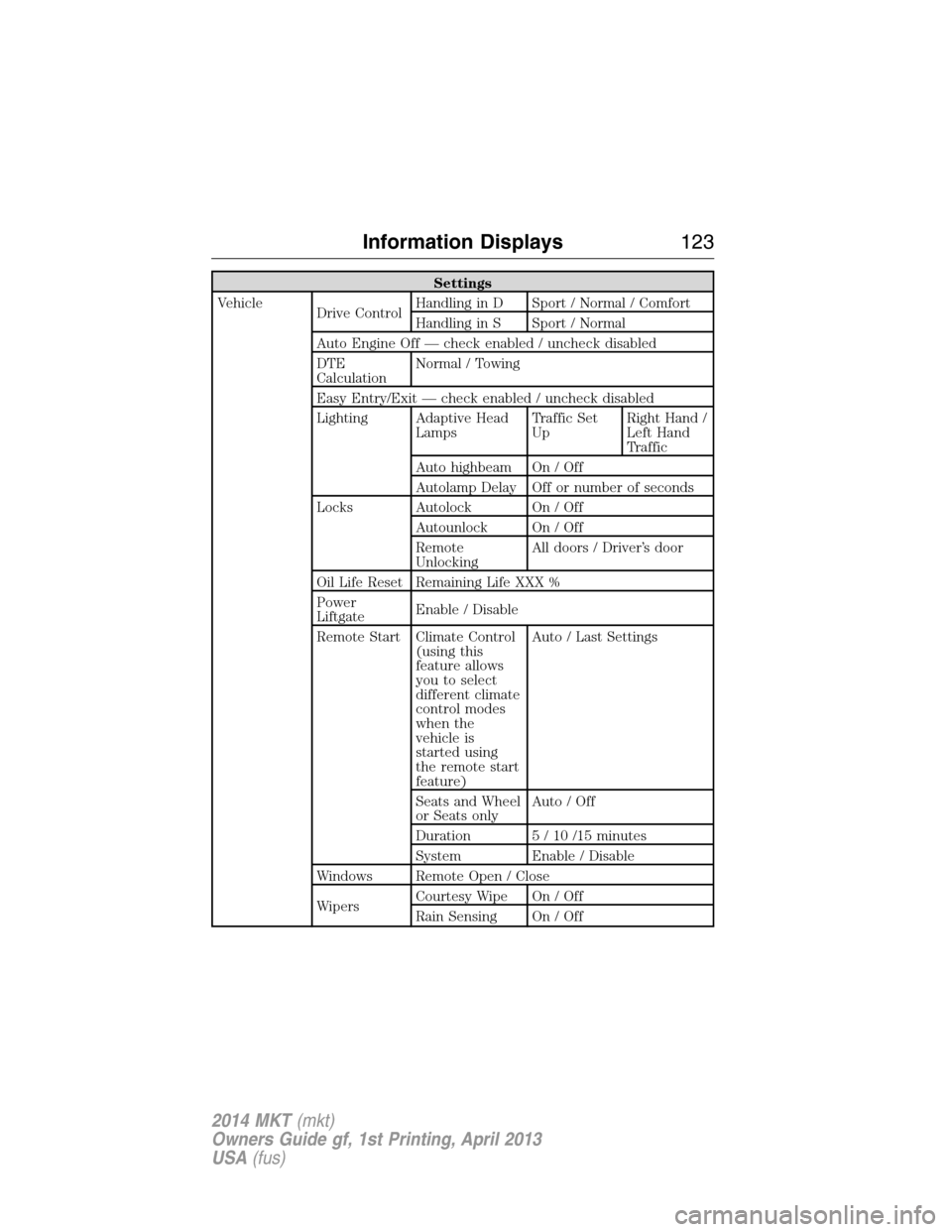
Settings
Vehicle
Drive ControlHandling in D Sport / Normal / Comfort
Handling in S Sport / Normal
Auto Engine Off — check enabled / uncheck disabled
DTE
CalculationNormal / Towing
Easy Entry/Exit — check enabled / uncheck disabled
Lighting Adaptive Head
LampsTraffic Set
UpRight Hand /
Left Hand
Traffic
Auto highbeam On / Off
Autolamp Delay Off or number of seconds
Locks Autolock On / Off
Autounlock On / Off
Remote
UnlockingAll doors / Driver’s door
Oil Life Reset Remaining Life XXX %
Power
LiftgateEnable / Disable
Remote Start Climate Control
(using this
feature allows
you to select
different climate
control modes
when the
vehicle is
started using
the remote start
feature)Auto / Last Settings
Seats and Wheel
or Seats onlyAuto / Off
Duration 5 / 10 /15 minutes
System Enable / Disable
Windows Remote Open / Close
WipersCourtesy Wipe On / Off
Rain Sensing On / Off
Information Displays123
2014 MKT(mkt)
Owners Guide gf, 1st Printing, April 2013
USA(fus)
Page 134 of 498

Park Aid Messages Action / Description
Check Park Aid Displayed when the transmission is in R
(Reverse) and the park aid is disabled.
Check Front Park Aid Displayed when the transmission is in D
(Drive) and the front park aid is disabled.
Check Rear Park Aid Displayed when the transmission is in R
(Reverse) and the park aid is disabled.
Front Park Aid On Off Displays the front park aid status.
Rear Park Aid On Off Displays the rear park aid status.
Passenger Sensing
System MessageAction / Description
Occupant Sensor
BLOCKED Remove
Objects Near
Passenger SeatDisplayed when objects are by the passenger
seat. After the objects are moved away from
the seat, if the warning stays on or continues
to come on contact your authorized dealer as
soon as possible.
Reminder Messages Action / Description
Steering column lock:
Remove and re-insert
key while turning
wheel to unlockDisplays when you need to turn the steering
wheel in order to disengage the steering lock.
Shift to Park Displayed when the engine is turned off and
shift select lever is in any position other than
P (Park).
Engine On Displayed when the driver door is open, the
vehicle engine is on and the vehicle is in park.
Information Displays133
2014 MKT(mkt)
Owners Guide gf, 1st Printing, April 2013
USA(fus)
Page 138 of 498

•AUTO:Select to switch to automatic fan speed control. The system
automatically determines fan speed in order to reach and maintain the
desired temperature.
B.Heated seat controls (if equipped):Press to switch the heated
seats off and on. SeeHeated seatsin theSeatschapter for more
information.
C.Air distribution control:Press repeatedly to select airflow as
follows:
Distributes air through the overhead vents of the second and
third row seating areas.
Distributes air through the floor of the second or third row
seating areas.
Distributes air through the floor and overhead vents of the
second and third row seating areas.
D.Temperature control:Controls the temperature of the air circulated
in the rear of the vehicle. Turn to select the desired temperature.
E.
Cooled seat control (if equipped):Press to switch the cooled
seats off and on. SeeHeated and cooled seatsin theSeatschapter for
more information.
F.AUTO:Press to activate automatic control of the airflow direction in
the rear of the vehicle. The system automatically determines the airflow
distribution in order to reach and maintain the desired temperature.
G.REAR LOCK:Illuminates when the rear climate system is being
controlled by the front controls. The rear climate controls do not work
when this is illuminated.
GENERAL OPERATING TIPS
•To reduce fog build-up on the windshield during humid weather,
select defrost. Temperature and fan speed can also be increased to
improve clearing.
•To reduce humidity build-up inside the vehicle, do not drive with the
system off or with recirculated air engaged.
•Do not put objects under the front seats that will interfere with the
airflow to the back seats.
•Remove any snow, ice or leaves from the air intake area at the base
of the windshield.
Climate Control137
2014 MKT(mkt)
Owners Guide gf, 1st Printing, April 2013
USA(fus)