Page 484 of 956
4843-3. Using the audio system
LX570_OM_OM60L21U_(U) Selecting a station (excluding XM ®
Satellite Radio)
■ Seek tuning
Press and hold “ ” or “ ” on the “PRST•TRACK” button.
■ Manual tuning
Turn the “TUNE•SCROLL” knob.
■ Preset stations
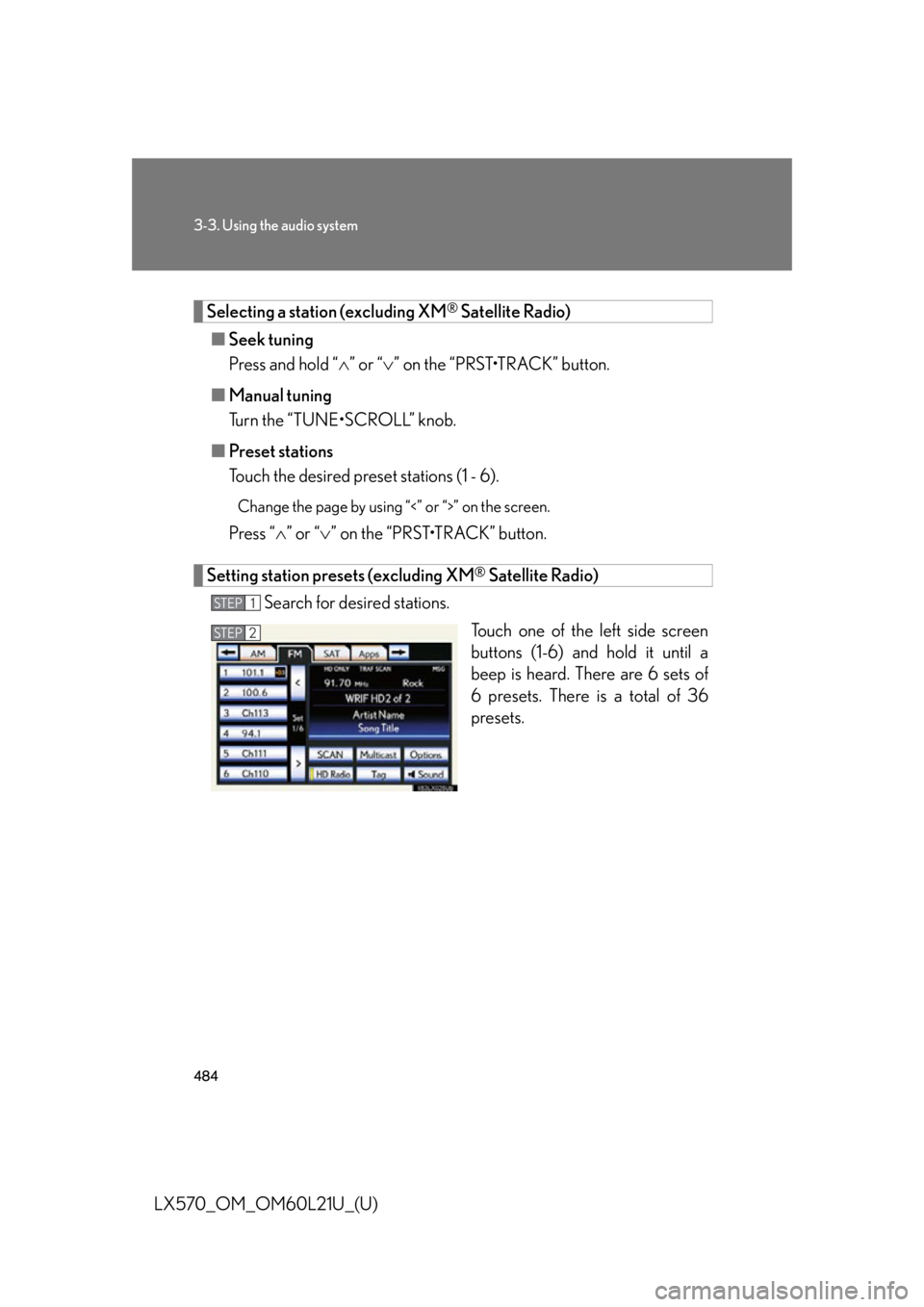
Touch the desired preset stations (1 - 6). Change the page by using “<” or “>” on the screen.
Press “ ” or “ ” on the “PRST•TRACK” button.
Setting station presets (excluding XM ®
Satellite Radio)
Search for desired stations.
Touch one of the left side screen
buttons (1-6) and hold it until a
beep is heard. There are 6 sets of
6 presets. There is a total of 36
presets.STEP 1
STEP 2
Page 485 of 956
4853-3. Using the audio system
3
Interior features
LX570_OM_OM60L21U_(U) Scanning radio stations (excluding XM ®
Satellite Radio)
Scanning all radio st ations within range
Touch “SCAN” on the screen. “SCAN” appears on the screen.
The radio will find the next station an d stay there for 10 seconds if “All”
or “HD Only” is selected, or 5 second s if “Analog” is selected, and then
scan again. ( P. 4 8 8 )
Touch “SCAN” once again when the desired station is reached.
RBDS (Radio Broadcast Data Systems)
This feature allows your radio to receive station identification information
and program information (classical, ja zz, etc.) from radio stations which
broadcast this information.
■ Receiving RBDS broadcasts
Touch “Options” on the screen.STEP 1
STEP 2
STEP 1
Page 486 of 956
4863-3. Using the audio system
LX570_OM_OM60L21U_(U) Touch “< TYPE” or “TYPE >” on the
screen.
The program list changes as follows each time the switch is touched.
• Classical
•Country
• EasyLis (Easy Listening)
• Inform (Information)
•Jazz
•News
• Oldies
•Other
•Pop Music
• Religion
•Rock
•R&B (Rhythm and Blues)
•Sports
•Talk
• Traffic (Not available when “HD Radio Settings” are set to analog.)
• Alert (Emergency Alert)
When a program is set, “TYPE SEEK” appears.
Touch “TYPE SEEK” on the screen. The radio seeks for stations by the relevant program type.
If no relevant program can be foun d, “no type” appears on the screen.STEP 2
STEP 3
Page 487 of 956

4873-3. Using the audio system
3
Interior features
LX570_OM_OM60L21U_(U) ■ Traffic announcement
Touch “Traffic” on the screen. “TRAF SEEK” appears on the dis-
play, and the radio seeks a traffic
program station.
If no traffic program station is
found, “No Traffic” appears on the
display.
HD Radio™ Technology
HD Radio™ Technology is the digital evolution of analog AM/FM radio.
Your radio product has a special receiv er which allows it to receive digital
broadcasts (where available) in addi tion to the analog broadcasts it
already receives.
Digital broadcasts have better sound quality than analog broadcasts as
digital broadcasts provide free, crystal clear audio with no static or distor-
tion. For more information, and a guid e to available ra dio stations and
programming, refer to www.hdradio.com .
HD Radio Technology manufactured under license from iBiquity
Digital Corporation. U.S. and Fo reign Patents. HD Radio™ and the
HD, HD Radio, and “Arc” logos are proprietary trademarks of
iBiquity Digital Corp.
Page 488 of 956
4883-3. Using the audio system
LX570_OM_OM60L21U_(U) ■ HD Radio™ system settings
HD Radio™ system can be set using the procedure outlined below.
Press the “SETUP” button.
To u c h “A u d i o ” .
Touch “HD Radio Settings”.
Touch “HD Radio/Analog Setting”.STEP 1
STEP 2
STEP 3
STEP 4
Page 489 of 956
4893-3. Using the audio system
3
Interior features
LX570_OM_OM60L21U_(U) Touch the item to be set. “All”: Touch to receive both analog
and digital broadcasts.
“HD Only”: Touch to receive only
digital broadcasts.
“Analog”: Touch to receive only
analog broadcasts.
Touch “Save”.
■ Using HD Radio™ Technology
Press the “AUDIO” button.
Touch the “AM” or “FM” tab or
press the “AUDIO” button repeat-
edly to select the desired tab. An orange “HD)” logo indicator
will be displayed on the screen
when in digital.
The song title, artist name and
music genre will appear on the
screen when available by the radio
station.STEP 5
STEP 6
STEP 1
STEP 2
Page 490 of 956
4903-3. Using the audio system
LX570_OM_OM60L21U_(U) Touch “Options” to display this
screen. When “Text” is touched, informa-
tion such as the artist name, song
title, album title and music genre of
the track being listened to are dis-
played on the text screen. To dis-
play messages from the station,
touch “Additional Information”.
When “< TYPE” or “TYPE >” is
touched, a program type will be
searched. Once a program type
has been set, “TYPE SEEK” will
appear on the screen. ( P. 4 8 5 )
■
Changing the multiple or supplemental programs
On the FM radio frequency most di gital stations have “multiple” or
supplemental programs on one FM station.
Touch “Multicast”. Each time “Multicast” is touched,
the supplemental program
changes.
If “Multicast” is touched when
tuned to the last of the supplemen-
tal programs, the main program
will be returned to.STEP 3
Page 491 of 956
4913-3. Using the audio system
3
Interior features
LX570_OM_OM60L21U_(U) ■ Preserving tag information
Tag information in the music broadcasting is preserved in the system
and transmits to an iPod.
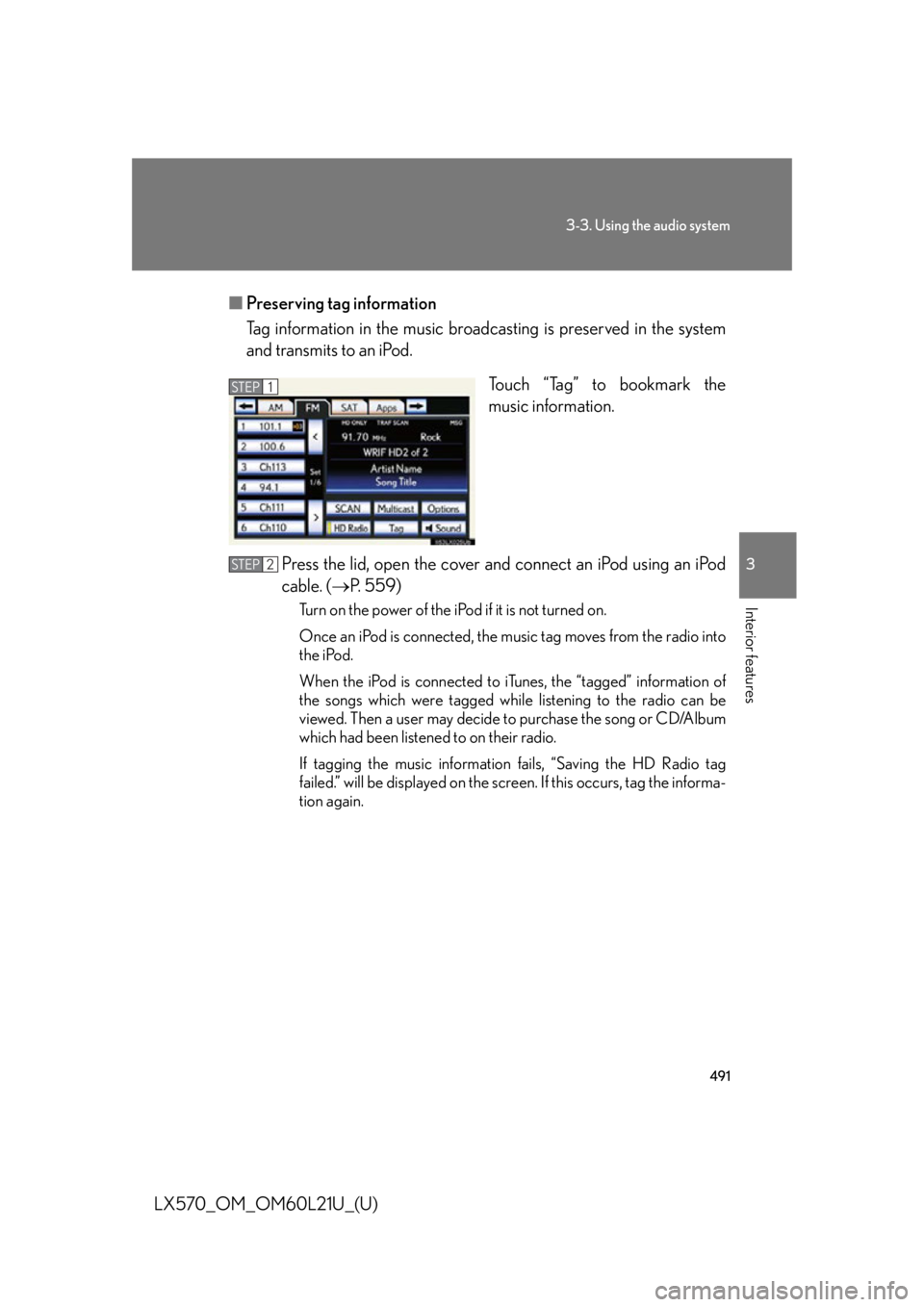
Touch “Tag” to bookmark the
music information.
Press the lid, open the cover and connect an iPod using an iPod
cable. ( P. 559)Turn on the power of the iPod if it is not turned on.
Once an iPod is connected, the music tag moves from the radio into
the iPod.
When the iPod is connected to iTunes, the “tagged” information of
the songs which were tagged while listening to the radio can be
viewed. Then a user may decide to purchase the song or CD/Album
which had been listened to on their radio.
If tagging the music information fails, “Saving the HD Radio tag
failed.” will be displayed on the screen. If this occurs, tag the informa-
tion again.STEP 1STEP 1
STEP 2