Page 12 of 588
12
IS250_EE(OM53C51E)Pictorial index
Pictorial index
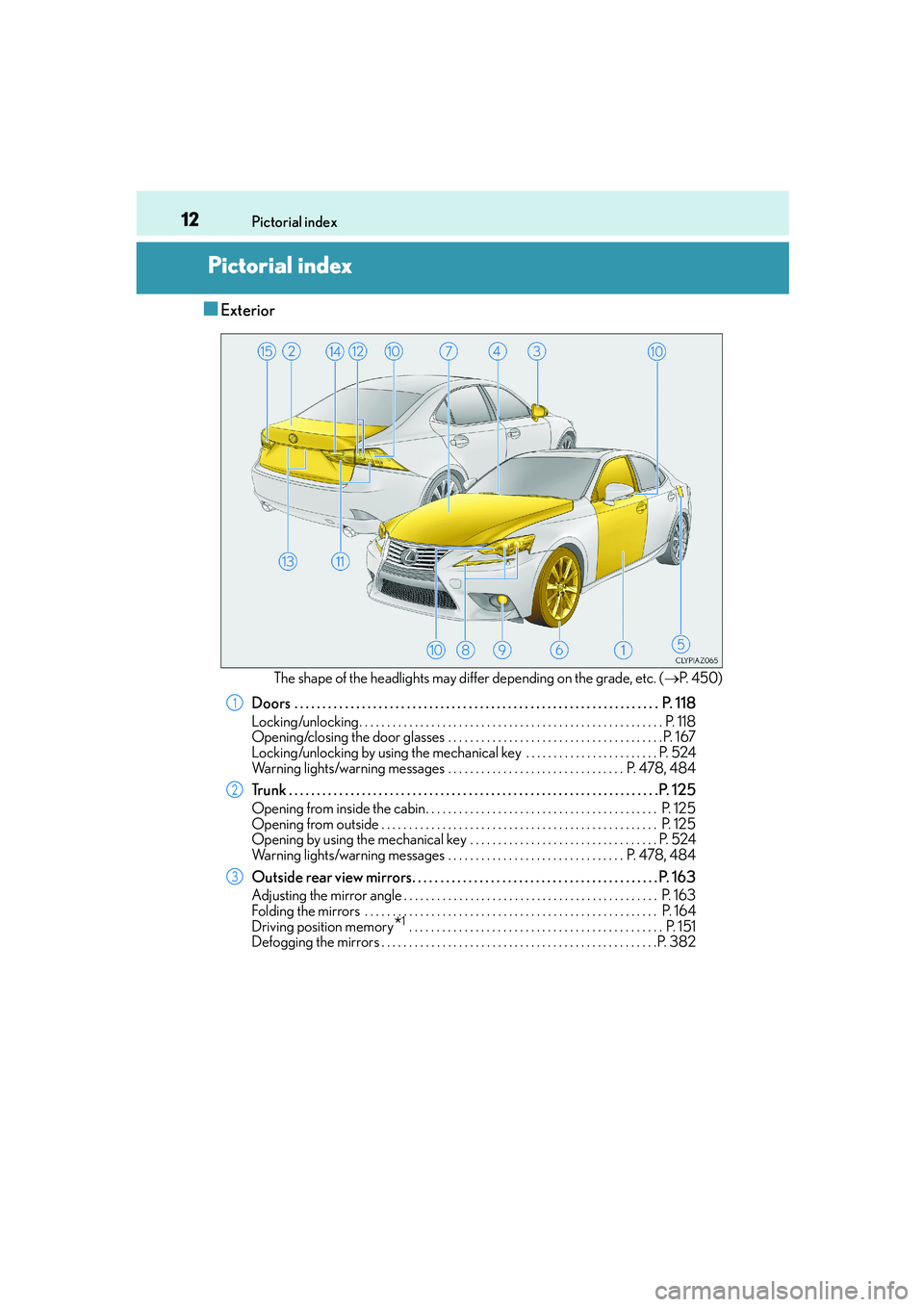
■Exterior
The shape of the headlights may differ depending on the grade, etc. (→P. 4 5 0 )
Doors . . . . . . . . . . . . . . . . . . . . . . . . . . . . . . . . . . . . . . . . . . . . . . . . . . . . . . . . . . . . . . . . . P. 118
Locking/unlocking. . . . . . . . . . . . . . . . . . . . . . . . . . . . . . . . . . . . . . . . . . . . . . . . . . . . . . . P. 1 1 8
Opening/closing the door glasses . . . . . . . . . . . . . . . . . . . . . . . . . . . . . . . . . . . . . . . P. 167
Locking/unlocking by using the mechanical key . . . . . . . . . . . . . . . . . . . . . . . . P. 524
Warning lights/warning messages . . . . . . . . . . . . . . . . . . . . . . . . . . . . . . . . P. 478, 484
Trunk . . . . . . . . . . . . . . . . . . . . . . . . . . . . . . . . . . . . . . . . . . . . . . . . . . . . . . . . . . . . . . . . . .P. 125
Opening from inside the cabin. . . . . . . . . . . . . . . . . . . . . . . . . . . . . . . . . . . . . . . . . . P. 125
Opening from outside . . . . . . . . . . . . . . . . . . . . . . . . . . . . . . . . . . . . . . . . . . . . . . . . . . P. 125
Opening by using the mechanical key . . . . . . . . . . . . . . . . . . . . . . . . . . . . . . . . . . P. 524
Warning lights/warning messages . . . . . . . . . . . . . . . . . . . . . . . . . . . . . . . . P. 478, 484
Outside rear view mirrors. . . . . . . . . . . . . . . . . . . . . . . . . . . . . . . . . . . . . . . . . . . . P. 163
Adjusting the mirror angle . . . . . . . . . . . . . . . . . . . . . . . . . . . . . . . . . . . . . . . . . . . . . . P. 163
Folding the mirrors . . . . . . . . . . . . . . . . . . . . . . . . . . . . . . . . . . . . . . . . . . . . . . . . . . . . . P. 164
Driving position memory
*1 . . . . . . . . . . . . . . . . . . . . . . . . . . . . . . . . . . . . . . . . . . . . . . P. 151
Defogging the mirrors . . . . . . . . . . . . . . . . . . . . . . . . . . . . . . . . . . . . . . . . . . . . . . . . . .P. 382
1
2
3
Page 82 of 588
821-2. Theft deterrent system
IS250_EE(OM53C51E)
Vehicles employing this system have
labels on the window glass of both front
doors.
Turn the engine switch off, have all the passengers exit the vehicle and ensure
that all the doors are closed.
Using the entry function:
Touch the sensor area on the outside door handle twice within 5 seconds.
Using the wireless remote control:
Press twice within 5 seconds.
Using the entry function: Hold the outside door handle.
Using the wireless remote control: Press .
Double locking system
Unauthorized access to the vehicle is prevented by disabling the door unlock-
ing function from both the interior and exterior of the vehicle.
Setting the double locking system
Canceling the double locking system
CAUTION
■Double locking system precaution
Never activate the double locking system when there are people in the vehicle
because all the doors cannot be opened from inside the vehicle.
Page 83 of 588
831-2. Theft deterrent system
1
For safety and security
IS250_EE(OM53C51E)
The alarm uses light and sound to give an alert when an intrusion is detected.
The alarm is triggered in the following situations when the alarm is set:
●A locked door or trunk is unlocked or opened in any way other than using the
entry function or wireless remote control. (The door will lock again automati-
cally.)
●The hood is opened.
●The intrusion sensor detects something moving inside the vehicle. (An
intruder gets in the vehicle.) (if equipped)
●The tilt sensor detects a change of vehicle inclination. (if equipped)
Close the doors, trunk and hood, and
lock all the doors using the entry func-
tion or wireless remote control. The
system will be set automatically after
30 seconds.
The indicator light changes from being
on to flashing when the system is set.
Alarm∗
∗
: If equipped
The alarm
Setting the alarm system
Page 84 of 588
841-2. Theft deterrent system
IS250_EE(OM53C51E)
Do one of the following to deactivate or stop the alarm:
●Unlock the doors or open the trunk using the entry function or wireless
remote control.
●Start the engine. (The alarm will be deactivated or stopped after a few sec-
onds.)
■System maintenance
The vehicle has a maintenance-free type alarm system.
■Items to check before locking the vehicle
To prevent unexpected triggering of the alarm and vehicle theft, make sure of the follow-
ing:
●Nobody is in the vehicle.
●The windows and moon roof (if equipped) are closed before the alarm is set.
●No valuables or other personal items are left in the vehicle.
Deactivating or stopping the alarm
Page 85 of 588
851-2. Theft deterrent system
1
For safety and security
IS250_EE(OM53C51E)
■Triggering of the alarm
The alarm may be triggered in the following situations:
(Stopping the alarm deactivates the alarm system.)
■Alarm-operated door lock
In the following situations, the doors are locked automatically to prevent intruders:
●The doors are unlocked manually without the mechanical key and the alarm is trig-
gered.
●While the alarm is operating, the doors are unlocked manually without the mechanical
key.
●The doors or trunk are unlocked using the
mechanical key.
●A person inside the vehicle opens a door, the
trunk or hood, or unlocks the vehicle using a
inside lock button.
●The battery is recharged or replaced when the
vehicle is locked. (→P. 5 2 9 )
NOTICE
■To ensure the system operates correctly
Do not modify or remove the system. If modified or removed, the proper operation of
the system cannot be guaranteed.
Page 87 of 588

871-2. Theft deterrent system
1
For safety and security
IS250_EE(OM53C51E)
■Canceling and automatic re-enabling of the intrusion sensor and tilt sensor
●The alarm will still be set even when the intrusion sensor and tilt sensor are canceled.
●After the intrusion sensor and tilt sensor are canceled, pressing the engine switch or
unlocking the doors using the entry function or wireless remote control will re-enable
the intrusion sensor and tilt sensor.
●The intrusion sensor and tilt sensor will automatically be re-enabled when the alarm
system is deactivated.
■Intrusion sensor detection considerations
The sensor may trigger the alarm in the following situations:
●Places with extreme vibrations or noises, or situations in which the vehicle is subject to
repeated impacts or vibrations:
• When parked in a parking garage
• When the vehicle is transported on a ferry, trailer, train, etc.
• When ice adhering to the vehicle is removed
• When the vehicle is in an automatic or high-pressure car wash
• When in a hail or lightning storm
●A window or the moon roof is open.
In this case, the sensor may detect the follow-
ing:
• Wind or the movement of objects such as
leaves and insects inside the vehicle
• Ultrasonic waves emitted from devices
such as the intrusion sensors of other vehi-
cles
• The movement of people outside the vehi-
cle
●Unstable items, such as dangling accessories
or clothes hanging on the coat hooks, are in
the vehicle.
Page 112 of 588
112
IS250_EE(OM53C51E)3-1. Key information
The following keys are provided with the vehicle.
Electronic keys
• Operating the smart entry & start
system (→P. 1 3 0 )
• Operating the wireless remote con-
trol function
Mechanical keys
Key number plate
Card key (electronic key) (if
equipped)
Operating the smart entry & start sys-
tem (→P. 1 3 0 )
Locks the doors (→P. 118)
Closes the windows and moon roof
*
(→P. 118)
Unlocks the doors (→P. 118)
Opens the windows and moon roof
*
(→P. 118)
Opens the trunk (→P. 1 2 6 )
*: These settings must be customized at any authorized Lexus dealer or repairer, or
another duly qualified and equipped professional.
Keys
The keys
1
2
3
4
Wireless remote control
1
2
3
4
5
Page 118 of 588
118
IS250_EE(OM53C51E)3-2. Opening, closing and locking the doors and trunk
The vehicle can be locked and unlocked using the entry function, wireless
remote control or door lock switches.
◆Entry function (if equipped)
Carry the electronic key to enable this function.
Grip the handle to unlock the
doors.
Make sure to touch the sensor on the
back of the handle.
The doors cannot be unlocked for
3 seconds after the doors are locked.
To u c h t h e l o c k s e n s o r ( i n d e n t a -
tion on the upper part of the door
handle) to lock the doors.
◆Wireless remote control
Locks all the doors
Press and hold to close the windows
and moon roof.*
Unlocks all the doors
Press and hold to open the windows
and moon roof.*
*
: These settings must be customized at
any authorized Lexus dealer or
repairer, or another duly qualified
and equipped professional.
Doors
Unlocking and locking the doors from the outside
1
2
1
2


