Page 184 of 588

1844-1. Before driving
IS250_EE(OM53C51E)
◆We i g h t l i m i t s
Check the allowable towing capacity, GVM (Gross Vehicle Mass), MPAC
(Maximum Permissible Axle Capacity), and permissible draw bar load before
towing. (→P. 5 3 8 )
◆To w i n g h i t c h / b r a c k e t
Lexus recommends the use of the Lexus hitch/bracket for your vehicle. Other
products of a suitable nature and comparable quality may also be used.
◆To prevent an accident
The handling of the vehicle will feel different when towing a trailer. Beware of
the 3 most common causes of towing-related accidents: driver error, exces-
sive speed, and overloading.
Trailer towing (vehicles with a towing package)
The strain of towing a trailer will have a negative impact on the running perfor-
mance, handling, fuel consumption and endurance of your vehicle. Use the
vehicle features in the correct manner and operate the vehicle with care for
safer driving and optimal comfort. Damage and/or malfunctions that occur as
a result of towing performed for commercial purposes are not covered by the
Lexus warranty.
Ask your local authorized Lexus dealer or repairer, or another duly qualified
and equipped professional for further details before towing, as there are addi-
tional legal requirements in some countries.
Page 185 of 588

1854-1. Before driving
4
Driving
IS250_EE(OM53C51E)
■Total trailer weight and permissible drawbar load
Total trailer weight
Weight of the trailer itself plus the
trailer load should be within the max-
imum towing capacity. Exceeding
this weight is dangerous. (→P. 5 3 8 )
When the total trailer weight is
greater than the vehicle weight, we
recommend the use of a friction sta-
bilizer (sway control device).
Permissible drawbar load
Allocate the trailer load so that the drawbar load is greater than 25 kg (55.1 lb.) or
4% of the towing capacity. Do not let the drawbar load exceed the indicated
weight. (→P. 5 3 8 )
■Information tag (manufacturer’s label)
Gross vehicle mass
The combined weight of the driver, passengers, towing hitch, total curb mass and
drawbar load should not exceed the gross vehicle mass by more than 100 kg
(220.5 lb.). Exceeding this weight is dangerous.
Maximum permissible rear axle capacity
The weight borne by the rear axle should not exceed the maximum permissible
axle capacity by 15% or more. Exceeding this weight is dangerous.
The values for towing capacity were derived from testing conducted at sea level.
Take note that engine output and towing capacity will be reduced at high altitudes.
Important points regarding trailer loads
1
2
XTy p e AXTy p e B
1
2
Page 190 of 588

1904-1. Before driving
IS250_EE(OM53C51E)
■Important points regarding stability
Vehicle movement resulting from uneven road surfaces and strong cross-
winds will affect handling. The vehicle may also be rocked by passing buses or
large trucks. Frequently check behind when moving alongside such vehicles.
As soon as such vehicle movement occurs, immediately start to decelerate
smoothly by slowly applying the brakes. Always steer the vehicle straight
ahead while braking.
■Passing other vehicles
Consider the total combined length of your vehicle and trailer and ensure that
the vehicle-to-vehicle distance is sufficient before executing lane changes.
■Transmission information
To maintain engine braking efficiency, when using engine braking when driv-
ing on a long steep downward grade, do not use the transmission in D. The
vehicle must be driven in gear shift position “4” in M mode. (→P. 2 0 0 )
■If the engine overheats
Towing a loaded trailer up a long, steep incline in temperatures exceeding
30°C (85°F) may result in the engine overheating. If the engine coolant tem-
perature gauge indicates that the engine is overheating, turn the air condition-
ing off immediately, leave the road and stop the vehicle in a safe place.
(→P. 5 3 1 )
■When parking the vehicle
Always place wheel chocks under the wheels of both the vehicle and trailer.
Firmly set the parking brake and shift the shift lever to P.
Page 195 of 588
1954-2. Driving procedures
4
Driving
IS250_EE(OM53C51E)
■When “Check Entry & Start System” is displayed on the multi-information display
The system may be malfunctioning. Have the vehicle inspected by any authorized Lexus
dealer or repairer, or another duly qualified and equipped professional immediately.
■If the electronic key battery is depleted
→P. 5 2 1
■Operation of the engine switch
●When operating the engine switch, one short, firm press is enough. If the switch is
pressed improperly, the engine may not start or the engine switch mode may not
change. It is not necessary to press and hold the switch.
●If attempting to restart the engine immediately after turning the engine switch off, the
engine may not start in some cases. After turning the engine switch off, please wait a
few seconds before restarting the engine.
■If the smart entry & start system has been deactivated by a customized setting
→P. 5 2 4
CAUTION
■When starting the engine
Always start the engine while sitting in the driver’s seat. Do not depress the accelerator
pedal while starting the engine under any circumstances.
Doing so may cause an accident resulting in death or serious injury.
■Caution while driving
If engine failure occurs while the vehicle is moving, do not lock or open the doors until
the vehicle reaches a safe and complete stop. Activation of the steering lock in this cir-
cumstance may lead to an accident, resulting in death or serious injury.
■Stopping the engine in an emergency
If you want to stop the engine in an emergency while driving the vehicle, press and hold
the engine switch for more than 2 seconds, or press it briefly 3 times or more in succes-
sion. (→P. 4 6 7 )
However, do not touch the engine switch while driving except in an emergency. Turning
the engine off while driving will not cause loss of steering or braking control, but the
power assist to these systems will be lost. This will make it more difficult to steer and
brake, so you should pull over and stop the vehicle as soon as it is safe to do so.
Page 198 of 588
1984-2. Driving procedures
IS250_EE(OM53C51E)
*1: To improve fuel efficiency and reduce noise, shift the shift lever to D for normal driv-
ing.
*2: Any gear range can be fixed when driving in M mode.
■Sport mode/Eco drive mode
→P. 2 6 3
■Snow mode
Snow mode can be selected to suit the conditions when driving on slippery
road surfaces, such as snow.
Press the switch.
Press the switch again to return to
normal mode.
Shift position purpose
Shift positionObjective or function
PParking the vehicle/starting the engine
RReversing
NNeutral
DNormal driving*1
MM mode driving*2 (→P. 2 0 0 )
Selecting the driving mode
Page 199 of 588
1994-2. Driving procedures
4
Driving
IS250_EE(OM53C51E)
To drive using temporary shift range selection, operate the “-” paddle shift switch.
The shift range can then be selected by operating the “-” and “+” paddle shift
switches. Changing the shift range allows restriction of the highest gear, prevent-
ing unnecessary upshifting and enabling the level of engine braking force to be
selected.
Upshifting
Downshifting
The selected shift range, from D1 to D6,
will be displayed in the meter.
To return to normal D position driving,
the “+” paddle shift switch must be held
down for a period of time.
■Shift ranges and their functions
A lower shift range will provide greater engine braking forces than a higher shift
range.
Selecting shift ranges in the D position
1
2
Meter displayFunction
D2 - D6
A gear in the range between 1 and the selected gear is auto-
matically chosen depending on vehicle speed and driving
conditions
D11st gear is set
Page 200 of 588
2004-2. Driving procedures
IS250_EE(OM53C51E)
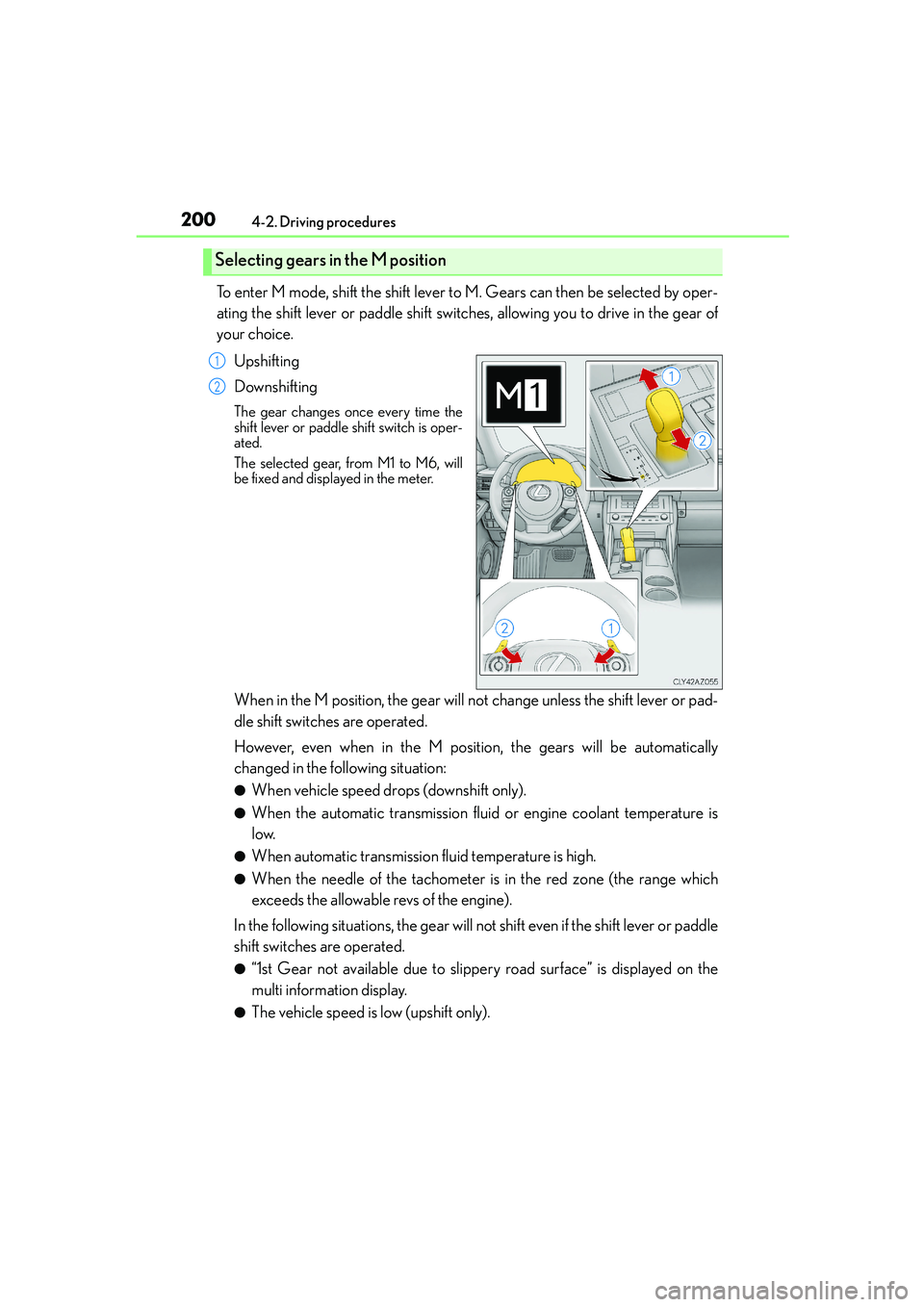
To enter M mode, shift the shift lever to M. Gears can then be selected by oper-
ating the shift lever or paddle shift switches, allowing you to drive in the gear of
your choice.
Upshifting
Downshifting
The gear changes once every time the
shift lever or paddle shift switch is oper-
ated.
The selected gear, from M1 to M6, will
be fixed and displayed in the meter.
When in the M position, the gear will not change unless the shift lever or pad-
dle shift switches are operated.
However, even when in the M position, the gears will be automatically
changed in the following situation:
●When vehicle speed drops (downshift only).
●When the automatic transmission fluid or engine coolant temperature is
low.
●When automatic transmission fluid temperature is high.
●When the needle of the tachometer is in the red zone (the range which
exceeds the allowable revs of the engine).
In the following situations, the gear will not shift even if the shift lever or paddle
shift switches are operated.
●“1st Gear not available due to slippery road surface” is displayed on the
multi information display.
●The vehicle speed is low (upshift only).
Selecting gears in the M position
1
2
Page 201 of 588

2014-2. Driving procedures
4
Driving
IS250_EE(OM53C51E)
The Gear Shift Indicator display is a guide to help the driver achieve improved
fuel economy and reduced exhaust emissions within limits of engine perfor-
mance.
When not in operation
Shift-up indicator
■Gear Shift Indicator function
●This function automatically operates during M mode.
●By following the Shift-up indicator and shifting up accordingly, it is possible
to achieve improved fuel economy and reduced exhaust emissions.
●The Gear Shift Indicator does not have a similar function for downshifting.
●Depending on the driving conditions, the Gear Shift Indicator may not dis-
play the Shift-up indicator while driving in M mode.
■When the “-” paddle shift switch is operated with the shift lever in the D position
A shift range will be automatically selected. The highest gear of the first shift range will be
one gear lower than the gear in use during normal D position driving.
■Automatic deactivation of shift range selection in the D position
Shift range selection in the D position will be deactivated in the following situations:
●When the vehicle comes to a stop
●If the accelerator pedal is depressed for more than a certain period of time
●When the shift lever is shifted to a position other than D
■To protect the automatic transmission
“Transmission Fluid High Temperature” is displayed on the multi-information display and
a function is adopted that automatically selects a higher shift range when the fluid tem-
perature is high. Have the vehicle inspected by any authorized Lexus dealer or repairer,
or another duly qualified and equipped professional.
Gear Shift Indicator (if equipped)
1
2

