2014 Lancia Voyager steering wheel
[x] Cancel search: steering wheelPage 185 of 364

Turn Menu Off
The system allows the driver to select
information by pressing the following
buttons mounted on the steering
wheel:
UP ButtonPress and release the UP
button to scroll upward
through the main menus
(Fuel Economy, Vehicle
Info, Tire BAR, Cruise, Messages,
Units, System Setup) and sub-menus.
DOWN Button
Press and release the DOWN
button to scroll downward
through the main menus and
sub-menus.
SELECT Button
The SELECT button allows
access to information in
EVIC submenus, selects
some feature settings, and
resets some EVIC features. The EVIC
prompts the driver when the SELECT
button can be used by displaying the
right arrow graphic.
BACK Button
Press the BACK button to
scroll back to a previous
menu or sub-menu.
ELECTRONIC VEHICLE
INFORMATION CENTER
(EVIC) DISPLAYS
The EVIC display consists of three
sections:
1. The top line where compass direc-
tion, odometer line and outside tem-
perature are displayed.
2. The main display area where the
menus and pop up messages are dis-
played. 3. The reconfigurable telltales sec-
tion below the odometer line.
The main display area will normally
display the main menu or the screens
of a selected feature of the main
menu. The main display area also dis-
plays "pop up" messages that consist
of approximately 60 possible warning
or information messages. These pop
up messages fall into several catego-
ries:
Five Second Stored Messages
When the appropriate conditions oc-
cur, this type of message takes control
of the main display area for five sec-
onds and then returns to the previous
screen. Most of the messages of this
type are then stored (as long as the
condition that activated it remains ac-
tive) and can be reviewed from the
"Messages" main menu item. As long
as there is a stored message, an "i"
will be displayed in the EVIC's
compass/outside temp line. Examples
of this message type are "Right Front
Turn Signal Lamp Out" and "Low
Tire Pressure".
EVIC Steering Wheel Buttons
179
Page 223 of 364
Macrovision. Reverse engineering
or disassembly is prohibited.
Manufactured under license under U.S. Patent #’s: 5,451,942;
5,956,674; 5,974,380; 5,978,762;
6,487,535 & other U.S. and world-
wide patents issued & pending.
DTS is a registered trademark and
the DTS logos, Symbol and DTS
2.0 Channel are trademarks of
DTS, Inc. © 1996-2007 DTS, Inc.
All Rights Reserved.
Manufactured under license from Dolby Laboratories. Dolby and the
double-D symbol are trademarks of
Dolby Laboratories.
ABOUT DIVX VIDEO: DivX® is a
digital video format created by DivX,
LLC, a subsidiary of Rovi
Corporation. This is an official DivX
Certified® device that plays DivX
video. Visit divx.com for more infor-
mation and software tools to convert
your files into DivX videos.
ABOUT DIVX VIDEO-ON-
DEMAND: This DivX Certified® de-
vice must be registered in order to play purchased DivX Video-on-
Demand (VOD) movies. To obtain
your registration code, locate the
DivX VOD section in your device
setup menu. Go to vod.divx.com for
more information on how to complete
your registration.
DivX®, DivX Certified® and associ-
ated logos are trademarks of Rovi
Corporation or its subsidiaries and
are used under license.
Trademark
Blu-ray Disc™, Blu-ray™ and the
logos are trademarks of the Blu-ray
Disc Association.
Java is a registered trademark of Oracle and/or its affiliates.
CAUTION!
Use of controls or adjustments or
performance of procedures other
than those specified herein may re-
sult in hazardous radiation expo-
sure.
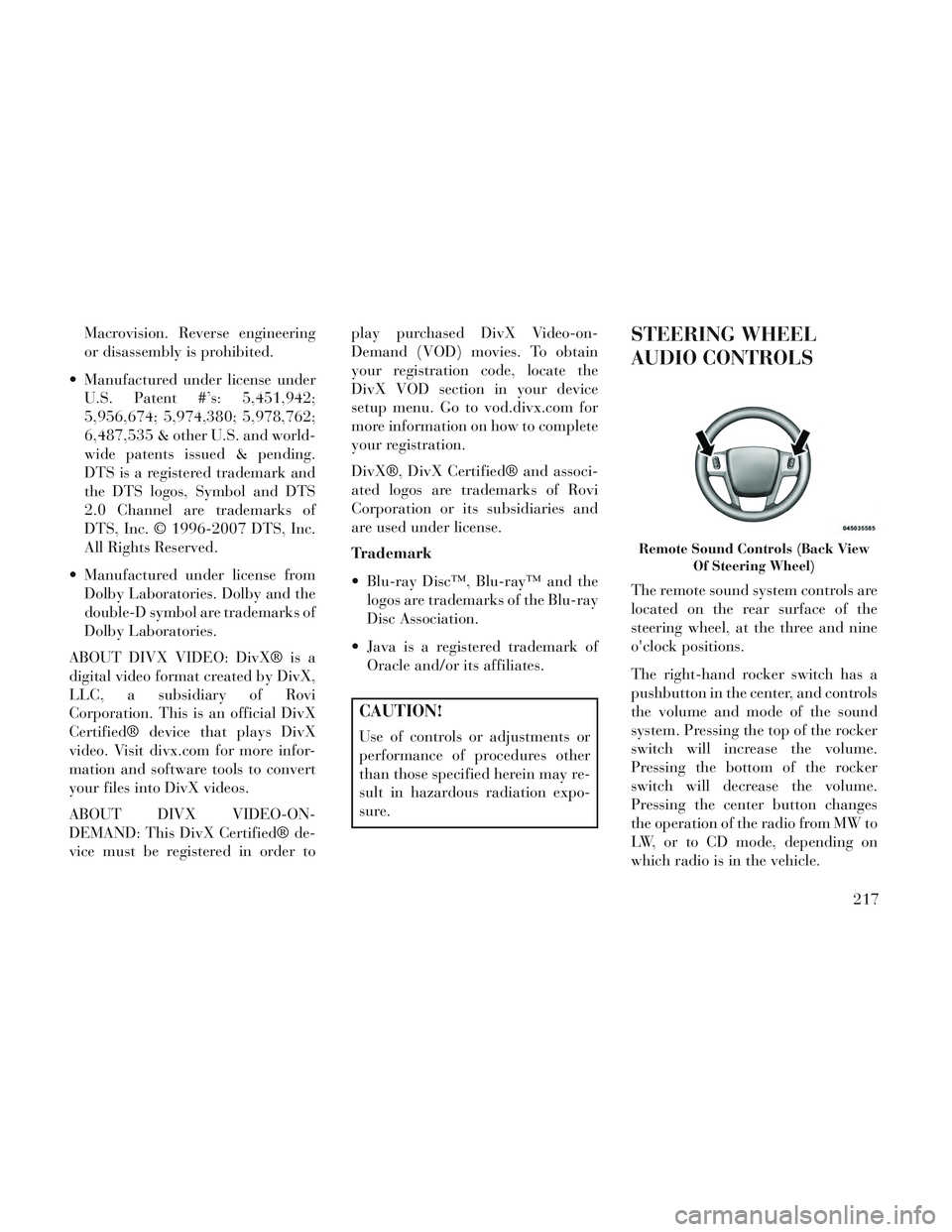
STEERING WHEEL
AUDIO CONTROLS
The remote sound system controls are
located on the rear surface of the
steering wheel, at the three and nine
o'clock positions.
The right-hand rocker switch has a
pushbutton in the center, and controls
the volume and mode of the sound
system. Pressing the top of the rocker
switch will increase the volume.
Pressing the bottom of the rocker
switch will decrease the volume.
Pressing the center button changes
the operation of the radio from MW to
LW, or to CD mode, depending on
which radio is in the vehicle.
Remote Sound Controls (Back View
Of Steering Wheel)
217
Page 250 of 364

CAUTION!(Continued)
Driving through standing watermay cause damage to your vehi-
cle’s drivetrain components. Al-
ways inspect your vehicle’s fluids
(i.e., engine oil, transmission,
axle, etc.) for signs of contamina-
tion (i.e., fluid that is milky or
foamy in appearance) after driv-
ing through standing water. Do
not continue to operate the ve-
hicle if any fluid appears con-
taminated, as this may result in
further damage. Such damage is
not covered by the New Vehicle
Limited Warranty.
Getting water inside your vehi- cle’s engine can cause it to lock up
and stall out, and cause serious
internal damage to the engine.
Such damage is not covered by
the New Vehicle Limited War-
ranty.
WARNING!
Driving through standing waterlimits your vehicle’s traction ca-
pabilities. Do not exceed 8 km/h
when driving through standing
water.
Driving through standing water limits your vehicle’s braking ca-
pabilities, which increases stop-
ping distances. Therefore, after
driving through standing water,
drive slowly and lightly press on
the brake pedal several times to
dry the brakes.
Getting water inside your vehi- cle’s engine can cause it to lock up
and stall out, and leave you
stranded.
Failure to follow these warnings may result in injuries that are se-
rious or fatal to you, your passen-
gers, and others around you.
POWER STEERING
The standard power steering system
will give you good vehicle response
and increased ease of maneuverability in tight spaces. The system will pro-
vide mechanical steering capability if
power assist is lost.
If for some reason the power assist is
interrupted, it will still be possible to
steer your vehicle. Under these condi-
tions, you will observe a substantial
increase in steering effort, especially
at very low vehicle speeds and during
parking maneuvers.
NOTE:
Increased noise levels at the end
of the steering wheel travel are
considered normal and do not
indicate that there is a problem
with the power steering system.
Upon initial start-up in cold weather, the power steering
pump may make noise for a
short amount of time. This is due
to the cold, thick fluid in the
steering system. This noise
should be considered normal,
and it does not in any way dam-
age the steering system.
244
Page 251 of 364

WARNING!
Continued operation with reduced
power steering assist could pose a
safety risk to yourself and others.
Service should be obtained as soon
as possible.
CAUTION!
Prolonged operation of the steering
system at the end of the steering
wheel travel will increase the steer-
ing fluid temperature and it should
be avoided when possible. Damage
to the power steering pump may
occur.
POWER STEERING FLUID
CHECK
Checking the power steering fluid
level at a defined service interval is
not required. The fluid should only be
checked if a leak is suspected, abnor-
mal noises are apparent, and/or the
system is not functioning as antici-
pated. Coordinate inspection efforts
through an authorized dealer.
CAUTION!
Do not use chemical flushes in your
power steering system as the
chemicals can damage your power
steering components. Such damage
is not covered by the New Vehicle
Limited Warranty.
WARNING!
Fluid level should be checked on a
level surface and with the engine off
to prevent injury from moving parts
and to ensure accurate fluid level
reading. Do not overfill. Use only
manufacturer's recommended
power steering fluid.
If necessary, add fluid to restore to the
proper indicated level. With a clean
cloth, wipe any spilled fluid from all
surfaces. Refer to “Fluids, Lubri-
cants, and Genuine Parts” in “Main-
taining Your Vehicle” for further in-
formation.
PARKING BRAKE
Before leaving the vehicle, make sure
that the parking brake is fully applied
and place the shift lever in the PARK
position.
The foot operated parking brake is
positioned below the lower left corner
of the instrument panel. To apply the
park brake, firmly push the park
brake pedal fully. To release the park-
ing brake, press the park brake pedal
a second time and let your foot up as
you feel the brake disengage.
When the parking brake is applied
with the ignition switch in the ON
position, the “Brake Warning Light”
in the instrument cluster will illumi-
nate.
Parking Brake
245
Page 253 of 364

modulate hydraulic pressure to pre-
vent wheel lock-up and help avoid
skidding on slippery surfaces.
ABS is activated during braking un-
der certain road or stopping condi-
tions. ABS-inducing conditions can
include ice, snow, gravel, bumps, rail-
road tracks, loose debris, or panic
stops.
You may experience the following
when the brake system goes into anti-
lock:
The ABS motor running (it maycontinue to run for a short time
after the stop).
A clicking sound of solenoid valves.
Brake pedal pulsations.
A slight drop or fall away of the brake pedal at the end of the stop.WARNING!
The Anti-Lock Brake Systemcontains sophisticated electronic
equipment that may be suscep-
tible to interference caused by
improperly installed, or high out-
put radio transmitting equip-
ment. This interference can cause
possible loss of anti-lock braking
capability. Installation of such
equipment should be performed
by qualified professionals.
Pumping of the Anti-Lock Brakes will diminish their effectiveness
and may lead to a collision.
Pumping makes the stopping dis-
tance longer. Just press firmly on
your brake pedal when you need
to slow down or stop.
The Anti-Lock Brake System cannot prevent collisions, includ-
ing those resulting from excessive
speed in turns, following another
vehicle too closely, or hydroplan-
ing.
(Continued)
WARNING!(Continued)
The capabilities of an ABS-equipped vehicle must never be
exploited in a reckless or danger-
ous manner, which could jeopar-
dize the user’s safety or the safety
of others.
The ABS cannot prevent the natural laws of physics from act-
ing on the vehicle, nor can it in-
crease braking or steering effi-
ciency beyond that afforded by
the condition of the vehicle
brakes and tires or the traction
afforded.
All vehicle wheels and tires must be
the same size and type, and tires must
be properly inflated to produce accu-
rate signals for the computer.
ANTI-LOCK BRAKE
WARNING LIGHT
The “Anti-Lock Brake
Warning Light” monitors
the anti-lock brake system.
The light will come on when
247
Page 255 of 364

WARNING!
The TCS cannot prevent thenatural laws of physics from act-
ing on the vehicle, nor can it in-
crease the traction afforded.
The TCS cannot prevent colli- sions, including those resulting
from excessive speed in turns, or
hydroplaning.
The capabilities of a TCS- equipped vehicle must never be
exploited in a reckless or danger-
ous manner, which could jeopar-
dize the user's safety or the safety
of others.
BRAKE ASSIST SYSTEM
(BAS) (for versions/markets,
where provided)
The Brake Assist System (BAS) is de-
signed to optimize the vehicle’s brak-
ing capability during emergency
braking maneuvers. The system de-
tects an emergency braking situation
by sensing the rate and amount of
brake application, and then applies
optimum pressure to the brakes. This
can help reduce braking distances. The BAS complements the ABS. Ap-
plying the brakes very quickly results
in the best BAS assistance. To receive
the benefit of the system, you must
apply continuous braking pressure
during the stopping sequence. Do not
reduce brake pedal pressure unless
braking is no longer desired. Once the
brake pedal is released, the BAS is
deactivated.
WARNING!
The BAS cannot prevent the
natural laws of physics from act-
ing on the vehicle, nor can it in-
crease the traction afforded by
prevailing road conditions.
The BAS cannot prevent colli- sions, including those resulting
from excessive speed in turns,
driving on very slippery surfaces,
or hydroplaning.
The capabilities of a BAS- equipped vehicle must never be
exploited in a reckless or danger-
ous manner which could jeopar-
dize the user's safety or the safety
of others.
ELECTRONIC STABILITY
CONTROL (ESC)
The Electronic Stability Control
(ESC) enhances directional control
and stability of the vehicle under vari-
ous driving conditions. ESC corrects
for over/under steering of the vehicle
by applying the brake of the appro-
priate wheel to assist in counteracting
the over/under steer condition. En-
gine power may also be reduced to
help the vehicle maintain the desired
path.
ESC uses sensors in the vehicle to
determine the vehicle path intended
by the driver and compares it to the
actual path of the vehicle. When the
actual path does not match the in-
tended path, ESC applies the brake of
the appropriate wheel to assist in
counteracting the oversteer or under-
steer condition.
Oversteer - when the vehicle is turning more than appropriate for
the steering wheel position.
249
Page 256 of 364

Understeer - when the vehicle isturning less than appropriate for
the steering wheel position.
WARNING!
The Electronic Stability Control
System (ESC) cannot prevent the
natural laws of physics from acting
on the vehicle, nor can it increase the
traction afforded by prevailing road
conditions. ESC cannot prevent all
accidents, including those resulting
from excessive speed in turns, driv-
ing on very slippery surfaces, or hy-
droplaning. ESC also cannot prevent
accidents resulting from loss of ve-
hicle control due to inappropriate
driver input for the conditions. Only
a safe, attentive, and skillful driver
can prevent accidents. The capabili-
ties of an ESC equipped vehicle must
never be exploited in a reckless or
dangerous manner which could
jeopardize the user’s safety or the
safety of others.
ESC Operating Modes
The “ESC Off” switch is lo-
cated in the center switch
bank, next to the hazard
flasher switch.
ESC On
This mode is the normal operating
mode for ESC on two-wheel drive ve-
hicles. Whenever the vehicle is
started, the ESC system will be in this
mode. This mode should be used for
most driving situations. ESC should
only be turned off for specific reasons
as noted below.
ESC Partial Off
This mode is entered by momentarily
pressing the “ESC Off” switch.
When in the “Partial Off” mode, the
TCS portion of ESC, except for the
“limited slip” feature described in the
TCS section, has been disabled and
the “ESC Off Indicator Light” will be
illuminated. When in the “Partial
Off” mode, ESC will operate without
engine torque management. This
mode is intended to be used if the vehicle is in deep snow, sand or gravel
conditions and more wheel spin than
ESC would normally allow is required
to gain traction. To turn ESC on
again, momentarily press the “ESC
Off” switch. This will restore the nor-
mal “ESC On” mode of operation.
NOTE: To improve the vehicle's
traction when driving with snow
chains, or starting off in deep
snow, sand or gravel, it may be
desirable to switch to the “Partial
Off” mode by pressing the “ESC
Off” switch. Once the situation re-
quiring ESC to be switched to the
“Partial Off” mode is overcome,
turn ESC back on by momentarily
pressing the “ESC Off” switch.
This may be done while the vehicle
is in motion.
WARNING!
In partial ESC mode, the engine
power reduction feature of ESC is
disabled. Therefore, enhanced ve-
hicle stability offered by the ESC
system is reduced.
250
Page 306 of 364

CAUTION!(Continued)
Do not push or tow this vehiclewith another vehicle as damage to
the bumper fascia and transmis-
sion may result.
If the vehicle being towed re- quires steering, the ignition
switch must be in the ON/RUN or
ACC position, not in the LOCK/
OFF position.
Without The Key Fob
Special care must be taken when the
vehicle is towed with the ignition in
the LOCK/OFF position. The only
approved method of towing without
the key fob is with a flatbed truck.
Proper towing equipment is necessary
to prevent damage to the vehicle.
With Ignition Key
The manufacturer recommends tow-
ing your vehicle with all four wheels
OFF the ground using a flatbed. If
flatbed equipment is not available,
and the transmission is operable, the vehicle may be flat towed (with all
four wheels on the ground) under the
following conditions:
The transmission must be in NEU-
TRAL.
The towing distance must not ex- ceed 24 km.
The towing speed must not exceed 40 km/h.
If the transmission is not operable,
or the vehicle must be towed faster
than 40 km/h or farther than
24 km, it must be towed with the
front wheels OFF the ground (us-
ing a flatbed truck, towing dolly, or
wheel lift equipment with the front
wheels raised).
CAUTION!
Towing faster than 40 km/h or far-
ther than 24 km with front wheels
on the ground can cause severe
transmission damage. Such dam-
age is not covered by the New Ve-
hicle Limited Warranty.
CAUTION!
Towing this vehicle in violation of
the above requirements can cause
severe transmission damage. Dam-
age from improper towing is not
covered under the New Vehicle
Limited Warranty.
SHIFT LEVER
OVERRIDE
If a malfunction occurs and the shift
lever cannot be moved out of the
PARK position, you can use the fol-
lowing procedure to temporarily
move the shift lever:
1. Turn the engine OFF.
2. Firmly apply the parking brake.
Shift Lever Override Access Cover
300