2014 KIA Sportage stop start
[x] Cancel search: stop startPage 14 of 457
25
Your vehicle at a glance
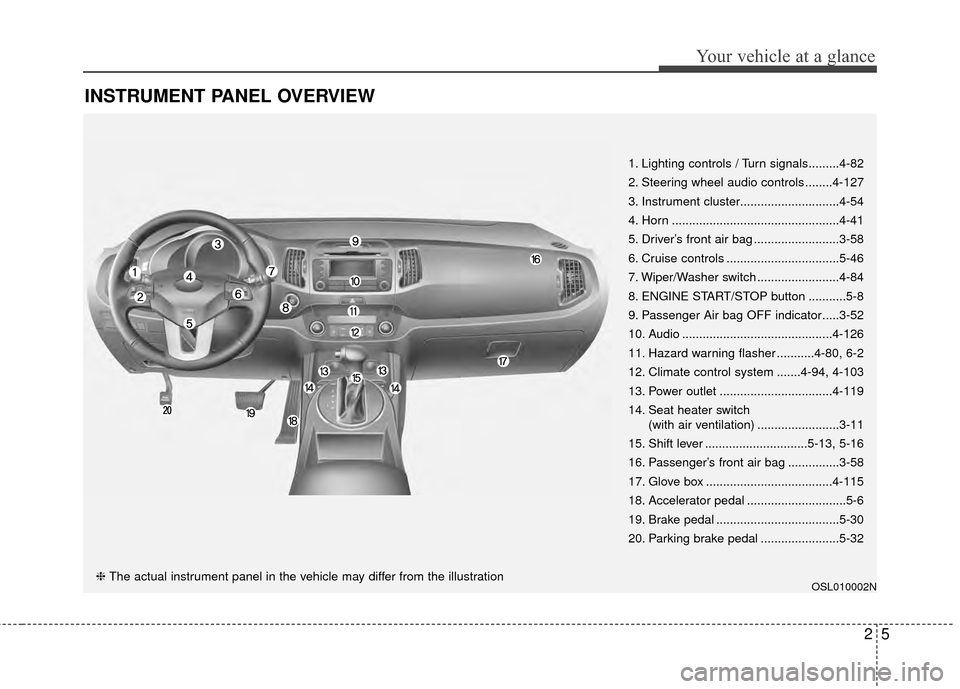
INSTRUMENT PANEL OVERVIEW
OSL010002N
1. Lighting controls / Turn signals.........4-82
2. Steering wheel audio controls ........4-127
3. Instrument cluster.............................4-54
4. Horn .................................................4-41
5. Driver’s front air bag .........................3-58
6. Cruise controls .................................5-46
7. Wiper/Washer switch ........................4-84
8. ENGINE START/STOP button ...........5-8
9. Passenger Air bag OFF indicator.....3-52
10. Audio ............................................4-126
11. Hazard warning flasher ...........4-80, 6-2
12. Climate control system .......4-94, 4-103
13. Power outlet .................................4-119
14. Seat heater switch(with air ventilation) ........................3-11
15. Shift lever ..............................5-13, 5-16
16. Passenger’s front air bag ...............3-58
17. Glove box .....................................4-115
18. Accelerator pedal .............................5-6
19. Brake pedal ....................................5-30
20. Parking brake pedal .......................5-32
❈ The actual instrument panel in the vehicle may differ from the illustration
Page 97 of 457
45
Features of your vehicle
To activate the immobilizer sys-tem:
Turn the ignition key to the OFF posi-
tion. The immobilizer system acti-
vates automatically. Without a valid
ignition key for your vehicle, the
engine will not start.
To deactivate the immobilizersystem:
Insert the ignition key into the key
cylinder and turn it to the ON posi-
tion.
✽ ✽ NOTICE
When starting the engine, do not use
the key with other immobilizer keys
around. Otherwise the engine may
not start or may stop soon after it
starts. Keep each key separately in
order to avoid a starting malfunc-
tion.
✽ ✽NOTICE
If you need additional keys or lose
your keys, consult an authorized Kia
dealer.
CAUTION
The transponder in your ignition
key is an important part of theimmobilizer system. It isdesigned to give years of trou-ble-free service, however youshould avoid exposure to mois-ture, static electricity and roughhandling. Immobilizer systemmalfunction could occur.
CAUTION
Do not change, alter or adjust theimmobilizer system because itcould cause the immobilizer sys-tem to malfunction and shouldonly be serviced by an author-ized Kia dealer.
Malfunctions caused by improp-er alterations, adjustments ormodifications to the immobilizersystem are not covered by yourvehicle manufacturer warranty.
CAUTION
Do not put metal accessories
near the ignition switch.
Metal accessories may interruptthe transponder signal and mayprevent the engine from beingstarted.
WARNING
In order to prevent theft of your
vehicle, do not leave spare keys
or your key number anywhere in
the vehicle. The ignition key and
key number are unique to your
vehicle, and therefore, should
be kept confidential.
Page 103 of 457
411
Features of your vehicle
D020104AHM
Tailgate unlock (3)
The tailgate is unlocked if the button
is pressed for more than 1 second.
The hazard warning lights will blink
twice to indicate that the tailgate is
unlocked.
However, after pressing this button,
the tailgate will lock automatically
unless you open the tailgate within
30 seconds.
Also, once the tailgate is opened and
then closed, the tailgate will lock
automatically.
D020105AHM
Alarm (4)
The horn sounds and the hazard
warning lights blink for about 30 sec-
onds if this button is pressed for
more than 0.5 seconds. To stop the
horn and lights, press any button on
the transmitter.
D040100AHM
Smart key functions
Carrying the smart key, you may lock
and unlock the vehicle doors (and
tailgate). Also, you may start the
engine. Refer to the following, for
more details.
D040101BHM
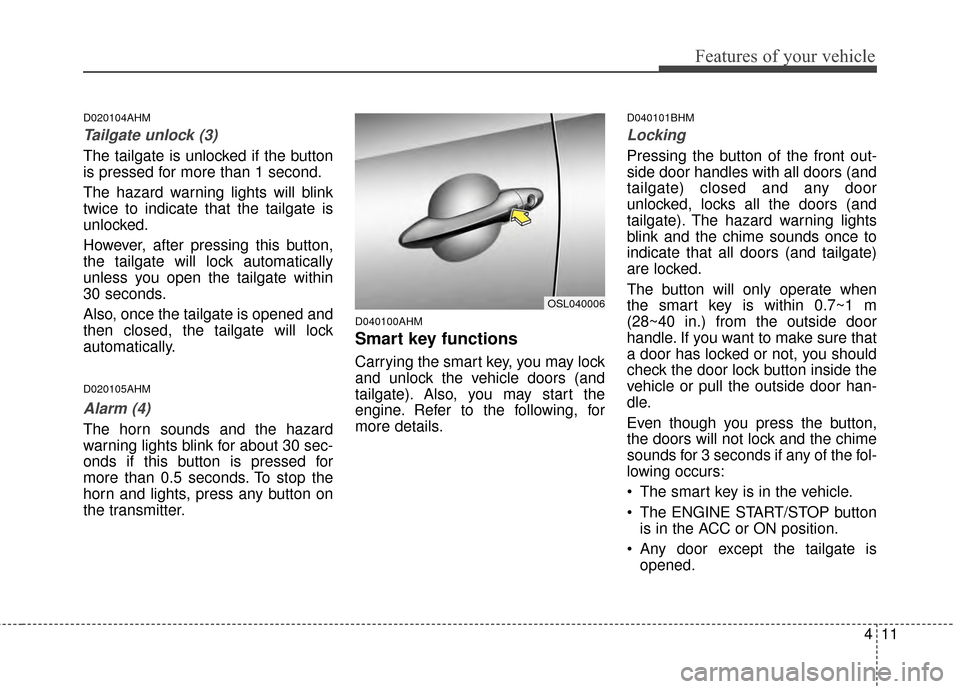
Locking
Pressing the button of the front out-
side door handles with all doors (and
tailgate) closed and any door
unlocked, locks all the doors (and
tailgate). The hazard warning lights
blink and the chime sounds once to
indicate that all doors (and tailgate)
are locked.
The button will only operate when
the smart key is within 0.7~1 m
(28~40 in.) from the outside door
handle. If you want to make sure that
a door has locked or not, you should
check the door lock button inside the
vehicle or pull the outside door han-
dle.
Even though you press the button,
the doors will not lock and the chime
sounds for 3 seconds if any of the fol-
lowing occurs:
The smart key is in the vehicle.
The ENGINE START/STOP buttonis in the ACC or ON position.
Any door except the tailgate is opened.
OSL040006
Page 132 of 457
Features of your vehicle
40
4
D130300AUN
Tilt steering/
Telescope steering
(if equipped)
Tilt steering allows you to adjust the
steering wheel before you drive.
You can also raise the steering wheel
to give your legs more room when
you exit and enter the vehicle (if
equipped).
The steering wheel should be posi-
tioned so that it is comfortable for
you to drive, while permitting you to
see the instrument panel warning
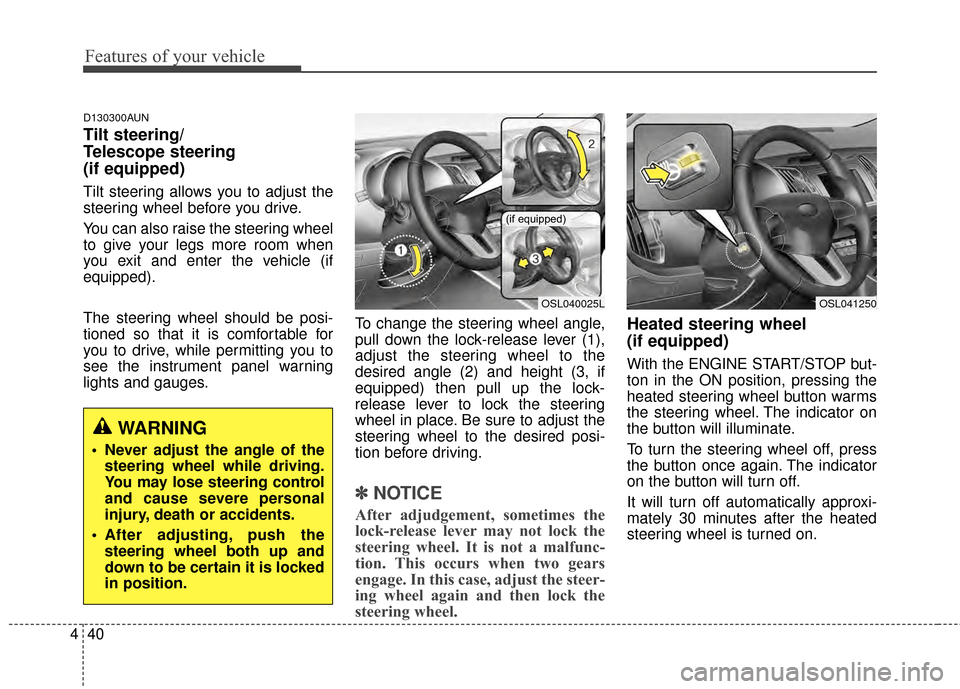
lights and gauges. To change the steering wheel angle,
pull down the lock-release lever (1),
adjust the steering wheel to the
desired angle (2) and height (3, if
equipped) then pull up the lock-
release lever to lock the steering
wheel in place. Be sure to adjust the
steering wheel to the desired posi-
tion before driving.
✽ ✽
NOTICE
After adjudgement, sometimes the
lock-release lever may not lock the
steering wheel. It is not a malfunc-
tion. This occurs when two gears
engage. In this case, adjust the steer-
ing wheel again and then lock the
steering wheel.
Heated steering wheel
(if equipped)
With the ENGINE START/STOP but-
ton in the ON position, pressing the
heated steering wheel button warms
the steering wheel. The indicator on
the button will illuminate.
To turn the steering wheel off, press
the button once again. The indicator
on the button will turn off.
It will turn off automatically approxi-
mately 30 minutes after the heated
steering wheel is turned on.
WARNING
Never adjust the angle of the
steering wheel while driving.
You may lose steering control
and cause severe personal
injury, death or accidents.
After adjusting, push the steering wheel both up and
down to be certain it is locked
in position.
OSL040025L
(if equipped)
OSL041250
Page 158 of 457
Features of your vehicle
66
4
D150308AHM-EE
Parking brake & brake
fluid warning light
Parking brake warning
This light is illuminated when the
parking brake is applied with the igni-
tion switch in the START or ON posi-
tion. The warning light should go off
after a few seconds when the park-
ing brake is released.
Low brake fluid level warning
If the warning light remains on, it may
indicate that the brake fluid level in
the reservoir is low.
If the warning light remains on:
1.Drive carefully to the nearest safe location and stop your vehicle.
2.With the engine stopped, check the brake fluid level immediately and
add fluid as required. Then check
all brake components for fluid
leaks.
CAUTION
If the engine is not stoppedimmediately after the engine oilpressure warning light is illumi-nated, severe damage couldresult.
CAUTION
If the oil pressure warning lightstays on while the engine is run-ning, serious engine damagemay result. The oil pressurewarning light comes on when-ever there is insufficient oilpressure. In normal operation, itshould come on when the igni-tion switch is turned on, then goout when the engine is started.If the oil pressure warning lightstays on while the engine is run-ning, there is a serious malfunc-tion.
If this happens, stop the vehicleas soon as it is safe to do so,turn off the engine and checkthe oil level. If the oil level is low,fill the engine oil to the properlevel and start the engine again.If the light stays on with theengine running, turn the engineoff immediately. In any instancewhere the oil light stays onwhen the engine is running, theengine should be checked by anauthorized Kia dealer before thevehicle is driven again.
Page 161 of 457
469
Features of your vehicle
D150318AHM
Low fuel level warninglight
This warning light indicates the fuel
tank is nearly empty. When it comes
on, you should add fuel as soon as
possible. Driving with the fuel level
warning light on or with the fuel level
below “E” can cause the engine to
misfire and damage the catalytic
converter.
Electric power steering(EPS) system warninglight
This indicator light comes on after
the ignition key is turned to the ON
position and then it will go out after
the engine is started.
This light also comes on when the
EPS has some troubles. If it comes
on while driving, have your vehicle
inspected by an authorized Kia deal-
er.
Immobilizer indicator (if equipped)
With smart key system
If any of the following occurs in a
vehicle equipped with the smart key,
the immobilizer indicator illuminates,
blinks or goes off.
When the smart key is in the vehi- cle, if the ENGINE START/STOP
button is in the ACC or ON posi-
tion, the indicator will illuminate for
approximately 30 seconds to indi-
cate that you are able to start the
engine. However, when the smart
key is not in the vehicle, if the
ENGINE START/STOP button is
pressed, the indicator will blink for
a few seconds to indicate that you
are not be able to start the engine.
If the indicator illuminates only for 2 seconds and goes out when the
ENGINE START/STOP button is
turned to ON position with the
smart key in the vehicle, have the
system checked by an authorized
Kia dealer. When the battery is weak, if the
ENGINE START/STOP button is
pressed, the indicator will blink and
you are not able to start the
engine. However, you can start the
engine if you press the Engine
Start/Stop Button with the smart
key. Also, if the smart key system
related parts have a problem, the
indicator will blink.
EPS
Page 164 of 457
Features of your vehicle
72
4
Cruise SET indicator
The indicator illuminates when the
cruise function switch (SET - or RES
+) is ON.
The cruise SET indicator in the
instrument cluster is illuminated
when the cruise control switch (SET
- or RES +) is pushed.
The cruise SET indicator does not
illuminate when the cruise control
switch (CANCEL) is pushed or the
system is disengaged.D150327AUN
Key reminder warning chime
(if equipped)
If the driver’s door is opened while
the ignition key is left in the ignition
switch (ACC or LOCK position), the
key reminder warning chime will
sound. This is to prevent you from
locking your keys in the vehicle. The
chime sounds until the key is
removed from the ignition switch or
the driver’s door is closed.
KEY OUT indicator (if equipped)
When the ENGINE START/STOP
button is in the ACC or ON position,
if any door is open, the system
checks for the smart key. If the smart
key is not in the vehicle, the indicator
will blink, and if all doors are closed,
the chime will also sound for about 5
seconds. The indicator will go off
while the vehicle is moving.
4WD system warninglight (if equipped)
When the ignition switch is turned to
the ON position, the 4WD indicator
will illuminate and then go off in a few
seconds.
If the 4WD system warning light
illuminates, this indicates that there
is a malfunction in the 4WD system.
If this occurs, have your vehicle
checked by an authorized Kia dealer
as soon as possible.
SET
KEY
OUT
Page 165 of 457
473
Features of your vehicle
4WD LOCK indicator (if equipped)
The 4WD LOCK indicator light is illu-
minated when the 4WD LOCK button
is pushed. The purpose of this 4WD
LOCK mode is to increase the drive
power when driving on wet pave-
ment, snow-covered roads and/or
off-road. The 4WD LOCK indicator
light is turned off by pushing the but-
ton again.
LCD display warning (if equipped)
Key not in vehicle
If the smart key is not in the vehicle
and if any door is opened or closed
with the ENGINE START/STOP but-
ton in the ACC, ON, or START posi-
tion, the warning illuminates on the
LCD display. Also, the chime sounds
for 5 seconds when the smart key is
not in the vehicle and the door is
closed.
Always have the smart key with you.
Key not detected
If the smart key is not in the vehicle
or is not detected and you press the
ENGINE START/STOP button, the
warning illuminates on the LCD dis-
play for 10 seconds. Also, the immo-
bilizer indicator light blinks for 10
seconds. Low key battery
If the ENGINE START/STOP button
turns to the OFF position when the
smart key in the vehicle discharges,
the warning illuminates on the LCD
display for about 10 seconds. Also,
the warning chime sounds once.
Replace the battery with a new one.
Press brake pedal to start engine
If the ENGINE START/STOP button
turns to the ACC position twice by
pressing the button repeatedly with-
out depressing the brake pedal, the
warning illuminates on the LCD dis-
play for about 10 seconds to indicate
that you should depress the brake
pedal to start the engine.
Press cluch pedal to start engine
If the ENGINE START/STOP button
turns to the ACC position twice by
pressing the button repeatedly with-
out depressing the clutch pedal, the
warning illuminates on the LCD dis-
play for about 10 seconds to indicate
that you should depress the clutch
pedal to start the engine.
CAUTION
Do not use 4WD LOCK mode on
dry paved roads or highway, itcan cause noise, vibration ordamage of 4WD related parts.