2014 KIA Sportage mirror
[x] Cancel search: mirrorPage 11 of 457
Your vehicle at a glance
22
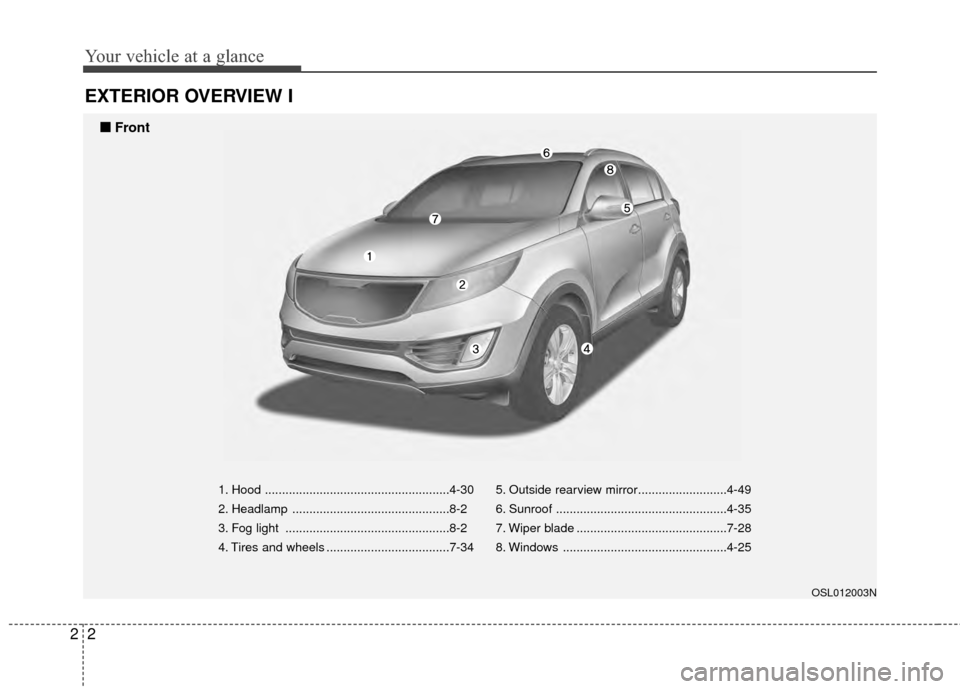
EXTERIOR OVERVIEW I
1. Hood ......................................................4-30
2. Headlamp ..............................................8-2
3. Fog light ................................................8-2
4. Tires and wheels ....................................7-345. Outside rearview mirror..........................4-49
6. Sunroof ..................................................4-35
7. Wiper blade ............................................7-28
8. Windows ................................................4-25
OSL012003N
■
■
Front
Page 13 of 457
Your vehicle at a glance
42
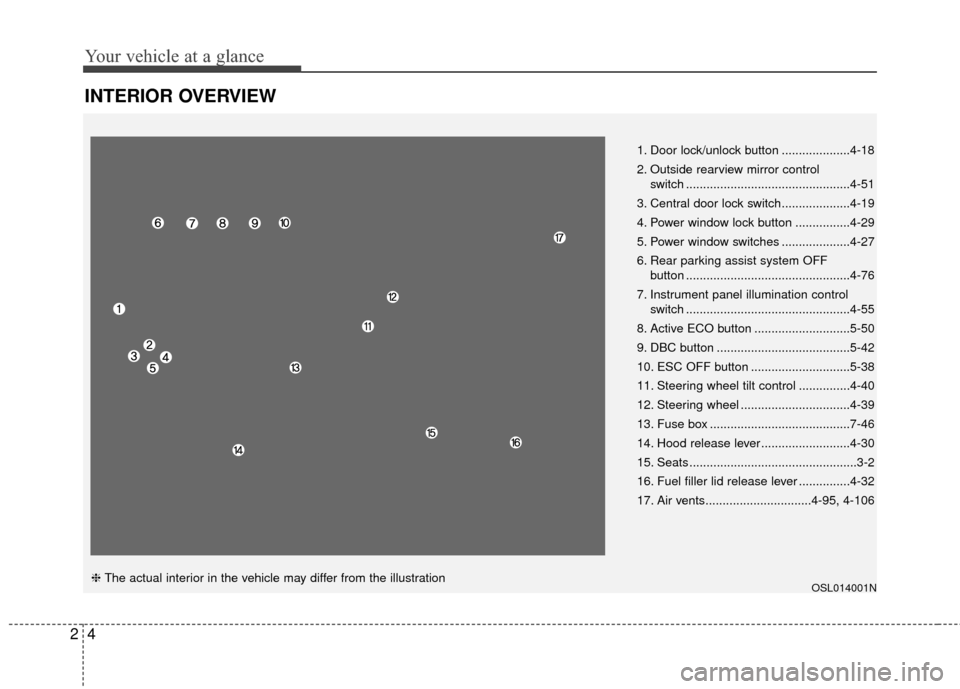
INTERIOR OVERVIEW
OSL014001N
1. Door lock/unlock button ....................4-18
2. Outside rearview mirror control switch ................................................4-51
3. Central door lock switch....................4-19
4. Power window lock button ................4-29
5. Power window switches ....................4-27
6. Rear parking assist system OFF button ................................................4-76
7. Instrument panel illumination control switch ................................................4-55
8. Active ECO button ............................5-50
9. DBC button .......................................5-42
10. ESC OFF button .............................5-38
11. Steering wheel tilt control ...............4-40
12. Steering wheel ................................4-39
13. Fuse box .........................................7-46
14. Hood release lever ..........................4-30
15. Seats .................................................3-2
16. Fuel filler lid release lever ...............4-32
17. Air vents...............................4-95, 4-106
❈ The actual interior in the vehicle may differ from the illustration
Page 93 of 457

Features of your vehicle
Keys . . . . . . . . . . . . . . . . . . . . . . . . . . . . . . . . . . . . \
. . 4-3
• Record your key number . . . . . . . . . . . . . . . . . . . . . . . 4-3
. . . . . . . . . . . . . . . . . . . . . . . . . . . . . . . . 4-3
Remote keyless entry . . . . . . . . . . . . . . . . . . . . . . . . 4-7
. . . . . . . . . . . 4-7
. . . . . . . . . . . . . . . . . . . . . . . . 4-8
. . . . . . . . . . . . . . . . . . . . . . . . . . . 4-9
Smart key . . . . . . . . . . . . . . . . . . . . . . . . . . . . . . . . 4-10
. . . . . . . . . . . . . . . . . . . . . . . . . . 4-11
. . . . . . . . . . . . . . . . . . . . . . . . 4-12
. . . . . . . . . . . . . . . . . . . . . . . . . . 4-14
Theft-alarm system . . . . . . . . . . . . . . . . . . . . . . . . 4-15
Door locks . . . . . . . . . . . . . . . . . . . . . . . . . . . . . . . . 4-17
. . . . . . . . . . . . . . . . . . . . . . . . . . . 4-17
. . . . . . . . . . . . . . . . . . . . . . . . . . . . . 4-18
. . . . . . . . . . . . . . . . 4-20
. . . . . . . . . . . . . . . . . 4-21
Tailgate . . . . . . . . . . . . . . . . . . . . . . . . . . . . . . . . . . 4-22\
Windows . . . . . . . . . . . . . . . . . . . . . . . . . . . . . . . . . 4-25
Hood. . . . . . . . . . . . . . . . . . . . . . . . . . . . . . . . . . . . \
. 4-30
Fuel filler lid . . . . . . . . . . . . . . . . . . . . . . . . . . . . . . 4-32
Panoramic sunroof . . . . . . . . . . . . . . . . . . . . . . . . . 4-35Steering wheel . . . . . . . . . . . . . . . . . . . . . . . . . . . . . 4-39
. . . . . . . . . . . . . . . . 4-39
. . . . . . . . . . . . . . . . . . . . 4-40
. . . . . . . . . . . . . . . . . . . . . . . . . 4-40
. . . . . . . . . . . . . . . . . . . . . . . . . . . . . . . . . . . . \
. . . 4-41
. . . . . . . . . . . . . . . . . . . . . . . . . . . . . . . . . 4-42
Mirrors . . . . . . . . . . . . . . . . . . . . . . . . . . . . . . . . . . 4-44\
. . . . . . . . . . . . . . . . . . . . . . . . 4-44
. . . . . . . . . . . . . . . . . . . . . . . 4-51
Instrument cluster . . . . . . . . . . . . . . . . . . . . . . . . . . . . . 4-54
. . . . . . . . . . . . . . . . . . 4-55
. . . . . . . . . . . . . . . . . . . . . . . . . . . . . . . . . . . . \
. 4-55
. . . . . . . . . . . . . . . . . . . . . . . 4-62
Back-up warning system . . . . . . . . . . . . . . . . . . . . 4-76
. . . . . . . . 4-76
system . . . . . . . . . . . . . . . . . . . . . . . . . . . . . . . . . . . . \
. 4-77
. . . . . . . . . . . . . . . . . . . . . . . . . . . . . . . . 4-79
Rear-camera display . . . . . . . . . . . . . . . . . . . . . . . 4-79
Hazard warning flasher . . . . . . . . . . . . . . . . . . . . . 4-80
4
Page 136 of 457
Features of your vehicle
44
4
D140100AHM
Inside rearview mirror
Adjust the rearview mirror so that the
center view through the rear window
is seen. Make this adjustment before
you start driving.
D140101AHM
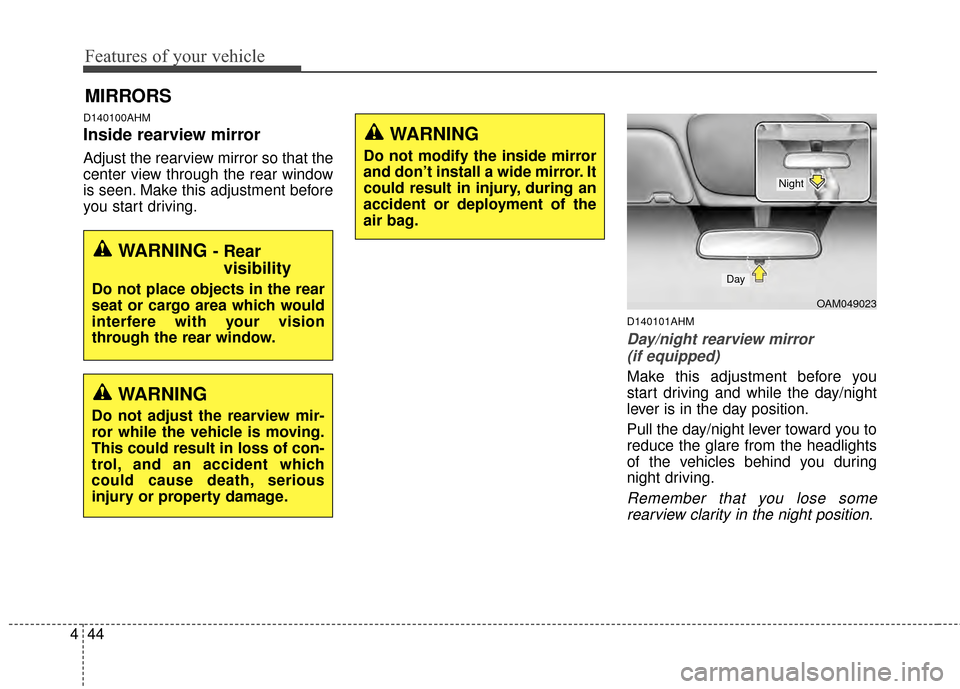
Day/night rearview mirror
(if equipped)
Make this adjustment before you
start driving and while the day/night
lever is in the day position.
Pull the day/night lever toward you to
reduce the glare from the headlights
of the vehicles behind you during
night driving.
Remember that you lose somerearview clarity in the night position.
MIRRORS
WARNING - Rear visibility
Do not place objects in the rear
seat or cargo area which would
interfere with your vision
through the rear window.
WARNING
Do not adjust the rearview mir-
ror while the vehicle is moving.
This could result in loss of con-
trol, and an accident which
could cause death, serious
injury or property damage.
WARNING
Do not modify the inside mirror
and don’t install a wide mirror. It
could result in injury, during an
accident or deployment of the
air bag.
OAM049023
Day
Night
Page 137 of 457
445
Features of your vehicle
D140102AHM-EE-C1
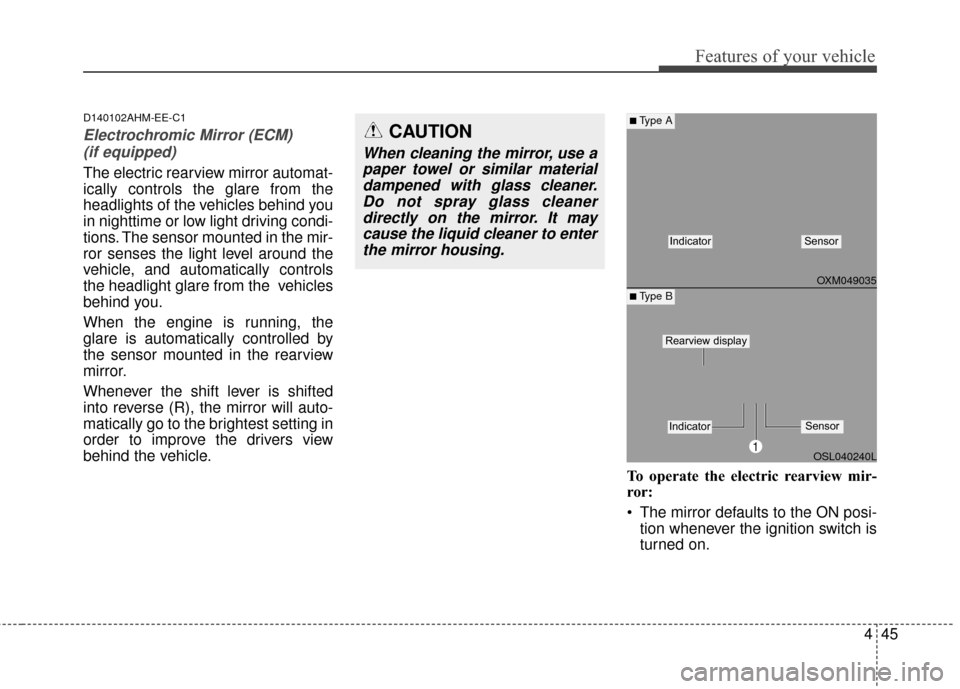
Electrochromic Mirror (ECM) (if equipped)
The electric rearview mirror automat-
ically controls the glare from the
headlights of the vehicles behind you
in nighttime or low light driving condi-
tions. The sensor mounted in the mir-
ror senses the light level around the
vehicle, and automatically controls
the headlight glare from the vehicles
behind you.
When the engine is running, the
glare is automatically controlled by
the sensor mounted in the rearview
mirror.
Whenever the shift lever is shifted
into reverse (R), the mirror will auto-
matically go to the brightest setting in
order to improve the drivers view
behind the vehicle.
To operate the electric rearview mir-
ror:
The mirror defaults to the ON posi-tion whenever the ignition switch is
turned on.
OXM049035
OSL040240L
■Type A
■ Type B
IndicatorSensor
1
IndicatorSensor
Rearview display
CAUTION
When cleaning the mirror, use apaper towel or similar materialdampened with glass cleaner.Do not spray glass cleanerdirectly on the mirror. It maycause the liquid cleaner to enterthe mirror housing.
Page 138 of 457
Features of your vehicle
46
4
Press the ON/OFF button (1) to
turn the automatic dimming func-
tion off. The mirror indicator light
will turn off.
Press the ON/OFF button (1) to
turn the automatic dimming func-
tion on. The mirror indicator light
will illuminate.
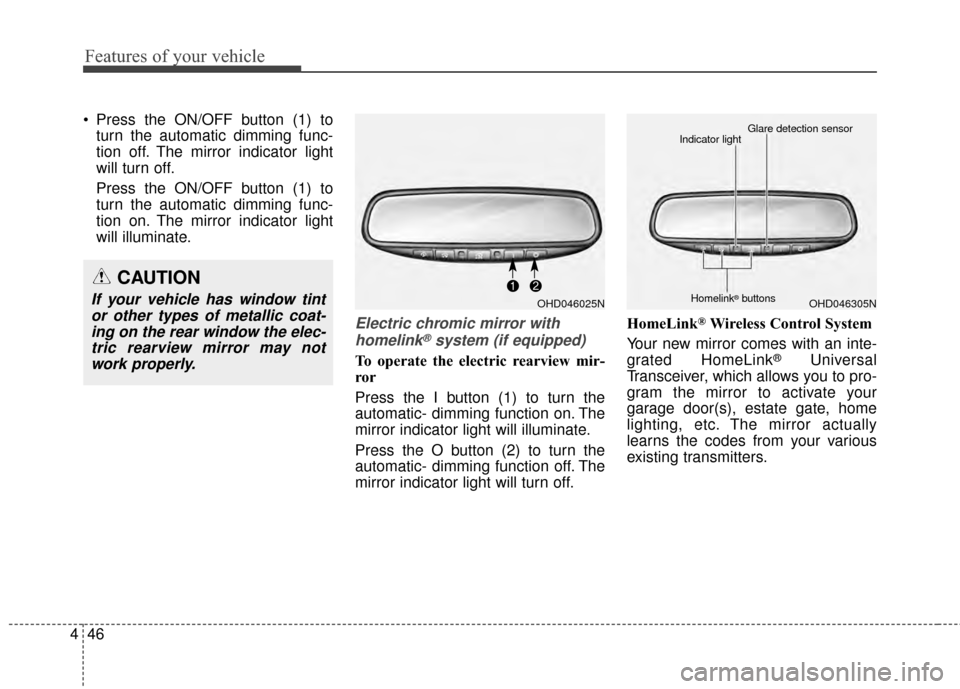
Electric chromic mirror with
homelink®system (if equipped)
To operate the electric rearview mir-
ror
Press the I button (1) to turn the
automatic- dimming function on. The
mirror indicator light will illuminate.
Press the O button (2) to turn the
automatic- dimming function off. The
mirror indicator light will turn off. HomeLink
®Wireless Control System
Your new mirror comes with an inte-
grated HomeLink
®Universal
Transceiver, which allows you to pro-
gram the mirror to activate your
garage door(s), estate gate, home
lighting, etc. The mirror actually
learns the codes from your various
existing transmitters.
CAUTION
If your vehicle has window tint or other types of metallic coat-ing on the rear window the elec-tric rearview mirror may notwork properly.OHD046025NOHD046305N
Glare detection sensor
Indicator light
Homelink®buttons
Page 139 of 457
447
Features of your vehicle
Retain the original transmitter for
future programming procedures (i.e.,
new vehicle purchase). It is also sug-
gested that upon the sale of the vehi-
cle, the programmed HomeLink
®but-
tons be erased for security purposes
(follow step 1 in the “Programming”
portion of this text).
Programming
Your vehicle may require the ignition
switch to be turned to the ACC posi-
tion for programming and/or opera-
tion of HomeLink
®. It is also recom-
mended that a new battery be
replaced in the hand-held transmitter
of the device being programmed to
HomeLink
®for quicker training and
accurate transmission of the radio-
frequency.
Follow these steps to train your
HomeLink
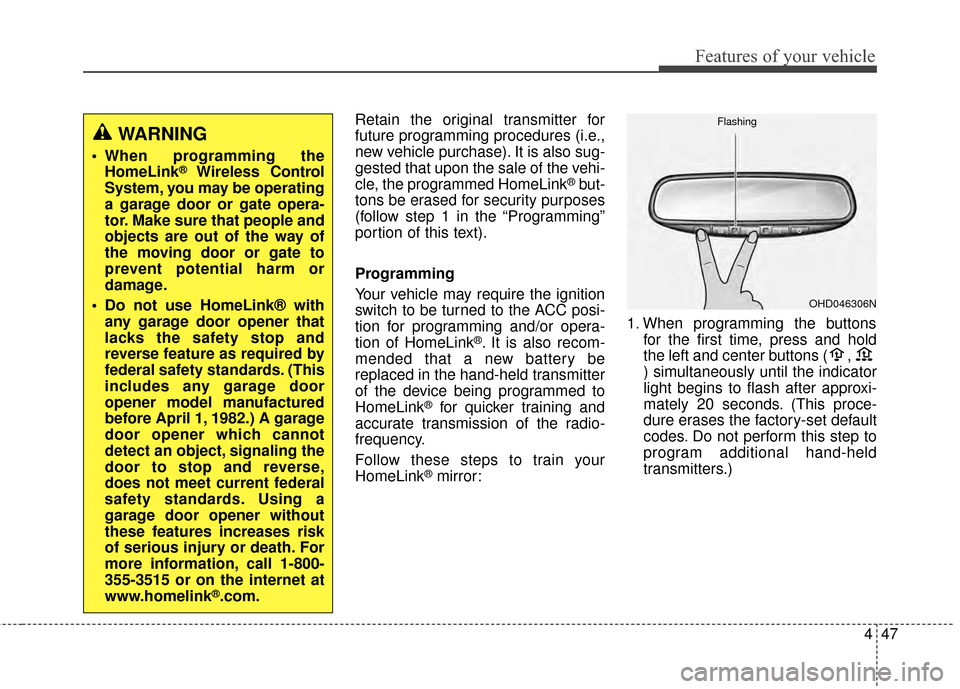
®mirror: 1. When programming the buttons
for the first time, press and hold
the left and center buttons ( ,
) simultaneously until the indicator
light begins to flash after approxi-
mately 20 seconds. (This proce-
dure erases the factory-set default
codes. Do not perform this step to
program additional hand-held
transmitters.)
WARNING
When programming theHomeLink®Wireless Control
System, you may be operating
a garage door or gate opera-
tor. Make sure that people and
objects are out of the way of
the moving door or gate to
prevent potential harm or
damage.
Do not use HomeLink® with any garage door opener that
lacks the safety stop and
reverse feature as required by
federal safety standards. (This
includes any garage door
opener model manufactured
before April 1, 1982.) A garage
door opener which cannot
detect an object, signaling the
door to stop and reverse,
does not meet current federal
safety standards. Using a
garage door opener without
these features increases risk
of serious injury or death. For
more information, call 1-800-
355-3515 or on the internet at
www.homelink
®.com.
OHD046306N
Flashing
Page 140 of 457
Features of your vehicle
48
4
✽
✽
NOTICE
For non rolling code garage door
openers, follow steps 2 - 3.
For rolling code garage door open-
ers, follow steps 2 - 6.
For Canadian Programming, please
follow the Canadian Programming
section.
For help with determining whether
your garage is non-rolling code or
rolling code, please refer to the
garage door openers owner’s manu-
al or contact HomeLink
®customer
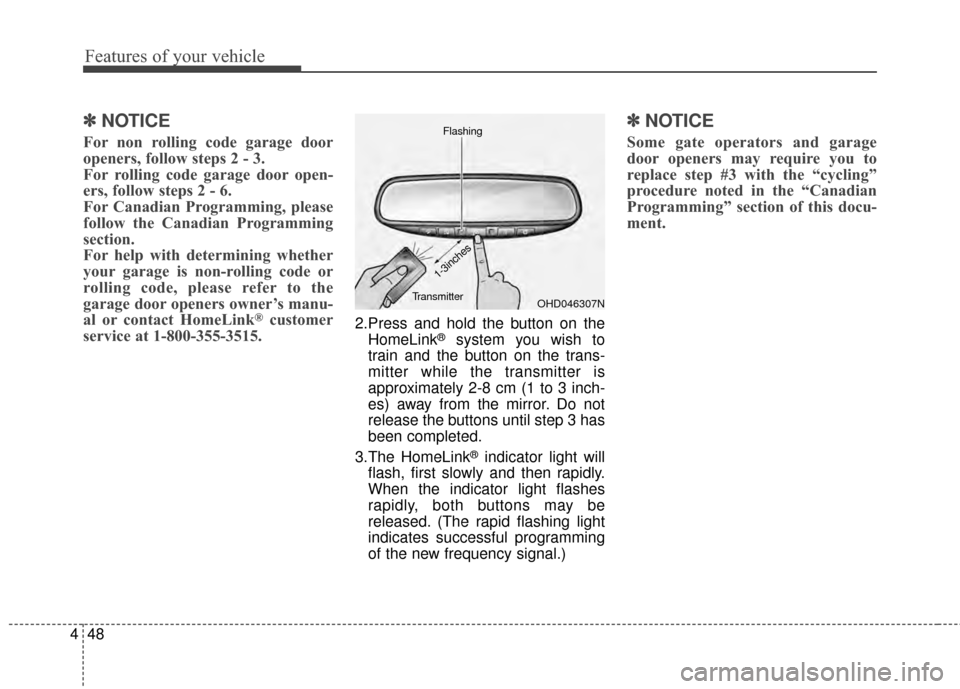
service at 1-800-355-3515.2.Press and hold the button on the
HomeLink®system you wish to
train and the button on the trans-
mitter while the transmitter is
approximately 2-8 cm (1 to 3 inch-
es) away from the mirror. Do not
release the buttons until step 3 has
been completed.
3.The HomeLink
®indicator light will
flash, first slowly and then rapidly.
When the indicator light flashes
rapidly, both buttons may be
released. (The rapid flashing light
indicates successful programming
of the new frequency signal.)
✽ ✽ NOTICE
Some gate operators and garage
door openers may require you to
replace step #3 with the “cycling”
procedure noted in the “Canadian
Programming” section of this docu-
ment.
OHD046307N
Flashing
1-3inches
Transmitter