2014 KIA Sportage Lock
[x] Cancel search: LockPage 121 of 457
429
Features of your vehicle
D080104AAM
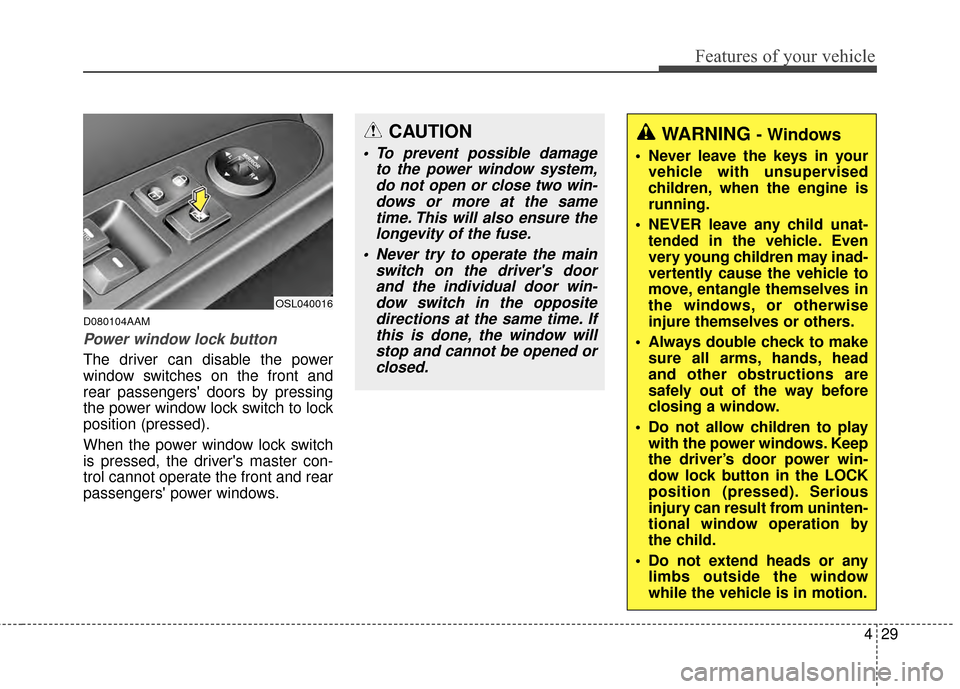
Power window lock button
The driver can disable the power
window switches on the front and
rear passengers' doors by pressing
the power window lock switch to lock
position (pressed).
When the power window lock switch
is pressed, the driver's master con-
trol cannot operate the front and rear
passengers' power windows.
CAUTION
To prevent possible damageto the power window system,do not open or close two win-dows or more at the sametime. This will also ensure thelongevity of the fuse.
Never try to operate the main switch on the driver's doorand the individual door win-dow switch in the oppositedirections at the same time. Ifthis is done, the window willstop and cannot be opened orclosed.
WARNING - Windows
Never leave the keys in your vehicle with unsupervised
children, when the engine is
running.
NEVER leave any child unat- tended in the vehicle. Even
very young children may inad-
vertently cause the vehicle to
move, entangle themselves in
the windows, or otherwise
injure themselves or others.
Always double check to make sure all arms, hands, head
and other obstructions are
safely out of the way before
closing a window.
Do not allow children to play with the power windows. Keep
the driver’s door power win-
dow lock button in the LOCK
position (pressed). Serious
injury can result from uninten-
tional window operation by
the child.
Do not extend heads or any limbs outside the window
while the vehicle is in motion.
OSL040016
Page 123 of 457
431
Features of your vehicle
D090200AAM
Closing the hood
1.Before closing the hood, check thefollowing:
partment must be correctly
installed.
bustible material must be
removed from the engine com-
partment.
2.Return the support rod to its clip to prevent it from rattling.
3.Lower the hood until it is about 30 cm (1 ft.) above the closed position
and let it drop. Make sure that it
locks into place.
WARNING
Before closing the hood,ensure that all obstructions
are removed from the hood
opening. Closing the hood
with an obstruction present in
the hood opening may result
in property damage or severe
personal injury.
Do not leave gloves, rags or any other combustible materi-
al in the engine compartment.
Doing so may cause a heat-
induced fire.
WARNING
Always double check to besure that the hood is firmly
latched before driving away. If
it is not latched, the hood
could open while the vehicle
is being driven, causing total
loss of visibility, which might
result in an accident.
The support rod must be inserted completely into the
hole provided whenever you
inspect the engine compart-
ment. This will prevent the
hood from falling and possi-
bly injuring you.
Do not move the vehicle with the hood raised. The view will
be blocked and the hood
could fall or get damaged.
Page 124 of 457
Features of your vehicle
32
4
D100100AAM
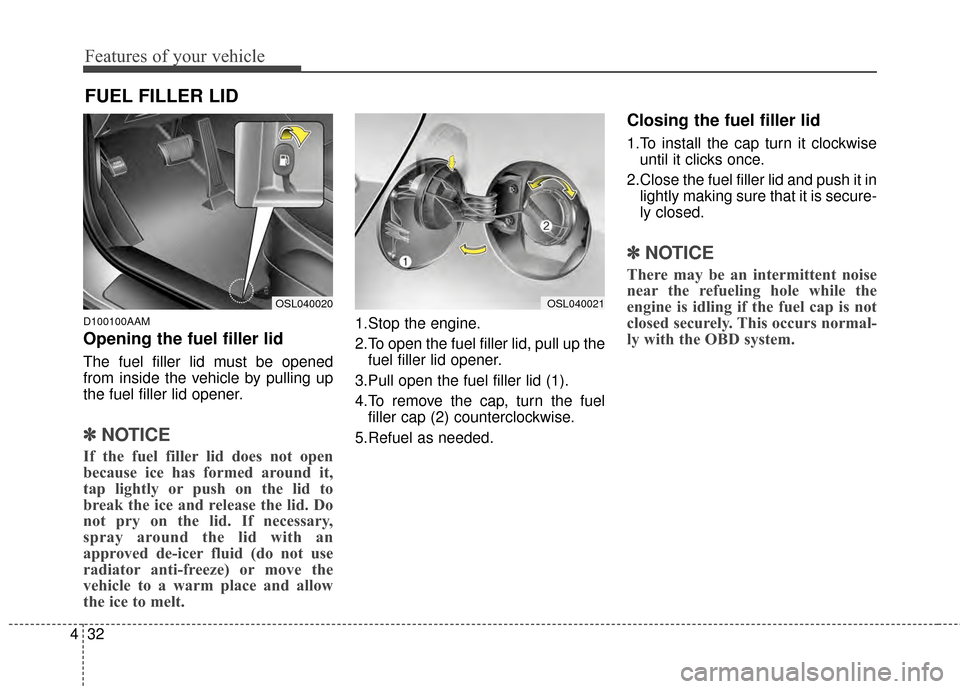
Opening the fuel filler lid
The fuel filler lid must be opened
from inside the vehicle by pulling up
the fuel filler lid opener.
✽ ✽
NOTICE
If the fuel filler lid does not open
because ice has formed around it,
tap lightly or push on the lid to
break the ice and release the lid. Do
not pry on the lid. If necessary,
spray around the lid with an
approved de-icer fluid (do not use
radiator anti-freeze) or move the
vehicle to a warm place and allow
the ice to melt.
1.Stop the engine.
2.To open the fuel filler lid, pull up the
fuel filler lid opener.
3.Pull open the fuel filler lid (1).
4.To remove the cap, turn the fuel filler cap (2) counterclockwise.
5.Refuel as needed.
Closing the fuel filler lid
1.To install the cap turn it clockwise until it clicks once.
2.Close the fuel filler lid and push it in lightly making sure that it is secure-
ly closed.
✽ ✽ NOTICE
There may be an intermittent noise
near the refueling hole while the
engine is idling if the fuel cap is not
closed securely. This occurs normal-
ly with the OBD system.
FUEL FILLER LID
OSL040020OSL040021
Page 131 of 457
439
Features of your vehicle
Electric power steering
Power steering uses the motor to
assist you in steering the vehicle. If
the engine is off or if the power steer-
ing system becomes inoperative, the
vehicle may still be steered, but it will
require increased steering effort.
The motor driven power steering is
controlled by the power steering con-
trol unit which senses the steering
wheel torque and vehicle speed to
command the motor.
The steering wheel becomes heavier
as the vehicle’s speed increases and
becomes lighter as the vehicle’s
speed decreases for better control of
the steering wheel.
Should you notice any change in the
effort required to steer during normal
vehicle operation, have the power
steering checked by an authorized
Kia dealer.
✽ ✽NOTICE
The following symptoms may occur
during normal vehicle operation:
• The EPS warning light does not
illuminate.
• The steering effort is high immedi- ately after turning the ignition
switch on. This happens as the sys-
tem performs the EPS system
diagnostics. When the diagnostics
is completed, the steering wheel
will return to its normal condition.
• A click noise may be heard from the EPS relay after the ignition
switch is turned to the ON or
LOCK position.
• Motor noise may be heard when the vehicle is at a stop or at a low
driving speed.
• The steering effort can suddenly increase, if the operation of the
EPS system is stopped to prevent
serious accidents when it detects
malfunction of the EPS system by
self-diagnosis. (Continued)(Continued)
• The steering effort increases if the
steering wheel is rotated continu-
ously when the vehicle is not in
motion. However, after a few min-
utes, it will return to its normal
conditions.
• When you operate the steering wheel in low temperature, abnor-
mal noise could occur. If tempera-
ture rises, the noise will disappear.
This is a normal condition.
STEERING WHEEL
CAUTION
If the EPS system does not
operate normally, the warninglight will illuminate on theinstrument cluster. The steeringwheel may become difficult tocontrol or operate abnormally.Take your vehicle to an author-ized Kia dealer and have thevehicle checked as soon aspossible.
Page 132 of 457
Features of your vehicle
40
4
D130300AUN
Tilt steering/
Telescope steering
(if equipped)
Tilt steering allows you to adjust the
steering wheel before you drive.
You can also raise the steering wheel
to give your legs more room when
you exit and enter the vehicle (if
equipped).
The steering wheel should be posi-
tioned so that it is comfortable for
you to drive, while permitting you to
see the instrument panel warning
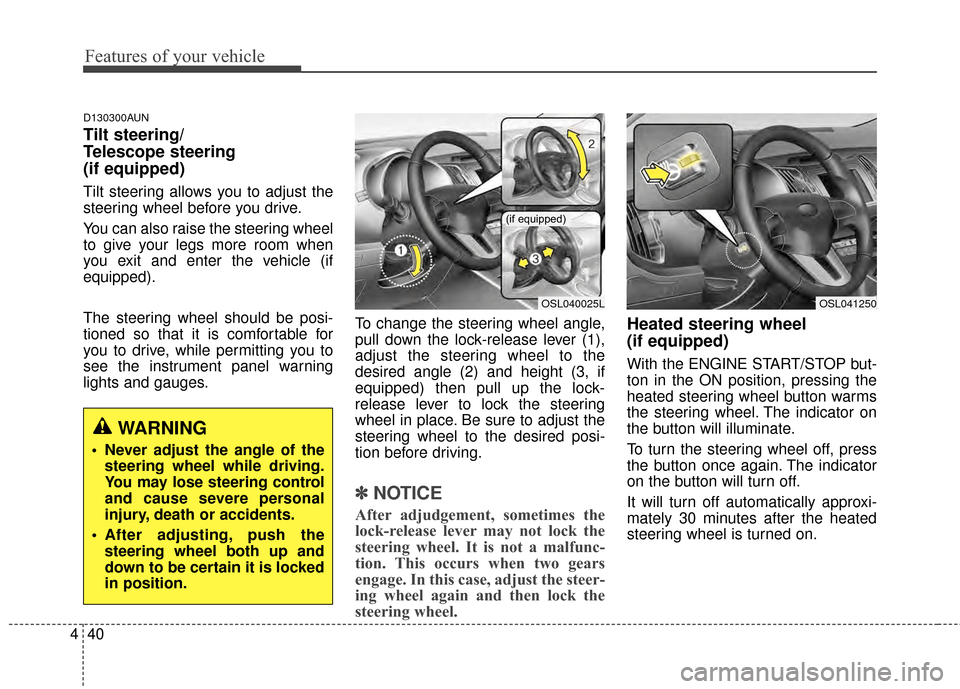
lights and gauges. To change the steering wheel angle,
pull down the lock-release lever (1),
adjust the steering wheel to the
desired angle (2) and height (3, if
equipped) then pull up the lock-
release lever to lock the steering
wheel in place. Be sure to adjust the
steering wheel to the desired posi-
tion before driving.
✽ ✽
NOTICE
After adjudgement, sometimes the
lock-release lever may not lock the
steering wheel. It is not a malfunc-
tion. This occurs when two gears
engage. In this case, adjust the steer-
ing wheel again and then lock the
steering wheel.
Heated steering wheel
(if equipped)
With the ENGINE START/STOP but-
ton in the ON position, pressing the
heated steering wheel button warms
the steering wheel. The indicator on
the button will illuminate.
To turn the steering wheel off, press
the button once again. The indicator
on the button will turn off.
It will turn off automatically approxi-
mately 30 minutes after the heated
steering wheel is turned on.
WARNING
Never adjust the angle of the
steering wheel while driving.
You may lose steering control
and cause severe personal
injury, death or accidents.
After adjusting, push the steering wheel both up and
down to be certain it is locked
in position.
OSL040025L
(if equipped)
OSL041250
Page 141 of 457
449
Features of your vehicle
Rolling code programming
To train a garage door opener (or
other rolling code equipped devices)
with the rolling code feature, follow
these instructions after completing
the “Programming” portion of this
text. (A second person may make the
following training procedures quicker
& easier.)
4.Locate the “learn” or “smart” buttonon the device’s motor head unit.
Exact location and color of the but-
ton may vary by product brand. If
there is difficulty locating the
“learn” or “smart” button, reference
the device’s owner’s manual or
contact HomeLink
®at 1-800-355-
3515 or on the internet at
www.homelink
®.com.
5.Press and release the “learn” or “smart” button on the device’s
motor head unit. You have 30 sec-
onds to complete step number 6. 6.Return to the vehicle and firmly
press and release the programmed
HomeLink
®button up to three
times. The rolling code equipped
device should now recognize the
HomeLink
®signal and activate
when the HomeLink®button is
pressed. The remaining two but-
tons may now be programmed if
this has not previously been done.
Refer to the “Programming” portion
of this text. Operating HomeLink
®
To operate, simply press the pro-
grammed HomeLink®button.
Activation will now occur for the
trained product (garage door, securi-
ty system, entry door lock, estate
gate, or home or office lighting). For
convenience, the hand-held trans-
mitter of the device may also be used
at any time. The HomeLink
®Wireless
Controls System (once programmed)
or the original hand-held transmitter
may be used to activate the device
(e.g. garage door, entry door lock,
etc.). In the event that there are still
programming difficulties, contact
HomeLink
®at 1-800-355-3515 or on
the internet at www.homelink®.com.
Page 155 of 457
463
Features of your vehicle
D150303AHM-U1
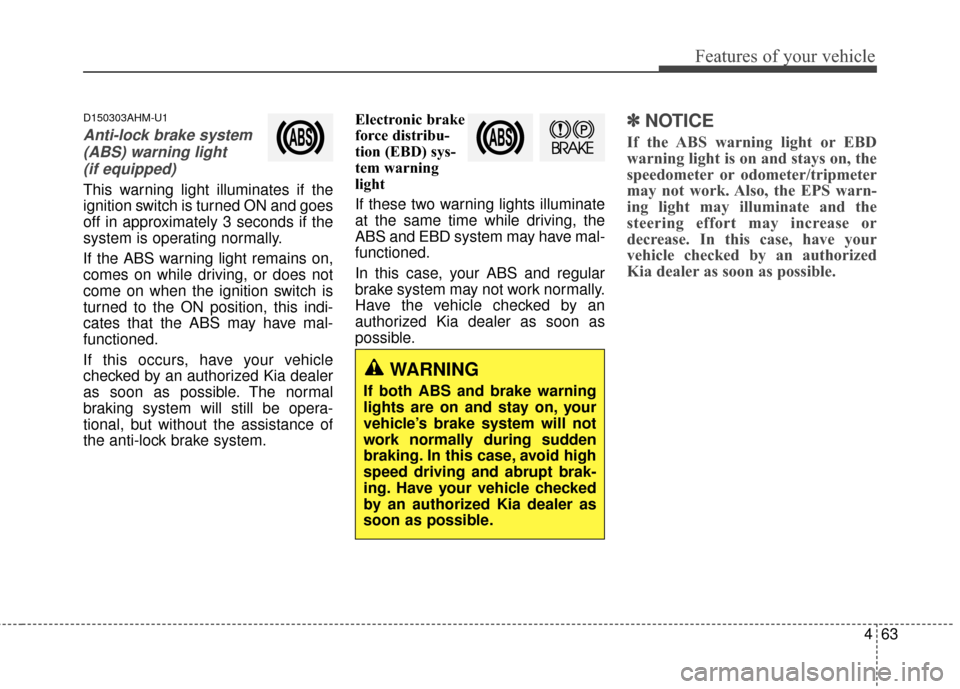
Anti-lock brake system(ABS) warning light (if equipped)
This warning light illuminates if the
ignition switch is turned ON and goes
off in approximately 3 seconds if the
system is operating normally.
If the ABS warning light remains on,
comes on while driving, or does not
come on when the ignition switch is
turned to the ON position, this indi-
cates that the ABS may have mal-
functioned.
If this occurs, have your vehicle
checked by an authorized Kia dealer
as soon as possible. The normal
braking system will still be opera-
tional, but without the assistance of
the anti-lock brake system. Electronic brake
force distribu-
tion (EBD) sys-
tem warning
light
If these two warning lights illuminate
at the same time while driving, the
ABS and EBD system may have mal-
functioned.
In this case, your ABS and regular
brake system may not work normally.
Have the vehicle checked by an
authorized Kia dealer as soon as
possible.
✽ ✽
NOTICE
If the ABS warning light or EBD
warning light is on and stays on, the
speedometer or odometer/tripmeter
may not work. Also, the EPS warn-
ing light may illuminate and the
steering effort may increase or
decrease. In this case, have your
vehicle checked by an authorized
Kia dealer as soon as possible.
WARNING
If both ABS and brake warning
lights are on and stay on, your
vehicle’s brake system will not
work normally during sudden
braking. In this case, avoid high
speed driving and abrupt brak-
ing. Have your vehicle checked
by an authorized Kia dealer as
soon as possible.
Page 164 of 457
Features of your vehicle
72
4
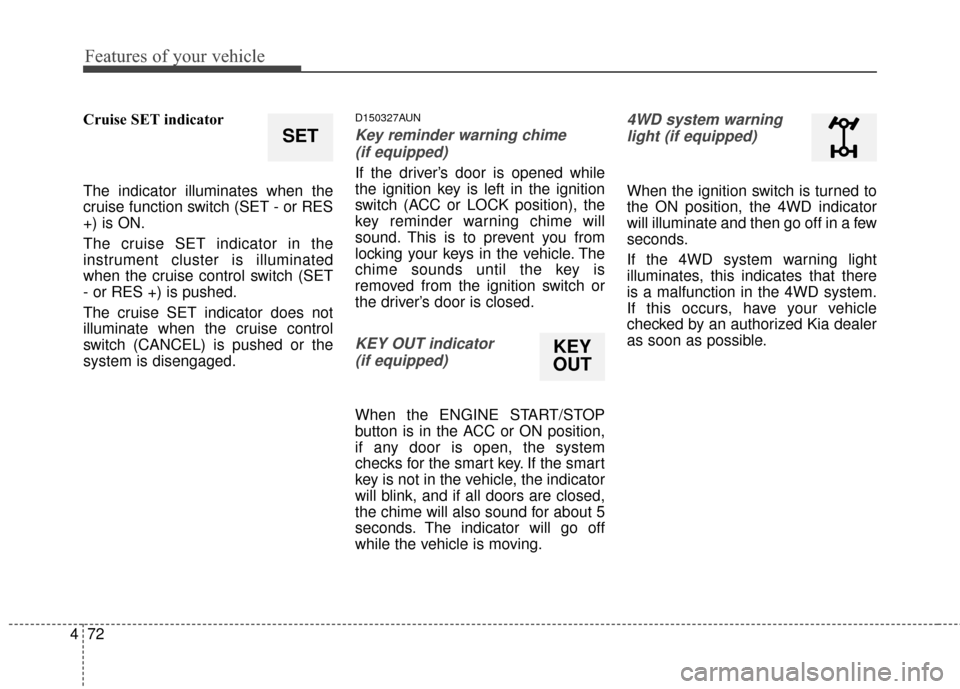
Cruise SET indicator
The indicator illuminates when the
cruise function switch (SET - or RES
+) is ON.
The cruise SET indicator in the
instrument cluster is illuminated
when the cruise control switch (SET
- or RES +) is pushed.
The cruise SET indicator does not
illuminate when the cruise control
switch (CANCEL) is pushed or the
system is disengaged.D150327AUN
Key reminder warning chime
(if equipped)
If the driver’s door is opened while
the ignition key is left in the ignition
switch (ACC or LOCK position), the
key reminder warning chime will
sound. This is to prevent you from
locking your keys in the vehicle. The
chime sounds until the key is
removed from the ignition switch or
the driver’s door is closed.
KEY OUT indicator (if equipped)
When the ENGINE START/STOP
button is in the ACC or ON position,
if any door is open, the system
checks for the smart key. If the smart
key is not in the vehicle, the indicator
will blink, and if all doors are closed,
the chime will also sound for about 5
seconds. The indicator will go off
while the vehicle is moving.
4WD system warninglight (if equipped)
When the ignition switch is turned to
the ON position, the 4WD indicator
will illuminate and then go off in a few
seconds.
If the 4WD system warning light
illuminates, this indicates that there
is a malfunction in the 4WD system.
If this occurs, have your vehicle
checked by an authorized Kia dealer
as soon as possible.
SET
KEY
OUT