Page 166 of 508
475
Features of your vehicle
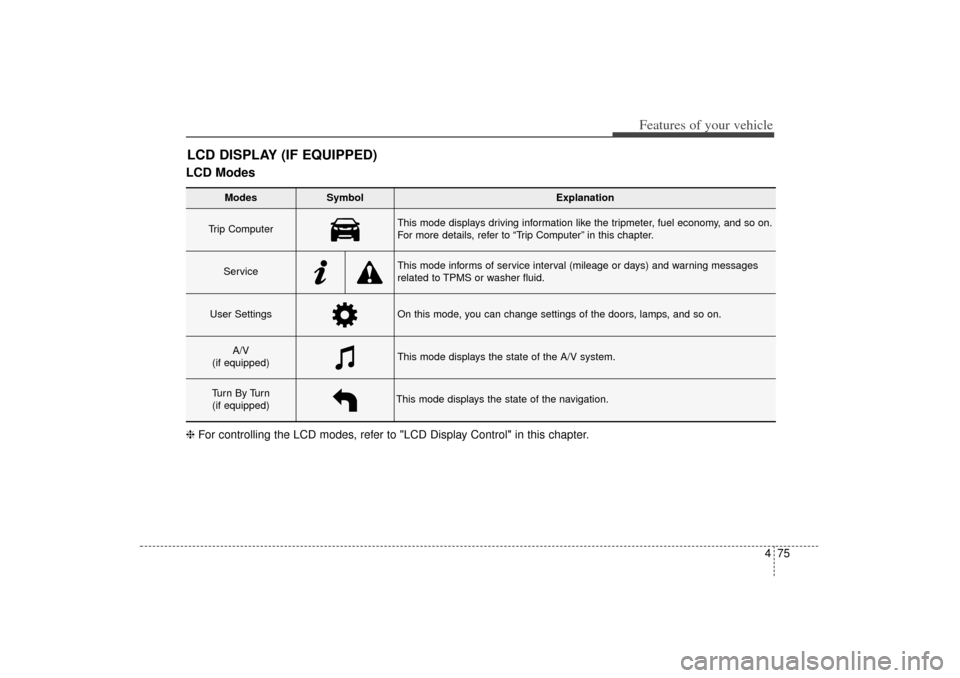
LCD ModesLCD DISPLAY (IF EQUIPPED)
Modes
Symbol
Explanation
Trip Computer
This mode displays driving information like the tripmeter, fuel economy, and so on.
For more details, refer to “Trip Computer” in this chapter.
Service
This mode informs of service interval (mileage or days) and warning messages
related to TPMS or washer fluid.
User Settings
On this mode, you can change settings of the doors, lamps, and so on.
A/V
(if equipped)
This mode displays the state of the A/V system.
Tu r n B y Tu r n (if equipped)
This mode displays the state of the navigation.
❈ For controlling the LCD modes, refer to "LCD Display Control" in this chapter.
XM(FL) CAN(ENG) 4a(~158).QXP 1/23/2013 3:49 PM Page 75
Page 170 of 508

479
Features of your vehicle
Two Press Unlock (if equipped)
Off:The two press unlock function will
be deactivated. Therefore, all doors
will unlock if the door is unlocked.
On: The driver’s door will unlock if the
door is unlocked. When the door is
unlocked again within 4 seconds,
all doors will unlock.
Horn Feedback (if equipped)
Off: The Horn feedback operation will
be deactivated.
On: After locking the door by pressing
the lock button on the transmitter, if
you press the lock button again
within 4 seconds, the warning
sound will operate once to indicate
that all doors are locked.
LampHead Lamp Delay (if equipped)
If this item is checked, the headlamp
delay and headlamp welcome func-
tion will be activated.
Welcome Light (if equipped)
If this item is checked, the welcome
light function of the pocket lamp will
be activated.
Auto Triple Turn (One-touch triple
turn signal) (if equipped)
If this item is checked, the lane
change signals will blink 3 times when
the turn signal lever is moved slightly.
SettingsTemperature Unit
Convert the temperature unit from °C
to °F or from °F to °C.
Welcome Sound
If this item is checked, the welcome
sound function will be activated.
Seat Easy Access (if equipped)
If this item is checked, the driver’s
seat will automatically move forward
or rearward for the driver to enter or
exit the vehicle comfortably.
AVG Fuel Eco Reset
Auto Reset:The average fuel economy will
reset automatically when refueling.
Manual Reset: The average fuel economy will not
reset automatically whenever refu-
eling.
For more details, refer to “Trip
Computer” in this chapter.
XM(FL) CAN(ENG) 4a(~158).QXP 1/23/2013 3:49 PM Page 79
Page 178 of 508
487
Features of your vehicle
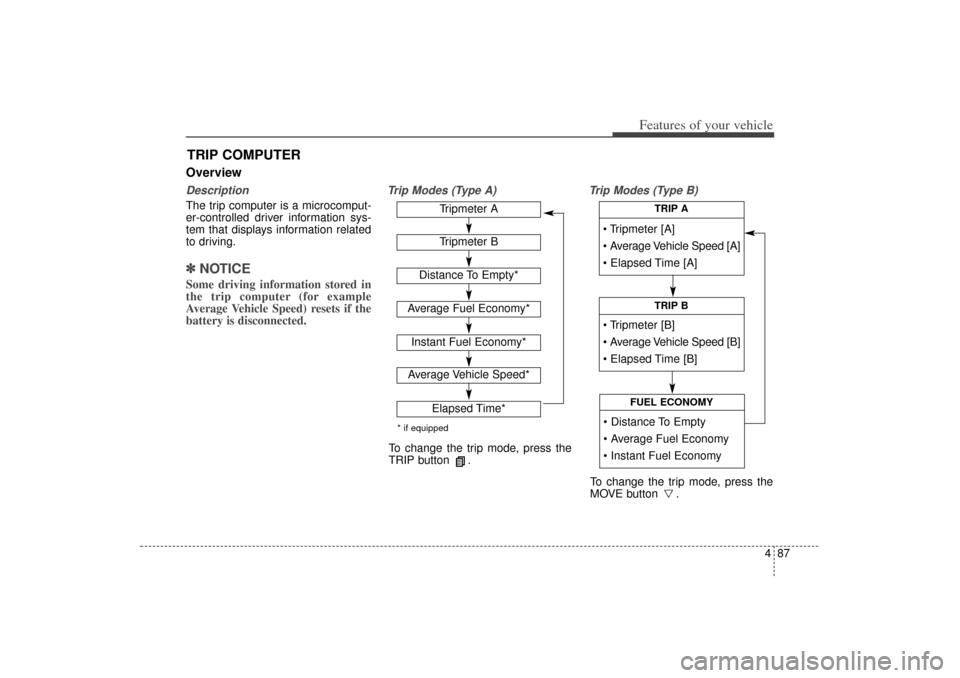
OverviewDescriptionThe trip computer is a microcomput-
er-controlled driver information sys-
tem that displays information related
to driving.✽ ✽NOTICESome driving information stored in
the trip computer (for example
Average Vehicle Speed) resets if the
battery is disconnected.
Trip Modes (Type A) Trip Modes (Type B)
TRIP COMPUTER
Tripmeter [A]
Average Vehicle Speed [A]
Elapsed Time [A]
TRIP A
Tripmeter [B]
Average Vehicle Speed [B]
Elapsed Time [B]
TRIP B
Distance To Empty
Average Fuel Economy
Instant Fuel Economy
FUEL ECONOMY
Tripmeter ATripmeter B
Distance To Empty*
Average Fuel Economy*Instant Fuel Economy*Average Vehicle Speed*
Elapsed Time*
* if equippedTo change the trip mode, press the
TRIP button .
To change the trip mode, press the
MOVE button .
XM(FL) CAN(ENG) 4a(~158).QXP 1/23/2013 3:50 PM Page 87
Page 180 of 508
489
Features of your vehicle
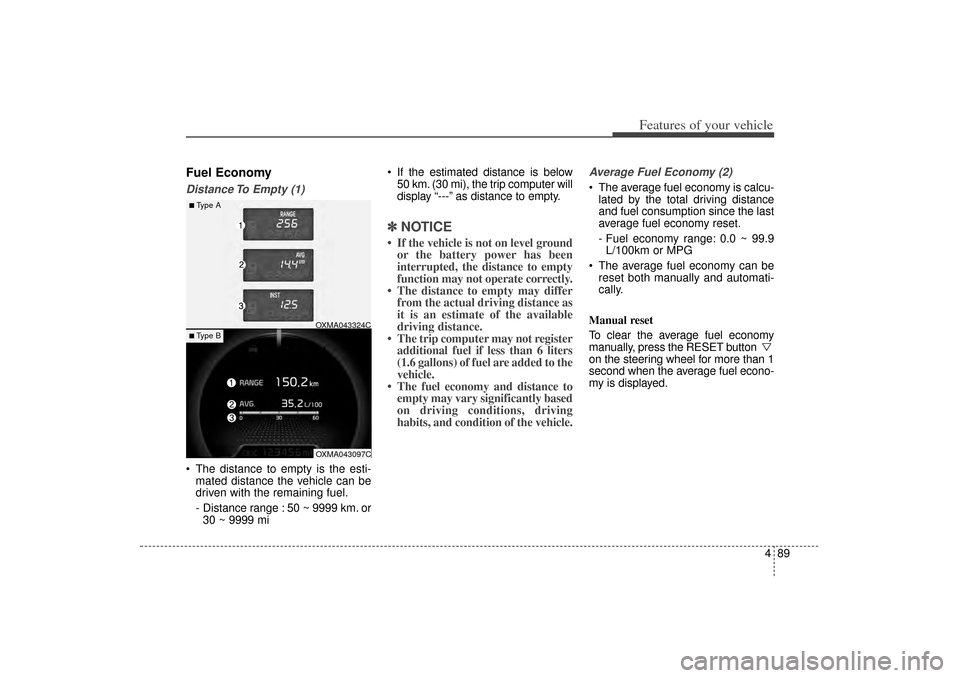
Fuel EconomyDistance To Empty (1) The distance to empty is the esti-mated distance the vehicle can be
driven with the remaining fuel.
- Distance range : 50 ~ 9999 km. or30 ~ 9999 mi If the estimated distance is below
50 km. (30 mi), the trip computer will
display “---” as distance to empty.
✽ ✽ NOTICE• If the vehicle is not on level ground
or the battery power has been
interrupted, the distance to empty
function may not operate correctly.
• The distance to empty may differ from the actual driving distance as
it is an estimate of the available
driving distance.
• The trip computer may not register additional fuel if less than 6 liters
(1.6 gallons) of fuel are added to the
vehicle.
• The fuel economy and distance to empty may vary significantly based
on driving conditions, driving
habits, and condition of the vehicle.
Average Fuel Economy (2) The average fuel economy is calcu-
lated by the total driving distance
and fuel consumption since the last
average fuel economy reset.
- Fuel economy range: 0.0 ~ 99.9L/100km or MPG
The average fuel economy can be reset both manually and automati-
cally.
Manual reset
To clear the average fuel economy
manually, press the RESET button
on the steering wheel for more than 1
second when the average fuel econo-
my is displayed.
■Type A
OXMA043324COXMA043097C
■ Type B
XM(FL) CAN(ENG) 4a(~158).QXP 1/23/2013 3:50 PM Page 89
Page 181 of 508
Features of your vehicle90
4Automatic reset
To make the average fuel economy
be reset automatically whenever refu-
eling, select the “Auto Reset” mode in
User Setting menu of the LCD display
(Refer to “LCD Display”).
Under “Auto Reset” mode, the aver-
age fuel economy will be cleared to
zero (---) when the vehicle speed
exceeds 1 km/h after refueling more
than 6 liters (1.6 gallons).✽ ✽
NOTICEThe average fuel economy is not dis-
played for more accurate calculation
if the vehicle does not drive more
than 10 seconds or 50 meters (0.03
miles) since the ignition switch or
Engine Start/Stop button is turned
to ON.
Instant Fuel Economy (3) This mode displays the instant fuel
economy during the last few sec-
onds when the vehicle speed is
more than 10 km/h (6.2 MPH).
- Fuel economy range: 0 ~ 30L/100km or 0 ~ 50 MPG
XM(FL) CAN(ENG) 4a(~158).QXP 1/23/2013 3:50 PM Page 90
Page 185 of 508

Features of your vehicle94
4✽
✽
NOTICE
- Electronic Brake
force Distribution
(EBD) System
Warning Light
When the ABS Warning Light is on
or both ABS and Parking Brake &
Brake Fluid Warning Lights are on,
the speedometer, odometer, or trip-
meter may not work. Also, the EPS
Warning Light may illuminate and
the steering effort may increase or
decrease.
In this case, have your vehicle inspect-
ed by an authorized Kia dealer as
soon as possible.
Electronic Power
Steering (EPS) WarningLight (if equipped)This warning light illuminates:
Once you set the ignition switch or Engine Start/Stop Button to the ON
position.
- It remains on until the engine isstarted.
When there is a malfunction with the EPS.
In this case, have your vehicle
inspected by an authorized Kia
dealer.
Malfunction Indicator
Lamp (MIL)This warning light illuminates:
Once you set the ignition switch or Engine Start/Stop Button to the ON
position.
- It remains on until the engine isstarted.
When there is a malfunction with the emission control system.
In this case, have your vehicle
inspected by an authorized Kia
dealer.
CAUTION -
Malfunction
Indicator
Lamp (MIL)
Driving with the MalfunctionIndicator Lamp (MIL) on maycause damage to the emissioncontrol systems which couldeffect drivability and/or fueleconomy.
XM(FL) CAN(ENG) 4a(~158).QXP 1/23/2013 3:50 PM Page 94
Page 187 of 508

Features of your vehicle96
4Engine Oil Pressure
Warning LightThis warning light illuminates:
Once you set the ignition switch or Engine Start/Stop Button to the ON
position.
- It remains on until the engine isstarted.
When the engine oil pressure is low.
If the engine oil pressure is low:
1. Drive carefully to the nearest safe location and stop your vehicle.
2. Turn the engine off and check the engine oil level (For more details,
refer to “Engine Oil” in section 7). If
the level is low, add oil as required.
If the warning light remains on
after adding oil or if oil is not avail-
able, have your vehicle inspected
by an authorized Kia dealer as
soon as possible.
Low Fuel Level Warning LightThis warning light illuminates:
When the fuel tank is nearly empty.
If the fuel tank is nearly empty:
Add fuel as soon as possible.
CAUTION -
Engine Oil
Pressure
Warning Light
If the engine does not stop immediately after the EngineOil Pressure Warning Light isilluminated, severe damagecould result.
If the warning light stays on while the engine is running, itindicates that there may beserious engine damage ormalfunction. In this case,
1. Stop the vehicle as soon as it is safe to do so.
2. Turn off the engine and check the oil level. If the oillevel is low, fill the engineoil to the proper level.
3. Start the engine again. If the warning light stays on afterthe engine is started, turnthe engine off immediately.In this case, have your vehi-cle inspected by an author-ized Kia dealer.
CAUTION -
Low Fuel
Level
Driving with the Low Fuel Levelwarning light on or with the fuellevel below “0 or E” can causethe engine to misfire and dam-age the catalytic converter (ifequipped).
XM(FL) CAN(ENG) 4a(~158).QXP 1/23/2013 3:50 PM Page 96
Page 189 of 508
Features of your vehicle98
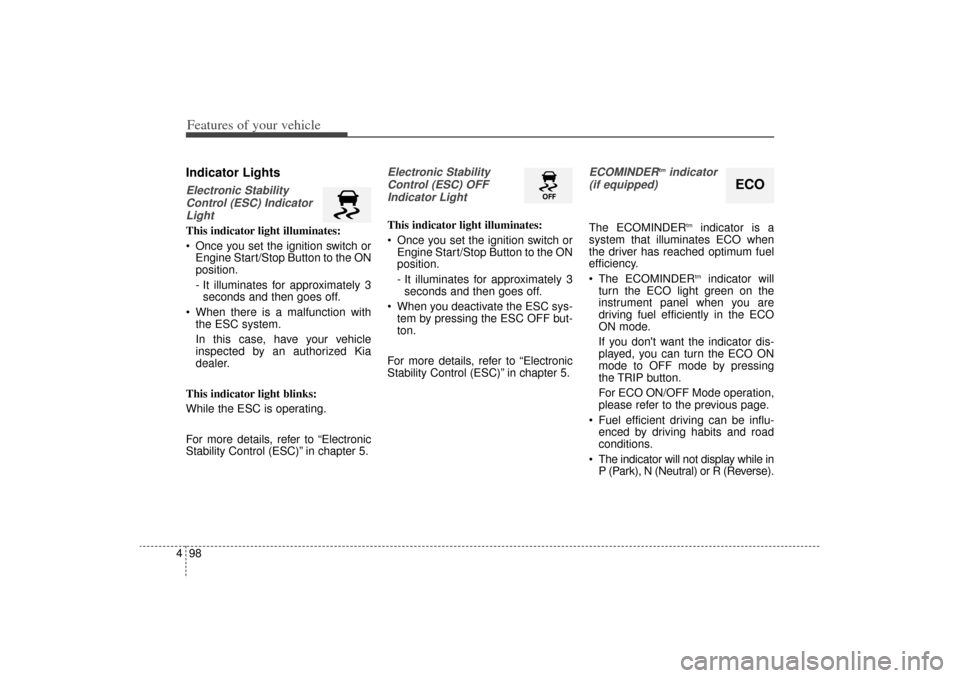
4Indicator LightsElectronic Stability
Control (ESC) IndicatorLightThis indicator light illuminates:
Once you set the ignition switch or Engine Start/Stop Button to the ON
position.
- It illuminates for approximately 3seconds and then goes off.
When there is a malfunction with the ESC system.
In this case, have your vehicle
inspected by an authorized Kia
dealer.
This indicator light blinks:
While the ESC is operating.
For more details, refer to “Electronic
Stability Control (ESC)” in chapter 5.
Electronic Stability Control (ESC) OFFIndicator Light This indicator light illuminates:
Once you set the ignition switch or Engine Start/Stop Button to the ON
position.
- It illuminates for approximately 3seconds and then goes off.
When you deactivate the ESC sys- tem by pressing the ESC OFF but-
ton.
For more details, refer to “Electronic
Stability Control (ESC)” in chapter 5.
ECOMINDER
tmindicator
(if equipped)
The ECOMINDER
tm
indicator is a
system that illuminates ECO when
the driver has reached optimum fuel
efficiency.
The ECOMINDERtm
indicator will
turn the ECO light green on the
instrument panel when you are
driving fuel efficiently in the ECO
ON mode.
If you don't want the indicator dis-
played, you can turn the ECO ON
mode to OFF mode by pressing
the TRIP button.
For ECO ON/OFF Mode operation,
please refer to the previous page.
Fuel efficient driving can be influ- enced by driving habits and road
conditions.
The indicator will not display while in P (Park), N (Neutral) or R (Reverse).
ECO
XM(FL) CAN(ENG) 4a(~158).QXP 1/23/2013 3:50 PM Page 98