2014 KIA Sorento key
[x] Cancel search: keyPage 296 of 508
![KIA Sorento 2014 3.G Owners Manual 4 205
Features of your vehicle
Audio StreamingPress the key Select
[Phone] Select [Audio Streaming]
When Audio Streaming is turned on,
you can play music files saved in yourBluetooth
®
Wireless Tech](/manual-img/2/2957/w960_2957-295.png "KIA Sorento 2014 3.G Owners Manual 4 205
Features of your vehicle
Audio StreamingPress the key Select
[Phone] Select [Audio Streaming]
When Audio Streaming is turned on,
you can play music files saved in yourBluetooth
®
Wireless Tech")
4 205
Features of your vehicle
Audio StreamingPress the key Select
[Phone] Select [Audio Streaming]
When Audio Streaming is turned on,
you can play music files saved in yourBluetooth
®
Wireless Technology
device from the car.
Outgoing VolumePress the key Select
[Phone] Select [Outgoing Volume]
Use TUNE know to adjust the out-
going volume level.
Even while on a call, the volume can be changed by using the key.
Turning Bluetooth System OffPress the key Select
[Phone] Select [Bluetooth System
Off]
Once
Bluetooth
®
Wireless
Technology is turned off, Bluetooth
®
Wireless Technology related features
will not be supported within the audio
system.
To turn
Bluetooth
®
Wireless
Technology back on, go to [Phone] and select “Yes”.
SETUP
SETUP
SEEK
TRACK
SETUP
SETUP
XM(FL) CAN(ENG) 4b(AUDIO).qxp 1/23/2013 3:43 PM Page 205
Page 297 of 508
![KIA Sorento 2014 3.G Owners Manual Features of your vehicle206
4VOICE RECOGNITIONUsing Voice RecognitionStarting Voice RecognitionShortly press the key on the
steering remote controller. Say a
command If prompt feedback is in [ON],](/manual-img/2/2957/w960_2957-296.png "KIA Sorento 2014 3.G Owners Manual Features of your vehicle206
4VOICE RECOGNITIONUsing Voice RecognitionStarting Voice RecognitionShortly press the key on the
steering remote controller. Say a
command If prompt feedback is in [ON],")
Features of your vehicle206
4VOICE RECOGNITIONUsing Voice RecognitionStarting Voice RecognitionShortly press the key on the
steering remote controller. Say a
command If prompt feedback is in [ON], then
the system will say “Please say a
command after the beep (BEEP)”
If prompt feedback is in [OFF], then
the system will only say “(BEEP)”
To change Prompt Feedback [On]/[Off], go to [System] [Prompt Feedback]
For proper recognition, say the command after the voice instruc-
tion and beep tone.
Skipping Prompt MessagesWhile prompt message is being stat-
ed Shortly press the key on the
steering remote controller (under 0.8
seconds)
The prompt message is immediately
ended and the beep tone will sound.
After the “beep”, say the voice com-
mand.Re-starting Voice RecognitionWhile system waits for a command
Shortly press the key on the
steering remote controller (under 0.8
seconds)
The command wait state is immedi-
ately ended and the beep ton will
sound. After the “beep”, say the voice
command.
SETUP
XM(FL) CAN(ENG) 4b(AUDIO).qxp 1/23/2013 3:43 PM Page 206
Page 298 of 508
4 207
Features of your vehicle
ENDING VOICE
RECOGNITIONWhile Voice Recognition is operatingPress and hold the key on the
steering remote controller (over 0.8
seconds)
While using voice command, press- ing any steering wheel control or a
different key will end voice com-
mand.
In a state where the system is wait- ing for a voice command, say “can-
cel” or “end” to end voice com-
mand.
In a state where the system is wait- ing for a voice command, press and
hold the key on the steering
remote controller to end voice com-
mand.
XM(FL) CAN(ENG) 4b(AUDIO).qxp 1/23/2013 3:43 PM Page 207
Page 299 of 508
Features of your vehicle208
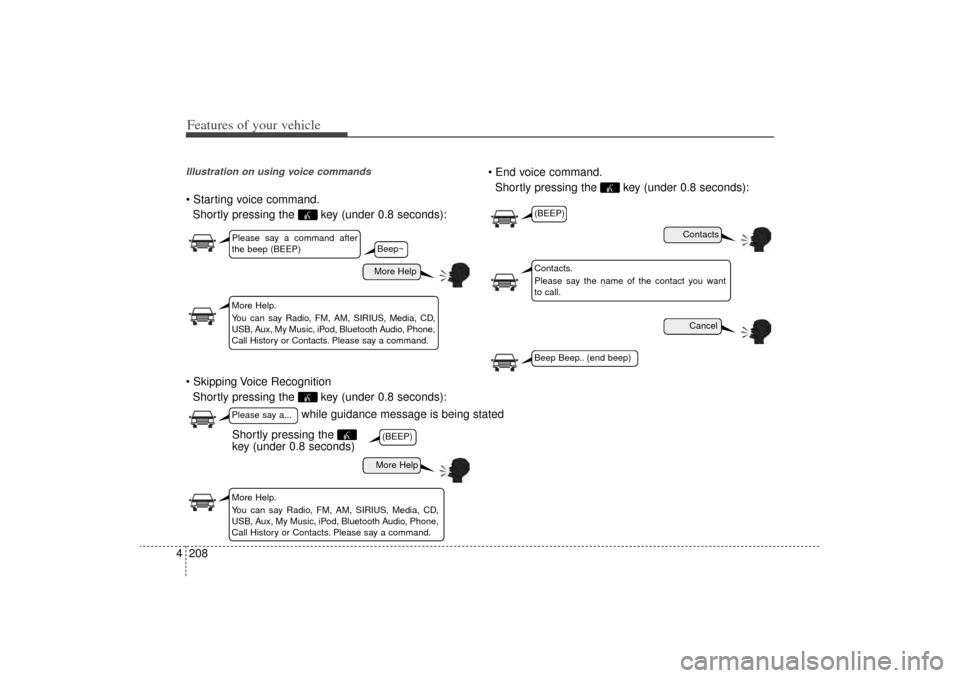
4Illustration on using voice commands Starting voice command.
Shortly pressing the key (under 0.8 seconds):
Skipping Voice Recognition Shortly pressing the key (under 0.8 seconds): End voice command.
Shortly pressing the key (under 0.8 seconds):
while guidance message is being stated
More Help
ContactsCancel
More Help
Please say a command after
the beep (BEEP)Please say a...More Help.
You can say Radio, FM, AM, SIRIUS, Media, CD,
USB, Aux, My Music, iPod, Bluetooth Audio, Phone,
Call History or Contacts. Please say a command.
Contacts.
Please say the name of the contact you want
to call.
More Help.
You can say Radio, FM, AM, SIRIUS, Media, CD,
USB, Aux, My Music, iPod, Bluetooth Audio, Phone,
Call History or Contacts. Please say a command.
(BEEP)
(BEEP)Beep Beep.. (end beep)
Shortly pressing the
key (under 0.8 seconds)
Beep~
XM(FL) CAN(ENG) 4b(AUDIO).qxp 1/23/2013 3:43 PM Page 208
Page 306 of 508

Driving your vehicle Before driving . . . . . . . . . . . . . . . . . . . . . . . . . . . . . . 5-3
Key . . . . . . . . . . . . . . . . . . . . . . . . . . . . . . . . . . . . \
. . . 5-5
Engine start/stop button . . . . . . . . . . . . . . . . . . . . . 5-8
Manual transaxle . . . . . . . . . . . . . . . . . . . . . . . . . . 5-13• Manual transaxle operation . . . . . . . . . . . . . . . . . . . . 5-13Automatic transaxle . . . . . . . . . . . . . . . . . . . . . . . . 5-16• Automatic transaxle operation . . . . . . . . . . . . . . . . . . 5-16All wheel drive (AWD) . . . . . . . . . . . . . . . . . . . . . . 5-23
Brake system . . . . . . . . . . . . . . . . . . . . . . . . . . . . . . 5-30• Power brakes . . . . . . . . . . . . . . . . . . . . . . . . . . . . . . . 5-30
• Parking brake . . . . . . . . . . . . . . . . . . . . . . . . . . . . . . . 5-32
• Anti-lock brake system (ABS) . . . . . . . . . . . . . . . . . . 5-34
• Electronic stability control (ESC) . . . . . . . . . . . . . . . 5-36
• Vehicle stability management (VSM) . . . . . . . . . . . . 5-40
• Hill-start assist control (HAC) . . . . . . . . . . . . . . . . . . 5-41Cruise control system. . . . . . . . . . . . . . . . . . . . . . . 5-44
Blind spot detection system (BSD) . . . . . . . . . . . . 5-49
Active ECO system. . . . . . . . . . . . . . . . . . . . . . . . . 5-54
Economical operation . . . . . . . . . . . . . . . . . . . . . . 5-55Special driving conditions . . . . . . . . . . . . . . . . . . . 5-57
• Hazardous driving conditions . . . . . . . . . . . . . . . . . . 5-57
• Rocking the vehicle . . . . . . . . . . . . . . . . . . . . . . . . . . . 5-58
• Smooth cornering . . . . . . . . . . . . . . . . . . . . . . . . . . . . 5-59
• Driving at night . . . . . . . . . . . . . . . . . . . . . . . . . . . . . . 5-60
• Driving in the rain . . . . . . . . . . . . . . . . . . . . . . . . . . . . 5-60
• Driving in flooded areas . . . . . . . . . . . . . . . . . . . . . . . 5-61
• Driving off-road . . . . . . . . . . . . . . . . . . . . . . . . . . . . . . 5-61
• Highway driving . . . . . . . . . . . . . . . . . . . . . . . . . . . . . 5-61Winter driving . . . . . . . . . . . . . . . . . . . . . . . . . . . . 5-63
Trailer towing . . . . . . . . . . . . . . . . . . . . . . . . . . . . . 5-66
Vehicle load limit . . . . . . . . . . . . . . . . . . . . . . . . . . 5-75
Vehicle weight . . . . . . . . . . . . . . . . . . . . . . . . . . . . . 5-81• Base curb weight . . . . . . . . . . . . . . . . . . . . . . . . . . . . . 5-81
• Vehicle curb weight . . . . . . . . . . . . . . . . . . . . . . . . . . . 5-81
• Cargo weight . . . . . . . . . . . . . . . . . . . . . . . . . . . . . . . . 5-81
• GAW (Gross axle weight) . . . . . . . . . . . . . . . . . . . . . . 5-81
• GAWR (Gross axle weight rating) . . . . . . . . . . . . . . . 5-81
• GVW (Gross vehicle weight) . . . . . . . . . . . . . . . . . . . 5-81
• GVWR (Gross vehicle weight rating) . . . . . . . . . . . . 5-81
5
XM(FL) CAN(ENG) 5.QXP 1/23/2013 3:29 PM Page 1
Page 310 of 508

55
Driving your vehicle
Illuminated ignition switch
(if equipped)Whenever a front door is opened, the
ignition switch will illuminate for your
convenience, provided the ignition
switch is not in the ON position. The
light will go off immediately when the
ignition switch is turned on. It will
also go off after about 30 seconds
when the door is closed.
Ignition switch positionLOCKThe steering wheel locks to protect
against theft (if equipped). The igni-
tion key can be removed only in the
LOCK position.
When turning the ignition switch to
the LOCK position, push the key
inward at the ACC position and turn
the key toward the LOCK position.
ACC (Accessory)The steering wheel is unlocked and
electrical accessories are operative.✽ ✽NOTICEIf difficulty is experienced turning
the ignition switch to the ACC posi-
tion, turn the key while turning the
steering wheel right and left to
release the tension.ONThe warning lights can be checked
before the engine is started. This is
the normal running position after the
engine is started.Do not leave the ignition switch ON if
the engine is not running to preventbattery discharge.
STARTTurn the ignition switch to the START
position to start the engine. The
engine will crank until you release
the key; then it returns to the ON
position. The brake warning light can
be checked in this position.
KEY POSITIONS (IF EQUIPPED)
OXM059001N
OXM059029N
XM(FL) CAN(ENG) 5.QXP 1/23/2013 3:29 PM Page 5
Page 311 of 508
Driving your vehicle65
Starting the engine1.Make sure the parking brake isapplied.
2. Automatic Transaxle - Place the
transaxle shift lever in P (Park).
Depress the brake pedal fully.
You can also start the engine when
the shift lever is in the N (Neutral)
position.
3.Turn the ignition switch to START and hold it there until the engine
starts (a maximum of 10 seconds),
then release the key.
WARNING
Always wear appropriate shoes
when operating your vehicle.
Unsuitable shoes (high heels,
ski boots,etc.) may interfere
with your ability to use the
brake and accelerator pedal.
WARNING
- Ignitionswitch
Never turn the ignition switch
to LOCK or ACC while the
vehicle is moving. This would
result in loss of directional
control and braking function,
which could cause an acci-
dent.
The anti-theft steering column lock is not a substitute for the
parking brake. Before leaving
the driver’s seat, always make
sure the shift lever is engaged
in 1st gear for the manual
transaxle or P (Park) for auto-
matic transaxle, set the park-
ing brake fully and shut the
engine off. Unexpected and
sudden vehicle movement
may occur if these precau-
tions are not taken.
(Continued)
(Continued)
Never reach for the ignitionswitch, or any other controls
through the steering wheel
while the vehicle is in motion.
The presence of your hand or
arm in this area could cause a
loss of vehicle control, an
accident and serious bodily
injury or death.
Do not place any movable objects around the driver’s
seat as they may move while
driving, interfere with the driv-
er and lead to an accident.
XM(FL) CAN(ENG) 5.QXP 1/23/2013 3:29 PM Page 6
Page 315 of 508

Driving your vehicle10
5✽
✽
NOTICEIf you leave the ENGINE START/
STOP button in the ACC or ON
position for a long time, the battery
will discharge.
Starting the engine with a
smart key (if equipped)1.Carry the smart key or leave it
inside the vehicle.
2.Make sure the parking brake is firmly applied
3. Automatic Transaxle - Place the
transaxle shift lever in P (Park).
Depress the brake pedal fully.
4.Press the ENGINE START/STOP button while depressing the brake
pedal.
5.In extremely cold weather (below (-18°C) 0°F) or after the vehicle
has not been operated for several
days, let the engine warm up with-
out depressing the accelerator.
Whether the engine is cold or warm,
it should be started without depress-
ing the accelerator.
WARNING
Never press the ENGINE START/STOP button while the
vehicle is in motion except in
an emergency. If the engine
stops while the vehicle is in
motion, this would result in
loss of directional control and
braking function, which could
cause an accident.
Before leaving the driver's seat, always make sure the
shift lever is engaged in P
(Park), set the parking brake
fully and shut the engine off.
Unexpected and sudden vehi-
cle movement may occur if
these precautions are not
taken.
(Continued)
(Continued)
Never reach for the ENGINESTART/STOP button or any
other controls through the
steering wheel while the vehi-
cle is in motion. The presence
of your hand or arm in the
area could cause loss of vehi-
cle control, an accident and
serious bodily injury or death.
Do not place any movable objects around the driver's
seat as they may move while
driving, interfere with the driv-
er and lead to an accident.
XM(FL) CAN(ENG) 5.QXP 1/23/2013 3:29 PM Page 10