2014 KIA Sedona ad blue
[x] Cancel search: ad bluePage 157 of 382
Features of your vehicle
148
3
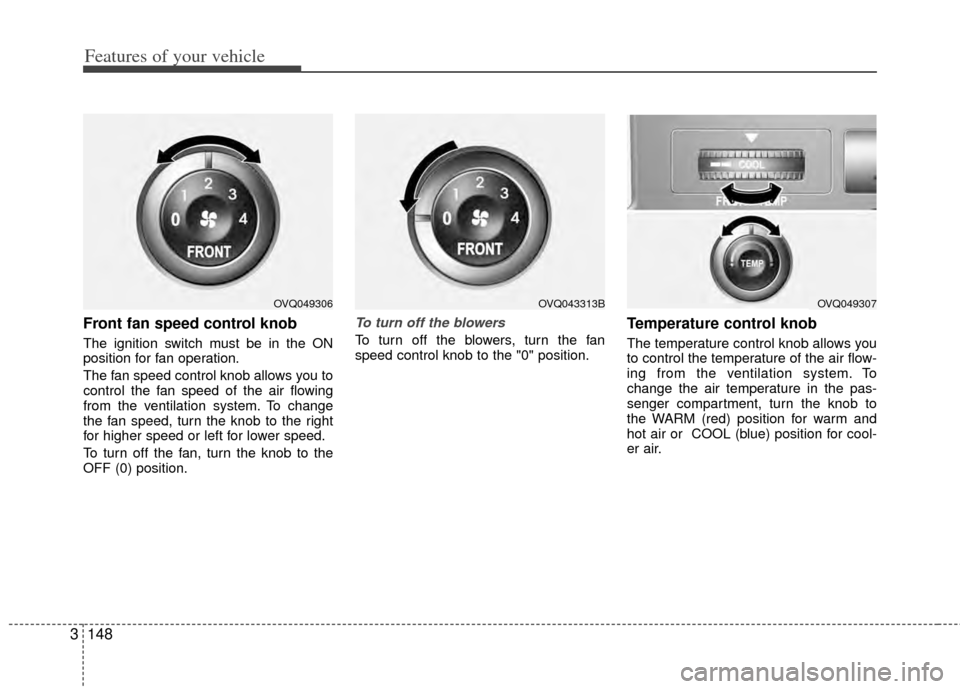
Front fan speed control knob
The ignition switch must be in the ON
position for fan operation.
The fan speed control knob allows you to
control the fan speed of the air flowing
from the ventilation system. To change
the fan speed, turn the knob to the right
for higher speed or left for lower speed.
To turn off the fan, turn the knob to the
OFF (0) position.
To turn off the blowers
To turn off the blowers, turn the fan
speed control knob to the "0" position.
Temperature control knob
The temperature control knob allows you
to control the temperature of the air flow-
ing from the ventilation system. To
change the air temperature in the pas-
senger compartment, turn the knob to
the WARM (red) position for warm and
hot air or COOL (blue) position for cool-
er air.
OVQ049306OVQ049307OVQ043313B
Page 159 of 382
Features of your vehicle
150
3
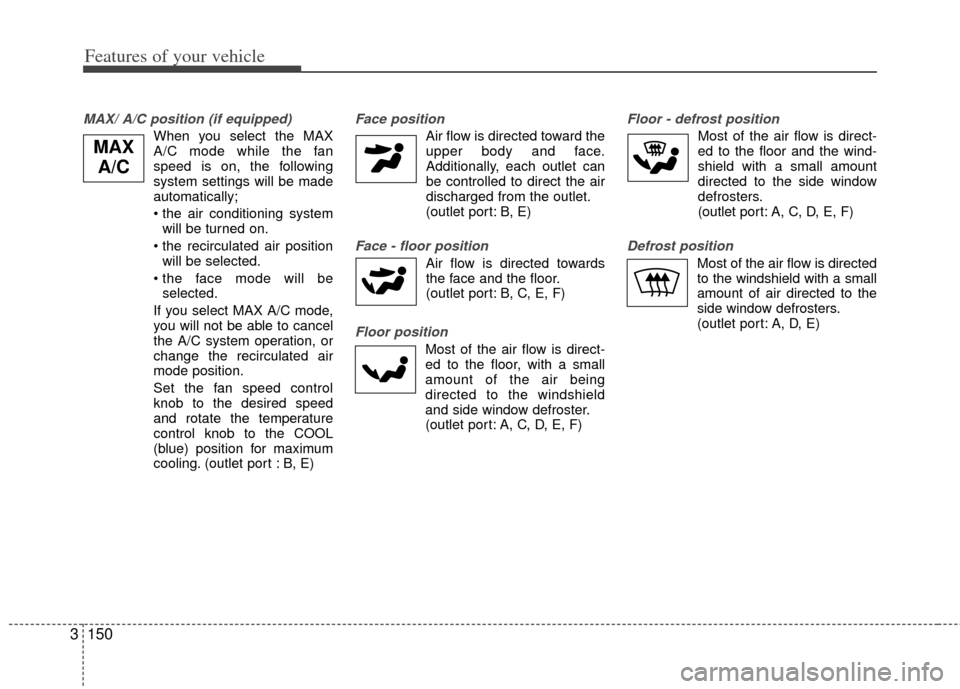
MAX/ A/C position (if equipped)
When you select the MAX
A/C mode while the fan
speed is on, the following
system settings will be made
automatically;
• the air conditioning system
will be turned on.
will be selected.
selected.
If you select MAX A/C mode, you will not be able to cancel
the A/C system operation, or
change the recirculated air
mode position.
Set the fan speed control knob to the desired speed
and rotate the temperature
control knob to the COOL
(blue) position for maximum
cooling. (outlet port : B, E)
Face position
Air flow is directed toward the upper body and face.
Additionally, each outlet can
be controlled to direct the air
discharged from the outlet.
(outlet port: B, E)
Face - floor position
Air flow is directed towardsthe face and the floor.
(outlet port: B, C, E, F)
Floor position
Most of the air flow is direct-
ed to the floor, with a small
amount of the air being
directed to the windshield
and side window defroster.
(outlet port: A, C, D, E, F)
Floor - defrost position
Most of the air flow is direct-
ed to the floor and the wind-
shield with a small amount
directed to the side window
defrosters.
(outlet port: A, C, D, E, F)
Defrost position
Most of the air flow is directed
to the windshield with a small
amount of air directed to the
side window defrosters.
(outlet port: A, D, E)
MAX A/C
Page 164 of 382
3155
Features of your vehicle
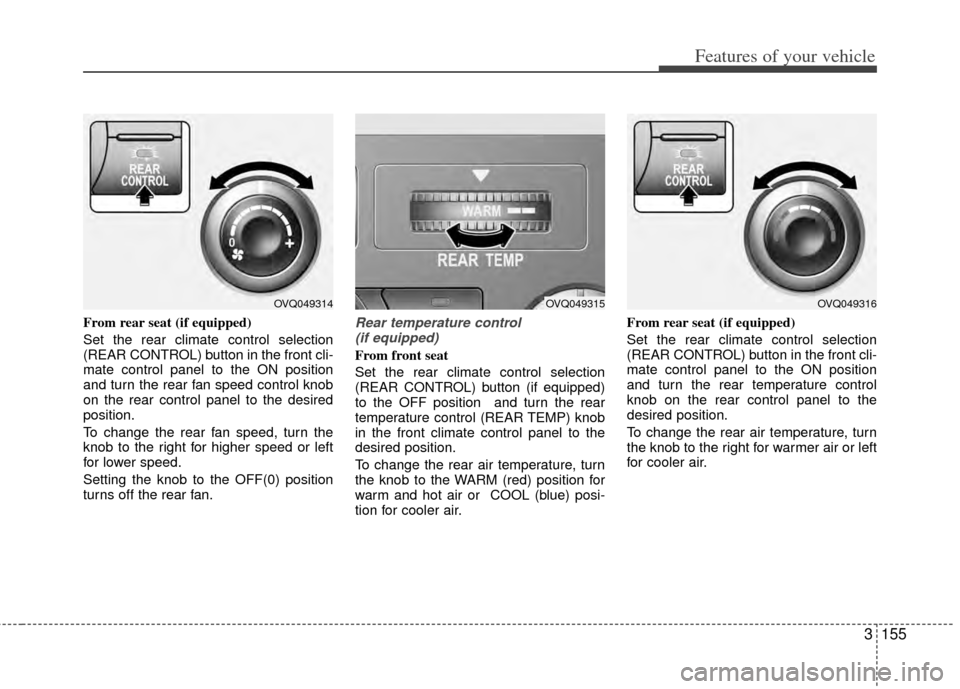
From rear seat (if equipped)
Set the rear climate control selection
(REAR CONTROL) button in the front cli-
mate control panel to the ON position
and turn the rear fan speed control knob
on the rear control panel to the desired
position.
To change the rear fan speed, turn the
knob to the right for higher speed or left
for lower speed.
Setting the knob to the OFF(0) position
turns off the rear fan.Rear temperature control (if equipped)
From front seat
Set the rear climate control selection
(REAR CONTROL) button (if equipped)
to the OFF position and turn the rear
temperature control (REAR TEMP) knob
in the front climate control panel to the
desired position.
To change the rear air temperature, turn
the knob to the WARM (red) position for
warm and hot air or COOL (blue) posi-
tion for cooler air. From rear seat (if equipped)
Set the rear climate control selection
(REAR CONTROL) button in the front cli-
mate control panel to the ON position
and turn the rear temperature control
knob on the rear control panel to the
desired position.
To change the rear air temperature, turn
the knob to the right for warmer air or left
for cooler air.
OVQ049314OVQ049315OVQ049316
Page 166 of 382
3157
Features of your vehicle
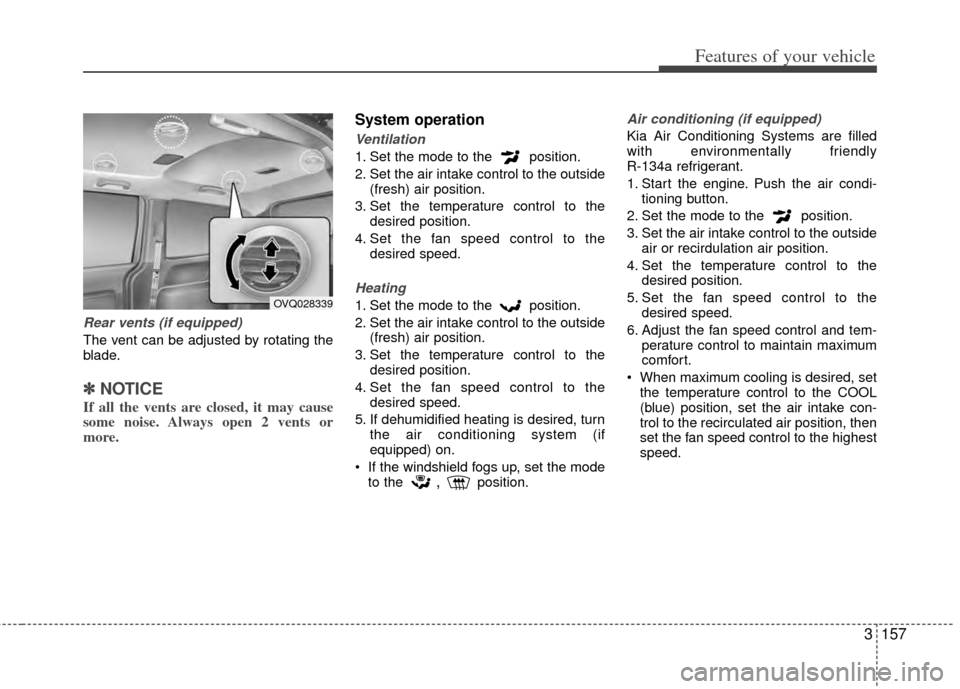
Rear vents (if equipped)
The vent can be adjusted by rotating the
blade.
✽ ✽NOTICE
If all the vents are closed, it may cause
some noise. Always open 2 vents or
more.
System operation
Ventilation
1. Set the mode to the position.
2. Set the air intake control to the outside
(fresh) air position.
3. Set the temperature control to the desired position.
4. Set the fan speed control to the desired speed.
Heating
1. Set the mode to the position.
2. Set the air intake control to the outside(fresh) air position.
3. Set the temperature control to the desired position.
4. Set the fan speed control to the desired speed.
5. If dehumidified heating is desired, turn the air conditioning system (if
equipped) on.
If the windshield fogs up, set the mode to the
,position.
Air conditioning (if equipped)
Kia Air Conditioning Systems are filled
with environmentally friendly
R-134a refrigerant.
1. Start the engine. Push the air condi- tioning button.
2. Set the mode to the position.
3. Set the air intake control to the outside air or recirdulation air position.
4. Set the temperature control to the desired position.
5. Set the fan speed control to the desired speed.
6. Adjust the fan speed control and tem- perature control to maintain maximum
comfort.
When maximum cooling is desired, set the temperature control to the COOL
(blue) position, set the air intake con-
trol to the recirculated air position, then
set the fan speed control to the highest
speed.
OVQ028339
Page 211 of 382
Features of your vehicle
202
3
Using RADIO, SETUP, VOLUME
and AUDIO CONTROL
1. FM/AM Button
The FM/AM button toggles between FM
and AM. Listed below are the paths as
the system switches from FM to AM and
back to FM.
FM/AM : FM1
➟FM2➟AM➟FM1...
2. SEEK Button
When the [SEEK ] is pressed, it will
automatically tune to the next lower
station.
When the [SEEK ] is pressed, it will automatically tune to the next higher
station.
3.POWER Button & VOLUMEKnob
Turns the audio system on/off whenthe IGNITION SWITCH is on ACC or
ON.
If the knob is turned clockwise/counte clockwise, the volume will increase
/decrease.
4. SCAN Button
When the button is pressed, it auto-matically scans the radio stations
upwards.
The SCAN feature steps through each station, starting from the initial station,
for 5 seconds.
Press the [SCAN] button again to stop the scan feature and to listen to the
currently selected channel.
5. MUTE Button
When the button is pressed, stops sound
and “Audio Mute” is displayed on LCD.
6. SETUP Button
Press this button to enter SETUP mode,
If no action is taken for 8 seconds, it will
return to previous mode.
In “SETUP” mode, rotate the TUNE knob
to move the cursor between items, and
push the TUNE knob to select.
Select whether long file names are
scrolled continuously (“ON”) or just once
(“OFF”).
Select this item to turn the SDVC(Speed
Dependent Volume Control) feature ON
or OFF. If it is turned ON, volume level is
adjusted automatically according to the
vehicle speed.
Select default display of SIRIUS mode.
“Category/Channel name” or “Artist/Song
Title” can be selected.
Select this item to enter
Bluetooth®
Wireless Technology setup mode. Refer
to “Bluetooth®Wireless Technology
PHONE OPERATION” section for
detailed information.
NOTE:
The Bluetooth®word mark and logos
are registered trademarks owned by
Bluetooth SIG, Inc. and any use of
such marks by Kia is under license.
Other trademarks and trade names
are those of their respective owners.
A
Bluetooth®enabled cell phone is
required to use Bluetooth®wireless
technology.
Page 221 of 382
Features of your vehicle
212
3
✽
✽
NOTICE FOR USING THE
iPod®DEVICE
• Some iPod models might not support
the communication protocol and the
files will not be played.
Supported iPod models:
- iPod Mini
- iPod 4th(Photo) ~ 6th(Classic)
generation
- iPod Nano 1st~4th generation
- iPod Touch 1st~2nd generation
• The order of search or playback of songs in the iPod can be different
from the order searched in the audio
system.
• If the iPod disabled due to its own malfunction, reset the iPod. (Reset:
Refer to iPod manual)
• An iPod may not operate normally on low battery.
• Some iPod devices, such as the iPhone
®, can be connected through
the Bluetooth®Wireless Technology
interface. The device must have audio
Bluetooth
®Wireless Technology
capability (such as for stereo head-
phone Bluetooth
® Wireless
Technology). The device can play, but
it will not be controlled by the audio
system.
* iPod®and iPhone®are registered trade-
marks of Apple Inc. iPod®and iPhone®
are mobile digital devices sold separately,
and connectivity requires the Kia accesso-
ry cable.
CAUTION IN USING THE
iPod®DEVICE
The Kia iPod Power Cable is
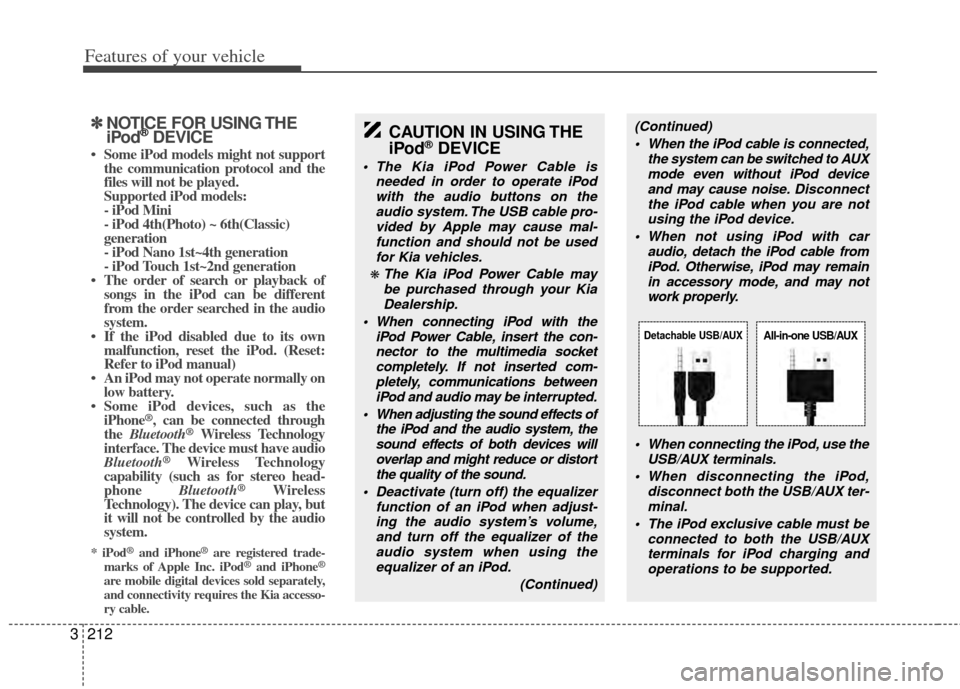
needed in order to operate iPodwith the audio buttons on theaudio system. The USB cable pro- vided by Apple may cause mal-function and should not be used for Kia vehicles.
❋ The Kia iPod Power Cable maybe purchased through your KiaDealership.
When connecting iPod with the iPod Power Cable, insert the con-nector to the multimedia socketcompletely. If not inserted com-pletely, communications between iPod and audio may be interrupted.
When adjusting the sound effects of the iPod and the audio system, thesound effects of both devices willoverlap and might reduce or distortthe quality of the sound.
Deactivate (turn off) the equalizer function of an iPod when adjust-ing the audio system’s volume,and turn off the equalizer of theaudio system when using theequalizer of an iPod.
(Continued)
(Continued) When the iPod cable is connected, the system can be switched to AUXmode even without iPod deviceand may cause noise. Disconnect
the iPod cable when you are not using the iPod device.
When not using iPod with car audio, detach the iPod cable fromiPod. Otherwise, iPod may remainin accessory mode, and may notwork properly.
When connecting the iPod, use theUSB/AUX terminals.
When disconnecting the iPod, disconnect both the USB/AUX ter-minal.
The iPod exclusive cable must be connected to both the USB/AUXterminals for iPod charging and operations to be supported.
Detachable USB/AUXAll-in-one USB/AUX
Page 229 of 382
Features of your vehicle
220
3
1. RSE Button
Play the RSE, and "RSE" Icon is dis-
played. After pressing the RSE button,
you can enjoy the RSE audio through the
speakers in RSE mode and "Connected"
is appeared at the same time.
At the state of NO RSE Icon, the RSE
button is pressed and "RSE Not Ready"
is appeared at the window.
The speaker volume level is adjustable
by VOLUME(+,-) knob on HEAD unit,
RSE unit and remote controller.
Refer to the "RSE" in this section for
details RSE operation.
RSE : Rear Seat Entertainment System (A/V).CAUTION IN USING
BLUETOOTH®WIRELESS
TECHNOLOGY CELLU-
LAR PHONE
Do not use a cellular phone or
perform Bluetooth®Wireless
Technology settings (e.g. pairing a phone) while driving.
Some Bluetooth
® Wireless
Technology-enab led phones may
not be recognized by the system or fully compatible with the sys-tem.
Before using Bluetooth
®Wireless
Technology related features of the audio system, refer yourphone’s User’s Manual for phone-side Bluetooth
®Wireless
Technology operations.
The phone must be paired to the audio system to use Bluetooth®
Wireless Technologyrelated fea-
tures.
You will not be able to use the hands-free feature when yourphone (in the car) is outside of the cellular service area (e.g. in atunnel, in a underground, in amountainous area, etc.).
(Continued)
(Continued) If the cellular phone signal is poor or the vehicles interior noise istoo loud, it may be difficult to hearthe other person’s voice during a call.
Do not place the phone near or inside metallic objects, otherwise
communications with Bluetooth
®
Wireless Technology system orcellular service stations can bedisturbed.
While a phone is connected through Bluetooth
®Wireless
Technology your phone may dis- charge quicker than usual for additional Bluetooth
® Wireless
Technology-related operations.
Some cellular phones or other devices may cause interferencenoise or malfunction to audio system. In this case, store thedevice in a different location may resolve the situation.
Please save your phone name in English, or your phone name maynot be displayed correctly.
(Continued)
Page 230 of 382
3221
Features of your vehicle
NOTE:
If you need more information about
Kia’s
Bluetooth®Wireless Technology.
Contact Kia website “www.Kia.com”
(OWNERS>General Info>
Bluetooth®
Wireless Technology).
BLUETOOTH®WIRELESS TECH-
NOLOGY PHONE OPERATION
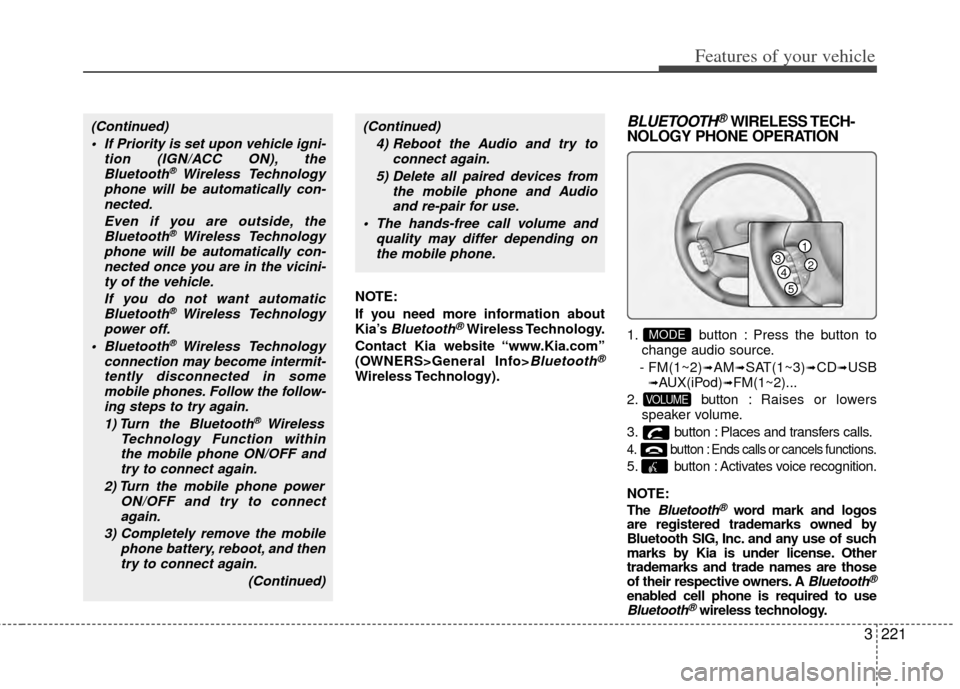
1. button : Press the button to
change audio source.
- FM(1~2)
➟AM➟SAT(1~3)➟CD➟USB➟AUX(iPod)➟FM(1~2)...
2. button : Raises or lowers
speaker volume.
3. button : Places and transfers calls.
4. button : Ends calls or cancels functions.
5. button : Activates voice recognition.
NOTE:
The
Bluetooth®word mark and logos
are registered trademarks owned by
Bluetooth SIG, Inc. and any use of such
marks by Kia is under license. Other
trademarks and trade names are those
of their respective owners. A
Bluetooth®
enabled cell phone is required to useBluetooth®wireless technology.
VOLUME
MODE
(Continued)
If Priority is set upon vehicle igni- tion (IGN/ACC ON), theBluetooth
® Wireless Technology
phone will be automatically con- nected.
Even if you are outside, theBluetooth
® Wireless Technology
phone will be automatically con- nected once you are in the vicini-ty of the vehicle.
If you do not want automaticBluetooth
® Wireless Technology
power off.
Bluetooth
® Wireless Technology
connection may become intermit- tently disconnected in somemobile phones. Follow the follow-ing steps to try again.
1) Turn the Bluetooth
® Wireless
Technology Function within the mobile phone ON/OFF andtry to connect again.
2) Turn the mobile phone power ON/OFF and try to connectagain.
3) Completely remove the mobile phone battery, reboot, and thentry to connect again.
(Continued)
(Continued)4) Reboot the Audio and try to connect again.
5) Delete all paired devices from the mobile phone and Audioand re-pair for use.
The hands-free call volume and quality may differ depending onthe mobile phone.
1
234
5