2014 KIA Sedona service
[x] Cancel search: servicePage 137 of 382
Features of your vehicle
128
3
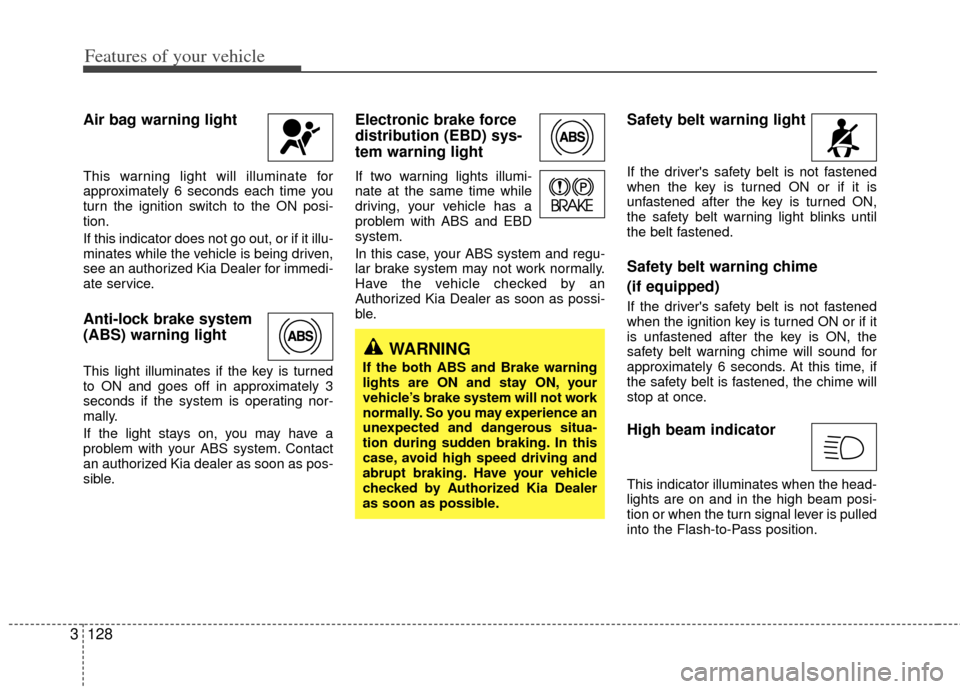
Air bag warning light
This warning light will illuminate for
approximately 6 seconds each time you
turn the ignition switch to the ON posi-
tion.
If this indicator does not go out, or if it illu-
minates while the vehicle is being driven,
see an authorized Kia Dealer for immedi-
ate service.
Anti-lock brake system
(ABS) warning light
This light illuminates if the key is turned
to ON and goes off in approximately 3
seconds if the system is operating nor-
mally.
If the light stays on, you may have a
problem with your ABS system. Contact
an authorized Kia dealer as soon as pos-
sible.
Electronic brake force
distribution (EBD) sys-
tem warning light
If two warning lights illumi-
nate at the same time while
driving, your vehicle has a
problem with ABS and EBD
system.
In this case, your ABS system and regu-
lar brake system may not work normally.
Have the vehicle checked by an
Authorized Kia Dealer as soon as possi-
ble.
Safety belt warning light
If the driver's safety belt is not fastened
when the key is turned ON or if it is
unfastened after the key is turned ON,
the safety belt warning light blinks until
the belt fastened.
Safety belt warning chime
(if equipped)
If the driver's safety belt is not fastened
when the ignition key is turned ON or if it
is unfastened after the key is ON, the
safety belt warning chime will sound for
approximately 6 seconds. At this time, if
the safety belt is fastened, the chime will
stop at once.
High beam indicator
This indicator illuminates when the head-
lights are on and in the high beam posi-
tion or when the turn signal lever is pulled
into the Flash-to-Pass position.
WARNING
If the both ABS and Brake warning
lights are ON and stay ON, your
vehicle’s brake system will not work
normally. So you may experience an
unexpected and dangerous situa-
tion during sudden braking. In this
case, avoid high speed driving and
abrupt braking. Have your vehicle
checked by Authorized Kia Dealer
as soon as possible.
Page 167 of 382
Features of your vehicle
158
3
Air conditioning system opera-
tion tips
If the vehicle has been parked in direct
sunlight during hot weather, open the
windows for a short time to let the hot
air inside the vehicle escape.
To help reduce moisture inside of win- dows on rainy humid days, decrease
the humidity inside the vehicle by oper-
ating the air conditioning system.
During air conditioning system opera- tion, you may occasionally notice a
slight change in engine speed as the
air conditioning compressor cycles on.
This is a normal system operation
characteristic.
Use the air conditioning system every month if only for a few minutes to
ensure maximum system perform-
ance.
When using the air conditioning sys- tem, you may notice clear water drip-
ping (or even puddling) on the ground
under the passenger side of the vehi-
cle. This is a normal system operation
characteristic.
Operating the air conditioning system in the recirculated air position does
provide maximum cooling, however,
continual operation in this mode may
cause the air inside the vehicle to
become stale.
Checking the amount of air con-
ditioner refrigerant and compres-
sor lubricant
When the amount of refrigerant is low,
the performance of the air conditioning is
reduced. Overfilling also has a bad influ-
ence on the air conditioning system.
Therefore, if abnormal operation is
found, have the system inspected by an
authorized Kia dealer.
CAUTION
When using the air conditioning system, monitor the temperaturegauge closely while driving uphills or in heavy traffic when out-side temperatures are high. Airconditioning system operationmay cause engine overheating.Continue to use the blower fanbut turn the air conditioning sys- tem off if the temperature gaugeindicates engine overheating.
When opening the windows in humid weather air conditioningmay create water droplets insidethe vehicle. Since excessivewater droplets may cause dam-age to electrical equipment, airconditioning should only be runwith the windows closed.
CAUTION
When the performance of the airconditioning system is reduced it is important that the correct type andamount of oil and refrigerant is used. Otherwise, damage to thecompressor and abnormal system operation may occur.
CAUTION
The air conditioning system shouldbe serviced by an authorized Kia dealer. Improper service may causeserious injury.
Page 181 of 382
Features of your vehicle
172
3
Air conditioning system opera-
tion tips
If the vehicle has been parked in direct
sunlight during hot weather, open the
windows for a short time to let the hot
air inside the vehicle escape.
To help reduce moisture inside of win- dows on rainy humid days, decrease
the humidity inside the vehicle by oper-
ating the air conditioning system.
During air conditioning system opera- tion, you may occasionally notice a
slight change in engine speed as the
air conditioning compressor cycles on.
This is a normal system operation
characteristic.
Use the air conditioning system every month if only for a few minutes to
ensure maximum system perform-
ance.
When using the air conditioning sys- tem, you may notice clear water drip-
ping (or even puddling) on the ground
under the passenger side of the vehi-
cle. This is a normal system operation
characteristic. Operating the air conditioning system
in the recirculated air position does
provide maximum cooling, however,
continual operation in this mode may
cause the air inside the vehicle to
become stale.
Checking the amount of air con-
ditioner refrigerant and compres-
sor lubricant
When the amount of refrigerant is low,
the performance of the air conditioning is
reduced. Overfilling also has a bad influ-
ence on the air conditioning system.
Therefore, if abnormal operation is
found, have the system inspected by an
authorized Kia dealer.
CAUTION
The air conditioning system shouldbe serviced by an authorized Kiadealer. Improper service may cause serious injury.
CAUTION
When the performance of the airconditioning system is reduced it isimportant that the correct type andamount of oil and refrigerant is used. Otherwise, damage to thecompressor and abnormal system operation may occur.
Page 188 of 382

3179
Features of your vehicle
1. When programming the buttons for thefirst time, press and hold the left and
center buttons (,)simultane-
ously until the indicator light begins to
flash after approximately 20 seconds.
(This procedure erases the factory-set
default codes. Do Not perform this step
to program additional hand-held trans-
mitters.)
✽ ✽ NOTICE
For non rolling code garage door open-
ers, follow steps 2 - 3.
For rolling code garage door openers,
follow steps 2 - 6.
For Canadian Programming, please fol-
low the Canadian Programming section.
For help with determining whether your
garage is non-rolling code or rolling
code, please refer to the garage door
openers owner’s manual or contact
HomeLink
®customer service at 1-800-
355-3515.
2. Press and hold the button on the
HomeLink®system you wish to train
and the button on the transmitter while
the transmitter is approximately 1 to 3
inches away from the mirror. Do not
release the buttons until step 3 has
been completed.
3. The HomeLink
®indicator light will
flash, first slowly and then rapidly.
When the indicator light flashes rapidly,
both buttons may be released. (The
rapid flashing light indicates successful
programming of the new frequency sig-
nal.)
✽ ✽ NOTICE
Some gate operators and garage door
openers may require you to replace step
#3 with the “cycling” procedure noted in
the “Canadian Programming” section of
this document.
OVQ036306N
FlashingOVQ036307N
Flashing
1-3inches
Transmitter
Page 192 of 382

3183
Features of your vehicle
1. When programming the buttons for thefirst time, press and hold the left and
center buttons (,)simultane-
ously until the indicator light begins to
flash after approximately 10 seconds.
Release both buttons. Do not hold for
longer than 20 seconds. (This proce-
dure erases the factory-set default
codes. Do Not perform this step to pro-
gram additional hand-held transmit-
ters.)
✽ ✽ NOTICE
For non rolling code garage door open-
ers, follow steps 2 - 3.
For rolling code garage door openers,
follow steps 2 - 6.
For Canadian Programming, please fol-
low the Canadian Programming section.
For help with determining whether your
garage is non-rolling code or rolling
code, please refer to the garage door
openers owner’s manual or contact
HomeLink
®customer service at 1-800-
355-3515.
2. Press and hold the button on the
HomeLink®system you wish to train
and the button on the transmitter while
the transmitter is approximately 1 to 3
inches away from the mirror. Do not
release the buttons until step 3 has been
completed.
3. The HomeLink
®indicator light will flash,
first slowly and then rapidly. When the
indicator light flashes rapidly, both but-
tons may be released. (The rapid flash-
ing light indicates successful program-
ming of the new frequency signal.)
✽ ✽ NOTICE
Some gate operators and garage door
openers may require you to replace step
#3 with the “cycling” procedure noted in
the “Canadian Programming” section
of this document.
OVQ032306N
FlashingOVQ032307N
Flashing
1-3inches
Transmitter
Page 208 of 382
3199
Features of your vehicle
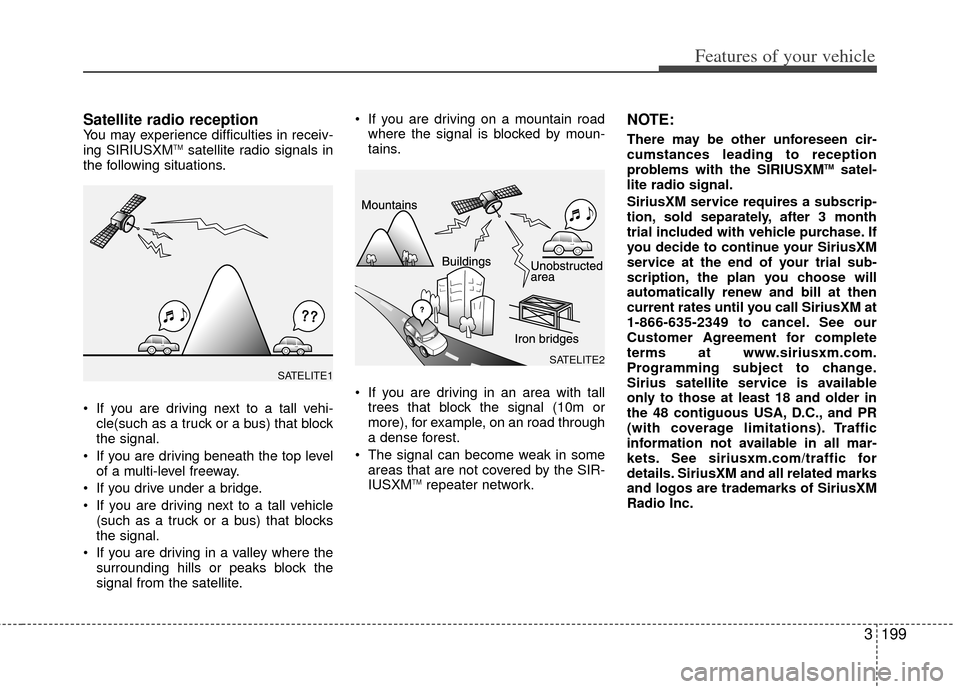
Satellite radio receptionYou may experience difficulties in receiv-
ing SIRIUSXMTMsatellite radio signals in
the following situations.
If you are driving next to a tall vehi- cle(such as a truck or a bus) that block
the signal.
If you are driving beneath the top level of a multi-level freeway.
If you drive under a bridge.
If you are driving next to a tall vehicle (such as a truck or a bus) that blocks
the signal.
If you are driving in a valley where the surrounding hills or peaks block the
signal from the satellite. If you are driving on a mountain road
where the signal is blocked by moun-
tains.
If you are driving in an area with tall trees that block the signal (10m or
more), for example, on an road through
a dense forest.
The signal can become weak in some areas that are not covered by the SIR-
IUSXM
TMrepeater network.
NOTE:
There may be other unforeseen cir-
cumstances leading to reception
problems with the SIRIUSXM
TMsatel-
lite radio signal.
SiriusXM service requires a subscrip-
tion, sold separately, after 3 month
trial included with vehicle purchase. If
you decide to continue your SiriusXM
service at the end of your trial sub-
scription, the plan you choose will
automatically renew and bill at then
current rates until you call SiriusXM at
1-866-635-2349 to cancel. See our
Customer Agreement for complete
terms at www.siriusxm.com.
Programming subject to change.
Sirius satellite service is available
only to those at least 18 and older in
the 48 contiguous USA, D.C., and PR
(with coverage limitations). Traffic
information not available in all mar-
kets. See siriusxm.com/traffic for
details. SiriusXM and all related marks
and logos are trademarks of SiriusXM
Radio Inc.
SATELITE2
SATELITE1
Page 224 of 382
3215
Features of your vehicle
Satellite Radio channels:SIRIUS Satellite Radio has over 130 chan-
nels, including 69 channels of 100% com-
mercial-free music, plus sports, news, talk
and entertainment available nationwide in
your vehicle. For more information and a
complete list of SIRIUS Satellite Radio
channels, visit sirius.com in the United
States, sirius-canada.ca in Canada, or call
SIRIUS at 1-888-539-7474.
Satellite Radio reception factors:
To receive the satellite signal, your vehi-
cle has been equipped with a satellite
radio antenna located on the roof of your
vehicle. The vehicle roof provides the
best location for an unobstructed, open
view of the sky, a requirement of a satel-
lite radio system. Like AM/FM, there are
several factors that can affect satellite
radio reception performance:
Antenna obstructions: For optimalreception performance, keep the
antenna clear of snow and ice build-up
and keep luggage and other material
as far away from the antenna as possi-
ble.
Terrain: Hills, mountains, tall buildings, bridges, tunnels, freeway overpasses,
parking garages, dense tree foliage
and thunderstorms can interfere with
your reception.SIRIUS Satellite Radio service:
SIRIUS Satellite Radio is a subscription-
based satellite radio service that broad-
casts music, sports, news and entertain-
ment programming to radio receivers,
which are available for installation in
motor vehicles or factory installed, as
well as for the home, portable and wire-
less devices, and through an Internet
connection on personal computer.
Vehicles that are equipped with a factory
installed SIRIUS Satellite Radio system
include:
Hardware and an introductory trial sub-scription term, which begins on the
date of sale or lease of the vehicle.
For a small upgrade fee, access to SIRIUS music channels, and other
select channels over the Internet using
any computer connected to the
Internet (U.S. customers only).
For information on extended subscrip-
tion terms, contact SIRIUS at 1-888-
539-7474.
NOTE:
SiriusXM service requires a subscrip-
tion, sold separately, after 3 month trial
included with vehicle purchase. If you
decide to continue your SiriusXM serv-
ice at the end of your trial subscription,
the plan you choose will automatically
renew and bill at then current rates until
you call SiriusXM at 1-866-635-2349 to
cancel. See our Customer Agreement
for complete terms at
www.siriusxm.com. Programming sub-
ject to change. Sirius satellite service is
available only to those at least 18 and
older in the 48 contiguous USA, D.C.,
and PR (with coverage limitations).
Traffic information not available in all
markets. See siriusxm.com/traffic for
details. SiriusXM and all related marks
and logos are trademarks of SiriusXM
Radio Inc. Subscriptions governed by
the SIRIUS Terms & Conditions available
at www
.sirius.com / serviceterms.
Available only in the 48 contiguous
United States and the District of
Columbia. Service available in Canada;
see www
.siriuscanada.caKia shall not be responsible for any such
programming changes.
Satellite Radio Electronic Serial
Number (ESN):This 12-digit Satellite
Serial Number is needed to re-activate,
modify or track your satellite radio account.
You will need this number when communi-
cating with SIRIUS.
SIRIUS Satellite Radio information (if equipped)
Page 229 of 382
Features of your vehicle
220
3
1. RSE Button
Play the RSE, and "RSE" Icon is dis-
played. After pressing the RSE button,
you can enjoy the RSE audio through the
speakers in RSE mode and "Connected"
is appeared at the same time.
At the state of NO RSE Icon, the RSE
button is pressed and "RSE Not Ready"
is appeared at the window.
The speaker volume level is adjustable
by VOLUME(+,-) knob on HEAD unit,
RSE unit and remote controller.
Refer to the "RSE" in this section for
details RSE operation.
RSE : Rear Seat Entertainment System (A/V).CAUTION IN USING
BLUETOOTH®WIRELESS
TECHNOLOGY CELLU-
LAR PHONE
Do not use a cellular phone or
perform Bluetooth®Wireless
Technology settings (e.g. pairing a phone) while driving.
Some Bluetooth
® Wireless
Technology-enab led phones may
not be recognized by the system or fully compatible with the sys-tem.
Before using Bluetooth
®Wireless
Technology related features of the audio system, refer yourphone’s User’s Manual for phone-side Bluetooth
®Wireless
Technology operations.
The phone must be paired to the audio system to use Bluetooth®
Wireless Technologyrelated fea-
tures.
You will not be able to use the hands-free feature when yourphone (in the car) is outside of the cellular service area (e.g. in atunnel, in a underground, in amountainous area, etc.).
(Continued)
(Continued) If the cellular phone signal is poor or the vehicles interior noise istoo loud, it may be difficult to hearthe other person’s voice during a call.
Do not place the phone near or inside metallic objects, otherwise
communications with Bluetooth
®
Wireless Technology system orcellular service stations can bedisturbed.
While a phone is connected through Bluetooth
®Wireless
Technology your phone may dis- charge quicker than usual for additional Bluetooth
® Wireless
Technology-related operations.
Some cellular phones or other devices may cause interferencenoise or malfunction to audio system. In this case, store thedevice in a different location may resolve the situation.
Please save your phone name in English, or your phone name maynot be displayed correctly.
(Continued)