2014 KIA MOHAVE light
[x] Cancel search: lightPage 277 of 417
Driving your vehicle
36
5
E070504AEN-EE
ESP OFF usage
When driving
The ESP turned on for daily driving
whenever possible.
To turn ESP off while driving, press the ESP OFF button while driving on a flat
road surface.
Never press the ESP OFF button while
ESP is operating (ESP indicator light
blinks).
If ESP is turned off while ESP is operat-
ing, the vehicle may slip out of control.
✽✽ NOTICE
When operating the vehicle on a dynamometer, ensure that the ESP is
turned off (ESP OFF light illuminat-
ed). If the ESP is left on, it may pre-
vent the vehicle speed from increas-
ing, and result in false diagnosis.
Turning the ESP off does not affect ABS or brake system operation.
E070505AHM-EE
Hill-start assist control (HAC) (if equipped)
A vehicle has the tendency to slip back
on a steep hill when it starts to go after
stopping. The Hill-start Assist Control
(HAC) prevents the vehicle from slipping
back by operating the brakes automati-
cally for about 2 seconds. The brakes are
released when the accelerator pedal is
depressed or after about 2 seconds.
✽✽ NOTICE
The HAC does not operate when the transmission shift lever is in the P
(Park) or N (Neutral) position.
The HAC activates even though the ESP is off but it does not activate
when the ESP has malfunctioned.
WARNING
Never press the ESP OFF button while ESP is operating. If the ESP is turned off while ESP is
operating, the vehicle may go out of
control.
To turn ESP off while driving, press
the ESP OFF button while driving
on a flat road surface.
WARNING
The HAC is activated only for about
2 seconds, so when the vehicle is
starting off always depress theaccelerator pedal.
Page 278 of 417
537
Driving your vehicle
E070506AHM-EE
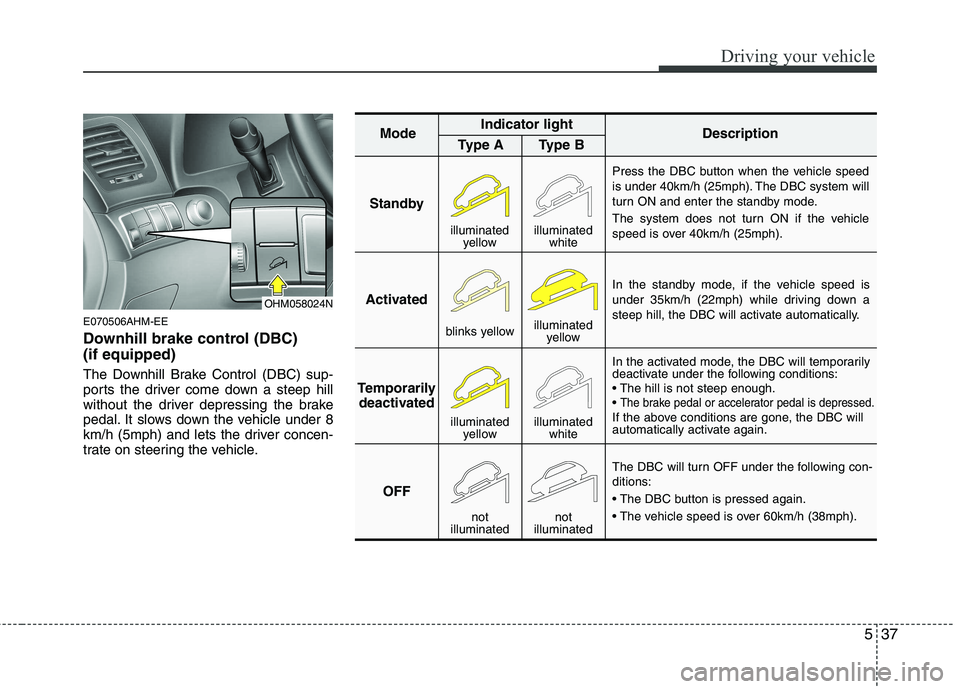
Downhill brake control (DBC) (if equipped)
The Downhill Brake Control (DBC) sup-
ports the driver come down a steep hill
without the driver depressing the brake
pedal. It slows down the vehicle under 8
km/h (5mph) and lets the driver concen-
trate on steering the vehicle.
StandbyPress the DBC button when the vehicle speed
is under 40km/h (25mph). The DBC system will
turn ON and enter the standby mode.
The system does not turn ON if the vehicle
speed is over 40km/h (25mph).
In the standby mode, if the vehicle speed is
under 35km/h (22mph) while driving down a
steep hill, the DBC will activate automatically.
In the activated mode, the DBC will temporarily
deactivate under the following conditions:
The brake pedal or accelerator pedal is depressed.If the above conditions are gone, the DBC will
automatically activate again.
The DBC will turn OFF under the following con- ditions:
Activated
Temporarily deactivated
OFF
Mode
Indicator light
Description
Type A Type B
blinks yellow illuminated
yellow
illuminated yellow illuminated
white
not
illuminated not
illuminated
illuminated yellowilluminated white
OHM058024N
Page 279 of 417
Driving your vehicle
38
5
✽✽
NOTICE
The DBC does not turn ON in the P (Park) position.
The DBC may not activate if the ESP (or BAS) is activated.
Noise or vibration may occur from the brakes when the DBC is activated.
The rear stop light comes on when the DBC is activated.
In a very steep hill even though the brake pedal or accelerator pedal is
depressed the DBC may not deacti-
vate.
Always turn OFF the DBC on normal roads. The DBC might activate from
the standby mode when abrupt corn-
ing or driving through speed bumps.E070600AHM Good braking practices Check to be sure the parking brake is
not engaged and the parking brake
indicator light is out before driving
away.
Driving through water may get the brakes wet. They can also get wet
when the vehicle is washed. Wet
brakes can be dangerous! Your vehicle
will not stop as quickly if the brakes are
wet. Wet brakes may cause the vehicle
to pull to one side.
To dry the brakes, apply the brakes
lightly until the braking action returns to
normal, taking care to keep the vehicle
under control at all times. If the braking
action does not return to normal, stop
as soon as it is safe to do so and call
an authorized Kia dealer for assis-
tance.
WARNING
If the DBC red indicator light illumi-
nates, the system has overheated
or something is wrong. The DBC
will not activate. If the DBC red indi-
cator light illuminates even thoughthe DBC system has been cooled
enough have the system checked
by an authorized Kia dealer.
WARNING
Whenever you leave or park your vehicle, always set the parking
brake as far as possible and fully
engage the vehicle's transmis-
sion into the P (Park) position. If
the parking brake is not fully
engaged, the vehicle may move
inadvertently and injure yourself
and others.
All vehicles should always have the parking brake fully engaged
when parking to avoid inadver-
tent movement of the vehicle
which can injure occupants orpedestrians.
Page 281 of 417

Driving your vehicle
40
5
E080000AHM
A locking differential, if equipped, is for
the rear wheel differential only. The fea-
tures of this locking differential are
described below:
Just as with a conventional differential,
the wheel on one side is allowed to turn
at a different speed from the wheel on
the other side when the vehicle is cor-
nering. The difference between the lock-
ing differential and a conventional differ-ential is that if the wheel on one side of
the vehicle loses traction, a greateramount of torque is applied to the rear
wheel on the other side to improve trac-tion.
✽✽
NOTICE
In a stationary position, the LD
(Locking Differential) will operate when
the difference of the revolution speed
between the rear right wheel and the
rear left wheel occurs.
The following procedures can be used to
confirm that the locking differential is
functioning properly:
1. Position the vehicle so that one wheel is on a dry paved surface and the other
on ice, snow, mud, etc. Drive the vehi-
cle, and observe the operation of the
locking differential. The vehicle should
not become stuck if the differential is
functioning properly.
2. Depress the accelerator pedal gradu- ally, and then when traction is good,
depress it forcefully. If the vehicle
accelerates well, the differential is
functioning properly.
✽✽ NOTICE
Usually a locking differential will oper-
ate and release automatically but occa-
sionally it may not release automatically.
At this time you will feel the tire is
dragged when you are driving or corner-
ing. You can release it manually by slight-
ly turning the steering wheel right and
left while the vehicle is moving slowly.
LOCKING DIFFERENTIAL (IF EQUIPPED)
CAUTION
Never start the engine with the gearshift lever placed in the for-
ward or reverse while one of the rear wheels is jacked up and theother in contact with the ground;doing so may cause the vehicle to
jump forward.
If one of the rear wheels begins to spin in mud, snow, etc., the vehi-cle can sometimes be driven out
by depressing the accelerator pedal further; however, avoid run-ning the engine continuously at high rpm because doing so could
damage the locking differential.
Page 284 of 417

543
Driving your vehicle
CAUTION
Always check if there is anythingunder the rear part of the vehicle
before adjusting the ALS.
There may be noise heard while the ALS is adjusting the height toa mode.
Do not turn off the engine or press the switch to another modewhile the ALS is adjusting to themode selected.
Do not activate the ALS when the air filter of the compressor has
been submerged.
Inspect or replace the ALS air fil- ter and air spring according to themaintenance schedule.
Do not drive the vehicle when the air spring is damaged or airless.Have the vehicle towed with allthe wheels lifted from the ground.
(Continued)
(Continued) Have the vehicle checked by an authorized Kia dealer if all thelights of the ALS indicator is illu-minated.
All the lights of the ALS indicator can be illuminated when the vehi-cle was parked with one side ofthe vehicle lifted or when one
side of the vehicle was lifted witha jack. When this happens, takethe vehicle to a level ground, and turn off the engine. The ALS will
operate normally when the engineis turned on again.
Page 285 of 417

Driving your vehicle
44
5
1. CRUISE indicator
2. SET indicator E090000BHM
The cruise control system allows you to
program the vehicle to maintain a con-stant speed without pressing the acceler-ator pedal. This system is designed to function
above approximately 40 km/h (25 mph).
✽✽
NOTICE
During normal cruise control opera- tion, when the SET switch is activated
or reactivated after applying the
brakes, the cruise control will ener-
gize after approximately 3 seconds.
The delay is normal.
To activate cruise control, depress the
brake pedal at least once after turning
the ignition switch to the ON position
or starting the engine. This is to check
if the brake switch which is important
part to cancel cruise control is in nor-
mal condition.
CRUISE CONTROL SYSTEM (IF EQUIPPED)
WARNING
If the cruise control is left on (CRUISE indicator light in the
instrument cluster illuminated),
the cruise control can be
switched on accidentally. Keep
the cruise control system off
(CRUISE indicator light OFF)
when the cruise control is not in
use, to avoid inadvertently set-ting a speed.
Use the cruise control system only when traveling on open
highways in good weather.
Do not use the cruise control when it may not be safe to keep
the vehicle at a constant speed,
for instance, driving in heavy or
varying traffic, or on slippery
(rainy, icy or snow-covered) or
winding roads or over 6% up-hill
or down-hill roads.
Pay particular attention to the driving conditions whenever
using the cruise control system.
Be careful when driving downhill using the cruise control system,
which may increase the vehiclespeed.
OHM059049
Page 286 of 417
545
Driving your vehicle
E090100AHM
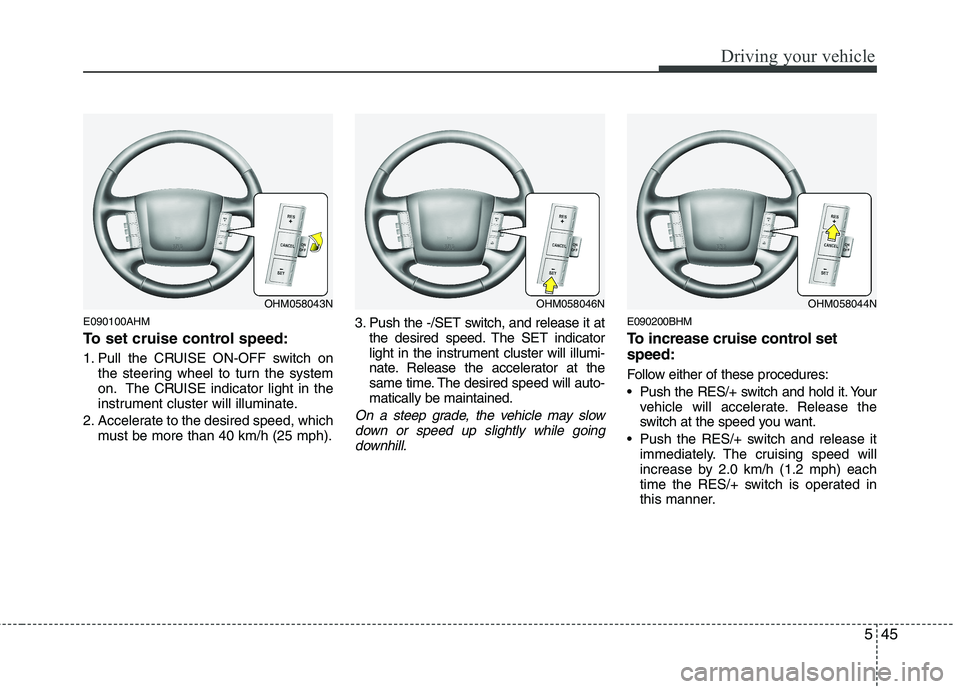
To set cruise control speed:
1. Pull the CRUISE ON-OFF switch onthe steering wheel to turn the system
on. The CRUISE indicator light in the
instrument cluster will illuminate.
2. Accelerate to the desired speed, which must be more than 40 km/h (25 mph). 3. Push the -/SET switch, and release it at
the desired speed. The SET indicator
light in the instrument cluster will illumi-
nate. Release the accelerator at the
same time. The desired speed will auto-matically be maintained.
On a steep grade, the vehicle may slow
down or speed up slightly while goingdownhill.
E090200BHM
To increase cruise control set speed:
Follow either of these procedures:
Push the RES/+ switch and hold it. Your vehicle will accelerate. Release the
switch at the speed you want.
Push the RES/+ switch and release it immediately. The cruising speed will
increase by 2.0 km/h (1.2 mph) each
time the RES/+ switch is operated in
this manner.
OHM058043NOHM058046NOHM058044N
Page 288 of 417
547
Driving your vehicle
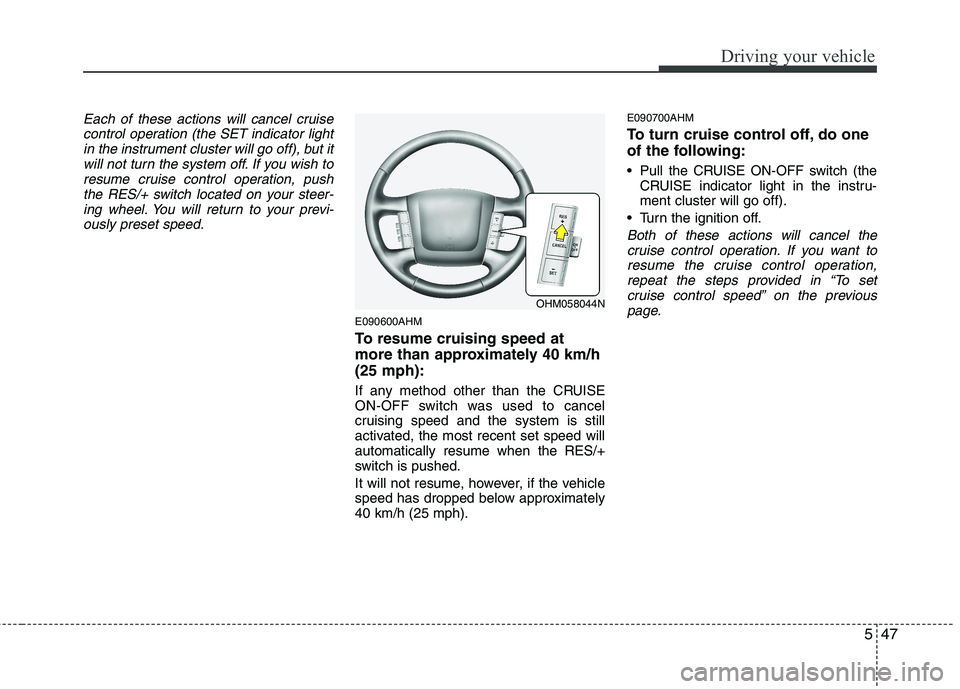
Each of these actions will cancel cruisecontrol operation (the SET indicator lightin the instrument cluster will go off), but itwill not turn the system off. If you wish to
resume cruise control operation, pushthe RES/+ switch located on your steer-ing wheel. You will return to your previ-
ously preset speed.
E090600AHM
To resume cruising speed at
more than approximately 40 km/h(25 mph):
If any method other than the CRUISE
ON-OFF switch was used to cancel
cruising speed and the system is still
activated, the most recent set speed willautomatically resume when the RES/+
switch is pushed.
It will not resume, however, if the vehicle
speed has dropped below approximately40 km/h (25 mph). E090700AHM
To turn cruise control off, do one
of the following:
Pull the CRUISE ON-OFF switch (the
CRUISE indicator light in the instru- ment cluster will go off).
Turn the ignition off.
Both of these actions will cancel the cruise control operation. If you want to
resume the cruise control operation, repeat the steps provided in “To setcruise control speed” on the previous
page.
OHM058044N