Page 271 of 711
Features of your vehicle
170 4
• For maximum defrosting, set the
temperature control to the extreme
right/hot position and the fan speed
control to the highest speed.
• If warm air to the floor is desired
while defrosting or defogging, set
the mode to the floor-defrost posi-
tion.
• Before driving, clear all snow and
ice from the windshield, rear win-
dow, outside rear view mirrors, and
all side windows.
• Clear all snow and ice from the
hood and air inlet in the cowl grill to
improve heater and defroster effi-
ciency and to reduce the probabili-
ty of fogging up the inside of the
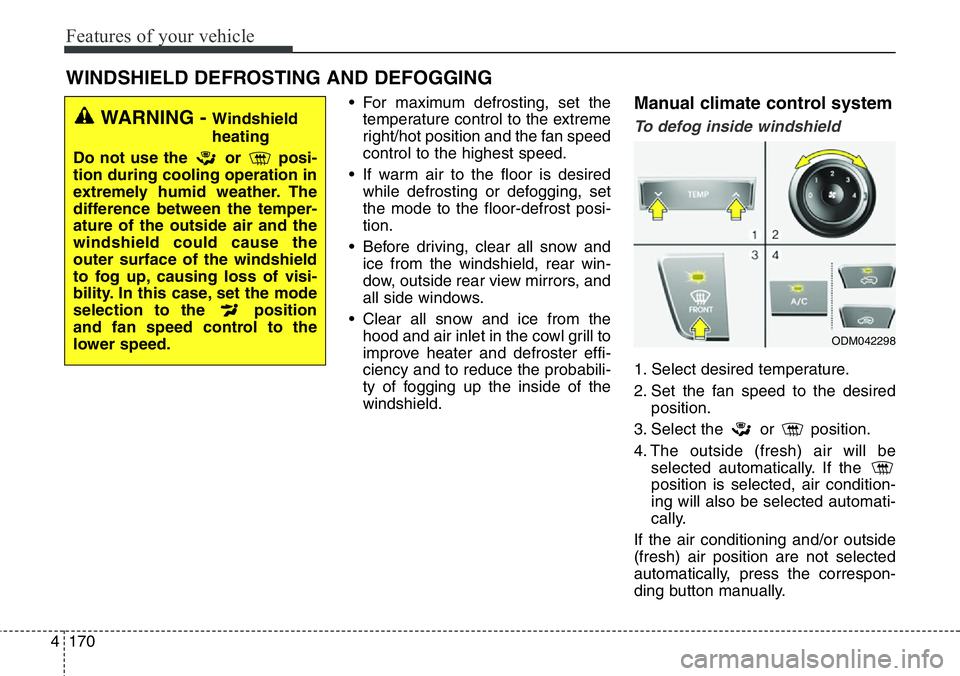
windshield.Manual climate control system
To defog inside windshield
1. Select desired temperature.
2. Set the fan speed to the desired
position.
3. Select the or position.
4. The outside (fresh) air will be
selected automatically. If the
position is selected, air condition-
ing will also be selected automati-
cally.
If the air conditioning and/or outside
(fresh) air position are not selected
automatically, press the correspon-
ding button manually.
WINDSHIELD DEFROSTING AND DEFOGGING
WARNING - Windshield
heating
Do not use the or posi-
tion during cooling operation in
extremely humid weather. The
difference between the temper-
ature of the outside air and the
windshield could cause the
outer surface of the windshield
to fog up, causing loss of visi-
bility. In this case, set the mode
selection to the position
and fan speed control to the
lower speed.
ODM042298
Page 272 of 711
4171
Features of your vehicle
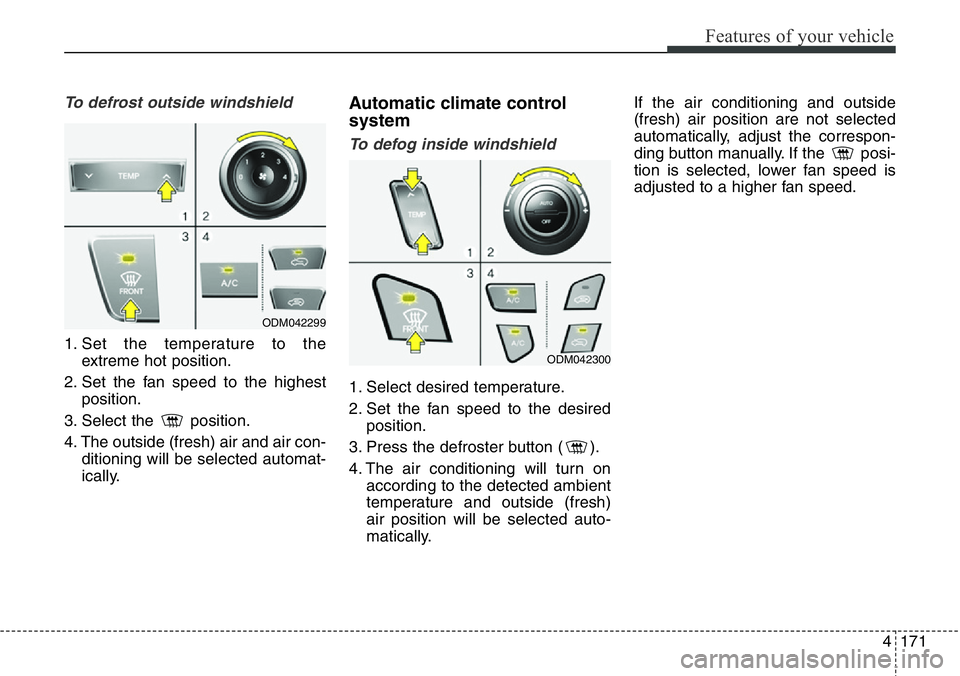
To defrost outside windshield
1. Set the temperature to the
extreme hot position.
2. Set the fan speed to the highest
position.
3. Select the position.
4. The outside (fresh) air and air con-
ditioning will be selected automat-
ically.
Automatic climate control
system
To defog inside windshield
1. Select desired temperature.
2. Set the fan speed to the desired
position.
3. Press the defroster button ( ).
4. The air conditioning will turn on
according to the detected ambient
temperature and outside (fresh)
air position will be selected auto-
matically.If the air conditioning and outside
(fresh) air position are not selected
automatically, adjust the correspon-
ding button manually. If the posi-
tion is selected, lower fan speed is
adjusted to a higher fan speed.
ODM042299
ODM042300
Page 273 of 711
Features of your vehicle
172 4
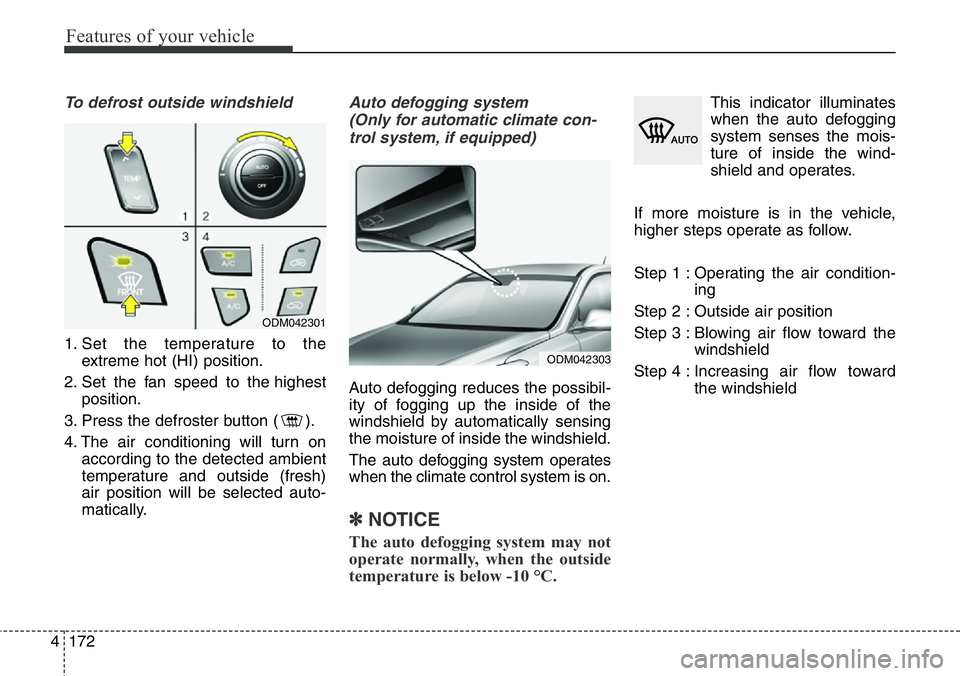
To defrost outside windshield
1. Set the temperature to the
extreme hot (HI) position.
2. Set the fan speed to the highest
position.
3. Press the defroster button ( ).
4. The air conditioning will turn on
according to the detected ambient
temperature and outside (fresh)
air position will be selected auto-
matically.
Auto defogging system
(Only for automatic climate con-
trol system, if equipped)
Auto defogging reduces the possibil-
ity of fogging up the inside of the
windshield by automatically sensing
the moisture of inside the windshield.
The auto defogging system operates
when the climate control system is on.
✽NOTICE
The auto defogging system may not
operate normally, when the outside
temperature is below -10 °C.
This indicator illuminates
when the auto defogging
system senses the mois-
ture of inside the wind-
shield and operates.
If more moisture is in the vehicle,
higher steps operate as follow.
Step 1 : Operating the air condition-
ing
Step 2 : Outside air position
Step 3 : Blowing air flow toward the
windshield
Step 4 : Increasing air flow toward
the windshield
ODM042301
ODM042303
Page 274 of 711
4173
Features of your vehicle
If your vehicle is equipped with the
auto defogging system, it is automat-
ically activated when the conditions
are met. However, if you would like to
cancel the auto defogging system,
press the front defroster button 4
times within 2 seconds while press-
ing the AUTO button. The indicator of
front defroster button will blink 3
times to notify you that the system is
cancelled. To use the auto defogging
system again, follow the procedures
mentioned above.
If the battery has been disconnected
or discharged, it resets to the auto
defogging status.✽NOTICE
If the A/C off is manually selected
while the auto defogging system is
on, the auto defogging indicator will
blink 3 times to give notice that the
A/C off can not be selected.
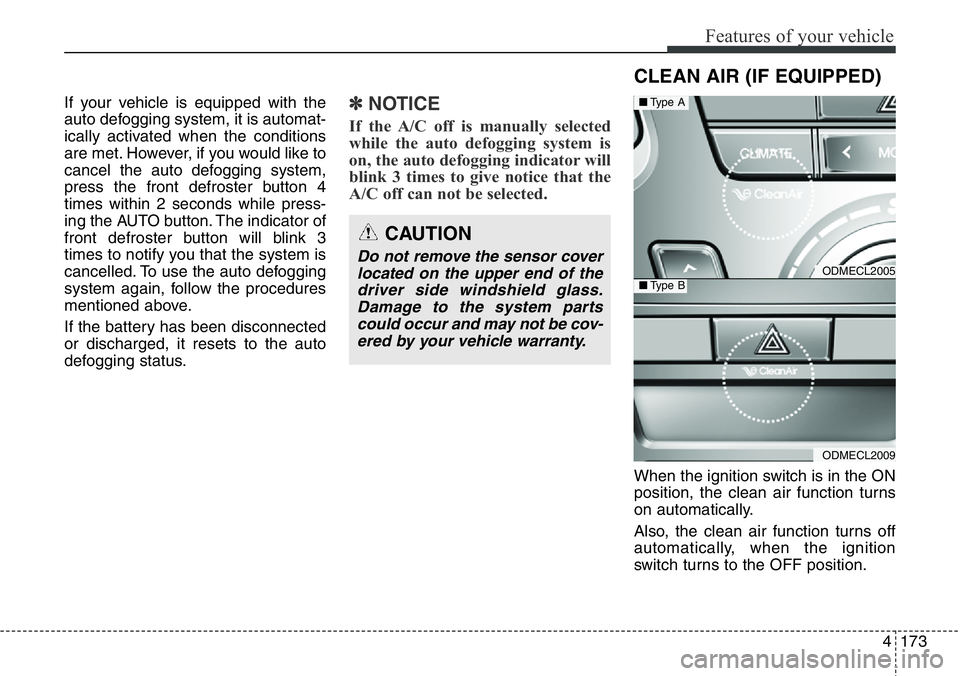
When the ignition switch is in the ON
position, the clean air function turns
on automatically.
Also, the clean air function turns off
automatically, when the ignition
switch turns to the OFF position.
CAUTION
Do not remove the sensor cover
located on the upper end of the
driver side windshield glass.
Damage to the system parts
could occur and may not be cov-
ered by your vehicle warranty.
CLEAN AIR (IF EQUIPPED)
ODMECL2005
ODMECL2009
■Type A
■Type B
Page 292 of 711
4191
Features of your vehicle
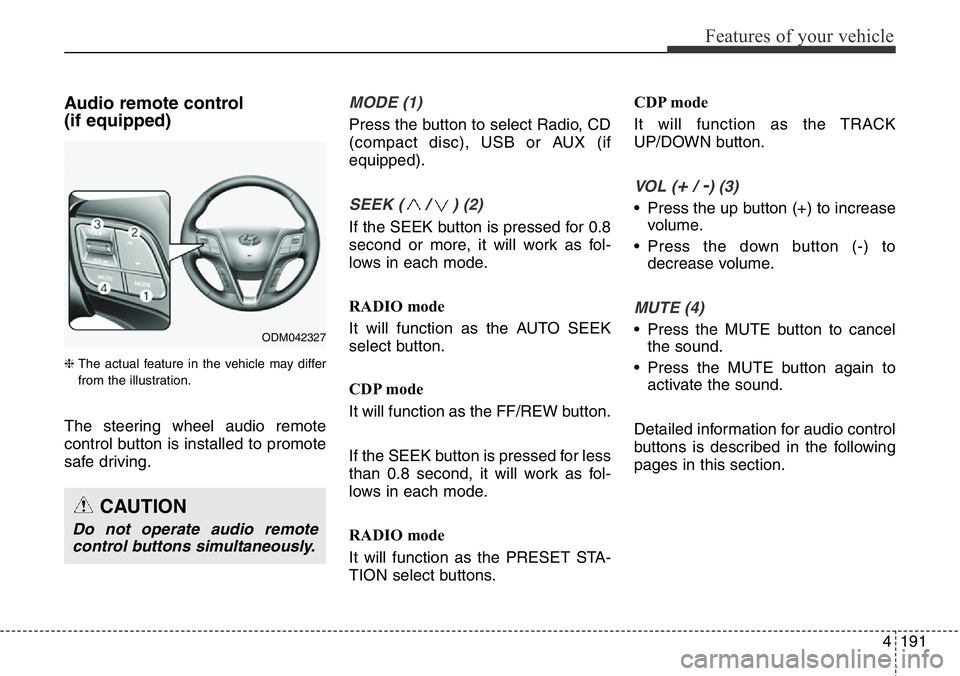
Audio remote control
(if equipped)
❈ The actual feature in the vehicle may differ
from the illustration.
The steering wheel audio remote
control button is installed to promote
safe driving.
MODE (1)
Press the button to select Radio, CD
(compact disc), USB or AUX (if
equipped).
SEEK ( / ) (2)
If the SEEK button is pressed for 0.8
second or more, it will work as fol-
lows in each mode.
RADIO mode
It will function as the AUTO SEEK
select button.
CDP mode
It will function as the FF/REW button.
If the SEEK button is pressed for less
than 0.8 second, it will work as fol-
lows in each mode.
RADIO mode
It will function as the PRESET STA-
TION select buttons.CDP mode
It will function as the TRACK
UP/DOWN button.
VOL (+/ -) (3)
• Press the up button (+) to increase
volume.
• Press the down button (-) to
decrease volume.
MUTE (4)
• Press the MUTE button to cancel
the sound.
• Press the MUTE button again to
activate the sound.
Detailed information for audio control
buttons is described in the following
pages in this section.
CAUTION
Do not operate audio remote
control buttons simultaneously.
ODM042327
Page 305 of 711
Features of your vehicle
204 4
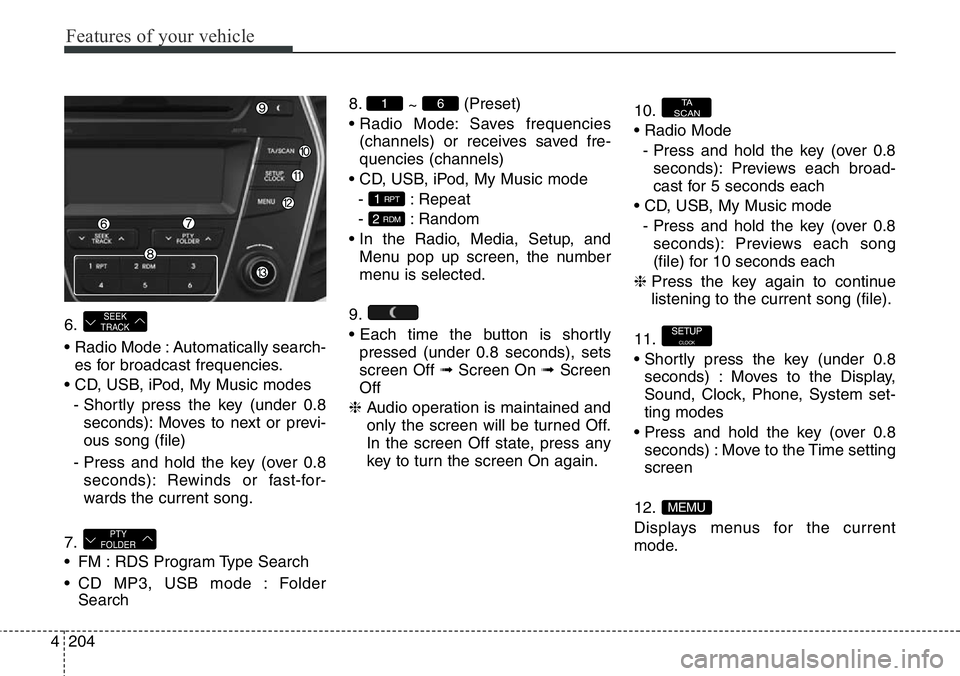
6.
• Radio Mode : Automatically search-
es for broadcast frequencies.
• CD, USB, iPod, My Music modes
- Shortly press the key (under 0.8
seconds): Moves to next or previ-
ous song (file)
- Press and hold the key (over 0.8
seconds): Rewinds or fast-for-
wards the current song.
7.
• FM : RDS Program Type Search
• CD MP3, USB mode : Folder
Search8.
~ (Preset)
• Radio Mode: Saves frequencies
(channels) or receives saved fre-
quencies (channels)
• CD, USB, iPod, My Music mode
- : Repeat
- : Random
• In the Radio, Media, Setup, and
Menu pop up screen, the number
menu is selected.
9.
• Each time the button is shortly
pressed (under 0.8 seconds), sets
screen Off ➟Screen On ➟Screen
Off
❈ Audio operation is maintained and
only the screen will be turned Off.
In the screen Off state, press any
key to turn the screen On again.10.
• Radio Mode
- Press and hold the key (over 0.8
seconds): Previews each broad-
cast for 5 seconds each
• CD, USB, My Music mode
- Press and hold the key (over 0.8
seconds): Previews each song
(file) for 10 seconds each
❈ Press the key again to continue
listening to the current song (file).
11.
• Shortly press the key (under 0.8
seconds) : Moves to the Display,
Sound, Clock, Phone, System set-
ting modes
• Press and hold the key (over 0.8
seconds) : Move to the Time setting
screen
12.
Displays menus for the current
mode.
MEMU
SETUPCLOCK
TA
SCAN
2 RDM
1 RPT
61
PTY
FOLDER
SEEK
TRACK
Page 308 of 711
4207
Features of your vehicle
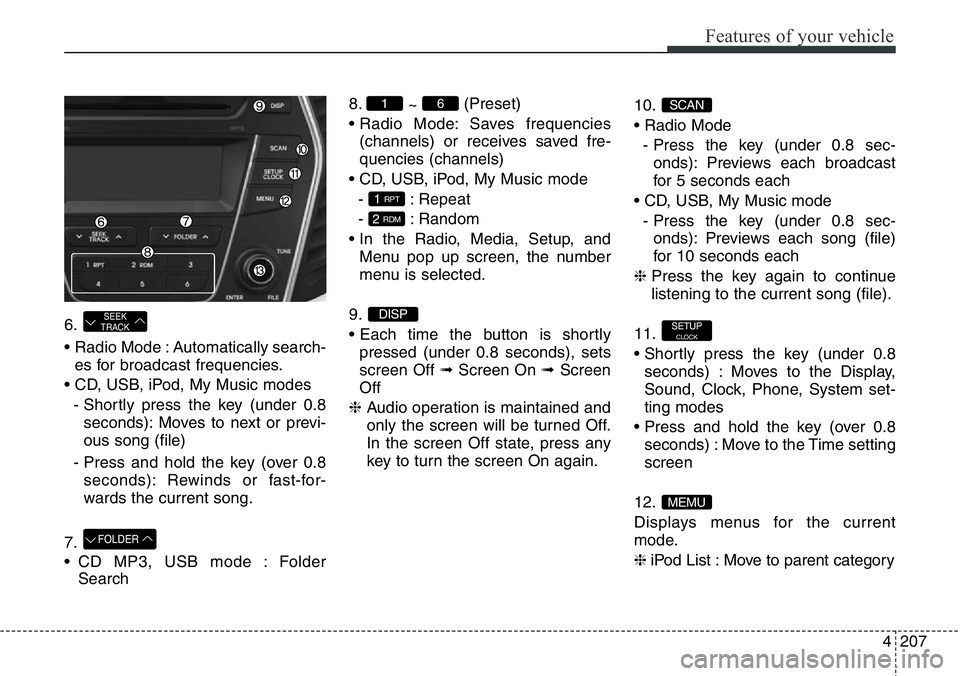
6.
• Radio Mode : Automatically search-
es for broadcast frequencies.
• CD, USB, iPod, My Music modes
- Shortly press the key (under 0.8
seconds): Moves to next or previ-
ous song (file)
- Press and hold the key (over 0.8
seconds): Rewinds or fast-for-
wards the current song.
7.
• CD MP3, USB mode : Folder
Search8.
~ (Preset)
• Radio Mode: Saves frequencies
(channels) or receives saved fre-
quencies (channels)
• CD, USB, iPod, My Music mode
- : Repeat
- : Random
• In the Radio, Media, Setup, and
Menu pop up screen, the number
menu is selected.
9.
• Each time the button is shortly
pressed (under 0.8 seconds), sets
screen Off ➟Screen On ➟Screen
Off
❈ Audio operation is maintained and
only the screen will be turned Off.
In the screen Off state, press any
key to turn the screen On again.10.
• Radio Mode
- Press the key (under 0.8 sec-
onds): Previews each broadcast
for 5 seconds each
• CD, USB, My Music mode
- Press the key (under 0.8 sec-
onds): Previews each song (file)
for 10 seconds each
❈ Press the key again to continue
listening to the current song (file).
11.
• Shortly press the key (under 0.8
seconds) : Moves to the Display,
Sound, Clock, Phone, System set-
ting modes
• Press and hold the key (over 0.8
seconds) : Move to the Time setting
screen
12.
Displays menus for the current
mode.
❈ iPod List : Move to parent category
MEMU
SETUPCLOCK
SCAN
DISP
2 RDM
1 RPT
61
FOLDER
SEEK
TRACK
Page 342 of 711
4241
Features of your vehicle
PHONE (if equipped)
Before using the Bluetooth®Wireless
Technology
phone features
• In order to use
Bluetooth®Wireless
Technology
phone, you must first
pair and connect the
Bluetooth®
Wireless Technologymobile phone.
• If the mobile phone is not paired or
connected, it is not possible to
enter Phone mode. Once a phone
is paired or connected, the guid-
ance screen will be displayed.
• If Priority is set upon vehicle igni-
tion (IGN/ACC ON), the
Bluetooth®
Wireless Technologyphone will be
automatically connected. Even if
you are outside, the
Bluetooth®
Wireless Technologyphone will be
automatically connected once you
are in the vicinity of the vehicle. If you
do not want automatic
Bluetooth®
Wireless Technologyphone connec-
tion, set the
Bluetooth®Wireless
Technology
power to OFF.
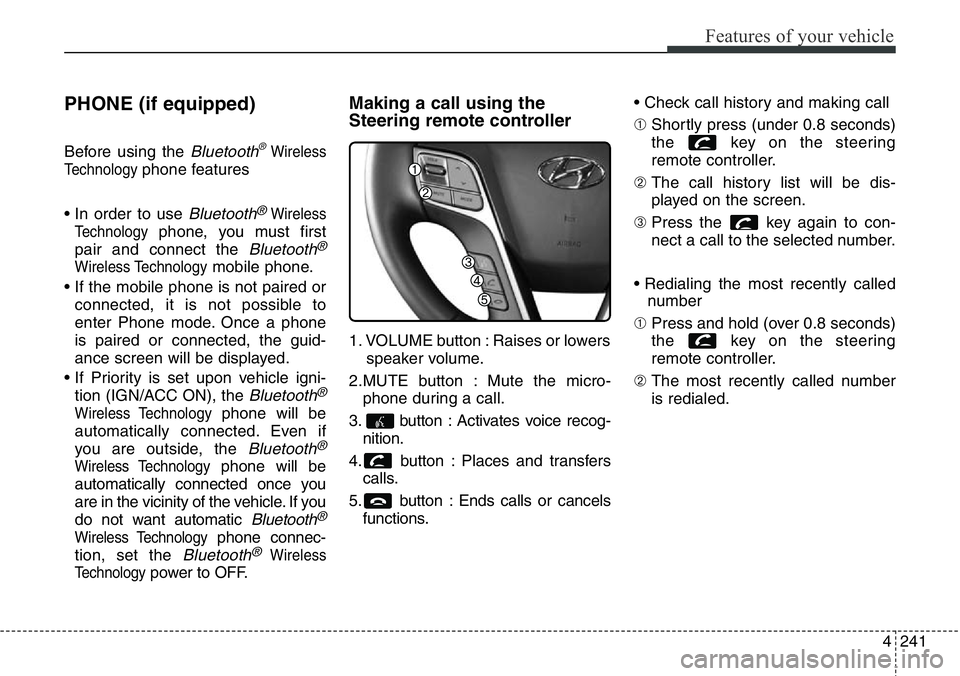
Making a call using the
Steering remote controller
1. VOLUME button : Raises or lowers
speaker volume.
2.MUTE button : Mute the micro-
phone during a call.
3. button : Activates voice recog-
nition.
4. button : Places and transfers
calls.
5. button : Ends calls or cancels
functions.• Check call history and making call
➀ Shortly press (under 0.8 seconds)
the key on the steering
remote controller.
➁ The call history list will be dis-
played on the screen.
➂ Press the key again to con-
nect a call to the selected number.
• Redialing the most recently called
number
➀ Press and hold (over 0.8 seconds)
the key on the steering
remote controller.
➁ The most recently called number
is redialed.