2014 HYUNDAI IX35 cooling
[x] Cancel search: coolingPage 318 of 1534

Maintenance
24
7
Check the condition and connections of all cooling system hoses and heater
hoses. Replace any swollen or deterio-
rated hoses.
The coolant level should be filled
between F (MAX) and L (MIN) marks on
the side of the coolant reservoir when theengine is cool.
If the coolant level is low, add enough
specified coolant to provide protection
against freezing and corrosion. Bring the
level to F (MAX), but do not overfill. If fre-
quent coolant refill is required, we rec-
ommend that the system be inspected by
an authorised HYUNDAI dealer.
Recommended engine coolant
When adding coolant, use only deion-
ized water or soft water for your vehicle
and never mix hard water in the
coolant filled at the factory. An improp-
er coolant mixture can result in serious
malfunction or engine damage.
The engine in your vehicle has alu- minum engine parts and must be pro-
tected by an ethylene-glycol-based
coolant to prevent corrosion and freez-ing.
DO NOT USE alcohol or methanol coolant or mix them with the specifiedcoolant.
Do not use a solution that contains more than 60% antifreeze or less than
35% antifreeze, which would reduce
the effectiveness of the solution.
For mixture percentage, refer to the fol-
lowing table.
OLM079006
Ambient
Temperature Mixture Percentage
(volume)
Antifreeze Water
-15°C (5°F) 35 65
-25°C (-13°F) 40 60
-35°C (-31°F) 50 50
-45°C (-49°F) 60 40
WARNING The electric motor (cooling fan) is con-
trolled by engine
coolant temperature,
refrigerant pressure
and vehicle speed. It may some-
times operate even when the
engine is not running. Use extreme
caution when working near the
blades of the cooling fan so that
you are not injured by a rotating fan
blades. As the engine coolant tem-
perature decreases, the electric
motor will automatically shut off.This is a normal condition.
If your vehicle is equipped with
GDI, the electric motor (cooling fan)
may operate until you disconnect
the nagative battery cable.
EL(FL) Aust 7.QXP 7/26/2013 2:23 PM Page 24
Page 354 of 1534

Maintenance
60
7
Engine compartment main fuse panel
No.Fuse ratingSymbolFuse Name Circuit Protected
MULTI
FUSE
180AMDPSEPS Control Module
260AB+1Smart Junction Box (Fuse - F13 / F20 / F26 / F31 / F37, IPS 4 / IPS 5 / IPS 6 / IPS 7)
340AABS 2ESP Control Module, ABS Control Module, Multipurpose Check Connector
440AEMSEMS Box (Fuse - F1 / F2 / F3 / F6)
540AABS 1ESP Control Module, ABS Control Module, Multipurpose Check Connector
640ABLOWERRLY. 1 (Blower Relay)
760AB+3Smart Junction Box (Fuse - F30 / F35 / F36, Power Connector - F1 / F2)
860AB+2Smart Junction Box (Power Window Relay, Fuse - F23 / F28 / F33, IPS 0 / IPS 1 / IPS 2 / IPS 3)
FUSE
940A(50A)
GSL(DSL)COOLING FA NRLY. 3 (Cooling Fan Low Relay), RLY. 9 (Cooling Fan High Relay)
1040AHEATED
GLASS RRRLY. 6 (Rear Defogger Relay)
1130AIGN 1W/O Smart Key - Ignition Switch,
With Smart Key - PDM Relay Box (IGN1 Relay)
1240AIGN 2RLY. 4 (Start Relay), W/O Smart Key - Ignition Switch,
With Smart Key - PDM Relay Box (IGN2 Relay)
1315AHORNRLY. 2 (Horn Relay), RLY. 5 (Burglar Alarm Horn Relay)
EL(FL) Aust 7.QXP 7/26/2013 2:25 PM Page 60
Page 400 of 1534
I3
Index
Battery ..............................................................................7-37
Battery saver function ......................................................4-88
Before driving ....................................................................5-4
Bonnet ..............................................................................4-25
Brake system ....................................................................5-31
Anti-lock brake system (ABS) ..................................5-34
Downhill brake control (DBC) ..................................5-41
Electronic stability control (ESC) ..............................5-36
Emergency Stop Signal (ESS)....................................5-43
Hill-start assist control (HAC) ..................................5-41
Parking brake..............................................................5-32
Power brakes ..............................................................5-31
TSA (Trailer stability assist) ......................................5-43
Vehicle stability management ....................................5-39
Brake/clutch fluid ............................................................7-26
Bulb replacement ............................................................7-63
Bulb wattage ......................................................................8-3
Button start/stop, see engine start/stop button ..................5-9 Camera (Rear view) ........................................................4-87
Capacities (Lubricants) ......................................................8-6Care
Exterior care ..............................................................7-77
Interior care ................................................................7-82
Tyre care ....................................................................7-40
Cargo security screen ....................................................4-131
Centre console storage ..................................................4-123
Central door lock switch ..................................................4-16
Certification label ..............................................................8-9Chains Tyre chains ................................................................5-58
Checking tyre inflation pressure ......................................7-42
Child restraint system ......................................................3-31 ISOFIX system ..........................................................3-36
Seat belt ......................................................................3-33
Tether anchor system..................................................3-34
Child-protector rear door lock ........................................4-18
Cigarette lighter ............................................................4-126
Climate control air filter ..................................................7-32
Combined instrument, see instrument cluster..................4-46
Compact spare tyre replacement ......................................7-45
Compass with Electric chromic mirror ............................4-40
Cool box ........................................................................4-124
Coolant ............................................................................7-23
Cooling fluid, see engine coolant ....................................7-23
BC
EL(FL) Aust Index.qxp 7/26/2013 2:14 PM Page 3
Page 606 of 1534
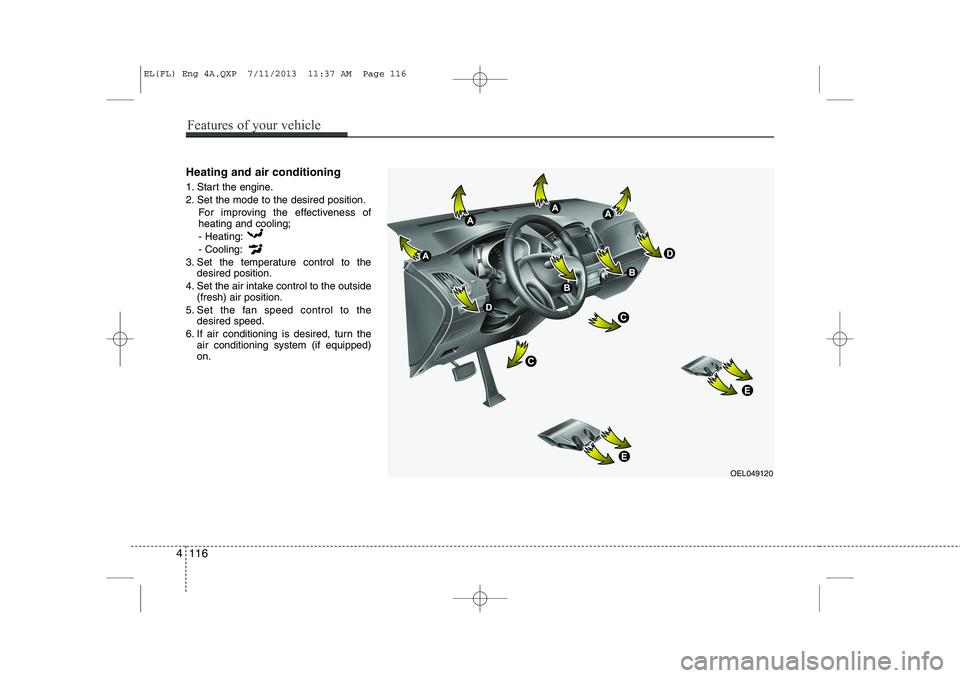
Heating and air conditioning
1. Start the engine.
2. Set the mode to the desired position.For improving the effectiveness of heating and cooling;- Heating: - Cooling:
3. Set the temperature control to the desired position.
4. Set the air intake control to the outside (fresh) air position.
5. Set the fan speed control to the desired speed.
6. If air conditioning is desired, turn the air conditioning system (if equipped) on.
OEL049120
4 116
Features of your vehicle
EL(FL) Eng 4A.QXP 7/11/2013 11:37 AM Page 116
Page 611 of 1534
Operation Tips
To keep dust or unpleasant fumes fromentering the vehicle through the venti-
lation system, temporarily set the air
intake control to the recirculated air
position. Be sure to return the control
to the fresh air position when the irrita-
tion has passed to keep fresh air in the
vehicle. This will help keep the driver
alert and comfortable.
Air for the heating/cooling system is drawn in through the grilles just ahead
of the windshield. Care should be
taken that these are not blocked by
leaves, snow, ice or other obstructions.
To prevent interior fog on the wind- shield, set the air intake control to the
fresh air position and fan speed to the
desired position, turn on the air condi-tioning system, and adjust the temper-
ature control to desired temperature.Air conditioning (if equipped)
HYUNDAI Air Conditioning Systems are
filled with environmentally friendly
R-134a refrigerant.
1. Start the engine. Push the air condi- tioning button.
2. Set the mode to the position.
3. Set the air intake control to the outside air or recirculated air position.
4. Adjust the fan speed control and tem- perature control to maintain maximum
comfort.
When maximum cooling is desired, set the temperature control to the extremeleft position (press the MAX A/C posi-
tion selection button (if equipped)) then
set the fan speed control to the highestspeed.✽✽ NOTICE
Page 612 of 1534
Air conditioning system operation tips
If the vehicle has been parked in directsunlight during hot weather, open the
windows for a short time to let the hot
air inside the vehicle escape.
To help reduce moisture inside of the windows on rainy or humid days,
decrease the humidity inside the vehi-
cle by operating the air conditioningsystem.
During air conditioning system opera- tion, you may occasionally notice aslight change in engine speed as the
air conditioning compressor cycles.
This is a normal system operation
characteristic.
Use the air conditioning system every month only for a few minutes to ensure
maximum system performance. When using the air conditioning sys-
tem, you may notice clear water drip-
ping (or even puddling) on the ground
under the passenger side of the vehi-
cle. This is a normal system operation
characteristic.
Operating the air conditioning system in the recirculated air position provides
maximum cooling, however, continual
operation in this mode may cause the
air inside the vehicle to become stale.
During cooling operation, you may occasionally notice a misty air flow
because of rapid cooling and humid air
intake. This is a normal system opera-
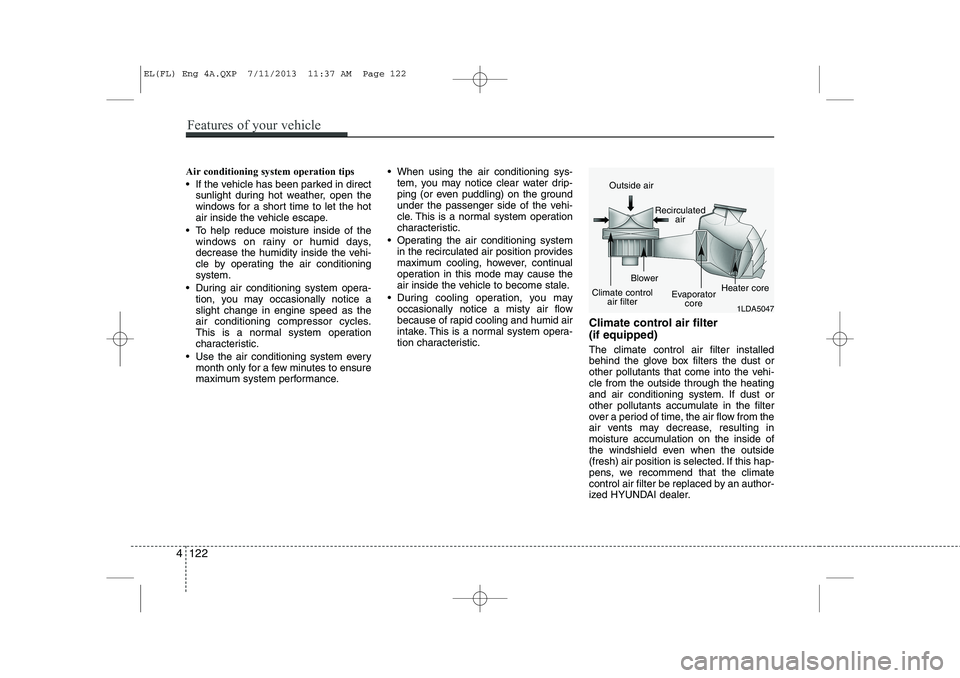
tion characteristic. Climate control air filter (if equipped) The climate control air filter installed
behind the glove box filters the dust or
other pollutants that come into the vehi-cle from the outside through the heating
and air conditioning system. If dust or
other pollutants accumulate in the filter
over a period of time, the air flow from the
air vents may decrease, resulting in
moisture accumulation on the inside of
the windshield even when the outside
(fresh) air position is selected. If this hap-
pens, we recommend that the climate
control air filter be replaced by an author-
ized HYUNDAI dealer.
1LDA5047
Outside air
Recirculatedair
Climate control air filter Blower
Evaporatorcore Heater core
4 122
Features of your vehicle
EL(FL) Eng 4A.QXP 7/11/2013 11:37 AM Page 122
Page 616 of 1534

Manual heating and air condition- ing The heating and cooling system can be
controlled manually by pressing buttons
or turning knob(s) other than the AUTO
button. In this case, the system workssequentially according to the order of
buttons or knob(s) selected.
1. Start the engine.
2. Set the mode to the desired position.For improving the effectiveness of heating and cooling;- Heating: - Cooling:
3. Set the temperature control to the desired position.
4. Set the air intake control to the outside (fresh) air position.
5. Set the fan speed control to the desired speed.
6. If air conditioning is desired, turn the air conditioning system on.
Press the AUTO button in order to con-
vert to full automatic control of the sys-tem.
Mode selection
The mode selection button controls the
direction of the air flow through the venti-lation system.
Refer to the illustration in the “Manual cli- mate control system”.
If you push the button once, the corre-
sponding switch will turn on, and if you
push the button again, the switch will turn
off. Face-Level (B, D)
Air flow is directed toward the upper body
and face. Additionally, each outlet can becontrolled to direct the air dischargedfrom the outlet.
Floor-Level (C, E, A, D)
Most of the air flow is directed to the
floor.
Defrost-Level (A, D)
Most of the air flow is directed to thewindshield.
Also you may select 2~3 modes at the
same time for desired air flow.
- face ( ) + floor ( ) mode
- face ( ) + defrost ( ) mode
- floor ( ) + defrost ( ) mode
- face ( ) + floor ( ) + defrost ( ) mode
OEL049123
4 126
Features of your vehicle
EL(FL) Eng 4A.QXP 7/11/2013 11:38 AM Page 126
Page 618 of 1534
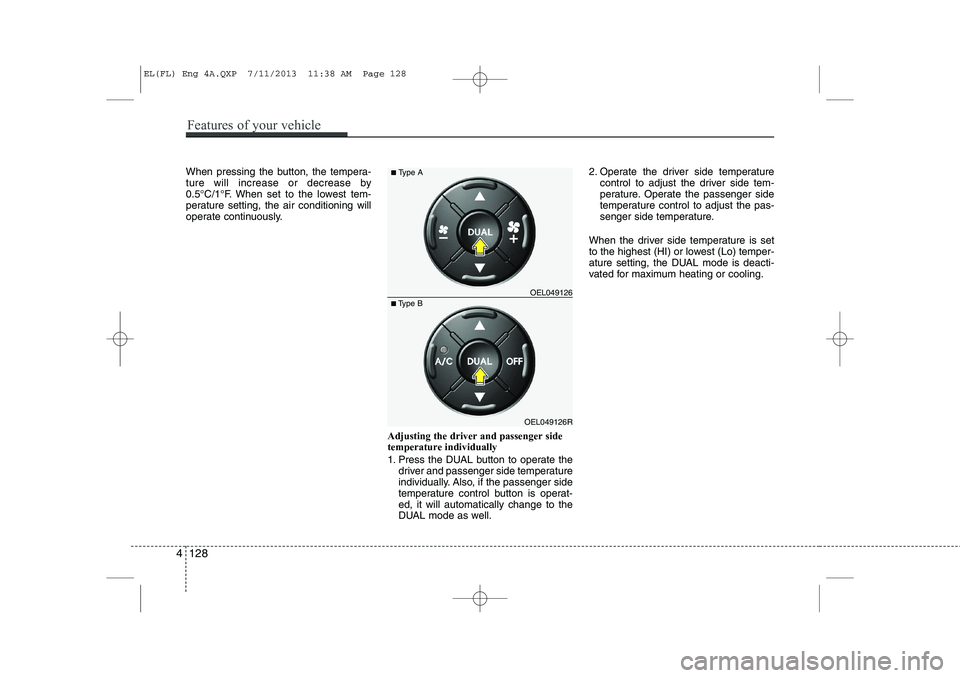
When pressing the button, the tempera-
ture will increase or decrease by
0.5°C/1°F. When set to the lowest tem-
perature setting, the air conditioning will
operate continuously.Adjusting the driver and passenger sidetemperature individually
1. Press the DUAL button to operate thedriver and passenger side temperature
individually. Also, if the passenger side
temperature control button is operat-ed, it will automatically change to the
DUAL mode as well. 2. Operate the driver side temperature
control to adjust the driver side tem-
perature. Operate the passenger side
temperature control to adjust the pas-
senger side temperature.
When the driver side temperature is set
to the highest (HI) or lowest (Lo) temper-
ature setting, the DUAL mode is deacti-
vated for maximum heating or cooling.
OEL049126R
■
Type B OEL049126
■
Type A
4 128
Features of your vehicle
EL(FL) Eng 4A.QXP 7/11/2013 11:38 AM Page 128