2014 HONDA ODYSSEY phone
[x] Cancel search: phonePage 263 of 327

262
Front Control Panel Operation
Rear System Setup
Rear Entertainment System
Rear System SetupHSETTINGS button
Rear Ent Settings
1.Rotate i to select an item. Press
u.
2.Rotate i to select an option.
Press u.
The following items are available:
•Source Select Popup: Selects whether the list of selectable audio sources comes
on when the AUDIO button is pressed.
•Rear Control: Sets whether to use the rear control panel to control the RES.
On (factory default): Operates the RES using the rear control panel.
Off: Disables the feature.
•Rear Speaker: Sets the front audio source to play through the rear speakers, even
when the RES is on. The RES source can only be heard through the wireless
headphones.
On (factory default): Outputs the sound of the front source to the rear speakers.
Off: Disables the feature.
•Single/Dual Screen Mode (Ultrawide RES only): Selects a source to continue
playing when you switch from dual mode to single mode on the overhead screen.
Rotate i to select a source and press u.
Page 266 of 327

265Rear Entertainment System
Wireless HeadphonesUsing the Wireless HeadphonesAudio for the Rear Entertainment System is sent to the wireless headphones that
come with the system.
1.Pivot the earpieces outward.
2.Adjust the volume by turning the
dial on the bottom of the right
earpiece.
3.Wear the headphones correctly
with the left and right earpieces on
the correct sides.
L (left) and R (right) are marked
on the sides of the frame.
1Using the Wireless Headphones
When you remove the headphones, the
earpieces automatically pivot inward, and the
headphones turn off. When not in use, store the
headphones in the back pocket of either front
seat.
You can use wired headphones through the
auxiliary input jacks.
2Auxiliary Console Panel P. 246
Volume Dial
Page 267 of 327

266
Wireless Headphones
Changing the Sound Source (Ultrawide RES only)
Rear Entertainment System
Changing the Sound Source (Ultrawide RES only)In dual screen mode, you can switch the sound source of the wireless headphones
between the left and right side screens.
Slide the tab to ”L” for the left side,
or “R” for the right side.■Wireless Headphone
1Changing the Sound Source (Ultrawide RES only)
You can switch the sound source from the setup
menu if you connected a set of wired
headphones.
1.Press the SETUP button on the rear control
panel.
2.Select Wired Headphones. Press the ENTER
button.
3.Select Left or Right to switch the sound
source. Press the ENTER button.
Tab
Page 268 of 327

267
Wireless Headphones
Replacing the Batteries
Rear Entertainment System
Replacing the Batteries
1.Insert a coin in the slot and twist it
slightly to pry the cover away from
the earpiece.
2.Pull the cover outward, and pivot it
out of the way.
3.Remove the battery.
4.Install the new battery in the
earpiece as shown in the diagram
next to the battery slot.
Battery Type: AAA battery
5.Slide the cover back into place on
the earpiece, then press down on
the back edge to lock it in place.
1Replacing the Batteries
The battery is under the cover on the left
earpiece.
An improperly disposed of battery can hurt the
environment. Always confirm local regulations
for battery disposal.
If static is heard in the headphones, try replacing
the battery.
Coin
Cover
Battery
Page 279 of 327
278Troubleshooting
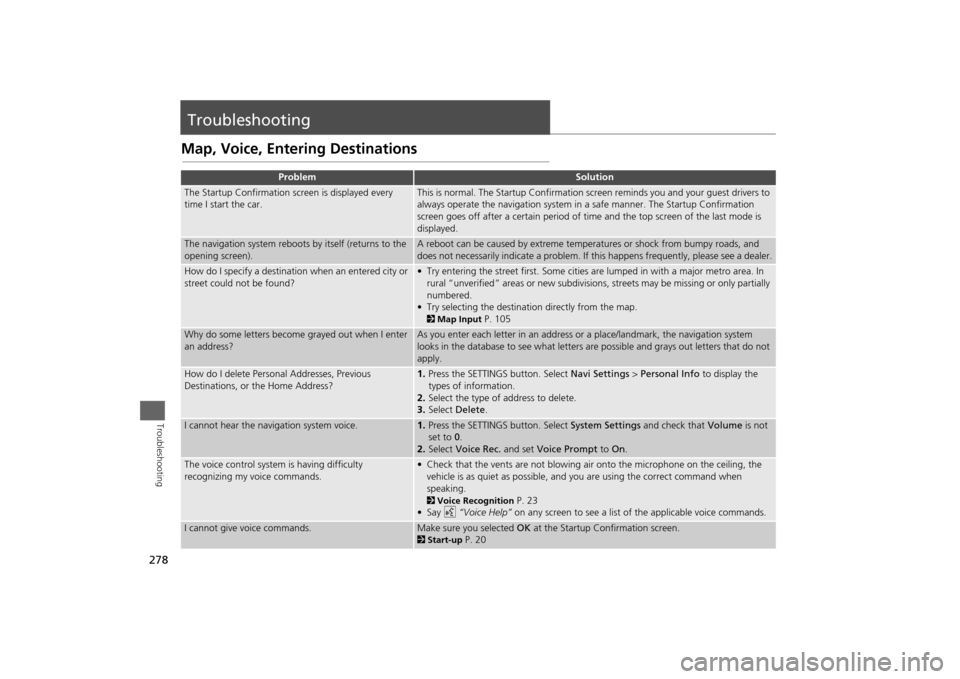
TroubleshootingMap, Voice, Entering Destinations
Problem
Solution
The Startup Confirmation screen is displayed every
time I start the car.
This is normal. The Startup Confirmation screen reminds you and your guest drivers to
always operate the navigation system in a safe manner. The Startup Confirmation
screen goes off after a certain period of time and the top screen of the last mode is
displayed.
The navigation system reboots by itself (returns to the
opening screen).
A reboot can be caused by extreme temperatures or shock from bumpy roads, and
does not necessarily indicate a problem. If this happens frequently, please see a dealer.
How do I specify a destination when an entered city or
street could not be found?
• Try entering the street first. Some cities are lumped in with a major metro area. In
rural “unverified” areas or new subdivisions, streets may be missing or only partially
numbered.
• Try selecting the destination directly from the map. 2Map Input
P. 105
Why do some letters become grayed out when I enter
an address?
As you enter each letter in an address or a place/landmark, the navigation system
looks in the database to see what letters are possible and grays out letters that do not
apply.
How do I delete Personal Addresses, Previous
Destinations, or the Home Address?
1.Press the SETTINGS button. Select Navi Settings > Personal Info to display the
types of information.
2.Select the type of address to delete.
3.Select Delete.
I cannot hear the navigation system voice.
1.Press the SETTINGS button. Select System Settings and check that Volume is not
set to 0.
2.Select Voice Rec. and set Voice Prompt to On.
The voice control system is having difficulty
recognizing my voice commands.
• Check that the vents are not blowing air onto the microphone on the ceiling, the
vehicle is as quiet as possible, and you are using the correct command when
speaking. 2Voice Recognition
P. 23
•Say d “Voice Help” on any screen to see a list of the applicable voice commands.
I cannot give voice commands.
Make sure you selected OK at the Startup Confirmation screen.2Start-up
P. 20
Page 280 of 327
279
Troubleshooting
Map, Voice, Entering Destinations
Troubleshooting
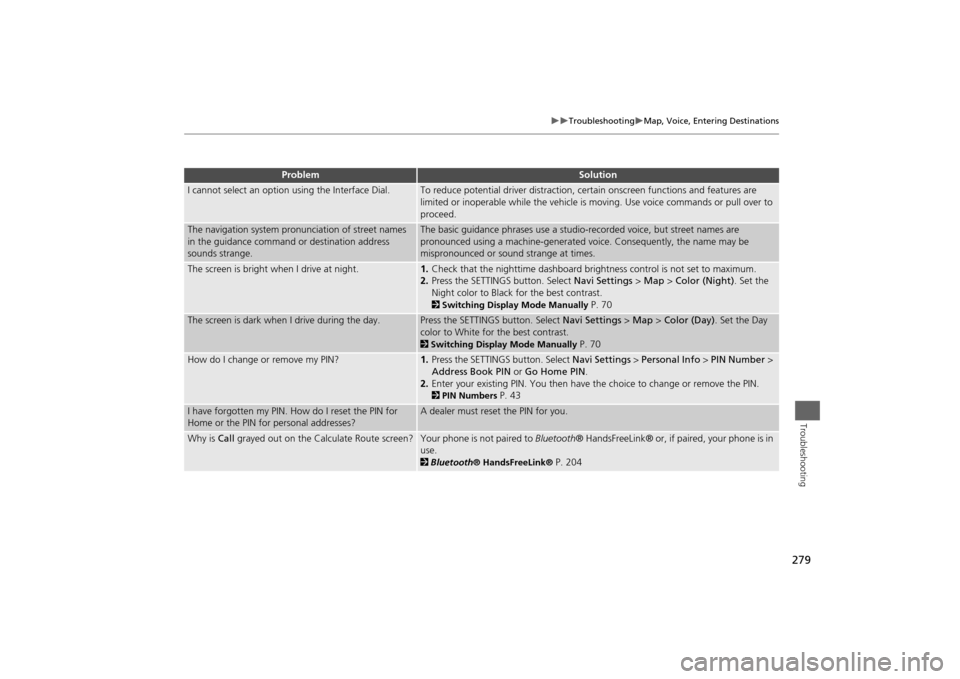
I cannot select an option using the Interface Dial.
To reduce potential driver distraction, certain onscreen functions and features are
limited or inoperable while the vehicle is moving. Use voice commands or pull over to
proceed.
The navigation system pronunciation of street names
in the guidance command or destination address
sounds strange.
The basic guidance phrases use a studio-recorded voice, but street names are
pronounced using a machine-generated voice. Consequently, the name may be
mispronounced or sound strange at times.
The screen is bright when I drive at night.
1.Check that the nighttime dashboard brightness control is not set to maximum.
2.Press the SETTINGS button. Select Navi Settings > Map > Color (Night). Set the
Night color to Black for the best contrast. 2Switching Display Mode Manually
P. 70
The screen is dark when I drive during the day.
Press the SETTINGS button. Select Navi Settings > Map > Color (Day). Set the Day
color to White for the best contrast. 2Switching Display Mode Manually
P. 70
How do I change or remove my PIN?
1.Press the SETTINGS button. Select Navi Settings > Personal Info > PIN Number >
Address Book PIN or Go Home PIN.
2.Enter your existing PIN. You then have the choice to change or remove the PIN. 2PIN Numbers
P. 43
I have forgotten my PIN. How do I reset the PIN for
Home or the PIN for personal addresses?
A dealer must reset the PIN for you.
Why is Call grayed out on the Calculate Route screen?
Your phone is not paired to Bluetooth® HandsFreeLink® or, if paired, your phone is in
use. 2Bluetooth® HandsFreeLink®
P. 204
Problem
Solution
Page 282 of 327
281
Troubleshooting
Guidance, Routing
Troubleshooting
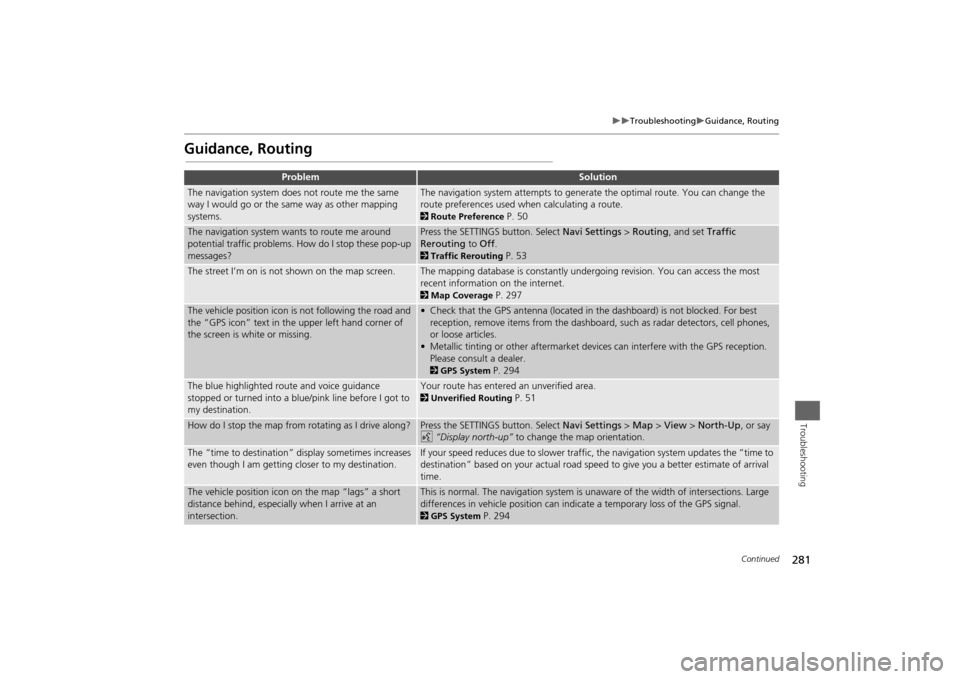
Guidance, Routing
Problem
Solution
The navigation system does not route me the same
way I would go or the same way as other mapping
systems.
The navigation system attempts to generate the optimal route. You can change the
route preferences used when calculating a route. 2Route Preference
P. 50
The navigation system wants to route me around
potential traffic problems. How do I stop these pop-up
messages?
Press the SETTINGS button. Select Navi Settings > Routing, and set Traffic
Rerouting to Off. 2Traffic Rerouting
P. 53
The street I’m on is not shown on the map screen.
The mapping database is constantly undergoing revision. You can access the most
recent information on the internet. 2Map Coverage
P. 297
The vehicle position icon is not following the road and
the “GPS icon” text in the upper left hand corner of
the screen is white or missing.
• Check that the GPS antenna (located in the dashboard) is not blocked. For best
reception, remove items from the dashboard, such as radar detectors, cell phones,
or loose articles.
• Metallic tinting or other aftermarket devices can interfere with the GPS reception.
Please consult a dealer. 2GPS System
P. 294
The blue highlighted route and voice guidance
stopped or turned into a blue/pink line before I got to
my destination.
Your route has entered an unverified area. 2Unverified Routing
P. 51
How do I stop the map from rotating as I drive along?
Press the SETTINGS button. Select Navi Settings > Map > View > North-Up, or say
d “Display north-up” to change the map orientation.
The “time to destination” display sometimes increases
even though I am getting closer to my destination.
If your speed reduces due to slower traffic, the navigation system updates the “time to
destination” based on your actual road speed to give you a better estimate of arrival
time.
The vehicle position icon on the map “lags” a short
distance behind, especially when I arrive at an
intersection.
This is normal. The navigation system is unaware of the width of intersections. Large
differences in vehicle position can indicate a temporary loss of the GPS signal. 2GPS System
P. 294
Continued
Page 289 of 327

288
Error Messages
Pandora®
Troubleshooting
Pandora®If an error occurs while playing Pandora®, you may see the following error messages.
If you cannot clear the error message, contact a dealer.
Error Message
Solution
Incompatible USB Device
Please Check Owner’s Manual
Appears when an incompatible device is connected. Disconnect the
device. Then turn the audio system off, and turn it again. Do not
reconnect the device that caused the error.
There is no station list in the device.
Please add the station list to your device.
No stations have been created.
Please create a station on the device.
Appears when there is no station list on the device. Use the device to
create a station.
Music licenses force us to limit the number of tracks you may skip each
hour.
Appears when you try to skip a song or select Dislike over the
predetermined number of times in an hour.
Unable to save rating.
Unable to save bookmark
or
Unable to skip
Appears when the commanded operation is failed. Try again later.
No data
Appears when no data is available with Pandora® activated. Reboot
the app and reconnect the device.
PANDORA ver unsupport
Appears when Pandora® version is not supported. Update Pandora®
to the latest version.
PANDORA system maintenance
Appears when the Pandora® server is in maintenance. Try again later.
Cannot connect to PANDORA when stopped. Check your mobile
phone
Appears when Pandora® is unable to play music. Check your device.
Navigation ScreenTouchscreen