Page 239 of 327
238
Text Message/E-mail
Displaying Messages
Bluetooth® HandsFreeLink®
HMENU button (on Phone Settings)
Text/Email
1.Rotate i to select a folder. Press
u.
2.Rotate i to select a message.
Press u.
The text message is displayed.
The system automatically starts
reading the message aloud.
■Displaying E-mails
1Displaying E-mails
Received text messages and E-mails may appear
in the message list screen at the same time. In
this case, text messages are titled
No subject
.
Page 242 of 327
241
Text Message/E-mail
HFL Menus
Bluetooth® HandsFreeLink®
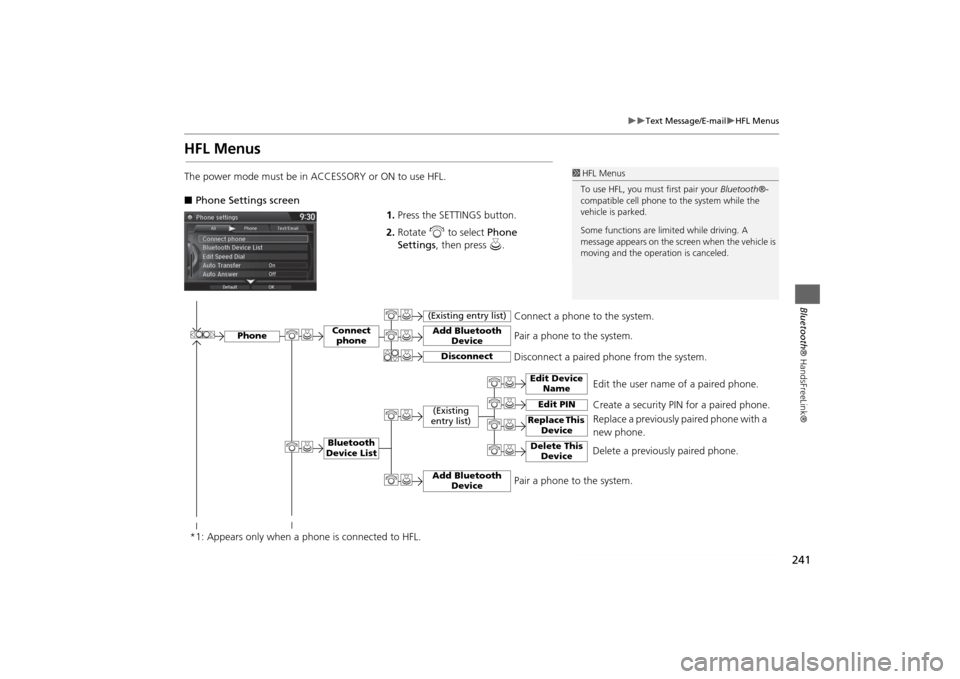
HFL MenusThe power mode must be in ACCESSORY or ON to use HFL.
■Phone Settings screen
1.Press the SETTINGS button.
2.Rotate i to select Phone
Settings, then press u.
1HFL Menus
To use HFL, you must first pair your Bluetooth®-
compatible cell phone to the system while the
vehicle is parked.
Some functions are limited while driving. A
message appears on the screen when the vehicle is
moving and the operation is canceled.
Edit the user name of a paired phone.
Phone
Edit Device
Name
Connect
phoneBluetooth
Device List
(Existing
entry list)
Replace This
Device
Add Bluetooth
Device
Disconnect a paired phone from the system.Connect a phone to the system.
*1: Appears only when a phone is connected to HFL.
Disconnect
(Existing entry list)
Pair a phone to the system.
Edit PIN
Create a security PIN for a paired phone.
Replace a previously paired phone with a
new phone.
Delete This
Device
Delete a previously paired phone.
Add Bluetooth
Device
Pair a phone to the system.
Page 243 of 327
242
Text Message/E-mail
HFL Menus
Bluetooth® HandsFreeLink®
Text/
Email
*1
Manual
Input
Edit Speed
Dial
New Entry
Import from
Call History
*1: Appears only when a phone is connected to HFL.
Import from
Phonebook
Delete All
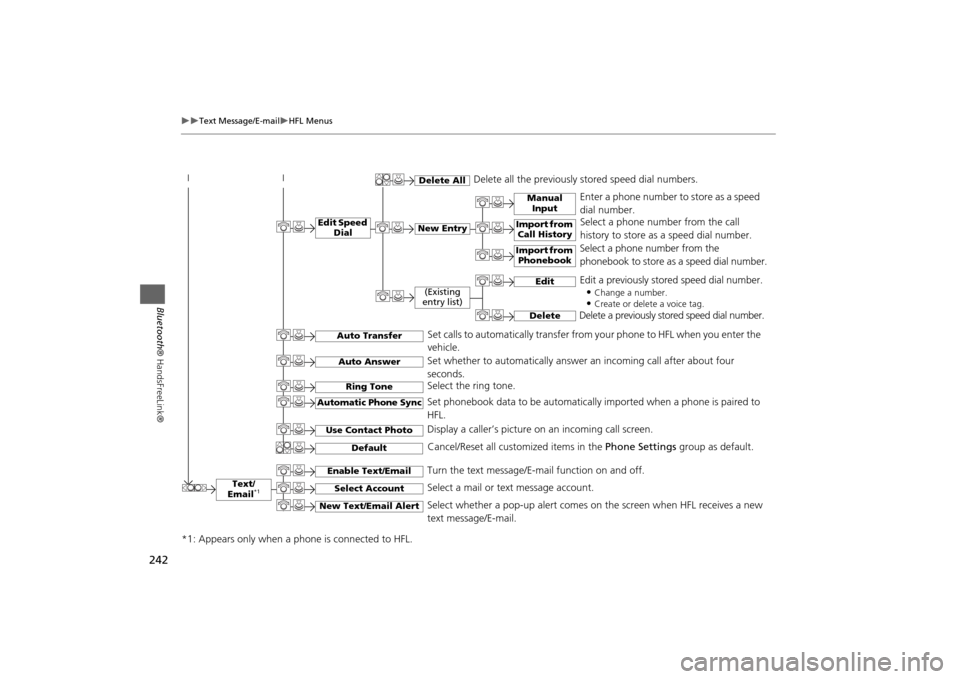
Delete all the previously stored speed dial numbers.
Select a phone number from the call
history to store as a speed dial number.
Select a phone number from the
phonebook to store as a speed dial number. Enter a phone number to store as a speed
dial number.
Edit
Delete
(Existing
entry list)
Edit a previously stored speed dial number.
•
Change a number.•Create or delete a voice tag.
Delete a previously stored speed dial number.
Set calls to automatically transfer from your phone to HFL when you enter the
vehicle.
Auto TransferAuto AnswerRing Tone
Set whether to automatically answer an incoming call after about four
seconds.
Select the ring tone.
Use Contact Photo
Set phonebook data to be automatically imported when a phone is paired to
HFL.
Display a caller’s picture on an incoming call screen.
Automatic Phone Sync
Select Account
Select a mail or text message account.
Enable Text/Email
Turn the text message/E-mail function on and off.
New Text/Email Alert
Select whether a pop-up alert comes on the screen when HFL receives a new
text message/E-mail.
Cancel/Reset all customized items in the Phone Settings group as default.
Default
Page 244 of 327
243
Text Message/E-mail
HFL Menus
Bluetooth® HandsFreeLink®
■Phone screen
1.Press the PHONE button.
2.Press the MENU button to display
the menu items.
Select a phone number from the call history to store as a
speed dial number.
Speed Dial
*1
Manual Input
New Entry
Import from
Call HistoryImport from
Phonebook
Select a phone number from the phonebook to store as a
speed dial number.Enter a phone number to store as a speed dial number.
More Speed Dials
Display another paired phone’s speed dial list.
*1: Appears only when a phone is connected to HFL.
(Existing entry list)
Dial the selected number in the speed dial list.
Phonebook
*1
Dial
*1
Display the paired phone’s phonebook. Enter a phone number to dial.
Page 245 of 327
244
Text Message/E-mail
HFL Menus
Bluetooth® HandsFreeLink®
Text/Email
*1
Message is
read aloud.
See the previous message.
(Read/Stop)PreviousNext
See the next message.System reads received message aloud, or stop message
from being read.
ReplyCall
Reply to a received message using one of six fixed phrases.
Make a call to the sender.
Select
Account
Select a message
and press .
Select a mail or text message account.
Redial
*1
Redial the last number dialed in the phone’s history.
Display the last 20 outgoing, incoming and missed calls.
Call History
*1
AllDialedReceived
Display the last 20 outgoing calls.
Display the last 20 incoming calls.
Missed
Display the last 20 missed calls.
*1: Appears only when a phone is connected to HFL.
Page 246 of 327
245
Rear Entertainment System
Rear seat passengers can enjoy a completely separate entertainment
source than front passengers, including movies, games, and other audio
choices.
Rear Entertainment System..................246
Auxiliary Console Panel .........................246
HDMI Input Jack (Ultrawide RES only) ....247
Rear Control Panel Operation...............250
Selecting the Audio Source ...................250
Rear DVD Menu ....................................251
Screen and Surround Settings ...............254
DVD Initial Settings (RES only) ...............257
Dual Screen Mode (Ultrawide RES only) .258
Replacing the Batteries ..........................260
Front Control Panel Operation.............261
Selecting the Audio Source using front
control panel .......................................261
Rear System Setup ................................262Setting the DVD Menu ......................... 263
Wireless Headphones........................... 265
Using the Wireless Headphones ........... 265
Changing the Sound Source (Ultrawide RES
only)................................................... 266
Replacing the Batteries ......................... 267
Page 247 of 327
246Rear Entertainment System
Rear Entertainment SystemThe Rear Entertainment System (RES) is operable from both the front control panel
and the rear control panel.2Front Control Panel Operation
P. 261
2Rear Control Panel Operation
P. 250
Auxiliary Console PanelAuxiliary input jacks and headphone connectors for the rear entertainment system
are above the third row seat armrest on the driver’s side.
V = Video jack
L = Left audio jack
R = Right audio jack
■Auxiliary Input Jacks
The system will accept auxiliary inputs from standard video games and video
equipment. Some video game power supplies may cause poor picture quality.
■Headphone Connectors
There are two headphone connectors for the rear passengers. Each connector has its
own volume control.
1Rear Entertainment System
This vehicle’s overhead mounted video display, if
so equipped, includes mercury-containing
components. Upon removal, please reuse,
recycle, or dispose of as hazardous waste.NOTICE
AUXILIARY INPUT JACK
Page 255 of 327
254
Rear Control Panel Operation
Screen and Surround Settings
Rear Entertainment System
Screen and Surround SettingsHSETUP button (in the DVD mode)
Select an item. Press the ENTER
button.
The following items are available:
•Brightness (Ultrawide RES only): Adjusts the screen’s brightness. Adjust the
brightness using the Interface Dial and press the ENTER button.
•Appearance (Ultrawide RES only): Selects the color of the rear menu screen.
•Display Adjust: Adjusts the screen’s preferences.2Adjusting the Screen
P. 255
•Aspect Ratio: Selects an aspect ratio of the image
2Setting the RES Aspect Ratio
P. 256
2Setting the Ultrawide RES Aspect Ratio
P. 256
•PERSONAL SURROUND: Sets the surround of the wireless headphones. You can
choose from three options: Music, Cinema, or Voice. Select Off to disable the
feature.
•Language: Sets the system language used on all screens. You can choose from
three languages: English, Français (French), or Español (Spanish).


