Page 235 of 573
uuAudio System Basic OperationuPlaying AM/FM Radio
234Features
Provides text data information related to your selected RDS-capable FM station.■To find an RDS station from Station List
1.Press the MENU button while listening to an FM station.
2.Rotate to select Station List, then press .
3.Rotate to select the station, then press .■Manual update
Updates your available station list at any time.
1.Press the MENU button while listening to an FM station.
2.Rotate to select Station List, then press .
3.Rotate to select Refresh, then press .■Radio Data System (RDS)
1Radio Data System (RDS)
When you select an RDS-capable FM station, the RDS
automatically turns on, and the frequency display
changes to the station name. However, when the
signals of that station become weak, the display
changes from the station name to the frequency.
Page 236 of 573
235
uuAudio System Basic OperationuPlaying AM/FM Radio
Features
■Radio text
Display the radio text information of the selected RDS station.
1.Press the MENU button.
2.Rotate to select Radio Text, then press .■Scan
Samples each of the strongest stations on the selected band for 10 seconds.
1.Press the MENU button.
2.Rotate to select Scan, then press .
To turn off scan, press to select Cancel Scan, or press the BACK button.
1.Select More.
2.Select Scan.
To turn off scan, select Cancel Scan.Interface DialAudio with Touch Screen
Page 237 of 573
236
uuAudio System Basic OperationuPlaying XM® Radio
Features
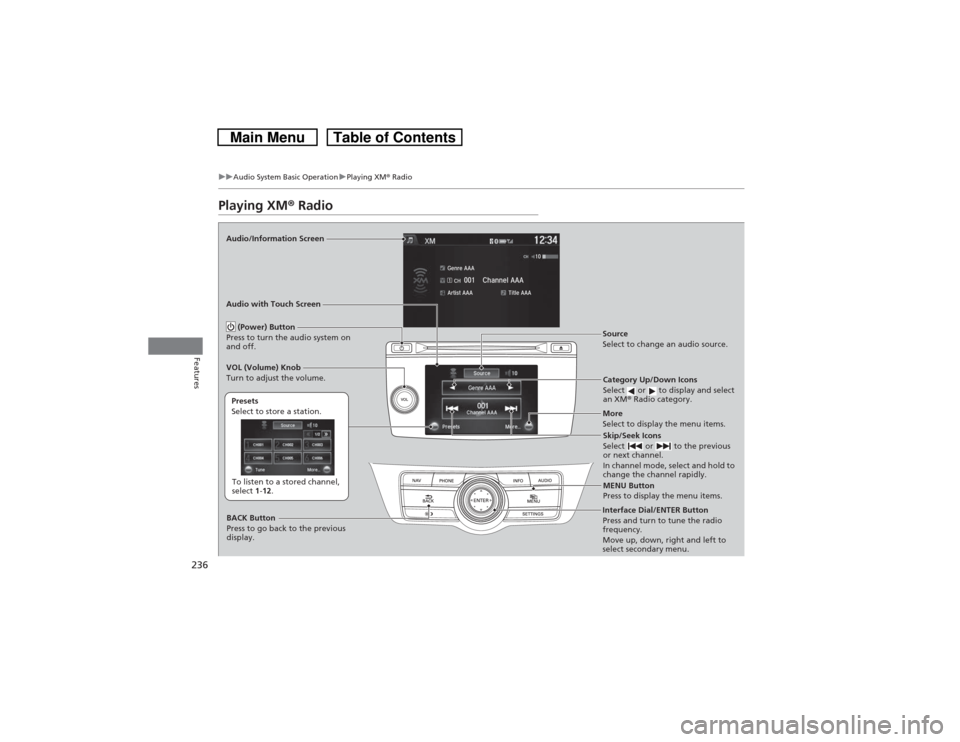
Playing XM® RadioAudio/Information Screen
Audio with Touch Screen
Category Up/Down Icons
Select or to display and select
an XM® Radio category.
MENU Button
Press to display the menu items.
(Power) Button
Press to turn the audio system on
and off.
Source
Select to change an audio source.
To listen to a stored channel,
select 1-12. Presets
Select to store a station.
Skip/Seek Icons
Select or to the previous
or next channel.
In channel mode, select and hold to
change the channel rapidly.
More
Select to display the menu items.
BACK Button
Press to go back to the previous
display. VOL (Volume) Knob
Turn to adjust the volume.Interface Dial/ENTER Button
Press and turn to tune the radio
frequency.
Move up, down, right and left to
select secondary menu.
Page 240 of 573
239
uuAudio System Basic OperationuPlaying a CD
Continued
Features
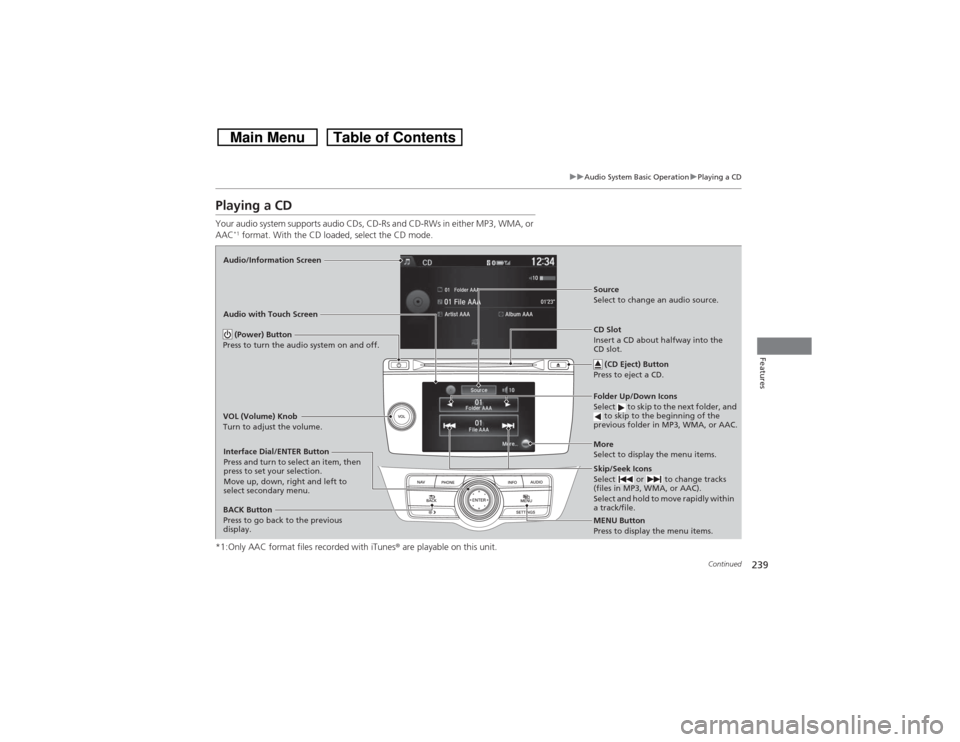
Playing a CDYour audio system supports audio CDs, CD-Rs and CD-RWs in either MP3, WMA, or
AAC
*1 format. With the CD loaded, select the CD mode.
*1:Only AAC format files recorded with iTunes® are playable on this unit.
Audio/Information Screen
Audio with Touch Screen
MENU Button
Press to display the menu items.
CD Slot
Insert a CD about halfway into the
CD slot.
(CD Eject) Button
Press to eject a CD.Folder Up/Down Icons
Select to skip to the next folder, and
to skip to the beginning of the
previous folder in MP3, WMA, or AAC.Source
Select to change an audio source.
Skip/Seek Icons
Select or to change tracks
(files in MP3, WMA, or AAC).
Select and hold to move rapidly within
a track/file.More
Select to display the menu items.
(Power) Button
Press to turn the audio system on and off.BACK Button
Press to go back to the previous
display. VOL (Volume) Knob
Turn to adjust the volume.Interface Dial/ENTER Button
Press and turn to select an item, then
press to set your selection.
Move up, down, right and left to
select secondary menu.
Page 241 of 573
uuAudio System Basic OperationuPlaying a CD
240Features
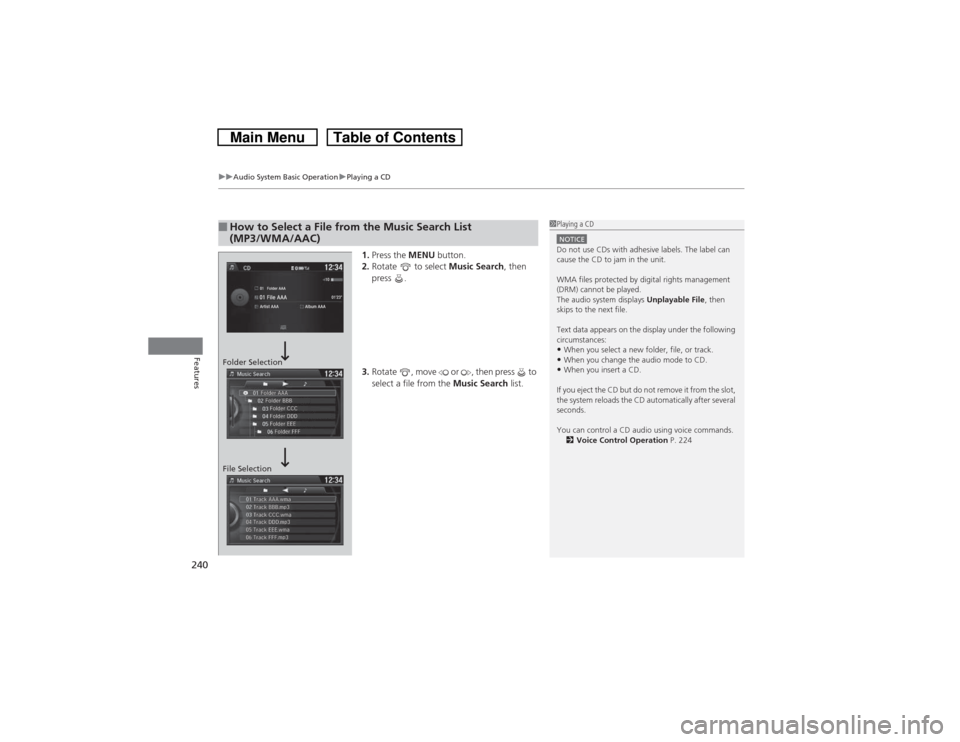
1.Press the MENU button.
2.Rotate to select Music Search, then
press .
3.Rotate , move or , then press to
select a file from the Music Search list.
■How to Select a File from the Music Search List
(MP3/WMA/AAC)
1Playing a CDNOTICEDo not use CDs with adhesive labels. The label can
cause the CD to jam in the unit.
WMA files protected by digital rights management
(DRM) cannot be played.
The audio system displays Unplayable File, then
skips to the next file.
Text data appears on the display under the following
circumstances:•When you select a new folder, file, or track.•When you change the audio mode to CD.•When you insert a CD.
If you eject the CD but do not remove it from the slot,
the system reloads the CD automatically after several
seconds.
You can control a CD audio using voice commands.
2Voice Control Operation P. 224
Folder Selection
File Selection
Page 243 of 573

242
uuAudio System Basic OperationuPlaying Hard Disc Drive (HDD) Audio
Features
Playing Hard Disc Drive (HDD) AudioThe Hard Disc Drive (HDD) Audio function plays tracks from music CDs that have
been recorded onto the built-in HDD. You can arrange the tracks in playlists or play
the tracks using various search methods.Audio/Information Screen
Audio with Touch Screen
MENU Button
Press to display the menu items.
CD Slot
Insert a CD about halfway into the
CD slot.
(CD Eject) Button
Press to eject a CD.Playlist/Album Up/Down Icons
Select to skip to the next playlist/
album, and to skip to the beginning
of the previous playlist/album.Source
Select to change an audio source.
Skip/Seek Icons
Select or to change tracks.
Select and hold to move rapidly
within a track.More
Select to display the menu items.
(Power) Button
Press to turn the audio system
on and off.BACK Button
Press to go back to the previous
display or cancel a setting. VOL (Volume) Knob
Turn to adjust the volume.Interface Dial/ENTER Button
Press and turn to select an item,
then press to set your selection.
Move up, down, right and left to
select secondary menu.
SETTINGS Button
Press to go the Settings menu screen.
Page 245 of 573
uuAudio System Basic OperationuPlaying Hard Disc Drive (HDD) Audio
244Features
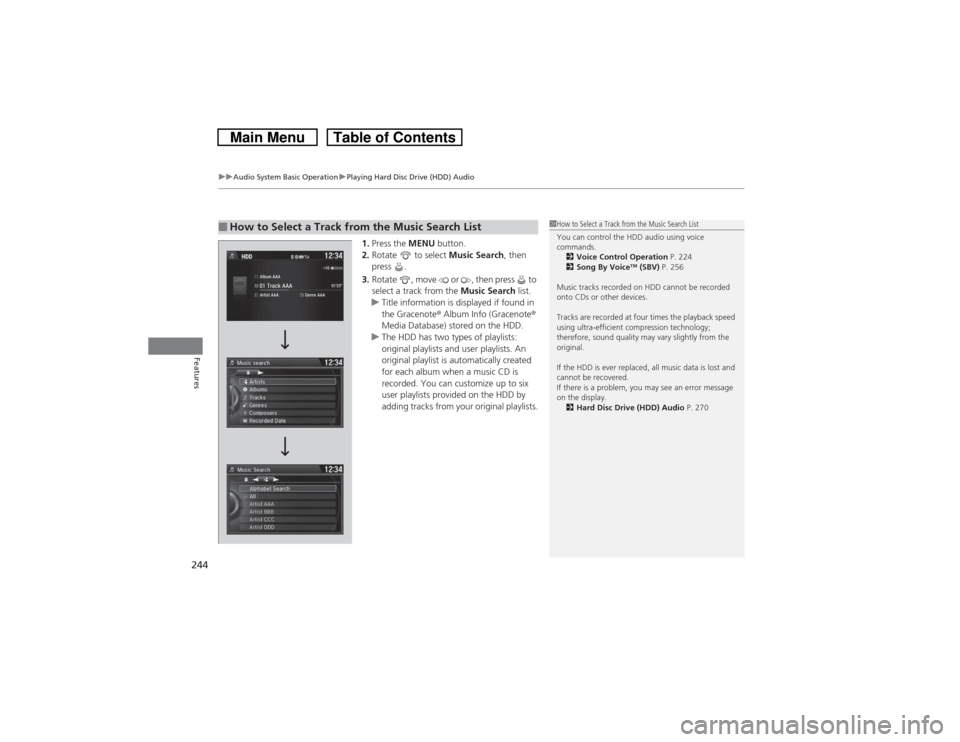
1.Press the MENU button.
2.Rotate to select Music Search, then
press .
3.Rotate , move or , then press to
select a track from the Music Search list.
uTitle information is displayed if found in
the Gracenote® Album Info (Gracenote®
Media Database) stored on the HDD.
uThe HDD has two types of playlists:
original playlists and user playlists. An
original playlist is automatically created
for each album when a music CD is
recorded. You can customize up to six
user playlists provided on the HDD by
adding tracks from your original playlists.
■How to Select a Track from the Music Search List
1How to Select a Track from the Music Search List
You can control the HDD audio using voice
commands.
2Voice Control Operation P. 224
2Song By Voice
TM (SBV) P. 256
Music tracks recorded on HDD cannot be recorded
onto CDs or other devices.
Tracks are recorded at four times the playback speed
using ultra-efficient compression technology;
therefore, sound quality may vary slightly from the
original.
If the HDD is ever replaced, all music data is lost and
cannot be recovered.
If there is a problem, you may see an error message
on the display.
2Hard Disc Drive (HDD) Audio P. 270
Page 251 of 573
250
uuAudio System Basic OperationuPlaying Hard Disc Drive (HDD) Audio
Features
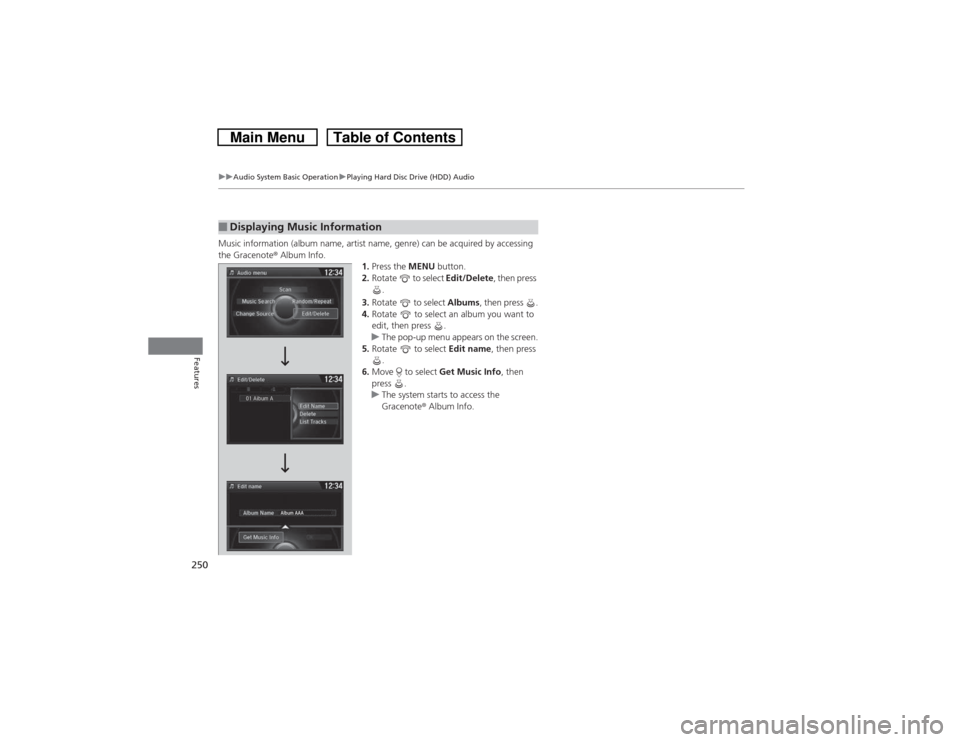
Music information (album name, artist name, genre) can be acquired by accessing
the Gracenote® Album Info.
1.Press the MENU button.
2.Rotate to select Edit/Delete, then press
.
3.Rotate to select Albums, then press .
4.Rotate to select an album you want to
edit, then press .
uThe pop-up menu appears on the screen.
5.Rotate to select Edit name, then press
.
6.Move to select Get Music Info, then
press .
uThe system starts to access the
Gracenote® Album Info.■Displaying Music Information