Page 208 of 573
207
uuAudio System Basic OperationuPlaying Internet Radio
Continued
Features
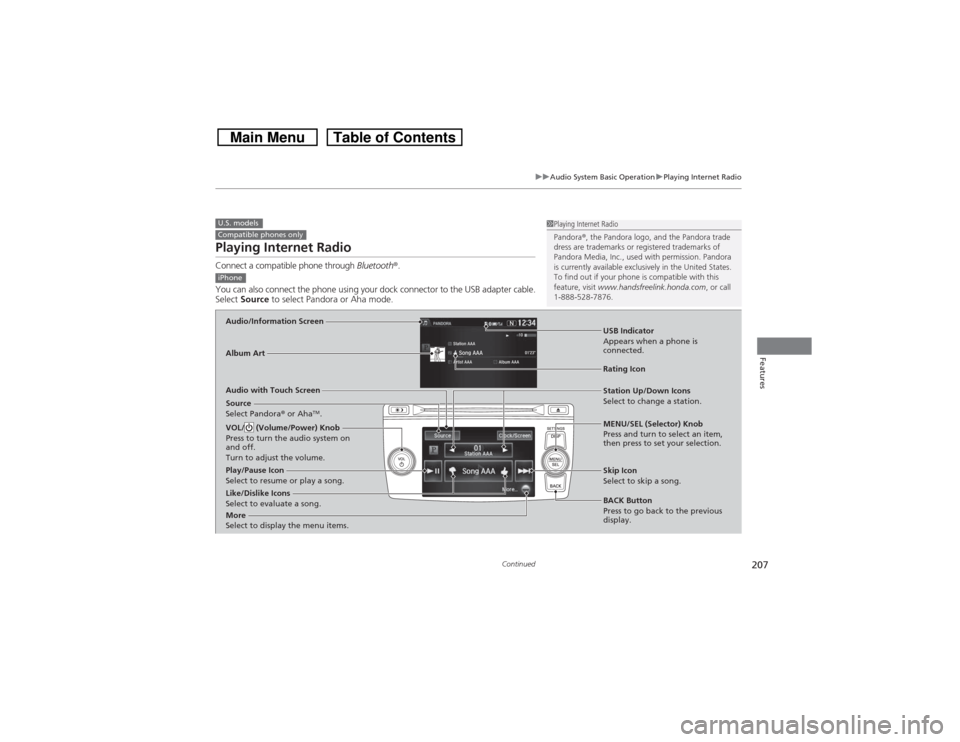
Playing Internet RadioConnect a compatible phone through Bluetooth®.
You can also connect the phone using your dock connector to the USB adapter cable.
Select Source to select Pandora or Aha mode.U.S. modelsCompatible phones only
1Playing Internet Radio
Pandora®, the Pandora logo, and the Pandora trade
dress are trademarks or registered trademarks of
Pandora Media, Inc., used with permission. Pandora
is currently available exclusively in the United States.
To find out if your phone is compatible with this
feature, visit www.handsfreelink.honda.com, or call
1-888-528-7876.
iPhoneAudio/Information ScreenAlbum Art
USB Indicator
Appears when a phone is
connected.Rating Icon
Audio with Touch Screen
BACK Button
Press to go back to the previous
display. MENU/SEL (Selector) Knob
Press and turn to select an item,
then press to set your selection. VOL/ (Volume/Power) Knob
Press to turn the audio system on
and off.
Turn to adjust the volume.
Skip Icon
Select to skip a song.
More
Select to display the menu items.
Station Up/Down Icons
Select to change a station.
Source
Select Pandora® or Aha
TM.
Like/Dislike Icons
Select to evaluate a song. Play/Pause Icon
Select to resume or play a song.
Page 211 of 573
210
uuAudio System Basic OperationuPlaying a USB Flash Drive
Features
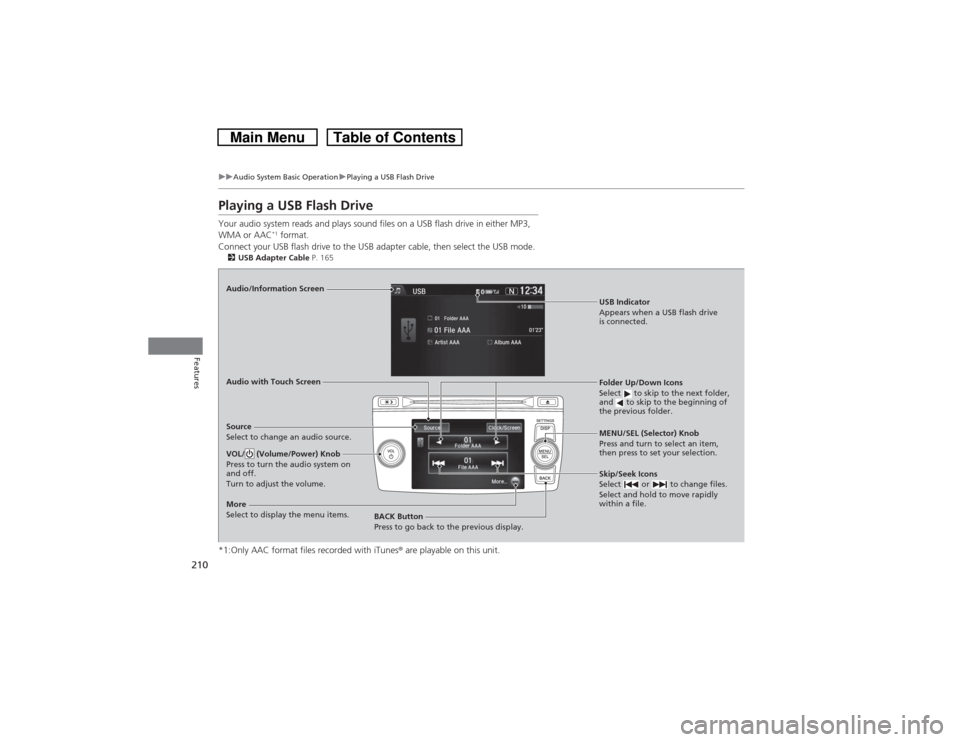
Playing a USB Flash DriveYour audio system reads and plays sound files on a USB flash drive in either MP3,
WMA or AAC
*1 format.
Connect your USB flash drive to the USB adapter cable, then select the USB mode.
2USB Adapter Cable P. 165*1:Only AAC format files recorded with iTunes® are playable on this unit.Audio/Information Screen
Audio with Touch Screen
BACK Button
Press to go back to the previous display.MENU/SEL (Selector) Knob
Press and turn to select an item,
then press to set your selection.VOL/ (Volume/Power) Knob
Press to turn the audio system on
and off.
Turn to adjust the volume.
Skip/Seek Icons
Select or to change files.
Select and hold to move rapidly
within a file.
More
Select to display the menu items.Source
Select to change an audio source.
USB Indicator
Appears when a USB flash drive
is connected.Folder Up/Down Icons
Select to skip to the next folder,
and to skip to the beginning of
the previous folder.
Page 212 of 573
Continued
211
uuAudio System Basic OperationuPlaying a USB Flash Drive
Features
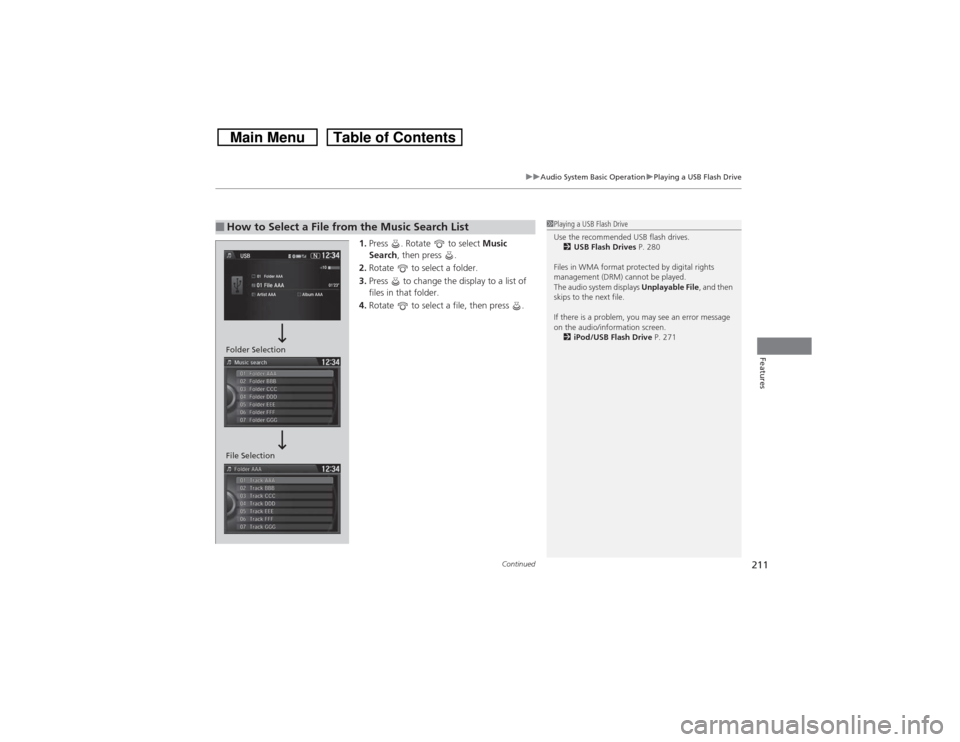
1.Press . Rotate to select Music
Search, then press .
2.Rotate to select a folder.
3.Press to change the display to a list of
files in that folder.
4.Rotate to select a file, then press .
■How to Select a File from the Music Search List
1Playing a USB Flash Drive
Use the recommended USB flash drives.
2USB Flash Drives P. 280
Files in WMA format protected by digital rights
management (DRM) cannot be played.
The audio system displays Unplayable File, and then
skips to the next file.
If there is a problem, you may see an error message
on the audio/information screen.
2iPod/USB Flash Drive P. 271
Folder Selection
File Selection
Page 214 of 573

213
uuAudio System Basic OperationuPlaying Bluetooth® Audio
Continued
Features
Playing Bluetooth® AudioYour audio system allows you to listen to music from your Bluetooth®-compatible
phone.
This function is available when the phone is paired and connected to the vehicle’s
Bluetooth® HandsFreeLink® (HFL) system.2Phone Setup P. 339
1Playing Bluetooth® Audio
Not all Bluetooth-enabled phones with streaming
audio capabilities are compatible with the system.
For a list of compatible phones:•U.S.: Visit www.handsfreelink.honda.com, or call
1-888-528-7876.•Canada: Visit www.handsfreelink.ca, or call 1-888-
528-7876.
In some states, it may be illegal to perform some data
device functions while driving.
If more than one phone is paired to the HFL system,
there will be a delay before the system begins to play.
Skip/Seek Icons
Select or
to change files.
Bluetooth Indicator
Appears when your
phone is connected to
HFL.
VOL/
(Volume/Power)
Knob
Press to turn the
audio system on
and off.
Turn to adjust the
volume.
Audio/
Information
Screen
Audio with
Touch Screen
BACK Button
Press to go back to
the previous
display.
More
Select to display
the menu items.MENU/SEL (Selector) Knob
Press and turn to select an
item, then press to set your
selection.Source
Select to change
an audio source.
Folder Up/Down
Icons
Select or to
change folder.
Play Icon Pause Icon
Page 216 of 573
215Features
Audio System Basic OperationTo use the audio system function, the ignition switch must be in ACCESSORY
(q or
ON
(w*1.
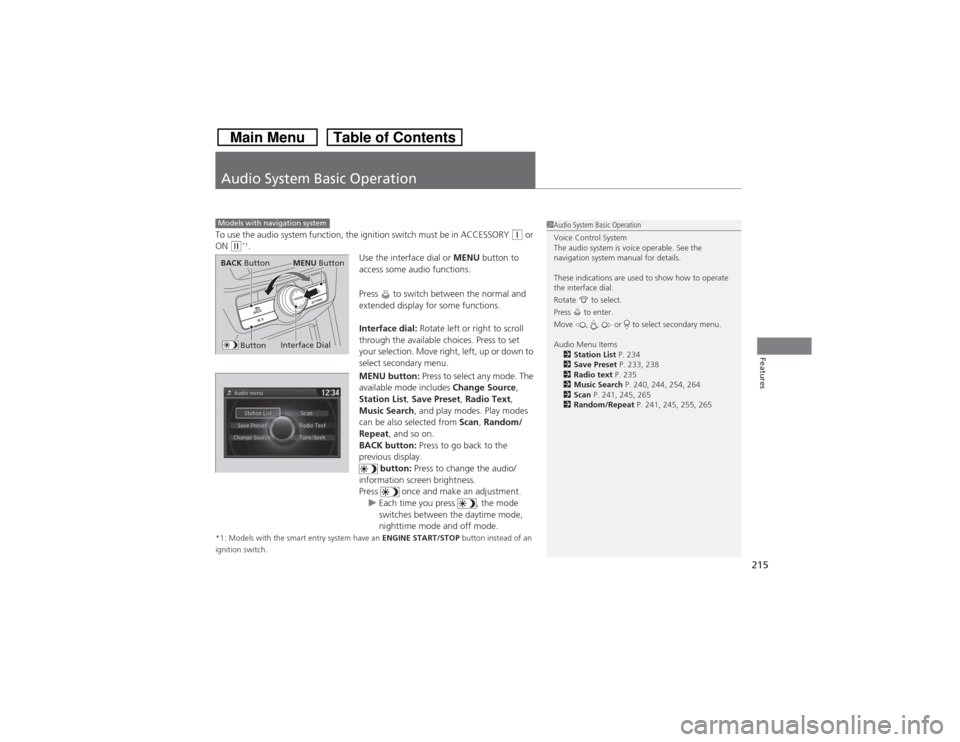
Use the interface dial or MENU button to
access some audio functions.
Press to switch between the normal and
extended display for some functions.
Interface dial: Rotate left or right to scroll
through the available choices. Press to set
your selection. Move right, left, up or down to
select secondary menu.
MENU button: Press to select any mode. The
available mode includes Change Source,
Station List, Save Preset, Radio Text,
Music Search, and play modes. Play modes
can be also selected from Scan, Random/
Repeat, and so on.
BACK button: Press to go back to the
previous display.
button: Press to change the audio/
information screen brightness.
Press once and make an adjustment.
uEach time you press , the mode
switches between the daytime mode,
nighttime mode and off mode.
*1: Models with the smart entry system have an ENGINE START/STOP button instead of an
ignition switch.Models with navigation system
1Audio System Basic Operation
Voice Control System
The audio system is voice operable. See the
navigation system manual for details.
These indications are used to show how to operate
the interface dial.
Rotate to select.
Press to enter.
Move , , or to select secondary menu.
Audio Menu Items
2Station List P. 234
2Save Preset P. 233, 238
2Radio text P. 235
2Music Search P. 240, 244, 254, 264
2Scan P. 241, 245, 265
2Random/Repeat P. 241, 245, 255, 265
Interface Dial
MENU Button
BACK Button
Button
Page 217 of 573
216
uuAudio System Basic OperationuAudio with Touch Screen
Features
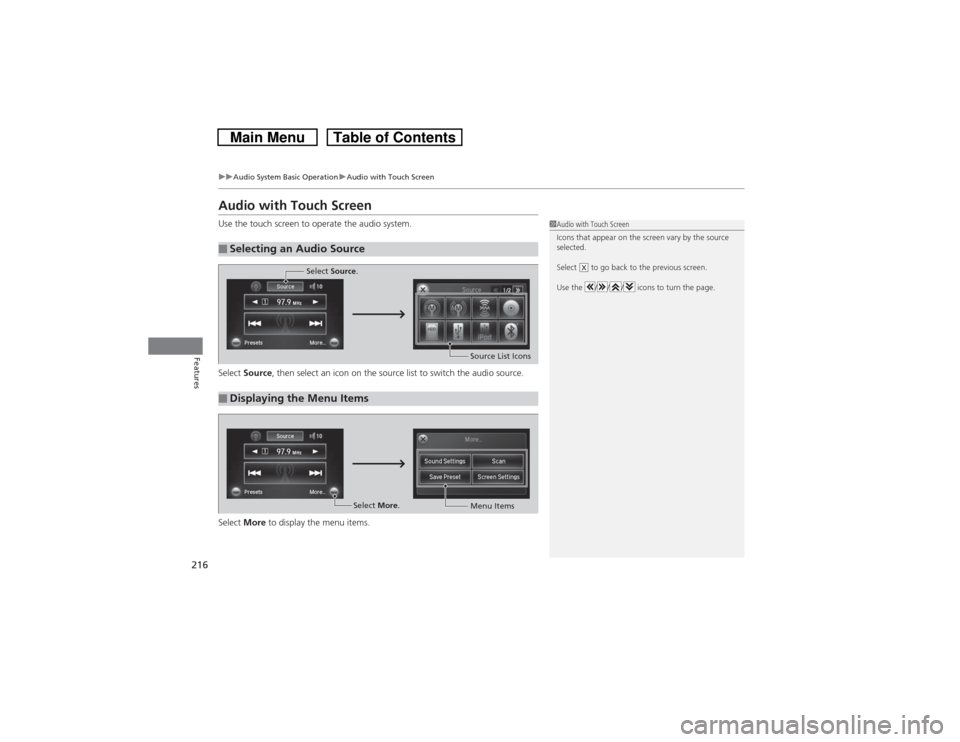
Audio with Touch ScreenUse the touch screen to operate the audio system.
Select Source, then select an icon on the source list to switch the audio source.
Select More to display the menu items.■Selecting an Audio Source
1Audio with Touch Screen
Icons that appear on the screen vary by the source
selected.
Select to go back to the previous screen.
Use the / / / icons to turn the page.
X
■Displaying the Menu Items
Select Source.
Source List Icons
Select More.
Menu Items
Page 218 of 573
217
uuAudio System Basic OperationuAudio with Touch Screen
Features
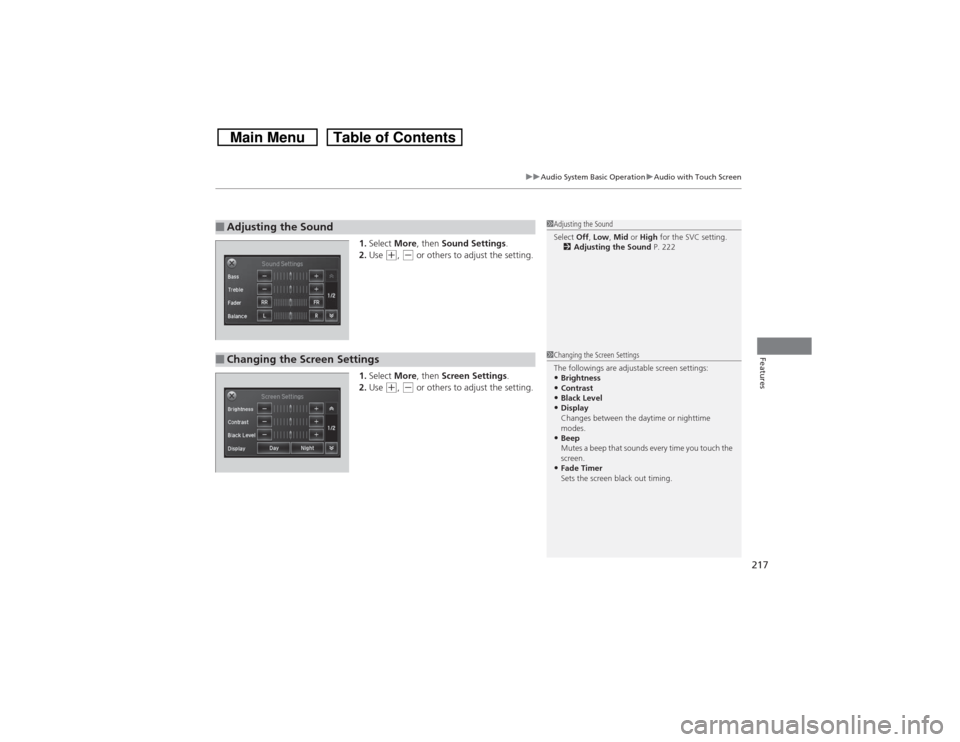
1.Select More, then Sound Settings.
2.Use
(+, (- or others to adjust the setting.
1.Select More, then Screen Settings.
2.Use
(+, (- or others to adjust the setting.
■Adjusting the Sound
1Adjusting the Sound
Select Off, Low, Mid or High for the SVC setting.
2Adjusting the Sound P. 222
■Changing the Screen Settings
1Changing the Screen Settings
The followings are adjustable screen settings:•Brightness•Contrast•Black Level•Display
Changes between the daytime or nighttime
modes.•Beep
Mutes a beep that sounds every time you touch the
screen.•Fade Timer
Sets the screen black out timing.
Page 219 of 573
218
uuAudio System Basic OperationuAudio/Information Screen
Features
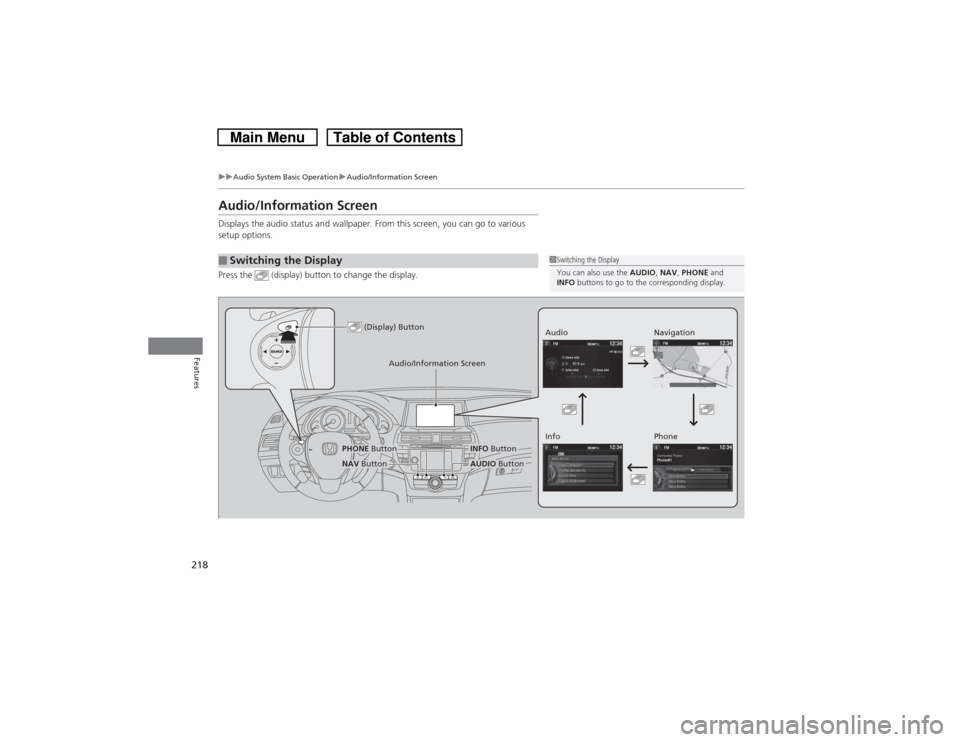
Audio/Information ScreenDisplays the audio status and wallpaper. From this screen, you can go to various
setup options.
Press the (display) button to change the display.■Switching the Display
1Switching the Display
You can also use the AUDIO, NAV, PHONE and
INFO buttons to go to the corresponding display.
(Display) Button
Audio
Info
Audio/Information Screen
Navigation
Phone
AUDIO Button
NAV ButtonPHONE Button
INFO Button