Page 253 of 573
252
uuAudio System Basic OperationuPlaying an iPod
Features
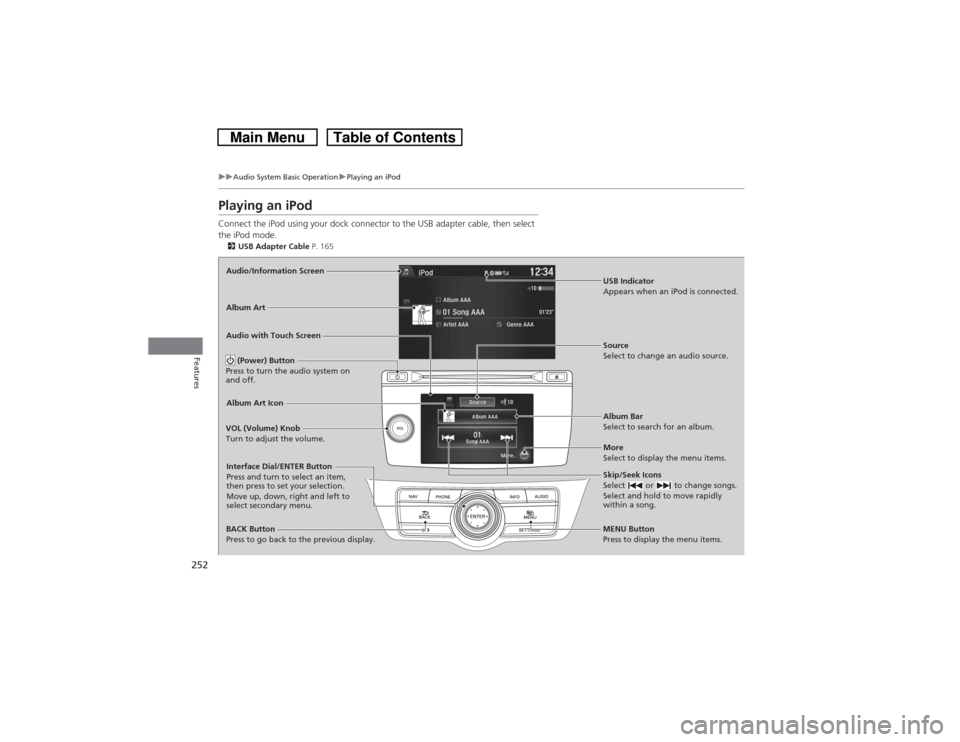
Playing an iPodConnect the iPod using your dock connector to the USB adapter cable, then select
the iPod mode.2USB Adapter Cable P. 165Audio/Information Screen
Audio with Touch Screen
MENU Button
Press to display the menu items.
Album Bar
Select to search for an album. Source
Select to change an audio source.
Skip/Seek Icons
Select or to change songs.
Select and hold to move rapidly
within a song.More
Select to display the menu items.
(Power) Button
Press to turn the audio system on
and off.BACK Button
Press to go back to the previous display. VOL (Volume) Knob
Turn to adjust the volume.Interface Dial/ENTER Button
Press and turn to select an item,
then press to set your selection.
Move up, down, right and left to
select secondary menu.
USB Indicator
Appears when an iPod is connected.
Album ArtAlbum Art Icon
Page 254 of 573
Continued
253
uuAudio System Basic OperationuPlaying an iPod
Features
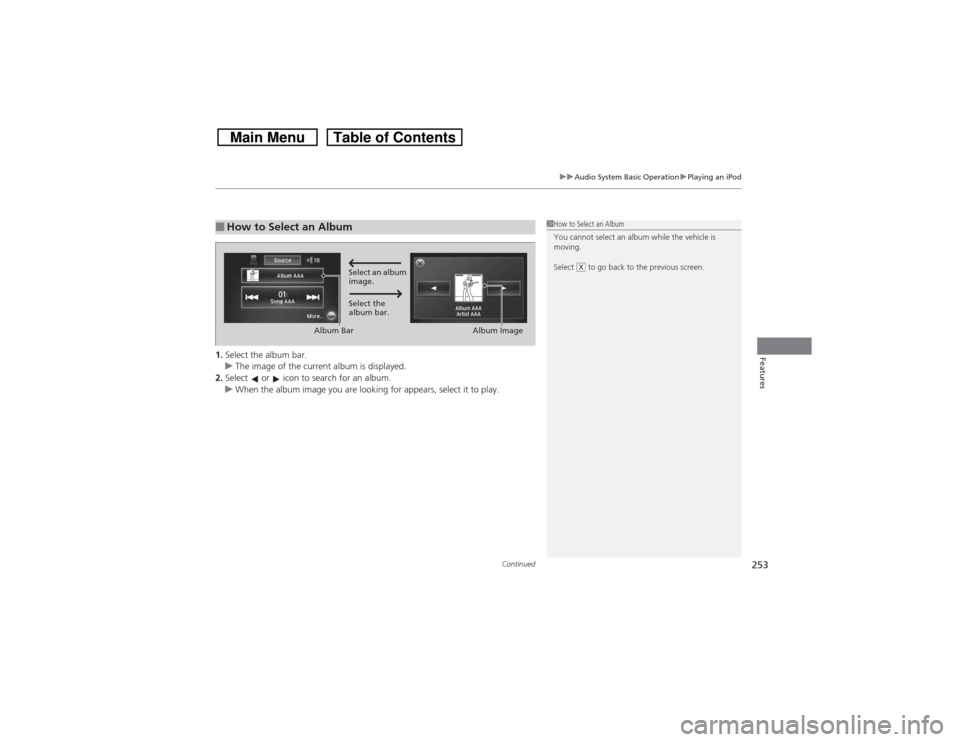
1.Select the album bar.
uThe image of the current album is displayed.
2.Select or icon to search for an album.
uWhen the album image you are looking for appears, select it to play.■How to Select an Album
1How to Select an Album
You cannot select an album while the vehicle is
moving.
Select to go back to the previous screen.
X
Select an album
image.
Select the
album bar.
Album Bar
Album Image
Page 261 of 573
260
uuAudio System Basic OperationuPlaying Internet Radio
Features
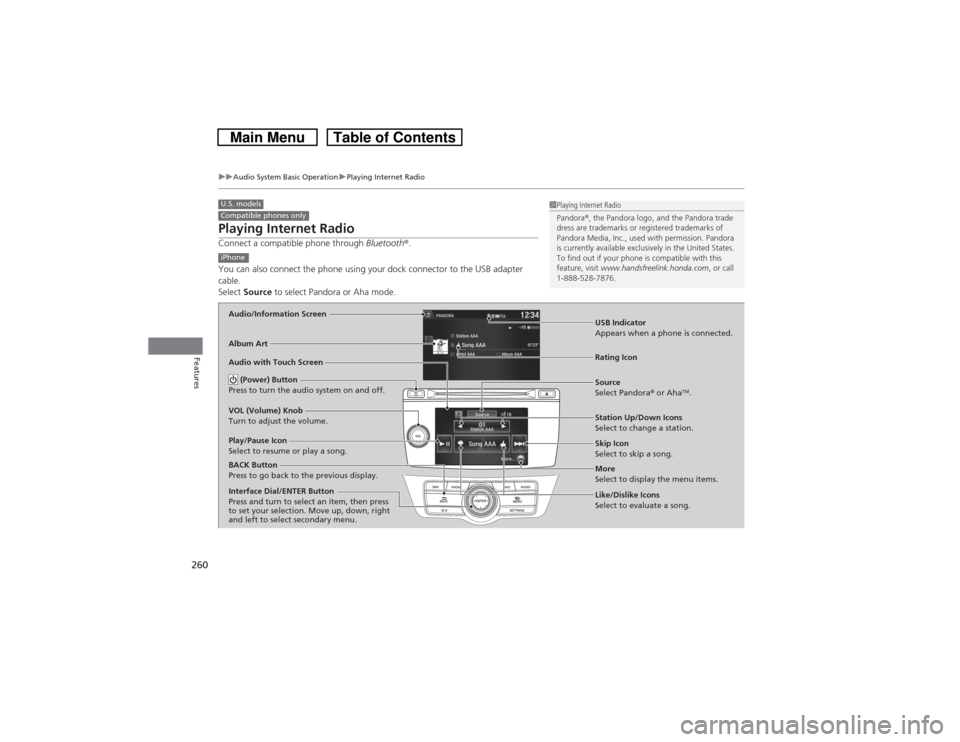
Playing Internet RadioConnect a compatible phone through Bluetooth®.
You can also connect the phone using your dock connector to the USB adapter
cable.
Select Source to select Pandora or Aha mode.U.S. modelsCompatible phones only
1Playing Internet Radio
Pandora®, the Pandora logo, and the Pandora trade
dress are trademarks or registered trademarks of
Pandora Media, Inc., used with permission. Pandora
is currently available exclusively in the United States.
To find out if your phone is compatible with this
feature, visit www.handsfreelink.honda.com, or call
1-888-528-7876.
iPhoneAudio/Information ScreenAlbum Art
USB Indicator
Appears when a phone is connected.Rating Icon
Audio with Touch Screen
BACK Button
Press to go back to the previous display.
Skip Icon
Select to skip a song.
More
Select to display the menu items. Station Up/Down Icons
Select to change a station. Source
Select Pandora® or Aha
TM.
Play/Pause Icon
Select to resume or play a song.
Like/Dislike Icons
Select to evaluate a song. (Power) Button
Press to turn the audio system on and off.
VOL (Volume) Knob
Turn to adjust the volume.Interface Dial/ENTER Button
Press and turn to select an item, then press
to set your selection. Move up, down, right
and left to select secondary menu.
Page 264 of 573
263
uuAudio System Basic OperationuPlaying a USB Flash Drive
Continued
Features
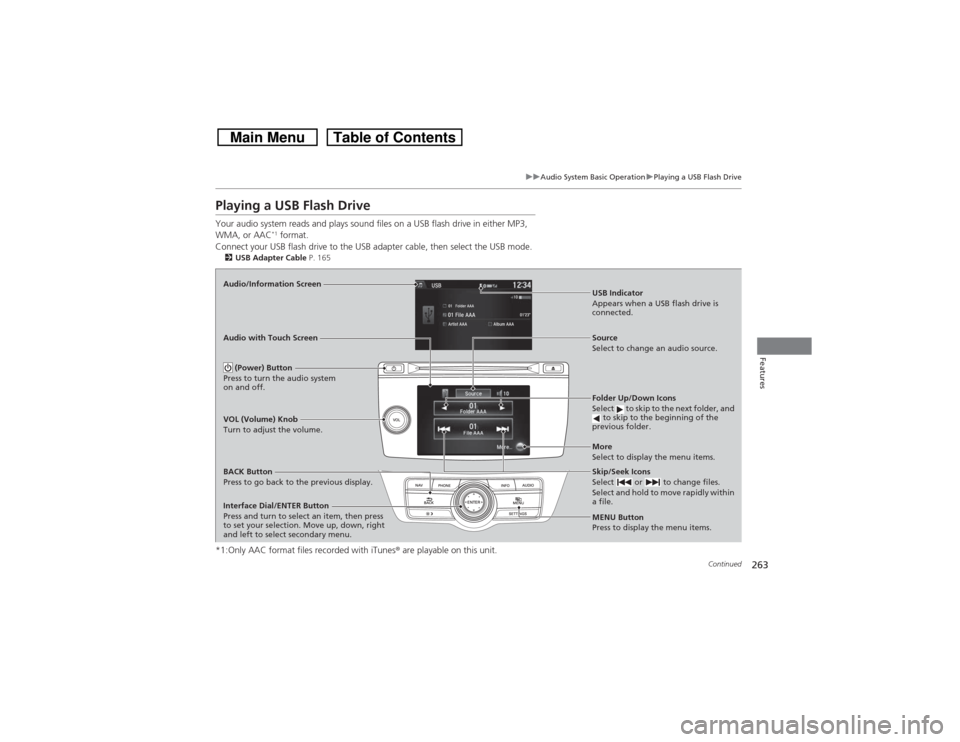
Playing a USB Flash DriveYour audio system reads and plays sound files on a USB flash drive in either MP3,
WMA, or AAC
*1 format.
Connect your USB flash drive to the USB adapter cable, then select the USB mode.
2USB Adapter Cable P. 165*1:Only AAC format files recorded with iTunes® are playable on this unit.Audio/Information Screen
BACK Button
Press to go back to the previous display.
More
Select to display the menu items. Source
Select to change an audio source. USB Indicator
Appears when a USB flash drive is
connected.Folder Up/Down Icons
Select to skip to the next folder, and
to skip to the beginning of the
previous folder.Skip/Seek Icons
Select or to change files.
Select and hold to move rapidly within
a file.
(Power) Button
Press to turn the audio system
on and off.VOL (Volume) Knob
Turn to adjust the volume.
Interface Dial/ENTER Button
Press and turn to select an item, then press
to set your selection. Move up, down, right
and left to select secondary menu. Audio with Touch Screen
MENU Button
Press to display the menu items.
Page 265 of 573
uuAudio System Basic OperationuPlaying a USB Flash Drive
264Features
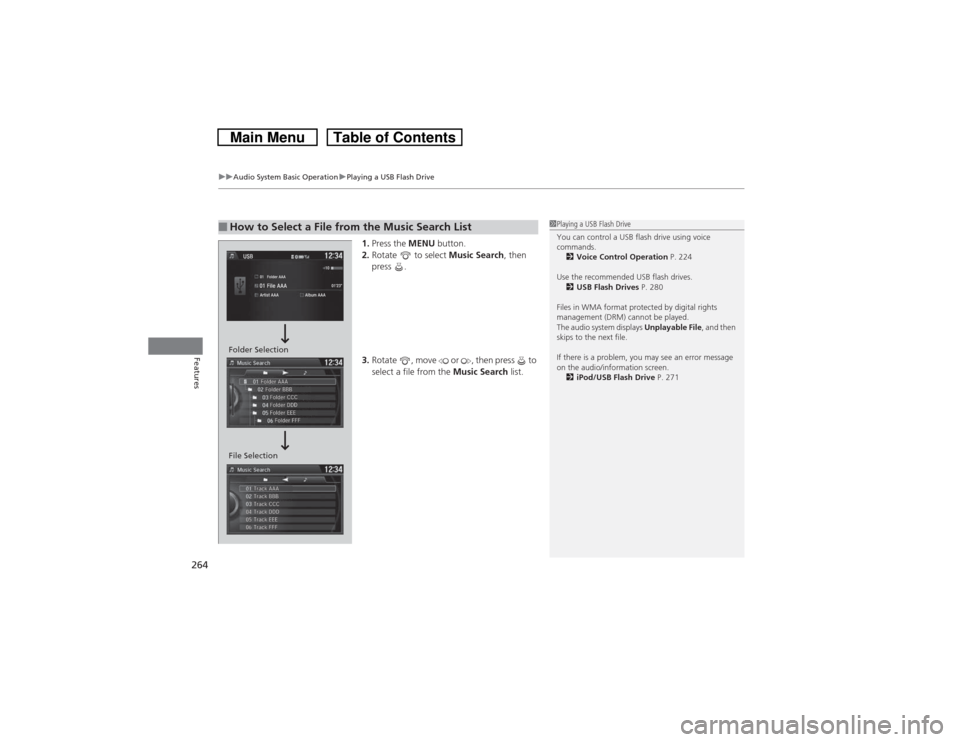
1.Press the MENU button.
2.Rotate to select Music Search, then
press .
3.Rotate , move or , then press to
select a file from the Music Search list.
■How to Select a File from the Music Search List
1Playing a USB Flash Drive
You can control a USB flash drive using voice
commands.
2Voice Control Operation P. 224
Use the recommended USB flash drives.
2USB Flash Drives P. 280
Files in WMA format protected by digital rights
management (DRM) cannot be played.
The audio system displays Unplayable File, and then
skips to the next file.
If there is a problem, you may see an error message
on the audio/information screen.
2iPod/USB Flash Drive P. 271
Folder Selection
File Selection
Page 267 of 573
266
uuAudio System Basic OperationuPlaying Bluetooth® Audio
Features
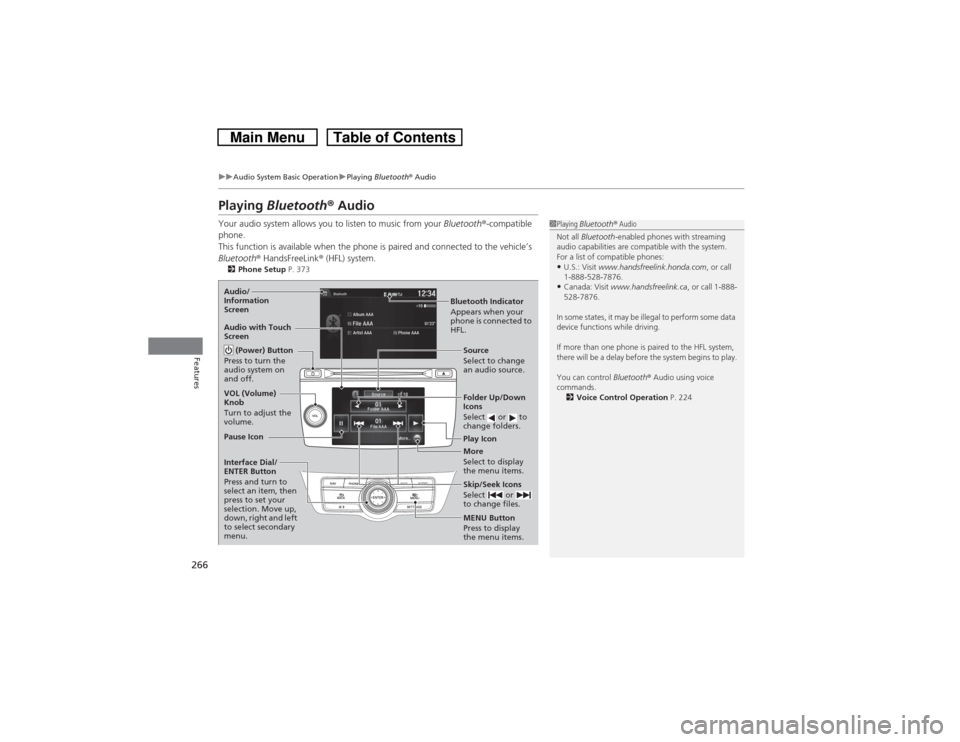
Playing Bluetooth® AudioYour audio system allows you to listen to music from your Bluetooth®-compatible
phone.
This function is available when the phone is paired and connected to the vehicle’s
Bluetooth® HandsFreeLink® (HFL) system.2Phone Setup P. 373
1Playing Bluetooth® Audio
Not all Bluetooth-enabled phones with streaming
audio capabilities are compatible with the system.
For a list of compatible phones:•U.S.: Visit www.handsfreelink.honda.com, or call
1-888-528-7876.•Canada: Visit www.handsfreelink.ca, or call 1-888-
528-7876.
In some states, it may be illegal to perform some data
device functions while driving.
If more than one phone is paired to the HFL system,
there will be a delay before the system begins to play.
You can control Bluetooth® Audio using voice
commands.
2Voice Control Operation P. 224
Bluetooth Indicator
Appears when your
phone is connected to
HFL. Audio/
Information
Screen
Audio with Touch
Screen
Play Icon Pause Icon
More
Select to display
the menu items. Source
Select to change
an audio source. (Power) Button
Press to turn the
audio system on
and off.VOL (Volume)
Knob
Turn to adjust the
volume.
Interface Dial/
ENTER Button
Press and turn to
select an item, then
press to set your
selection. Move up,
down, right and left
to select secondary
menu.
Skip/Seek Icons
Select or
to change files.MENU Button
Press to display
the menu items. Folder Up/Down
Icons
Select or to
change folders.
Page 271 of 573
270
uuAudio Error MessagesuHard Disc Drive (HDD) Audio
Features
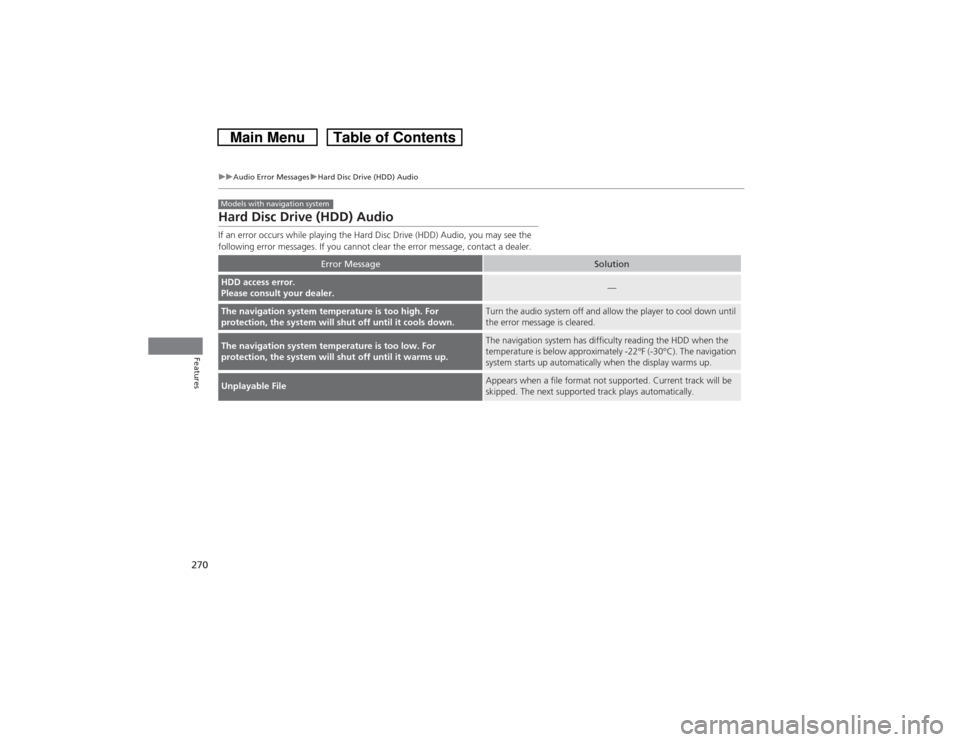
Hard Disc Drive (HDD) AudioIf an error occurs while playing the Hard Disc Drive (HDD) Audio, you may see the
following error messages. If you cannot clear the error message, contact a dealer.
Error Message
Solution
HDD access error.
Please consult your dealer.
—
The navigation system temperature is too high. For
protection, the system will shut off until it cools down.
Turn the audio system off and allow the player to cool down until
the error message is cleared.
The navigation system temperature is too low. For
protection, the system will shut off until it warms up.
The navigation system has difficulty reading the HDD when the
temperature is below approximately -22°F (-30°C). The navigation
system starts up automatically when the display warms up.
Unplayable File
Appears when a file format not supported. Current track will be
skipped. The next supported track plays automatically.
Models with navigation system
Page 277 of 573
276Features
General Information on the Audio SystemXM® Radio Service
*
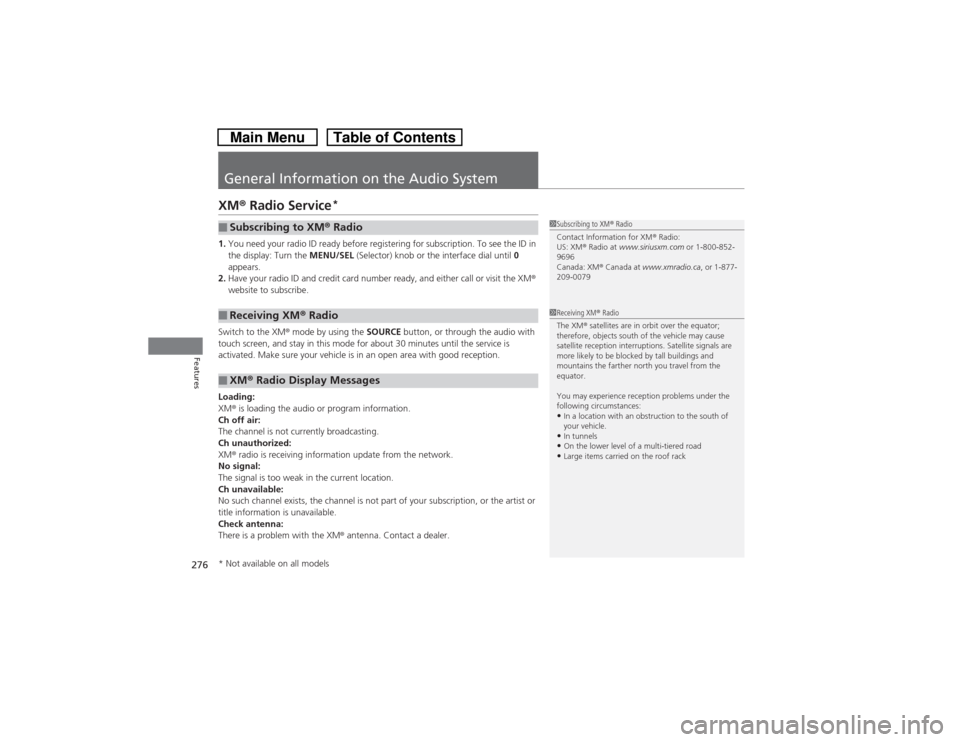
1.You need your radio ID ready before registering for subscription. To see the ID in
the display: Turn the MENU/SEL (Selector) knob or the interface dial until 0
appears.
2.Have your radio ID and credit card number ready, and either call or visit the XM®
website to subscribe.
Switch to the XM® mode by using the SOURCE button, or through the audio with
touch screen, and stay in this mode for about 30 minutes until the service is
activated. Make sure your vehicle is in an open area with good reception.
Loading:
XM® is loading the audio or program information.
Ch off air:
The channel is not currently broadcasting.
Ch unauthorized:
XM® radio is receiving information update from the network.
No signal:
The signal is too weak in the current location.
Ch unavailable:
No such channel exists, the channel is not part of your subscription, or the artist or
title information is unavailable.
Check antenna:
There is a problem with the XM® antenna. Contact a dealer.■Subscribing to XM® Radio■Receiving XM® Radio■XM® Radio Display Messages
1Subscribing to XM® Radio
Contact Information for XM® Radio:
US: XM® Radio at www.siriusxm.com or 1-800-852-
9696
Canada: XM® Canada at www.xmradio.ca, or 1-877-
209-00791Receiving XM® Radio
The XM® satellites are in orbit over the equator;
therefore, objects south of the vehicle may cause
satellite reception interruptions. Satellite signals are
more likely to be blocked by tall buildings and
mountains the farther north you travel from the
equator.
You may experience reception problems under the
following circumstances:•In a location with an obstruction to the south of
your vehicle.•In tunnels•On the lower level of a multi-tiered road•Large items carried on the roof rack
* Not available on all models